1
BurnInTest V7.0
Users Guide
May 2012
© 1999-2012 PassMark Software
BurnInTest Introduction
by PassMark Software
PassMark ’s BurnInTest is a software tool that allows all the major
sub-systems of a computer to be simultaneously tested for reliability and
stability. Anyone who has used computers for any period of time k nows
the importance of having a stable system. The cost of a hardware failure
can be enormous. If you are luck y your data will only become inaccessible
while faulty components are replaced. If you’re unluck y you can lose your
files completely or have them permanently corrupted. Even if you have
good back ups, you can still lose days of work returning the PC to its
pre-failure state. In many cases the lost data can never be replaced and
businesses can be brought to their k nees, with the loss of documentation,
customer details and financial records.
BurnInTest V7.0
© 1999-2012 PassMark Software
All rights reserved. No parts of this work may be reproduced in any form or by any means - graphic, electronic, or
mechanical, including photocopying, recording, taping, or information storage and retrieval systems - without the
written permission of the publisher.
Products that are referred to in this document may be either trademarks and/or registered trademarks of the
respective owners. The publisher and the author make no claim to these trademarks.
While every precaution has been taken in the preparation of this document, the publisher and the author assume no
responsibility for errors or omissions, or for damages resulting from the use of information contained in this
document or from the use of programs and source code that may accompany it. In no event shall the publisher and
the author be liable for any loss of profit or any other commercial damage caused or alleged to have been caused
directly or indirectly by this document. Please send corrections and suggestions to [email protected]
Printed: May 2012
Contents
5
Table of Contents
Part I Introduction and Overview
10
Part II What's new
14
Part III Quick start guide
16
Part IV How to purchase BurnInTest
18
Part V Understanding the display
20
1 Main ...................................................................................................................................
Menu Options
20
2 Pop-up
...................................................................................................................................
Menu Options
24
3 System
...................................................................................................................................
Information
26
4 Results
...................................................................................................................................
- Interpreting the results
29
5 Event...................................................................................................................................
Log
30
6 Temperature
................................................................................................................................... 33
Part VI Test descriptions
36
1 2D graphics
...................................................................................................................................
- graphics functions
37
2 2D graphics
...................................................................................................................................
- video memory
38
3 3D Graphics
...................................................................................................................................
test suite
39
4 Bluetooth
................................................................................................................................... 40
5 CPU test
................................................................................................................................... 41
6 Disk test
...................................................................................................................................
suite
43
7 Monitor
...................................................................................................................................
EMC testing
47
8 Network
...................................................................................................................................
test
47
9 Advanced
...................................................................................................................................
network test
49
10 Optical
...................................................................................................................................
drive test
52
11 Parallel
...................................................................................................................................
port test
56
12 Plug-in
...................................................................................................................................
test
57
13 Printer
...................................................................................................................................
Test
58
14 RAM test
................................................................................................................................... 59
15 Serial...................................................................................................................................
port test
61
16 Sound
...................................................................................................................................
Card
63
17 Tape ...................................................................................................................................
drive testing
65
18 USB port
...................................................................................................................................
test
66
19 Video...................................................................................................................................
play
69
© 1999-2012 PassMark Software
5
6
BurnInTest V7.0
Part VII Test selection and duty cycles
72
Part VIII Selecting Test Preferences
76
1 2D Graphics
................................................................................................................................... 77
2 3D Graphics
................................................................................................................................... 78
3 CPU ................................................................................................................................... 78
4 Disk ................................................................................................................................... 79
What is S.M.A.R.T?
.......................................................................................................................................................... 81
5 Errors................................................................................................................................... 85
6 Logging
................................................................................................................................... 85
7 Standard
...................................................................................................................................
Network Test and Bluetooth
88
8 Advanced
...................................................................................................................................
Network
90
9 Optical
...................................................................................................................................
drives
92
10 Parallel
...................................................................................................................................
port
94
11 Plugin
................................................................................................................................... 94
12 Pre-Test
................................................................................................................................... 97
13 Printer
................................................................................................................................... 97
14 Post-Test
................................................................................................................................... 98
15 RAM................................................................................................................................... 100
Setting the Lock
..........................................................................................................................................................
Pages in Mem ory right
102
16 Serial
...................................................................................................................................
ports
103
17 Sound
................................................................................................................................... 104
18 Tape................................................................................................................................... 104
19 Temperature
................................................................................................................................... 105
20 Battery
...................................................................................................................................
monitoring
109
21 USB...................................................................................................................................
ports
109
22 Video
...................................................................................................................................
playback
110
Part IX Test reporting
114
1 Report
...................................................................................................................................
information (Machine identity)
114
2 Save...................................................................................................................................
Window as Image
116
3 Preparing
...................................................................................................................................
a Customer Test Certificate
116
4 Example
...................................................................................................................................
text log
118
5 Example
...................................................................................................................................
HTML log
121
6 Example
...................................................................................................................................
Customer Test Certificate
127
7 Example
...................................................................................................................................
memory module SPD data
128
Part X Test automation and productivity
132
1 Maintaining
...................................................................................................................................
multiple configurations
132
2 Command
...................................................................................................................................
line arguments (more options)
133
© 1999-2012 PassMark Software
Contents
7
3 Scripting
...................................................................................................................................
a series of tests
136
Scripting test
..........................................................................................................................................................
preferences
145
4 Externally
...................................................................................................................................
controlling BurnInTest
157
5 Installing
...................................................................................................................................
BurnInTest to a USB drive or an optical disk
158
6 Testing
...................................................................................................................................
with no operating system installed
159
7 Reboot
...................................................................................................................................
/ restart cycling
160
8 Hotkeys
................................................................................................................................... 161
9 Language
...................................................................................................................................
support
162
Part XI Test hardware
164
1 Audio
...................................................................................................................................
loop back cable
164
2 eSATA
................................................................................................................................... 165
3 FireWire
................................................................................................................................... 165
4 Optical
...................................................................................................................................
drive test media
165
5 Parallel
...................................................................................................................................
loop back plugs
166
6 Serial
...................................................................................................................................
loop back plugs
167
7 USB...................................................................................................................................
loop back plugs
168
Part XII Support
172
1 Problems
...................................................................................................................................
and FAQ
172
License keys.......................................................................................................................................................... 173
System requirem
..........................................................................................................................................................
ents
174
Install and uninstall
.......................................................................................................................................................... 174
General usage
.......................................................................................................................................................... 174
Test setup and
..........................................................................................................................................................
inform ation
175
Problem s during
..........................................................................................................................................................
testing
176
Reporting .......................................................................................................................................................... 178
Test Autom ation
.......................................................................................................................................................... 179
Precautions ..........................................................................................................................................................
for thorough and careful testing
180
General com..........................................................................................................................................................
m ents about occasional system crashes
182
2 Fault...................................................................................................................................
finding
182
3 Common
...................................................................................................................................
test error messages
185
4 System
...................................................................................................................................
requirements
204
5 Contacting
...................................................................................................................................
PassMark Software
205
Part XIII Legal
208
Index
211
© 1999-2012 PassMark Software
7
Part
I
10
1
BurnInTest V7.0
Introduction and Overview
PassMark’s BurnInTest is a software tool that allows all the major sub-systems of a computer to be
simultaneously tested for reliability and stability. Anyone who has used computers for any period of time
knows the importance of having a stable system. The cost of a hardware failure can be enormous. If you
are lucky your data will only become inaccessible while faulty components are replaced. If you’re
unlucky you can lose your files completely or have them permanently corrupted. Even if you have good
backups, you can still lose days of work returning the PC to its pre-failure state. In many cases the lost
data can never be replaced and businesses can be brought to their knees, with the loss of
documentation, customer details and financial records.
What BurnInTest does is thoroughly exercise the hardware in a PC in a short period of time, in the same
way as normal applications use a PC over a long period of time. This takes advantage of the fact that
computer hardware tends to fail either very early in its life or after many thousands of hours of use.
Typically BurnInTest should be used before a PC is put into service, as a failure of a computer that isn’t
being used for a critical application and doesn’t have any critical data is much less damaging,
(especially if it is still under warranty).
BurnInTest will bring to the surface intermittent or hidden problems so that after a successfully run the
computer can be used with a much higher level of confidence.
BurnInTest tests the CPU using a range of CPU instructions, Hard drives, CD/DVD/BD ROMs, CD/DVD
burners, Sound cards, 2D graphics, 3D graphics, Video playback, Printers, Memory, Network
connection and Bluetooth. (BurnInTest Pro additionally tests Tape drives, Serial ports, Parallel ports and
USB 1.x and 2.0 ports with loop back connectors).
If you have specialized hardware that BurnInTest does not test, you can even write your own test and
integrate it with BurnInTest. PassMark has produced "Plugin" tests for touch screens, Keyboards, Dial
up Modems and FireWire ports.
All these tests can be done simultaneously as the application is multithreaded.
-
The best value professional Burn In tool on the market !!
-
Avoid delivering D.O.A. (Dead on Arrival) hardware to your customers.
-
Dramatically reduce your burn in times with multithreaded simultaneous testing of components.
-
Build your image as a supplier of quality systems.
-
Avoid costly downtime, system rebuilds and lost data.
-
Test the stability of a system after configuration changes or hardware upgrades (critical for over
clocking).
-
Interfaces for logging temperature and laptop battery charge levels (additional software required).
-
Use BurnInTest to help with Electromagnetic Compliance Testing (EMC) to ANSI C63.4-1992
For more information.
© 1999-2012 PassMark Software
Introduction and Overview
To get started quickly see the Quick start page.
See Overview of display for information of BurnInTest controls and different views.
See Test descriptions for information about each test.
Learn how to interpret the results.
Have a look at what each menu option does.
Get the answers to Frequently Asked Questions.
Find out how to purchase the software.
© 1999-2012 PassMark Software
11
Part
II
14
2
BurnInTest V7.0
What's new
Please see our version history online at http://www.passmark.com/products/bit_history.htm
© 1999-2012 PassMark Software
Part
III
16
3
BurnInTest V7.0
Quick start guide
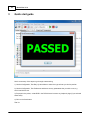
Here’s a summary of the steps to go through to start testing.
1) Use the Configuration, Test Duty Cycles window to select the type of tests you wish to perform.
2) Use the Configuration, Test Preferences window to set any parameters that you wish to use, e.g.
which hard drive to use.
3) Put paper in the printer, a data DVD in the DVD-drive and connect any loopback plugs (if you selected
these tests).
4) Click on the Start button.
That’s it.
© 1999-2012 PassMark Software
Part
IV
18
4
BurnInTest V7.0
How to purchase BurnInTest
Price
US Dollars:
US Dollars:
$79 (Professional version, single user)
$39 (Standard version, single user)
See the PassMark website:
Online store: http://www.passmark.com/sales
Ordering FAQ: http://www.passmark.com/support/ordering_faq.htm
© 1999-2012 PassMark Software
Part
V
20
5
BurnInTest V7.0
Understanding the display
The BurnInTest display comprises the following main components.
Menu
The menu bar at the top of the main window provides most of the options for using BurnInTest.
Context sensitive popup menus are available from the main window tabs using the mouse 'Right
click'.
The main window has 4 tabs that display different types on information:
System Information
Select the System Information tab to display information about the current system.
Burn In Results
Select the Burn In Results tab to display test results. Note: On starting the tests, the Burn In
Results tab will be displayed.
Event log (error log)
Select the Event log tab to display a list of events/errors that occurred during a test.
Temperature
Select the Temperature tab to display the temperature during testing from the configured hardware
components.
Test windows
When starting tests, a test window will be opened for each test type (e.g. Disk) to display
information about the testing that is currently being performed. See the Test descriptions for
additional information.
5.1
Main Menu Options
File
Load Test Configuration
A test configuration that has been previously saved to disk can be loaded using this menu
option. The loaded configuration will set all the parameters available in the ‘test duty cycles’ and
‘test preferences’ windows (see above) to the values contained within the file. Using this menu
option in conjunction with the ‘Save Test Configuration As’ function it is possible to create a
number of standard test configurations. See Maintaining multiple test configurations, for more
information.
Save Test Configuration As
This option allows the current configuration settings to be stored in a file for later use. All the
values available in the ‘test duty cycles’ and ‘test preferences’ windows (see above) will be
saved into a file, whose name is selected by the user. Using this menu option in conjunction
with the ‘Load Test Configuration’ function it is possible to create a number of standard test
configurations. See Maintaining multiple test configurations, for more information. Saved
© 1999-2012 PassMark Software
Understanding the display
21
configuration files can also be loaded automatically by including them on the command line.
See Command line arguments for more details.
Save Results Report
Save the recent results as a text report, HTML report or a customer targeted Test Certificate.
See Preparing a Customer Test Certificate for more information about configuring a test
certificate for your company.
Save Window as Image
Allows the currently selected tab on the main window (e.g. System Information or Burn In
Results) to be saved in one of 3 different graphics file formats. Bitmap (BMP), GIF and
Enhanced Meta file format (EMF). See the save as image dialog box for more information.
Print Window
Allows the currently selected tab on the main window (e.g. System Information or Burn In
Results) to be printed. The standard Print dialog window will be displayed allowing the user to
select a printer, etc...
Install BurnInTest to a USB drive
Install BurnInTest to a USB drive such that BurnInTest can be run from the USB drive.
Exit
Exits from the application.
Edit
Copy Image to Clipboard
Copies the currently selected tab on the main window (e.g. System Information or Burn In
Results) to the clipboard in an Bitmap Format (bmp). The results can then be pasted as a
graphical image into other documents that support this format, e.g. Microsoft Word.
Some applications may not accept a pasted bitmap format image. In this case it is better to use
the Save Window as Image menu option (above) to create an image file, which can then be
imported into another application.
Copy Text and HTML to Clipboard
Copies the currently selected tab on the main window (e.g. System Information or Burn In
Results) to the clipboard in text and HTML formats. The results can then be pasted as text into
other documents that support these format, e.g. Notepad (text) or Microsoft Word (HTML).
Clear All Results
Clear the results produced so far, resetting all values and log files to zero. This is done
automatically each time a new test run is started (unless the accumulated logging option is set
in the preferences window).
Configuration
Test Selection & Duty Cycles
Displays the test setup dialog which allows automatic stopping of tests to be configured, a
subset of tests to be selected for execution and a duty cycle to be set for each test.
© 1999-2012 PassMark Software
22
BurnInTest V7.0
Test Preferences
This option allows the user to customize some aspects of the way BurnInTest works. See the
description of the preferences dialog box for more details.
Report Information
Displays the report information window, which allows General report information such as the
Machine type, , Customer name and Technician's name to be entered.
Edit Error Classifications
This opens the BurnInTest error description and classification file in the default text editor. This
file can then be edited to include customer specific error descriptions and error severity
classifications. The user account will need to have write access to the BurnInTest directory to
modify this file (e.g. a standard Vista account will not be able to save any changes to this file).
Please see Error Classifications.
Test
Start Test Run
Runs the tests selected in the ‘Test Selection & Duty Cycles’ window. Each test will be run in
its own window using its own execution thread. This allows multiple tests to be executed
simultaneously. The results from each test are summarized in the main window. Depending on
what tests are being started, the speed of the machine and the selected duty cycles; the tests
may take several seconds to start.
After tests have been started the menu’s and buttons are ‘Grayed’ out, and no another actions
can take place until the tests are stopped manually or automatically.
Stop test run
Stops all the tests that are currently running. It may take several seconds to stop all the tests,
remove test files from the disk and de-allocate system resources. If one of the test windows is
the active window, Alt-F4 can also be used to stop all the tests. Individual tests can not be
stopped after they have been started, as all tests will be stopped at the same time.
Execute script
Runs the tests selected in the specified BurnInTest script file (.bits).
Quick Tests
Quick Tests (quick configuration of tests) provides a commonly used set of tests that can be run
without any pre-configuration and user defined test scripts.
There are up to 3 groups of Quick Tests shown in the menu:
Group 1 includes the BurnInTest pre-defined tests. These can't be changed by the user.
Group 2 includes any BurnInTest scripts in the bit.exe directory (e.g. C:\Program
Files\BurnInTest\). These are defined by the user and are available to all user's.
Group 3 includes any BurnInTest scripts in the current default directory (e.g. C:
\Users\<UserName>\Documents\PassMark\BurnInTest\), where <UserName> is the
administrator account that BurnInTest is run under. These are defined by the user and are
specific to the currently logged in user.
© 1999-2012 PassMark Software
Understanding the display
23
Maximum CPU temperature
Runs a short CPU test to maximize CPU temperature and check CPU cooling. This test uses
the BurnInTest CPU test that, through PassMark testing, has been found to generate the
greatest amount of CPU heat of any of the BurnInTest tests. This is useful in determining
whether the CPU cooling system, such as heat sink/CPU bonding and fan are sufficient for the
CPU cooling. This is particularly useful for overclockers, where additional CPU heat is generated
which can cause system instability. This test runs for 10 minutes. A HTML log file called
"CPU_MaxTemp_<timestamp>.log" is created in the default directory. See CPU test.
CPU coverage
Runs a short CPU test to validate many different CPU instructions. This test all of the CPU
instructions that are tested by BurnInTest. This test runs for 10 cycles. A HTML log file called
"CPU_Coverage_<timestamp>.log" is created in the default directory. See CPU test.
RAM
Runs a single pass of the standard RAM test for each test pattern. This test runs for 1 cycle. A
HTML log file called "RAM_<timestamp>.log" is created in the default directory. See RAM test.
Video RAM
Runs a single pass of the video RAM test. This test runs for 1 cycle. A HTML log file called
"Video_RAM_<timestamp>.log" is created in the default directory. See 2D graphics - video
memory.
3D graphics
Runs a short full screen 3D graphics test. This test runs for 5 minutes. A HTML log file called
"3D_<timestamp>.log" is created in the default directory. See 3D Graphics test.
Local disk scan
Runs single pass of the disk test for all local fixed disk volumes. Once a disk has been tested it
will wait for all other disks to complete the single test pass. Once all local disks have been
tested once the test will end. A HTML log file called "Local_Disk__<timestamp>.log" is created
in the default directory. See Disk test.
Removable disk scan
Runs single pass of the disk test for all removable disk volumes, excluding floppy disks. Once a
disk has been tested it will wait for all other disks to complete the single test pass. Once all
local disks have been tested once the test will end. A HTML log file called
"Removable_Disk_<timestamp>.log" is created in the default directory. See Disk test.
User defined Quick Tests
User defined Quick Tests are only available with BurnInTest Professional only.
User defined Quick Tests can be added to the menu by including BurnInTest Scripts (*.bits) in
(i) the bit.exe directory (e.g. C:\Program Files\BurnInTest\) and (ii) the current default directory
(e.g. C:\Users\<UserName>\Documents\PassMark\BurnInTest\, where <UserName> is the
administrator account that BurnInTest is run under). The maximum number of User defined
Quick Tests is 25.
Help
© 1999-2012 PassMark Software
24
BurnInTest V7.0
Help
Opens this help file. Context related help is available from most windows using the “F1” key.
Purchase Software
Opens the default browser at the PassMark Secure Online Store.
Enter License Key
Allows entry of Username and Key received via email to license BurnInTest. See this online step
by step guide for help.
Note: Your license key information should be kept in a safe place in case the software ever
needs to be reinstalled. You may also require it when software upgrades are released.
PassMark Homepage
Opens the default browser at the PassMark website home page.
Check Updates...
Checks whether there is a later version of BurnInTest available from the PassMark website.
About
Displays Version and License information about the currently installed version of BurnInTest.
5.2
Pop-up Menu Options
Context sensitive popup menus are available from the main window tabs using the mouse 'Right click'.
Depending on the current tab shown, the options are:
System Information tab
Copy Image to Clipboard
Copies the System Information display to the clipboard in an Bitmap Format (bmp). The results
can then be pasted as a graphical image into other documents that support this format, e.g.
Microsoft Word.
Copy Text and HTML Summary to Clipboard
Copies the System summary section of the System Information to the clipboard in a text and
HTML format.
Copy Text and HTML to Clipboard
Copies the System Information to the clipboard in a text and HTML format.
Burn In Results tab
Copy Image to Clipboard
Copies the Results display to the clipboard in an Bitmap Format (bmp).
Copy Text and HTML to Clipboard
© 1999-2012 PassMark Software
Understanding the display
Copies the Results to the clipboard in a text and HTML format.
Clear All Results
Clear the results produced so far, resetting all values to zero.
Event Log tab
Copy Image to Clipboard
Copies the Events display to the clipboard in an Bitmap Format (bmp).
Copy Text and HTML to Clipboard
Copies the Events to the clipboard in a text and HTML format.
Clear All Results
Clear the results produced so far, resetting all values to zero.
Temperature tab
Copy Image to Clipboard
Copies the Temperature display to the clipboard in an Bitmap Format (bmp).
© 1999-2012 PassMark Software
25
26
5.3
BurnInTest V7.0
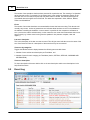
System Information
© 1999-2012 PassMark Software
Understanding the display
27
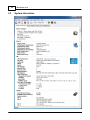
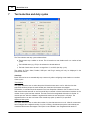
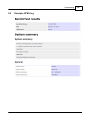
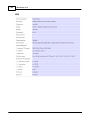
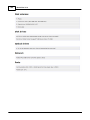
The System information tab contains a snapshot of key information about the current system at the time
BurnInTest starts:
System summary
A brief summary of the system: Operating system, CPU, RAM, graphics card, local disks and
optical drives.
General
Information about the system manufacturer, motherboard and BIOS.
CPU
CPU type, number of CPU's, features and cache information. Many modern CPU's will also have
their Bus multiplier, Scalable Bus frequency and Front Side Bus Frequency displayed. Information
such as the Manufacturer internal code name, fabrication size and revision are included when
available. Note: It is recommended that other CPU intensive software not be running when
BurnInTest starts as this can impact the measurement of the CPU speed.
The CPU features shown indicate that the CPU supports the features as outlined in the following list:
MMX
Multimedia Extensions.
3DNow! 3DNow! is a multimedia extension instruction set created by AMD.
SSE
Streaming SIMD Extensions (SSE) is a SIMD (Single Instruction, Multiple Data)
instruction set extension.
SSE2
SSE2, Streaming SIMD Extensions 2.
SSE3
SSE3, Streaming SIMD Extensions 3.
SSSE3
Supplemental Streaming SIMD Extension 3 (SSSE3).
SSE4.1, Instruction set for the Intel Core micro architecture. Intel SSE4 consists of 54
SSE4.2 instructions. A subset consisting of 47 instructions, referred to as SSE4.1. SSE4.2,
a second subset consisting of the 7 remaining instructions.
SSE4a
2 new AMD SSE instructions.
DEP
Data Execution Prevention (DEP) is a security feature included in Microsoft
Windows. It is intended to prevent an application from executing code from a nonexecutable memory region.
PAE
Physical Address Extension (PAE) refers to a feature that allows more than 4
gigabytes (GB) of physical memory to be used in 32-bit systems, given appropriate
operating system support.
AMD64
AMD64 is AMD's implementation of x86-64 (64-bit computing).
Intel64
Intel 64 is Intel's implementation of x86-64 (64-bit computing).
VMX
x86 virtualization is a method where "guest" operating systems run under another
"host" operating system.
SMX
Safer Mode Extensions. The CPU supports Intel Trusted Execution Technology.
Turbo
Intel Turbo mode is supported.
Note: This section provides a link, Online CPU comparison, that provides an online comparison of
the current CPU type performance with many other CPU types.
Memory
Total and available RAM, RAM modules, Memory devices (where available, RAM module type, size,
speed, serial number and manufacturer) and Paging file information.
Note 1: The Total RAM reported is the total available to the Operating system, i.e. the effective total.
© 1999-2012 PassMark Software
28
BurnInTest V7.0
This may be less that the physical memory in the system. For example, if a system has 4GB of
physical memory with a 32-bit operating system, then there may only be 3.3GB (for example) in
total RAM available to the Operating System.
Note 2: If memory bandwidth is available, e.g. "Module1: 1024MB (667MHz)", it should be noted that
this is the marketed "bandwidth". This is typically the peak transfer capacity of the memory chips,
and not the actual clock on the memory chip, and not the transfer rate of the memory module. For
example DDR2-667 has a memory clock speed of 166MHz, an I/O Bus clock frequency of 333MHz
and a peak data transfer of 667 Million data transfers per second. This is often referred to as PC25300 or PC-5400, as the peak data transfer of the memory module (not the individual chips) is
approximately 5300 or 5400 MB/s
Note 3: Detailed Memory module SPD data is available in a level 2 activity trace log file. This
includes information such as the memory module timings. An example is shown here.
Graphics
Graphics cards model, type, amount of memory, BIOS version, device driver information (provider,
version and date) and monitor information (resolution, color depth and frequency).
Note: The device driver reported may be the version of the main graphics card device driver, and this
may be different to the 'product' version number that wraps up multiple device drivers.
Disk volumes
List of Disk volumes on the system.
Disk drives
List of physical hard disks, serial number and size.
Optical drives
List of optical drives.
Network
List of network adapters.
Ports
List of Serial, Parallel, PS2 and FireWire ports.
List of USB Host Controllers and connected USB devices. To list all USB Ports it is suggested to
plug in a PassMark USB 2.0 Loopback Plug into all free USB ports.
© 1999-2012 PassMark Software
Understanding the display
5.4
29
Results - Interpreting the results
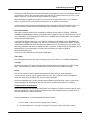
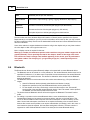
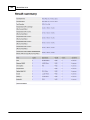
This Burn In Results tab displays a summary of all the results of all the tests that are currently running
or have just run.
Context sensitive popup menus are available using the mouse 'Right click', while double clicking on a
test result row will open the "Common test error messages" help to display a description of the Last
Error Description.
Test Name
This column shows a picture depicting the test type and the name of the test. Only those tests actually
running are displayed.
Cycle
The number of test cycles that have been executed for a particular test. The meaning of a ‘test cycle’
varies from test to test. For example for the Printer test it is the number of full pages printed, for the Hard
disk test it is the number of file write / verify cycles that have occurred. See the test description for more
details about the significance of this field.
Operations
© 1999-2012 PassMark Software
30
BurnInTest V7.0
The number of test operations that have been executed for a particular test. The meaning of a ‘Operation’
varies from test to test. For example, for the Printer test it is the number of characters printed, for the
Hard disk test it is the number of bytes that have been written or verified. See the test description for
more details about the significance of this field. The values are expressed in Units, Millions, Billions,
Trillions and Quadrillions.
Errors
The number of errors that have been encountered while the test has been executing. This value should
normally stay at zero. A value of greater than zero indicates there has been an error in the hardware or
the software controlling the hardware. In some cases it is possible for the computer to self-detect an
error. (such as the math’s and disk tests). In other cases the user must check themselves that no error
has occurred (e.g. Is there sound coming from the speakers? Are printouts complete, clear and
legible? ).
Last error description
This is the description of the last error that occurred. This will give some indication as to the cause of the
error. See Common Errors for a description of the errors that may be encountered.
View error by categories
Toggles the Results tab main display between the following two error table views:
1. Number of error and last error description per Test Name, and
2. Number of errors for each category per Test Name (that is, CRITICAL, SERIOUS, WARNING AND
INFORMATION).
View error description
To view a description of the error double click on the error description and the error descriptions in the
help file will be shown.
5.5
Event Log
© 1999-2012 PassMark Software
Understanding the display
31
The Event Log tab displays the recent errors and status messages that have occurred during a test run.
It is possible to save a copy of the test events using the Copy to clipboard functions, the ‘File -> Save
Report’ menu item, or in a test report using 'Preferences->Logging'.
The event window is updated in as events occur and can be left open while a test run is in progress.
There is no practical limit to the number of events that can be written to a test report.
Context sensitive popup menus are available using the mouse 'Right click', while double clicking on an
event will open the "Common test error messages" help to display a description common errors.
Event Classification
Test events (such as test errors) are classified into different severity levels of CRITICAL, SERIOUS,
WARNING or INFORMATION. Where an informational line (related to this error) follows the error line, the
error classification is not repeated and is shown as a LOG NOTE (to aid determination of the number of
unique errors per classification).
A test failure is defined to be one or more CRITICAL, SERIOUS or WARNING errors. INFORMATION
level events are logged for information only and are not considered to constitute a test failure. An event
classification of NONE also exists and this means that the event is not meaningful in the context of the
test being undertaken and events configured this way are ignored. All events may be configured to not be
reported if they are not meaningful in a specific test environment (by setting to NONE in
BITErrorClassifications.txt).
Each line is color coded based on the Error Classification.
Time stamp
The time stamp records the time when the event occurred. The format is, YYYY-MM-DD HH:MM:SS
Test type
The test type refers to the name of the test which originated the event. Examples are, “RAM”, Floppy
Disk”. The word “Status”, indicated that the event is not an error but just a status message.
Details
This is a text field that contains additional information about the error (or status message).
In some cases a log entry may be spread across two lines. The 1st line will contain some general
information about the error and the 2nd line will contain more detail.
Some error messages may contain internal program variables (and thus be fair cryptic). These are not
always intended to be interpreted by the user can but help us track down faults in our software.
Configuring Error Classifications
Each of the standard errors detected by BurnInTest can configured to include a customer specific string
and error classification. The file BITErrorClassification.txt (in the software directory) contains the error
text and classification used by BurnInTest.
The file is formatted as a Comma Separated File with four fields:
1.
Error number – this must not be changed by the customer;
2.
Error description text – this may be changed. This must be a sting enclosed by quotes;
© 1999-2012 PassMark Software
32
BurnInTest V7.0
3.
Error classification – this may be changed. This must be one of the following text values (not in
quotes): CRITICAL, SERIOUS, WARNING, INFORMATION or NONE.
4.
Customer comment – this is optional and may be changed – it is ignored by BurnInTest.
Comment lines may be inserted by using a “#” at the start of the line. These lines will be ignored by
BurnInTest.
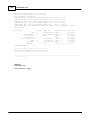
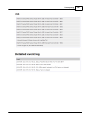
An example is shown below:
# PassMark BurnInTest,,,
# Error message text and classification,,,
0,"No errors",NONE,
1,"Incorrect mathematical addition",SERIOUS,
2,"Incorrect mathematical subtraction",SERIOUS,
3,"Incorrect mathematical division",SERIOUS,
4,"Incorrect mathematical multiply",SERIOUS,
5,"Incorrect MMX addition",SERIOUS,
6,"Incorrect MMX subtraction",SERIOUS,
7,"Incorrect MMX multiplication",SERIOUS,
8,"Failed Window s call - Line Draw ing",SERIOUS,
© 1999-2012 PassMark Software
Understanding the display
5.6
33
Temperature
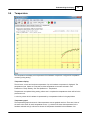
The Temperature tab displays the temperature of the hardware components configured for temperature
monitoring during testing.
Temperature display
The minimum, current and maximum temperature of up to 6 hardware components is displayed. The
temperature scale, Celsius or Fahrenheit, and the temperature sources are selected in Test
Preferences->Temp / Battery. See Test preferences - Temperature.
Temperatures are updated during testing; after a test is complete the temperatures shown will be for the
previous test run.
A color key shows which hardware is represented by a temperature timeline in the graph below.
Temperature graph
The temperature graph shows each of the temperature sources graphed over time. There are 2 lines of
the same color shown for each temperature source, (1) a thicker line shows the temperature for the
hardware selected and (2) a thinner line shows the temperature threshold for that hardware. One
© 1999-2012 PassMark Software
34
BurnInTest V7.0
temperature line may obscure other temperature lines.
The X-axis is time, and the Y-axis temperature. Up to the last 1000 temperature samples are stored
during a test. The time axis is scaled based on the temperature sample duration (set in preferences).
The temperature axis is scaled based on the temperature values and temperature thresholds.
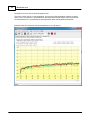
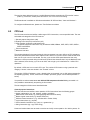
Example of the CPU maximum heat test temperature on an Intel Core i5:
© 1999-2012 PassMark Software
Part
VI
36
6
BurnInTest V7.0
Test descriptions
There are many different hardware component tests built into the software. Each of these tests contains
one or more sub-tests designed to exercise different aspects of your computer system. These tests can
be run concurrently, with each test having its own window and using its own CPU thread or as individual
tests. It is also possible to vary the load mix by increasing or decreasing the duty cycle for a particular
test.
Each test keeps an error counter, a cycle counter and an operations counter. The significance of each of
these counters is detailed with each test.
The following tests are currently available.
2D Graphics tests
Video adapter memory testing
Tests of standard two dimensional graphical functions
Monitor EMC testing
3D Graphics test
Tests the DirectX 3D graphics system
CPU tests
Tests a wide cross section of CPU functionality
Hard disk and floppy disk tests
Reading, writing files
Memory (RAM) test
Tests the Memory in the computer
Network test
Tests the Network connection
Advanced Network Test
Optical drive test
Tests the CD-ROM, CD burner, DVD-ROM, DVD burner, BD-ROM and optionally the sound card
Parallel port test
Tests the parallel port connected to the computer
Plug-in test
Integrate your own test to BurnInTest
Printer test
Tests the default printer
Serial port test
Tests the serial ports connected to the computer
Sound card test
Test wave form, MIDI and MP3 audio play back
© 1999-2012 PassMark Software
Test descriptions
37
Tape drive test
Tests the tape drive
USB port test
Tests the USB ports on the computer
Video play test
Test the playback of different video files
6.1
2D graphics - graphics functions
This suite contains a number of tests that exercise the standard Windows graphics functions and the
video card. The test can be run across multiple monitors.
By default, a test window will be opened when the tests are started. This will be placed on the primary
monitor and sized with width based on the BurnInTest test window size and height.
With BurnInTest Professional, the user can change this default by increasing the number of test
windows from 1 up to 4. The test window sizes can also be changed from 160x100 up to full screen.
The test windows can be placed automatically on the primary monitor, or automatically across all
monitors (up to 4). When the test windows are of the default size and placed on the primary monitor,
they will be arranged below the previously opened test Window (as is the case with the other test
windows). When the test windows are not the default size, or are automatically placed across the
monitors, then the test windows will be centered on each Monitor. If there are more test windows that
actual monitors, then the test windows will be wrapped back to the first (then second etc) monitor and
there will be a slight offset of the test window.
Line Drawing
Lines are drawn into window. The color is changed every 500 lines to enable the lines to been seen in
the test window.
Painting Bitmaps
A bitmap is painted into a window as quickly as possible.
Outline shapes
Two different shapes are drawn into a window
-
An ellipse
-
A square with rounded corners
The color is changed every 64 shapes to enable the shapes to be seen in the test window.
GUI (Graphical User Interface)
Tests the use of common Windows controls including: Tree view, List View, List Box, Slider, Progress
bar, Check box, Radio button, Edit boxes and window movement. A fixed size GUI test window is
opened for this test. During this time the 2D graphics test window that is used for the other 2D tests
(above) is hidden.
For each graphical operation the Windows return code is checked to verify that the operation was
successful. The numbers displayed at the top of the window for this test represent how many millions of
graphical operations have been performed. Each different math’s test is run for half a second. After all 4
© 1999-2012 PassMark Software
38
BurnInTest V7.0
tests have been run the cycle count is incremented. The duty cycle, the CPU speed and the video card
speed, determine how many operations can be processed during the half second period.
The codes used at the top of the windows are,
LI = Millions of lines drawn
SH = Millions of shapes drawn
RE = Millions of rectangles (Bitmaps) drawn
The total of these three values is displayed in the main window.
6.2
2D graphics - video memory
This test directly writes, reads and verifies data to the primary display device using the Microsoft
DirectDraw interface. As such, the version of DirectX specified in the System Requirements must be
installed on the machine under test.
You may test:
Just the local video memory – that is the graphics adapters onboard memory. This is the default
setting. It is suggested that this is run with the memory test to test the System RAM as well
(The default settings).
All available video memory – this includes the local video memory and any other video memory,
such as RAM reserved for graphics. As this test can use a significant proportion of system RAM
on some systems as video memory, running the memory test at the same time can lead to only
a small amount of test memory being available for test by the memory test (as a large amount of
the system RAM can be tested using the 2D video memory test). This test is therefore generally
not intended to be run simultaneously with the memory test (but it can be).
In each case, the test first determines how much of the appropriate memory is free and then fills this
memory with a series of test patterns. Each test pattern is written to video memory and then displayed
in the test window. After display, the test pattern data is read back from video memory and verified. Any
errors are reported.
Note: The amount of video memory tested is essentially the amount of Video RAM available to
BurnInTest. It excludes the video RAM used by the primary surface. In multi-card Graphics systems, it
may only include the video RAM of 1 card.
The screen color depth must be set to a minimum of 16 bits.
The test patterns used are similar to the memory test, plus some color specific patterns.
White (11111111)
Black (00000000)
Binary 1 (10101010)
Binary 2 (01010101)
Sequence (1, 2, 3, …)
Red
Green
Blue
1 test cycle is defined to be 1 complete pass (write, read and verify) of the test video memory.
© 1999-2012 PassMark Software
Test descriptions
39
Notes:
1) The 2D Graphics Video memory test is not compatible with the 3D non-windowed full screen test. If
you intend to run both the 2D Video memory test and the 3D test, please select a Windowed 3D test (in
Preferences->3D->Window Size).
2) A display monitor is required for this test and the 2D test window must be in the foreground for the
test to operate.
3) The 32-bit version of BurnInTest is limited to testing up to 1.5GB of video memory. The 64-bit version
of BurnInTest is limited to testing up to 4GB of video memory.
6.3
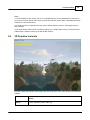
3D Graphics test suite
This test creates and animates a 3D image to test the 3D functions of the video card and its associated
software.
3D test
Objects
© 1999-2012 PassMark Software
1 plane, 300 trees, terrain, water, sky
40
BurnInTest V7.0
Mode
Windowed (size as per user selection)
Other features
used
Stencil buffer, Alpha blending, Lighting, Fogging, Multitexture, Mip-mapping
Resources
information
The terrain is formed by 32,258 triangular polygons (16,384 vertices).
The water surface has 512 triangular polygons (1,350 vertices).
Each plane object has 192 triangular polygons and 286 vertices.
The test makes use of the Windows DirectX 3D interface. If DirectX (version specified in the System
Requirements) is not installed on your PC you will not be able to run this test (in fact you may not even
be able to start BurnInTest). DirectX can be downloaded from Microsoft and comes standard with all new
versions of Windows.
Some video cards don’t support hardware acceleration at high color depths and you may have to reduce
the color depth to 16bit color to get the test to run.
Note: A display monitor is required for this test.
Warning: A number of manufactures produce video cards have very poor software support for 3D
graphics (DirectX). This is especially the case for the cheaper, bottom of the range video cards.
Poor drivers can result in strange visual artifacts appearing on the screen, poor 3D performance
and system crashes. The old saying of, “you get what you pay for”, seems especially true for
video cards.
6.4
Bluetooth
The Bluetooth test allows a systems Bluetooth adapter to be tested with a remote Bluetooth device.
The Bluetooth test can be turned on or off in preferences. The remote Bluetooth device name is to be
specified in Preferences, if no device name is specified, the test assumes the first remote Bluetooth
device found is to be used for the test. This allows for automation when multiple remote Bluetooth
devices are detected.
The Bluetooth test will run at the same time as the other tests selected (e.g. CPU) and will have 3
stages:
1. Search for Bluetooth devices (already paired devices and devices in range),
2. Request the specified (or first) remote Bluetooth device service profiles and
3. For the duration of the test, continuously connect and disconnect to the “File transfer”
service profile of the specified remote Bluetooth device. If the “File transfer” service profile is
not available, the first service profile found will be used.
The local and remote Bluetooth devices will need to support the Bluetooth “File transfer” service
profile.
On making a connection to the remote Bluetooth device, some remote devices require an
Authentication Passkey to be entered on the remote device, and then on the local device. This
occurs on the first iteration and this requires user manual interaction to enter a Passkey on both
sides. Second and subsequent connections do not require the Passkey to be re-entered. Some
devices allow certain service profiles to not require Authentication (a Passkey), and in this case, no
user interaction should be required. We have been testing both scenarios. The later scenario is
supported on a HP Windows Mobile Pocket PC we have (as the remote Bluetooth device).
© 1999-2012 PassMark Software
Test descriptions
41
The test has been designed to test to a mobile Bluetooth device supporting the "File transfer" service
profile e.g. Pocket PC, mobile phone and iPhone. It is not for PC to PC testing.
The Bluetooth test is available on Windows workstations XP SP3 and later, Vista and Windows 7.
To configure the Bluetooth test, please see "Test Preferences window.
6.5
CPU test
The CPU test exercises and verifies a wide range of CPU instructions, at user specified loads. The user
selectable sub-categories of the CPU test are:
General purpose instructions (x86)
Floating Point Unit (FPU) instructions (x87)
CPU extension instructions (x86 extensions).
The specific extension instructions may be selected: MMX, 3DNow!, SSE, SSE2, SSE3, SSE4.1,
SSE4.2 and SSE4a.
Prime number test
Maximum heat test
The numbers displayed in the test window for this test represent how many millions of CPU operations
have been performed and verified. Each different math’s test is run for half a second. After all tests have
been run the cycle count is incremented. The duty cycle and the CPU speed determine how many
operations can be processed during the half second period. Note however that if only the Maximum heat
test is selected, then the duty cycle is set to 100% and a single cycle is defined to be 1 trillion CPU
operations.
By default, a CPU test is run on each CPU core. The number of CPU tests running a particular subcategory is shown in the test window in the "Threads" column.
The number of CPUs (Packages x cores x threads) that can be tested is up to 256 (where supported by
the Operating System). That is, CPUs across multiple "processor groups" can be tested (see Note 2
below).
It is possible to raise an error on a user defined CPU temperature threshold being exceeded. It is
also possible to automatically stop testing in this scenario.
The sub-categories of this test are described below.
General purpose instructions
This test exercises and verifies correct operation of CPU instructions from the following groups:
Integer mathematics (e.g. add, subtract, multiply and divide)
Data transfer instructions (e.g. pushing/popping data to/from the stack)
Bitwise logical instructions (e.g. bitwise and/or/xor)
Shift and rotate instructions (e.g. shift data left x number of bits)
Logical instructions (e.g. equals)
Control transfer instructions (e.g. jump on x greater than y)
String instructions (eg. copy a text string)
Known and random data sets are used to exercise and verify correct operation. On 32-bit systems, 32-
© 1999-2012 PassMark Software
42
BurnInTest V7.0
bit data sets are used. On 64-bit systems, 64-bit data sets are used. The random numbers are
generated regularly to provide a larger data set, as well as ensure that the CPU caches overflow and that
this mechanism is tested.
Floating Point Unit (FPU) instructions
This test exercises and verifies correct operation of CPU instructions from the following groups:
Floating Point math (e.g. add, subtract, multiply and divide)
Transcendental's (e.g. sine, cosine)
Load constants (e.g. load Pi)
Known and random data sets are used to exercise and verify correct operation. On 32-bit systems, 32bit floating point data sets are used. On 64-bit systems, 64-bit floating point data sets are used. The
random numbers are generated regularly to provide a larger data set, as well as ensure that the CPU
caches overflow and that this mechanism is tested.
Extension instructions (x86 extensions)
This test exercises extensions to the x86 CPU instruction set for a variety of applications, such as
multimedia.
3DNow!: This test exercises and verifies correct operation of CPU 3DNow! instructions, including a
sample of moving 3DNow! registers, adding, subtracting, and multiplying. Known and random data
sets are used to exercise and verify correct operation. Data sets are pairs of 32-bit floats (eg. x,y),
where x and y are 32-bit floats.
MMX: As above, but for MMX instructions. Instructions include moving MMX registers, adding,
subtracting, and multiplying. Data set: 64-bit data sets are used.
SSE : As above, but for SSE instructions. Instructions include moving SSE registers, adding,
subtracting, and multiplying. Data set: groups of 4 x 32-bit floats (e.g. a,b,c,d) where a,b,c and d are
32-bit floats.
SSE2: As for the SSE test, but for SSE2 instructions. Data set: pairs of 64-bit floats (e.g. x,y) where
x,y are 64-bit floats.
SSE3: As for the SSE2 test, but for SSE3 instructions. Data set: pairs of 64-bit floats.
SSE4.1: As for the SSE3 test, but for SSE4.1. Instructions include a sample of moving registers and
multiplication. Data set: pairs of 64-bit integers.
SSE4.2: As for the SSE4.1 test, but for SSE4.2 instructions. Instructions include CRC helper
functions. Data set: pairs of 32-bit integers.
SSE4a: As for the SSE4.1 test, but for SSE4.a instructions. Instructions include data extraction
functions. Data set: pairs of 64-bit unsigned integers.
Notes:
1. MMX stand for "Multimedia Extensions".
2. SSE stand for "Streaming SIMD extensions".
3. SIMD stands for "Single Instruction Multiple Data."
4. Tests are only performed if the CPU supports that test. For example, SSE3 tests will only be
performed if the CPU supports SSE3.
5. Known and random data sets are used to exercise and verify correct operation
6. The random test data is generated regularly to provide a larger data set, as well as ensure that the
CPU caches overflow and that this mechanism is tested.
Prime number
This test exercises and verifies correct operation of CPU through the use of a prime number generation
algorithm.
© 1999-2012 PassMark Software
Test descriptions
43
Maximum heat
Based on PassMark Software testing of a set of CPU algorithms for different systems, a test has been
produced that aims to generate the highest CPU temperature possible by BurnInTest. This test is aimed
at checking that the cooling system is capable of doing its job with the system CPU under extreme
load, especially when the CPU has been overclocked.
Notes:
(1) Some CPU operation tests are only supported in the 32-bit version of BurnInTest. These are: 3DNow!,
MMX, Push/Pop stack operations, Transcendental's and Load constants.
(2) A normal software application only has access to a single "processor group". BurnInTest has been
designed to test CPUs across multiple processor groups and hence test more than 64 logical
processors. For more information on a "processor groups" see Microsoft's website, an extract is
included below:
"The 64-bit versions of Window s 7 and Window s Server 2008 R2 support more than 64 logical processors on a single
computer. This functionality is not available on 32-bit versions of Window s.
Systems w ith more than one physical processor or systems w ith physical processors that have multiple cores provide
the operating system w ith multiple logical processors. A logical processor is one logical computing engine from the
perspective of the operating system, application or driver. A core is one processor unit, w hich can consist of one or
more logical processors. A physical processor can consist of one or more cores. A physical processor is the same as
a processor package, a socket, or a CPU.
Support for systems that have more than 64 logical processors is based on the concept of a processor group, w hich is
a static set of up to 64 logical processors that is treated as a single scheduling entity. Processor groups are numbered
starting w ith 0. Systems w ith few er than 64 logical processors alw ays have a single group, Group 0."
6.6
Disk test suite
This suite contains a number of tests that exercise the mass storage units (hard disk or otherwise)
connected to the computer. This test can be on the File System (e.g. NTFS disk volume C:) or in the
case of BurnInTest Professional directly to the physical disk (e.g. physical disk 1, not using a file
system like NTFS). The physical disk test is available on unformatted disks and formatted disks that do
not contain Windows installations or paging files. On systems without an Operating System, i.e. when
using Bootable BurnInTest or WinPE, only unformatted disks are supported for the physical disk test.
By default drive C: is used for the hard disk but this can be changed from the Preferences Dialog. and up
to 50 drives can be selected for simultaneous testing. From this 50 it is possible to select combinations
of available floppy disks, hard disks and flash drives. Drives can be connected via the IDE bus, SATA,
eSATA, SCSI, USB, Firewire or any other method supported by Windows.
How the tests work
The user can select one of the following test modes or choose to automatically cycle between the
patterns. This selection is done in the preferences window. Possible test modes are,
Default (Cyclic)
Sequential data pattern (0,1,2...255)
Random data with random seeking
High Low frequency data overwrite (10101 then 00001)
Butterfly seeking
© 1999-2012 PassMark Software
44
BurnInTest V7.0
Binary data pattern 1 (10101010)
Binary data pattern 2 (01010101)
Zeros data pattern (00000000)
Ones data pattern (11111111)
Random data pattern
Quick physical drive test (BurnInTest Professional only)
During each test cycle (except Butterfly seeking and Quick physical drive test) a file is created and
verified on the disk.
BurnInTest Professional specific
For the physical disk test there is no file system (e.g. NTFS) to write 'visible' files. As such BurnInTest
will create 'virtual' files directly to the disk. This will destroy any data on the disk. The physical drive test
in general will be much faster than the formatted drive test and provide better results.
BurnInTest Professional specific end
The size of the file is equal to a certain percentage of the disks capacity and all files are created in the
root directory of the drives selected. The default file size is 1.0% of the disk size. For small capacity
drives, like floppy disks, there is a minimum file size of 32KB. It is possible to change the default file
size percentage from the preferences window.
Each test file is filled with a coded number sequence (a Pattern) that is used to verify the correct
operation of the disk when the file is verified (read). Files are created in the free space on the disk until
the disk is at least 94%* full (we’ll refer to this as the ‘full’ level). When the disk has reached this limit,
all the test files are deleted and the test starts again.
(*) 94% is used on disks that have a swap file or a Windows directory. A limit of 94% is used to ensure
that some space is kept for use by other applications (including the windows swap file). On disks that do
not have a swap file or a Windows directory, between 99.5% and 100% of the disk will be used.
A number of test modes perform additional testing to that described above. These are described below:
Random data with Random seek ing consists of 2 repeating steps, (1) Writing, reading and verifying a
test file with random data and (2) Seeking to random locations in the test files and reading or writing data
blocks at this location.
(1) BurnInTest generates 7 unique blocks of random data for each disk under test (the block size is
determined by the User preferences settings e.g. 16KB). BurnInTest sequentially writes a file using the
first block of random data, followed by the second, third , forth, fifth, sixth and seventh and then the first
etc, until the file size specified is reached (e.g. 0.1% of the disk size). After writing this test file with the
random test data, the data is read sequentially and verified against the test data written.
(2) Following the writing and verifying of each file, the random seek part of the test starts. BurnInTest will
select a test file at random (1..n, where n is the number of the test file that has already been written to
disk). It will then select a random block within that test file (i.e. an offset into the file of, block number x
block size, eg. 10 * 16KB = 160KB). BurnInTest will seek to this position in the test file and take an
action. BurnInTest, at random, will either (i) read and verify a block at this position in the file or (ii) write a
block at this position in the file. This process is repeated the number of times specified by the user in
the disk preferences “seek count” field.
Steps (1) and (2) are repeated until the disk full level is reached. At this point, all the test files written to
© 1999-2012 PassMark Software
Test descriptions
45
disk will be deleted and the process will be repeated.
The Random seeking mode is not supported when the Raw disk test mode is selected.
High Low frequency data overwrite works by first writing a file with a high frequency pattern
(10101010101010010101…), then overwriting this with a low frequency pattern
(00001000010000100001…) and then verifying that the low frequency pattern has been fully and correctly
written. Note: This test pattern will write more data than it reads/verifies, this is the reason the MB
Written and MB verified shown on the disk test window may not be equal.
Butterfly seek ing works by detecting the hard disk geometry (number of cylinders etc) and then seeking
between cylinder 0 and cylinder X and back to cylinder 0. This is repeated the user specified ‘seek
count’ times, before X is incremented by 1. This is repeated until the last cylinder on the Volume is
reached. The number of operations reported refers to the number of combined Seek/Read operations.
Note (1) that this test is only supported in Windows XP and above on non-Floppy, non-optical drives. (2)
Performing a seek in many cases does not move the disk driver head, to ensure the disk drive head is
moved to the seek position, a small read (of the Sector size) is done at each seek position. Also,
incremental offsets of the sector size are used for the ‘X’ seek and the return to ‘0’ seek, to ensure that
the disk drive cache is overflowed and physical disk seeks consistently occur (once the disk cache has
overflowed). (3) Disk drive geometry may be faked or translated by hard disks/ device drivers and may
not be the actual drive geometry. (4) The Cylinders, track and sector size used are typically logical
values provided by the hard disk. (5) Up to 8 different physical extents per Volume (or Drive letter) are
supported in the butterfly-seeking test. (6) As with other disk tests, if a physical disk is partitioned into
multiple volumes (drives) and testing is simultaneously carried out on these volumes, the nature of the
test will change. In the case of Butterfly seeking, the movement of the physical disk drive head will not
reflect butterfly seeking, but something between butterfly seeking and random seeking, as the seeks for
volume 1 go from its logical cylinder 0 to X and the seeks for volume 2 go from its logical cylinder 0 to Y
are mixed in time. (7) Some disk drive device drivers do not support the supply of disk geometry
information that is needed for this test. (8) The Raw disk test option does not support the Butterfly
seeking test mode and will be skipped. Error reporting may be configured not to report “Butterfly seeking
test not supported for this disk” errors. This can be achieved by editing the Error Classifications file
(BITErrorClassifications.txt) for Error Number 160 to NONE. For example, changing the line from:
160,"Butterfly seeking test not supported for this disk",INFORMATION,
to
160,"Butterfly seeking test not supported for this disk",NONE,
The default setting is to cycle between the patterns. In this case a new pattern will be selected each
time the disk has reached the BurnInTest ‘full’ level. Where the disk drive is a floppy, CD, DVD, or the
operating system is Vista (and later) and the user is not running BurnInTest with 'elevated' administrator
privileges, then Butterfly seeking will be skipped in the Cyclic testing and a log message reported.
BurnInTest Professional specific
The Quick physical drive test works by writing, reading and verifying virtual test files to the start of the
disk, the end of the disk and a random selection in between. This provides for much quicker disk testing.
BurnInTest Professional specific end
© 1999-2012 PassMark Software
46
BurnInTest V7.0
Overview of settings
The user can chose to log SMART (Self-Monitoring Analysis and Reporting Technology) errors. To learn
more about SMART, see section What is S.M.A.R.T?
Each of the following settings: Slow drive warning threshold, File size, Test pattern and the logging of
SMART errors may be configured differently for each disk drive. The disk drive Duty Cycle setting will be
used for all drives when the Duty Cycle Override entry is set blank (no value). If a different duty cycle is
required for a particular disk drive, a value may be entered in the Duty Cycle Override entry.
The following settings can be configured differently for each drive: Slow drive warning threshold, File size,
Test Pattern and Log SMART errors. To use the general disk drive Duty cycle for each disk just set the
Duty Cycle override value to blank (no value), otherwise set the required value per disk.
If an error is detected in the coded number sequence then the error count is incremented. The numbers
of bytes written and read from the disk are displayed in the test window. The addition of these two values
is displayed in the main window.
Disk Self Test
The Disk Self Test (DST) is a set of built-in routines implemented by the vendor to perform failure
diagnostics on the disk. The execution of the DST and the retrieval of the test results are defined by the
ATA industry standard. Most drives that conform to this standard implements this set of built-in routines.
If the "SMART" option is selected for the disk test, then the DST is run before the standard BurnInTest
disk test. If the "-f" command line parameter is also specified, then an extended disk self test is also
run. If the DST is not supported by the disk, a message will be logged and the DST skipped.
Disclaimer: It has been observed that some drives that claim to support the Disk Self Test (DST)
standard don't in fact fully support the specification. Some drives report the percentage progress
incorrectly, and some drives report their status incorrectly.
Test window display
Graphical progress bars indicate if the test is currently writing or verifying (reading) information, the
percentage complete for the particular file and the space remaining on the disk.
The speed of the hard disk and the duty cycle determine how quickly test files are created.
Notes
(1) When multiple copies of BurnInTest are used to test shared or networked drives at the same time,
care must be taken to avoid file name collision on the drive being tested. File name collision will manifest
itself as file creation errors. As the name of the test files created in the root directory of the disk being
tested contains the drive letter, collisions can be avoided by assigning different drive letters to the
network drive on each machine running BurnInTest.
(2) There are a few issues to aware of when interpreting the results of the disk test. These are covered in
the precautions section.
(3) To test Firewire ports using BurnInTest it is recommended that an external hard disk via the Firewire
port is used in conjunction with the BurnInTest disk test. (2) Similarly, to test external memory card
readers/writers or other removable drives, it is recommended that the BurnInTest disk test is used.
© 1999-2012 PassMark Software
Test descriptions
6.7
47
Monitor EMC testing
(Applicable to BurnInTest Pro version only)
BurnInTest can be used to help with Electromagnetic Compliance Testing (EMC) to ANSI standard
C63.4-1992. Section 11.1.3 of this standard details the requirements for testing of Visual Display Units.
In brief, this standard requires that screens of scrolling 'H' characters be displayed while EMC testing
takes place. The monitor and the image displayed need to be adjusted by the tester in order to
maximize the electromagnetic output of the monitor. (e.g., by selecting maximum brightness and white
text on a black background).
BurnInTest provides the ability to display a screen of Scrolling 'H' characters and the possibility to
adjust,
-
The color of the text
-
The color of the background
-
The Scroll speed (via the duty cycle window, slide bar)
-
The character used, as a replacement for 'H'
-
The font face and font size
The 2D Graphics preferences window can be used to either select the standard 2D graphics load test or
the EMC testing scrolling ‘H’ pattern.
When activated, the Scrolling ‘H’ pattern fills the entire screen but Alt-Tab can be used to switch back to
the main Window or other applications. Scrolling only takes place when the test window is the active
window. If there are multiple displays, the ‘Scrolling’ H’s will fill all displays.
6.8
Network test
BurnInTest provides two different network tests. The standard network test and the advanced network
test. The standard network test is included in both the Standard and Professional editions of BurnInTest,
while the Advanced network test is included in the Professional edition. This section describes the
Standard network test.
The Standard network test
The Standard network test, tests your networking hardware and software. This is done by sending
special ICMP_ECHO message using the Internet Control Message Protocol (ICMP). The ICMP_ECHO
message is more commonly known as a ‘ping’. This message is echoed but to your computer by a
remote host. This allows the reliability of the network connection to be determined. There are 4 test
modes, the first test mode tests to the Internal loopback. The other 3 test modes test all network
physical ports (all, ethernet only or 802.11 only). Up to 12 remote hosts, and hence 12 local network
ports, can be selected by setting the Destination Network address in the "Test Preferences window.
These values are used for the Network test. Each one must be a URL or an IP address (or left blank).
A URL is the name of a network host, e.g. www.hostname.com
An IP address is a sequence of numbers that correspond to a network host. e.g. 169.192.0.1. IPv4 and
IPv6 on Vista and later can be tested.
The host selected must be accessible from the computer and capable of responding to the ‘ping’
command. PassMark recommends the selection of a local host to minimize data link problems, which
are fairly common on the Internet. The IP address 127.0.0.1 can also be used for local loop back testing,
© 1999-2012 PassMark Software
48
BurnInTest V7.0
but this is not test the full port hardware.
The packet sent to the remote host contains a data payload and a checksum. Every time a packet is
echoed from the remote host the checksum is verified and the data payload is compared byte by byte
with the data that was sent. Any differences in the payload or an incorrect checksum will result in an
error. The data payload is 64 bytes in length.
To use this test the TCP/IP Internet protocol must be installed on your computer. This can be
determined from the Windows Control Panel, Network Window. If you try and use this test without the
Internet protocol being installed, you will get a message like, “Could not create a Network Socket”.
The amount of time BurnInTest will spend waiting for a packet can also be set in the Test Preferences
window
An example of a running test is shown below:
The meaning of the information displayed in the network test window is given below.
Network Adapter
The IP address of the Network port under test.
Server
The IP address of the destination Network address (specified in preferences).
Packets Sent
The number of packets sent to the remote host
Packets Received
The number of packets received back from the remote host. This should remain at the same level as the
Packets Sent counter. If after 2 second a sent packet is not echoed, this causes a timeout error and
Packets Sent will be greater than Packets received.
Current delay
The round trip time in milliseconds for the last packet sent.
Average Delay
The average round trip time in milliseconds for a packet.
Max Delay
© 1999-2012 PassMark Software
Test descriptions
49
The maximum round trip time in milliseconds for a packet. The maximum values often happen at the very
start of the test session. This is because Windows is still loading and caching the required networking
software.
Bytes sent
The total number of bytes transmitted to the network.
Flow rate
The average number of packets sent per second for the test period. The duty cycle set for the Network
Test determines how many packets are being sent per second.
Errors
The number of errors that have been detected and the percentage of packets that were attempted to be
sent that had an error are displayed. The definition of what an “error” is can be changed from the Test
Preferences window. Depending on the settings in the preferences window, the error count can be
incremented for every detected error or alternatively it can be set to only increment when the specified
error ratio is exceeded.
When the specified error ratio is exceeded, the ratio is reset to zero to avoid triggering a continuous
stream of errors. Thus the ratio value displayed is the ratio of bad errors to total packets attempted to be
sent since the last time the threshold was crossed.
For the purposes of detecting a crossing of the threshold and signaling an error, the ratio is ignored until
a sufficient number of packets have been attempted to be sent to make the ratio valid. For example, if
the ratio is set to 2%, at least 50 packets must be attempted to be sent before the ratio is deemed to be
valid. If the ratio is set to 0.1%, at least 1000 packets must be attempted to be sent before the ratio is
deemed to be valid. If errors are detected, but there has been an insufficient number of packets
attempted to be sent, then a warning will be raised at the end of the test run.
Compatibility issues
See Test Preferences window.
6.9
Advanced network test
(Applicable to BurnInTest Pro version only)
Overview
The Advanced Network test allows stability and load testing of up to 12 Network Interfaces (NICs) on a
system running BurnInTest.
The Advanced Network test is a peer to peer TCP/IP test of NICs using various parameters and load
settings. BurnInTest is capable of detecting the presence of remote machines on the same network
segment that are running "EndPoint" software (i.e. all EndPoints need to be visible to all the BurnInTest
system NICs). BurnInTest will need to run on one system and the remote machines will need to run the
‘EndPoint’ (EP) software.
IPv4 and IPv6 (Vista and later) can be tested. Note: BurnInTest and the Endpoints must support IPv4.
One instance of the BurnInTest Advanced Network test can only be run on a Network. That is, you can
not run 2 (or more) BurnInTest Advanced Network tests at the same time on the same network. Up to 12
NIC's on the BurnInTest system may be selected for testing.
The EP application (endpoint.exe) may be run on up to 12 other systems on the network. Only 1 EP can
© 1999-2012 PassMark Software
50
BurnInTest V7.0
be run per system. An EP can not be run on the BurnInTest system.
To set the Advanced network configuration options, select Configuration -> Test Preferences -> the
Network tab, select "Advanced network test" and select the "Edit options" button. Please see Advanced
Network Test for descriptions of the options available.
EP (End point) overview
The EP purpose is to detect requests from BurnInTest to start network testing and to send, receive and
verify data from BurnInTest.
EP is a standalone application that is started on a remote machine and will be able to run whether there
is an instance of BurnInTest running or not. It will need to be able to access all available NICs of the
machine that it is running on. .
The “Endpoint.exe” software file is included in the BurnInTest installation directory and should be copied
to the remote PC’s and run from these systems. For example they should be copied from the BurnInTest
directory on the main PC, C:\Program Files\BurnInTest\Endpoint.exe, to each remote PC to a directory
C:\Program Files\BurnInTest\Endpoint\Endpoint.exe. An EP can be run by double clicking on the
application file.
To use the advanced network test there must be at least 1 EP running on another system (up to 1 EP
running on each of 6 systems) on the network. The higher the configured load (required %) and the larger
the number of NIC's under test (on the BurnInTest system), the more Endpoints you should use.
It is recommended that the EP NIC's be the same or higher speed as the fastest BurnInTest system
NIC. ie. it is probably not a good test if the EP NIC is 10Mb/s, and the BurnInTest system NIC is 100Mb/
s or 1Gb/s. Only the 'first' EP NIC will be used for testing, hence it is suggested that the slowest NIC's
are disconnected, leaving a single NIC (the fastest) connected on the EP system.
As a guide, it is suggested that with low load (required %), up to a maximum of 3 NICs can be tested
per EP. With high load (required %), up to a maximum of 1 NIC can be tested per EP.
For example:
(1) If you were testing 2 x Gb NICs (BurnInTest side) with a configured load of 5%, then 1 x EP with a Gb
NIC would be suitable. 2 x EPs could be used. 3 x or more EP's would provide no value.
(2) If you were testing 2 x Gb NICs (BurnInTest side) with a configured load of 90%, then 2 x EPs with a
Gb NIC would be suitable. 1 x EP would most likely provide lower throughput. 3 x or more EP's would
provide no value.
(3) If you were testing 6 x 100Mb NICs (BurnInTest side) with a configured load of 5%, then 2 EPs with a
100Mb NICs would be suitable. A single EP would most likely provide lower throughput. 3 to 6 would
provide greater throughput. 7 x or more EP's would provide no value (and is not supported - a maximum
of 6 EP's are supported).
It should be noted that the system may not be able to achieve the configured load (required %) due to a
number of factors, including CPU load, and network configuration. It is suggested that other BurnInTest
tests (e.g. CPU test) are not set such that they push the CPU beyond 'hard on 90%' when running the
Advanced Network test.
To successfully run the test, BurnInTest uses broadcasts to find all the available EP applications on the
network, so anything that may block the broadcasts, such as a router, needs to be taken into account.
Firewalls could also interfere with the test and may need to be configured to allow BurnInTest and the
EP applications to use the network.
How the test works
At the start of testing, BurnInTest broadcasts a request to the EPs on the local LAN segment. The
© 1999-2012 PassMark Software
Test descriptions
51
broadcast will use UDP and be directed at the universal 255.255.255.255 broadcast address. Each EP
will respond to this request. This provides BurnInTest with a list of all available EPs.
BurnInTest will then start a network test for each BurnInTest NIC selected for testing. Each of these
BurnInTest system NICs will be assigned one Endpoint NIC to test with. For example, with 3 BurnInTest
NIC's and 3 EP systems, NIC1 -> EP1, NIC2 -> EP2, NIC3 ->EP3. If there are more BIT system NICs
than EPs then the available EPs will be used, for example, with 4 BurnInTest NIC's and 2 EP systems,
NIC1 -> EP1, NIC2 -> EP2, NIC3 -> EP1, NIC4 -> EP2. This allocation will remain the same for the
duration of the test.
A test will be started for each NIC and BurnInTest will send a control message to it's designated EP NIC
to request it to start testing, on receiving a 'Ready to test' response from the EP, BurnInTest will setup
test TCP sockets (WinSock) on the user specified port (+ the test number) and start sending test data
to the EP. If full duplex is configured for that NIC, then the EP will also send test data back to it's
allocated BurnInTest system NIC.
The test data is pseudo randomly generated at both the BurnInTest and EP ends (ie. the data is not just
'looped' by the EP). A checksum will be added to the data to allow BurnInTest and each EP to verify the
data integrity (if the user has selected this option).
Both BurnInTest and the EP monitor Network load in order to estimate how much data should be sent
from BurnInTest to an already connected EP (and from an EP to BurnInTest) in order to achieve the
required % load.
Errors will be logged in the standard BurnInTest log files as specified in Configuration -> Test
Preferences -> Logging.
Notes
To ensure compatibility between BurnInTest and the Endpoint software, it is important that you use the
version of Endpoint.exe that is included in the BurnInTest distribution you are using.
In Windows XP and later you need to be the administrator to run this test. In Windows Vista (and later)
you will need to run BurnInTest and the Endpoint software with Elevated administrator privileges ("Run as
administrator") or turn off UAC (User Account Control). Turning off UAC will remove all user account
control and you should understand the impact of this before doing it (and ensure the system is returned
to required settings after the test).
In some cases, it is possible that a failing NIC (such as reported send or receive errors) can lead to
subsequent false positive errors being reported for other NICs. When analyzing Advanced Network
errors, this should be considered and the first error (within a period of 1 minute) taken to be the problem
NIC.
CheckEnd (previously distributed with BurnInTest) has been removed and is now obsolete.
Examples
The Advanced network test window for a test of an IPv4 and IPv6 NIC on the BurnInTest system to a
single Endpoint system on the test network:
© 1999-2012 PassMark Software
52
BurnInTest V7.0
The endpoint system:
6.10
Optical drive test
A read test of CD, DVD and Blu-ray drives; write test of CD and DVD drives; and a sound card test when
used with a music CD. This test can be used with many different types of CD / DVD / Blu-ray media,
including the following types.
-
Music CD, Data CD-ROM, Data CD-R, Data CD-RW, Specialized test CD (see below for details)
© 1999-2012 PassMark Software
Test descriptions
53
-
Data DVD-ROM, Data DVD-R, Data DVD-RW, Data DVD+RW, Data DVD RAM, Specialized test
DVD (see below for details)
-
BD-R, BD-RE
The type of disc being used must be suitable for the test mode set in the Optical drive preferences
window however. If multiple optical drives are installed in your system, you can select all or some of
them from the Preferences window. Up to 26 drives can be selected for simultaneous testing.
Test modes
NO TEST
Don’t test the drive selected.
Music CD playback
For a music CD, the test verifies the operation of the CD ROM and the PC’s sound system by
repeatedly playing a music CD. The number of cycles corresponds to the total number of times the
entire CD has been played. The number of ‘ops’ corresponds to the number of bytes read from the CD in
order to generate the sound. The duty cycle affects the time spent waiting between tracks. Choose a
band you like and turn the volume up loud.
Data disk read and verify
For optical data disks, the disk is scanned with each file being read in turn. A 32bit checksum is created
for each file as it is read from the disk. The disk is then re-read and the checksums verified to complete
the cycle. The best data disks’s to use are those, which are full and contain a good variety of files.
Some large ones and some small ones. If the CD has more than 10,000 files only the 1st 10,000 will be
scanned.
PassMark Test CD / DVD
This test method is the most advanced CD-ROM test mode and provides a level of in depth testing not
available with the other two methods. When possible this method should be selected in preference to the
other two. It allows a complete read and verify of the data on the CD, and optionally random seek testing
(see Additional seeking and Seek count below).
There is the possibility to create CDs and DVDs especially for use with BurnInTest. These specialized
CDs and DVDs contain a set of files that have been specifically created to thoroughly check your drive.
With these CDs and DVDs, BurnInTest is able to know the layout and exact content for each file on the
CD/DVD. This allows BurnInTest to read back each file and test every bit for accuracy.
PassMark sells these specialized CDs and DVDs but you can also make your own file set using a utility
called CD-Maker. You will still need 3rd party CD or DVD burner software to actually create the disc
however.
CD-Maker creates a set of files that can be burned to CD or DVD. More information about this tool can
be found on the PassMark Software web site. (http://www.passmark.com/products/cdmaker.htm )
No media in Drive
This test method only attempts to detect the presence of an optical drive. No attempt is made to read
from the drive. This can be a useful option when there are no discs available for testing but a basic check
is still required to ensure that the drive was detected and enumerated by Windows. This test option is
not as thorough as the other options and, if possible, one of the other options should be used.
Burn CD-RW
© 1999-2012 PassMark Software
54
BurnInTest V7.0
This test method provides testing of a CD burner through continuously erasing, burning, verifying then
randomly seeking across a CD-RW. It is recommended that this test be run with a set number of test
cycles rather than a set duration.
PassMark 650MB or 700MB (user specified) Test CD data (see PassMark Test CD / DVD above) is
created temporarily on the hard disk. For the period of the test, the following testing is then repeated:
Erase the CD-RW media (User specified Quick or Full format). The quick option erases
content type information in typically less than two minutes. The Full option additionally
erases all user data on the disc, however this can take a considerable amount of time (over
1 hour) and the test cannot be canceled during this stage.
Burn the PassMark Test CD data to the CD.
A complete read and verify of the data on the CD.
And optionally random seek testing (see Additional seeking and Seek count below).
Burn CD-RW requires Windows Vista (and later), IMAPI v2 patched XP or IMAPI v2 patched
2003 Server. See http://support.microsoft.com/kb/932716.
Burn CD-RW requires a CD-RW only drive. Combo drives with DVD burners are not currently
supported - in this case test with writable DVD media.
Burn DVD-RW
This test method provides testing of a DVD burner through continuously erasing, burning, verifying then
randomly seeking across a DVD-RW or DVD+RW.
PassMark DVD-5, DVD-9, DVD-10 or DVD-18 Test CD data (see PassMark Test CD / DVD above) is
created temporarily on the hard disk. For the period of the test, the following testing is then repeated:
Erase the DVD-RW or DVD+RW media (User specified Quick or Full format). The quick
option erases content type information in typically less than two minutes. The Full option
additionally erases all user data on the disc, however this can take a considerable amount
of time (over 1 hour) and the test cannot be canceled during this stage.
Burn the PassMark Test DVD data to the DVD.
A complete read and verify of the data on the DVD.
And optionally random seek testing (see Additional seeking and Seek count below).
Burn DVD-RW requires Windows Vista (and later), IMAPI v2 patched XP or IMAPI v2 patched
2003 Server. See http://support.microsoft.com/kb/932716.
Note:
- DVD-5 is Single sided, single layer. A 12cm DVD is 4.7GB (actually approx. 4,700,000,000
bytes)
- DVD-9 is Single sided, dual layer. A 12cm DVD is 8.5GB.
- DVD-10 is Double sided, single layer. A 12cm DVD is 9.4GB.
- DVD-18 is Double sided, dual layer on both sides. A 12cm DVD is 17.1GB.
When referring to DVD capacity the industry uses 1GB approximately 109Bytes .
Auto Test CD & Burn DVD
This option is only available after "Select all optical drives" is selected.
© 1999-2012 PassMark Software
Test descriptions
55
This option is useful for systems with a DVD burner and one or more other optical drives. When
selected, BurnInTest will allow a global set of test parameters to be applied to all of the CD and DVD
drives detected on each system at test run time. However, the Test Modes that will be used will be set
by BurnInTest. If a DVD recorder is detected on the system, then the first (lowest drive letter) DVD
burner will be allocated a Test mode of Burn DVD. All other CD and DVD drives will be allocated the
"PassMark Test CD / DVD" Test mode.
Additional seeking and Seek count
When Additional seek ing is selected (for PassMark CD/DVD’s and Burn CD-RW only), seeking to
different positions on the CD/DVD or CD-RW and verifying the data at this position will occur Seek Count
number of times for each cycle of a file read and verify.
Display
Depending on the test the following information is displayed in the test window.
Progress bar
Displays the progress graphically for the longer CD burn phases.
Phase
Data CD and specialized CDs :
Starting
Checksum creation
Searching for files
Opening file
Reading Test CD
Verifying checksums
Seeking
CD burn:
Starting
Creating test data files
Setting active CD burner
Erasing CD-RW media
Erasing CD-RW media retry
Preparing to Burn CD
Adding staged image data
Burning image to CD
Closing the CD
Finished CD Burn
© 1999-2012 PassMark Software
56
BurnInTest V7.0
Checksum creation
Searching for files
Opening file
Reading Test CD
Verifying checksums
Seeking
Files scanned
This is the number of files that have been scanned during the current cycle
Current file
This is the name of the file that is currently being scanned. If this is in the seek phase, this will display
the file and block within the file that the drive has seeked to.
Bytes read
This is the total number of bytes read from the CD
CD burn:
This is the total number of bytes written or read from the CD (depending on the phase).
Throughput (Current and Average)
This is read speed from the CD in Megabytes per second and a conversion to standard CD Drive speed
(e.g. 4x). It should be noted that this measurement includes the seek and rotational latency time, so
that the speed reported will always be lower than the maximum drive speed. This is especially the case
for a CD with many small files. Also most drive manufacturers quote the maximum speed for their drives,
the actual transfer rate is usually significantly lower than the quoted maximum. E.g. It is not unusual for
a 32x speed drive to only reach a speed of 2MB/Sec, 13x.
CD burn:
This is the write or read speed (depending on the phase).
Errors
Data CD and specialized CDs :
The number of errors detected. See Common Errors for a description of the errors that may be
encountered.
6.11
Parallel port test
(Applicable to BurnInTest Pro version only)
Tests the parallel communications port connected to the PC. The parallel port to be tested can be
selected from the Test Preferences window.
A parallel port loop back plug is required to run this test. These can be purchased from the PassMark
web site (www.passmark.com) or you can make them yourself.
Each test cycle corresponds to 500,000 bytes of data transmission. The number of ‘ops’ corresponds to
the number of bytes sent and received. The duty cycle affects the time spent waiting between cycles.
© 1999-2012 PassMark Software
Test descriptions
57
The parallel port selected must not already be in use by Windows (for example by the printer or other
external device), for the test to be carried out. The default on-board Parallel port settings are that Port1
is named LPT1 and corresponds to the physical IO memory address 0378. Depending on the version of
Windows you are using you may be able to change a number of Parallel Port settings, including the port
name (e.g. You may have renamed LPT1 to LPT2) and the IO address (e.g. You may have changes
port1 to use 0x3BC instead of 0x378). BurnInTest will automatically detect the changes for the on-board
parallel port. For W2000 and later versions of Windows, PCI and ISA parallel ports will also be
automatically detected and available for testing.
Note: That the Windows operating system may block exclusive access to the Parallel port. This is
reported with the error “Unable to lock Parallel Port”. When this occurs there is a retry pattern over a
number of minutes to try and lock the port. Regardless of the result, the parallel port test will then
commence. If you wish to ignore the “Unable to lock Parallel Port” message the BITErrorClassifications.
txt file can be edited to change this error message classification (Number 138) to NONE.
In Windows XP and later you need to be the administrator to run this test. In Windows Vista (and later)
you will need to run BurnInTest with Elevated administrator privileges ("Run as administrator") or turn off
UAC (User Account Control). To perform Parallel Port testing from a script that includes system reboots,
UAC will need to be turned off to perform Parallel Port testing after the reboot. Turning off UAC will
remove all user account control and you should understand the impact of this before doing it (and ensure
the system is returned to required settings after the test).
If the port is not detected by BurnInTest check the BIOS settings for the port. Note that the old ‘bidirectional’ BIOS mode is not supported. ECP or EPP mode is required.
Parallel Port
This is the port name for the parallel port being tested. The port can be selected from the Test
Preferences window.
Bytes Sent
This is the number of bytes that have been sent to the parallel port.
Bytes Received
This is the number of bytes that have received from the parallel port.
Errors
This is the number of errors detected.
Throughput
This is the measured throughput for the port.
6.12
Plug-in test
(Applicable to BurnInTest Pro version only)
If you have specialized hardware that BurnInTest does not test, you can write your own test and
integrate it with BurnInTest.
Up to 5 Plugins can be specified. PassMark has developed Plugins for the following tests:
Touch screen testing, using PassMark’s MonitorTest software;
© 1999-2012 PassMark Software
58
BurnInTest V7.0
Modem testing, using PassMark’s ModemTest software;
Keyboard testing, using PassMark’s KeyboardTest software,
Sample software in C and C++ is also available to assist developing a Plugin for your specific
hardware.
The plug-in test will appear as another test, much like all of the tests. It may be switched on or off, and
duty cycle set. The Plug-in application can define the following, which may be displayed, logged and
included in the BurnInTest results:
The test window title text.
The number of test cycles completed.
The number of plug-in test errors in the current test run. The plug-in may flag BurnInTest when a new
error occurs, and pass a plug-in defined error message (this will be displayed in the BurnInTest
windows and may be logged in the log file).
The plug-in may flag BurnInTest when it wants to display new status text (defined by the plug-in),
such as “Waiting for event”.
The Plug-in may define up to 3 “number of operations counts”. Typically this would be for something
like, the number of writes, reads and verifies. All three operation counters may be given plug-in
defined labels, which will be displayed in the BurnInTest test window. Any operation counter may be
flagged as not in use, hence you could use a single operations counter, such as just “Write”.
BurnInTest will display each label and number of operations counters separately in the test window.
They will be summed for the main window operation count. These values are 64 bit integers.
6 Plug-in defined string values and labels are provided for the display of other interesting data to the
user, e.g. the plug-in could provide throughput in Mb/s to BurnInTest. BurnInTest displays this
information in the test window. Both of these fields may be flagged as not in use.
Software may be written to interface an external plug-in test module with BurnInTest. An interface is
defined to pass test parameters between an external test application and BurnInTest. BurnInTest will
attempt to start this application when the Plug-in test is run and this application is specified as the Plugin file. BurnInTest will pass a flag that indicates that the test run is still underway (e.g. has/ has not been
stopped by the user) and BurnInTest will pass in the Duty cycle. Before starting the test, the plug-in
application must initialize the test parameters (such as display labels) and flag that they have been set.
Once the test is started, the test result parameters and most test window labels may be updated based
on the test results. BurnInTest will pick up any changes. Specific cases where the Plugin must flag to
BurnInTest that new parameters are available are for a new labels (as a group flag), error, a new status
message and the user defined strings 1 & 2. You may need to check that BIT has read the old values
before writing new values. See the Interface definition, PLUGININTERFACE, and the sample source code
for details.
6.13
Printer Test
This test verifies the correct operation of the printer by either sending a standard page of text, or a
© 1999-2012 PassMark Software
Test descriptions
59
sending a command file, to the printer.
Standard test
This test verifies the correct operation of the printer. The test sends pages of text to the default Windows
printer. (See Start, Settings Printers in Windows to define a default printer). The pages printed by the
printer should be a page of solid text in a fixed point font filling the printable area of the page. There
should be a small margin (usually under 1cm) around the block of text.
The number of pages printed during a period of time depends on the print duty cycle. For each duty
cycle increment there will be an additional 20second delay between each page. This means that a Duty
Cycle of 1 corresponds to a delay of 33minutes between pages. A duty cycle of 50 corresponds to a
delay of about 16minutes between pages
The pages printed should be visually inspected to check if they are complete.
The cycle count for the printer test corresponds to the number of pages printed. The ‘ops’ count
corresponds to the number of characters printed.
Standard color printer test
The standard color test sends pages of color text to the default Windows printer. The pages printed by
the printer should be a page of solid color text in a fixed-point font filling the printable area of the page.
There should be a small margin (usually under 1cm) around the block of text. The colors are as follows:
Title: Black
Repeated blocks of:
Red
(RGB: 0xFF0000)
Red
(RGB: 0x7F0000)
Green (RGB: 0x00FF00)
Green (RGB: 0x007F00)
Blue
(RGB: 0x0000FF)
Blue
(RGB: 0x00007F)
Printer command file
The user can define a printer command file to be used in place of the standard test. A printer command
file is a file containing a series of printer commands which is used by the printer to carry out certain
actions. For example a printer command file could contain instructions on how to print an image or page
of text. Specialized printer command files can also be created by printer manufacturers in order to run
their printers through a particular test routine.
See the Print Preferences section for more details about how to create and select printer command files.
6.14
RAM test
The Memory test, tests the reliability of the RAM installed in the computer. As BurnInTest runs within
windows some of the available RAM is being used by windows and any other applications running. Any
memory that is not already in active use will be tested by the Memory test.
The Memory test works by writing a pattern numbers in the RAM, then verifying the numbers read from
the RAM match this sequence. The pattern used can change automatically from one cycle to the next.
© 1999-2012 PassMark Software
60
BurnInTest V7.0
Possible test patterns are,
1. Sequence (0,1,2...)
2. Binary 1 (10101010...)
3. Binary 2 (01010101...)
4. Zeros (00000000...)
5. Ones (11111111...)
6. Cell adjacency test
See RAM test preferences.
The Test pattern may be selected to be one of the above test patterns. Alternatively, the default (Cyclic)
setting will cycle through each of the test patterns.
The total amount of free RAM is displayed in the Memory Test Window. Some memory is always left
available to avoid Out of Memory Errors, and disk thrashing caused by Windows swapping to disk. The
MBs Written and MBs Verified fields on the Memory Test Window are cumulative since the start of the
test and can be greater than the size of the installed RAM.
For the Memory test, a cycle is defined to be the number of times the above 3 step sequence is
completed. The ‘operations’ count represents the number of bytes read or written.
It should be noted that not all RAM faults will be detected by this test. This is especially the case if
Windows or the Windows cache is using a large proportion of the available RAM. RAM faults may show
up as system crashes or disk errors however. RAM fault detection is improved by running a RAM pretest, available with the Standard memory test. See RAM test preferences.
How the tests work
There are 3 steps that the Sequence, Binary 1, Binary 2, Zeros, and Ones (11111111...) tests goes
through. These are:
1/ Memory allocation. The test will dynamically allocate and release memory depending on how much
is currently available. The amount that has been allocated and is under test is displayed in the Test
Ram field.
2/ Writing the test data from the low address to the high address.
3/ Verifying the test data from the low address to the high address.
The Cell adjacency test aims to find the RAM problem of adjacent memory cells being incorrectly
changed when writes occur to a memory cell. A known 8-bit data pattern is written to memory from the
high address range to the low address range. Then starting at the low address and testing towards the
high address, each byte is checked that it was not altered by an adjacent write in the previous writing of
memory and a new 8-bit data pattern is written. A final pass is then made starting at the high address
and testing towards the low address, with each byte is checked that it was not altered by an adjacent
write in the previous writing of memory.
Standard memory test
The standard memory is the normal test for testing memory. See the description in the RAM test
preferences window for more details.
© 1999-2012 PassMark Software
Test descriptions
61
Torture test (Memory over-allocation & disk swapping test) (BurnInTest Professional only)
The torture test is a multi-process memory test. Multiple processes are started in their own virtual
address space and each process allocates and tests a block of RAM. This avoids the problem of virtual
memory fragmentation which the standard test can experience trying to allocate a single large block of
RAM. Each process runs asynchronously, so writing and reading of various memory blocks will take
place at the same time in different processes. The other advantage over the standard test is the
possibility to over-allocate the RAM. (The standard test attempts to prevent this to avoid disk swapping).
Over-allocation takes place when more RAM is used by the torture test than is currently available in the
system. This then results in Windows disk swapping memory blocks into a paging file on the disk. This
continual swapping to and from the disk places a very heavy load on the system. The I/O activity on the
disk will increase dramatically but CPU load can actually decrease as more and more time is spent
waiting for the paging activity to complete. Depending on the level of over-allocation Windows may need
to extend the paging file or may even fail as it runs out of available RAM.
Addressing Windows Extension (AWE) memory test (32-bit BurnInTest Professional only)
The Addressing Windows Extension (AWE) memory test allows a larger area of memory to be tested on
32-bit versions of Windows. It requires some additional administrator user rights. It will also only work in
Window XP. See the description in the RAM test preferences window for more details. The advanced
memory test is only available in the Professional version of the software.
See also
RAM test preferences
Setting administrator user rights
6.15
Serial port test
(Applicable to BurnInTest Pro version only)
Tests the serial communications ports connected to the PC. Up to 64 serial ports may be tested
simultaneously. The serial ports and test speed can be selected from the Test Preferences window.
A serial port loop back plug per port is required to run this test. These can be purchased from the
PassMark web site (www.passmark.com) or you can make them yourself.
Each loopback test cycle corresponds to about 10 seconds of data transmission followed by a signal pin
test phase. The signal pin test phase checks that the following pins on the serial port are functioning
correctly.
RTS – Request to Send
CTS - Clear to Send
DTR – Data terminal ready
DSR – Data set ready
The number of operations corresponds to the number of bytes sent and received. The duty cycle affects
the time spent waiting between cycles.
The serial port selected must not already be in use by Windows (for example by the mouse or an active
modem), for the test to be carried out.
The speed that the serial port operates at is independent from the modem speeds. Even if you have a
56Kbit/s modem your serial port may operate at a higher speed. The maximum serial port speed
© 1999-2012 PassMark Software
62
BurnInTest V7.0
depends on the type of chip installed on your motherboard. Most PC’s will only do up to 115Kbit/s, so
don’t be alarmed if the test fails at 128Kbit/s or above.
If the “detect only” option was selected in the preferences window then the loopback test will not be
performed. The presence of the serial port in the system will still be checked for however.
The following information is displayed for each port being tested.
Serial Port
This is the Windows name for the serial port being tested. The port can be selected from the Test
Preferences window. Any port between COM1 and COM64 is supported.
Speed
This is speed that the serial port is configured for. The speed can be selected from the Test Preferences
window.
To cycle through each speed setting starting from the lowest to the highest, select either “Cycle to
115K” or “Cycle to 256K”. In these cases a test of approximately 30 seconds will be carried out for each
of the following speeds, in the following order:
300 Baud
600
1200
2400
4800
9600
14400
19200
38400
56000
57600
115200 (Cycle back to 300 Baud for “Cycle to 115K” option)
128000
256000 (Cycle back to 300 Baud for “Cycle to 256K” option)
Bytes Sent
This is the number of bytes that have been sent to the serial port.
Bytes Received
This is the number of bytes that have received from the serial port.
Errors
This is the number of errors detected.
Note: - From V4.1 1025 the Serial Port error reporting has been improved, with framing errors, buffer
overrun errors, input buffer overflow errors, parity errors and Transmit buffer full errors now reported,
rather than a broader error description.
© 1999-2012 PassMark Software
Test descriptions
63
Throughput
This is the real measured throughput for the port. This will generally be less than the Speed (see above)
as there is some overhead in the code and in the data transmission itself (e.g. Stop bits).
Note: The Serial port test has been designed to use under moderate CPU load. Very high CPU load,
especially CPU Interrupt load, may lead to data overrun events as the CPU is unable to handle the
Interrupt quickly enough. This is normal under very heavy load.
6.16
Sound Card
This test operates in two different modes. The standard mode verifies that the sound card can play back
MP3, wave form audio and MIDI (Musical Instrument Digital Interface) sound.
There is also a loopback mode, which requires a loopback cable. Loopback mode measures the
distortion between audio input and audio output. Loopback cables are available from http://www.
passmark.com
Standard Test:
Three small sound clips are played by in a loop. The duration of play back is determined by the duty
cycle setting selected by the user. A larger duty cycle setting will result in a longer playback period. The
sound test window displays the amount of time remaining in the playback. If the sound clip is shorter
than the test period, then the sound will be played in a loop until the test period is complete.
You may select the files that are played during the test in the Sound preferences window. The default
test files are in the BurnInTest installation directory.
C:\Program Files\BurnInTest\Testsound.mid (MIDI file)
C:\Program Files\BurnInTest\Testsound.wav (Wave file)
C:\Program Files\BurnInTest\Testsound.mp3 (MP3 file)
While the test is running the user should verify that the sounds produced are clear and without distortion.
If no sound is heard and BurnInTest detects no errors, check
-
The mute and volume settings in the Windows mixer / volume control window
-
The speakers are plugged into the correct plug on the sound card
The speakers volume control is turned up
Loopback Test:
Loopback testing involves connecting the audio out and line in plugs of your computers sound card
together with an audio loopback cable.
More specifically, BurnInTest uses the 'first' waveform-audio capable input port for the audio in. This will
be the Audio, Sound recording, Default device (the input device can be changed based on the options
available in the Audio Sound recording list, Control panel -> Sounds and audio devices -> Audio tab ->
Sound recording, Default device). For example, the list of options for the input device may be:
"Realtek HD Audio rear input"
"Realtek HD Front Green Jack"
"Realtek HD Front Pink Jack"
The test uses a single channel (mono), 8 bit sound format with telephone quality sample rate
(11025Hz). The test generates a sin wave sample with a frequency of 300Hz and a duration of
© 1999-2012 PassMark Software
64
BurnInTest V7.0
approximately 20 seconds. This sample is output, looped back over an audio loop back cable and the
input recorded. Once the sample is complete, the test then analyzes the waveform for distortion. It is
possible to set the maximum level of distortion before an error is logged in the Sound preferences
window.
An operation is defined to be an 8-bit sample of a waveform that is looped and is within the user
distortion setting. A cycle is defined to be playing a waveform sample of approximately 20 seconds,
recording this sample and analyzing it for distortion.
Note 1: If you use the Sound Loopback test at the same time as you use the Video Playback test, you
must use a Video file with no audio component as the audio will impact the distortion ratio of the sound
test.
Note 2: If your sound card is capable of modifying the usage of the line in jack then you should ensure
that line it is in fact currently configured as line in. For example with RealTek High Definition Audio, when
the sound card is set up for 8 channel home theater, the line in jack is changed to a side speaker out
jack (using the RealTek Alcwzrd software).
Note 3: If a system is under high load, the audio device driver may not be able to output a continuous
Sine waveform. If this occurs, you may see the "Corrupt Audio input" warning. To determine if this is load
related, reduce system load and re-test.
Note 4: If your system produces audio on certain events, such as clicking a mouse button, then these
sounds should be turned off before using the sound Loopback test.
Before beginning a loopback test, there are a few important configurations, which must be carried out in
Windows in order for the test results to be meaningful.
Getting ready for the loopback test
1. Open the mixer.
This can be done from Control Panel =>Sounds and Audio devices. Alternatively, the mixer can be
started by double clicking on the small speaker icon on the task bar. Note that the mixer device has two
properties sections, Playback and Recording, which contain different volume controls depending on your
sound card. It is possible to toggle between the two sections through the Options =>Properties menu
item of the mixer device.
2. Check that Wave output is enabled.
Look at the settings for the overall Volume Control and Wave volume
control. The slide bars should be near the center of the range and the Mute check boxes should be
© 1999-2012 PassMark Software
Test descriptions
65
unchecked. It is advisable to Mute all other output devices (e.g. Midi, CD Audio) in order to maintain a
pure output signal. In particular, the Line In volume control should be muted to prevent feedback loops in
some sound cards. Initially leave the balance setting in the middle. If these settings are not correct,
there will be no sound output.
3. Switch to the mixer recording (input) window.
From the mixer window select the Options => Properties menu item, and then select the Recording
option and the volume control check boxes. After clicking on OK the recording volume controls for the
mixer inputs are displayed.
4. Check that Line In input is enabled.
This volume control is the most important setting for the loopback test. If
the volume setting is too low, the input signals will be correspondingly vague and therefore distortion will
be high. If the volume setting is too high, the input signal may become “capped” as the sound waves
become truncated. This will also lead to high distortion and errors being logged. You may need to play
with this control while the test is in progress in order to find the “sweet spot”. A useful tool for calibrating
your input and output audio levels is PassMark SoundCheck, available from http://www.passmark.com.
Once the Volume Controls and Recording Controls have been configured correctly, the test is ready to
begin. BurnInTest measures the level of distortion between the output signal and the input signal on a
wave-by-wave basis. If the distortion measured exceeds the value set in the Sound Preferences window
and an error is logged and the output and input waves are displayed in the Sound Test window. Waves
that exceed 0.5 of the maximum distortion level are also displayed, but no error is logged.
6.17
Tape drive testing
(Applicable to BurnInTest Pro version only)
Tests the tape drive connected to the PC. Drives can be connected via the SCSI bus, IDE bus or any
other method supported by Windows XP (and later). Note that Windows 2000 and later operating
systems no longer supports tape drives that use the floppy disk interface. The tape drive to be tested
can be selected from the Test Preferences window.
A blank tape (media) is required to run this test. If the tape is not blank any existing data will be
overwritten and permanently lost.
There are three optional steps that can be included as part of each test cycle. See the Test Preferences
window for more details.
© 1999-2012 PassMark Software
66
BurnInTest V7.0
Test description
The test is carried out by writing a number of files onto the tape, rewinding the tape and then verifying the
files were correctly written by re-reading them from the tape. A progress bar shows the percentage
complete for the current test cycle. The contents of the files will correspond to a particular data pattern.
The following patterns will be used in a cyclic manner in the following order.
Sequence (0,1,2...255)
Binary 1 (10101010)
Binary 2 (01010101)
Zeros (00000000)
Ones (11111111)
The number of files created and the size of each file can be set in the Preferences window. The tape
needs to be large enough to contain the number of files selected plus a small amount of overhead for file
marks.
A test cycle is completed each time all the files have been written and re-read. A cycle may end
prematurely for some errors conditions. The number of ‘Ops’ reported in the main window is the total of
the bytes read and bytes written.
Pattern
The current data pattern that is being used to fill the test files. (see the list above)
Bytes Written
This is the total number of bytes that have written to the tape
Bytes Read
This is the total number of bytes that have read from the tape
Errors
This is the number of errors detected.
Throughput (R/W)
This is the measured throughput for the tape drive. Measured in MB/Sec. A separate value is maintained
for reading and writing. A few large test files will result in better throughput compared to many small
ones.
6.18
USB port test
(Applicable to BurnInTest Pro version only)
Tests the USB (Universal Serial Bus) communications ports connected to the PC. The USB devices that
are connected can be viewed from the Test Preferences window.
A USB port loop back plug is required to run this test. Up to 25 USB ports can be tested when used with
the PassMark USB 2.0 Loopback plug.
There are two versions of USB loopback plugs. The USB 2.0 loopback plug provides a wider range of
test for USB 1.x and 2.0 (USB 2.0 supports rates up to 480Mb/sec). For backwards compatibility the
© 1999-2012 PassMark Software
Test descriptions
67
USB 1.0 loopback plug supports a range of testing for USB 1.x (USB 1.x supports rates up to 12 Mb/
sec). The PassMark USB 2.0 Loopback Plug can be purchased from the PassMark web site.
Using a PassMark USB 2.0 Loopback Plug and BurnInTest, it is possible to,
Quickly check if a USB port is powered (the red LED)
Check that data can be sent and received from the port
Check USB errors rates and transmission speed.
Check that the system remains stable under long periods of load
Test that USB support in Windows has been correctly installed
Check USB cabling
Concurrently check multiple USB ports at the same time.
In addition, with the USB 2.0 loopback plug and BurnInTest, it is possible to test:
Check if your PC ports are high speed 480Mbits/sec (USB 2.0), or full speed 12Mbits/sec (USB
1.x) via a LED or the BurnInTest USB test Window
Check USB errors rates and transmission speed (using the USB 2.0 Highspeed protocol)
It is worth noting that with the USB 2.0 loopback plug and the PassMark USB2Test software it is
possible to:
Benchmark the maximum speed of your PC's USB ports
Measure the level of recovered data (retransmitted frames)
Using these plugs on a system that is functioning correctly, you can expect error free loopback transfer
speeds of around:
USB1 loopback plug:
700 - 800 Kbits/sec per port
USB 2.0 loopback plug: 5 – 7 Mbits/sec per port. (Note: With benchmark ing functionality
provided in the USB2Test software you can expect to see between 250Mb/sec and 380Mb/sec
for a USB 2.0 port connected to the motherboard).
To reach this level you need to have the USB test duty cycle set to 100%.
Up to 25 PassMark USB 2.0 loopback plugs (requires V7.0 or later of the device driver) or 10 PassMark
USB 1 loopback plugs can be simultaneously connected to a PC (providing that free USB ports are
available on the PC or on a down stream hub). Note: If required, both USB1 and USB 2.0 loopback plugs
can be used to test different USB ports simultaneously.
To use the plugs they must be correctly installed with their device driver. See the installation and users
guide that is supplied with the plugs for more details. Additional information about the plugs is also
available on the PassMark web site.
Each test cycle corresponds to:
© 1999-2012 PassMark Software
68
BurnInTest V7.0
USB 1 loopback plug:
300 data blocks (Roughly 600KB)
USB 2.0 loopback plug: 8000 data blocks (4000KB)
The number of Operations (‘ops’) corresponds to the number of bytes sent and received. The duty cycle
affects the time spent waiting between cycles.
Each plug also has its own serial number stored in EEPROM, on the plug, so it is possible to identify
each plug when multiple plugs are connected. USB 2.0 loopback plugs are firmware controlled and
upgradeable.
The USB test sends data to the USB loopback plug in:
USB 1 loopback plug: 2KB blocks. The USB loopback plug receives this data, checks the
cyclic redundancy checksum is correct, and then re-encodes the data before sending it back to
the PC.
USB 2.0 loopback plug: 0.5KB blocks. The USB loopback plug receives this data, copies it to a
new buffer and transmits it back to the PC. The PC compares the data in the block for an exact
match, and then builds a new packet of random data bytes before sending it back to the PC.
Any differences between the data send and received is flagged as an error.
As the low level USB protocol has some ability to detect errors and re-transmit bad data it is important
to pay attention to the transfer speed. A low transfer speed may be an indicator of an intermittent or
partial hardware fault. With the USB 2.0 loopback plug an error LED will be lit when more than a defined
number of recoverable bus errors occur (currently set to 4). (Note: The USB2Test software will report the
number of recoverable bus errors per block ). A lack of high quality cabling within or external to the PC
is a typical cause of retransmission due to recoverable bus errors.
The USB 2.0 loopback plug Error LED is reset at the start of each test if results are configured to be
cleared:
at the start of each test (Preferences, Logs, Log Clearing, Automatically clear logs at the start
of each run),
on selecting “Edit, Clear All Results” or
on a power reset (e.g. PC sleep mode).
USB test window
The following information is displayed in the USB test window.
USB Identity
An indication of whether the USB port is connected to a USB1 or USB2.0 loopback plug is shown
together with the maximum speed supported by the protocol currently supported by the USB port (e.g.
12Mb/s or 480Mb/s). The device number and the unique device serial number are then displayed. The
device number is determined by the order in which plugs are connected and disconnected and is not
linked to a physical USB socket on the PC. (Note that this is different from Serial and Parallel ports).
The device serial number is collected during the USB device enumeration process and comes from the
memory (EEPROM) in the plug itself.
© 1999-2012 PassMark Software
Test descriptions
69
Bytes Sent
The number of Kilobytes sent to the USB device.
Bytes Rec.
The number of Kilobytes received from the USB device.
Throughput
The number of Kilobits or Megabits of data received and transmitted in the last second.
Ave. Throughput
The average number of Kilobits or Megabits of data received and transmitted per second since the start
of the test.
Errors
The number of errors that have occurred (i.e. Transmitted data does not match received data).
6.19
Video play
This test allows video files to be played as a BurnInTest test. This allows for the detection of numerous
error conditions that a PC might exhibit, from lack of media codec support, playback errors and dropped
samples (reduced quality due to the PCs inability to process the video quickly enough) and Bit Error
Rates. From the Video Playback Preferences window, up to 4 video files can be selected for playback,
with each video being played in turn (1st, 2nd, 3rd, 4th, 1st etc). The test can be run across multiple
monitors.
Video files come in a number of different file formats and within these file formats, video and audio are
encoded using different compression methods.
The file formats supported include:
Audio-Video Interleaved (AVI)
Motion Picture Experts Group (MPEG, MPG)
The Video Compression formats supported (where installed) include:
Cinepak
Intel Indeo
DivX
MJPEG
MPEG-1
MPEG-4 video: ISO version 1.0 , Microsoft version 3
Microsoft Windows Media Video codec version 7.0
MPEG-2 is not supported.
Note: Each of the above formats are registered trademarks of their respective owners.
Sample test videos are available from the PassMark Web site.
By default, a test window will be opened when the tests are started. This will be placed on the primary
© 1999-2012 PassMark Software
70
BurnInTest V7.0
monitor and sized with width based on the BurnInTest test window size and height such that the aspect
ratio is maintained (i.e. so it is not squashed). The window be may moved, resized or made full screen.
With BurnInTest Professional, the user can change this default by increasing the number of test
windows from 1 up to 4. The test window sizes can also be changed from 160x100 up to full screen.
The test windows can be placed automatically on the primary monitor, or automatically across all
monitors (up to 4). When the test windows are of the default size (300x200 - with the height adjusted to
maintain aspect ratio) and placed on the primary monitor, they will be arranged below the previously
opened test Window (as is the case with the other test windows). When the test windows are not the
default size, or are automatically placed across the monitors, then the test windows will be centered on
each Monitor. If there are more test windows that actual monitors, then the test windows will be wrapped
back to the first (then second etc) monitor and there will be a slight offset of the test window.
The title bar will show the native video size (Width x Height). Bit Error Rate will be logged to the detailed
log, where available and greater than 0.
The number of operations will indicate the number of seconds of Video played. A cycle represents each
video file that is played, e.g. if Videos 1,2,3,4,1,2 were played, this would represent 6 cycles.
Duty cycle sets the amount of delay between each of the video files played.
Error reporting may be configured not to report reduced quality of Video playback (dropped samples)
errors. This can be achieved by editing the Error Classifications file (BITErrorClassifications.txt) for Error
Number 182 to NONE. For example, changing the line from:
182,"Video Playback is dropping samples",WARNING,
to
182,"Video Playback is dropping samples",NONE,
© 1999-2012 PassMark Software
Part
VII
72
7
BurnInTest V7.0
Test selection and duty cycles
The Test selection and duty cycles window allows:
The test auto stop condition to be set. This is based on a test duration and/ or a number of test
cycles;
The individual tests (e.g. CPU) to be selected or de-selected and
The load of each test to be set in a range from 1% to 100% (the duty cycle).
The options for Tape, Serial, Parallel, USB port and Plug-in testing will only be displayed in the
professional version.
Auto-Stop
BurnInTest can be set to automatically stop a test run by either configuring a test duration or a number
of test cycles.
Test duration
This option allows the user to select the period of time that tests are to run for. After the time has
expired all windows (except the main window) are closed and all the tests are stopped.
The duration, in minutes should be entered in the “Auto Stop after n Minutes” field. A value of 0 in this
field means that the tests will run until a manual Stop command is issued via the button bar/menu or the
number of test cycles has been reached. The test time for the unregistered trial version is fixed at 15
minutes per test. After the software is registered the maximum auto stop time is 100 days. The
registered version can also run forever if the manual stop option (a value of 0) is specified.
Number of test cycles
This option allows the user to select the number of cycles that tests are to run for. After all current tests
have undergone the configured number of cycles in testing, all windows (except the main window) are
closed and all the tests are stopped. This option is not available in the unregistered trial version of
© 1999-2012 PassMark Software
Test selection and duty cycles
73
BurnInTest.
The number of cycles should be entered in the “or n Cycles” field. A value of 0 in this field means that
the tests will run until a manual Stop command is issued via the button bar/menu or the test duration
has been reached.
NOTES:
1) Both options are based on the current test run and not accumulated results.
2) The test duration and number of cycles are both used to automatically stop a test run (with a logical
OR). For example, if duration is set to 15 minutes and number of cycles is set to 3. The test run will be
stopped when the first of either 15 minutes OR 3 cycles is reached. If you want to automatically stop a
test run based only on duration, set the number of cycles to 0 (i.e. Run for the set duration OR forever). If
you want to automatically stop the test run, only based on the number of test cycles, set the test
duration to 0 (i.e. Run forever OR for the set number of cycles).
3) If you need to run each test a single time, one after the other (i.e. In series, rather than in parallel), a
script should be created to: Set the number of cycles, run test1, run test2, …, run test n. See
SETCYCLES.
Test Check boxes
Each test has an associated check box that can be used to turn the test on or off. Your CPU must
support the specific CPU instructions sets (e.g. MMX), for the check box to be activated.
Slide bars & Duty cycle
Each test has a slide bar and an associated edit box. The slide bar allows the user to determine the
“duty cycle” for each test. A low duty cycle means that a delay will be inserted during the execution of
the test, reducing the load on the system and reducing the number of operations performed during any
particular period of time. A high duty cycle corresponds to higher load.
A value can also be directly entered into the edit box. The background color of the edit box will vary from
dark red to white to bright green depending on the duty cycle selected.
Note: If required, the Duty Cycle may be overridden per disk drive from the Disk Preferences window.
Buttons
The buttons at the bottom of the window allow all tests to be activated or deactivated with a single click.
The default values can also be restored. The settings selected are saved when the OK button is clicked.
Selecting which tests to run
In order to help select which tests to run, here are some general guidelines.
Only select tests that match your hardware
The tests you select should correspond to the hardware installed in the PC. For example, if your
computer doesn’t have a tape drive installed, there is no point having the tape drive test enabled. This will
only result in a lot of errors being generated.
Selecting tests for specific testing
If you suspect a problem with a particular device, (e.g. the RAM), leave the other tests turned off and just
run this particular test at 100%. This will maximize the load on this element.
Selecting tests for general burn in testing
For a general burn in, select a variety of different tests. The RAM and Disk tests are the most important.
© 1999-2012 PassMark Software
74
BurnInTest V7.0
Select the other tests based on how you plan to use the computer. For example if the machine is to be
used as a server, then the Network test, Tape drive test, CPU tests and CD test should also be enabled.
In general it is better to test those elements that will receive the most usage once the machine is put
into active use. For example the floppy drive test could be left off, (or tested at a low duty cycle), if the
floppy drive is not critical for the machines intended use.
Optimize the load
As all the tests run at the same time in different threads. Some care should be taken to ensure that
important tests are not starved of the CPU and run too slowly. Thus it can be advantages to initially leave
the CPU tests off and run with the other tests. Then add in the CPU tests but adjust the duty cycle down
until the CPU load just hits 100%.
For example, assuming that the CD and disk drive are critical parts of your system, run just these tests
at 100% duty cycle, then note the load on the CPU. Then add in the RAM and CPU tests at a lower duty
cycle in order to fully load the CPU.
Note that there is no point trying load up the CPU to more than 100%. Adding more load once the CPU
is running at 100% doesn’t result in any more processing being done. The CPUs available processing
time is just redistributed and all the running processes run more slowly.
Experiment
As just about everyone has different requirements don’t hesitate to experiment with the settings to obtain
the best result in your environment.
Notes:
Bootable BurnInTest (part of the PC Test Kit and Bootable USB Flash Drive products) does not support
the following tests and as such these tests have been removed from the selection: 2D, 3D, Video
Playback, Sound, Printer and Tape.
© 1999-2012 PassMark Software
Part
VIII
76
8
BurnInTest V7.0
Selecting Test Preferences
Test Preference Windows
The Test Preference Windows allow the detailed configuration of each test type, such as the CPU and
disk tests, to be set. The test configuration Windows are described in the Test preference sections
shown below:
2D Graphics and video memory
tests
3D Graphics test
CPU test
Disk test
Error handling
Logging
Network, Bluetooth and Advanced
network tests
Optical Drive test
Plug-in test
Parallel port test
Post-test actions
Pre-test actions
Printer test
RAM test
Serial port test
Sound test
Tape test
Temperature and Battery
monitoring
USB test
Video playback test
Preferences editor
The test preference Windows allow the configuration for the current system or similar systems. In
general it does not provide the option to configure the testing of hardware that does not exist on the
© 1999-2012 PassMark Software
Selecting Test Preferences
77
system being used and it will validate the user settings (e.g. that input test files exist). Some users need
to create test configuration files for a large variety of systems including for hardware that does not exist
on the system being used.
BurnInTest can be started in a special 'Preferences editor' mode to allow the creation of BurnInTest
configuration files for hardware that does not exist on the current system (e.g. configure a hard disk to
be tested that is not on the system being used). Specifically, when specifying the command line
parameter "-Y":
CPU instructions not supported on the current system can be selected for testing;
All HDD drive letters [A..Z] and physical disk numbers [0..50] are displayed and can be configured
for testing;
All optical drive letters [A..Z] are displayed in Preferences->Optical drives and can be configured
for testing;
Files are not validated for existence: Plugin test files, sound test files, log files, video playback
files and pre/ post test files.
When BurnInTest is run in the Preferences editor mode, tests configurations can be created and different
configuration files saved as required. BurnInTest tests may not be run when BurnInTest is run in this
mode.
Scripting preferences
Many of the test preferences can also be configured using BurnInTest scripting commands.
8.1
2D Graphics
The 2D Graphics Test preferences are only included in the BurnInTest Pro version only.
2D Graphics Test
There are three options available for 2D graphics testing in the professional version of the BurnInTest.
Local Video Memory only
The user can test the video RAM by writing and reading data to and from the RAM on the video card.
This option selects to test the local video memory.See Video adapter memory testing for more details.
All Available Video Memory
This option selects to test the local video memory and shared video memory.
Lines and Bitmaps
Tests standard two dimensional graphical functions.
EMC - Scrolling Characters
Aids in Electromagnetic Compliance (EMC) testing for monitors.
Ignore sk ipped frames
Selecting this option will mean that a skipped frame error will be ignored. A skipped frame is typically
caused when the systems load is too high to process the video frame.
© 1999-2012 PassMark Software
78
BurnInTest V7.0
Scrolling 'H' EMC Test settings
Options to change the scrolling character are included here. The Font, Character, Text and Background
can be changed. A preview of the seetings is then displayed.
Test window setup (multiple monitor testing)
The standard 2D Graphics test can be configured to test 2D Graphics across multiple monitors.
Number of windows
Number of test windows that will be started (1 to 4).
Window placement
Whether the test windows should be placed on the primary monitor, or across all monitors.
Window size
Size of the test window, 160x100 up to full screen. Note: The GUI test uses a fixed size Window.
8.2
3D Graphics
The 3D Test preferences are only included in the BurnInTest Pro version only.
Test window setup (multiple monitor testing)
The 3D test can be configured to test 3D graphics across multiple monitors.
Number of windows
Number of test windows that will be started (1 to 4).
Window placement
Whether the test windows should be placed on the primary monitor, or across all monitors.
Window size
Size of the test window, 160x100 up to full screen.
Full screen resolution
When a Window Size of "Full screen (non-windowed)", the resolution of the 3D test can be selected from
the drop down list.
Maximum refresh rate / Monitor refresh rate
The refresh rate can be set to be either the maximum the graphics card can achieve or to be the same
as the Monitor setting.
8.3
CPU
Select CPU test types
Using the check boxes it is possible to select which CPU test sub categories will be performed and
which ones will be skipped. See the CPU test for more details.
© 1999-2012 PassMark Software
Selecting Test Preferences
79
CPU affinity (lock testing to a single CPU)
The CPU affinity setting is included in the BurnInTest Pro version only.
Normal task scheduling or CPU targeted testing can be selected here. Normal task scheduling will result
in threads being dynamically scheduled on the CPU with the least load. In this way the load is spread
between all available CPU’s. CPU targeted testing schedules all the threads onto a particular CPU.
Note that CPU selection is only possible if more than one CPU is installed and/or the CPU has more
than one core. Administrator access rights are required.
Even if CPU targeted testing is used some load can “spill” onto other CPU’s. This is because system
processes will still be allocated to other CPU’s
8.4
Disk
These fields and buttons allow the user to select the drives used in the disk test. This includes tests for
hard disks, solid-state drives, flash drives, floppy disk drives and other types of drives
Disk selection
Automatically select all hard drives at the start of testing
If you would like to test all fixed disks (hard disks) over multiple systems that have different drives
letters, you can select “Automatically select all hard drives” and all of the hard drive volumes on the
system will be selected prior to running the test. When this option is selected, the test settings for all
Hard Disks can be modified by selecting the "# Auto settings" row in the Disk selection list. It is not
possible to configure individual disk settings when this option is selected.
This option will not alter the preferences for floppy disk drives or optical drives.
Edit details for drive
To edit the test preferences for a disk, select the Drive in the “Disk Selection” list. Any changes you
make in the “Edit details for drive: <drive name>” will be reflected in this list. A drive name is shown by
either it's disk volumes letter (e.g. "C:") or a physical drive number (e.g. "2:").
Test this drive
To specify that a drive should be tested, check the “Test this drive”. This will copy the last used settings
to the drive specified. To test a shared network drive, the drives needs to have a drive letter mapped to it.
Only those drives detected by the Windows operating system as displayed in the drop down list.
The following settings can be configured differently for each drive: Slow drive warning threshold, File size,
Test Pattern and Log SMART errors. To use the general disk drive Duty cycle for each disk just set the
Duty Cycle override value to blank (no value), otherwise set the required value per disk.
To remove a disk from the test, uncheck the “Test this drive”.
Up to 50 disk volumes (drive letters) and physical drives (drive numbers) can be selected for
simultaneous testing. Note: The simultaneous testing of two partitions on the same physical hard drive
will result in a lot of seeking between partitions and slow down the test significantly.
A physical drive (drive number) will shown in BurnInTest Professional if the disk is either unformatted or
© 1999-2012 PassMark Software
80
BurnInTest V7.0
formatted but has no Windows installation and no paging file. This raw disk test will create virtual test
files on the raw disk. Administrator privileges are required, under Vista (and later), elevated
Administrator privileges are required.CAUTION: As the Raw disk test will write directly to the disk (not
via the file system), all data on the disk including any disk format information (e.g. NTFS information) will
be destroyed. As such, use this option with caution.
Test mode
The test patterns that can be selected are explained in the section, “Disk test suite".
File size
The use can select the test file size and test pattern that is used with the disk test for each disk. The
size of the file is equal to a certain percentage of the disks capacity. The default file size is 1.0% of the
disk size. So if a disk had a total capacity of 200GB then the default size of each file would be 2GB.
Setting a smaller percentage results in more files being created on the disk and the read / verify cycle
occurring more quickly. Note that one disk test cycle is defined to be writing a test file of the size
specified by this setting, and reading/verifying the data.
Note that the file system type (NTFS, FAT32 or FAT) and the version of the Windows operating system
(e.g. Windows XP) may limit the size of the file that can be created on a disk.
Seek count
For test modes that perform seeking to different positions on the disk drive (e.g. Random data with
random seek ing), the seek count specifies the number of seeks for a particular iteration (e.g. After
Random data with random seek ing has created 100 test files, the Seek count specifies the number of
times a seek should occur between blocks within these 100 files).
Block size
Test files are written and read to the files system/ disk in multiple blocks. This is the read/ write block
size. Generally, the larger the block size the faster the test will be.
Slow drive threshold
BurnInTest can be configured so that a warning message is generated when the transfer speed from a
disk device drops below a certain level. The transfer speed is measured in Megabytes / second and a
different threshold can be assigned for each drive.
Selecting a level of 0 will disable the feature.
When the measured I/O transfer speed is below the threshold, a warning message will appear in the
detailed error log. The entry will be similar to the following,
2002-08-30 15:01:26, Disk, Threshold level: 20.00 MB/Sec, Measured speed: 18.29 MB/Sec
The disk test periodically samples the transfer speed every second (600ms when the duty cycle > 90).
Every sample below the threshold generates a warning.
The duty cycle for the disk test should be set to 100% when using this feature. Using a lower value
doesn’t make a lot of sense. Setting a threshold can be useful in helping to determine if the drive is
functioning correctly and the correct device drivers have been loaded.
Duty cycle override
To use the general disk drive Duty cycle for each disk just set the Duty Cycle override value to blank (no
value), otherwise set the required value per disk.
SMART options
Run self test and log SMART errors
© 1999-2012 PassMark Software
Selecting Test Preferences
81
Select this checkbox to have BurnInTest run the Disk Self Test and monitor the disk drives SMART
attributes.
The Disk Self Test is a set of built-in routines implemented by the vendor to perform failure diagnostics
on the disk.
If a SMART attribute for any of the hard drives being tested exceeds its threshold, an error is logged
along with the attribute exceeded. To learn more about SMART see What is S.M.A.R.T?
Log bad sector increase
Select this checkbox to have BurnInTest monitor changes to the disk drive bad sector SMART attribute
during the test.
Bad sector threshold
When "Log bad sector increase" is selected, this value specifies the threshold after which BurnInTest
will raise an error. It is the allowed increased in the number of bad sectors during the test.
8.4.1
What is S.M.A.R.T?
S.M.A.R.T. (Self-Monitoring Analysis and Reporting Technology) is an interface between the BIOS and a
computers hard disk. It is a feature of the Enhanced Integrated Drive Electronics (EIDE) technology that
controls access to the hard drive. If S.M.A.R.T is enabled when a computer is set up, the BIOS can
receive analytical information from the hard drive and determine whether to send the user a warning
message about possible future failure of the hard drive.
S.M.A.R.T monitors a set of drive attributes, such as temperature, throughput performance and the
number of hours the drive has been powered on. It compares these attributes to a corresponding set of
thresholds. If an attribute drops below its threshold, the drive is no longer considered fit for use and
should be replaced immediately. Not all attributes are available on all drives, however - it is the
responsibility of the drive manufacturer to include S.M.A.R.T support.
The S.M.A.R.T attributes are listed here.
ID Name
Raw value Description**
is better
when*
1
Raw Read Lower
Error Rate
Represents the rate of uncorrected read errors
2
Throughput Higher
Performan
ce
Represents the throughput performance of the drive. I.e. The speed at which
the drive is reading and writing data.
3
Spin Up
Time
Represents the average amount of time required to spin up the drive spindle to
operational speed from a stopped state.
4
Start/Stop
Lower
Count
Represents the number of start/stop cycles for the drive. The raw value
indicates the count of start/stop cycles for the drive. The drive being powered
on/off or suspended/woken up are considered as start/stop cycles.
5
Reallocate Lower
Represents the amount of spare sector pool available. Spare sectors are used
Lower
© 1999-2012 PassMark Software
82
BurnInTest V7.0
d Sector
Count
to replace sectors that became bad for some reason (for instance, if a read
error occurs). Therefore the more sectors reallocated, the worse the condition
of the drive.
7
Seek Error
Lower
Rate
Represents the number of seek errors. Each time the drive attempts a seek
operation, but fails to position its head correctly, the seek error rate
increases.
8
Seek Time
Performan Higher
ce
Represents how efficiently the drive is performing seek operations. A low value
indicates problems with the drive subsystem, for instance the servo
responsible for positioning the head.
9
Power On
Higher
Hours
Count
This is an informative attribute, the raw value of which displays the number of
hours the drive has been powered on for.
A
Spin Retry
Lower
Count
Represents the number of times a drive fails to spin its spindle up to operation
speed on the first attempt.
Calibration
B Retry
Higher
Count
Calibration is the act of repositioning the drive read/write head to cylinder 0.
This value represents the number of times a calibration has failed on the first
attempt.
Power
C Cycle
Count
Informative attribute, the raw value of which represents the number of drive
power on/drive power off cycles for the disk.
D
Lower
Soft Read
Lower
Error Rate
Uncorrected read errors reported to the operating system.
To the best of our knowledge, there are 2 definitions, both related to
Temperatur
temperature: "Airflow Temperature" and "Temperature difference from 100".
BE
Unknown
e related
The definition depends on the vendor, and in some cases the drive model. In
any case, if the threshold is exceeded, it is temperature related.
BF
G-Sense
Lower
Error Rate
Frequency of mistakes as a result of impact loads
Power-off
C0 Retract
Lower
Count
Number of times the heads are loaded off the media. Heads can be unloaded
without actually powering off.
Load/
C1 Unload
Cycle
Count of load/unload cycles into head landing zone position.
C2
Lower
Temperatur
Lower
e
Hardware
C3 ECC
Higher
Recovered
Informative attribute, the raw value of which represents the current temperature
in Celsius of the drive.
Time between ECC-corrected errors.
© 1999-2012 PassMark Software
Selecting Test Preferences
83
Reallocatio
C4 n Event
Lower
Count
Represents the number of reallocation events, which have taken place.
Sometimes multiple sectors are reallocated together – this corresponds to
one reallocation event. (See also: Reallocated Sector Count and Current
Pending Sector Count).
Current
Pending
C5
Sector
Count
Represents the number of sectors currently pending reallocation.
Lower
Uncorrecta
C6 ble Sector Lower
Count
The total number of uncorrectable errors when reading/writing a sector.
UltraDMA
C7 CRC Error Lower
Count
Represents the number of CRC error found in the Ultra DMA high-speed
transfer mode. (CRC stands for Cyclic Redundancy Check and is data
verification algorithm which uses polynomial checksums).
C8
Write Error
Lower
Count
Represents the rate of uncorrected write errors. Lower raw values indicate that
there is a problem with either disk surface or read/write heads.
C9
Soft Read
Lower
Error Rate
Number of off-track errors.
Data
Address
CA
Mark
errors
Lower
Number of Data Address Mark errors
CB
Run Out
Cancel
Lower
Number of ECC errors
CC
Soft ECC
Lower
Correction
Thermal
CD asperity
Lower
rate(TAR)
Number of errors corrected by software ECC.
Number of thermal asperity errors.
CE
Flying
Height
CF
Spin High
Unknown Amount of high current used to spin up the drive.
Current
Unknown Height of heads above the disk surface.
D0 Spin Buzz Unknown Number of buzz routines to spin up the drive
Offline
Seek
D1
Unknown Drive’s seek performance during offline operations
Performan
ce
DC Disk Shift Lower
© 1999-2012 PassMark Software
Distance the disk has shifted relative to the spindle (usually due to shock).
84
BurnInTest V7.0
DD
G-Sense
Lower
Error Rate
The number of errors resulting from externally-induced shock & vibration.
DE
Loaded
Hours
Time spent operating under data load (movement of magnetic head armature)
Load/
Unload
DF
Retry
Count
Lower
Unknown Number of times head changes position.
Load
Friction
Lower
Resistance caused by friction in mechanical parts while operating.
Load/
Unload
E1
Cycle
Count
Lower
Total number of load cycles
Unknown
Total time of loading on the magnetic heads actuator (time not spent in
parking area).
E0
E2
Load 'In'time
Torque
E3 Amplificati Unknown Number of attempts to compensate for platter speed variations
on Count
Power-off
E4 Retract
Lower
Count
The number of times the magnetic armature was retracted automatically as a
result of cutting power.
E6
GMR Head
Unknown Amplitude of "thrashing" (distance of repetitive forward/reverse head motion)
Amplitude
E7
Temperatur
Unknown Drive Temperature, unknown units.
e
Head
F0 Flying
Hours
FA
Unknown Time while head is positioning
Read Error
Lower
Retry Rate
Number of errors while reading from a disk
*Raw values are an absolute reading of an attribute as reported by the hard disk; what constitutes a high
or a low value will differ between attributes and hard disk models. If you are unsure of how to interpret
these values it is better to observe the normalized value.
**Descriptions for several of the attributes are taken from various sources on the web including wikipedia.
org.
© 1999-2012 PassMark Software
Selecting Test Preferences
8.5
85
Errors
Action on Error
A number of actions can be taken when BurnInTest detects an error
Continue
The error counter is incremented and testing continues.
Play sound and continue
The error counter is incremented, the computer plays a sound via the sound card and testing continues.
System beep and continue
The error counter is incremented, the system speaker beeps and testing continues.
Auto-Stop tests
All the tests are stopped and the "failed" window is displayed.
Windows errors (Abort / Retry / Cancel)
You can specify whether BurnInTest should block or allow critical Windows errors.
8.6
Logging
Automatic test results logging (reporting)
Test events (such as errors) are always automatically logged to the Event log history. This can be
viewed by selecting the "Event Log" tab on the main window. This type of logging is not affected by the
“Logging on” option, which refers to automatic logging to disk.
Text and HTML reports can be manually created using “File”, "Save report”. This will save System
information, a result summary and the recent Detailed Event log history. A customer style HTML test
certificate is also available.
Turn automatic logging on
Logging to disk is switched on and off with the “Turn automatic logging on” option. When disk logging
is on, BurnInTest will log System information, results, result summaries, and detailed error descriptions
to files based on the following user settings.
The log files will be created when a test run starts. The log files are closed and available for use by
another application when "Turn automatic logging on" is switched off, any of the logging options (Log
Directory, Detail Level, ASCII/HTML Format) are changed, or when BurnInTest is exited or automatically
stopped with a REBOOT or REBOOTEND scripting command.
Log file name
Log file name
The Log file name allows the directory and filename prefix to be specified. For the default of “Time
stamped files”, the file will automatically be appended with _YYMMDD_HHMMSS.log, .htm or .trace,
© 1999-2012 PassMark Software
86
BurnInTest V7.0
specifying the Year, Month, Day, Hour, Minute & second that the disk log file was created.
Log name prefix
Specify “Log name prefix” if you wish to prefix the standard BurnInTest Text or HTML log filenames you
can type a prefix string into the “Prefix” edit box. For example, if you want to prefix the standard
BurnInTest log filenames with the text “SPECIAL_TEST_” then just enter,
SPECIAL_TEST_
This prefix to the log file name can use environment variables, such as %COMPUTERNAME%, %
USERNAME%, %OS%, %PROCESSOR_ARCHITECTURE%. So, if for example you wanted to prefix
log files with a test run description, the computer’s name and the user’s name, just enter,
%COMPUTERNAME%_%USERNAME%_
Time stamped files / Single file
By default, time stamped log files are created, this is the “Time stamped files” option. A new set of log
files will be created when Logging On is switched on, any of the logging options (Log Directory, Detail
Level, ASCII/HTML Format) are changed, or when BurnInTest is started with Logging switched on. The
only exception is when BurnInTest is automatically stopped with a REBOOT or REBOOTEND scripting
command, and then the original log files will be re-opened and appended to.
By specifying “Single file”, no date or time stamp is appended to the filename and only a single log file
(and if specified, a single trace file) will be created and all results will be logged to this file. “Single file”
may be a useful option when the output is to be processed by an external program.
Notes:
1) When running BurnInTest from a USB drive, using the -p command line parameter, it is
recommended that you do not specify a Log file path, only a file name. By doing this, if the USB drive
letter changes between systems then the Log file will still be stored in the BurnInTest directory on the
USB drive.
2) Unlike V5 of BurnInTest, you can specify any environment variable in the log name prefix. As such,
you need to be careful in regards to the environment variable you use. For example, don't specify an
environment variable that contains a directory path, as this may be invalid.
Report types
The format of the Result summary and Normal log files may be specified to be either ASCII text or HTML
via the “Text (ASCII)”, “HTML” or "Customer certificate" buttons. This setting will also determine the
format of the Trace logs.
Report detail
Log file detail level
A “Log file detail level” may be selected for disk logging to specify the amount of information to be
written to disk. The options that may be selected are:
1.
Result Summary only. Produces a .log or .htm file containing system information, a summary of
the tests run (e.g. Which tests, the number of operations and errors per test) and a summary of
the serious and critical errors during a test run (cleared at the end of a non-scripted test run or
at the end of the script for a scripted test run).
2.
Normal. Produces a .log or .htm file containing the “Result Summary only” information and
© 1999-2012 PassMark Software
Selecting Test Preferences
87
detailed errors (1 or 2 lines per error).
Trace file detail level
A “Trace file detail level” may be selected for detailed disk logging to specify the amount of information
to be written to disk. The options that may be selected are:
1.
No Trace log. No trace log is produced. This is the default setting.
2.
Activity Trace level 1. Produces a .trace with the “Normal” information, a summary of test
activities (e.g. The starting and stopping of tests) and some additional error descriptions.
3.
Activity trace level 2. Produces a .trace file with the “Activity Trace level 1” information and a
detailed description of the test activity.
Summarize
Some test runs can lead to a large number of error events that are the same. To produce a summarized
log of these errors, select “Summarize”. When more than 3 events that are the same are produced in
chronological order, the 3rd event through to the last same event will be summarized into a single line,
together with an indication of the number of events that are the same that have not been displayed. The
default is to not summarize events.
Max file size (lines)
Setting “Max file size” specifies the approximate maximum file size in terms of the number of lines in
either the log or trace files.
Periodically log result summary reports during a test
When logging is switched on, by default a result summary report will be logged at the end of a test run.
Change this value if you would like to log interim summary reports during the test (every X minutes). The
main requested use of this option is to help obtain information about the testing status of a system prior
to a system crash on an unstable system. Note: All error events are written in real time, so the main use
of this option will be if there are few errors occurring.
Pre-test logging options
Test results, including the detailed error and status log history, can either be cleared each time a new
test run is started or test results can be accumulated across several test runs.
Accumulating test results means that the error count, cycle count and operations count values are the
total values that have been accumulated across all test runs on this machine. Accumulation will also
occur across scripted reboots, sleeps and execute commands.
Log files may be appended to the existing log file or a new log file created at the start of each test run.
Three options are available for clearing/accumulating test results and creating/appending log files. These
options are:
Clear test results and create a new log
Clear test results and append to the existing log
Accumulate test results and append to the existing log
When using BurnInTest Scripting, accumulating test results is useful to accumulate results across
multiple tests runs (i.e. multiple RUN commands). Accumulate test results is the typical settings for
© 1999-2012 PassMark Software
88
BurnInTest V7.0
scripting multiple test runs in a single script file. Accumulated results will be cleared at the start of each
test script and the accumulation occurs across all test runs within that script.
Test results can also be cleared using the ‘Edit / Clear All Results’ menu item.
See also
Example reports
Calling external programs via Auto stop actions
Maintaining multiple test configurations
8.7
Standard Network Test and Bluetooth
Network Test configuration
The Standard Network Test is available in the Standard and Professional editions of BurnInTest. The
Advanced Network Test is only available in the BurnInTest Professional edition.
Standard Network Test / Advanced Network Test
Use these radio buttons to switch between using the Standard and Advanced network tests.
Standard Network Test (enter IPv4/6 host addresses)
Recommended setup:
It is recommended that the system under test be on a controlled test network;
The default BurnInTest configuration tests to the internal loopback address 127.0.0.1. This is the
default simply as the other test modes require configuration for the local test network. The All
available physical network ports is the recommended Test mode. In this case, one destination host
address should be specified for each network port to be tested. The system network ports should all
be on the same subnet.
Test Mode
Internal Loopback : A test to the Internal loopback address, 127.0.0.1 is performed. BurnInTest will not
force the routing of test traffic over a specific network port and the data routing will depend on the local
routing table setup in Windows. Depending on the implementation, this may only test the network
software stack.
All available physical network ports: BurnInTest will automatically route the test traffic over all Network
adapters that are available and enabled on the system. The Network Adapters under test will be
logged. The number of Network Adapters that will be tested is based on the number of Network
Address destinations specified in Preferences->Network. Each Network Address (1 to 12) will be
allocated to a Network adapter. If there are more Network Addresses specified than (detected)
Network adapters then an error will be raised. All Network ports should all be on the same subnet.
All available physical ethernet ports: As per All available physical network ports, but this test mode
will only test ethernet ports.
All available physical 802.11 ports: As per All available physical network ports, but this test mode will
only 802.11 ports.
© 1999-2012 PassMark Software
Selecting Test Preferences
89
Note: On Windows Vista and later, the internal loopback (e.g. 127.0.0.1) may not be specified for the All
available physical ... ports test modes.
1..12 (Network addresses)
When the Test mode is set to any option except "Internal Loopback", destination network addresses for
the tests can be entered. Up to 12 network addresses can be entered for the simultaneous testing of the
network ports to 12 different destinations. Enter one destination address for each network port to be
tested. Each address must be a URL or an IP address.
A URL is the name of a network host, e.g. www.hostname.com
An IP address is a sequence of 4 numbers that correspond to a network host. IPv4 and IPv6 on Vista
and later can be tested. e.g. 169.192.0.1 or fe80::5d79:7fe4:c09c:4d59
The host selected must be accessible from the computer and capable of responding to the ‘ping’
command. See the Network Test for more details. PassMark recommends the selection of a local host
to minimize data link problems, which are fairly common on the Internet.
Bad packet generates error / Bad packet ratio generates error / Ratio (Error handling)
There are two options for handling errors that occur during the execution of the network test. BurnInTest
can either log an error for every bad (or missing) packet or can be set to only log an error when the
number of errors exceed a threshold ratio set by the user. This threshold ratio is expressed as the
percentage of bad packets compared to the overall number of packets attempted to be sent.
Timeout
This value determines how long BurnInTest will wait for a data packet to be sent or received before an
error is reported. The value is measured in Milliseconds. 4000ms (4 seconds) is the default value.
For more information see the description of the Network Test.
Advanced test options
This option is only available in the BurnInTest Pro version.
When the Advanced Network Test option is selected at the top of the Window, the “Edit Options” button
will be available. Clicking this button will open the Advanced Network Test Options Window and allow the
options for the advanced test to be set.
For more information see the description of the Advanced Network Test.
Bluetooth test
The Bluetooth test has been grouped with the Network test in terms of Test selection and duty cycle. So
the “Test configuration and duty cycle” window Network settings also apply to the Bluetooth test. So
"Network" must be selected on “Test configuration and duty cycle” Window. The test system must
support Bluetooth and have Bluetooth enabled.
Active
The Bluetooth test options are on the right hand side of the Preferences->Network window. To activate
the Bluetooth test, select the “Active” checkbox.
Remote device name
© 1999-2012 PassMark Software
90
BurnInTest V7.0
Optionally you can specify the remote device name to connect to (the remote Bluetooth device options
sometimes allow you to view and change this). You might also want to turn off the standard network
test.
The remote Bluetooth device needs to be setup to allow connections. For example, on a Windows
Mobile device this is in Start->Settings, Connections tab, Bluetooth icon. Select “Turn On”. On the
Accessibility tab, ensure “Allow other devices to connect, All devices” is selected” and “Other devices
can discover me”. On the Services tab, select “File Transfer” and ensure “Enable service” in selected. If
you don’t want to test the authentication process (this involves entering a PassKey on the remote device
on connection, and then on the test system), you can de-select “Authentication (Passkey) required” if
available. It is also recommended that the remote devices power savings settings are turned off so that it
does not turn off during testing. These options will vary depending on your remote Bluetooth device.
Notes: the Windows Bluetooth dialogs must be closed during the testing.
The Bluetooth device needs to be in range.
Display devices
To assist users in determining the names of remote Bluetooth devices, a "Display devices" button is
available. This will show all remote Bluetooth devices that are paired or are in range that can be used for
the Bluetooth test. You can then enter one of these device names into the "Remote device name" edit
box.
See the Bluetooth test description for more details
8.8
Advanced Network
(Applicable to BurnInTest Pro version only)
Select network card(s) to test
Network card IP address
This list will show up to 20 IP addresses of network cards that are installed on the system and plugged
in. The values in the fields below are saved for each network card and can be different for each card.
IPv4 and IPv6 (on Vista and later) NICs will be displayed in the drop down. Note: BurnInTest and the
Endpoints must support IPv4.
Test On/Off
Check this box the enable testing for the selected IP of a network card.
Test settings
Half duplex / Full duplex
Full duplex – will send and receive data during the test.
Half duplex – will only send data during the test.
Data port Number
This is the starting port number that is used when sending data during the test, as the testing
progresses more then one port may be in use by each network card. Unless it conflicts with other
© 1999-2012 PassMark Software
Selecting Test Preferences
91
services in use this should be left at the default value.
Block Size (bytes)
This value is buffer size used when breaking the file into packets and sending it across the network.
Target NIC load (%)
This is the required load placed on the network card during testing, the test will be throttled to maintain
the necessary amount of data being sent through the network card. For example, a load of 15% for a
1000 megabit (1 gigabit) network card will be a transfer rate around 17 MB/s. Note: If this setting is high,
the system may not be able to generate sufficient traffic to meet this load requirement.
Low NIC threshold
A low throughput threshold value can be specified to raise a throughput error when the throughput falls
below the specified level.
Validate data
If this is checked then the data sent during the test will be validated , this may slow down the testing
due to the CPU overhead of validation.
Display test endpoints
The display endpoints option makes it clear which endpoints are currently available for testing. This will
display the IPv4 and IPv6 address from each endpoint that is currently available for testing.
Example:
The following preferences window shows a local NIC with IPv4 and IPv6 and a remote Endpoint with 2
NICs, both supporting IPv4 and IPv6:
© 1999-2012 PassMark Software
92
8.9
BurnInTest V7.0
Optical drives
These fields allow the user to select the optical drives to be used for the Optical disk test (CD, DVD and
BD).
Optical Drive Selection
Automatically select all optical drives at the start of testing
This option is useful when testing a large number of systems with varying optical drive letters. When
selected, BurnInTest will allow a global set of test parameters to be applied to all of the optical drives
detected on each system at test run time.
When this option is selected, an additional Test Mode, Auto Test CD & Burn DVD, is available. This
option is useful for systems with a DVD burner and one or more other optical drives. When selected,
BurnInTest will allow a global set of test parameters to be applied to all of the CD and DVD drives
detected on each system at test run time. However, the Test Modes that will be used will be set by
BurnInTest. If a DVD recorder is detected on the system, then the first (lowest drive letter) DVD burner
will be allocated a Test mode of Burn DVD. All other CD and DVD drives will be allocated the "PassMark
Test CD / DVD" Test mode.
If Select all available drives is selected and the automatic detection of optical drives determines there are
no drives, then the optical drive test is turned off.
Edit details for drive
To edit the test preferences for an optical drive, select the Drive in the “Optical Drive Selection” List. Any
changes you make in the “Edit details for drive: <drive name>” will be reflected in this list.
Test mode
To specify that an optical drive should be tested, select a “Test Mode” from the drop down list. Only
those optical drives detected by the Windows operating system as displayed in the drop down list. The
test modes are: NO TEST, Music CD playback, Data disk read and verify, PassMark Test CD / DVD, No
media in drive, Burn CD and Burn DVD. "Auto Test CD & Burn DVD" is also available after "Select all
optical drives" has been selected. See the CD Test description for more details about test modes.
To remove an optical drive from the test, select a “Test Mode” of “NO TEST” from the drop down list.
Up to 26 drive letters can be selected for simultaneous testing. The CD and DVD burn tests supports a
maximum of 1 drive simultaneously The type of CD or DVD used in the actual test should match the
setting in this window.
Additional seek ing / Seek count
For PassMark CD/DVD’s and Burn CD-RW only. When Additional seek ing is selected, seeking to
different positions on the CD/DVD or CD-RW will occur Seek Count number of times for each cycle of
file read/verify.
Quick Erase / Full Erase
For Burn CD-RW and Burn DVD-RW only. Erase the CD or DVD media. The quick option erases content
type information in typically less than two minutes. The Full option additionally erases all user data on
the disc, however this can take a considerable amount of time (over 1 hour) and the test cannot be
canceled during this stage.
Test media
For Burn CD-RW and Burn DVD-RW only.
CD-RWs are available in a number of sizes. The most common are 650Megabytes (MB) and 700MB of
© 1999-2012 PassMark Software
Selecting Test Preferences
93
data. This option allows the user to specify whether the CD-RW to be tested is supports 650MB or
700MB.
DVD-RWs and DVD+RWs are available in a number of sizes. The most common are 4.7GB data. This
option allows the user to specify the size of the test data to be written to the disk.
Test data drive
For Burn CD-RW and Burn DVD-RW only. PassMark format Test CD or DVD data is temporarily created
on a hard disk before burning this test data to the CD or DVD. This test data is very large. By default, it
will be created in the BurnInTest installation directory, and is deleted after the CD or DVD burn test. The
target drive for this test data may be changed from the “default installation directory” to the root directory
of a hard disk on the system. This hard disk drive letter is specified from the drop down “Test data drive”
list. The selected drive will be saved as user configuration after selecting “OK” (you do not need to add a
CD drive to alter this drive configuration).
This option is provided for when BurnInTest is run from read-only media (CD/DVD’s), Floppy disks or
other disks with insufficient space and where the hard disk that BurnInTest is installed is to be tested by
the BurnInTest hard disk test (writing and reading a large temporary test file to a disk that is being tested
with BurnInTest should be avoided).
Autoplay configuration
When an optical disk is inserted into a drive, Windows will attempt to auto-play the disc. In Windows XP
and above a window prompting the user to take some action is displayed even if the CD is just a data
CD and can not be played. The behavior can be prevented by selecting the ‘block removable storage
auto play’ option in the CD preferences window.
For this feature to work the following conditions must be meet.
- The main window of BurnInTest must be the active foreground window.
- Internet explorer version 4.0 or above must be installed.
- The auto-play feature must not already be disabled by some other means (e.g. changes to the registry)
Note: In some cases it is also possible to block the auto-play function by holding down the shift key
when a disc is inserted. (This is a feature of Windows and not BurnInTest).
Using the Registry to Disable Auto Run / Auto play (Experts only)
There are two registry values that can be used to persistently disable Auto Run: NoDriveAutoRun and
NoDriveTypeAutoRun. The first value disables Auto Run for specified drive letters and the second
disables Auto Run for a class of drives. If either of these values is set to disable Auto Run for a particular
device, it will be disabled.
Note: The NoDriveAutoRun and NoDriveTypeAutoRun values should only be modified by system
administrators to change the value for the entire system for testing or administrative purposes.
Applications (such as BurnInTest) should not modify these values, as there is no way to reliably restore
them to their original values.
The NoDriveAutoRun value disables Auto Run for specified drive letters. It is a REG_DWORD data value,
found under the HKEY_CURRENT_USER\Software\Microsoft\Windows\CurrentVersion\Policies\Explorer
key. The first bit of the value corresponds to A:, the second to B:, and so on. To disable Auto Run for
one or more drive letters, set the corresponding bits. For example, to disable the A: and C: drives, set
NoDriveAutoRun to 0x00000005.
The NoDriveTypeAutoRun value disables Auto Run for a class of drives. It is a REG_DWORD or 4-byte
© 1999-2012 PassMark Software
94
BurnInTest V7.0
REG_BINARY data value, found under the
HKEY_CURRENT_USER\Software\Microsoft\Windows\CurrentVersion\Policies\Explorer key. By setting
the bits of this value's first byte, different drives can be excluded from working with Auto Run.
The following table gives the bits and bit mask constants that can be set in the first byte of
NoDriveTypeAutoRun to disable Auto Run for a particular drive type. For Microsoft Windows 2000, you
must restart Windows Explorer before the changes take effect.
8.10
Bit Number
Bit mask Constant
Description
0x04
DRIVE_REMOVEABLE
Disk can be removed from drive (such
as a floppy disk).
0x08
DRIVE_FIXED
Disk cannot be removed from drive (a
hard disk).
0x10
DRIVE_REMOTE
Network drive.
0x20
DRIVE_CDROM
CD-ROM drive.
0x40
DRIVE_RAMDISK
RAM disk.
Parallel port
The Parallel port test is only included in the BurnInTest Pro version only.
Parallel port settings
Parallel port
The communications port that will be used by the parallel port test, e.g. LPT1, LPT2 or LPT3 (only ports
currently installed will be displayed). See the parallel port test for more details.
Only a single parallel port may be tested at one time.
Detection and loopback test / Port detection only
It is possible to select either a “Detect and loopback test” or a “Detect only” test. The, detect and
loopback test, requires the use of parallel port loop back plug. The, detect only, test does not require a
loopback plug. When possible use the loopback test as it is a more though test.
8.11
Plugin
The Plugin test is only included in the BurnInTest Pro version only.
You can specify up to 5 external Plugin test applications.
Specify Plugin Appliction 1..5
Application
Specifies the Plugin filename and command line arguments. See Available Plugin’s below for examples.
Run as pre-test plugin
© 1999-2012 PassMark Software
Selecting Test Preferences
95
Some Plugin tests may require manual user testing, for example, testing a keyboard. You can specify
that a plugin be run before the main set of tests, such that the Plugin test will run, exit on completion of
that test, and then the main set of tests will be run. This option is available for 3 (of the 5) Plugins.
Plugin’s available from Passmark
PassMark has developed Plugins for touch screen, Modem, Keyboard and Firewire port testing.
Touchscreen testing
When PassMark’s MonitorTest is used as a BurnInTest Plugin, it tests in a pre-defined test sequence.
MonitorTest shows a series of touch test displays that prompt the user to take certain actions to test
the TouchScreen. PassMark MonitorTest allows single touch tests and multi touch pan, zoom, rotate
and tap gesture tests.
Version of Plugin required: PassMark MonitorTest V3.1 Build 1000 (or higher)
Test name within BurnInTest displays and reports: Monitor.
Test information displayed in BurnInTest: Status text, number of operations, errors and cycles, error text
and severity.
Application field should be set to:
MonitorTest.exe /p
Where:
/p specifies MonitorTest to run as a plugin
e.g.
C:\Program Files\MonitorTest\MonitorTest.exe /p
Note: any arguments that contain a directory path, must be enclosed in quotation marks.
Run as pre-test plugin: should be checked.
Notes:
1) You should install MonitorTest before starting.
2) You should license MonitorTest so that the “Welcome” window is not displayed when the
BurnInTest tests are started.
Modem testing
When PassMark’s ModemTest is used as a BurnInTest Plugin, it tests in the Local Diagnostics mode.
This mode requires only a single modem and no telephone line. ModemTest requests Identification
information from the Modem (via a series of AT commands) and then if supported by the modem starts a
local loop back on the analog side of the modem, ModemTest then sends data packets which are
echoed back by the modem.
Version of Plugin required: PassMark ModemTest V1.3 1010 (or higher)
Test name within BurnInTest displays and reports: Modem.
Test information displayed in BurnInTest:.Status text, number of operations, errors and cycles, error text
and severity.
Application field should be set to:
ModemTest.exe /p <COM port number> <Results file name> <Config file>
Where:
/p specifies ModemTest to run as a plugin,in local diagnostic mode;
© 1999-2012 PassMark Software
96
BurnInTest V7.0
<COM port number> is the serial port the Modem is associated with;
<Results file name> is a ModemTest specific result file;
<Config file> is a ModemTest specific configuration file.
e.g.
C:\Program Files\ModemTest\ModemTest.exe /p 1 results.log "C:\Program
Files\ModemTest\ModemTest.cfg"
Note: any arguments that contain a directory path, must be enclosed in quotation marks.
Run as pre-test plugin: should be unchecked.
Notes:
3) You should install ModemTest before starting.
4) You should license ModemTest so that the “Welcome” window is not displayed when the
BurnInTest tests are started.
5) You should set up a configuration file and save it in the ModemTest directory before starting.
Keyboard testing
When PassMark’s KeyboardTest is used as a BurnInTest Plugin, it tests in the Batch mode without
collecting the manually entered information such as Keyboard Serial number. This mode allows
automatic detection of all keys being successfully pressed, of User failure with User selected reasons.
The keyboard can be failed at any time during the test or on requested user verification. A reason from a
list of failure reasons will also be logged in BurnInTest.
It should be noted that the KeyboardTest Keyboard Layout file (.kbl) needs to describe the keyboard you
plan to test. This file describes all of the keys on the keyboard and is used (among other things) to
determine when all the keys have been pressed and hence the trigger for automatically passing the
keyboard. You may be able to use one of the default keyboards shipped with KeyboardTest, you may
find a matching keyboard on our website Keyboard Layout Download Page or you may have to create
your own .kbl file as described in the KeyboardTest help file.
Version of Plugin required: PassMark KeyboardTest V2.2 1011 (or higher)
Test name within BurnInTest displays and reports: Keyboard.
Test information displayed in BurnInTest:.Status text, number of operations, errors and cycles, error text
and severity.
Application field should be set to:
KeyboardTest.exe /p
Where:
/p specifies KeyboardTest to run as a plugin,in a modified batch mode
e.g.
C:\KeyboardTest\KeyboardTest.exe /p
Run as pre-test plugin: should be unchecked.
Notes:
1) You should install KeyboardTest before starting.
2) You should license KeyboardTest so that the “Welcome” window is not displayed when the
BurnInTest tests are started.
3) You should set up a Keyboard configuration file and bitmap of your test keyboard before
starting. Please refer to the KeyboardTest help file.
© 1999-2012 PassMark Software
Selecting Test Preferences
8.12
97
Pre-Test
Action before running tests
You may specify the default behavior of BurnInTest before it begins any test cycle.
None (start immediately)
Immediately starts test(s) without any warning message or reminders.
Display warning message (default)
Displays the default warning message reminding the user of some basic precautions, such as possible
port conflicts and the presence of loopback plugs and cables. Note: Pre-test warnings are not provided
for Plugin tests.
Run external application
Run another application prior to starting the test run. For instance the user may wish to launch the
Windows Performance Monitor to examine the effects of the test on the system.
An external application can pass a sub-script of commands to BurnInTest to configure test information
such as the system serial number. This uses the same mechanism as described by the EXECUTEWAIT
scripting commadn.
This option is not compatible with the Auto run tests option (command line parameter "-R") and this
option will be skipped in this case. To run a Pre-Test application when the Auto run option is specified,
please use the "Run external application & wait for it to exit" option.
Run external application &wait for it to exit
Run another application prior to starting the test run. BurnInTest will wait for this application to exit
before it continues.
See also, EXECUTEWAIT for scripting.
External Application
The path to the external application above.
8.13
Printer
Print test configuration
Standard printer test
The standard test sends pages of text to the default Windows printer. The pages printed by the printer
should be a page of solid text in a fixed-point font filling the printable area of the page. There should be a
small margin (usually under 1cm) around the block of text.
Standard color printer test
The standard color test sends pages of color text to the default Windows printer.
Printer command file
The user can define a printer command file to be used in place of the standard test. A printer command
file is a file containing a series of printer commands which is used by the printer to carry out certain
actions.
Print cover page before sending job to printer
© 1999-2012 PassMark Software
98
BurnInTest V7.0
The user may choose to print a cover page before sending the command file to the printer. This may help
troubleshooting possible command file, as opposed to, printer errors.
How to create a printer command file
There is an example printer command file included with BurnInTest. The example file is called “HP
Printer file.pcl” and can be found in the BurnInTest installation directory. This file is a list of printer
commands used with HP inkjet printers. It moves the print head without actually printing any pages.
The language used for each make of printer is different, but you can still make your own printer
command file. You need to create a document, then print this document to a file using the correct printer
device driver.
For example in Microsoft word, when printing your document select the “Print to file” checkbox in the
Print window. Once a file is created it can then be used with BurnInTest.
Normally printer command files have a ‘.prn’ file name extension but this may vary depending on the
printer language used.
PCL = Printer command language (from Hewlett Packard)
PS = Postscript.
8.14
Post-Test
Action: Testing PASSED / Action: Testing FAILED
There are different actions that may be taken based on whether a test Passes or Fails, and whether the
test is automatically stopped (i.e. the test has run for the set duration) or manually stopped by the user
pressing the Stop button.
Auto Stop
Actions specific to automatically stopped tests are described below.
Stop Tests (Normal behavior)
This option will stop all the running tests and close all test windows. The Result window indicating a
PASS or FAIL will be displayed. This is the normal default setting.
Stop Tests and print results
This option will stop all the running tests and close all test windows. The results will be sent to the
default printer.
Run external application and exit
To help with the process of test automation it is possible to have BurnInTest run an external application,
and exit automatically, after the tests have been completed. This could be used, for example, to call an
application or batch file that would undertake a different type of testing (e.g. PassMark PerformanceTest)
or customer specific reporting.
Exit and Reboot PC
This option is useful for reboot cycling testing. Once configured BurnInTest can be setup so that the PC
will reboot itself in a cycle, with test runs occurring between each reboot. See the section on Reboot
cycling for more details.
© 1999-2012 PassMark Software
Selecting Test Preferences
99
Manual Stop
Actions specific to manually stopped tests are described below.
Stop Tests (Normal behavior)
This option will stop all the running tests and close all test windows. This is the normal default setting.
Display option to run application
This option allows tests to be stopped prior to reaching the test duration, while maintaining a post test
process that is consistent with the automatic stop actions (such as customer specific reporting).
BurnInTest can display an option to the user asking whether they want to run the Post test application
after a test run is manually stopped. If the user selects to run the external application, BurnInTest will
exit after running the application. If the user selects not to run the external application, then BurnInTest
will not exit.
Always display result Window
By default, this option is unchecked, and the result window indicating PASS/FAIL is only displayed after
the Auto Stop, Stop Tests option. The user may specify to display this result window for the other
options (i.e. manually stopped tests, and running an external application). If this option is checked the
result window will be displayed after any external application is run, and before exiting BurnInTest.
Use System Beep on auto stop
When selected, the system beep will occur when a test is automatically stopped. This is to alert a
nearby user that the test is completed.
External Application
This specifies the application to be run if the appropriate option above is selected.
Syntax:
< Filename> <Parameter List>
Parameters:
< Filename >
The name of the executable file. The file name must be enclosed in double
quotes (“”). The file must be a batch or executable, and the “.bat” or “.exe”
must be included.
< Parameter List > An optional list an parameters to be passed to the application. Each fixed
parameter must be enclosed in quotations.
A number of variable parameters are supported. These parameters will be
substituted with fixed strings enclosed in double quotes (“”). These are:
$RESULT - “PASS” or “FAIL” will be substituted if the test is stopped
automatically. If the test is manually stopped by the user, “PASS (manual
abort)” or “FAIL (manual abort)” will be substituted.
$SERIAL – The serial number will be substituted.
$MACHINETYPE – The machine type will be substituted.
$NOTES – The notes will be substituted.
Examples:
#Set plug-in test application file with full path
© 1999-2012 PassMark Software
100
BurnInTest V7.0
c:\temp\cleanup.bat
c:\temp\cleanup.exe $RESULT $SERIAL $MACHINETYPE $NOTES
#Set plug-in test application file with path relative to BurnInTest drive
\temp\cleanup.exe
#Set plug-in test application file with path relative to BurnInTest application path
cleanup.exe
Reboot options
Selecting this button will open the “Passmark Rebooter” application to set the reboot configuration. This
will allow the various reboot options to be changed, such as the reboot count down timer and the number
of reboot cycles.
8.15
RAM
The RAM Test preferences are only included in the BurnInTest Pro version only.
RAM Test mode and test pattern
Standard
The standard memory test allocates RAM from the Windows operating system. BurnInTest then uses
the virtual address range supplied by Windows. Having RAM allocated in this way means that Windows
can swap these RAM pages out to disk and generally move them around in physical memory. As
BurnInTest accesses each memory page frequently during a test, this swapping does not happen very
much in practice but it does create a small amount of uncertainty about what is actually being tested.
The Test pattern may be selected to be one of the following, or to cycle through each pattern in the
following order:
Sequence (0,1,2...255)*
Binary 1 (10101010)*
Binary 2 (01010101)*
Zeros (00000000)*
Ones (11111111)*
8-bit Cell adjacency test
Note: *The 32-bit version of BurnInTest will use 32-bit data patterns. The 64-bit version of
BurnInTest will use 64-bit data patterns.
Multi-Process Torture Test (Pro version only)
The torture test is a multi-process memory test. It can be very useful to test the system paging
mechanism (swapping RAM <-> Disk). Multiple processes are started in their own virtual address space
and each process allocates and tests a block of RAM. Disk swapping and the over-allocation of RAM
can be tested using this method. The number of test processes to start and the percentage of total RAM
that each process will use can be specified by the user.
The Test pattern may be selected to be one of the following, or to cycle through each pattern in the
following order:
© 1999-2012 PassMark Software
Selecting Test Preferences
101
Sequence (0,1,2...255)*
Binary 1 (10101010)*
Binary 2 (01010101)*
Zeros (00000000)*
Ones (11111111)*
8-bit Cell adjacency test
Note: *The 32-bit version of BurnInTest will use 32-bit data patterns. The 64-bit version of
BurnInTest will use 64-bit data patterns.
Addressing Windows Extensions (32-bit Pro version only)
The Addressing Windows Extensions memory test directly allocates physical RAM and locks it down to
avoid any inference from Windows. The memory allocated is effectively removed from the Windows
operating system and can never be swapped or moved (until unlocked). It is still not possible to use all of
the installed RAM, as Windows still needs to run. However this is a much better state of affairs as
compared to the standard test. There is also a second advantage with the Advanced test. It can use, in
theory, up to 64GB of RAM. The standard version of Windows2000 supports 4GB of RAM. Windows
Advanced Server and Windows Data Center Server support 8GB and 64GB respectively.
The main disadvantage of the Advanced memory test is that you must manually assign an additional
administrator right to lock pages in RAM.
The Test pattern may be selected to be one of the following, or to cycle through each pattern in the
following order:
32-bit test patterns:
Sequence (0,1,2...255)
Binary 1 (10101010)
Binary 2 (01010101)
Zeros (00000000)
Ones (11111111)
Test pattern
The test pattern options will vary depending on the type of RAM test selected, see above for details.
Standard test settings (Pro version only)
Also run the Standard test as a pre-test
An option exists to run a Memory test prior to the main set of tests. The advantage of doing this is that
the memory can be checked before the other tests are run, making it easier to identify memory
problems directly, rather than possibly indirectly (such as faulty memory in the system cache showing
as a disk error). Also, when the RAM test is run individually, the allocation of test RAM is more
aggressive and thus more RAM is tested. For example, when the RAM test is run individually, it will
more aggressively take system cache and test this RAM.
The Memory pre-test will override the duty cycle setting for the pre-test phase of the test, and set the
memory duty cycle to 100%. The user selected duty cycle will be used after the memory pre-test, during
the main set of tests. During the memory pre-test all test patterns will be tested for one cycle each.
© 1999-2012 PassMark Software
102
BurnInTest V7.0
The test duration and number of test cycles of the RAM pre-test is included in the overall test duration
and number of cycles. For example, if the overall test duration is set for 60 minutes and the RAM pretest takes 15 minutes, then the main set of tests will run for 45 minutes after the memory pre-test.
Multi-process torture test settings (32-bit Pro version only)
The number of test processes to start and the percentage of total RAM that each process will use can
be specified in this section. It should be noted that setting more than 100% of RAM for testing will force
the testing of the paging mechanism (i.e. swapping pages from memory to disk due to over allocation of
memory). This can make the system unresponsive, especially if run with other BurnInTest tests.
Logging settings
Turning the "Log memory allocations" setting on will cause BurnInTest to log memory allocations (and
de-allocations) into the detailed log file. This is mainly useful for debugging purposes.
See also
Memory test description
8.15.1 Setting the Lock Pages in Memory right
To use the advanced RAM test, the user needs to be logged in as the administrator and have the “Lock
pages in memory” right. This right is turned off by default when Windows is installed. To turn it on you
need to be logged in as the administrator and complete the following steps.
1/ Open the Windows control panel.
2/ Open the “Administrative Tools” window from the control panel and then open the “Local Security
Policy” utility. This should open a new window called. “Local Security Settings”.
3/ In the left hand section of the window, click on the “User Rights Assignment”, folder. This folder can
be found under the “Local Policies” folder.
© 1999-2012 PassMark Software
Selecting Test Preferences
103
4/ In the right hand section of the window find the “Lock pages in memory” policy. Then select “Action /
Security” from the menu to display the “Local security Policy Setting” window. (In Windows XP, the
menu option is now called “Properties” instead of “Security”).
5/ Use the add button to assign the right to the administrator. The “Local Policy Setting” check box
should now be checked. Click on OK to close the window. (In Windows XP, this is slightly more
complex and you will probably need the “Advanced” button to search for users to add).
6/ You now need to log off and log back on (or reboot your machine) for this new setting to take effect.
If you check back in the “Local Security Policy” utility after you login you should now see that the
Administrator has “Effective rights” to lock pages in memory.
Note1: This function is not available in all operating systems. For example, it is available in XP
Professional, but not XP home.
Note2: Windows XP security can be a complex thing. If you have a problem after following this procedure
and rebooting, set the “Lock pages in memory” right to “Everyone” and try again.
8.16
Serial ports
The Serial port test is only included in the BurnInTest Pro version only.
COM Ports selected
>> Remove selected ports
To remove one or more a serial ports, select the COM port(s) from the left hand list then click on the
remove button.
<< Add new port to list
To select a serial port for testing, select the COM port number from the right hand drop down list, select
the test type, then click on the add button. Up to 64 ports can be selected for simultaneous testing.
COM1..n (Serial port drop down list)
The communications ports that will be used by the serial port test, e.g. COM1.
Detect and loopback test / Detect test only
For each serial port it is possible to select either a “Detect and loopback test” or a “Detect only” test.
The, Detect and loopback test, requires the use of serial port loopback plugs. The Detect only test does
not require a loopback plug. When possible use the loopback test as it is a more though test.
COM port test settings
Disable RTS/ CTS and DSR / DTR test phase
The checkbox will disable the part of the serial port that checks that the signal pins are functioning
correction.
RTS = Request to send pin
CTS = Clear to send pin
DSR = Data set ready pin
© 1999-2012 PassMark Software
104
BurnInTest V7.0
DTR = Data Terminal ready pin
This can be useful to avoid errors when testing non-standard serial ports.
Send and Receive timeouts
This is the amount of time in milliseconds that BurnInTest will wait for the successful completion of a
Serial I/O operation.
Port speed
The communications speed or the cycling through the different speeds can be selected. Note that most
serial ports do not support speeds above 115200bits/sec.
See also
See the serial port test for more details.
8.17
Sound
Sound test type
Select the type of test you wish to carry out.
Standard Test (Wave File, MIDI and MP3)
Browse to select the files which will be used during the standard test, or enter the path to the audio file.
Leave the filename field blank if you do not want to test a specific sound type (eg. if you do not want to
test Midi, and only test Wave and MP3, then set the Midi Filename to be blank - ie. delete its entry). At
least one of the sound tests, Wave, Midi or MP3 must be selected. The default is that all 3 test types
are included.
Loopback Test
Select the maximum distortion allowable for the loopback test. The values available are between 1 and
20 percent. 1% represents a low level of distortion.
For more information see the description of the Sound Test
8.18
Tape
The Tape test is only included in the BurnInTest Pro version only.
Tape drive
Tape drive ID
The tape drive ID can be entered into this field. Windows normally assigns the name of the tape drive.
Typical names are TAPE0, TAPE1, etc..
Test options
Individual file size / Number of files
The number of test files and the size of each file can be selected here. The size of the tape must be
large enough to hold the files selected.
© 1999-2012 PassMark Software
Selecting Test Preferences
105
Format tape before test
The formatting step tries to create a new partition on the tape. The size of the partition will depend on the
tape drive in use. Some tape drives may not support this option as not all media types require this
formatting step to be executed before the tape media is used.
Sk ip tak e lock ing
The locking step attempts to physically lock the tape in the drive, so that it can not be manually ejected
during the test. Some tape drives may not support this option.
Use filemark s between files
File marks are used to separate files on a tape. Normally a file mark is a short section of blank tape.
Different tape drives support file marks that are different in length and content. File marks are not
required to run this test as BurnInTest knows the exact length of each file written to the tape and thus
has no need to be notified when the end of a file is reached. If you get file mark errors when running the
tape test, turn this option off as your tape drive probably doesn’t support the type of filemarks used by
BurnInTest.
Drive and Media information
Drive info
This window display information that has been extracted from the tape drive. It allows the user to see
which features are supported by a particular tape drive. This window is really only intended for tape drive
experts.
Media info
This window display information that has been extracted from the tape drive and its current media. It
allows the user to see some information about the media currently in the drive. This window is really only
intended for tape drive experts.
8.19
Temperature
Temperature Monitoring
It is possible to monitor, graph and log the temperature of some hardware components while running
BurnInTest tests. Temperature values are displayed and graphed on the Temperature tab and included in
BurnInTest reports. Temperature values will also be stored in the log files at periodic intervals if a periodic
logging interval is specified.
When using the 3rd party HMonitor software, Fan speed and Voltage values can also be displayed and
logged during testing.
Automatically select temperature sources
When this option is selected BurnInTest will be selected as teh temperature source and up to 6
temperature sources will be automatically at the start of each test run. This allows for portability of
configuration files across systems with different temperature sources, as well as reduced configuration
time.
BurnInTest will determine the number of CPU, Hard disk and GPU temperature sources supported (i.e.
sources per temperature type) at the start of a test run. BurnInTest will attempt to select at least one
temperature source from each type of temperature source (e.g. at least 1 CPU, 1 HDD and 1 GPU)
© 1999-2012 PassMark Software
106
BurnInTest V7.0
supported. BurnInTest will also attempt to use as many temperature sources as possible (up to 6), e.g.
2 x CPU, 3 x HDD, 1 x GPU. Temperature thresholds are set to the value of 90C and are not based on
the hardware type.
Monitoring application
BurnInTest can monitor CPU, HDD and GPU temperatures for certain systems, or you can use a 3rd
party Temperature Monitoring Application with BurnInTest.
To select the application that monitors temperature, select one of the following options:
No Monitoring
BurnInTest
Intel Active Monitor and Intel Desktop Utilities (Hardware Monitor)
Hmonitor or
SpeedFan
Temperature scale
The temperature scale of either Celsius or Fahrenheit should be selected.
Temperature sources / Event thresholds
Up to 6 temperature sources may be selected for monitoring, depending on the Monitoring application
selected. Up to 200 temperature sources can be detected by BurnInTest, depending on the system. All
detected temperature sources will be logged to a file when a periodic logging interval is specified.
It is possible to raise a temperature event (error), "Temperature threshold exceeded", on a user defined
temperature threshold being exceeded. For each temperature source a maximum temperature value can
be specified. If the temperature exceeds this value, a temperature event will be displayed and logged.
Stop testing on temperature threshold exceeded
Select this option to automatically stop testing on the temperature threshold being exceeded event. This
could prevent system shutdown or in extreme cases prevent hardware damage from over temperature (e.
g. due to a CPU fan failure).
Sample every x seconds
The frequency that the temperature sources are checked for the temperature values can be configured
by specifying the frequency in seconds.
Additional information about the monitoring applications
BurnInTest
If you are using BurnInTest, you can select up to 6 temperature sources, including certain Intel CPUs,
AMD CPUs, Hard disks and nVIDIA and AMD GPUs. BurnInTest provides the following temperature
sources:
1) Intel CPUs. Temperature average of CPU cores or a specific core. e.g.
"CPU 1 average": the average of the CPU core temperature values (e.g. the average temperatures
© 1999-2012 PassMark Software
Selecting Test Preferences
107
of core 1 and core 2 on CPU 1);
"CPU 1 core 1": the temperature on core 1 of CPU 1;
2) AMD CPUs. Temperature average of CPU cores or a specific core.
e.g. "CPU 1": the CPU 1 package temperature values;
3) Hard Disk s that support S.M.A.R.T.
e.g. "HDD 0 (ST3160827AS)": Physical hard disk drive number 0 (model in brackets).
4) Newer nVIDIA GPUs. Please ensure you have the latest graphics card device drivers installed.
5) Newer AMD GPUs. Please ensure you have the latest graphics card device drivers installed.
Most modern CPUs include a thermal monitoring capability for fan speed threshold triggering and CPU
protection purposes. These are not highly accurate temperature sensors. CPU temperatures can
generally be sourced directly from the CPU or from an external component on the Motherboard (e.g. a
SuperIO chip). In all cases, the CPU temperature reported by BurnInTest is sourced directly from the
CPU and this may vary from externally reported CPU temperatures. These values should be treated as
approximate values. In general the CPU temperature is more accurate at higher temperatures (as this is
when the CPU mainly utilizes the temperature monitoring), and less accurate at lower temperatures.
Some Intel CPU temperatures less than 50C may mean little more than just that, the temperature is
less than 50C. While the temperatures may have a high degree of error at lower temperatures, the values
can still be quite useful in determining differences between temperatures, such as determining whether a
different cooling solution leads to a higher or lower CPU temperature.
The CPU temperature calculation is specific to each type of CPU. The current version of BurnInTest
supports the following CPUs:
Most Intel Core2, Atom and Core i3/i5/i7 CPUs,
AMD K10 and K11 CPUs (Opteron and Phenom).
The Hard disk drive (HDD) temperatures are sourced from the disk S.M.A.R.T. attributes. As such the
disk needs to support S.M.A.R.T. - most modern HDDs do.
Both nVIDIA and AMD support temperature monitoring from a number of their GPUs, where they support
GPU temperature monitoring, BurnInTest will display the results.
Temperature monitoring requires BurnInTest be run with administrator privileges. In Vista (and later), this
means "Elevated administrator" privileges are required.
About Intel Active Monitor
Versions tested with BurnInTest: 1.19
Intel Active Monitor monitors CPU temperatures, motherboard temperatures, voltages and fan speeds. It
contains some system information and supports programmable alerts.
The first 3 valid sensors available are used by BurnInTest. By default these are typically CPUs, the case
or hard disks.
Intel Active Monitor is available from http://www.intel.com/design/motherbd/active.htm
About Intel Desk top Utilities
© 1999-2012 PassMark Software
108
BurnInTest V7.0
Versions tested with BurnInTest: 2.1, 3.0
Intel Desktop Utilities monitors CPU temperatures, motherboard temperatures, voltages and fan speeds.
It contains some system information and supports programmable alerts. It is compatible with most
newer Intel motherboards.
The first 3 valid sensors available are used by BurnInTest. By default these are typically CPUs, the case
or hard disks.
Intel Desktop Utilities is available from http://www.intel.com/design/motherbd/software/idu/
About SpeedFan
Versions tested with BurnInTest: 4.08, 4.32, 4.35, 4.37, 4.43
SpeedFan monitors CPU, motherboard, memory and HDD temperatures. It also monitors voltages and
fan speeds. It allows the user to alter fan speeds to aid the over clocking enthusiast. It reports system
information - in particular SMBus info and SMART attributes.
The first 3 valid sensors available are used by BurnInTest. By default these are typically CPUs, the case
or hard disks.
SpeedFan is available from http://www.almico.com/speedfan.php
About Hmonitor
Versions tested with BurnInTest: 3.1.2.5, 4.0.1.2, 4.5.2.1
Hmonitor Pro monitors and displays hardware parameters collected by the several sensor chips,
installed on certain motherboards. The program can monitor voltages, CPU temperature, Motherboard
temperature and cooler fans RPMs. It is fully customizable with alarms that can be set to go off when
the temperature goes too high. In addition to this there is a built in "thermo control" function, that kicks
in when the CPU is idle. Hmonitor can be used under XP/Vista/Windows7 operating systems on Intelbased personal computers.
If you are using Hmonitor, you can select from a range of Hmonitor provided temperature sources, such
as CPU1 and CPU2. The temperature labels are configurable in Hmonitor.
Fan speed and Voltage values can also be displayed and logged during testing.
Hmonitor is currently available at http://www.hmonitor.com. PassMark also maintains a Web page that
can tell you where to get Hmonitor.
http://www.passmark.com/products/temperature.htm
General comments about using the 3rd party applications
In the case of each temperature monitoring application…
Check that your main board supports temperature monitoring. This can be done from the
documentation that comes with the board / computer or from the manufacturers web page.
Ensure that the third party monitoring application is correctly installed. See below for a list of
supported applications.
Check that third party monitoring application supports your motherboard. Each application comes
with a list of supported boards. See below for more details on the supported applications.
© 1999-2012 PassMark Software
Selecting Test Preferences
109
Check that the third party monitoring application is a compatible version. See below for a list of
compatible versions.
Run the third party monitoring application, then Run BurnInTest.
Make sure temperature monitoring is turned on in BurnInTest (from the Test preferences Window) and
if required, the temperature source value is selected. For Hmonitor, up to two sources can be
selected for display and logging in BurnInTest.
Start testing.
BurnInTest reads the CPU temperature values from the third party monitoring application, displaying
them on the screen and writing them to disk if logging is turned on. Please bear in mind that the
accuracy of the temperature values in BurnInTest depend entirely on the third party application in
question.
8.20
Battery monitoring
Battery / UPS Monitoring
BurnInTest can work with another product from PassMark Software called BatteryMon. BatteryMon
allows the charge level in laptop batteries and uninterruptible power supplies UPSs to be monitored.
Click the check box to turn on the feature.
Turning on this feature will cause BurnInTest to log the battery statistics collected by BatteryMon. Both
programs need to be active and running for this feature to work. Statistics collected will appear in the
BurnInTest reports, where they will be broken down on a per battery basis. There is also a summary
charge level displayed in the main window. When specified in Logging preferences, temperature and
battery information will also be reported each periodic log interval.
For more information about BatteryMon see the PassMark Software web site.
http://www.passmark.com/products/batmon.htm
8.21
USB ports
The USB test is only included in the BurnInTest Pro version only.
Loopback test
Automatically select all USB ports with USB 2.0 Loopback plugs connected
When selected, this option determines the number of USB tests at the start of each test run by
detecting the number of PassMark USB 2.0 Loobpack plugs correctly connected to the system at that
time.
It should be noted that while this improves test automation, it is possible that a USB port is faulty and
the USB2.0 Loopback Plug has failed to be detected and the number of tests run is less than the
required number of tests. When using this option, some type of validation should be done to verify that
all of the USB 2.0 loopback plugs are correctly connected , e.g. check the Tx and Rx LEDs flash on all
plugs during the test.
Number of USB ports to test
This is the number of USB devices that BurnInTest attempts to connect to. In general you will want to
set this value to be equal to the number of USB loopback devices that you would typically have
connected to the machine. A maximum of 25 plugs may be used at the same time. If there are more
plugs connected than configured in this section, USB ports will be tested based on the following: Ports
© 1999-2012 PassMark Software
110
BurnInTest V7.0
with USB2.0 loopback plugs attached are first allocated for test (lowest device number to highest),
followed by ports with USB1 loopback plugs attached (lowest device number to highest).
PassMark USB 2.0 Loopback plugs detected
This is a list of the loopback plugs that have been detected as being connected to the PC. Examples
are:
PMUSB2-0: 480Mb/s (PASSMARK USB2Test, Serial #:PMK5C0KV, V2)
PMUSB2-1: 12Mb/s (PASSMARK USB2Test, Serial #:PMK5C0SD, V2)
PMUSB1-0: 12Mb/s (USB Loopback plug, Serial #:PM29K8PH)
PMUSBn-m specifies whether the USB port has a Passmark USB loopback plug connected to it, where
n specifies whether the plug is a USB1 or USB2.0 loopback plug, and m specifies the device number.
The device number is just a sequential number (for USB1 and separately for USB2) which is incremented
for each plug connected.
The maximum speed supported by the connected protocol for this Port is then displayed Note: (1) that
the 2nd port in the list has a USB2.0 loopback plug attached, but the port only supports USB1 and
hence only the lower maximum speed of 12Mb/s is available and displayed. (2) This is not a bench
marked speed, but based on the protocol the plug has been able to connect to the PC with. (3)
Benchmark ing speed can be undertak en using the USB2Test software.
The text after the Maximum Speed is the description of the device that was found in the memory of the
plug. This text will normally be, " USB Loopback plug " for a USB1 loopback device and “PASSMARK
USB2Test” for a USB2.0 loopback plug.
The serial number is a unique identification number that is different for each plug. A typical serial number
would be, " PMK5C0KV ". This unique serial number is stored in the plug.
For USB2.0 loopback plugs, the version of the firmware is then displayed.
See the USB port test for more details.
Refresh list
Select this option to detect all of the USB 2,0 Loopback plug currently connected to the system.
PassMark USB 1.x loopback plug transmission timeout
Only applies to the USB1 loopback plug.
The user may specify the transmission timeout (in milliseconds). If a reply hasn’t been received after this
time, an error will be logged.
8.22
Video playback
Select video playback files
Video file 1..4
The Video Playback preferences window allows you to specify up to 4 video files. These may be typed
directly into each of the 4 edit boxes (full directory path and file name required), or you can browse to the
required video file by selecting the browse “…” button.
The order the videos are specified, is the order they will be played.
Video’s in the file formats .avi, .mpg & .mpeg are supported.
Sample test videos with different file formats and video compression are available from the PassMark
Web site. To automatically register four samples video files within BurnInTest (rather than typing them in
manually) please follow the following steps:
© 1999-2012 PassMark Software
Selecting Test Preferences
111
1.
Download the videos from the PassMark website.
2.
Copy the files into the BurnInTest directory.
3.
If you have set up other test video files in preferences, delete these from within Preferences,
Video Playback, by simply highlighting the text in each edit box and pressing delete on your
keyboard.
4.
Exit BurnInTest
5.
Start BurnInTest
If these PassMark Video sample files exist in the BurnInTest directory, you will now see
these are configured in Preferences, Video Playback.
Steps 3 & 4 can be skipped if no video files have been previously configured in BurnInTest, Preferences,
Video Playback.
If the PassMark video samples are not installed in the BurnInTest directory. BurnInTest will attempt to
find the Microsoft Windows “Clock.avi” video, and configure this as Video file number 1.
Test window setup (multiple monitor testing)
With BurnInTest Professional, the Video test can be configured to test videos across multiple monitors:
Number of windows
Number of test windows that will be started (1 to 4).
Window placement
Whether the test windows should be placed on the primary monitor, or across all monitors.
Window size
Size of the test window, 160x100 up to full screen.
For more information see the description of the Video play Test
© 1999-2012 PassMark Software
Part
IX
114
9
BurnInTest V7.0
Test reporting
System information, test events, test results and temperature can by saved in test reports.
Reports can be a number of different formats:
Text (example).
HTML (example).
HTML Customer Test certificate (example).
Any or all of these report types can be selected to be created for a test run.
Test specific report information can be specified in the Report information (Machine identity) window.
This allows a machine type, serial number and additional notes to be included in the reports. The
Customer Test Certificate is meant as a single page summary for distribution to an end customer; as
such additional information of the customer name and tester can also be specified to be included in this
report.
The Customer Test Certificate report type uses a user configurable HTML template to allow the look and
feel of the report to be customized. Customer specific information can also be included in the report by
editing the HTML template provided in the BurnInTest installation package.
This report information can be generated automatically or manually:
Saved into a file automatically during a test. The level of detail can be specified (please see Test
Preferences - Logging).
Saved into a file manually (please see File - Save Results Report).
Copied to the clipboard for pasting into another application (please see Edit - Copy clipboard and Popup menus).
Images may be captured from the BurnInTest tabs (e.g. Temperature) using the File - Save Window as
Image option. The image formats EMF, GIF and BMP can be saved manually to a file or copied to the
clipboard.
Detailed debug type reports can also be selected to help diagnose system problem. There are 2 levels of
'Activity Trace' logging. Level 1 activity trace logging mainly outputs additional information regarding error
conditions, Level 2 trace logging outputs Level 1 content as well as a significant amount of activity
reporting that helps understand specifically what the tests are doing in quite some detail (these files are
generally very large). These reports can be selected to be in text or HTML format, however text files are
generally easier to analyze post testing. Level 2 trace files can also include detailed information like
Windows system and application events and detailed System memory information (example).
9.1
Report information (Machine identity)
© 1999-2012 PassMark Software
Test reporting
115
General report information
The fields in this section allow the entry of information related to the identity of the machine being tested.
This can be an aid to users that plan to test numerous machines and need to associate the results
obtained with a particular machine at a later date. Users would typically do this in order to maintain an
audit trail for quality assurance reasons.
Three free form text fields are available. The information entered into this window will be displayed in
saved result files, in the main window and on printed results.
Machine Type
Typically the make and model of the machine would be entered in this field, e.g. Dell Dimension T800
XPS
Serial Number
Typically the serial number would be entered here, e.g. D345-789-YT99
Notes
This is a spare text field that users may make use of to save any additional information that needs to be
associated with the machine being tested or the organization doing the testing. No more than 300
characters may be entered into this field.
Certificate report information
The fields in this section allow the entry of customer specific information for the system under test. This
information is used in the Customer Test Certificate report. See Preparing a Customer Test Certificate for
more information about configuring a test certificate for your company.
Customer Name
The name of the Customer you are testing the system for.
Technician’s Name
The name of the tester.
Save As Defaults
This button will save the contents of these three fields to disk. Each time BurnInTest starts the fields will
automatically be reloaded. This can save retyping the same information over and over again.
© 1999-2012 PassMark Software
116
9.2
BurnInTest V7.0
Save Window as Image
This dialog allows the main window (or its contents) to be saved as an image file which can then be
imported into other application or placed on a Web page.
Image format
One of 3 different graphics file formats can be selected.
-
BMP. Stores the image in Bitmap format. Many applications support Bitmaps but as no compression
is used the file size is very large.
-
GIF Stores the image in GIF87a format. Fewer applications support GIF’s and only 256 colors can be
used. Powerful compression gives small file sizes and it is one of the standard image formats used
on the Internet.
-
EMF (Enhanced Meta file format). Saves a scalable vector image that can be resized within other
applications. File size is very small but only limited support is available in other applications.
Option – Visible section only (or Save entire window as it appears on the screen)
If Visible section only is not selected (the default and typical selection), the full results section of the
window will be saved, including any part of the results that is currently not displayed in the window (i.e.
Result information that you need to scroll down to).
If Visible section only is selected, the full visible Window as it appears on the screen (including menu
bar, button bar, border, etc) will be saved. If result data is now visible (i.e. Result information that you
need to scroll down to) then this will not be saved.
9.3
Preparing a Customer Test Certificate
A Test Certificate is a report targeted at your customer. It includes your company details, Technician
information, System summary, Result summary and a Certification statement. The report would typically
be created after a test run. It is produced by (i) selecting File -> Save report menu and the Test
Certificate option or (ii) selecting Configuration -> Test Preferences -> Logging tab, and selecting a
Report type of Customer certificate.
The Test Certificate is a HTML template. This HTML template will need to be modified with your
company’s details.
The items in the report that are specific to your customer, and likely to change frequently, can be
modified from Configuration -> Edit -> Report information. This is the Customer’s Name and Technician’s
© 1999-2012 PassMark Software
Test reporting
117
name.
The items in the report that are specific to your company, and unlikely to change frequently, can be
modified in the HTML template.
A description of the HTML template follows.
Test certificate HTML template
The default location of the HTML test certificate template is the BurnInTest directory. It must be named
BITCertificateTemplate.html. This file may be modified in the BurnInTest directory, or copied to the
User's "My Documents\PassMark\BurnInTest" directory and modified in this location. Note: As
BurnInTest is run as administrator, the default User's account will be that of the administrator account
used (e.g. C:\Users\Administrator\Documents\PassMark\BurnInTest). BurnInTest will first try to use a
template from the current My Documents directory, and if this is not found, it will use the template in the
BurnInTest directory. A sample BITCertificateTemplate.html is provided in the installation package.
Style
The HTML file defines the Styles for the Report in the <style> block. You can change the style, such as
font size and colors by modifying the style block.
Company Logo
The first item in the <body> of the HTML file is a <table> containing your company name and logo as a
gif file.
For example:
<p>Put your company logo here:</p>
<img src="./Passmark_logo3.gif">
You should modify the text in the first line to be your Company name, and change the logo gif filename
to a file containing your company logo.
BurnInTest generated report components
BurnInTest will automatically insert 3 sections where the following marker is placed in the HTML file,
<!--BITCERTIFICATE--> <!--Do not edit this line as it will be replaced by the results report-->
The sections are:
BurnInTest Certificate: Includes Customer name, date, technician name and BurnInTest version.
System summary: Includes summary information about the CPU,OS, RAM, video card and
drives.
Result summary: Includes test start and stop times, duration, and a list of tests run with a
PASS or FAIL indication.
Certification statement
The certification heading and title can be modified in the HTML file by editing the following sections:
<h2>Certification</h2>
<p>This document certifies that the Tests described above have been carried out by a suitably
qualified technician on the System described </p>
© 1999-2012 PassMark Software
118
9.4
BurnInTest V7.0
Example text log
PassMark BurnInTest Log file - http://www.passmark.com
========================================================
Date: 05/18/11 17:06:21
BurnInTest V7.0 Pro 0000
(64-bit)
System summary:
Windows 7 Ultimate Edition build 7600 (64-bit),
1 x Intel(R) Core(TM) i5 CPU 750 @ 2.67GHz,
4.0GB RAM,
ATI Radeon HD 3450,
466GB HDD,
CD-RW/DVDRW/BD/HD DVD-ROM,
General:
System Name: COREI5
System Model: GBTUACPI
BIOS Manufacturer: GBT
- 42302e31
BIOS Release Date: 2009/08/01
CPU:
CPU manufacturer: GenuineIntel
CPU Type: Intel(R) Core(TM) i5 CPU 750 @ 2.67GHz
Codename: Lynnfield
CPUID: Family 6, Model 1E, Stepping 5, Revision B1
Socket: LGA1156
Lithography: 45nm
Physical CPU's: 1
Cores per CPU: 4
Hyperthreading: Disabled
CPU features: MMX SSE SSE2 SSE3 SSSE3 SSE4.1 SSE4.2 DEP PAE Intel64 VMX SMX Turbo
Clock frequencies:
- Measured CPU speed: 2665.2 MHz [Turbo: 3198.2MHz]
- Multiplier: x20.0 [Turbo: x24.0]
- Base Clock: 133.3 MHz
Muliplier range: Min: x9, Max non turbo: x20 [Turbo: 4C: x21, 3C: x21, 2C: x24, 1C:
x24]
Cache per CPU package:
- L1 Instruction Cache: 4 x 32 KB
- L1 data cache: 4 x 32 KB
- L2 cache: 4 x 256 KB
- L3 cache: 8 MB
TDP Limit: 95 Watts
TDC limit: 89 Amps
Memory
Total Physical Memory: 4091MB
Available Physical Memory: 2871MB
Memory devices:
DIMM 3:
- 2GB DDR3 SDRAM PC3-8500
- Corsair CM3X2G1600C9DHX
- 1.5V, Clk: 533.3MHz, Timings 7-7-7-20 (@ Max. freq.)
DIMM 4:
- 2GB DDR3 SDRAM PC3-8500
- Corsair CM3X2G1600C9DHX
© 1999-2012 PassMark Software
Test reporting
119
- 1.5V, Clk: 533.3MHz, Timings 7-7-7-20 (@ Max. freq.)
Virtual memory: C:\pagefile.sys (allocated base size 4091MB)
Graphics
ATI Radeon HD 3450
Chip Type: ATI display adapter (0x95C5)
DAC Type: Internal DAC(400MHz)
Memory: 256MB
BIOS: 113-AAXXXXX-XXX
Driver provider: ATI Technologies Inc.
Driver version: 8.821.0.0
Driver date: 1-26-2011
Monitor 1: 1920x1200x32 59Hz (Primary monitor)
Disk volumes
A: Floppy
C: Local drive, NTFS, (465.76GB total, 390.29GB free)
D: Optical drive, PASSMARK_DVD, UDF
E: Removable
Disk drives
Disk drive: Model WDC WD5000AADS-00L4B1 ATA Device (Size: 465.76GB)
Disk drive: Model Corsair VoyagerGT USB Device (Size: 15.12GB)
Optical drives
D: HL-DT-ST BDDVDRW GGC-H20L (CD-RW/DVDRW/BD/HD DVD-ROM)
Network
Realtek PCIe GBE Family Controller (Speed: 1Gb/s)
Ports
Communications Port: COM1 - RS232 Serial Port (max Baud rate: 115200)
Parallel port: LPT1
USB
Intel(R) 5 Series/3400 Series Chipset Family USB Universal Host Controller - 3B3B
Intel(R) 5 Series/3400 Series Chipset Family USB Universal Host Controller - 3B3E
Intel(R) 5 Series/3400 Series Chipset Family USB Universal Host Controller - 3B3F
Intel(R) 5 Series/3400 Series Chipset Family USB Enhanced Host Controller - 3B3C
Intel(R) 5 Series/3400 Series Chipset Family USB Universal Host Controller - 3B36
Intel(R) 5 Series/3400 Series Chipset Family USB Universal Host Controller - 3B37
Intel(R) 5 Series/3400 Series Chipset Family USB Universal Host Controller - 3B38
Intel(R) 5 Series/3400 Series Chipset Family USB Universal Host Controller - 3B39
- Microsoft Microsoft 3-Button Mouse with IntelliEye(TM)
Intel(R) 5 Series/3400 Series Chipset Family USB Enhanced Host Controller - 3B34
- Corsair Voyager GT (SN: A804012700016209)
******************
DETAILED EVENT LOG
******************
LOG NOTE:
2011-05-18
LOG NOTE:
2011-05-18
LOG NOTE:
2011-05-18
detected
LOG NOTE:
2011-05-18
**************
RESULT SUMMARY
**************
© 1999-2012 PassMark Software
17:06:21, Status, PassMark BurnInTest V7.0 Pro 0000 BETA
17:06:22, Status, Main Tests started
17:06:22, CPU, SSE4a test(s) selected, but CPU feature not
17:07:27, Status, Test run stopped
120
BurnInTest V7.0
Test Start time: Wed May 18 17:06:21 2011
Test Stop time: Wed May 18 17:07:27 2011
Test Duration: 000h 01m 06s
Temperature CPU 1 average (Min/Current/Max): 34.3C / 49.8C / 52.3C
Temperature CPU 1 core 1 (Min/Current/Max): 37.0C / 52.0C / 55.0C
Temperature CPU 1 core 2 (Min/Current/Max): 32.0C / 50.0C / 51.0C
Temperature CPU 1 core 3 (Min/Current/Max): 36.0C / 51.0C / 53.0C
Temperature CPU 1 core 4 (Min/Current/Max): 32.0C / 46.0C / 50.0C
Temperature HDD 0 (WDC WD5000AADS-00L4B1 ATA Device) (Min/Current/Max): 34.0C /
34.0C / 34.0C
Test Name
CPU
Memory (RAM)
2D Graphics
Temperature
Optical disk (D:)
Sound
Disk (C:)
Network 1
TEST RUN PASSED
Cycles
3
0
0
1
0
0
1
Operations
40.559 Billion
4.493 Billion
400
251 Million
1.125 Million
3.150 Billion
9760
Result
PASS
PASS
PASS
PASS
PASS
PASS
PASS
PASS
Errors
0
0
0
0
0
0
0
0
Last Error
No errors
No errors
No errors
No errors
No errors
No errors
No errors
No errors
*******************************************
SERIOUS ERROR SUMMARY FOR THE LAST TEST RUN
*******************************************
----------------------------------------------------------------------------------------------------
See also
Detailed error log
Test preferences - Logging
© 1999-2012 PassMark Software
Test reporting
9.5
Example HTML log
© 1999-2012 PassMark Software
121
122
BurnInTest V7.0
© 1999-2012 PassMark Software
Test reporting
© 1999-2012 PassMark Software
123
124
BurnInTest V7.0
© 1999-2012 PassMark Software
Test reporting
© 1999-2012 PassMark Software
125
126
BurnInTest V7.0
© 1999-2012 PassMark Software
Test reporting
9.6
Example Customer Test Certificate
© 1999-2012 PassMark Software
127
128
9.7
BurnInTest V7.0
Example memory module SPD data
Detailed Memory module SPD data is available in a level 2 activity trace log file. This includes
information such as the memory module timings. An example extract from a level 2 activity trace file is
shown below:
Memory
Total Physical Memory: 2047MB
Available Physical Memory: 623MB
Memory devices:
Slot 1:
- 1GB DDR2 SDRAM PC2-6400
- Corsair CM2X1024-6400
- SSTL 1.8V, Clk: 400.0MHz, Timings 5-5-5-18 (@ Max. freq.)
Slot 2:
- Not populated
Slot 3:
- 1GB DDR2 SDRAM PC2-6400
- Corsair CM2X1024-6400
- SSTL 1.8V, Clk: 400.0MHz, Timings 5-5-5-18 (@ Max. freq.)
Slot 4:
- Not populated
Memory SPD:
DIMM#0
Memory type: DDR2 SDRAM
SPD revision: 1.2
Manufacturer: Corsair
Manufacturing date: Year: 0, Week: 0
Serial number: 00000000
Part number: CM2X1024-6400
Clock speed: 400.0 MHz
Memory size: 1024 MB
Number of banks: 8
Row address bits: 14
Column address bits: 10
Bus width: 64 bits
Device width: 8 bits
Number of ranks: 1
ECC: No
Module voltage: SSTL 1.8V
Minimum clock cycle time (tCK): 2.500 ns
Supported CAS latencies: 4 5
Minimum CAS latency time (tAA): 12.500 ns
Minimum RAS to CAS delay time (tRCD): 12.500 ns
Minimum row precharge time (tRP): 12.500 ns
Minimum active to precharge time (tRAS): 45.000 ns
Supported timing at highest clock speed: 5-5-5-18
Minimum Row Active to Row Active Delay (tRRD): 7.500 ns
Minimum Active to Auto-Refresh Delay (tRC): 55.000 ns
Minimum Recovery Delay (tRFC): 105.000 ns
Data access time from clock (tAC): 0.400 ns
Minimum Write Recovery time (tWR): 15.000 ns
© 1999-2012 PassMark Software
Test reporting
Minimum Write to Read CMD Delay (tWTR): 7.500 ns
Minimum Read to Pre-charge CMD Delay (tRTP): 7.500 ns
Address/Command Setup Time Before Clock (tIS): 0.180 ns
Address/Command Hold Time After Clock (tIH): 0.250 ns
Data Input Setup Time Before Strobe (tDS): 0.050 ns
Data Input Hold Time After Strobe (tDH): 0.130 ns
Maximum DQS to DQ Skew (tDQSQ): 0.200 ns
Maximum Read Data Hold Skew (tQHS): 0.240 ns
Supported Burst Lengths: 4 8
Refresh Rate: Reduced (7.8us)
Supports Partial Array Self-Refresh: No
Module Height: 30.0 mm
DIMM#2
Memory type: DDR2 SDRAM
SPD revision: 1.2
Manufacturer: Corsair
Manufacturing date: Year: 0, Week: 0
Serial number: 00000000
Part number: CM2X1024-6400
Clock speed: 400.0 MHz
Memory size: 1024 MB
Number of banks: 8
Row address bits: 14
Column address bits: 10
Bus width: 64 bits
Device width: 8 bits
Number of ranks: 1
ECC: No
Module voltage: SSTL 1.8V
Minimum clock cycle time (tCK): 2.500 ns
Supported CAS latencies: 4 5
Minimum CAS latency time (tAA): 12.500 ns
Minimum RAS to CAS delay time (tRCD): 12.500 ns
Minimum row precharge time (tRP): 12.500 ns
Minimum active to precharge time (tRAS): 45.000 ns
Supported timing at highest clock speed: 5-5-5-18
Minimum Row Active to Row Active Delay (tRRD): 7.500 ns
Minimum Active to Auto-Refresh Delay (tRC): 55.000 ns
Minimum Recovery Delay (tRFC): 105.000 ns
Data access time from clock (tAC): 0.400 ns
Minimum Write Recovery time (tWR): 15.000 ns
Minimum Write to Read CMD Delay (tWTR): 7.500 ns
Minimum Read to Pre-charge CMD Delay (tRTP): 7.500 ns
Address/Command Setup Time Before Clock (tIS): 0.180 ns
Address/Command Hold Time After Clock (tIH): 0.250 ns
Data Input Setup Time Before Strobe (tDS): 0.050 ns
Data Input Hold Time After Strobe (tDH): 0.130 ns
Maximum DQS to DQ Skew (tDQSQ): 0.200 ns
Maximum Read Data Hold Skew (tQHS): 0.240 ns
Supported Burst Lengths: 4 8
Refresh Rate: Reduced (7.8us)
Supports Partial Array Self-Refresh: No
© 1999-2012 PassMark Software
129
130
BurnInTest V7.0
Module Height: 30.0 mm
© 1999-2012 PassMark Software
Part
X
132
10
BurnInTest V7.0
Test automation and productivity
BurnInTest provides a number of features to facilitate test automation and improve productivity. These
include:
Maintaining multiple test configurations for different test hardware;
Command line arguments to automate the start of BurnInTest with certain test configurations and
parameters;
Scripting a series of tests with different test configurations;
Externally controlling BurnInTest from another application and controlling other applications from
BurnInTest;
Installing BurnInTest Professional onto a USB flash drive such that no BurnInTest installation is
required on the test system;
Using BurnInTest to test PC hardware when there is no Operating System installed on the system;
Using BurnInTest to test across system reboots;
Shortcut hot keys and
Some support for non-English character sets.
10.1
Maintaining multiple configurations
If you are in the business to testing many different computers then you may benefit from maintaining
different test configuration. By saving a particular configuration to a file, you can avoid resetting all the
parameters each time BurnInTest is used with a different computer setup.
A configuration file contains all the parameters available in the test duty cycles and test preferences
windows. The saving and loading of configuration files can be done from the menu options, ‘Load Test
Configuration’ and ‘Save Test Configuration As’. Configuration files can also be used from the command
line. You can drag and drop a configuration file into BurnInTest.
Configuration files normally end in the extension ‘bitcfg. For example the current configuration is stored
automatically in the file ‘LastUsed.bitcfg’
Using this feature it is possible to make your own configuration for each computer setup that your
business encounters / builds. e.g. The heavy load situation, the Disk test only configuration.
After the configuration files have been created they can be transferred between computers where
BurnInTest is installed
See also
Calling external programs via Auto stop actions
Logging faults
© 1999-2012 PassMark Software
Test automation and productivity
10.2
133
Command line arguments (more options)
Command line arguments can be used to specify certain BurnInTest options and can be particularly
useful when automating BurnInTest.
Available command line arguments
The following are the BurnInTest command line parameters:
-B
BurnInTest will generate additional Serial port test information when activity trace level 2 logging is set.
This can be useful to help debug specific serial port errors.
-C [configfilename]
Loads the configuration file specified by [configfilename]
-D [minutes]
Sets the test duration to the value specified by minutes. Decimal values can be used.
-E [data]
Specifies the test data to use in the serial port test. [data] is a single byte in the range, 0..255. If this is
not specified, the serial port test will use the default setting of random data. This can be useful to help
debug specific serial port errors.
-F
If the disk self test is selected, then run the extended disk self test also (i.e. after the short disk self
test).
-H
Set the screen resolution to 1024 x 768 with 32-bit color on startup. This is intended for use with
BurnInTest when running on Microsoft WinPE.
-J
Cycle Disk test patterns between test files (when cyclic set). Note: Random seeking will be skipped in
this case. This option has been added to allow multiple test patterns to be used across very large disks,
without waiting for the disk to be completely tested with one pattern before moving on to the next disk
test pattern.
-K
Keep disk test files. Specifies not to delete the disk drive test files when an error (e.g. Verification error)
occurs. This is intended to assist investigating disk errors. It is recommended that this option is used in
conjunction with the Auto Stop Tests on Error feature within Preferences. Once the test files have been
investigated, they should be deleted manually.
-KA
Keep disk test files. Specifies not to delete the disk drive test files, in all cases. Once the test files have
been investigated, they should be deleted manually.
-L [x,y,wt,ht]
Starts BurnInTest with the main window located at top-left co-ordinates x, y and with width wt and height
ht. It is important that there are no white space characters in [x,y,wt,ht] specifications.
-M
Automatically display the Machine ID Window when BurnInTest is started. This can be useful in a
production line scenario to allow the tester to enter test specific information in a more automated
fashion.
© 1999-2012 PassMark Software
134
BurnInTest V7.0
-N [size in MB]
Exclude disk volumes from the automatic disk test selection if the size is less than the size specified (in
MB). This option has been added to allow small volumes (such as the System Reserved volume on an
SSD under WinPE) to be excluded from the automatic disk volume selection. Usage example "-n 2000",
will exclude all disk volumes from the automatic disk selection (if specified) if less the size of the disk
volume is less than 2GB.
-P
Force all files (e.g. configuration and log files) that would normally be saved or loaded from the User's
Personal folder (ie. where the directory path has not been specified) to be saved or loaded from the
BurnInTest directory. This can be useful when running BurnInTest from removable media, such as a USB
drive, CD, DVD, Firewire drive etc.
-R
Executes the tests immediately without needing to press the go button. It also skips the pre-test
warning message.
-S [scriptfilename]
On startup, BurnInTest will automatically run the script file specified by [scriptfilename]. [scriptfilename]
can be an absolute or relative path to the script file, but if the path and/or filename contain any space
characters, you should enclose the entire string in double quotes (“”). Learn more about Scripting here.
Often, -c <config file> is used with the -s command line parameter. This starts the script with a specific
configuration, rather than the current configuration on the PC (in the LastUsed.bitcfg file). If the script
contains REBOOT/REBOOTEND commands, the startup shortcut specifying BurnInTest (to start
BurnInTest after reboot) should not include the -c <config file>, as in this case, the current configuration
on the PC should be used for the continuation of a script after reboot.
-T
Allows an external application to stop BurnInTest testing.
-U
Force BurnInTest to set logging on at startup. Logging will be started with Activity trace 2 logging and a
file name of Debug<_date/time>.trace.
-V
Increase the error reporting detail for the standard RAM test.
-W
Minimize the amount of System Information collected and displayed by BurnInTest. This can be useful
for test automation as is can take some time to collect this information and slow test startup. It could
also be used to simply reduce the amount of system information in reports.
-X
Skip the DirectX version checks at startup time. This can be useful for users that do not want to install
the latest version of DirectX and do not want to use the DirectX tests (eg. 3D tests).
-Y
Start BurnInTest in Preferences editor mode.
Using command line arguments
There are a number of different way to specify command line arguments and this can depend on what
you are trying to achieve. The most common options for specifying a command line argument are:
1) You can create a shortcut to bit.exe and then specify the command line in the shortcut target.
© 1999-2012 PassMark Software
Test automation and productivity
135
Example 1: Start BurnInTest from a shortcut and run tests automatically.
Right click on the bit.exe file and select Create Shortcut.
Right click on the new shortcut file and select Properties and specify a Target with the command
line argument.
"C:\BurnInTest\bit.exe" -r
Now to run BurnInTest with these command line parameters, just double click the BurnInTest
shortcut. You could also copy the shortcut to the Windows Startup folder to run BurnInTest
automatically with the current default settings after Windows has booted.
2) You can open a command window, Start-R, "Cmd". This will open a command window where you can
type commands directly, such as shown below.
Example 2: Start BurnInTest from a command window and run a pre-defined script of tests
Select Windows Start-R, "Cmd"
Once the Windows command window is open, type in the commands:
cd C:\Program Files\BurnInTest
bit.exe -s MyScript.bits
3) You can write a batch file to execute BurnInTest with Command line arguments.
Example 3: Start BurnInTest from a batch file with a pre-defined configuration file
Create a file with an text editor (like Notepad) called Test.bat and include the lines in the file
c:
cd "\program files\BurnInTest"
bit.exe –c “heavyload.bitcfg”
Example 4: Start BurnInTest on a USB flash drive from a batch file, run the tests automatically and
use the bit.exe directory as the default directory (i.e. save log files to the USB thumb drive).
In the BurnInTest directory on the USB flash drive, you create a file, bit_p.bat, then edit this file and
add the line:
bit.exe -r -p
See also
Calling external programs via Auto stop actions
Reboot cycling
© 1999-2012 PassMark Software
136
10.3
BurnInTest V7.0
Scripting a series of tests
BurnInTest includes a simple scripting language that allows a series of tests with different configurations
to be executed in a sequence.
A PASS/FAIL indication for all of the tests included in the script can be displayed at the end of the
scripted test run. To achieve this you should select “Accumulate logs until manually cleared” from the
Logging Preferences and results should be cleared before or at the start of the scripted test run.
Script files are ASCII text files that you can create with a text editor (e.g. notepad). The file name must
end with the extension ‘.bits’. To start a script use the ‘Test / Execute script’ menu item.
Each script command must appear on its own line in the text file and the entire command must appear
on a single line. (i.e. a single command can not be split across multiple lines).
The command and its parameters must be separated by one or more spaces.
Comments can be included by starting the line with the ‘#’ character.
The main scripting commands are shown below. Scripting commands to configure test preferences are
shown here.
EXECUTE COMMAND
Overview:
Executes an external file and continues processing the script.
Syntax:
EXECUTE <Filename> <Parameters>
Parameters:
Filename
The name of the file to execute. The file name must be enclosed in double
quotes (“”). The file must be an executable.
Parameters
Any command line parameters which you wish to pass to your executable. If
any of these parameters are filenames, you should enclose them in double
quotes (“”)
Examples:
#Start up Notepad with some results before starting tests.
EXECUTE "c:\windows\system32\notepad.exe" "c:\MyResults\Results.txt"
RUN CONFIG
EXECUTEWAIT COMMAND
Overview:
Runs an executable file and waits for that process to finish before continuing to process the script.
Passing configuration information from an external program to BurnInTest.
© 1999-2012 PassMark Software
Test automation and productivity
137
The executable file may produce a file of scripting commands that are to be run by BurnInTest once the
executable file has closed. As an example, this may be used to set the Machine type, serial number,
test notes etc at the start of a script file..
The only script commands that will be processed by BurnInTest are the SET… commands. All other
commands will be ignored. If this file, called a Sub-Script file, is created it must:
be placed in the same directory as the EXECUTEWAIT executable file;
must be called “bit-script-input.txt”; and
must conform to the scripting file format.
After processing the script commands in this file, BurnInTest will delete the file.
See STARTLOGGING.
Syntax:
EXECUTE <Filename> <Parameters>
Parameters:
Filename
The name of the file to execute. The file name must be enclosed in double
quotes (“”). The file must be an executable.
Parameters
Any command line parameters which you wish to pass to your executable. If
any of these parameters are filenames, you should enclose them in double
quotes (“”)
Examples:
#Start PassMark’s Sleeper application with user defined parameters.
EXECUTEWAIT "sleeper.exe" -S1000 -R 30 -N 1 –E
#Start up Notepad with some results before starting tests.
EXECUTEWAIT "c:\winnt\system32\notepad.exe" "c:\MyResults\Results.txt"
RUN CONFIG
EXIT COMMAND
Syntax:
EXIT
Parameters:
none
Note: BurnInTest will exit with a return code indicating whether the tests run during the script
passed or failed. An exit code of 0 means SUCCESS, while and exit code of 1
means FAILURE.
Examples:
© 1999-2012 PassMark Software
138
BurnInTest V7.0
RUN CONFIG
#Exit BurnInTest and return an exit code to the batch file
EXIT
LOAD COMMAND
Syntax:
LOAD <File name>
Parameters:
<File name>
The full path name to a configuration file. This configuration file must have
been previously created from within BurnInTest. A partial path name can be
used to load a configuration file from the current default directory (e.g. My
Documents\<UserName>\PassMark\BurnInTest\), where <UserName> is the
administrator account that BurnInTest is run under, or the bit.exe directory (e.
g. C:\Program Files\BurnInTest\). A loaded configuration file will over write all
preferences currently selected.
Examples:
#Load the low load configuration file that we created earlier
LOAD “C:\ConfigurationFiles\LowLoad.bitcfg”
LOG COMMAND
Overview:
Writes text to the detailed error and status log history.
Syntax:
LOG <Text>
Parameters:
Text
The text to be added to the detailed error and status log history.
Examples:
#Start an S1 sleep and log the start and stop times
LOG "Sleep S1 Duration 60 seconds starting"
EXECUTEWAIT SLEEPER -S1 -D 60
LOG "Sleep S1 Duration 60seconds complete"
LOOP
Syntax:
LOOP <number of iterations>
© 1999-2012 PassMark Software
Test automation and productivity
139
<Tasks to repeat>
}
Parameters:
< number of iterations >
The number of times the Tasks within brackets will be repeated.
Examples:
LOG "Start"
SETDURATION 1
LOOP 3
LOG "CPU Test"
RUN CPU
}
MESSAGE COMMAND
Syntax:
MESSAGE <Message Text>
Parameters:
< Message Text > A single line of text that will be displayed in a window with an OK button. The
user must click on the OK button to continue with the script.
Examples:
MESSAGE “Insert the test disc into the DVD drive then click on OK to proceed with the test”
SETCUSTOMER COMMAND
Syntax:
SETCUSTOMER < Customer name >
Parameters:
<Customer name> The customer name string. Must be enclosed in double quotes (“”).
Examples:
#Set the customer name
SETCUSTOMER "The big PC store"
NOTE: SETSERIAL, SETMACHINETYPE, SETNOTES, SETCUSTOMER, SETTECHNICIAN commands
should be included as the first commands in a script so that the report settings are included in any log
file System Information.
SETCYCLES COMMAND
© 1999-2012 PassMark Software
140
BurnInTest V7.0
Syntax:
SETCYCLES <Number of test cycles>
Parameters:
< Number of test cycles > Sets the number of test cycles that will lead to an automatic stopping
of the test runs after all selected tests have reached or exceeded this number
of test cycles. Using this command is the same as changing the auto-stop
number of cycles from the preferences window.
Example 1:
#Set the number of test cycles to 1
SETCYCLES 1
Example : Run each test one cycle in series.
SETCYCLES 1
SETDURATION 0
LOG "Run CPU Test”
RUN CPU
Etc…
NOTE: Automatic stopping after a set number of test cycles is only supported in the licensed version of
BurnInTest.
SETDURATION COMMAND
Syntax:
SETDURATION <Duration>
Parameters:
<Duration>
Sets the test duration in minutes. Using this command is the same as
changing the auto-stop period from the preferences window.
Examples:
#Set the test duration to 90 seconds
SETDURATION 1.5
SETDUTYCYCLE COMMAND
Syntax:
SETDUTYCYCLE <Test Name> <Duty setting>
Parameters:
<Test Name>
See below for a list of all test names.
<Duty setting>
Sets the duty cycle for the specified test to the value specified. Values must
© 1999-2012 PassMark Software
Test automation and productivity
141
be between 1 and 100. Using this command is the same as changing the duty
cycle value from the Test duty cycle window.
Examples:
#Set the disk test to maximum load
SETDUTYCYCLE DISK 100
#Set the CPU test to medium load
SETDUTYCYCLE DISK 65
SETMACHINETYPE COMMAND
Syntax:
SETMACHINETYPE < Machine Name>
Parameters:
< Machine Name > The Machine Name. Must be enclosed in double quotes (“”).
Examples:
#Set Machine type
SETMACHINETYPE "Dell XPS800"
NOTE: SETSERIAL, SETMACHINETYPE, SETNOTES, SETCUSTOMER, SETTECHNICIAN commands
should be included as the first commands in a script so that the report settings are included in any log
file System Information.
SETNOTES COMMAND
Syntax:
SETNOTES <Notes >
Parameters:
< Notes >
The Notes. Must be enclosed in double quotes (“”).
Examples:
#Set Notes
SETNOTES "Test notes defined by the external application."
NOTE: SETSERIAL, SETMACHINETYPE, SETNOTES, SETCUSTOMER, SETTECHNICIAN commands
should be included as the first commands in a script so that the report settings are included in any log
file System Information.
SETSERIAL COMMAND
Syntax:
SETSERIAL < Serial Number >
Parameters:
© 1999-2012 PassMark Software
142
BurnInTest V7.0
<Serial Number>
The serial number string. Must be enclosed in double quotes (“”).
Examples:
#Set the serial number
SETSERIAL "1234-shdfgdhs-GHGHG"
NOTE: SETSERIAL, SETMACHINETYPE, SETNOTES, SETCUSTOMER, SETTECHNICIAN commands
should be included as the first commands in a script so that the report settings are included in any log
file System Information.
SETTECHNICIAN COMMAND
Syntax:
SETTECHNICIAN < Technician name >
Parameters:
<Technician name>
(“”).
The technician (or testers) name. Must be enclosed in double quotes
Examples:
#Set the technician name
SETTECHNICIAN "Bill Smith"
NOTE: SETSERIAL, SETMACHINETYPE, SETNOTES, SETCUSTOMER, SETTECHNICIAN commands
should be included as the first commands in a script so that the report settings are included in any log
file System Information.
SLEEP COMMAND
Syntax:
SLEEP <Delay period>
Parameters:
< Delay period >
An integer that represents the number of milliseconds to pause before
continuing with the next command in the script..
Examples:
#Pause 2 seconds
SLEEP 2000
STARTLOGGING COMMAND
To set report items like serial number in the report (log file) a script command, STARTLOGGING, is used
to turn logging on and create a log file (start logging). The intent of this is to allow any test script
reporting items to be configured before the log file is created.
Syntax:
STARTLOGGING
© 1999-2012 PassMark Software
Test automation and productivity
143
Parameters:
None.
Examples:
#Run an external application to set the report configuration subscript and pass this to BurnInTest
via the bit-script-input.txt file
EXECUTEWAIT ".\bitsetup.exe"
#Start logging using current settings with the SETXXX commands in the resulting bit-script-input.
txt file
STARTLOGGING
#Set first test duration time for 1 minute
SETDURATION 1
#Run the test
RUN CONFIG
REBOOT and REBOOTEND COMMAND
Note: These commands should only be used where multiple reboots within one script are
required. The commands are designed in such a way that they ONLY make sense in the
following context…
BurnInTest must be launched automatically at start up using a shortcut to bit.exe in the Start-Up
directory. The shortcut must use the /s command line parameter to automatically run the script, which
contains the REBOOT command. So if, for example the script file containing the REBOOT command
was called ‘Reboot.bits’, then the command line ‘Target’ of the shortcut would look something like
“C:\Program Files\BurnInTest\bit.exe” /r /s Reboot.bits
These commands require that the Rebooter application is present in the BurnInTest application directory.
Any reboots occurring as a result of these commands will use the current Rebooter settings. BurnInTest
must have write access to the directory that the script is located in.
Overview:
REBOOT reboots the computer. After the computer boots up, and BurnInTest restarts, the script will
continue to execute at the line following the REBOOT command.
REBOOTEND reboots the computer. After the computer boots up, BurnInTest will restart, but the script
will no longer continue to execute.
Example:
MESSAGE “Run some 3D tests”
RUN 3D
MESSAGE “Reboot for the first time”
REBOOT
MESSAGE “Run some 2D tests”
RUN 2D
MESSAGE “Reboot for the second time”
© 1999-2012 PassMark Software
144
BurnInTest V7.0
REBOOT
MESSAGE “And now one final reboot”
REBOOTEND
MESSAGE “This message will never be displayed”
Note: It is recommended to use “Accumulate logs” when using REBOOT and REBOOTEND.
RUN COMMAND
Syntax:
RUN <Test Name>
Parameters:
<Test Name>
See below for a list of all test names.
Examples:
#Run the CD test with the current settings
RUN CD
#Run all the tests in the current configuration simultaneously
RUN CONFIG
<Test Name> Parameter
The test name parameter can takes the following values. The first value “CONFIG” is special because it
does not refer to the name of an individual test. When used with the RUN command it causes all tests in
the current configuration file to be started simultaneously.
CONFIG
CPU (or MATHS)
CD
DISK
MEMORY
NETWORK
PARALLEL
PRINTER
SERIAL
SOUND
TAPE
USB
2D
© 1999-2012 PassMark Software
Test automation and productivity
145
3D
VIDEO
PLUGIN
Example
#Load my preferred test configuration
LOAD "MyConfiguration1.bitcfg"
#Override the test duration for all tests
SETDURATION 60
MESSAGE "Click on OK to start test run"
RUN CPU
MESSAGE "Insert test discs into both the CD and DVD drive"
RUN CD
#Load my preferred test configuration for disk testing
LOAD "MyDiskConfig.bitcfg"
RUN CONFIG
10.3.1 Scripting test preferences
This section describes scripting many of the user settings available from the BurnInTest Preferences
Windows.
Notes:
All commands are case insensitive. They are written in upper case for illustration.
Scripting of the 3D, tape and Printer preferences are not supported in the current version of
BurnInTest.
SETDEFAULTPREFERENCES COMMAND
Overview:
Set the test preferences to the initial installation state.
Syntax:
SETDEFAULTPREFERENCES
Parameters:
This command does not require any parameters.
Example:
SETDEFAULTPREFERENCES
© 1999-2012 PassMark Software
146
BurnInTest V7.0
SETDISK COMMAND
Overview:
Set the disk test options. The first parameter for the command is always disk name except for ‘ALL’
parameter which tests all drives.
Syntax:
SETDISK DISK <parameter> MODE <parameter> SLOW <parameter> FILE <parameter> BLOCK
<parameter> SMART <parameter> SEEK <parameter> BADSECTOR <parameter> THRESHOLD
<parameter> DUTY <parameter>
SETDISK ALL <parameter>
Parameters:
DISK: Disk Name (volume letter)
This parameter must be specified first.
MODE (Test Mode):
1.CYCLIC (Cyclic)
2.SEQUENTIAL (Sequential data pattern)
3.SEEKING (Random data with random seeking)
4.HIGHLOW (High low frequency data overwrite)
5.BUTTERFLY (Butterfly seeking)
6.BINARY1 (Binary data pattern 1)
7.BINARY2 (Binary data pattern 2)
8.ZEROS (Zeros data pattern)
9.ONES (Ones data pattern)
10.RANDOM (Random data pattern)
SLOW (Slow drive threshold): Value in MB/sec
FILE (File Size): Value in % of disk space
BLOCK (Block size): Value in KB
SMART (Log SMART errors): [ YES | NO ]
SEEK (Seek count): Value
BADSECTOR (Log bad sector increase): [ YES | NO ]
© 1999-2012 PassMark Software
Test automation and productivity
147
THRESHOLD (Bad sector threshold): Value
DUTY (Duty cycle override): Value in %
The following parameters are global (i.e. not for a particular disk):
ALL (Select all hard drives): [ YES | NO ]
Examples:
SETDISK DISK c: MODE binary1 SLOW 4 FILE 2 BLOCK 512 SMART no
SETDISK DISK d: SEEK 10 BADSECTOR yes THRESHOLD 25 DUTY 5
SETDISK ALL yes
SETOPTICALDISK COMMAND
Overview:
Set the Optical disk test preferences. The first parameter for this command is always optical disk
name except for ‘ALL’ parameter which tests all drives. The Burn CD and Burn DVD test modes
cannot be scripted.
Syntax:
SETOPTICALDISK DRIVE <parameter> MODE <parameter> SEEK <parameter> SEEK_VAL
<parameter> BLOCK_AUTO <parameter>
SETOPTICALDISK ALL <parameter>
Parameters:
DRIVE: Drive Name
This parameter must be specified first.
MODE (Test mode):
1. NO_TEST (No test)
2. MUSIC (Music CD playback)
3. DATA (Data disk read and verify)
4. PASSMARK (Passmark test CD/DVD/BD)
5. NO_CD (No media in drive)
SEEK (Seek count): [ YES | NO ]
COUNT (Seek count value): Value of seek count
© 1999-2012 PassMark Software
148
BurnInTest V7.0
BLOCK_AUTO (Autoplay configuration): [ YES | NO ]
The following parameters are global (i.e. not for a particular disk):
ALL (Select all optical drives): [ YES | NO ]
Example:
SETOPTICALDISK DRIVE d: MODE passmark SEEK yes SEEK_VAL 5 BLOCK_AUTO yes
SETOPTICALDISK ALL yes
SETLOG COMMAND
Overview:
Set the Logging test options.
Syntax:
SETLOG LOG <parameter> NAME <parameter> PREFIX <parameter> TIME <parameter> REPORT
<parameter> LOGLEVEL <parameter> TRACELEVEL <parameter> SUM <parameter> LINES
<parameter> PERIODIC <parameter> FILE <parameter>
Parameters:
LOG (Turn automatic logging on): [ YES | NO ]
NAME (Log file name): File path within double quotes
PREFIX (Log file prefix): File prefix within double quotes
TIME (Time Stamped files): [ YES | NO ]
REPORT (Report type) (only one selectable):
1. TEXT (Text)
2. HTML (HTML)
3. CERT (Customer certificate)
LOGLEVEL (Log file detail level):
1. NO (result summary)
2. Yes (normal)
TRACELEVEL (Trace file detail level), the trace file format will be set to text:
1. No (no trace)
2. A1 (Activity trace 1)
© 1999-2012 PassMark Software
Test automation and productivity
149
3. A2 (Activity trace 2)
SUM (Summarize): [ YES | NO ]
LINES (Max file size): Maximum number of lines
PERIODIC (Periodic result summary logging interval): Value in minutes
FILE (Pre-test logging Options):
1. NEW(Clear the test result and create a new log file)
2. APPEND(Clear the test result and append the next test to the existing log file)
3. ACCUMULATE (Accumulate test result across test runs and append to existing log
Examples:
SETLOG LOG yes NAME "file1.html" PREFIX "computername" TIME yes
SETLOG REPORT html REPORT cert LOGLEVEL yes TRACELEVEL a2 SUM yes LINES 10000
SETLOG PERIODIC 2 FILE append
Notes:
For convenience, the BurnInTest V6.0 syntax for SETLOG is still supported, however new scripts should
not use the V6.0 syntax:
SETLOG COMMAND
Syntax:
SETLOG <Filename>
Parameters:
<Filename>
The name of the log file. The file name must be enclosed in double quotes
(“”).
SETERRORS COMMAND
Overview:
Sets the errors test preferences
Syntax:
SETERRORS ACTION <parameter> WINDOWS <parameter>
Parameters:
© 1999-2012 PassMark Software
150
BurnInTest V7.0
ACTION (Action on Error):
1. CONTINUE
2. SOUND (Play sound and continue)
3. BEEP (System beep and continue)
4. STOP (Auto stop tests)
WINDOWS:
1. BLOCK (Block critical window errors)
2. ALLOW (Allow critical window errors)
Example:
SETERRORS ACTION beep WINDOWS allow
SETNETWORK COMMAND
Overview:
Set the network preferences for test. The advanced network test options cannot be scripted.
Syntax:
SETNETWORK ADD[1-12] <parameter>
SETNETWORK ERROR <parameter> TIMEOUT <Parameter> RATIO <parameter>
SETNETWORK ALL <parameter>
SETNETWORK BLUETOOTH <parameter> NAME <parameter>
Parameters:
ADD1 – ADD12: Supply the network address
The following parameters are global (i.e. not for a network port test disk):
ERROR (Error setting for bad packet):
1.
EVERYPACKET (Every bad packet generated an error)
2.
HIGHRATIO (High bad packet ratio generated an error)
TIMEOUT (Timeout): value in msec.
RATIO (Bad Packet Ratio): Ratio of Bad packet to total packets
ALL (Test mode): [LOOPBACK | YES | ETHERNET | WIRELESS ]
© 1999-2012 PassMark Software
Test automation and productivity
151
BLUETOOTH (bluetooth_active): [ YES | NO ]
NAME (Remote device name): Name of the remote Bluetooth device
Examples:
SETNETWORK ADD1 "192.1.1.1"
SETNETWORK ADD2 "192.1.1.2"
SETNETWORK ADD12 "192.1.1.2"
SETNETWORK ALL yes
SETNETWORK ERROR everypacket TIMEOUT 3 RATIO 2
SETNETWORK BLUETOOTH yes NAME " My test device "
SET2DGRAPHICS COMMAND
Overview:
Sets the 2D graphics test options. The scrolling ‘H’ EMC test and multiple monitor testing option
cannot be scripted.
Syntax:
SET2DGRAPHICS TYPE <parameter> IGNORE <parameter>
Parameters:
TYPE:
1. LOCAL(Local video memory only)
2. ALL(All available video memory)
3. LINES(Lines and Bitmap )
IGNORE (Ignore skipped frames): [ YES | NO ]
Example:
SET2DGRAPHICS TYPE all IGNORE yes
SETUSB COMMAND
Overview:
Set the USB test options. Script currently support change in maximum number of ports
© 1999-2012 PassMark Software
152
BurnInTest V7.0
Syntax:
SETUSB <number>
Parameters:
number: Value of ports to be tested
Example:
SETUSB 3
SETRAM COMMAND
Overview:
Set the RAM test options. Multi-Process Torture test and AWE tests options cannot be scripted.
Syntax:
SETRAM TYPE <parameter> PATTERN <parameter> PRETEST <parameter> LOG <parameter>
Parameters:
TYPE (Ram test mode):
1. STANDRAD (Standard)
PATTERN: [CYCLIC | SEQUENCE | BINARY1 | BINARY2 | ZEROS | ONES | ADJACENCY ]
PRETEST (run the standard test as pre-test): [ YES | NO ]
LOG (Log memory applications): [ YES | NO ]
Example:
SETRAM TYPE standard PATTERN binary1 PRETEST no LOG yes
SETPLUGIN COMMAND
Overview:
Set the plug-in preferences for test.
Syntax:
SETPLUGIN PLUGIN[1-5] <parameter> PRETEST[1-3]<parameter>
Parameters:
PLUGIN1 - PLUGIN5 (specify plug-in application): specify the plug-in path within double quotes.
© 1999-2012 PassMark Software
Test automation and productivity
153
PRETEST1 - PRETEST3 (run as pre-test Plugin option available for Plugins 1-3): [ YES | NO ]
Examples:
SETPLUGIN PLUGIN1 "c:\plugin1.exe" PRETEST1 yes
SETPLUGIN PLUGIN2 "C:\plugin2.exe" PRETEST2 no
SETVIDEOPLAYBACK COMMAND
Overview:
Set the Video playback files for test. Multiple monitor testing options cannot be scripted.
Syntax:
SETVIDEOPLAYBACK VIDEO[1-4] <parameter>
Parameters:
VIDEO1 - VIDEO4: Video file path within double quotes
Example:
SETVIDEOPLAYBACK VIDEO1 "c:\video1.avi" VIDEO2 "c:\video2.mpg" VIDEO3 "c:\video3.wmv"
VIDEO4 "c:\video4.mpeg"
SETSERIALPORTS COMMAND
Overview:
Set the serial test options.
Syntax:
SETSERIALPORTS COM<0-63> <parameter>
SETSERIALPORTS DISABLE <parameter> FLOWCONTROL <parameter> TIMEOUT <parameter>
SPEED <parameter>
Parameters:
COM0 – COM63: Com port selection
1. DETECT_LOOP (Detect and loop test)
2. DETECT (Detect test only)
3. NONE (remove from comp port selected )
The following are global COM port test parameters (i.e. not specific to a COM port):
© 1999-2012 PassMark Software
154
BurnInTest V7.0
DISABLE (Disable RTS/CTS and DSR/DTR test phase): [ YES | NO ]
FLOWCONTROL (Use RTS/CTS flow control during loopback): [ YES | NO ]
TIMEOUT (Send and recv Timeout): Value in ms
PORT_SPEED (Kb/s): [ 110 | 300 | 600 | 1200 | 2400 | 4800 | 9600 | 14400 | 19200 | 38400 |
56000 | 57600 | 115200 | CYCLE_115K | 128000 | 256000 | CYCLE_256K | 921600 ]
Examples:
SETSERIALPORTS COM1 detect_loop COM2 detect_loop COM3 detect
SETSERIALPORTS DISABLE no TIMEOUT 20 SPEED 19200
SETPARALLELPORTS COMMAND
Overview:
Set the Parallel test options.
Syntax:
SETPARALLELPORTS PORT <parameter> TEST <parameter>
Parameters:
PORT (Parallel port number): Value of port number
TEST (Test type):
1. DETECT_LOOP (Detection and loopback test)
2. DETECT (Port detection only)
Note: Only 1 parallel port can be tested at a time.
Example:
SETPARALLELPORTS PORT lpt1 TEST detect
SETSOUND COMMAND
Overview:
Set the Sound test options.
Syntax:
SETSOUND TEST STANDARD WAV <parameter> MIDI<parameter> MP3 <parameter>
© 1999-2012 PassMark Software
Test automation and productivity
155
SETSOUND TEST LOOPBACK DISTORTION <parameter>
Parameters:
TEST(Sound test type):
1. STANDARD (Standard test)
2. LOOPBACK (Loopback test)
WAV : File path
MIDI: File path
MP3 : File path
DISTORTION (Max Distortion) : value
Examples:
SETSOUND TEST standard WAV "myfile.wav" MIDI "myfile.midi" MP3 "myfile.mp3"
SETSOUND TEST loopback DISTORTION 7
SETCPU COMMAND
Overview:
Set the CPU test options. The CPU affinity options cannot be scripted.
Syntax:
SETCPU GP <parameter> FPI <parameter> PRIME <parameter> MAX_HEAT <parameter> MMX
<parameter> 3DNOW <parameter> SSE <parameter> SSE2 <parameter> SSE3 <parameter>
SSE4_1 <parameter> SSE4_2 <parameter> SSE4A <parameter>
Parameters:
GP (General Purpose Instructions): [ YES | NO ]
FPU (Floating Point unit Instructions): [ YES | NO ]
PRIME (Prime number test): [ YES | NO ]
MAX_HEAT: [ YES | NO ]
MMX: [ YES | NO ]
3DNOW: [ YES | NO ]
SSE: [ YES | NO ]
SSE2: [ YES | NO ]
© 1999-2012 PassMark Software
156
BurnInTest V7.0
SSE3: [ YES | NO ]
SSE4_1: [ YES | NO ]
SSE4_2: [ YES | NO ]
SSE4A: [ YES | NO ]
Examples:
SETCPU GP yes FPU yes PRIME yes MAX_HEAT yes MMX yes 3DNOW yes SSE yes SSE2
yes
SETCPU SSE3 yes SSE4_1 yes SSE4_2 yes SSE4A yes
SETPRETEST COMMAND
Overview:
Sets the test preferences for Pre-Test options
Syntax:
SETPRETEST ACTION <parameter> PATH <parameter>
Parameters:
ACTION (Action before running tests):
1. NONE (start immediately)
2. WARNING (display warning messages)
3. RUN (run external application)
4. WAIT (run external application and wait)
PATH (External application): Specify the application path within double quotes
Example:
SETPRETEST ACTION run PATH "c:\filename.exe"
SETPOSTTEST COMMAND
Overview:
Set the Post-Test options. The reboot options cannot be scripted.
Syntax:
© 1999-2012 PassMark Software
Test automation and productivity
157
SETPOSTTEST AUTO_STOP_P <parameter> MAN_STOP_P <parameter> RESULT_P
<parameter> SYSTEM_BEEP_P <parameter> RUN_P <parameter>
SETPOSTTEST AUTO_STOP_F <parameter> MAN_STOP_F <parameter> RESULT_F
<parameter> SYSTEM_BEEP_P <parameter> RUN_F <parameter>
Parameters:
AUTO_STOP_P /AUTO_STOP_F (auto stop options):
1. NORMAL ( Stop tests )
2. PRINT (Stop test and print result)
3. RUNAPP (Run extern app and exit)
4. REBOOT (Exit and reboot PC)
MAN_STOP_P/MAN_STOP_F (Manual stop options)
1. NORMAL (Stop tests)
2. RUNEXTERNAL (Display option to run application)
RESULT_P/RESULT_F (Always display result window): [ YES | NO ]
SYSTEM_BEEP_P/SYSTEM_BEEP_F (Use System Beep on autostop): [ YES | NO ]
RUN_P/RUN_F (run external application): Specify the application path within double quotes.
Examples:
SETPOSTTEST AUTO_STOP_P runapp MAN_STOP_P normal RESULT_P no RUN_P "pass_app.
exe"
SETPOSTTEST AUTO_STOP_F runapp MAN_STOP_F normal RESULT_F no RUN_F "fail_app.
exe"
10.4
Externally controlling BurnInTest
Controlling BurnInTest from another application
Users can run BurnInTest from an external controlling application using the BurnInTest command line
options. This can be useful if BurnInTest testing is one of several steps in the system validation process
and this process is to be controlled by another application.
BurnInTest can run for a specified duration, number of cycles or run a scripted series of tests.
There is an option with the licensed version of BurnInTest to allow the controlling application to stop the
BurnInTest testing and BurnInTest can be configured to exit at the end of the testing.
To allow an external application to signal BurnInTest testing to stop, BurnInTest must be started with the
"-T" command line parameter. Once the tests are running the application controlling BurnInTest can
signal BurnInTest to stop testing by creating a file called "BURNINTEST_STOP" in the BurnInTest
© 1999-2012 PassMark Software
158
BurnInTest V7.0
program files directory or the '..\<UserName>\Documents\PassMark\BurnInTest\' directory, where
<UserName> is the administrator account that BurnInTest is run under. The application that creates the
stop file must delete this file. To configure BurnInTest to exit at the end of testing, specify Test
Preferences->Post-Test 'Run external application and exit' and leave the application field blank.
Controlling other applications from BurnInTest
BurnInTest can run an external application (and wait for it to complete) before running tests. This can be
used for a number of reasons such as changing the test environment before testing or having an external
application provide test information to BurnInTest, such as the company name, tester's name, serial
number etc. See Pre-Test preferences to see how an external application can pass a sub-script of
commands to BurnInTest to configure test information such as the system serial number.
BurnInTest can run external applications (and wait for it to complete) after running tests. This can be
used for a number of reasons such as resetting the test environment after testing or passing results to
another application to have it perform another step in the system validation process. To see how to run
an application from BurnInTest after testing and what parameters (e.g. $RESULT) can be passed to this
application please see Post-Test preferences.
10.5
Installing BurnInTest to a USB drive or an optical disk
It is possible to install BurnInTest Professional onto a USB drive or CD/DVD/BD such that no installation
is required on the test system. This can be useful in a number of scenarios, such as field staff testing
PC's without installing BurnInTest on the test system.
When running BurnInTest this way, there will be no files left on the PC after BurnInTest has finished. The
procedure is the same for optical disks, but as it is not writeable for log files, logging should be either
turned off or specified to be on a writeable drive . You can also get more sophisticated by having multiple
test configurations, there is some information about this in the online help file.
When BurnInTest is run from a removable drive when installed in this way, the default directory for the
users files (like reports and the configuration file) is the BurnInTest directory, rather than the normal
default directory of the users Documents directory. The command line parameter "/p" required in V5.x in
this scenario is now turned on automatically, and is no longer required for a USB drive installation.
Installing BurnInTest to a USB drive
This installation process can be performed for a USB drive installation (any writable drive) using the
menu option "File"->"Install BurnInTest to a USB drive".
From the "Install BurnInTest to a USB drive" Window, you need to specify:
1) The USB drive and directory you want to install BurnInTest to. For example, "F:\BurnInTest".
BurnInTest will create the directory if it does not exist.
2) The type of installation. If you have a license key, then select Licensed, otherwise select Evaluation
for a trial period.
3) If you selected a "Licensed" installation type, then enter the Username/Key.
When you select install, BurnInTest will create the directory on the USB drive (e.g. F:\BurnInTest), copy
all of the files from the BurnInTest directory (e.g. C:\Program Files\BurnInTest) to the USB drive (e.g. F:
\BurnInTest) and install the license information onto the USB drive.
Installing BurnInTest to an optical disk
To install BurnInTest on an optical disk (CD/DVD/BD) follow the process above, but specify a writable
© 1999-2012 PassMark Software
Test automation and productivity
159
temporary directory in step 1 (e.g. C:\BurnInTest). On completing the installation to the temporary
directory, burn the created directory to the optical disk.
10.6
Testing with no operating system installed
Many BurnInTest users can benefit from testing PC hardware when there is no Operating System
installed, or the Operating System is inoperable. This can be useful for testing PC hardware:
1.
In a production line environment,
2.
That is to be shipped with Linux,
3.
In a known virus free environment and
4.
To try to determine the cause of corruption of an Operating System.
The most common technique is to use a Windows Pre-install environment. BurnInTest has been tested
with Microsoft WinPE, allowing a bootable CD, DVD or USB flash drive with BurnInTest to be used to
test a system without an installed operating system.
As the pre-install environments do not include all of the tools and drivers that a standard Windows
system would, there are some limitations in testing a system with BurnInTest using a Pre-install
environment. These are outlined below.
Please note that you can run BurnInTest from a CD, DVD or USB drive without a Pre-install environment
if your target test system has an operating system installed. A pre-install environment is only needed if
the system to be tested does not have an operable Windows operating system installed. Please see "
Installing BurnInTest to a USB drive or optical drive".
Microsoft WinPE support
Currently, the following BurnInTest tests are supported:
CPU;
Disk (disk volumes only);
Network (Standard);
Optical disk (read tests);
Parallel Port ;
Plugin (BurnInTest plugins).
RAM;
Serial port;
USB (using the Passmark USB plugs).
Currently, the following tests under are not supported:
Video Playback;
Sound;
2D;
3D;
Printer;
© 1999-2012 PassMark Software
160
BurnInTest V7.0
Tape.
Please note that we have intentionally not restricted any of the BurnInTest tests in software, as some
users may be able to use these tests with additional environment configuration.
Some system information normally displayed by BurnInTest will not be available under WinPE, this
includes (but may not be limited to) the Graphics card, HDD model and USB controller/device
information.
Note that in our testing the 32-bit version of BurnInTest will not run in a 64-bit WinPE environment – use
the 64-bit version of BurnInTest in this scenario.
Note: A system using Microsoft WinPE will restart after 1 to 3 days, depending on the version you use.
10.7
Reboot / restart cycling
BurnInTest can be setup so that the PC will reboot itself in a cycle, with test runs occurring between
each reboot. BurnInTest uses another software utility called Rebooter to reboot / restart a PC. Rebooter
can be used from within BurnInTest or it can be run by itself (look for the executable called, rebooter.exe
in the BurnInTest installation directory).
To use Rebooter from within BurnInTest, go to the BurnInTest Preferences window and then select the
"Post-Test" tab. Clicking on the ‘Reboot options’ button will open the Rebooter configuration window.
You can get additional help about Rebooter options by clicking on the help button in the Rebooter
configuration window.
Here is a brief description of how a BurnInTest can be set-up to reboot itself in a cycle.
Step1 – Select and save Rebooter settings
Set the ‘Maximum Reboots’ value to the number of cycles required.
Set the other parameters in Rebooter. (Reboot type, Delay, etc). Don’t set the delay value to be too
short, as you want BurnInTest to fully stop before rebooting. 20 Seconds is a good value.
Save the settings, with the ‘Save Options’ button. Then close the Window.
Step2 – Configure the settings you want in BurnInTest
From the Preferences and Duty Cycle windows enter all the settings that you want for your test runs.
When you close these windows, the settings are saved to disk and will become the new default values.
Alternatively a separate configuration file could be created (using the ‘Save As Config’ menu option) and
used on the command line.
Make sure you
-
Set a test period with the Auto-Stop option in the preferences window.
-
Select ‘Exit & reboot PC’ in the Action after Auto-Stop check boxes.
-
Have the log file accumulation option set in the Logging section of the preferences window.
Step3 – Create an auto run shortcut
Create an auto run short cut that points to the BurnInTest executable. You need to do this manually in
Windows. The command line in the shortcut should use the ‘/r’ option. This will start tests executing in
BurnInTest automatically. The command line for the shortcut should be something like
© 1999-2012 PassMark Software
Test automation and productivity
161
C:\Program Files\BurnInTest\bit.exe /r
The Rebooter help file (Rebooter.hlp ) also contains more details about how to start programs
automatically with Windows.
Step4 – Start the cycle
Start the 1st test run from within BurnInTest, with the "Start Tests" button. At the end of the test period
you have entered the PC will reboot according to the settings in Rebooter and after the reboot,
BurnInTest will automatically re-start and do another test run, then Reboot again.
Note:
When Rebooter is started from BurnInTest, the Rebooter setting of "Auto load Rebooter at startup" is not
applied. This allows BurnInTest to be setup as the auto restart program, and avoids the conflict of both
BurnInTest and Rebooter autostarting after a reboot. This means that only a single reboot will be
performed when rebooter is run from BurnInTest. To perform multiple reboots from within BurnInTest a
script should be used with multiple REBOOT commands.
More about Rebooter
Rebooter is a small utility program developed by PassMark Software to help automate the PC hardware
testing process. It has been designed to work with PassMark BurnInTest but will also work with 3rd
party application. Rebooter allows you to,
10.8
-
Shutdown, Reboot or Logout of a PC.
-
Reboot a PC from the command line
-
Set a timer so that the PC will reboot after a certain amount of time
-
Setup a reboot loop, to reboot a PC over an over again in a cycle.
-
Force a shutdown or request a shutdown.
-
Enable and disable the Windows auto-login feature. (XP and later)
-
Include reboots into your hardware stress testing plan, (when used with BurnInTest).
Hotkeys
In addition to the standard menu hotkeys, such as ALT-F to open the File menu, the following Function
hotkeys are also available.
F1: Opens BurnInTest Help.
F2: Opens the "BurnInTest Preferences" window.
F3: Opens the "Test configuration and duty cycles" window.
F4: Sets BurnInTest to the "Auto Run" mode (as though BurnInTest was run with the -r command line
parameter) and starts a test run.
F6: Starts a test run
F10: When run from Microsoft WinPE (Windows Pre-install Environment) F10 will open a command
window.
© 1999-2012 PassMark Software
162
10.9
BurnInTest V7.0
Language support
BurnInTest is in English. However, in BurnInTest V7.0 Non-English character sets are now supported.
Examples of this support are:
The error classification file that specifies the BurnInTest error strings can include non-English error
strings and comments. e.g. All of the main error strings could be changed to another language.
Input fields within BurnInTest can be non-English. This allows, for example, report information such as
the customer name, technicians name, machine type and additional notes to use non-English
character sets. This information will be displayed in BurnInTest windows and output to BurnInTest
reports.
Internal system information that is non-English will be recorded and displayed in the System
Information window and reports.
Windows system and application events that are non-English will be recorded and displayed in
reports.
© 1999-2012 PassMark Software
Part
XI
164
11
BurnInTest V7.0
Test hardware
Testing system components may require additional hardware. This includes:
Sound test
Audio loopback cable
Disk test
eSATA
FireWire
Optical drive test
Optical drive test media
Parallel port test
Parallel loop back plugs
Serial port test
Serial loop back plugs
USB test
USB loop back plugs
11.1
Audio loop back cable
(Applicable to BurnInTest Pro version only)
PassMark audio loopback cables contain two 3.5mm gold plated stereo plugs which connect
the Audio out and microphone in ports of your sound card during sound card loopback
testing.
The following are the cable specifications.
Dimensions:
Total length: 330mm ± 0.5mm
Plug length: 14mm ± 0.5mm
Plug diameter: 3.5mm
Conductors:
American wiring gauge: (26(10/0.12)x2F, 0.43mm diameter
Insulation: PBC, 1.0mm diameter
Shielding:
Spiral shield: Bare copper wire, 30/0.10
Sheath:
Material: PVC
Color: Black
© 1999-2012 PassMark Software
Test hardware
165
Audio loopback cables can be purchased from http://www.passmark.com
11.2
eSATA
For eSATA port testing, PassMark suggest using an External Hard Disk with an eSATA interface and
the BurnInTest disk test.
11.3
FireWire
For FireWire port testing, PassMark suggest using an External Hard Disk with a FireWire interface and
the BurnInTest disk test.
11.4
Optical drive test media
High Quality Data CDs, Dual-Layer DVDs and Dual-Layer BDs for Testing CD, DVD and Blu-ray
Drives
This optical drive test media set can be used to help diagnose, troubleshoot and load test
your PC's Blu-ray Disc (BD) Drives, DVD Drives and CD Drives. The Optical Drive Test
Media set contains a Test CD, a Test DVD and a Test BD. When used with the BurnInTest
software package, you can:
Check that your CD, DVD and Blu-ray Disc drives can read data and seek between
files;
Benchmark the speed of your optical drives using a standardized disc;
Check that your CD, DVD and Blu-ray Disc drives can read data at both
extremities of the disc (the inner and outer edges);
Check every bit of data read from the CD, DVD and BD is 100% correct;
Check that your DVD drives can correctly read both the top and bottom layers of a
dual layer DVD;
Check that your BD drives can correctly read both the top and bottom layers of a
dual layer BD; and
Verify BD, DVD and CD drive transfer speeds.
The Test BD is a world first for the effective testing of Blu-ray Disc Drives. It is a dual-layer disc
offering 50GB of storage.
The Test DVD is a DVD-9 which means that it is a single-sided double-layered disc offering 8.5GB of
storage. The Test CD contains 700MB of data.
All discs are manufactured by pressing (not burning) because pressed discs offer a higher level of
reflectivity compared to burnt discs. Higher reflectivity leads to higher reliability and less read errors.
How do they work?
These test discs contain a number of files which completely fill each disc. Each file contains a predetermined sequence of binary data. This same data sequence has been programmed into BurnInTest
so that when the disc is read each byte can be checked to see if it is the correct value. If an incorrect
value is read, BurnInTest flags this as an error.
Compatibility
All test discs are region free.
All test discs contain no Digital Rights Management (DRM).
The discs are compatible with all PC BD, CD and DVD drives.
© 1999-2012 PassMark Software
166
BurnInTest V7.0
The discs can be used with both the standard and professional versions of BurnInTest. Version
3.0 or above is required for use of the CD and DVD. Version 6.0 or above is required for use of
the BD.
The discs are compatible with all versions of Windows.
The CD and DVD discs can also be used with PerformanceTest (V4.x or above) to perform
detailed CD and DVD drive benchmarking.
Note: Blu-ray is sometimes incorrectly referred to as "Blue-ray Disk", but Blu-ray Disc (BD) is the
correct way to capitalize and spell this format.
Other notes
The CD is a CD-ROM and does not contain music data. Thus it can not be played on a normal Hi-Fi
music CD player (That is to say, it is only suitable for use with computer PC CD players).
The DVD is a DVD-ROM and but does not contain video. Thus it can not be played on a normal DVD
player connected to a television. It can only be used on a PC DVD player.
The BD is a BD-ROM and contains only data. It cannot be played in a normal Blu-ray video disc player
connected to a television nor a PS3. It can only be used on a PC Blu-ray player.
None of the above media contains the BurnInTest software. The software must be downloaded from the
PassMark Software web site.
11.5
Parallel loop back plugs
(Applicable to BurnInTest Pro version only)
You can purchase high quality molded loop back plugs from
PassMark or you can make your own. You'll find below the
instructions for making a parallel port loop back plug. These
plugs are designed to be plugged into the 25 pin parallel on your
computer. In conjunction with software such as BurnInTest they
allow the testing of the port.
Warning: This are the pin outs of the plug which we have made and successfully tested with our own
software on our own PC's. You use this information at your own risk ! It's easy to mak e a mistak e and we
tak e no responsibility for the potentially serious consequences.
The parallel port on IBM compatible PC's have always used a DB-25 connector. However, over time
several changes have taken place to the electrical interface with the introduction of enhanced and bidirectional parallel ports. We believe that this plug will work with all styles of parallel ports.
DB-25
Pin
Direction
Description
2
Out
Data bit 0 (Least significant bit)
3
Out
Data bit 1
4
Out
Data bit 2
5
Out
Data bit 3
© 1999-2012 PassMark Software
Test hardware
6
Out
Data bit 4
10
In
Acknowledge status
11
In
Busy status
12
In
Paper out status
13
In
Select status
15
In
Error status
167
To make the loop back plug the following pins need to be connected together
Data 0 and Error status (Pin 2 & 15)
Data 1 and Select status (3 & 13)
Data 2 and Paper out status (4 & 12)
Data 3 and Acknowledge status (5 & 10)
Data 4 and Busy status (6 & 11)
This diagram shows the connections that need to be made. It's the rear view of the male DB-25
connector that's required for the plug. The red lines and grey dots show the connections that need to be
made.
Male DB-25 connector - Rear view
11.6
Serial loop back plugs
(Applicable to BurnInTest Pro version only)
You can purchase high quality molded loop back plugs from PassMark or you can make
your own. A loop back plug is a small connector that plugs into the serial port on your
computer in order to loop the data output line into the data input line. It also sets a few
control lines to trick the computer into thinking that an external device is connected to the
port. You'll find below the instructions for making your own serial port loop back plug. These
plugs are designed to be plugged into the small 9 pin serial ports on your computer. In
conjunction with software such as BurnInTest they allow the testing of the port.
© 1999-2012 PassMark Software
168
BurnInTest V7.0
Warning: This is the pin outs of the plug which we have made and successfully tested with our own
software on our own PC's. You use this information at your own risk ! It's easy to mak e a mistak e and we
tak e no responsibility for the potentially serious consequences.
The serial port on IBM compatible PC's conform to the RS232 electrical standard and use a male DB-9
connector. (older PC's may use a DB-25 in which case a converter will be required). The DB-9 connector
as the following 9 pins.
DB9 Pin
EIA Description
Description
1
DCD
Data carrier detect
2
RXD
Receive data
3
TXD
Transmit data
4
DTR
Data terminal ready
5
GND
Signal ground
6
DSR
Data set ready
7
RTS
Request to send
8
CTS
Clear to send
9
RI
Ring Indicator
To make the loop back plug the following pins need to be connected together
Receive and transmit (2 & 3)
Request to send and Clear to send (7 & 8)
Data carrier detect, Data set ready and Data terminal ready (1, 6 & 4)
This diagram shows the connections that need to be made. It's the rear view of the female DB-9
connector that's required for the plug. The red lines and gray dots show the connections that need to be
made on the back of the plug.
Female DB-9 connector - Rear view
11.7
USB loop back plugs
(Applicable to BurnInTest Pro version only)
USB 2.0 loopback and benchmarking plug
© 1999-2012 PassMark Software
Test hardware
169
USB 2 Loopback plugs can be used to help diagnose, troubleshoot and load test your PC’s
USB 1.x and 2.0 ports. Five status LEDs on the USB 2 Loopback plug will dramatically
improve the troubleshooting and diagnostic ability of computer technicians and system
integrators, who have previously been working blind.The Red, Green and Yellow LED's on the
front of this USB adapter plug provide a quick visual indication of I/O activity and if the USB
bus is powered. The Orange LED will provide a quick indication whether the PC port is
currently supporting the higher USB 2.0 speed (up to 480Mb/s) or the lower speed found with
USB 1.x (of up to 12 Mb/s). The leftmost red LED indicates whether recoverable bus error
(retransmission of data) has occurred.
These plugs are unique! They are the only true USB 2.0 loop back adapters on the market and have
been especially designed for use with our BurnInTest Professional software package. They do not require
an external power supply and do not require a connection to any other port on a PC. Each plug also has
its own serial number stored in EPROM, on the plug, so it is possible to identify each plug when multiple
plugs are connected.
Each plug also contains its own CPU and executes its own firmware (which can be upgraded in the
future by download)
Technical Specifications
2.0 HighSpeed and FullSpeed
(and is backwardly compatible with USB 1.1 and 1.0)
Plug and play:
Compliant
Standard 4 wire USB
Physical connector:
(2 x Balanced Signal, 1 Voltage [VBUS], 1 Ground [GND])
USB Transfer modes: Bulk
Voltage:
4.4V - 5.25V. (No external power supply is required)
Current:
250mA (typical operation)
Clock speed:
24Mhz
Device data buffers:
3 x 64-byte control. 4Kbyte data available
Device memory:
8KB Firmware code and data available
Case:
High impact MABS plastic
Size:
65mm x 50mm x 20mm (2.5 x 2.0 x 0.8 inches)
Weight:
35g (1.3oz)
Orange LED = USB2.0 (HighSpeed ) or USB1.0 (FullSpeed )
indicator
Green LED = Transmit data
Indicators:
Red LED 1 = Power from USB bus
Yellow LED = Receive data
Red LED 2 = USB bus transmission error indicator
EMC standards:
AS/NZS 3548:1995, EC
Storage Temperature: -20 ºC to + 70 ºC
Usage Temperature:
0 ºC to + 45ºC
Max speed:
480 Mbits/sec
Model number:
PMUSB02 (rev2)
RoHS (Lead free):
Yes
USB standard:
© 1999-2012 PassMark Software
170
BurnInTest V7.0
Compatibility
Windows 2000, Windows XP, Windows 2003 Server, Windows Vista, Windows 2008 Server and
Windows 7 are supported.
Window 95, 98, ME, NT4, Mac & Linux are not supported.
In order to use the plugs BurnInTest Professional V4.0 or above is required or the stand alone test
software. USB 2.0 and 1.1 ports are supported (when connected to a USB 1.1 port only the lower speed,
USB 1.1, mode will be used).
For further details regarding any of the products in this section please see the PassMark website: www.
passmark.com
See also
USB ports test
USB test preferences
© 1999-2012 PassMark Software
Part
XII
172
12
BurnInTest V7.0
Support
Support available is shown below:
Problems and FAQ
Fault finding
Common error messages
System requirements
Contacting PassMark Software
12.1
Problems and FAQ
We've compiled answers to commonly asked questions in our BurnInTest FAQ below. You can also
discuss any questions or suggestions you may have at our BurnInTest Discussion and Support forums,
as well as read solutions for issues that have been previously answered.
If you need further assistance, please feel free to contact us by e-mail.
Frequently Asked Questions (FAQ)
License keys
Q. My License key does not seem to work.
Q. How many licenses do I need if I purchase the software?
Q. I’ve lost my registration key, how can I get it back?
System Requirements
Q. Does BurnInTest run under DOS ?
Install and Uninstall
Q. How do I install the software? I need some help to "Unzip" the file I have just downloaded.
Q. I don’t need to do any more tests, how do I uninstall BurnInTest?
Q. Does BurnInTest V7.0 support the use of BurnInTest V6.0 configuration files?
General Usage
Q. The test run stops after 15 minutes, why?
Q. How does BurnInTest work? Doesn't it just wear my computer out?
Q. How long should I run BurnInTest for?
Test Setup and Information
Q. I have a quad core/ dual core/dual CPU system, does BurnInTest test all CPUs ?
Q. Are there any recommendations when using the USB2.0 Loopback plugs with BurnInTest ?
Q. Can I test my FireWire ports ? How ?
Q. How can I use BurnInTest to test for counterfeit oversize capacity USB drives?
© 1999-2012 PassMark Software
Support
173
Q. BurnInTest does not have a test for my specialized hardware. Can I add my own test to be run with
the other tests?
Q. Can I test my system without an operating system?
Q. I having trouble setting the 'lock pages in memory' in Windows XP?
Q. I want to test my tape drive, how do I know what device ID to use?
Q. How do I setup the Advanced Network test to test more than 6 network ports on my system?
Problems During Testing
Q. My system crashed after X days of running BurnInTest but after a reboot was OK again?
Q. My system is unstable. What can I do?
Q. Problems with 2D and 3D testing on Windows 2003 server and Windows 2008 server)?
Q. BurnInTest crashes at the start of testing. This might result in a hardware reset, an invalid page fault
or a partial crash with a window being empty (black).
Q. I have a ATI Radeon video card and after running for a while the system hangs.
Q. I get the error "2D graphics, Failed Windows call - Bitmaps" and I have a Matrox or nVidia video card.
Q. BurnInTest crashes (with rubbish on the screen or a black screen) when the monitor powersave
feature turns on after X minutes of running.
Q. I get an error like, " Protection Error: Debugger detected - please shut it down and restart"?
Q. I get time-out errors during the serial port test?
Q. I get an error with the parallel port test, "Error loading parallel port device driver".
Q. For the parallel port test, the detailed log file indicates some errors, which are not, indicated in the
main window of the BurnInTest. Why?
Q. I get the error, "No permission to open RAW network socket" with the Network test.
Reporting
Q. Can I add my company logo and company information to the BurnInTest test certificate report?
Test Automation
Q. Is there anyway that BurnInTest can be used in an automated fashion, on a production line?
Q. How can I setup BurnInTest to run from a USB drive or CD/DVD/BD under Windows?
Q. I am not using the 3D test and don't want to install or update DirectX. Can I skip the DirectX warning
message on startup?
General comments about occasional system crashes
12.1.1 License keys
Q. My License key does not seem to work.
Both the User Name and Registration Key must be correctly entered before the software turns itself into
the registered version. See this online step by step guide for help.
Keys from
Keys from
Keys from
Keys from
Keys from
upgrade.
Keys from
Keys from
V7.0 of BurnInTest will work in V7.0 of BurnInTest.
V6.0 of BurnInTest will work in V6.0 of BurnInTest.
V5.0 of BurnInTest will work in V5.1, V5.2 & V5.3 of BurnInTest.
the 32bit version of BurnInTest will work in the 64bit edition of BurnInTest.
BurnInTest V1, V2, V3, V4, V5 & V6.0 will not work in BurnInTest V7.0. But you can
BurnInTest Standard edition will not work in BurnInTest Professional edition.
BurnInTest for Linux will not work in BurnInTest for Windows.
If you purchased BurnInTest V6.0 within 6 months of BurnInTest V7.0 being released you are entitled to
a free upgrade to BurnInTest V7.0. You can request a new key from the BurnInTest free upgrade page.
© 1999-2012 PassMark Software
174
BurnInTest V7.0
Q. How many licenses do I need if I purchase the software?
You need 1 license per machine that is running the software, or has the software installed at the same
time.
Example 1: You have a PC production line that produces 10 machines per day. You test each machine
during the night. So a maximum of 10 machines are running the software at any one time, and you reimage the machine before shipping. 10 Licenses are required.
Example 2: You are a company that takes delivery of no more than two new machines at a time. You
want to burn in both machines at the same time. 2 licenses are required, assuming you uninstall the
software before putting the machine into service.
Example 3: You have 5 staff in the field repairing PC's. Each technician carries a copy of BurnInTest with
them on a USB drive. 5 licenses are required assuming the software is always run from the USB drive.
Q. I’ve lost my registration key, how can I get it back?
Mail us at [email protected] telling us the name that was used to register the software, your E-mail
address, the name of the product (BurnInTest), and roughly the date when the software was purchased.
We will mail your key back out to you.
12.1.2 System requirements
Q. Does BurnInTest run under DOS ?
No. There is no version of BurnInTest that runs under DOS. While there are some advantages of running
tests under DOS, there also plenty of disadvantages. Not all hardware devices are supported under
DOS, DOS is not multithreaded and the user interface is poor. BurnInTest will however run from a floppy
disk or CD under Windows (see below).
12.1.3 Install and uninstall
Q. How do I install the software, I need some help to "Unzip" the file I have just downloaded.
Most of our software is now distributed in self extracting archives ('.exe' files) so you don't need to
'unzip'. However some download sites prefer the Zip version. If you need help to unzip a file see our
Unzipping page.
Q. I don’t need to do any more tests, how do I uninstall BurnInTest ?
Use the "add / remove programs" icon in the Windows control panel.
Q. Does BurnInTest V7.0 support the use of BurnInTest V6.0 configuration files ?
Yes. BurnInTest will read a V6.0 configuration file and automatically convert this to a V7.0 configuration
file.
12.1.4 General usage
Q. The test run stops after 15 minutes, why ?
© 1999-2012 PassMark Software
Support
175
With the trial version the tests will only run for 15 minutes at a time. After the software has been
purchased, the time is unlimited. Note that you can still get a much longer test run in the trial version by
clicking on the Go button each 15 minutes. After the software has been purchased the test duration can
be set from the, ‘Auto Stop’ field in the ‘Test preferences’ window.
Q. How does BurnInTest work? Doesn't it just wear my computer out ?
Societies’ reliance on computers means that the cost of hardware failure can be enormous (and
embarrassing). BurnInTest thoroughly exercises PC hardware in the shortest period of time so
intermittent or hidden problems are found before they turn into a disaster. The typical life span of the
main moving component in a PC, the hard drive, is quoted at around 300,000 hours by manufacturers
such as Seagate. The use of BurnInTest for a 6 to 12 hour period would thus have a no significant impact
on the life of the drive. On the other hand, it would allow manufacturing faults and intermittent faults to be
detected in a controlled manner when the consequences of failure are minimal.
Q. How long should I run BurnInTest for?
Not an easy question. In our opinion, the chances or finding a problem in the first hour are relatively high,
(the system gets hot, it's the first run across the disk / CD and the first use of some of the drivers). Then
every hour after that, the chance of finding a hardware problem drops significantly. The extra benefit of
doing 12 hours compared to 6 hours is thus probably not great. Other nice technique is temperature
cycling. All major manufacturers of electronic equipment do this, they have large ovens and fridges in
which they test equipment. The expansion and contraction of components and solder joins brings to light
many problems. You could do 6 hours On, 6 hours Off, then 6 hours On, to get some limited
temperature variation like this. NASA and the Army load their equipment on to vibration machines, but
this may be going too far for home / office use.
12.1.5 Test setup and information
Q. I have a quad core/ dual core/dual CPU system, does BurnInTest test all CPUs ?
Yes. BurnInTest starts test threads for each CPU, CPU core and Hyperthreaded CPUs. This can be
seen from the Windows Task Manager (Performance tab).
Q. Are there any recommendations when using the USB2.0 Loopback plugs with BurnInTest ?
Yes. V7.0 (or higher) of the device driver should be used for USB2.0 Loopback Plugs.
Q. Can I test my FireWire ports ? How ?
Yes. For FireWire port testing, PassMark suggest using an External Hard Disk with a FireWire interface
and the BurnInTest disk test.
Q. How can I use BurnInTest to test for counterfeit oversize capacity USB drives
See this guide on our website for detecting fake USB drives.
Q. BurnInTest does not have a test for my specialized hardware. Can I add my own test to be
run with the other tests ?
Yes. If you have specialized hardware that BurnInTest does not test, you can write your own test and
integrate it with BurnInTest V7.0.
Up to 5 plugins can be specified. PassMark has developed plugins for the following tests:
- Touch screen testing, using PassMark's MonitorTest software;
- Modem testing, using PassMark's ModemTest software;
- Keyboard testing, using PassMark's KeyboardTest software,
Sample software in C and C++ is also available to assist developing a plugin for your specific hardware.
© 1999-2012 PassMark Software
176
BurnInTest V7.0
Q. Can I test my system without an operating system?
Yes. A bootable CD or USB flash drive can be created with Microsoft Windows Pre-install Environment
(WinPE) and BurnInTest V7.0 Professional. Many BurnInTest users can benefit from testing PC
hardware when there is no Operating system installed, or the Operating System is inoperable. This can
be useful for testing PC hardware:
1. In a production line environment,
2. That is to be shipped with Linux,
3. In a known virus free environment and
4. To try to determine the cause of corruption of an Operating System.
A document has been produced to assist people in setting up an environment that allows PassMark
BurnInTest to be used in these situations.
Q. I having trouble setting the 'lock pages in memory' in Windows XP?
Windows XP security rights can be complex to set up and manage. If you have followed the instructions
in the help file for setting the 'lock pages in memory' right and still have a problem, try setting this right
for "Everyone" and not just for the "Administrator".
Q. I want to test my tape drive, how do I know what device ID to use ?
If your system has only a single tape drive, then the system device identifier will be tape0, and the
physical definition will be \\.\tape0. If you have more than one tape drive, then their physical definition
would be automatically assigned by Windows (NTDETECT.COM in NT) at startup in the increasing order
of their SCSI id's. So if you have two tape drives with SCSI id's 3 and 5, then the tape drive with SCSI id
3 would be \\.\tape0 and the tape drive with SCSI id 5 would be \\.\tape1. For BurnInTest you only need
to enter the device identifier (TAPE0, TAPE1, etc..). You must have a windows device driver installed to
use the tape drive. So if it is not working, this is the thing to check. Note also that Windows 9x do not
support tapes drives.
Q. How do I setup the Advanced Network test to test more than 6 network ports on my system?
The BurnInTest help file contains information on the workings and setup of the Advanced Network test. In
summary, this test allows an M:N network test, where M is the number of PC's running BurnInTest and
N is the number of PC's running Endpoint software. To test say 6 network ports on a system you will
need to run BurnInTest on this PC with 6 network ports. For this test you would only run BurnInTest on
this one system. You will also need other PC's (1 or more) on the network with 6 (or more) Network
Adapters and these systems must run the Passmark Endpoint software. The Endpoint software can be
found in the BurnInTest installation directory, and should be copied to the Endpoint PC systems. You
specify the Network ports on the BurnInTest system to test, the network load, protocols etc in
Configuration -> Test Preferences -> Network -> Advanced Network Test -> Advanced test options ->
Test On etc.. You do not specify the Endpoint Network port addresses as these are determined
automatically by BurnInTest. The Advanced Network Test can also be used to test the Endpoint
systems Network ports and intermediate networking equipment.
12.1.6 Problems during testing
Q. My system crashed after X days of running BurnInTest but after a reboot was OK again.
See the general comments below about system crashes and fault finding tips.
Q. My system is unstable. What can I do ?
See general instructions for tracking down a fault
Q. Problems with 2D and 3D testing on Windows 2003 server and Windows 2008 server) ?
In Windows 2003 and 2008 server all video card acceleration is turned off by default. In BurnInTest you'll
© 1999-2012 PassMark Software
Support
177
see the error,
3D Graphics test : Error initializing Direct-X device
You need to manually turn it back on if you plain to do video testing. It seems that Microsoft's position is
that this acceleration isn't required for typical server functionality. Anyway to fix this,
1. Start the Display applet in Control Panel (go to Start, Control Panel, then click Display).
2. From the General tab, click Advanced, then select the Troubleshoot tab.
3. Move the "Hardware acceleration" pointer to Full.
Q. BurnInTest crashes at the start of testing. This might result in a hardware reset, an invalid
page fault or a partial crash with a window being empty (black).
The most common reason for a fault like this is a problem with the 3D test which uses DirectX 9.0c.
There are a number of video card drivers that don't support hardware accelerated DirectX correctly or
have bugs under particular versions of Windows. This can result in a system crash and sometime
strange rubbish appearing on the screen. What you should do is:
Prove that the crash was in fact caused by DirectX. This can be done by turning off the 3D
Graphics test in BurnInTest and then checking that this prevents the crash.
Check that you are using the latest certified video driver for your video card (ask your computer /
video card supplier or check their web page).
Use the "DxDiag" program to verify your drivers and test Direct3D. You should find "DxDiag" in
c:\windows\system or in c:\program files\directx\setup.
A number of hardware manufacturers produce video cards which have very poor software support for 3D
graphics (DirectX). This is especially the case for the cheaper, bottom of the range video cards. Poor
drivers can result in strange visual artifacts appearing on the screen, poor 3D performance and system
crashes. The old saying of, "you get what you pay for", seems especially true for video cards, Beware.
Q. I have a ATI Radeon video card and after running for a while the system hangs.
There are particular drivers versions from ATI that have known bugs in them. So try either older or newer
versions. ATI seem to put out a new set of drivers every second week so we have given up trying to track
their versions numbers.
Q. I get the error "2D graphics, Failed Windows call - Bitmaps" and I have a Matrox or nVidia
video card.
This error was seen on a Matrox Millenium G550 with drivers 5.82.18.0 20-02-2002 running on XP. When
the screen saver starts up, this error occurs. This is a bug in the device driver. Newer drivers from Matrox
will hopefully correct this problem. Otherwise you will need to disable the Window screen saver before
running BurnInTest.
Update: This problem was also seen with some versions of the nVidia video card drivers.
Q. BurnInTest crashes (with rubbish on the screen or a black screen) when the monitor
powersave feature turns on after X minutes of running.
Some video cards' device drivers seem to have a bug that causes this crash when the monitor goes into
powersave mode. If you disable the monitor powersave feature (from the Power Management window in
the Windows Control panel) this resolves the problem. The main offender seems to be the Maxtrox G400
video card. We have had only 1 report of this problem so it doesn't seem to be very common.
Q. I get an error like, " Protection Error: Debugger detected - please shut it down and restart" ?
There are several causes for this error, but the most common is that there is an known incompatibility
with the Nero 6, Nero 7 and BurnInTest. We have circumvented this problem from V5.3.1005 of
BurnInTest. The problem can be resolved by updating BurnInTest, uninstalling Nero (or just the DivX
codec) or upgrading or downgrading the Divx software or not using the video test in BurnInTest.
© 1999-2012 PassMark Software
178
BurnInTest V7.0
Q. I get time-out errors during the serial port test?
If you are testing serial ports at a high speed, together with USB ports, it should be noted that some
chip sets have been reported to have limitations while under load high load. Contact your manufacturer
regarding these types of limitations.
Q. I get an error with the parallel port test, "Error loading parallel port device driver"
It can occur when you are running BurnInTest Professional from a networked drive. In this case Windows
may fail to load the device driver required to provide access to the parallel port. The only solution, for the
moment, is to copy the BurnInTest files to a local drive before running it.
Update1: This has also been seen, even when BurnInTest is on a local drive. It seems to be a timing
issue. BurnInTest will automatically attempt to reload the driver after a delay of a few seconds and the
test will continue correctly thereafter.
Update2: We have one report that with Gigabyte motherboards you need the latest VIA chip set drivers
to get the parallel port test working.
Q. For the parallel port test, the detailed log file indicates some errors, which are not,
indicated in the main window of the BurnInTest. Why ?
If a byte is read from the parallel port and it is determined to be wrong, then there is a 2nd attempt to
read the same byte (at least 10ms after the 1st attempt). If the 2nd attempt gets the right value then
there is no error reported in the main window. If the 2nd attempt also gets a wrong value then the error
count in the main window is incremented. In the case of corrupted data being received during the parallel
port test the following information is included in the log file.
Sent = the byte value sent to the parallel loopback plug
Rec = the byte value returned from the parallel loopback plug
Att = Read Attempt 1 or 2 (see above)
RawByte = When a byte is read from the pins on the parallel port the bits are in the wrong order. This is
the RawByte. After the bits are put back in their correct order then they should match the Sent byte.
This is displayed mainly for our debugging purposes.
Q. I get the error, "No permission to open RAW network socket" with the Network test.
You need to have administrator privileges to run this test. Access to raw sockets is granted on a pertransport basis. For the address family AF_INET, only administrators have the access necessary to
create raw sockets.
12.1.7 Reporting
Q. Can I add my company logo and company information to the BurnInTest test certificate
report?
Yes. The test certificate introduced in BurnInTest 5.0 is a HTML document (BITCertificateTemplate.html).
It is almost completely customizable, such as style, your company logo, company information and the
certification statement. The only 'fixed' component of the report is a tag ("<!--BITCERTIFICATE-->") that
marks where BurnInTest will insert the results information.
You will need an HTML editor to modify the test certificate for your company. For example:
(1) To insert your Company Logo, the first item in the <body> of the HTML file is a <table> containing
your company name and logo as a gif file.
<p>Put your company logo here:</p>
<img src="./Passmark_logo3.gif">
© 1999-2012 PassMark Software
Support
179
You should modify the text in the first line to be your Company name, and change the logo gif filename
to a file containing your company logo.
(2) To change your company information you should edit the footer in the HTML file:
<div class="footer">
Put your company name here:<br>
Suite 10, Level 1, 38 Waterloo St., Surry Hills, 2010, Sydney, Australia<Br>
Phone + 61 2 9690 0444 Fax + 61 2 9690 0445<Br>
E-Mail: [email protected]<Br>
</div>
Please see the "Preparing a Customer Test Certificate" (index item "Test Certificate") in the BurnInTest
5.0 help file for more information on modifying the test certificate.
12.1.8 Test Automation
Q. Is there anyway that BurnInTest can be used in an automated fashion, on a production
line ?
There are a number of features built into BurnInTest to help automate system testing. This includes a
number of command line parameters like: "/r" - run BurnInTest tests automatically, "/m" - display the
machine ID data entry window on BurnInTest startup, "/c" - load a user defined configuration file on
BurnInTest startup, "/s" - run a user defined test script on BurnInTest startup. See our white paper on
this subject and BurnInTest help.
Q. How can I setup BurnInTest to run from a USB drive or CD/DVD/BD under Windows ?
(Applicable to BurnInTest Pro version only)
It is possible to install BurnInTest Professional onto a USB drive or CD/DVD/BD such that no installation
is required on the test system. This can be useful in a number of scenarios, such as field staff testing
PC's without installing BurnInTest on the test system.
When running BurnInTest this way, there will be no files left on the PC after BurnInTest has finished. The
procedure is the same for a optical disks, but as it is not writeable for log files, logging should be either
turned off or specified to be on a writeable drive . You can also get more sophisticated by having multiple
test configurations, there is some information about this in the online help file.
When BurnInTest is run from a removable drive when installation in this way, the default directory for the
User Files (like reports and the configuration file) is the BurnInTest directory. Rather than the normal
default directory of the User's personal directory. The command line parameter "/p" required in V5.x in
this scenario is now turned on automatically, and is no longer required for a USB drive installation.
Installing BurnInTest to a USB drive
This installation process can be performed for a USB drive installation (any writable drive) using the
menu option "File"->"Install BurnInTest to a USB drive".
From the "Install BurnInTest to a USB drive" Window, you need to specify:
1) The USB drive and directory you want to install BurnInTest to. For example, "F:\BurnInTest".
BurnInTest will create the directory if it does not exist.
2) The type of installation. If you have a license key, then select Licensed, otherwise select Evaluation
for a trial period.
© 1999-2012 PassMark Software
180
BurnInTest V7.0
3) If you selected a "Licensed" installation type, then enter the Username/Key.
When you select install, BurnInTest will create the directory on the USB drive (e.g. F:\BurnInTest), copy
all of the files from the BurnInTest directory (e.g. C:\Program Files\BurnInTest) to the USB drive (e.g. F:
\BurnInTest) and install the license information onto the USB drive.
Installing BurnInTest to an optical disk
To install BurnInTest on an optical disk (CD/DVD/BD) follow the process above, but specify a writable
temporary directory in step 1 (e.g. C:\BurnInTest). On completing the installation to the temporary
directory, burn the created directory to the optical disk.
Q. I am not using the 3D test and don't want to install or update DirectX. Can I skip the DirectX
warning message on startup?
Yes. Start BurnInTest with the "/x" command line parameter.
12.1.9 Precautions for thorough and careful testing
For a hardware test to be useful several precautions need to be taken. Failure to take into account these
factors may result in tests being misleading or other unwanted results.
Stop all other applications before running BurnInTest. BurnInTest can be run in the background but it
just doesn’t seem prudent to do any important work when you’re testing a computer to see if it will
fail. In any case BurnInTest will place such a load on the system that any other applications will run
at a snails pace. Not having other applications running also frees up more RAM that can be used by
the Memory test.
Back-up any important files before you start. BurnInTest can simulate many days of typical office PC
use in a few hours, this increases the risk of hardware failure. Note that the testing process itself
doesn’t touch any existing files on the hard disk or floppy disk. It does however overwrite the contents
of tapes used in the tape drive test (Pro version only)
When testing multiple disk drives at the same time you may not want to test multiple partitions that
are on the same physical drive at the same time. Doing this can result in an enormous amount of
seeking between partitions and not as much reading and writing.
PassMark recommends running BurnInTest just after you install a PC for the first time, as this is the
ideal time to find a problem. The PC will be still under warranty and you can’t lose any of your data
(because you haven’t loaded any). Any disruption caused by a failure will be minimal.
Remember that BurnInTest does not create problems in your hardware, it just helps you find them in
a controlled manner. BurnInTest doesn’t use any nasty programming tricks to try and make your
hardware fail. It uses the same functions and procedures that standard Windows applications and file
servers use. If your computer fails when running BurnInTest, it was going to fail in the near future
anyway !
If you only want to test a particular component of the computer, turn the other tests off. There’s no
point using the CD-Drive when you only wanted to test the new hard drive.
Doing a successful test run doesn’t mean that the computer will never fail. Software problems,
viruses, and the fact that no computer component has an unlimited life span means that precautions
need to be taken. Having good BurnInTest results is NOT a substitute for making good file backups in
the future.
Because BurnInTest doesn’t delete any of the existing files from a disk, this occupied portion of the
© 1999-2012 PassMark Software
Support
181
disk will not be tested. Thus the more free space that the disk has before the test, the larger the
portion of the disk that will be tested.
For the Printer test, inspect printed pages by hand. Check the text is complete and legible.
When using the CD test with a music CD verify that the music is being played clearly though the
PC’s sound system.
On some new computers, the warranty may be voided if you open up the case. Check your warranty
before you start poking around in the case.
Old computers tend to fill up with dust over the period of many years. This dust layer can cause heat
build up and even short circuits. Check for dust build-up in old computers before you start.
Check the computer has adequate ventilation & check all the fans are in good working order.
Check that the computer isn’t full of bugs. (i.e. the insect type). Depending on where you live, insects
can be a real problem. The term ‘Computer Bug’ was coined after a dead moth was found to have
shorted out one of the first computers built. In Australia, cockroaches are the most common cause of
failure in microwave ovens. Recent studies have even suggested that some insects are attracted to
electro-magnetic fields. So watch out !
There are many cases where a software bug may appear to be a problem with the hardware. Knowing
who or what to blame isn’t easy. Check with your hardware manufacturer(s) from time to time in case
they have released new software that fixes some problems they may have found. The hardware
components that in general have the most problems with their, ‘Driver’ software are, Video cards
(especially the 3D functions), Sound cards and CDs.
By using the Network test you can test both your computer and the network it is connected to. If an
error does occur it may be difficult to determine the location of the error. If you are using an Internet
address then it is very likely that any transient errors are the result of problems on the Internet. The
best compromise is probably to set the test address to the address of a machine on your local area
network, (if you have one).
When selecting a Serial or Parallel port to use for loopback testing, ensure that the port selected is
not already in use by the system. (e.g. by a mouse or printer). Also check the BIOS mode for the
parallel port is correct.
Because of limitations in the memory test, faulty RAM errors may not be picked up by the test and
faulty RAM can often manifest itself in different ways. These include disk I/O errors, system crashes
and lockups.
Not all faults can be detected via software and a machine can not be deemed to be 100% fault free
after testing with BurnInTest. Some reasons for this include,
+ Faults may develop only after a certain period of time;
+ Faults may manifest themselves only in certain environmental conditions (e.g. excessive heat);
+ Faults might only manifest themselves in an unusual or specific set of circumstances out of these
which are tested;
+ Not all modes of operation for all possible hardware devices are tested;
+ Faults might only appear with certain combinations or versions of software / device drivers.
BurnIntest is not fault-tolerant and is not designed or intended for use or resale as on-line control
equipment in hazardous environments requiring fail-safe performance, such as in the operation of
nuclear facilities, aircraft navigation or communication systems, air traffic control, direct life support
machines, or weapons systems, in which failure of BurnIntest could lead directly to death, personal
injury, or severe physical or environmental damage (“High Risk Activities”). PassMark and its
suppliers specifically disclaim any express or implied warranty of fitness for High Risk Activities.
© 1999-2012 PassMark Software
182
BurnInTest V7.0
12.1.10 General comments about occasional system crashes
Problems can occur if your computer runs out of system resources because there is some process or
driver that doesn't release memory, handles, semaphores, etc.. back to the operating system. After a
long period of uptime Windows runs out of resources and dies a terrible death. What can you do about
this? Identify the offending software, if you can, and disable it. This can even be a bug in the Operating
system however.
Computers can have a Random Crash. What do we mean by this? Many things can bring down a
computer. Typical things would be a spike on the power line, a strong burst of Electromagnetic
interference (e.g. Mobile phones, electric motors, etc..). If your system is running at its limits due to
overclocking or your components are running at the top of their temperature range, small external
influences can push your system over the edge, resulting in a terrible death. If you believe in Chaos
theory (and most scientists now do), then you also have to believe that computers will just crash
unexpected from time to time, how often would depend on the design tolerances built into your hardware.
What can you do about this?
- Do as the military do. Buy military specification computer hardware that has higher tolerances.
- Do what NASA does. Run 3 computers at the same time, expecting one to give the wrong answer or
crash.
- Do what most big banks do. Run a hot standby system, that can takeover the job of the main computer
in a few seconds.
- Do what the Telecommunications industry does. Buy equipment with N+1 redundancy and switch
traffic off the faulty hardware. Almost all Telecommunications hardware also has a built in Auto-reboot
function. Why? because they know it will eventually fail.
Timing issue. Some software / hardware bugs only show up in very very rare occasions. Classic
examples of this are Hardware or Software Interrupts occurring in a critical section of code. What can
you do about these types of bugs? Almost nothing as a user. They have plagued software since the first
line of code was written they are very difficult problems to find and are almost never picked up during
software testing. Problems can occur in drivers, the operating system, your hardware, everywhere. As
everyone is always on a tight deadline, endurance testing often doesn't make it into a software
developers test plan.
Mundane program bugs are, of course, also a major cause of failure.
12.2
Fault finding
Once you find a fault there are a number of things that can be done to determine the cause of the fault
that should enable you to fix the problem. The information that should be collected and the actions to
take will depend on the nature of the problem. The main types of faults are:
System restart or crash (Blue Screen Of Death) or system instability and
BurnInTest reported errors.
Finding the cause of a fault generally relies on finding information about the fault and performing a
series of tests that help to narrow down the possible causes to, for example, a specific hardware
component or device driver.
© 1999-2012 PassMark Software
Support
183
Collecting information to help narrow down the cause of a fault
General
BurnInTest reporting will provide information about the test failure. A description of the BurnInTest
reported errors are shown in the Common error messages section. Generally the system component
that has a problem is identified by the test that reports the error.
More detail can be logged about errors or activity with Level 1 and Level 2 trace files respectively (see
Test reporting). Level 1 activity trace logging mainly outputs additional information regarding error
conditions. Level 2 trace logging outputs Level 1 content as well as a significant amount of activity
reporting that helps with the understanding of what the tests are doing in quite some detail (these files
are generally very large). These reports can be selected to be in text or HTML format, however text files
are generally easier to analyze.
Windows logs information for certain system and application events. This can include information such
as device drivers failing and reloading. These events are included in the BurnInTest level 2 trace file so
that they can be seen directly in the context of the test that is occurring. This can help explain some
errors.
System restart or crash (Blue Screen Of Death)
When a serious error occurs in Windows, a device driver or hardware the system can crash. Windows
can be configured to either restart on a crash or show a diagnostics screen (better known as the Blue
Screen of Death, or BSOD). If the system crashes during testing, it is suggested that:
Windows be configured to show the BSOD, rather than automatically restart. E.g. In Windows 7 this
can be configured in Control Panel->System->Advanced system settings->Startup and Recovery
Settings->Uncheck System failure, Automatically restart. Often the BSOD will provide valuable
information about the crash, such as the name of the device driver that crashed. If this is identified,
then you can take actions such as updating the device driver that failed, or replacing or uninstalling the
device hardware that failed.
Check the Windows System event logs for errors around the time of the failure.
Testing to narrow down the cause of a problem
If a fault occurs and it is not obvious which system component has caused the failure, you should try an
narrow down the potential causes. Examples are:
- Test with another similar system (if you have one)
- Reduce the BurnInTest test set until you have the minimum test set that provokes the problem.
Some suggestions for common faults
What follows is some hints on how to go about finding the cause of a particular system instability. (i.e.
The system locks up, you get the windows blue screen, etc..). We don’t want to try and explain the
steps involved in each of these processes, they are just points that may warrant future investigation.
Check you don’t have any viruses.
Check the hard drive for errors using the built in Windows error checker. (Right click on the drive letter
in Windows explorer, select properties then tools / Error checking )
© 1999-2012 PassMark Software
184
BurnInTest V7.0
Check that free space is available on the hard disk(s) for the windows swap file.
Don’t run all the BurnInTest tests at once when looking for a fault. Run just the 2D graphics, then run
just the 3D graphics, then just the disk, etc.. This will allow the problem to be isolated to one area.
If BurnInTest is reporting strange errors, try turning the 3D test off. Bad DirectX 3D video drivers can
cause a lot of strange problems.
Know that faulty RAM can show up in many different ways. eg. Disk I/O error or a system crash.
Boot Windows up in Safe Mode and see if the system is more stable.
If you suspect faulty hardware to be the source of the problem, and you know what you’re doing, pull
out all the "optional hardware", e.g. LAN cards, I/O cards and see if the system is more stable.
Once again, if you know what you’re doing, start swapping out components of the system to see if the
fault can be localized. Obviously you’ll need some spare hardware to do this.
Have a look through the issues in the precautions section of the online help file.
Check that the power supply that you have is large enough to power all the components installed in
your system. A power supply typically supplies power at several different voltages (e.g. 3.3V, 5V,
12V). You should check that there is adequate wattage available at each of these voltages. PC power
supplies are typically in the 250 - 500 Watt range. (Avoid power supplies that are 250 watts or less )
Spikes in the main power supply can cause problems. If you suspect that you have dirty mains power
consider getting a power conditioner / UPS / surge protector.
Check that internal cards and cables are not loose and don't have dirty contacts.
Ensure that your computer is operating at a reasonable temperature. Check that fans are operating
correctly and heat sinks are making good contact. A Pentium III without it's heat sink and fan will
quickly reach over 100 degrees Celsius. With a heat sink and fan the temperature is maintained at a
more reasonable 45 degrees Celsius
If you’re really stuck you may want to try a reinstallation of Windows on a reformatted disk. Think
carefully about this option before you attempt it, there are lots of good reasons why you don’t want to
reformat your hard disk.
Make sure you have got the most up to date software drivers for your hardware. Drivers are a neverending source of problems.
Check that you haven’t ended up with an overclocked CPU and don’t know about it.
Check that your BIOS settings are correct. Note down the original settings before you change
anything however. You might also want to check that you have the latest BIOS that is available from
your motherboard manufacturer.
Check that you haven’t purchased the cheapest and nastiest hardware in the hope of saving a couple
of dollars (or pounds, francs, etc.). Often it may not be the cheap hardware that causes problems but
the quality and support of the software drivers that come with the hardware that are a problem. Don’t
shop on price alone, check out the support and product reviews.
General precautions for testing
Have a look through the issues in the precautions section of this help file.
© 1999-2012 PassMark Software
Support
12.3
185
Common test error messages
When BurnInTest encounters an error during a test run a short description of the error is displayed in the
main window. What follows is an explanation of the common errors that may be encountered.
No errors
No errors have been detected.
Incorrect mathematical addition / subtraction / division / multiply
The execution of a mathematical operation came up with the wrong result (e.g. 1 + 1 = 3). This
is a very serious error for a computer as it means the computer is incapable of execution the
same sequence of instructions to get the same result. Possible reasons are faulty RAM,
System bus, CPU or overheating. There is a strong chance that your computer will crash or lock
up just after an error like this because if the computer can’t add two numbers correctly, there is
a good chance that it can’t continue to run a program either.
Incorrect
Incorrect
Incorrect
Incorrect
MMX addition / subtraction / multiplication
128bit (SIMD-SSE) floating point addition
128bit (SIMD-SSE) floating point multiply
64bit 3DNow! floating point result
Similar to the above, mathematical faults except that the error occurred while using the
extended CPU instructions. (Rather than the standard 32bit Maths)
Failed Windows call - Line Drawing / Bitmaps / Shapes
The Windows operating system has failed to correctly complete the graphical operation that was
requested by BurnInTest. This could indicate that Windows is running low on internal resources
or that there is a problem with the software drivers for the video card.
No free memory for buffer
Windows does not have enough free memory to allow the allocation of a buffer.
If the test that displays this error has not started, then this may not be a system error, but
rather a warning that there was not enough memory to run the test. For example, the memory
test may report this error if there is insufficient available memory to start the memory test, rather
than a physical memory error. This may be due to (i) Another BurnInTest test using a lot of
memory, e.g. the 2D video memory test with the test all available memory option can use a
significant amount of system RAM (depending on the system), or (ii) Another process is using a
lot of memory. It is suggested that other applications are closed whilst BurnInTest tests are
running, or (iii) there is not enough memory for some other reason.
Not enough free disk space
There is not enough free space on the disk to create a test file for the Disk tests.
Test file could not be created
BurnInTest was unable to create a file on the disk in order for it to be able to run the disk tests.
Check that you have access to the disk with Windows explorer, Check file write and create
permissions in the root directory of the disk under test.
Error while writing to the disk
The test file could not be completely written to the disk. This could indicate a hardware error or a
sudden lack of free disk space
Error writing to disk - Disk is full
The test file could not be completely written to disk because the selected hard drive is full.
© 1999-2012 PassMark Software
186
BurnInTest V7.0
Test file could not be re-opened
The test file was created successfully, but could not be reopened for verification. This could
indicate a hardware error or a resource problem within Windows.
Error while reading from the disk
The test file created on the disk can no longer be read. This could indicate a hardware error or a
problem within windows.
Data Verify failure
This is a serious error that indicates that the data read from the disk is NOT the same as the
data that was written to the disk. This could indicate a hardware error.
Disk is full or FAT root file system limit reached
A test file could not be created on the disk being tested because the disk is full or the capacity
of the file system has been exhausted. Normally this error only happens when the disk is
formatted using the old FAT files system. Floppy disks still use the old FAT file system and
there is a limited number of files that can be created in the root directory of a floppy disk. The
number of files depends on the length of each file name. (and does NOT depend on available
disk space). Thus this not really an error, but a limitation of the FAT file system. (Which has
now been replaced by FAT32 and NTFS).
Warning - Disk low speed threshold crossed
The disk speed has fallen below the low speed threshold as specified in the Disk test
preferences window.
Could not set CD Time format
Could not get number of audio track s
Could not play the audio track
CD-ROM failed to return status information
Can not detect audio information on CD
No audio media in CD-ROM
These errors relate to one of the following problems.
There is not a CD in the first CD-ROM connected to the computer.
The CD in the CD-ROM is not a Music CD.
The CD is already in use by another application.
The CD has an error on it and is unreadable.
The CD is dirty, dusty or scratched and can not be read
The CD Software drivers are not correctly installed.
The CD-ROM has a hardware error.
Check sum failure for optical disk file
This indicates that the file read from the optical data disk being tested failed the checksum
verification. This means that the optical drive is unable to accurately read data from the optical
disk being tested.
Could not open file on optical disk for reading
The disk in the optical drive selected could not be opened for reading as a data disk.
Error while reading file from optical disk
A full block of data could not be read from the optical data disk.
Error while searching for files on optical data disk
© 1999-2012 PassMark Software
Support
187
An error occurred while searching for files on a optical data disk. This can be the result of a
corrupted (Error code 1117) or blank optical disk (Error code 21).
Data read from the optical disk was incorrect
A block read from a specialized PassMark Test CD or DVD was incorrect. There was at least
one byte in the block that was not the value expected. In the detailed error log there is additional
information that give the number of bytes in error and displays the expected value and the value
actual read from the disc. It may be that the drive is faulty but you should check that the disc is
not scratched, dusty or damaged before assuming a hardware fault.
Could not determine type of PassMark Test CD/DVD
BurnInTest was expecting to find a specialized test CD/DVD in the drive selected. A specialized
test CD/DVD has a specific set of files, which all have a specific file size. These disc are
normally purchased from PassMark Software or made using the PassMark CD-Maker utility.
BurnInTest was not able to find the correct files or the files appear to have the wrong file size. If
you don’t have a specialized test CD/DVD available, select one of the other two test options in
the preferences window.
Error loading DirectX .dll
DirectX (version specified in the System Requirements section) is not installed correctly.
Error initializing DirectX
Error initializing DirectX device
These errors relate to one of the following problems.
DirectX (version specified in the System Requirements section) or above is not installed
correctly.
You need to install the most recent driver for your graphics card.
You’ve selected an incompatible screen resolution and/or color depth for your desktop.
Error creating DirectX textures
Out of video memory
This error means that you have exhausted all of your graphic adapters onboard memory.
Warning: Switching to reference rasterizer
BurnInTest was unable to initialize a hardware accelerated device and is using software
emulation to render the 3D graphics test. This will result in a much lower frame rate.
Video memory corruption
One of the pixel values read from video memory is not the same as that which was written to
video memory. This may indicate that your video memory is damaged.
Error initializing DirectDraw
DirectDraw could not be initialized. Check that DirectX (version specified in the System
Requirements section) is installed. Check that the most recent version of your video adapter
driver is present.
Frame could not be displayed and was sk ipped
DirectDraw reported an error when displaying one of the test patterns to the test window. If you
receive many of these errors, reboot and check that the most recent version of your video
adapter is present. There are several instances when this message is expected. One example
is when the video display mode is changed or power control settings are altered.
Not enough video memory available for test
© 1999-2012 PassMark Software
188
BurnInTest V7.0
The minimum video memory required for the test (usually 100KB) could not be allocated. Check
your display adapter is not carrying out any other resource hungry processes, such as games.
Attempt a reboot and ensure that the most recent version of your video adapter is present.
Minimum color depth of 16 bits required.
Your screen mode is set to a color depth of less than 16 bits. Set the screen mode to 16 bit or
32 bit color and run the test again.
Could not find the default printer
Could not open the default printer
Could not send page to printer
Could not open printer spooler
Error writing data to spooler
These errors relate to one of the following problems.
There is no printer defined in the Windows setup.
There is no default printer selected.
The default printer is not connected to the printer.
There is no paper / ink / toner in the printer.
There was a communications problem to the printer. e.g. The parallel port may not be
functioning correctly.
Could not open printer command file
The printer command file specified by the user was not found on the hard disk. Check the path
name and file name are correct in the preferences window.
Error verifying data in RAM
The data written to memory is not the same as the information read from memory. This is a very
serious error, much like the “Incorrect mathematical…”, error above. It’s highly likely that your
computer is about to crash or lock up.
Error allocating RAM from Windows
The Windows operating system was not able to allocate the amount of RAM requested by
BurnInTest for the memory test. As the RAM must be allocated in a continuous block, this error
can sometimes be seen as a result of free memory fragmentation.
Error connecting to network
Could not create a network sock et
Could not set sock et timeouts
During the establishment of a network connection an error was encountered. The Network
address selected has no effect on if these errors occur. They can be the result of the following
problems.
– There is no network connection configured for the computer
– The computer is physically disconnected from the network
– The Internet TCP/IP protocol is not installed on this computer
Network ing functions aren't available (ws2_32.dll)
During the establishment of a network connection an error was encountered. This error indicates
that the Windows Network Socket functions supplied by the library ws2_32.dll are not available
on this system. This main mean that
- The Internet TCP/IP protocol is not correctly installed on this computer
Could not allocate memory for pack ets
© 1999-2012 PassMark Software
Support
189
Windows is low on resources and cannot allocate any more memory.
Could not resolve host name, check settings
The Network address selected does not seem to be correct. Try another address, or using a
TCP/IP address directly. The address 127.0.0.1 is good for testing as it is an internal loop back.
No permission to open RAW network sock et
If you are a non-administrator logged you will get this error with the Network test. Access to
Raw Sockets is granted on a per-transport basis. For the address family AF_INET, only
administrators have the access necessary to create Raw Sockets. The test should be run while
logged in as the ‘administrator’.
Timeout sending pack et
Timeout waiting for pack et
Error sending pack et
Error receiving pack et
Bad pack et
These errors relate to one of the following problems.
The Host using the network address selected doesn’t reply to ‘ping’ messages. Try a different
host.
There is a configuration problem in your network connection.
Your network card may be faulty.
The network itself is not reliable. The information send was not the same as the information
echoed by the remote host.
The network is congested or faulty and the packets are not being echoed within the timeout
period specified in the preferences window.
There may be another device on the network that is interfering with the test. We have had
reports of some server software using broadcast messages to check for licensing. This has
been seen to cause some timeouts with the standard network test. Try testing on an isolated
network.
Network test alarm. Error ratio exceeded
The Bad Packet ratio specified in the Network test preferences has been exceeded.
Got someone else’s pack et
This is not really an error. It’s more of an information message. Don’t worry about this message.
Bad pack et. Check sum incorrect
The checksum in the echoed, incoming data packet is not correct. This indicates data
corruption or a fault on the remote machine. Note that this checksum is calculated by the
remote machine.
Bad pack et. Corrupt data
The contents of the incoming data packet are not correct. Normally this error would not been
seen as the checksum should detect the incorrect data before this error occurs.
COM port is already in use by another program
The serial port selected for the test is already is use by Windows. This may be for the mouse, a
modem or another serial device.
The requested COM port could not be found
The serial port selected for the test does not exist in this computer. This could happen if COM4
© 1999-2012 PassMark Software
190
BurnInTest V7.0
is selected but the computer has only 2 serial ports, COM1 and COM2.
Error while opening COM port
Windows has reported an error while trying to open the serial port selected for the test. This
could be a configuration problem in Windows. This error should not normally been seen.
Error getting current COM port configuration
Error while setting new COM port configuration
Windows has reported an error while trying to configure the selected serial port. The most
common cause for this error would be the selection of a speed that is not supported by the
serial port chips installed in the computer (the UART). Most chips only support speeds up to
115Kbit/s.
Corruption. Data received didn't match data sent
BurnInTest has detected that the data received from the serial port doesn’t match the data sent.
This could indicate that there is a hardware problem. This type of data corruption would however
be a fairly rare type of event. The more common result of a hardware failure would be the total
inability to send or receive data. (see below).
Error while setting current COM port timeouts
Windows has reported an error while trying to set the timeout periods for the data transmission
and reception. This could be a configuration problem in Windows. This error should not normally
been seen.
Error while sending data to the COM port
Error while receiving from the COM port
Windows has reported an error while trying to send / receive data through the serial port. If a
device (such as a loop back plug) is not connected to the serial port then no data can be sent. If
the loop back plug is connected and is not faulty, then this error may indicate a hardware fault.
COM port Clear To Send (CTS) line stuck high
COM port Clear To Send (CTS) line stuck low
COM port Data Set Ready (DSR) line stuck high
COM port Data Set Ready (DSR) line stuck low
The signal pin test phase of the serial test has failed. This might be because of an incorrectly
wired up loop back plug, a cabling problem between the serial socket and the motherboard, a
non standard COM port or a problem with the Windows configuration for the COM port. A failure
of the CTS pin may be caused by the associated RTS pin, to which it is looped. A failure of the
DSR pin may be caused by the associated DTR pin, to which it is looped. If you have made your
own serial port loop back plug - check it carefully.
Parallel device driver not initialized
To access the Parallel port BurnInTest needs to load a special device driver that allows direct
access to the parallel port. If this driver, “DIRECTIO.sys”, can not be found or loaded then this is
the error message. You need to be logged in as the administrator in order to load this driver. In
Windows Vista (and later) you need to be running with elevated administrator privileges or turn
Windows UAC off. This error may also occur if the file is missing.
Parallel device driver could not detect port
This error usually occurs if the parallel port test attempts to access a parallel port, which
© 1999-2012 PassMark Software
Support
191
doesn’t exist (such as perhaps LPT3 or LPT4). It can also happen if the BIOS settings for the
port are not correct. Note that the old ‘bi-directional’ BIOS mode is not supported. ECP or EPP
mode is required.
Could not open parallel device driver
This error usually occurs if the parallel port test fails to access a parallel port, which does exist.
Warning: Could not lock parallel port
When the parallel port test initializes, it attempts to lock the port for exclusive access. This is
essentially to prevent Windows XP and above “warm polling” the port, which can produce invalid
test results. This error results in a failure to lock the port and does not represent a failure in
testing the parallel port.
Corruption. Data received didn't match data sent
The data sent to the Parallel port was not the same as the data received. This may indicate a
hardware problem or a missing or faulty loop back connector.
Error while sending data to the parallel port
Error while receiving data to the parallel port
Windows has reported an error while trying send or receive data. This could be a configuration
problem in Windows. This error should not normally been seen.
Could not detect the parallel port selected
BurnInTest was unable to find a parallel port at the location selected. Try picking another port
and see the Parallel port test description for more details about port selection
Could not access the tape drive selected
The tape drive selected from the preferences window (e.g. TAPE1) could not be found connected
to the computer.
Error while formatting tape partition
The tape drive reported an error while trying to format the tape in the tape drive.
Error while loading (rewinding) tape
The tape drive reported an error as a result of a request to load and position the tape for writing.
Error while lock ing tape in drive
The tape drive reported that it was unable to lock the tape in the drive. Some tape drives may
not support this option and this art of the test can be turned off in the tape preferences window.
Tape device is not ready to start test
The tape drive is not in a state where it can accept a new command (but it should be).
No media in tape drive
The tape drive reported that there is no media in the drive.
No free memory for write buffer
There is not enough free RAM to allocate a write buffer.
Error while seek ing to new position on tape
The tape drive reported an error while seeking to a new position on the tape.
Error while writing to tape
© 1999-2012 PassMark Software
192
BurnInTest V7.0
The tape drive failed to fully write the current data block to the tape.
Error while writing file mark er between files
The tape drive failed to write a file marker. (A flag to indicate a new file)
Error while reading data block from tape
The tape drive failed to fully read the current data block from the tape.
Corruption. Data read didn't match data written
The data read from the tape didn’t match the data written to the tape.
Unable to get/set tape drive parameters
A request to get/set the tape drive capabilities resulted in an error.
Unable to get/set tape media parameters
A request to get/set the capabilities of the media current in the tape drive resulted in an error.
Tape is write protected
The tape media is write protected and the test cannot continue.
Tape drive has reported that it requires cleaning
The tape drive and/or the media in the drive are dirty. Clean the tape drive before reattempting
the test.
Tape partition is too small for test files
The media is too small or the tape drive does not have the capability to fit the requested files on
the tape. Select fewer files or smaller files or use a bigger tape.
Could not open MIDI Sequencer or MIDI file
The sound test was not able to open the sound card device or the midi sound file on the disk for
playback. This can be because the test file has been moved or deleted from the disk or because
the sound card has not been installed correctly.
Failed to play back MIDI via sequencer
The MIDI sequencer was not able to play back the file. This error is normally accompanied with
a 2nd error message in the detailed log that gives additional information.
Could not play back wave file
The sound test was not able to open the sound card device or the wave sound file on the disk for
playback. This can be because the test file has been moved or deleted from the disk or because
the sound card has not been installed correctly.
Audio Input doesn't match Audio Output
The data received through the audio line in is in a wave type form, but differs from the output
waveform by a greater degree than the Max Distortion value set in the Sound test preferences. It
is not rare for occasional high distortion values to occur on certain sound cards, especially if the
system load is particularly high.
If you are testing the video playback at the same time as the Sound loopback test, ensure the
video test file does not include an audio track.
Corrupt Audio input
This is a more serious error than the previous one. The audio line in data is corrupt and in no
© 1999-2012 PassMark Software
Support
193
way resembles the output wave. Check that the audio loopback cable is connected to the
correct ports and the Windows mixer settings are properly configured (see section 3.11 Sound
card test).
If a system is under high load, the audio device driver may not be able to output a continuous
Sine waveform. If this occurs, you may see the "Corrupt Audio input" warning. To determine if
this is load related, reduce system load and re-test.
If you are testing the video playback at the same time as the Sound loopback test, ensure the
video test file does not include an audio track.
Could not detect USB loopback plug
The USB enumeration process failed to find a USB loopback plug device. This might be
because, (1) The USB plug is not physically connected. (2) The USB loopback device driver was
not successfully installed. (3) The USB plug was connected while a test was already in progress
and thus was not recognized. (4) The Windows O/S is not installed correctly. (5) The USB
socket on the PC is faulty. (6) The USB cable being used is faulty or is prone to errors. (7) The
plug itself has become faulty. (8) The USB cable is too long or of poor quality (shielded cables
under 5m are recommended). As there are many possible causes for this error it can take some
investigation to find the origin of the fault. The first step however should always be to remove the
plug, wait a few seconds then reconnect the plug.
USB loopback plug identified itself incorrectly
The USB enumeration process succeeded, but the unique identification information stored in the
USB plugs EEPROM memory is incorrect. Under normal conditions this should never happen.
The plug can not be used unless it is programmed correctly. Contact PassMark Software for
assistance.
Could not allocate RAM for USB I/O buffers
The system is low on memory
USB device open failed
The initial attempt to connect to the device failed. The device might already be open and locked
by another process. With all the tests stopped, try removing the plug, waiting a few seconds
then reconnecting the plug.
USB device reset failed
Setting USB data rate failed
Setting USB data characteristics failed
Setting USB flow control failed
Setting USB I/O timeouts failed
Purging of USB I/O data buffers failed
Set USB loopback DTR failed
Set USB loopback RTS failed
These errors are all very rare. Normally errors will occur earlier in the initialization process and
not at these steps. In addition to the possible causes for errors mentioned above, it is also
possible that there is a software configuration problem. If one of theses errors persists, contact
PassMark Software for assistance.
Data pack et transmission failed
© 1999-2012 PassMark Software
194
BurnInTest V7.0
USB driver reported send error
Data could not be sent to the USB device. It may be that the device has an intermittent
connection to the host and has disconnected itself. (i.e. a faulty cable). It may also indicate that
there is a problem with the device drivers or USB hardware.
Data pack et reception failed
USB driver reported receive error
Data could not received from the USB device. It may also indicate that there is a problem with
the device drivers or USB hardware.
USB data pack et verify failed
A block of data was sent to, and received from, the USB plug but the data was corrupted. What
was received did not match what was sent. This could indicate a poor quality cable that is
subject to external electromagnetic interference or faulty USB hardware.
Warning: Too many USB errors attempted reset
After 10 errors BurnInTest automatically attempts clear the error condition start by provoking a
reset on the device and device drivers. If the error condition does clear after this action the
problem was almost definitely a software problem.
Insufficient rights to lock pages
Either you are not running Windows XP or the administrator user rights to lock pages in memory
is not set. See the page in the help file called, Setting the Lock Pages in Memory right for more
information. This right is required for the advanced memory test and is turned off be default. If
you have set this right, make sure you are logged on as the administrator and have rebooted the
machine so that the change takes effect.
Could not get extended RAM info. W2000 or XP Req.
The user has selected the advanced RAM test but there was a problem detecting while trying to
obtain information about extended RAM.
SMART Threshold exceeding condition detected.
One of the drives S.M.A.R.T Attributes has exceeded its threshold. This signals imminent drive
failure and indicates the tests should be stopped and the drive replaced. To learn more about S.
M.A.R.T, see What is S.M.A.R.T?
Could not get extended RAM info. W2000 or XP Req.
The user has selected the advanced RAM test but there was a problem detecting while trying to
obtain information about extended RAM.
Recoverable Video playback error.
Unrecoverable video playback error.
Video format not supported or invalid.
Unable to play the video file.
Failed to play the video file specified in Preferences. The Video codec may not be supported.
Check the installed video codecs. A level 2 trace log may also provide additional information.
Video Codec not supported or audio only.
The Video file specified in Preferences is either Audio only or the Video Codec is not supported.
Check that the Video contains video. Considering using the Video samples available from the
PassMark Software website.
Configured Parallel port does not exist
© 1999-2012 PassMark Software
Support
195
The Parallel port configured does not exist on the current system. Check that the Parallel port
specified in preferences exists on this system.
Could not set USB2Test mode
The USB test failed as there was insufficient memory for BurnInTest to communicate with the
USB 2.0 Loopback plug device driver.
Unable to get disk Volume extent information
BurnInTest has been unable to determine the physical disks that are used to form the disk drive
volume (letter). A level 2 trace log may also provide additional information.
Butterfly seek ing test not supported for this disk
BurnInTest has been unable to determine the physical disk drive geometry from the disk drive
device driver (like number of cylinders etc) required to perform the Butterfly seek test. This may
be for devices that do not support drive geometry, like some USB drives. It may also be an
access privileges issue. This error can be ignored by changing the BITErrorClassification.txt file
in the BurnInTest directory, e.g. for skipping the Butterfly seek test for non-cylinder based disks
(eg. USB drives). A level 2 trace log may also provide additional information.
Unable to open Physical disk drive for seek ing
The physical disk drive (rather than disk volume letter) could not be opened for the Disk Butterfly
seek test.
Seek size requested not equal to actual
During the seeking part of Disk or CD test, the requested seek size did not match the actual
seek size. A level 2 trace log may also provide additional information.
Not enough memory for the test
The test (e.g. Sound) was not able to be run as there was not sufficient memory.
Unable to load DirectDraw functions
Software emulation is not available
No hardware support for operation
Hardware-only DirectDraw object creation not possible
DirectDraw problem prevents the test from running. Check DirectDraw hardware acceleration is
enabled on the test system. By default, most servers (eg. all Windows 2003 servers) have
DirectDraw hardware acceleration disabled. DirectDraw hardware acceleration can typically be
enabled from: Control panel -> Display -> Settings -> Advanced -> Troubleshoot, and move the
Hardware acceleration slider to the right (ie. to increase the level of graphics hardware
acceleration). In some cases you will need to use the Graphics card manufacturers tool to
enable Direct3D hardware acceleration.
Invalid video file specified
No test video playback files entered in preferences.
Unsupported waveform audio format for output device
Sound output device unable to be opened
Could not create the sound output object
Unsupported waveform audio format for input device
Sound input device unable to be opened
There was an error during the audio test. A level 2 trace log may also provide additional
information.
Unable to allocate memory for audio clip buffer
The audio test was not able to be run as there was not sufficient memory for the test data to be
created.
© 1999-2012 PassMark Software
196
BurnInTest V7.0
Insufficient system resources to complete test
The test (e.g. CD, Disk or USB) was not able to be run as there was not sufficient memory for
the test data to be created.
Unable to create CD test data
Error creating a test image (that is to be written to the CD). This may be caused by insufficient
space on the Hard disk drive or insufficient privileges to the location specified in Preferences.
Unable to initialize for CD burning
Error retrieving information about the CD drive to test.
Unable to open CD test data
Error opening test data image (that is to be written to the CD). This may be an access violation
issue.
Unable to select CD recorder for test CD drive
Error preparing for CD burn test. Typically the test CD drive was not found.
Unable to Burn CD
There has been an error starting the CD burn test. The most common reasons are hardware
faults, unsupported media (e.g. CD-R, DVD-R, DVD-RW), the CD drive is not a burner.
Additional information should be displayed in the log file. A level 1 trace log may also provide
additional information.
Video Playback is dropping samples
The video playback test has dropped video frames. This is typically caused by the system load
being too high for the video playback test to be able to handle the display of all video frames.
This error can be ignored by changing the BITErrorClassification.txt file in the BurnInTest
directory.
External Plug-in reported error
The Plugin reported an error, but did not specify an error message. If possible, it may be useful
to change your Plugin test to define specific error messages.
External Plug-in file does not exist
BurnInTest has not been able to find the Plugin test file specified in preferences. Check the path
and file names.
Unable to communicate with the External Plug-in
BurnInTest has been unable to communicate with the plugin in order to start the Plugin test.
Check the command line parameters and the Plugin software code to ensure the BurnInTest
interface is properly handles, as per the sample applications on the PassMark website.
Data failed to validate, check sum error
Test data packet payload sent or received during the Advanced network test was corrupt.
Unable to initialize advanced network test
General Advanced network test startup error. A level 2 trace log may provide additional
information.
Corrupt header data
The header of an Advanced network received test packet is corrupt (wrong values or size).
Unable to start winsock , advanced network test can not continue
Unable to start Windows sockets which is required for the Network tests. Version 2.2 or higher
of Winsock is required.
© 1999-2012 PassMark Software
Support
197
COM port detected a Receive Overrun Error
A COM port hardware input buffer has overflowed.
It is often related to load on the COM port and the CPUs ability to service the COM port
interrupts (ie. CPU load and interrupt priorities). The COM port typically has two 16 byte buffers
(on a UART/Super IO chip). One for transmit and one for receive. The "COM port detected a
Receive Overrun Error" occurs if data is received by the receive buffer when the receive FIFO
buffer is full. That is, before a COM port interrupt is serviced by the CPU to copy the receive
buffer to RAM. The COM port interrupt trigger level is a Windows setting, this is typically
defaulted to 14 - ie. generate a CPU interrupt when 14 of the 16 bytes in the UART buffer are full.
In this case the last byte in the UART receive FIFO is overwritten and that data is lost.
To investigate further you could try changing:
(1) the COM port speed (reduce)
(2) the COM port duty cycle (reduce)
(3) the UART settings (please see: http://support.Microsoft.com/kb/131016/EN-US/ ). For
example reduce both buffers to 8 (ensure that the transmit FIFO is not larger than the receive
FIFO).
(4) If you are running the optical drive test at the same time, then you should check that the
optical drive is on a controller that is set to DMA rather than PIO (as PIO will lead to a large
number of CPU interrupts, which will impact the servicing of the COM port interrupt). I
understand that the controller can automatically drop from DMA to PIO mode based on the
number errors (such as a badly scratched disks).
COM port detected a Receive Parity Error
The serial port hardware detected a parity error during the serial port test.
COM port detected a Receive Framing error
The serial port hardware detected a framing error during the serial port test.
COM port detected a Transmit Queue is full
BurnIntest tried to transmit test data character over the configured serial port, however the
output buffer (on the serial port handling chip) was full.
Automatic data transmission recovery attempted
Automatic data reception recovery attempted
The USB test using the USB 2.0 Loopback plug has failed on a write or read to the USB plug.
USB errors can be corrected at different layers, including hardware, operating system/device
driver and application layers. Errors that are not recovered at a hardware layer are often
recovered at a device driver layer (but not always). With BurnInTest and the USB 2.0 Loopback
plug, PassMark have intentionally not attempted error recovery at the device driver level as this
may mask real hardware problems. This error is a hardware error (such as poor quality USB
cabling or other electrical interference) that is not recovered at the USB hardware layer.
BurnInTest will try to recover from the error at the application layer to determine if the error is
recoverable (i.e. the data has not been removed from or corrupted in the appropriate buffer)
These errors can be ignored by changing the BITErrorClassification.txt file in the BurnInTest
directory. In this case BurnInTest will attempt recovery, and only report the error if recovery fails.
Note: BurnInTest will not re-send data in order to achieve recovery.
© 1999-2012 PassMark Software
198
BurnInTest V7.0
Could not play back MP3 file
The playback of an MP3 test file has failed. This can be due to the Audio device driver being out
of date.
Advanced Network test error
General Advanced network test error. A level 1 trace log may provide additional information.
No media detected in drive
No floppy disk has been detected in the floppy disk drive.
No operations reported in timeout period
There where no operations during the last watchdog time period (2 minutes) or the test did not
start. This error is a warning that investigation is required.
Advanced Network Send error
Advanced Network Receive error
There has been an error when trying to send or receive test data during the Advanced Network
test. This is a network error. A level 2 trace log may provide additional information.
Unable to open test window
BurnInTest has not been able to open a test window. This may be due to lack of system
resources.
Failed to create texture for 3D test
This is a graphics card or DirectX error. With version 5.2 (not V5.3 or later) this error could have
occurred if the user had insufficient privileges to create temporary files in the root directory of the
drive (such as a standard user on Windows Vista)
DirectX Direct3D version required is unavailable
DirectX 9.0c is not installed on the test system. Install DirectX 9.0c.
Direct3D hardware accelerator function Unavailable
Direct3D hardware acceleration is not enabled on the test system. By default, most servers (eg.
all Windows 2003 servers) have Direct3D hardware acceleration disabled. Direct3D hardware
acceleration can typically be enabled from: Control panel -> Display -> Settings -> Advanced ->
Troubleshoot, and move the Hardware acceleration slider to the right (ie. to increase the level of
graphics hardware acceleration). In some cases you will need to use the Graphics card
manufacturers tool to enable Direct3D hardware acceleration.
Unable to create dialog for GUI test
Unable to create image list for GUI test
Failed Windows call - GUI treeview
Failed Windows call - GUI listbox
Failed Windows call - GUI listview
Failed Windows call - GUI progress bar
Failed Windows call - GUI sliders
Failed Windows call - GUI check boxes
Failed Windows call - GUI shak e test
There have been an error performing the standard 2D tests of performing common Window
drawing functions. This could be a Windows operating system or graphics card problem.
Not enough pack ets sent to verify error ratio
During the Standard network test, if an error is detected, but there has been insufficient testing
to reach a level of confidence as to whether the set pack et sent:error ratio has been reached,
then this error is raised instead of the ratio error.
Test control message error
© 1999-2012 PassMark Software
Support
199
There has been an error handling Advanced Network control messages, such as setting up new
connections or the reporting of statistics from the Endpoint to BurnInTest.
No Endpoints. Check endpoint.exe & firewalls.
BurnInTest has been unable to find any instances of the Endpoint software that must be run on
a remote system for the Advanced network test. This is commonly caused by either Endpoint.
exe not being run on a remote system or a Firewall blocking UDP) access to the Endpoint on
the remote system. Please check (at least) one Endpoint.exe is running on a remote system
and that Firewalls are configured to allow (TCP and UDP) access to it.
Unable to connect to Endpoint. Check endpoint.exe.
BurnInTest has been unable to connect to the Endpoint software that must be run on a remote
system for the Advanced network test. This is commonly caused by a Firewall blocking TCP
access to the Endpoint on the remote system. Please check (at least) one Endpoint.exe is
running on a remote system and that Firewalls are configured to allow (TCP and UDP) access to
it.
Unable to load performance counters
The advanced network test uses system performance counters. This error is displayed if on test
startup, the required performance counters can not be loaded. The performance counter library
needs to include a value for the Network Interface. The Performance counter library can be
rebuilt using "lodctr /R" - please see http://support.microsoft.com/?id=300956 before
doing this.
Connection error
General Advanced network test error. This error is reporting through Windows Management
Instrumentation. Further information will be displayed in the log, such as "Hardware disabled"
and "Hardware not present".
Media disconnected
A network connection has been disconnected during the Advanced network test. This is the
equivalent to the system seeing a network cable being unplugged.
Unable to bind to local NIC
During the startup of the Advanced Network test, BurnInTest has failed to allocate a port number
on the IP address specified for test. This is typically a Network test error, but also may be
caused by other software using (all) ports for that IP address.
Not ready to send data (timeout)
Not ready to receive data(timeout)
There has been a timeout when trying to send or receive test data during the Advanced Network
test. This is a network error, but may be caused if the system is greatly overloaded.
The 3D test was interrupted
Typically this occurs if the user interrupts the 3D test by pressing escape when running the full
screen 3D test. It is not a 3D error as such.
No operations in a memory test process
In the Multi-Process Torture Test, the number of memory test processes started was less than
that configured in Preferences. This is normally due to insufficient system resources and is not
specifically a RAM error. Check and possibly reduce the "Torture test settings" in Preferences>RAM.
Memory test failure. Faulty RAM lik ely.
There has been a low level software fault during the Advanced memory test. This normally
occurs due to an attempt to write to faulty RAM.
Standard memory test failure. Faulty RAM lik ely.
© 1999-2012 PassMark Software
200
BurnInTest V7.0
There has been a low level software fault during the standard memory test. This normally occurs
due to an attempt to write to faulty RAM.
Failed to start a memory test process
This error indicates the memory test (or at least part of the test) couldn't be started. It does not
mean there is a memory error.
There are a number of reasons why the BurnInTest memory testing processes (memtest.exe)
can't start be started. Further information should be shown in the log file, e.g "Unable to start
memory test process" or "Unable to configure interface with memory test process".
If you are running the "Torture test", one of the test processes failed to start. This is normally
due to insufficient system resources and is not specifically a RAM error. Check and possibly
reduce the "Torture test settings" in Preferences->RAM.
Otherwise, check if there is there anything that may be preventing the "memtest.exe" process
from running, like some type of security software. Check you have the latest version of
BurnInTest. Uninstall BurnInTest and re-install it.
A test process failed to allocate memory
In the Multi-Process Torture Test, one of the test processes specified failed to allocate RAM.
This is normally due to insufficient system resources and is not specifically a RAM error. Check
and possibly reduce the "Torture test settings" in Preferences->RAM.
No NIC detected
In the Standard Network test, when "Test all available Network Adapters" is selected, there were
more Network Addresses specified for testing (in Preferences->Network) than BurnInTest could
detect. Check that the number of Network address specified for testing matches the number of
NIC's installed on the system. If this matches, then check your NICs all have IP addresses
assigned to them, e.g. that the cable is plugged in and the device driver is loaded.
Unable to create CD/DVD test data
There has been a problem creating the test data files that are required for the CD or DVD burn
test. Check disk space and access privileges.
Unable to initialize for CD/DVD burning
There has been a problem starting the CD or DVD burn test. This is typically due to a problem
with the IMAPI2 functionality in Windows. The error log may provide additional information.
Unable to Burn CD/DVD
There has been a problem burning data to the CD or DVD burn test. The error log may provide
additional information.
Unable to Erase CD/DVD
There has been a problem erasing data from the CD or DVD burn test. The error log may provide
additional information.
IMAPI v2 not available
The CD and DVD burn tests require IMAPI2 to be installed on Windows. On Windows XP and
Windows 2003 Server, this is available from Microsoft as a patch. Please see the test
description for the CD / DVD test.
No media in drive
BurnInTest has attempted to erase the CD or DVD and has found that there is no CD or DVD in
the drive under test. Please check that you have a re-writeable CD or DVD in the drive under test
and that the test mode matches the media type (i.e. CD or DVD burn test).
Incorrect media in drive for test
© 1999-2012 PassMark Software
Support
201
BurnInTest has attempted to erase the CD or DVD and has found that the media is not rewriteable CD or DVD in the drive under test. Please check that you have a re-writeable CD or
DVD in the drive under test and that the test mode matches the media type (i.e. CD or DVD
burn test).
General instruction operation verification failed
The execution of a general instruction operation came up with the wrong result (e.g. 1 + 1 = 3).
General instruction include: Integer mathematics (e.g. add, subtract, multiply and divide), Data
transfer instructions (e.g. pushing/poping data to/from the stack), Bitwise logical instructions (e.
g. bitwise and/or/xor), Shift and rotate instructions (e.g. shift data left x number of bits), Logical
instructions (e.g. equals), Control transfer instructions (e.g. jump on x greater than y) and String
instructions (eg. copy a text string).
This is a very serious error for a computer as it means the computer is incapable of execution
the same sequence of instructions to get the same result. Possible reasons are faulty RAM,
System bus, CPU or overheating. There is a strong chance that your computer will crash or lock
up just after an error like this because if the computer can’t add two numbers correctly, there is
a good chance that it can’t continue to run a program either.
FPU operation verification failed
The execution of a Floating Point Unit instruction operation came up with the wrong result (e.g.
1.1 + 1.1 = 3.3). FPU instructions include: Floating Point math (e.g. add, subtract, multiply and
divide), Transcendentals (e.g. sin, cos) and Load constants (e.g. load Pi).
This is a very serious error for a computer as it means the computer is incapable of execution
the same sequence of instructions to get the same result. Possible reasons are faulty RAM,
System bus, CPU or overheating. There is a strong chance that your computer will crash or lock
up just after an error like this because if the computer can’t add two numbers correctly, there is
a good chance that it can’t continue to run a program either.
MMX operation verification failed
The execution of a MMX instruction operation came up with the wrong result. MMX (Multimedia
Extensions) instructions include a sample of moving MMX registers, adding, subtracting, and
multiplying MMX data.
This is a very serious error for a computer as it means the computer is incapable of execution
the same sequence of instructions to get the same result. Possible reasons are faulty RAM,
System bus, CPU or overheating.
SSE operation verification failed
The execution of a SSE(1) instruction operation came up with the wrong result. SSE (Streaming
SIMD extensions) instructions include a sample of moving SSE(1) registers, adding,
subtracting, and multiplying SSE data.
This is a very serious error for a computer as it means the computer is incapable of execution
the same sequence of instructions to get the same result. Possible reasons are faulty RAM,
System bus, CPU or overheating.
SSE2 operation verification failed
The execution of a SSE2 instruction operation came up with the wrong result. SSE2 (Streaming
SIMD extensions) instructions include a sample of moving SSE2 registers, adding, subtracting,
and multiplying SSE data.
This is a very serious error for a computer as it means the computer is incapable of execution
the same sequence of instructions to get the same result. Possible reasons are faulty RAM,
System bus, CPU or overheating.
SSE3 operation verification failed
© 1999-2012 PassMark Software
202
BurnInTest V7.0
The execution of a SSE3 instruction operation came up with the wrong result. SSE3 (Streaming
SIMD extensions) instructions include a sample of moving SSE3 registers, adding, subtracting,
and multiplying SSE data.
This is a very serious error for a computer as it means the computer is incapable of execution
the same sequence of instructions to get the same result. Possible reasons are faulty RAM,
System bus, CPU or overheating.
SSE4.1 operation verification failed
Not used. Reserved for future use.
SSE4.2 operation verification failed
Not used. Reserved for future use.
SSE4a operation verification failed
Not used. Reserved for future use.
Prime number operation verification failed
The execution of a prime number algorithm came up with the wrong result. This is a very serious
error for a computer as it means the computer is incapable of execution the same sequence of
instructions to get the same result. Possible reasons are faulty RAM, System bus, CPU or
overheating.
No operations during test period
No operations have occurred for a particular test during the test period. This typically means that
there has been some problem starting the test. Check that the test period is more than a few
seconds to allow all the tests to start. Check the test configuration.
Parallel port test requires 64-bit version of BurnInTest
Testing Parallel ports on 64-bit Windows requires the 64-bit version of BurnInTest. Re-test using
64-bit BurnInTest.
The 2D memory test is incompatible with the 3D full screen test
The 2D memory test is not compatible with the 3D full screen test. Either select a windowed 3D
test, or select the Lines and Bitmaps 2D test, or run the tests one after the other.
The physical drive is fixed, contains partitions or Windows files.
A physical disk (e.g. disk number 2) has been selected for testing with the raw disk test. The
disk has been found to either be a fixed drive (i.e. not a removable drive), has partitions on it or
has Windows files on it and hence the test will not run. This is a precaution to avoid destroying
data on a local fixed disk with the raw disk test. Either, remove the partitions on the disk (only if
you understand the implications of doing so) and re-test, or change the test configuration to
remove this physical disk from the test configuration. This error is not related to testing disk
volumes, e.g. "C:" - testing a disk volume will not destroy disk data.
The physical drive does not exist on this system. Check settings.
A physical disk (e.g. disk number 2) has been selected for testing with the raw disk test. The
disk has either not been found on the system, or the partition information could not be
determined. This is a precaution to avoid destroying data on a disk with the raw disk test.
Either, remove the partitions on the disk (only if you understand the implications of doing so)
and re-test, or change the test configuration to remove this physical disk from the test
configuration. This error is not related to testing disk volumes, e.g. "C:" - testing a disk volume
will not destroy disk data.
Bluetooth not supported. Check your Bluetooth adapter.
Unable to set up a Bluetooth test on the system. This can be due to Bluetooth not being
supported on the system or the Bluetooth adapter not being correctly installed. Check that the
© 1999-2012 PassMark Software
Support
203
Blutetooth adapter is installed correctly and that the device driver is correctly loaded. This error
message should be accompanied by a more detailed description of the error.
Failed to connect to the Bluetooth device.
Error searching for Bluetooth device.
Unable to connect to the Bluetooth device specified in Preferences->Network. Check that your
test Bluetooth device has Bluetooth enabled and is within range of the system. This error
message should be accompanied by a more detailed description of the error.
Unable to determine service profiles for Bluetooth device.
Unable to determine which service profiles are supported by the specified Bluetooth device.
Check that the Bluetooth device is setup to allow other devices to find it. This error message
should be accompanied by a more detailed description of the error.
Bluetooth device does not support required service profile (see help).
The specified Bluetooth device does not support the File Transfer Service that is required for the
Bluetooth test. Use a different Bluetooth test device.
Bluetooth test not supported on this Operating System (see help).
The Bluetooth test is not supported on the test system Operating System. The Bluetooth test is
available on workstation versions of Windows XP SP3, Vista and Windows 7.
Warning - Network low speed threshold crossed.
The current throughput for a Network port being tested with the Advanced Network test has
dropped below the Threshold specified. Check the threshold value is reasonable for the Network
under test. Check that the network is not overloaded.
No IPv4 Endpoints. Check endpoint NIC and operating system.
There are no IPv4 NICs on the currently available Endpoints and there is a IPv4 NIC on the test
system specified to be tested. As such, the specified IPv4 test can't start. Ensure there is an
IPv4 NIC on an Endpoint, or remove the IPv4 NIC specified for testing by BurnInTest.
No IPv6 Endpoints. Check endpoint NIC and operating system.
There are no IPv6 NICs on the currently available Endpoints and there is a IPv6 NIC on the test
system specified to be tested. As such, the specified IPv6 test can't start. Ensure there is an
IPv6 NIC on an Endpoint, or remove the IPv6 NIC specified for testing by BurnInTest.
Unable to unmount volume. Device in use, close program using device.
The Disk test specifies a physical disk to be tested (e.g. physical disk 1). To test the physical
disk, BurnInTest needs to be able to unmount all of the volumes (drive letters) on the disk. The
unmounting of a disk failed. Check whether another application is using the disk volume and
close all such applications.
Error playing video's audio stream - CPU usage exceeded.
During video playback, the audio stream within the video file failed to be played as the CPU was
overloaded. This may occur when a very low spec CPU is used, multiple audio streams are
played simultaneously or audio sound effects are enabled and require more CPU power than is
available.
Error playing video's audio stream.
During video playback, the audio stream within the video file failed to be played. A more specific
description of the error will also be displayed with this error message depending on the reason
© 1999-2012 PassMark Software
204
BurnInTest V7.0
for the failure.
Temperature threshold exceeded.
The temperature of a specified hardware source (e.g. CPU, hard disk or GPU) has exceeded the
configured threshold. Check the temperature threshold is reasonable for this type of hardware.
Check that the hardware cooling is working, e.g. CPU, GPU and case fans. Where possible and
appropriate, the CPU heatsink should be checked that it is properly seated on the CPU with
thermal grease.
The self-test routine was aborted by the host
The self-test routine was interrupted by the host with a hardware or software reset
The self-test routine was stopped due to a fatal or unk nown error
The last self-test routine completed with a failure of an unk nown test element
The last self-test routine completed with a failure of the electrical element
The last self-test routine completed with a failure of the servo and/or seek test element
The last self-test routine completed with a failure of the read element
The last self-test routine completed with a failure due to handling damage
The vendor self drive test built into the drive has reported one of these errors.
12.4
System requirements
Operating System: Windows XP SP3 and later, 2003 Server, Vista, 2008 Server, Windows 7 (*).
CPU: CPU support (e.g. SSE2) is required in order to run the CPU tests for those specific instructions
(e.g. SSE2).
RAM: 128 MB.
Disk space: 30 Meg of free hard disk space (plus an additional 100MB to run the Disk test).
DirectX 9.0c (or above) software for 3D graphics and video tests (plus working DirectX drivers for your
video card).
Operating System compatibility notes:
1. BurnInTest must be run with administrator privileges. It requires elevated administrator privileges in
Vista (and later).
2. RAM test: The standard and Torture tests are available on all operating systems. The Address
Windowing Extensions test mode is only available under operating systems where you can lock
memory pages into memory, such as Windows XP Professional.
3. Optical drive test: The CD and DVD burn tests require Windows Vista (and later), IMAPI v2 patched
XP or IMAPI v2 patched 2003 Server.
4. The Bluetooth test is available on Windows workstations XP SP3 and later, Vista and Windows 7.
5. Windows XP SP2 and earlier are not supported by BurnInTest V7.0. Use BurnInTest V6.0 for
compatibility with Windows 2000 & XP SP2 (and earlier). Use BurnInTest V5.2 for compatibility with
Windows 98 & ME.
© 1999-2012 PassMark Software
Support
Other
A printer to run the printer test, setup as the default printer in Windows.
A CD ROM + 1 Music CD or Data CD to run the CD test.
A CD-RW to run the CD burn test.
A DVD-RW or DVD+RW to run the DVD burn test.
A network connection and the TCP/IP networking software installed for the Network Tests
Pro version only:
A serial port loop back plug for the serial port test.
A parallel port loop back plug for the parallel port test.
A USB port loop back plug for the USB port test.
PassMark MonitorTest V3.1 1000 (or higher) for Plugin touch screen testing.
PassMark ModemTest V1.3 1010 (or higher) for Plugin Modem testing.
PassMark KeyboardTest V2.2 1011 (or higher) for Plugin Keyboard testing.
For more information please see the Test descriptions.
12.5
Contacting PassMark Software
On the Web
You can contact PassMark on the web at
http://www.passmark.com
E-Mail
For technical support questions, suggestions
[email protected]
For sales & commercial issues
[email protected]
Purchase BurnInTest Online Now
See also, the Ordering information page.
For any other issues
[email protected]
FAQ
You may also want to check out the list of Frequently Asked Questions.
© 1999-2012 PassMark Software
205
Part
XIII
208
13
BurnInTest V7.0
Legal
Ordering information
See the information on the Ordering information page for details about the different options available for
purchasing a license.
PassMark® Software Pty Ltd (‘PassMark’)
End User Licence Agreement (‘EULA’)
SOFTWARE COVERED BY THIS LICENCE
This licence agreement (“Agreement”) applies only to the version of the software package BurnInTest
with which this Agreement is included. Different licence terms may apply to other software packages
from PassMark and licence terms for later versions of BurnInTest may also be changed.
TITLE
PassMark or its licensors own the BurnInTest software package, including all materials included with the
package. PassMark owns the names and marks of ‘PassMark’®, ‘BurnInTest’ under copyright, trademark
and intellectual property laws and all other applicable laws.
TERMINATION
This licence will terminate automatically if you fail to comply with any of the terms and conditions,
limitations and obligations described herein. On termination you must destroy all copies of the
PassMark package and all other materials downloaded as part of the package.
Trial Version
If you are using a trial version of BurnInTest, then you must uninstall the software after the trial period of
thirty (30) days has elapsed.
DISCLAIMER OF WARRANTY
PassMark disclaims any and all warranties express or implied, including any implied warranties as to
merchantability or fitness for a particular purpose. You acknowledge and agree that you had full
opportunity to test BurnInTest before any live, public or production use, that you assume full
responsibility for selecting and using BurnInTest and any files that may created through the use of
BurnInTest and that if you use BurnInTest improperly or against instructions you can cause damage to
your files, software, data or business. The entire risk as to quality and performance of BurnInTest is
borne by you. This disclaimer of warranty constitutes an essential part of the agreement. Some
jurisdictions do allow exclusions of an implied warranty, so this disclaimer may not apply to you and you
may have other legal rights that vary by jurisdiction.
LIMITATION OF LIABILITY
In no event shall PassMark, its officers, employees, affiliates, contractors, subsidiaries or parent
organizations be liable for any incidental, consequential, or punitive damages whatsoever
relating to the use of BurnInTest, files created by BurnInTest or your relationship with
PassMark. Some jurisdictions do not allow exclusion or limitation of liability for incidental or
consequential damages, therefore the above limitation may not apply to you.
© 1999-2012 PassMark Software
Legal
209
HIGH RISK ACTIVITIES
BurnInTest is not fault-tolerant and is not designed or intended for use or resale as on-line control
equipment in hazardous environments requiring fail-safe performance, such as in the operation of nuclear
facilities, aircraft navigation or communication systems, air traffic control, direct life support machines, or
weapons systems, in which failure of BurnInTest could lead directly to death, personal injury, or severe
physical or environmental damage (“High Risk Activities”). PassMark and its suppliers specifically
disclaim any express or implied warranty of fitness for High Risk Activities.
LINKS TO THIRD-PARTY SITES
PassMark is not responsible for the contents of any third-party sites or services, any links contained in
third-party sites or services, or any changes or updates to third-party sites or services. In the case where
PassMark is providing those links and access to third-party sites and services to you only as a
convenience, and the inclusion of any link of access does not imply an endorsement by PassMark of the
third-party site of service.
ADDITIONAL SOFTWARE
This EULA applies to updates, supplements, add-on components or internet based services components
of the software that PassMark may provide to you or make available after the date you obtain your initial
copy of the software, unless they are accompanied by separate terms.
UPGRADES
To use software identified as an upgrade, you must first be licensed for the software identified by
PassMark as eligible for the upgrade. After installing the upgrade, you may no longer use the original
software that formed the basis of your upgrade eligibility, except as part of the upgraded software.
EXPORT RESTRICTIONS
You acknowledge that the software is subject to Australian export jurisdiction. You agree to comply with
all applicable international and nationals laws that apply to the software including destination restrictions
issued by Australia and other governments.
SOFTWARE TRANSFER
You may transfer your copy of the software to a different device. After the transfer, you must completely
remove the software from the former device.
Transfer to Third Party
This licence is granted exclusively to you, the original licensee, and therefore no right to resell, transfer,
or re-assign the license is granted. An exception may exist for manufacturers, distributors and dealers/
resellers of computer systems or computer software who have specifically negotiated for such an
exception with PassMark to resell a particular license key as part of an installed system or as an
authorized reseller of the software on its own.
SITE LICENSES
If this software is being installed as part of a Site License purchase, then following conditions apply:
The software may installed on an unlimited number of computer systems provided that:
1) The computers on which the software is installed belong to the one legal entity. Subsidiaries,
parent companies, brother/sister companies, affiliates and/or agents are not considered to be
the same legal entity and are therefore not entitled to have the software installed on their
computer systems unless specific permission is granted by PassMark.
2) The computer systems must all be situated in the one country. It is permissible that the
computers be located in different cities or states within the one country.
3) All such computers are the property of, or are being leased or borrowed by the licensee and are
on the premises of the licensee.
4) In the event that the computers are leased or borrowed, the software must be removed prior to
© 1999-2012 PassMark Software
210
BurnInTest V7.0
the computer being returned to its legal owner.
NO RENTAL/COMMERCIAL HOSTING
You many not rent, lease or lend the software.
LIMITATIONS ON REVERSE ENGINEERING, DECOMPILATION AND DISASSEMBLY
You may not reverse engineer, decompile, or disassemble the software, except and only to the extent
that such activity is expressly permitted by applicable law notwithstanding this limitation.
APPLICABLE LAW
This Agreement and any dispute relating to the ‘Software’ or to this Agreement shall be governed by the
laws of the state of New South Wales and the Commonwealth of Australia, without regard to any other
country or state choice of law rules. You agree and consent that jurisdiction and proper venue for all
claims, actions and proceedings of any kind relating to PassMark or the matters in this Agreement shall
be exclusively in courts located in NSW, Australia. If any part or provision of this Agreement is held to
be unenforceable for any purpose, including but not limited to public policy grounds, then you agree that
they remainder of the Agreement shall be fully enforceable as if the unenforced part or provision never
existed. There are no third party beneficiaries or any promises, obligations or representations made by
PassMark herein.
ENTIRE AGREEMENT
This Agreement (including any addendum or amendment to this EULA which is included with the
software) constitutes the entire Agreement between the parties with respect to the subject matter herein
and supersedes all previous and contemporaneous agreements, proposals and communications, written
or oral between you and PassMark. Waiver by PassMark of any violation of any provision of this
Agreement shall not be deemed to waive any further or future violation of the same or any other provision.
Additional information
For questions regarding the copyright, end user license contact, multi-user licenses and site licenses,
contact.
[email protected]
© 1999-2012 PassMark Software
Index
Automatic data transmission recovery attempted
185
Autoplay
92
Autorun
92
Autostop
98, 160
Index
-22D Graphics
37, 47, 77, 78
-332bit
204
3D Graphics test suite
39
-664bit
211
204
-AA test process failed to allocate memory
185
Access Violation
185
Accumulate logs
85
Accurate testing
180
Addition
41
Administrator right
59, 100
Administrator rights
102
Advanced
49, 90
Advanced Network Receive error
185
Advanced Network Receive error - no data received
185
Advanced Network Send error
185
Advanced Network Send error - no data sent
185
Advanced Network Socket error
185
Advanced Network Test
49, 90
Advanced Network test error
185
Advanced Network Test Options
90
Advanced Network test timed out
185
Advanced RAM test
100
ANSI C63.4-1992
47
Application events
29
ASCII 118, 121, 127
Attribute
81
Audio
63, 164
Audio Input doesn't match Audio Output
185
Auto execute
133
Automatic data reception recovery attempted
185
© 1999-2012 PassMark Software
-BBad packet. Checksum incorrect
185
Bad packet. Corrupt data
185
Bad packet. Length incorrect
185
BartPE
159
Battery
109
BatteryMon
109
Bitmap (2D Graphics test)
37
Bluetooth
40
Bluetooth device does not support required service
profile (see help).
185
Bluetooth not supported. Check your Bluetooth
adapter.
185
Bluetooth test not supported on this Operating System
(see help).
185
BMP
116
Bug Hunting
182, 185
Burner
52
Butterfly seeking test not supported for this disk
185
-CCan not detect audio information on CD
185
CD
92
CD burn
52
CD Media is not ready to be played
185
CD ROM
52, 92
CD-Maker
52
CD-ROM failed to return status WARNING
185
CD-RW
52
Certificate
118, 121, 127
Charge
109
Checksum failure for optical disk file
185
Classifications
20, 24
Clear
20, 24
COM port
61
COM port Clear To Send (CTS) line stuck high
185
COM port Clear To Send (CTS) line stuck low
185
COM port Data Set Ready (DSR) line stuck high
185
212
BurnInTest V7.0
COM port Data Set Ready (DSR) line stuck low
185
COM port detected a Receive Framing error
185
COM port detected a Receive Overrun Error
185
COM port detected a Receive Parity Error
185
COM port detected a Receive Queue overflow
185
COM port detected a Transmit Queue is full
185
COM port is already in use by another program
185
Command file
58
Command files
97
Command line
133, 160
Common Problems
172
Config
132
Configuration files
132, 133
Configured Parallel port does not exist
185
Connection error
185
Contacting PassMark
205
Copy
20, 24
Corrupt Audio input
185
Corrupt header data
185
Corruption. Data read didn't match data written
185
Corruption. Data received didn't match data sent
185
Corruption. Data received didn't match data sent.
Check plug is connected.
185
Could not access the tape drive selected
185
Could not allocate memory for packets
185
Could not allocate RAM for USB I/O buffers
185
Could not create a network socket
185
Could not create the sound output object
185
Could not detect specified optical drive
185
Could not detect the parallel port selected
185
Could not detect USB loopback plug
185
Could not determine type of Passmark test CD/DVD
185
Could not find CD in Drive
185
Could not find the default printer
185
Could not get extended RAM info. W2000 or XP Req.
185
Could not get number of audio tracks
185
Could not initialize Video interfaces
185
Could not open file on optical disk for reading
185
Could not open MIDI Sequencer or MIDI file
185
Could not open parallel device driver
185
Could not open printer command file
185
Could not open printer spooler
185
Could not open the default printer
185
Could not play back MP3 file
185
Could not play back wave file
185
Could not play the audio track
185
Could not resolve host name, check settings
Could not send page to printer
185
Could not set CD Time format
185
Could not set socket timeouts
185
Could not set tape drive parameters
185
Could not set tape media parameters
185
Could not set USB2Test mode
185
Customer Test Certificate
116
Cycle
29, 160
185
-DData CD
52
Data failed to validate, checksum error
185
Data packet reception failed
185
Data packet transmission failed
185
Data read from optical disk was incorrect
185
Data Verify failure
185
DB25
166
DB9
167
Debug logging
29
DEBUGMODE
29
Detailed log
30, 33
Direct3D hardware accelerator function unavailable
185
DirectX 39, 172
DirectX Direct3D version required is unavailable
185
Disc
52
Disc Assignment
92
Disk Assignment
79
Disk is full or FAT root file system limit reached
185
Disk test suite
43
Distortion
63
Division
41
Drive
65, 79, 92
Drive failure
81
Duration
98
Duty Cycle
72
DVD
52, 92
-EElectromagnetic Compliance Testing
Ellipse (2D Graphics test)
37
EMC
47, 77, 78
EMF
116
Error allocating RAM
185
47
© 1999-2012 PassMark Software
Index
Error classifications
20, 24, 30, 33
Error connecting to network
185
Error creating DirectX textures
185
Error getting current COM port configuration
185
Error handling
85
Error initializing DirectDraw
185
Error initializing DirectX 185
Error initializing DirectX device
185
Error loading DirectX .dll
185
Error loading Parallel port device driver. Check
administrator privileges.
185
Error log
30, 33
Error playing video's audio stream
185
Error playing video's audio stream - CPU usage
exceeded
185
Error querying device
185
Error receiving packet
185
Error searching for Bluetooth device.
185
Error sending packet. Check destination address.
185
Error settings
30, 33
Error verifying data in RAM
185
Error while formatting tape partition
185
Error while loading (rewinding) tape
185
Error while locking tape in drive
185
Error while opening COM port
185
Error while reading data block from tape
185
Error while reading file from optical disk
185
Error while reading from the disk
185
Error while receiving data from the parallel port
185
Error while receiving from the COM port. Check plug is
connected.
185
Error while searching for files on optical data disk
185
Error while seeking to new position on tape
185
Error while sending data to the COM port
185
Error while sending data to the parallel port
185
Error while setting current COM port timeouts
185
Error while setting new COM port configuration
185
Error while writing file marker between files
185
Error while writing to tape
185
Error while writing to the disk
185
Error writing data to spooler
185
Error writing to disk - Disk is full
185
Errors
29, 172
Errors - ignoring
30, 33
External Plug-in file does not exist
185
External Plug-in reported error
185
© 1999-2012 PassMark Software
213
-FFailed to connect to the Bluetooth device.
185
Failed to create texture for 3D test
185
Failed to play back MIDI via sequencer
185
Failed to start a memory test process.
185
Failed Windows call - Bitmaps
185
Failed Windows call - GUI checkboxes
185
Failed Windows call - GUI listbox
185
Failed Windows call - GUI listview
185
Failed Windows call - GUI progress bar
185
Failed Windows call - GUI shake test
185
Failed Windows call - GUI sliders
185
Failed Windows call - GUI treeview
185
Failed Windows call - Line Drawing
185
Failed Windows call - Shapes
185
Fan
105
Fan speed
105
FAQ
172
Fault
182, 185
File set
52
File size
43
File system not mounted
185
Filemarks
65
Firewire
43, 94
Floating point
41, 78
Floppy
79
Format
65
FPU operation verification failed
185
Frame could not be displayed and was skipped
185
Frequently Asked Questions
172
Future expansion
185
-GGeneral instruction operation verification failed
GIF
116
Got someone else's packet
185
Graphics test suite
37, 38
185
-HHard drive
79
Hardware failure detected
185
Hardware-only DirectDraw object creation not possible
185
214
BurnInTest V7.0
Hmonitor
105
HP Printer file.pcl
97
HTML
118, 121, 127
HTML Test Certificate
116
Loop back
56, 61, 164, 166, 167, 168
Loopback
63, 66, 164
LPT 94
LPT port
56
-I-
-M-
Image format
116
IMAPI v2 not available
185
Incorrect 128bit (SIMD-SSE) floating point addition
185
Incorrect 128bit (SIMD-SSE) floating point multiply
185
Incorrect 64bit 3DNow! floating point result
185
Incorrect mathematical addition
185
Incorrect mathematical division
185
Incorrect mathematical multiply
185
Incorrect mathematical subtraction
185
Incorrect media in drive for test
185
Incorrect MMX addition
185
Incorrect MMX multiplication
185
Incorrect MMX subtraction
185
Insufficient rights to lock pages. See help
185
Insufficient system resources to complete test
185
Integer
41, 78
Intel Active Monitor
105
Interpreting the results
29
Introduction to BurnInTest
10
Invalid video file specified
185
Machine type
114
Maths
78
Maths test suite
41
MBM
105
Media
52, 65
Media disconnected
185
Memory
59
Memory card readers
43
Memory sticks
43
Memory test
102
Memory test failure. Faulty RAM likely.
185
Menu Options
20, 24
Message
136
Midi files
63
Minimum colour depth of 16 bits required.
185
Minimum requirements
204
Mixer
63
MMX operation verification failed
185
ModemTest
94
Mother Board Monitor
105
MP3 files
63
Multiplication
41
Music
52, 63
Music CD
52
-KKeyboardTest
94
-LLicensing information
18
Lines (2D Graphics test)
37
Load
136
Lock pages in RAM
59, 100
Locking
65
Locking pages
102
Log clearing
85
Log file
118, 121, 127
Log files
85
Logging
85, 118, 121, 127
Loop
160
-NNetwork
47, 88
Network Test
49, 90
Network test alarm. Error ratio exceeded
185
Networking functions aren't available (ws2_32.dll)
185
New Features
14
NIC
88
No audio media in CD-ROM
185
No Endpoints. Check endpoint.exe & firewalls.
185
No errors
185
No free memory for buffer
185
No free memory for write buffer
185
No hardware support for operation
185
© 1999-2012 PassMark Software
Index
No IPv4 Endpoints. Check endpoint NIC and operating
system.
185
No IPv6 Endpoints. Check endpoint NIC and operating
system.
185
No media detected in drive
185
No media in drive
185
No media in tape drive
185
No NIC detected. Check test type.
185
No operations during test period
185
No operations in a memory test process
185
No operations reported in timeout period
185
No optical drive letter specified
185
No permission
172
No permission to open RAW network socket
185
Not enough free disk space
185
Not enough memory for the test
185
Not enough packets sent to verify error ratio
185
Not enough video memory available for test
185
Not ready to receive data(timeout)
185
Not ready to send data (timeout)
185
Notes
114
-OOpen test log
20, 24
OpenGL is not installed or is not installed correctly
185
OpenGL version outdated, needs to be v1.2 and above
185
Operations
29
Ops
29
Options
90
Ordering information
18
Out of video memory
185
Overview of BurnInTest
10
-PPackets
TST 47
Parallel
166
Parallel device driver could not detect port
185
Parallel device driver not initialized
185
Parallel port
56, 94
Parallel port test requires 64-bit version of BurnInTest
185
Partition
65
passing a script from an external application
136
© 1999-2012 PassMark Software
215
PassMark on the Web
205
Pattern
43, 59, 65
PCL
97
Permission error writing to disk
185
Plugin
94
Plugin error
185
Plug-in test
57
Policy
102
Postscript
97
Pre
97
Precautions for accurate testing
180
Preferences
77, 78, 79, 85, 88, 92, 94, 97, 98, 103,
104, 105, 109, 110
Pre-install environment
159
Pre-test
97
Prices
18
Prime number operation verification failed
185
Print
20, 24
Print preferences
97
Printer command files
58, 97
Printer test
58
Problems
172
Purging of USB I/O data buffers failed
185
-QQuick tests
20, 24
-RRAM
59
RAM test
102
RAW network sockets
172
Read (disk)
43
Reboot
98, 160
Rebooter
160
Recoverable Video playback error.
185
Registration information
18
Removable drives
43
Removable storage
92
Reporting
118, 121, 127
Restart
98, 160
Result interpretation
29
Rights to lock pages
102
root(admin) access needed to run this test
RS232
167
Run
136
185
216
BurnInTest V7.0
-SS.M.A.R.T 81
Save as image
20, 24, 116
Save test log
20, 24
Script
136
Scripting
136
Scrolling H
47
Security
102
Seek size requested not equal to actual
185
Serial Number (Machine)
114
Serial Number (USB)
66, 109
Serial port
61, 103, 167
Serial speed
103
Set USB loopback DTR failed
185
Set USB loopback RTS failed
185
Setduration
136
Setdutycycle
136
SetLog
136
SetMachineType
136
SetNotes
136
SetPlugin
136
SetSerial
136
Setting USB data characteristics failed
185
Setting USB data rate failed
185
Setting USB flow control failed
185
Setting USB I/O timeouts failed
185
SIMD
3DNow! 78
Sleep
136
SMART 81
SMART Threshold exceeding condition detected.
185
Software emulation is not available
185
Sound
52, 104, 164
Sound card
63, 164
Sound clips
63
Sound input device unable to be opened
185
Sound output device unable to be opened
185
SPD
26
Speaker
63
Specialized CD/DVD
52
SpeedFan
105
SSE
78
SSE operation verification failed
185
SSE2 operation verification failed
185
SSE3 operation verification failed
185
SSE4.1 operation verification failed
185
SSE4.2 operation verification failed
185
SSE4a operation verification failed
185
Standard memory test failure. Faulty RAM likely.
185
Standard RAM test
100
Start test run
20, 24
Started
16
Stop test run
20, 24
Sub-script input files
136
Subtraction
41
Summary
16
Support
205
System Events
29
System information
26
System requirements
204
System unable to allocate memory resource
185
System unable to allocate memory resource for
generating random points
185
-TTape
65, 104
Tape device is not ready to start test
185
Tape drive
65, 104
Tape drive does not support partition formatting
185
Tape drive has reported that it requires cleaning
185
Tape is write protected
185
Tape partition is too small for test files
185
TCP/IP
47, 88
Temperature
105
Temperature Sources
105
Test
97
Test Certificate
116
Test configuration
72
Test control message error
185
Test file could not be created. Check access
privileges.
185
Test file could not be re-opened
185
Test name
29
Test Pattern
43
Test setup
20, 24, 72
Text
118, 121, 127
The 2D memory test is incompatible with the 3D Full
screen test
185
The 3D test was interrupted
185
The drive detected was not an optical drive
185
© 1999-2012 PassMark Software
Index
The physical drive does not exist on this system.
Check settings.
185
The physical drive is fixed, contains partitions or
Windows files.
185
The requested COM port could not be found
185
Threshold
81
Time
98
Timeout sending packet
185
Timeout waiting for packet
185
Timer
98
Torture Test
100
-UUDP packet loss has risen above set threshold
185
Unable to allocate memory for audio clip buffer
185
Unable to bind to local NIC
185
Unable to Burn CD
185
Unable to Burn CD/DVD
185
Unable to communicate with the External Plug-in
185
Unable to connect to Endpoint. Check endpoint.exe.
185
Unable to create CD test data
185
Unable to create CD/DVD test data
185
Unable to create dialog for GUI test
185
Unable to create image list for GUI test
185
Unable to determine service profiles for Bluetooth
device.
185
Unable to Erase CD/DVD
185
Unable to get disk Volume extent information
185
Unable to get tape drive parameters
185
Unable to get tape media parameters
185
Unable to initialize advanced network test
185
Unable to initialize for CD burning
185
Unable to initialize for CD/DVD burning
185
Unable to load DirectDraw functions
185
Unable to load performance counters (check admin
privileges)
185
Unable to obtain video control interface.
185
Unable to open CD test data
185
Unable to open Physical disk drive for seeking
185
Unable to open test window
185
Unable to play the video file.
185
Unable to select CD recorder for test CD drive
185
Unable to start Windows sockets. Bluetooth test can
not continue
185
Unable to start winsock, advanced network test can
not continue
185
© 1999-2012 PassMark Software
217
Unable to unmount volume. Device in use, close
program using device.
185
Universal Serial Bus
168
Unknown DirectX error
185
Unrecoverable video playback error.
185
Unsupported waveform audio format for input device
185
Unsupported waveform audio format for output device
185
Upgrades
18
UPS
109
URL
88
USB
66, 109, 168
USB 1.x
66, 168
USB 2.0
66, 168
USB data packet verify failed
185
USB Device
66
USB device open failed
185
USB device reset failed
185
USB driver reported receive error
185
USB driver reported send error
185
USB loopback plug identified itself incorrectly
185
USB port
66, 109
USB specifications
168
-VVerbose logging
29
Video
69
Video Codec not supported or audio only.
185
Video format not supported or invalid.
185
Video formats supported
69
Video memory
38, 77, 78
Video memory corruption
185
Video Play
110
Video playback
69
Video Playback is dropping samples
185
Video RAM
38
Video window management problem.
185
Visable section
116
Voltage
105, 109
Volume
63
-WWarning - Disk low speed threshold crossed
185
Warning - Network low speed threshold crossed
185
218
BurnInTest V7.0
Warning: Could not lock parallel port
185
Warning: Switching to reference rasteriser
185
Watchdog timeout on USB2 device
185
Wave files
63
Web page
205
Whats new
14
Windows requirements
204
WinPE
159
write(disk)
43
-Xx64
x86
204
204
-YYour system has suffered an internal error
185
© 1999-2012 PassMark Software