1
SYSTEM SETUP
DVD Menu
Set the default DVD menu language.
Note: not every disc supports this function.
VIDEO SETUP
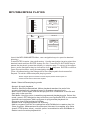
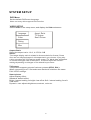
Select Video in the setup menu, and display the Video submenu:
Language
Video
Aspect Ratio
TV System
Smart Picture
Rating
Misc
Aspect Ratio
Select the aspect ratio.: 16:9 , 4:3 PS, 4:3LB
Notes:
The image display ratio is related to the recorded disc format. Some
disc can not display images in the aspect ratio you choose. If you play
a disc recorded in 4:3 format on a wide screen TV, black bars will appear
on the left and right side of the screen. You must adjust the screen
setting depending on the type of the television you have.
TV System
This product supports output of various systems (NTSC, PAL).
When connecting to a TV set make sure that both units have the same
PAL / NTSC settings.
Smart picture
Adjust display effect:
Standard: default effect.
Bright: internal setting for bright view effect. Soft: internal setting for soft
view effect.
Dynamic: user adjusts brightness, contrast, color etc.
10