1
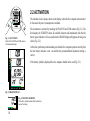
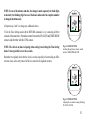
4. Connect the TIME/MODE and COM contacts to confirm this new personal/altitude
adjustment mode (Fig. 4.10). The blinking will stop and the other mode indicators will
disappear.
A
S
C
R
A
T
E
m
TIME
MODE
A2
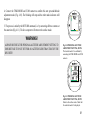
5. The process is ended by the RETURN command, i.e. by connecting all three contacts at
the same time (Fig. 4.11). The dive computer will return to the surface mode.
PLAN
ON
COM
LOG
HIS
ALT
SET
PLAN
WARNING!
ALWAYS RECHECK THE PERSONAL/ALTITUDE ADJUSTMENT SETTING TO
ENSURE THAT IT IS NOT SET FOR AN ALTITUDE LESS THAN THAT OF THE
DIVE SITE!
Fig. 4.10 PERSONAL/ALTITUDE
ADJUSTMENT SETTING, STEP 4
The desired mode A2 is confirmed by
connecting the TIME/MODE and COM
contacts.
A
S
C
R
A
T
E
m
MAX
A2
SURF TIME
DIVE
TIME
C
COM
LOG
HIS
ALT
SET
TIME
MODE
PLAN
ON
PLAN
Fig. 4.11 PERSONAL/ALTITUDE
ADJUSTMENT SETTING, STEP 5
Return to the surface mode. Check that
the selected mode A2 is displayed.
49