1
www.iCleboUSA.com
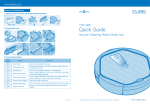
Product Care & Maintenance
1.Regularly empty the dust bin and replace the antibacterial filter
YCR-M05
Quick Guide
Vacuum Cleaning Robot iClebo Arte
2. Cleaning Main brush
Furrow
3. Check display & Solution
Check
display
Cause
Solution
C1
Lifted wheel
Move the robot cleaner to flat area.
C2
Cannot detect floor
Move the robot cleaner to flat area in case the wheel is stuck on
the threshold or porch.
C3
Dust bin error
Dust bin is not properly assembled. : Install properly.
C4
Wheel motor overload
C5
Brush motor overload
C6
Suction motor overload
Clean filter, empty the dust bin.
C7
Internal system error
Turn off the power switch of the robot cleaner then turn it on again.
C8
Magnetic Encoder
Check the front wheel & magnetic sensor are clean & correctly
inserted.
Check if foreign substance such as hair or lint exists on the wheel.
: Remove the foreign substance.
Check if foreign substance such as hair or lint exists on the main
brush or side-brush. : Remove the foreign substance.
※The complete user manual is also available to download on our website
www.iCleboUSA.com
www.iCleboUSA.com
3. Timer Cleaning Function (RANDOM or AUTO mode)
Installation of robot cleaner
※ Robot starts cleaning at the set time everyday, completes all the cleaning, and then returns to the charging station.
1. Preparation of the vacuum cleaning robot
Setting the timer (Remote control is required to set the time)
Classification
Remote
control
Entrance
prevention tape
Window
display
Set "hour"
Bottom
side
Set "minute"
※ Before setting the Timer Cleaning start time, make sure to set the robot's clock to the current time.
※ Check the set time: press time button once
Cancel the set time: press time button twice
2. Installation of the charging station and charging
Climbing Function
※ "Climb" is set to "on" by default but can be deselected on the Remote Control in "Auto" or "Random" modes & also within
"Max" or "Spot" cleaning. When "Climb" is set the robotic vacuum cleaner can cross obstacles up to a height of about
0.79 in. Sometimes the shape or surface of an obstacle may prevent the robot from climbing over it even when it is less
than 0.79 in in height.
※ Deselect "Climb" when circumstances require cleaning without climbing over obstacles of 0.2 in or higher that need to be
avoided (shag type rug for example) The robot will always climb up to 0.2 in in height.
※ Note: the following modes/functions can only be set using the Remote Control.
Set the Cleaning
mode
mode
Usage of robot cleaner
1. Operation and timer settings for the vacuum cleaning robot
Classification
Start
Cleaning mode
Remote
control &
cleaning
robot
Explanation
Cleaning
mode
Auto is the default cleaning
mode and the robot uses
‘Smart Navigation’to
move in a systematic
cleaning pattern to cover
the entire cleaning area.
Randomly cleans during the set time ( 60 min. by
default) In Random mode the cleaner often covers
an area one or more times thereby increasing the
thoroughness of cleaning. After selecting Random
mode use the +/- and Set buttons on the Remote
Control to enter the required duration of cleaning.
Zigzag part cleaning
within 3.3 ft diameter
In "Max" Cleaning mode Iclebo Arte first operates
as if in "Auto" mode where the robot uses its camera
navigation to systematically clean the entire
accessible area. After that the robot enters
"Random" mode and continues cleaning as if to
make doubly sure you will be happy with its work!
Remote
control
Only with
remote
control
Robot
cleaner
Explanation
2. Setting the clock
Classification
Time setting (Remote control is required to set the time)
Remote
control
Window
display
Set "hour"
① Press the remote control "Clock" button to set the current time.
② Use the +/- buttons to set the Hour,then press "Enter".
③ Use the +/- buttons to set the Minutes, then press "Enter".
④ Clock is now set.
⑤ Press the set button when correct time is displayed.
Set "minute"
Status
Explanation
The cleaning mode is automatically
switched to Mopping mode once
the mop plate is mounted on the
bottom. It is recommended that "Climb"
be deselected when in Mopping mode.
Status
Explanation
By using the "Climb" function the robotic vacuum
cleaner's climbing ability will be increased from 5mm
to cross obstacles up to a height of about 18mm.
Sometimes the shape or surface of an obstacle may
prevent the robot from climbing over it even when the
obstacle is less than 18mm in height
※ If you wish to clean without climbing over obstacles of 0.2 in or higher because of the indoor environment(carpet, rug, or
doorsill) set CLIMB button not to climb over obstacles over 0.2 in before usage.