1
PROGRAMMING
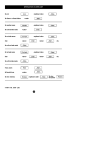
Programming TIMERS
[Master Code]
Press...
Enters Program Mode. The PROGRAM light will be on.
[Option No.]*
Press...
The existing time will be displayed.
Press... [NEW TIME]
u
The new time will be displayed.
om
.a
Press...
ur
ity
.c
To exit Program Mode
se
c
EXAMPLES The panel must be in program mode. (Program light ON).
di
go
• To program the Entry Delay Time to be 15 seconds: P26E 15 E
.b
en
• To program the Exit Delay Time to be 40 seconds: P28E 40 E
oa
d
by
w
w
w
* For a list of programming option numbers, see the Programming Options Table on page 19.
rD
ow
nl
Programming the FOLLOW ME TELEPHONE NUMBER
[Master Code]
ed
fo
Press...
ov
id
Enters Program Mode. The PROGRAM light will be on.
Pr
Press...
0
0
The existing telephone number (if any) will be displayed.
Press... [NEW TELEPHONE NUMBER]
The new telephone number will be displayed.
Press...
To exit Program Mode
EXAMPLES The panel must be in program mode. (Program light ON).
• To program the Follow Me Telephone Number to be 9123 1234: P00E 91231234 E
• To delete the Follow Me Telephone Number: P00E MEMORY E
NESS D16 (V4.5) CONTROL PANEL - USER MANUAL
21