1
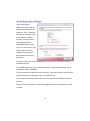
Image Images can be added to the design panel by either dragging an image from the Clipart window into the Design Panel, or clicking “Image” on the far left of any of the Text, Image, Merge Text or Object toolbars. Clicking image brings up the import image window. This will convert your picture into black and white for use with the software. The original is displayed on the left, the Import Preview displays what the image will look like once imported. Adjust the three sliders to pro- duce the best black and white image. Invert the image by selecting the Invert Image box . For images that you will use more than once, “import” the image into the MyClipart folder instead, this will save the image for future projects. Imported images should be at least 300 dpi to achieve best quality results. Most image types are supported with the exception of vector files (Corel Draw and Adobe Illustrator). 21