1
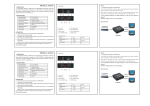
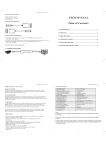
HDXT-E60 User Manual Table of Contents 1.0 Introduction……………………………………………………..1 2.0 Specifications……………………………….…………….……2 3.0 Package Contents………………………………………….…..3 4.0 Panel Descriptions…………………………………….…….…3 5.0 Connection and operation...................................................4 6.0 Troubleshooting……………………………………….…….…5 HDMI SUPER EXTENDER BY CAT-5e/6 HDMI EXTENDER (By CAT-5e/6 cable) Dear customer Thank you for purchasing this product. For optimum performance and safety, please read these instructions carefully before connecting, operating or adjusting this product. Please keep this manual for future reference. 1.0 INTRODUCTION This kind of HDMI Extender by CAT-5e/6 uses two pieces of CAT-5e/6 cables to extend the HDTV display up to 60 meters for 1080p. It not only breaks the limitation of the HDMI cable transmission length,but also CAT-5e/6 has more flexibility and convenience in cable construction. It is equipped with HDMI (high definition multimedia interface) connectors and is capable of supporting DVI (digital visual interface) equipment when used with an HDMI to DVI Adapter, providing greater flexibility and options when integrating several home theater components. This product offers solutions for residential consumers: HDTV retail and show site, HDTV, STUB, DVD and Projector factories, noise, space and security concerns, data center control, information distribution, conference room presentation, school and corporate training environments. 1.1 BENEFITS 1) The length of HDMI cable is fixed and unchangeable after it is produced. Because the HDMI connector can only be soldered or terminated by the professional workers in factory, the users can not reduce or increase by themselves. However CAT-5e/6 cables are available everywhere and be processed easily by the user or installer. 2) Because the header of the long HDMI cable is big, using it must in hidden method. What's more, it is not easy to bend the HDMI cable and to pull it through the in-wall tube or tray. However, CAT-5e/6 cable has no such problems. 3) Using this product, the transmission distance can be up to 60 meters for 1080p using CAT-6 cable. For the general HDMI cables, they must be customized when the length is over 10 meters. 1.2 FEATURES This HDMI Extender has many features that enable it to perform in a superior manner. Among those features you will find: One pair as a full functional module, no need of setting. CAT-5e/6 cable can substitute HDMI cable to achieve long distance 1 HDMI SUPER EXTENDER BY CAT-5e/6 transmission. Follow the standard of IEEE-568B. Transmission distance can be up to 60 meters for 1080p using CAT-6 Cable. Auto-adjustment of feedback, equalization and amplify, the user does not need to care about the length of the cable. Compact size. Support HDMI1.2a. Support highest video resolution 1080p. Support 165MHz/1.65Gbps per channel(4.95Gbps all channel) bandwidth. Support 8bit per channel (24bit all channel) deep color. Support HDCP Support uncompressed audio such as LPCM Support compressed audio such as DTS Digital, Dolby Digital(including DTS-HD and Dolby True HD) 2.0 SPECIFICATIONS Signal Inputs/Output Input Video Signal Maximum Single Link Range Output Video HDMI Input/Output Connector Operating Frequency Vertical Frequency Range Video Amplifier Bandwidth Resolutions(HDTV) Interlaced(50&60Hz) Progressive(50&60Hz) Mechanical Size(H-W-D) Weight(Net) Warranty Limited Warranty Environmental Operating Temperature Operating Humidity Storage Temperature Storage Humidity Power Requirement External Power Supply Power consumption (Max) Regulatory Approvals Converter Unit Power Supply Accessories Adapter AC Power Adapter User Manual 5 Volts p-p (TTL) 1920x1080P HDMI1.2a+HDCP1.0/1.1 Type A 19 pin 50/60Hz 1.65Gbps/165MHz 480i,576i,1080i 480p,576p,720p,1080p 45mmW x 25mmH x 81mmD 0.246KGs 1 Year Parts and Labor 0 ℃ to +70℃ 10% to 85 % RH (no condensation) -10℃ to +80℃ 5% to 90 % RH (no condensation) 5V DC@2A 5W FCC,CE,UL UL,CE,FCC US standard, UK standard and so on 2 HDMI SUPER EXTENDER BY CAT-5e/6 Note: In order to achieve the high transmission quality, please choose the shielded CAT-5e or CAT-6 cable. 2: The cables with lower quality will not achieve the perfect transmission effect and long distance. 3: Theoretically the function of the product is normal when adopt short distance transmission. If the product cannot transmit long distance, this is to say, there are quality problems in the transmission cables. 3.0 PACKAGE CONTENTS Before attempting to use this unit, please check the packaging and make sure the following items are contained in the shipping carton: 1) 2) 3) 4) Main unit NO. 1 Sender Main unit NO. 2 Receiver 5V DC Power Supply. User’s Manual 4.0 PANEL DESCRIPTIONS Sender Receiver 3 HDMI SUPER EXTENDER BY CAT-5e/6 1) 2) 3) 4) 5) 6) 7) HDMI input CAT-5e output. CAT-5e output. HDMI output CAT-5e Input1 CAT-5e Input2 Power Input 5.0 Connection and Operation 1) Connect the HDMI input sources such as:HD-DVD、PS3、STB etc. 2) Connect two CAT-5e/6 cables to both the output of the transmitter and input of the receiver. 3) Connect the HDMI output( such as : HD-LCD、HD-DLP)into the receiver. 4) Plug the power into the receiver. Attention: Insert / Extract cable gently. 4 HDMI SUPER EXTENDER BY CAT-5e/6 5.1 CONNECTION DIAGRAM Display Such LCD TV HDMI signal source such as STB as DC 5V CAT-5e/6 cable Sender Receiver CAT-5e/6 cable 6.0 TROUBLESHOOTING If the product doesn’t appear to be functioning, make certain that there are four points you should pay attention. First, check the connection between the HDMI cable and the extender correctly. They all should be connected with a length 6 feet or less. (In other words, make certain that the problem is not caused by long cables). Second, measure the cable length you are attempting to use between the sender and the receiver. They all should connect correctly by Cat-6 cable for 1080p. Then, they can reach the length of 60M. If the signal is present under those conditions, make certain that the power is present to the product. If it is, all cables should be premium quality. Lastly, inspect the cables and connectors for damage. 5