1
3
<<Contents>> <<Index>>
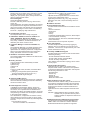
l FieldMate Validator (/VT option)
This is an option for the N-IO nodes of Yokogawa
CENTUM VP/ProSafe-RS.
Validation of connection between N-IO node and the
field devices is possible by the FieldMate Validator
without FCS (Field Control Station)/SCS (Safety Control Station). The N-IO node configuration and input/
output validation are also possible without FCS/SCS.
This option enables FieldMate to communicate with
field devices via N-IO node. (The Device Replacement Tool cannot be used via N-IO node.)
* FieldMate Validator can be used only while the communication between FCS/SCS and the N-IO node is not established.
* The I/O configuration data can be exported/imported between FieldMate Validator and CENTUM VP/ProSafe-RS.
For that, Microsoft Excel (Excel 2010 32bit/64bit SP2 or later)
is required to be installed in the FieldMate Validator PC. And
the following software is required to be installed in CENTUM
VP/ProSafe-RS system.
CENTUM VP:
- VP6E5000 Engineering Server Function
- VP6E5100 Standard Engineering Function
- VP6E5210 Module-based Engineering Package
ProSafe-RS:
- RS4E5000 Engineering Server Function
- RS4E5100 Safety System Engineering and Maintenance Function
- RS4E5210 I/O List Engineering Package
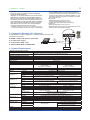
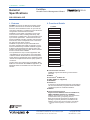
3. Connection Example (for reference)
Sample BRAIN or HART configuration, connecting a pressure transmitter.
[Required Components]
l
l
l
l
BRAIN or HART EJA Pressure Transmitter.
24 V DC Power supply
Load Resistor (250Ω ±10%)
USB FieldMate Modem: BRAIN/HART
PC/FieldMate
OS Language
Hardware Operating Environment
PC
CPU
Main Memory
Hard Disk Drive
DVD-ROM Drive
Display
Network port
BRAIN
HART
FOUNDATION
fieldbus H1 *1
Interface
Modem
Interface
Interface board
Driver
FOUNDATION
fieldbus H1 *1
Interface
Interface board
Driver
FOUNDATION
fieldbus H1 *1
Interface
Interface hardware
Driver
Interface
Interface card
COMM DTM &
driver
DP/PA coupler
PROFIBUS
HART
ISA100.11a *4
ISA100.11a *6
Modbus Serial
Login
Account
Interface
Modem
Interface
Modem
Driver
Interface
Interface
Modem
Driver
+
CHECK
EJA
Load
Resistor
USB
+
-
24VDC Power Unit
4. System Requirements
Software Operating Environment
OS
+
SUPPLY
USB
FieldMate
MODEM
F002.ai
Windows 8.1 / 8.1 Pro 32bit/64bit Update or later
Windows 7 Professional, Home Premium 32bit/64bit SP1 or later *7
English, Japanese, Chinese(simplified), German, French, Russian *8
Windows 8.1
Windows 7
IBM PC/AT Compatible
Intel ® Core™ i5-2520M or similar specification CPU
2GB or more
8GB or more
Windows 8.1 compatible
Windows 7 compatible
1024×768 or better resolution
1024×768 or better resolution
recommended
recommended
Windows 8.1 compatible
Windows 7 compatible
Windows 8.1
Windows 7
One USB port USB2.0 standard
USB FieldMate Modem: BRAIN/HART(Yokogawa Option)
One PCMCIA card slot
PCMCIA-FBUS Series 2 (National Instruments)
NI-FBUS Communications Manager
NI-FBUS Communications Manager
5.0 or later
4.1.1 or later
One USB port USB2.0 standard
NI USB 8486 (National Instruments)
NI-FBUS Communications Manager
NI-FBUS Communications Manager
5.0 or later
4.1.1 or later
One USB port USB2.0 standard
FFusb (Softing)
V1.10.04.00 or later *2
V1.00.1.17 or later *2
One USB port USB2.0 standard
PROFIusb (Softing)
PROFIdtm V2.11 or later
PROFIdtm V2.11 or later
Driver V5.46 or later
Driver V5.45 or later
KFD2-BR-A.PA.93 (PEPPERL+FUCHS)
6ES7 157-0AC80-0XA (SIEMENS)
Bluetooth 2.0
VIATOR ® Bluetooth ®Interface: Model 010041(MACTek ®) *3
One USB port USB2.0 standard
Infrared Adapter :ACT-IR224UN-LN96-LE 9600bps (ACTiSYS) *5
Version 1.7.0 or later
Version 1.5.0 for Win 8 Only
One Ethernet port
One USB port USB2.0 standard
Isolated RS422/485 USB adaptor
Not supported
SP390A-R2 (BLACK BOX)
Version 2.0.0 or later
All Rights Reserved. Copyright © 2006, Yokogawa Electric Corporation
Administrator privilege
GS 01R01A01-01E Dec. 4, 2015-00