1
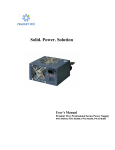
Solid. Power. Solution.
User’s Manual Prudent Way Professional
Series Power Supply PWI-PR550V2, PWI-PR450V2,
PWI-PR350V2
Prudent Way Professional Series Power Supply User’s Manual
ATX 12V version 2.3
Models: PWI-PR550V2 (2.3v), PWI-PR450 V2 (2.3v), PWI-PR350 V2 (2.3v),
Table of Contents
1. Introduction ……….……………………………..2
2. Safety & Warning ………………………………..2
3. Installation……….………………………………..2
4. Product Specification………....…………….…….4
5. Simple Trouble Shooting…………………………5
1
Prudent Way Professional Series Power Supply User’s Manual
ATX 12V version 2.3
Models: PWI-PR550V2 (2.3v), PWI-PR450 V2 (2.3v), PWI-PR350 V2 (2.3v),
Thank you for choosing Prudent Way Professional Series Power Supply. Please take the time to read the
following instructions before installing the power supply. Please note that failure to follow the proper
procedures may cause severe harm to your body and PC components.
We sincerely hope that you find this quality power supply provides you with many years of good service.
1. Introduction
The Prudent Way Professional Series power supply provides solid power solution for any professional use.
It’s highly efficient with the latest smart fan technology to save energy and reduce noise for the computer
system. The stylish 12/14cm black fans are designed to provide extra air flow to the PC. The smart cable
management feature reduces clutter in the PC and further reduces the heat generated. Professional Series power
supply adapts RoHS compliant materials so it’s more environmentally friendly. The excellent quality of
Professional Series power supply is backed up by a 3 year warranty to display the enduring value, all at a
friendly price.
2. Safety & Warning
Please read the following information carefully before using the power supply.
DO NOT take apart, add to, or remove any components from the power supply. There are
HAZARDOUS VOLTAGES inside the power supply. Warranty will be voided by doing so.
DO NOT expose the power supply or computer to water or moist, dusty or extreme temperature
environments.
DO NOT use wet hands to plug or unplug the power cord.
DO grab the plug instead of cord when you remove the power cord from the wall outlet.
DO switch off and unplug any power sources before attempting any cleaning to avoid electrical
shock. Use a dry cloth only.
3. Installation
Step 1.
Step 2.
Step 3.
Step 4.
Read the Safety and Warning information above.
Disconnect the power cord from the old power supply.
Open your computer case by following your computer case manual.
Disconnect all of the power connectors from the motherboard and peripheral devices such as
hard drive, optical drives, floppy drives, case fans, etc.
Step 5. Make sure the AC voltage switch is set to the right voltage. Failure to do so may damage
power supply. United States voltage is 115V.
Step 6. Remove the existing power supply from your computer case and replace it with your new
Professional Series power supply.
Step 7. Assemble the power supply and screw it in your PC’s correct power supply position.
Step 8. Connect the 24-pin main power connector (Table 1). If your motherboard uses a 20-pin
connector, detach the 4-pin attachment on the 24-pin power connector.
Step 9. Connect all other connectors to drives and peripheral correctly (Table 1).
Step 10. Make sure all connectors are connected correctly.
Step 11. Screw and close the side panel of your PC case.
Step 12. Plug in the power cord to the power supply. Switch the on/off (I/O) button to “I”. The
system is now ready to go.
2
Prudent Way Professional Series Power Supply User’s Manual
ATX 12V version 2.3
Models: PWI-PR550V2 (2.3v), PWI-PR450 V2 (2.3v), PWI-PR350 V2 (2.3v),
Connectors
Connector
Number of Pins
Qty
Function
Main Power Connector
Image
20+4
1
Provide CPU, motherboard,
memory, PCI, AGP, USB
hub with power.
ATX 12V 8 Pin Power
Connector
8
PWI-PR550: 1 PWI-PR450:
0 PWI-PR350: 0
For processor
ATX 12V 4 Pin Power
Connector
4
PWI-PR550: 1 PWI-PR450:
1 PWI-PR350: 1
For processor
Peripheral Power Connector
4
PWI-PR550: 2 PWI-PR450:
2 PWI-PR350: 2
For, hard drive, IDE type
optical drive and other
peripherals
PCI Express Connector
6
PWI-PR550: 2 PWI-PR450:
1 PWI-PR350: 1
For PCI Express Card
PCI Express Connector
6+2
PWI-PR550: 1 PWI-PR450:
0 PWI-PR350: 0
For PCI Express Card
SATA Connector
5
PWI-PR550: 8 PWI-PR450:
6 PWI-PR350: 4
For serial ATA type HDD
and other peripherals
Floppy Drive Connector
4
1
For floppy drive
3
Prudent Way Professional Series Power Supply User’s Manual
ATX 12V version 2.3
Models: PWI-PR550V2 (2.3v), PWI-PR450 V2 (2.3v), PWI-PR350 V2 (2.3v),
4. Product Specification
Features
PWI-PR550V2
Type
ATX12V V. 2.3 (dual 12V)
PWI-PR450V2
PWI-PR350V2
Switches
ATX Logic On/Off Additional Power Rocker Switch (115/230V selector switch)
Maximum Power
550 W
Transient Response
+5V,+12V and 3.3V outputs return to within 5% in less than 1ms for 25% load change
Power Good Signal
100 - 500 ms
Over Voltage Protection Recycle AC to
reset
+12V1/+12V2=13.4V-15.6V, +5V=5.7V-7.0V,+3.3V=3.7V-4.3V
Special Connectors
1 Main Connector (20+4 pin)
450W
350W
1 12V (P4)
2 Peripheral
2 Peripheral
2 Peripheral
8 SATA
6 SATA
4 SATA
1 Floppy
1 Floppy
1 Floppy
1 PCI-E (6+2) 12V + 2 PCI-E 12V
1 PCI-E 12V
1 PCI-E 12V
1 12V (P8)
N/A
N/A
Dual +12V
Yes
N/A
N/A
SLi Support
Yes
N/A
N/A
Fans
14cm black fan w/ speed and temperature control
Cables
Black Sleeved Cables
Only 24Pin w/ Black Sleeve
12cm black fan w/ speed and temperature control
Unit Size
149(W) x163(D) x85 (H) mm
149(W) x149(D) x85 (H) mm
Net Weight
1.91KG
1.34Kg
DIMENSIONS
1.27kg
OUTPUT (550W)
Output Voltage
+3.3V
+5V
+12V1
+12V2
-12V
Max. Load
24A
17A
21A
20A
0.3A
2.5A
Min. Load
0.5A
0.3A
0.5A
0.5A
0A
0.1A
Regulation
+-5%
+-5%
+-5%
+-5%
+-10%
+-5%
Ripple & Noise (mV)
80mV
80mV
150mV
150mV
150mV
80mV
252W
240W
Available Power
130W
_
535W
Total Power
550W continuous maximum at full load
3.6W
+5VSB
12.5W
OUTPUT (450W)
Output Voltage
+3.3V
+5V
+12V1
+12V2
-12V
Max. Load
24A
15A
17A
16A
0.3A
2.5A
Min. Load
0.5A
0.3A
0.5A
0.5A
0A
0.1A
Regulation
+-5%
+-5%
+-5%
+-5%
+-10%
+-5%
Ripple & Noise (mV)
50mV
80mV
120mV
120mV
120mV
50mV
204W
192W
3.6W
Available Power
Total Power
120W
+5VSB
12.5W
435W
450W continuous maximum at full load
OUTPUT (350W)
Output Voltage
+3.3V
+5V
+12V1
+12V2
-12V
+5VSB
Max. Load
21A
15A
11A
14A
0.3A
2.1A
Min. Load
0.5A
0.3A
0.5A
0.5A
0A
0.1A
Regulation
+-5%
+-5%
+-5%
+-5%
+-10%
+-5%
Ripple & Noise (mV)
50mV
80mV
120mV
120mV
120mV
50mV
Available Power
103W
132W
168W
_
335W
Total Power
350W continuous maximum at full load
3.6W
10.5W
INPUT
Input Voltage
115/230V
Input Frequency Range
60/50 Hz
Input Current
10A RMS MAX. FOR 115VAC
Efficiency
> 75%
8A RMS MAX. FOR 115VAC
4
6A RMS MAX. FOR 115VAC
Prudent Way Professional Series Power Supply User’s Manual
ATX 12V version 2.3
Models: PWI-PR550V2 (2.3v), PWI-PR450 V2 (2.3v), PWI-PR350 V2 (2.3v),
EMI/RFI
FCC Class B
ENVIRONMENTAL
Operating Temp.
0 to 40oC
Operating Alt.
10,000ft
MTBF
> 100,000 Hours
Safety Approval
UL/CUL #E340111, FCC , CE, CB,
RoHS Compliant
Yes
PFC
n/a
5. Simple Trouble Shooting
Condition: No Power
1. Check that the power cord is plugged into an electrical outlet and the power switch is at “I” position.
2. Make sure the power connectors are properly and securely attached to all the drives and peripheral
devices.
3. If the power supply is installed into a PC case, make sure the connection of the front panel power
switch to the motherboard is correct.
4. Turn the power off, wait for a few minutes and turn it back on.
5. If the power supply still has no power, remove all connectors to devices and test the power supply by
using a tester. This test is to help rule out any hardware problems. If the fan spins, the power supply
is likely to be in good working condition. Please check if the power supply is compatible with other
hardware in your PC.
6. If the power supply still does not power up after following the above instructions, please send the
unit back to your dealer or retailer for service.
For feedback about this product, please contact
Prudent Way Inc Toll Free: (866)384-3873
Email: [email protected]
For support or general inquiry, please contact
Prudent Way Inc Toll Free: (866)384-3873
Email: [email protected]
Prudent Way Inc
www.prudentway.com
(866)384-3873
5