1
Options
Option buttons
Rinse Hold
● This option holds clothes in the final rinse water, keeping them fresh
until you are ready to complete the programme
To use this option press the ‘Rinse Hold’ button once,
illuminates in the
display window above the ‘Rinse Hold’ option button. Complete the final spin
by pressing the ‘Rinse Hold’ button again when the symbol is flashing. This
option is not available with Wool, Handwash and the Spin only
programmes.
PROGRAMMES
AND OPTIONS
Time Saver
● This option can be used to reduce the time of a wash programme.
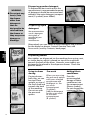
To use this option press the ‘Time Saver / F.Fwd’ option button once before
the wash programme is started, the chevron progress lights
will
illuminate.
This option is not available with Fast Wash and Rinse and Spin
programmes.
Fast Forward
● This option allows you to skip one stage in the wash programme which
is currently running.
To use this option, select your wash programme and press ‘Start’ to begin the
programme. Wait for the status light for the stage you want to skip in the
programme to illuminate and then press the ‘Time Saver / F.Fwd’ option
button. The machine will bleep and the chevron progress light above the
‘Time Saver / F.Fwd’ button will be flashing. The chevrons will stop flashing
when the machine has moved to the next stage. When the chevrons have
stopped flashing you can press the ‘Time Saver / F.Fwd’ button again to skip
to the next stage and so on or you can allow the programme to continue to
the end as normal.
Note: While the chevrons are flashing you can cancel this feature and return
to the normal wash cycle, by pressing the ‘Time Saver / F.Fwd’ option button
again.
This option is available with all programmes.
Automatic Features
Auto half load
Auto half load saves you time and money when washing smaller loads. Water levels are automatically adjusted
to cater for the different loads.
Unbalanced load warning
Your machine has an inbuilt feature to prevent it spinning with an unbalanced load. This will minimise
excessive vibration and prolong the life of the machine.
Before each spin the machine ‘senses’ the load within the drum and if the machine considers the load to be
unbalanced, it will not automatically spin. Instead the machine will try to redistribute the load to achieve
balance by tumbling backwards and forwards. If it is unable to balance the load after the fifth attempt the
machine will abort the spin process. As an indicator to you that this has happened the ‘Spin’ progress status
light will flash, to advise that no spin has been performed.
If this safety feature is encountered you can spin the load, after first opening the door, redistributing the load
and reselecting a fast or slow spin programme. In the case of small loads or single items you may try adding
some extra items of a comparable size to help balance the load.
21