1
Smartphone User Manual 183
Troubleshooting
If you encounter a problem with your phone, please review
the list below to try and find your problem. If still having problems, please contact Technical Support or your dealer.
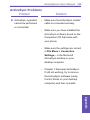
Problem
n My phone's screen is
blank.
Solution
•
•
Your phone is designed by default
to switch to a screen saver. To
turn it on, press any key.
Your battery may be run down.
Charge the battery immediately.
•
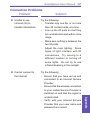
n My phone operation
has become very
slow.
You may have opened too many
programs. To release the operation
load, you can terminate unneeded
programs using the Task Manager
utility (see Chapter 9).
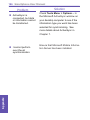
n A “battery low”
warning message
pops up on the
screen.
Plug the AC power into your phone to
charge it.
•
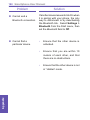
Check the Sounds settings by
selecting Settings > Sounds
from the Start menu.
Select Calendar from the Start
menu and then select Options
from the Calendar menu to see if
Set Reminders is activated.
Appendix
n My phone does not
make any sound
or vibrate when the
phone rings or alarms
occur.