1
TROUBLESHOOTING
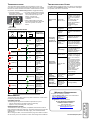
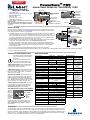
TROUBLESHOOTING CHART
The information below indicates various symptoms a user may
encounter in the event the PowerSure PST experiences a problem.
Use this information to determine whether external factors caused
the problem. See Troubleshooting Chart for suggested remedy.
If the UPS fails to operate properly, turn off the unit and repeat
the steps in the Installation section of this manual. If the problem persists, refer to the chart below:
1. The Fault indicator
2. An alarm sounds, alerting that the
illuminates, indicating the
UPS requires attention. The alarm
UPS detected a problem.
can be silenced except for low
battery, overload and
overtemperature warning
conditions.
Fault
Indicator
Utility/Battery
Indicator
3. Utility and/or Battery indicators
may be illuminated as a diagnostic
aid to the operator, as shown
below:
Problem
Cause
UPS will not
start
Site Wiring
Fault Indicator
GUIDE TO STATUS INDICATORS
Fault
(Red)
Site Wiring Utility/Battery
Fault (Amber)
(Green)
-
+
!
Diagnosis/
Audible Alarm
Normal Mode
—
—
ON
UPS is
operating in
Normal Mode;
no beep.
Battery Test
has been
initiated; no
beep.
—
—
Flashing
—
Flashing
ON
Flashing
—
ON
ON
—
ON
Flashing
—
—
ON
Site Wiring
Fault; no beep.
The unit is
overloaded;
beep every
half-second
The UPS has
failed;
continuous
beep
Unit has shut
down due to
overload;
continuous
beep
UPS starts
on battery,
but will not
switch to AC
Overload/
Short circuit
UPS not
plugged in
Plug in power cord
securely.
Circuit
protector
tripped
Reset the circuit
protector and restart the
UPS.
Power not
available at
utility
receptacle
Have the utility
receptacle checked by a
qualified electrician.
Input voltage
below
threshold
Wait until the voltage
rises to an appropriate
level or have the utility
receptacle checked by a
qualified electrician.
AC
overvoltage
Wait until voltage lowers
to an appropriate level
or have the utility
receptacle checked by a
qualified electrician.
Overload/
Short circuit
UPS shuts
down, Fault
Indicator lit
Internal UPS
fault
The UPS shut
down due to
failure;
continuous
beep
—
—
—
—
The UPS is
operating in
Flashing Battery mode;
beep every 5
seconds.
—
—
UPS battery is
Flashing low; beep every
half-second
Flashing
—
ON
—
Battery Mode
The unit is
Flashing overloaded;
beep every
half-second
The UPS has
Flashing failed;
continuous
beep
MAINTENANCE
The PowerSure PST UPS requires very little maintenance. Follow these
practices to prevent problems.
MAINTAINING BATTERIES
The batteries are valve-regulated, nonspillable, lead acid and must be
kept charged to retain their design life. The UPS continuously charges the
batteries when connected to the utility supply, even while the UPS is
switched off.
When storing the UPS, it is recommended to plug in the UPS for at least
24 hours every four to six months to ensure full recharge of the batteries.
UPS not
providing
expected
backup time
Check the circuit
protector on the rear of
the UPS. If it is tripped,
reset it and restart the
UPS.
If the problem persists,
disconnect some of the
equipment from your
UPS—the total wattage
of your equipment must
not exceed the capacity
of the UPS. For further
help, call your local
dealer, Liebert
representative or the
Liebert Worldwide
Support Group.
Line-neutral
reversal/Poor
ground
connection
Have the utility checked
by a qualified
electrician.
Overload
Reduce load.
Battery not
charged due
to a recent
outage
Recharge battery.
WARRANTY REGISTRATION
To register for warranty protection:
• Visit the Quick Links section of our Web site at:
http://www.liebert.com
• Click on Product Warranty
Registration and fill in the form.
IF YOU HAVE ANY QUESTIONS,
PLEASE CONTACT US AT:
US: 800-222-5877
Outside the US: 614-841-6755
[email protected]
SL-23275QS (9/03) Rev. 0
DISCONTINUED
PRODUCT
CLEANING THE UPS
The following will help ensure trouble-free operation for years:
• Vacuum dust from the ventilation intake occasionally.
• Wipe the cover periodically with a dry cloth.
Site Wiring
Fault
Indicator
illuminated
Solution
Check the circuit
protector on the side of
the UPS. If it is tripped,
reset it and restart the
UPS.
For further help, call
your local dealer,
Liebert representative
or the Liebert
Worldwide Support
Group.