1
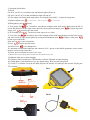
2, Operation Specification
1) On/off
On: Press “on/off” for 2 seconds to start and indicator light will turn on;
Off: press “on/off” for 2 seconds and indicator light will trun off.
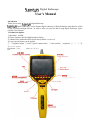
2) Focus adjust: lens aiming at the target object, revolving the focus knob⑤ to make the image clear
3)Lightness adjust: press
to decrease; while press
to increase
4)Taking photos: press
shortly
for 2 seconds to enter photos catalogue while small image displayed on the left of
5) View photos: Press
screen and photos list on the right; choose photo by moving direction button; press
to display big sized
image; press
to back to previous menu.
6) AV recording: press
1 second to record, repress to save video.
7) View video: press
2 seconds to enter video catalogue while small image displayed on the left of screen
to display video; press
and video list on the right; choose photo by moving direction button; press
to back to previous menu.
8)Set: press
to enter set up menu
9) Press
to back to previous menu.
10) Delete: Press
to see dialogue box
11) document read: Start the endoscope and connect it to PC, operate on the mobile equipment; or take out the
memory card to read by card reader
12) Reset: press reset button to reset if system halted
13) Memory card: insert by aiming at the card slot; take out by press memory card;
14) Indicator light: turn on when charging
15) Charging: connect endoscope to USB interface, indicator light truns on when charging
16) Change battery: push the battery cover out, change battery, then cover the battery back.
17) Conect TV or monitor: insert the AV audio plug into AV interface of endoscope, then connect AV plug into
TV or monitor
N014
N014J