1
Headset/ Dataport Operation
470 E.book Page 18 Wednesday, May 14, 2003 4:12 PM
Headset/ Dataport
Operation
Using a Headset with your
Telephone
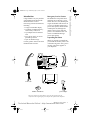
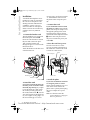
The Model 470 is equipped to
accept headsets with a standard
2.5mm jack . These can be plugged
into the headset jack located on the
left hand side of the telephone.
Contact your telephone equipment
retailer or distributor to purchase a
headset. Customers should read
and observe all safety
recommendations contained in
headset operating guides when
using any headset.
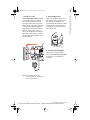
Using the Dataport
Located on the right hand side of
the Model 470, the dataport can be
used to connect another device such
as a fax machine or computer
modem to the phone. Plug one end
of a line cord to the phone and the
other end to the device to be
connected.
Note: The dataport will only operate when the handset is on
hook (in the phone base cradle).
Making and Receiving Calls
using a Headset
1.
2.
3.
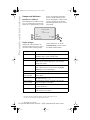
Ensure that you have selected a
headset audio mode by accessing the Options menu. See the
section "Customizing your
phone" for detailed information.
Press the d/f key to obtain
dialtone or answer an incoming
call. Depending on the audio
mode selected from the
Options menu, dialtone or an
incoming call will be received
on either the headset or the
handsfree speakerphone.
Press the k key to end
the call.
18 Model 470 User Guide
Technical Manuals Online! - http://www.tech-man.com