1
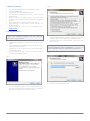
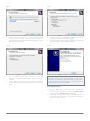
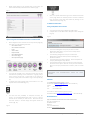
1. Minimum requirements Fig. 2b An Intel Compatible PC Pentium™ III 500 MHz or higher At least 256 MB of RAM A Hard disk with at least 100 MB of free space Win 2000 (with Service Pack 4 or later), or Win XP (with Service Pack 2) Microsoft Outlook or Outlook Express or another email application that is MAPI compliant installed and configured properly A min. 1024x768 video board and compatible monitor Recommended: An Intel Pentium III PC with Win XP Professional SP2 Latest version of Java (can be downloaded from www.java.com) 2. Installing the database IMPORTANT: YOU MUST HAVE THE APPROPRIATE RIGHTS TO INSTALL THIS DATABASE WHEREBY YOU WILL ALSO BE INSTALLING A NEW PROGRAM. Download the database from the egta link provided in your email. Once the database is completely downloaded, please extract the .zip file to you local drive. Double click on the setup icon file the setup should begin automatically (fig. 2a). On the setup wizard page, click on the “Next” button to continue the installation (fig. 2a). On the “Select Destination Location” page (fig. 2c), click on the “Next” button if you agree with the default location. Otherwise, select your own destination location and then click on “Next”. IMPORTANT: PLEASE NOTE THAT IF YOUR OPERATING SYSTEM IS WINDOWS VISTA OR WINDOWS 7, YOU NEED TO CHOOSE DIFFERENT OUTPUT FOLDER THAN ''Program Files''. Fig. 2c Fig. 2a Select a start menu folder (fig. 2d) The next page that appears is the license agreement (fig. 2b). Once you have read it carefully, click on “I accept the agreement”, and then click on the “Next” button. egta TV databases - user's guide | 2