1
HD-RH1 User Manual
Product Description
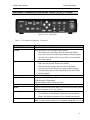
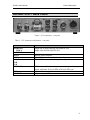
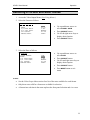
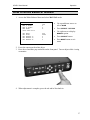
HD-RH1 Camera Controller Unit (CCU)- Front
Figure 2. CCU – front panel
Table 2. CCU buttons and functions – front panel
Button
On/Off switch
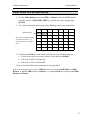
Format
Rate
File
Panel Lock
Bars
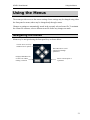
Menu
Arrow Keys
Select
Function
Powers camera on and off.
Press and hold to cycle through format options:
· The format does not change until you release the button.
· If you release on the current format setting, nothing changes.
· See Operations and/or Video Output Menu for more detail
on Format options.
Press and hold to cycle through rate options:
· Only rates for selected format are available.
· The rate does not change until you release the button.
· If you release on the current rate setting, nothing changes
· See Operations and/or Video Output Menu for more detail
on Rate options.
Press and hold to cycle through scene files and select one.
Press to disable the front panel buttons and knobs. Panel is locked if
LED indicator is illuminated.
Press and hold to un-lock the front panel.
Toggles the display of the color bar test pattern.
Press to access the on-screen Menu, or to exit out of a menu without
making a selection. (See Using Menus )
Press to navigate to a menu, menu option, or parameter.
· Up and down scrolls through vertical list of menu options.
· Right / left displays parameters for a selected menu option.
Press to select/enable a menu option.
Note: A menu selection replaces a front panel setting and vice-versa.
6