1
OCi OPERATING MANUAL
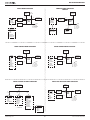
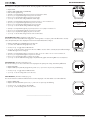
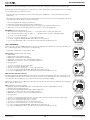
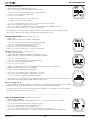
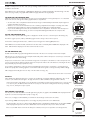
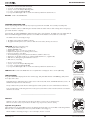
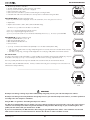
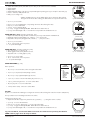
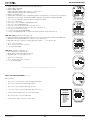
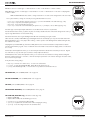
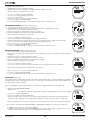
FREE & TECH FREE SURF MAIN, information includes (Fig. 114A/B/C):
> Surface Interval (min:sec up to 59:59, then hr:min) with SURF icon.
> Graphic FREE or TECH FREE.
> Graphic TIMERS - OFF, or Graphic RUN TMR with elapsed Run Time (up to 9:59 min:sec), or Graphic CDT with Countdown Time remaining (min:sec).
> Battery icon, if voltage is low.
> Graphic DIVE - with number of dives completed during that set of repetitive dives, up to 99 (0 if no dive made yet).
> TLBG with icon if any nitrogen remaining after NORM or FREE dives in past 24 hours. Blank if TECH FREE.
•
•
•
•
•
•
•
•
•
Fig. 114A - FREE SURF MAIN
(no dive yet, Timers OFF)
S (2 sec) - to access Compass (which can only be accessed from the Main).
A (< 2 sec) - to access ALT 1.
M (< 2 sec) - to access the FREE or TECH FREE Main Menu.
M (2 sec) - to access Watch Main Time.
S (< 2 sec) - to access start/stop the CDT, or Run Timer, if in use.
A (2 sec) - to reset the CDT to the value set, or Run Timer to 0:00, if in use.
A + S (2 sec) - to reset the Dive # to 0.
L (< 2 sec) - to toggle the Backlight On/Off.
L (2 sec), while the Backlight is On - to reset the timer and keep it On for the full duration time set.
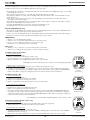
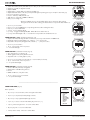
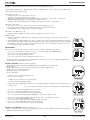
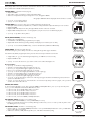
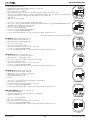
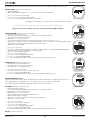
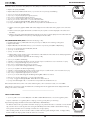
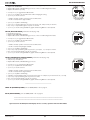
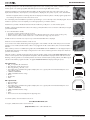
SURF ALT 1 (Last), information includes (Fig. 115):
> Graphic LAST DIVE, indicating that data is from the dive previously conducted while in FREE or TECH FREE mode.
> Max Depth with FT (or M) and MAX icons, 2 dashes ( - - ) if no previous dive.
> Elapsed Dive Time (up to 9:59 min:sec) with graphic EDT, 3 dashes ( - : - - ) if no previous dive.
Fig. 114B - FREE SURF MAIN
(post dive, Run Timer running)
• A (< 2 sec) - to access ALT 2.
• 10 sec - revert to Main, if A is not pressed.
• L - to operate the Backlight.
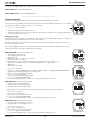
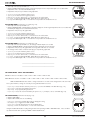
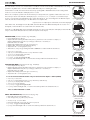
SURF ALT 2, information includes (Fig. 116):
> Time of Day (hr:min_sec) with A (or P).
> Altitude graphic, if EL2 (to EL7), blank if Sea level.
> Temperature with ° icon and graphic F (or C).
Fig. 114C - TECH FREE
SURF MAIN
(post dive, CDT running)
• A (< 2 sec) - to revert to Main.
• 10 sec - revert to Main, if A is not pressed.
• L - to operate the Backlight.
-----------------------------------------------------------------------------------------------------------------------------------------
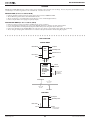
Fig. 115 - SURF ALT 1
(Last dive's data)
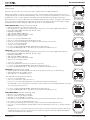
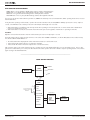
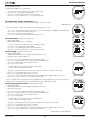
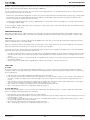
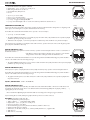
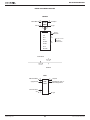
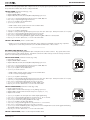
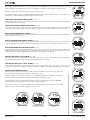
FREE & TECH FREE MAIN MENU (Fig. 117)
Button operations:
• M (< 2 sec) - to access the Menu, while viewing the Surface Main.
• A (< 2 sec) - to step down (forward) through selections.
Fig. 116 - SURF ALT 2
• M (< 2 sec) - to step up (backward) through selections.
• S (< 2 sec) - to access a selection indicated by the pointer icon ( > ).
FREE or
TECH FREE
MAIN MENU
• S (2 sec), while viewing the menu - to revert to Surface Main.
>
• M (2 sec) any time - to revert to Surface Main.
• 2 min (no button action) - will revert to Surface Main.
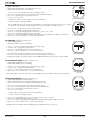
© 2002 Design, 2013
49
SEL TIMER
CDT SETUP
LOG/HIST
SET ALARMS
SET UTILITIES
OP MODE
HISTORY
OCi ID
Fig. 117 - MAIN MENU
(sample screen)
Doc. No. 12-5335-r02 (9/12/13)