1
9
Boiler controls
The boiler is provided with a fully automatic microprocessor control. This control simplifies operation by
undertaking all major control functions. Initially when
power to the unit is switched on it will remain on standby.
The control panel display will show the relevant state.
The various parameters can be called up in two ways:
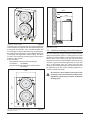
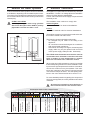
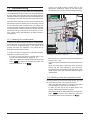
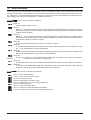
9.1 Explanation of the function keys
Key functions from the
indication are:
-
The
state.
during all
In this state the display will show
normal operating functions of the appliance. Should a
fault develop this will be shown on the display.
The technical read out.
Start from the
state by pressing the Step key for
5 seconds. Returning from this to the
display is
done in the same way. From the technical read out a more
extensive read out can be obtained e.g. the boiler flow
temperature and the water pressure in the central heating
system.
-
-
When the system has been filled and the automatic venting
program starts, when a program has been selected, the
program takes 15 minutes and stops automatically. After
this the unit will function normally.
On a call for heating or hot water the control system will
select the required water control temperature. This water
temperature is called the T-set value. On a call for central
heating the boiler ignites first at low input. The input is
then changed slowly to match the load required. The
boiler operates in this way to avoid excessive water
noises and temperature overshoot. On a call for hot water
supply the T-set value of central heating return water
temperature is monitored. Depending on the amount of
sanitary water which is withdrawn from the DHW cylinder,
the central heating return water temperature, from which
the input is adjusted, will vary.
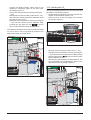
Central Heating program key, see chapter
10.1;
Hot Water program key, see chapter 10.2;
PC program key, adjusts the pump to continuous
water circulation in the central heating system, or
according to the pump overrun times on the relevant
programs;
Step key, after briefly pressing, the water pressure
can be retrieved and pages per chapter can be
retrieved. After pressing for 5 seconds it switches
from
indication to technical indication and the
other way round;
Mode key, after briefly pressing, a selection of the
data chapters can be retrieved. After pressing for 5
seconds it is possible to enter the code as described
in chapter 10.3;
Reset key, after briefly pressing, for:
unlocking errors;
ending the access code;
ending the automatic venting program, only when
the access code is entered and the reset key is
pressed briefly.
After pressing for 5 seconds an operating stop is
made, for example, for activating the automatic
venting program.
Other key functions from the other indications are:
-
-
Installation instructions S-HR series page 16
and the extensive
Central Heating key then has the + function;
Hot Water key then has the - function;
PC key then has the store function, which means
that by means of this key a modified setting is
confirmed;
Step key for scrolling in a data chapter.