1
Chapter 2 - Menu Screens
General User Program Interface
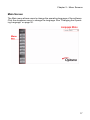
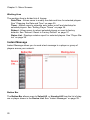
The program interface for InfoSAP Admin consists of a button bar along the left
side of the window and various tools and working areas depending on which
menu is active.
Menu Descriptions
Select Interface Language.
Update content to players or player groups.
Manage players and player groups.
Send instant messages to players or player groups.
Manage FTP servers.
View history and configuration information for players.
Assign players to different users and update login settings.
View version and build information.
Log out of the software without exiting.
Log out and exit the software.
16