1
System requirements
1.1
UM1680
IDEs supporting STM32 family
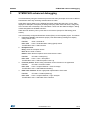
STMicroelectronics' STM32 family of 32-bit ARM Cortex-M core-based microcontrollers are
supported by a complete range of software tools, encompassing traditional IDEs with C/C++
compilers and debuggers from major 3rd-parties (free versions up to 64KB of code,
depending on partner), and completed with innovative tools from STMicroelectronics.
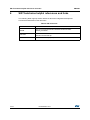
Table 1 regroups general information about some IDE versions that officially support the
STM32F429I product.
Table 1. Supported Toolchain versions
Toolchain
Company
Compiler
Version
Download link (*)
EWARM
www.iar.com/en/Products/IAR-Embedded-Workbench/ARM
– 30-day evaluation edition
6.60
IAR Systems® IAR C/C++
and later – KickStart edition(32 KB Limitation for Cortex M3/M4)
– KickStart edition(16 KB Limitation for Cortex M0)
MDK-ARM
Keil™
TrueSTUDIO © Atollic
ARMCC
www.keil.com/demo/eval/arm.htm
4.72
and later MDK-Lite (32 KB Code size limitation)
GNUC
www.atollic.com/index.php/request-eval-license(1)
4.1
– 32 KB Limitation (8 KB on Cortex-M0 and Cortex-M1)
and later
– 30 day Professional version (Trial)
1. Registration is required before download
1.2
ST-LINK/V2 installation and development
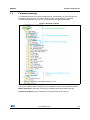
The STM32F429 Discovery board includes an ST-LINK/V2 embedded debug tool interface
which requires a dedicated USB driver. This driver is available on the www.st.com ST-LINK
V2 page and is supported by these common software toolchains, and others:
•
•
•
IAR™ Embedded Workbench for ARM (EWARM)
–
The toolchain is installed by default on the PC's local hard disk in the
C:\Program Files\IAR Systems\Embedded Workbench x.x directory.
–
After installing EWARM, install the ST-LINK/V2 driver by running
ST-Link_V2_USB.exe from [IAR_install_directory]\embedded Workbench x.x
\arm\drivers\ST-Link\ST-Link_V2_USBdriver.exe
RealView Microcontroller Development Kit (MDK-ARM) toolchain
–
The toolchain is installed by default on the PC's local hard disk in the
C:\Keil directory; the installer creates a start menu shortcut for µVision4.
–
When connecting the ST-LINK/V2 tool, the PC detects new hardware and asks to
install the ST-LINK_V2_USB driver. The "Found New Hardware wizard" guides
you through the steps needed to install the driver from the recommended location.
Atollic TrueSTUDIO® STM32
–
The toolchain is installed by default on the PC's local hard disk in the
C:\Program Files\Atollic directory.
–
The ST-Link_V2_USB.exe is installed automatically with the software toolchain.
Complementary information on the firmware package and the STM32F429 Discovery
requirements are available from the Getting started with STM32 Firmware document.
Note:
6/18
The embedded ST-LINK/V2 supports only SWD interface for STM32 devices.
DocID025381 Rev 1