1
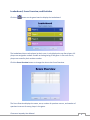
You can sort the Score Overview table by clicking on the header of the column you would like to
sort by. For example, to sort the table by player scores, click the Score column header (indicate
by the red box above). Clicking a column header multiple times changes the direction of the
sort between ascending and descending order.
You can also access the Statistics feature from the Score Overview. Select a player on the Score
Overview table by clicking on the player's name. Click the Statistics button to view the selected
player's statistics.
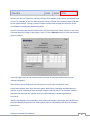
In the top-right corner of the statistics view, the name of the player whose stats you are
viewing is displayed.
The statistics view is divided up into two sections: Overall stats and Specific stats.
Overall stats displays stats from the entire game. Note that the penalties stat describes the
number of points subtracted from the player using the penalty panel. The Incorrect question
penalties stat describes the number of points subtracted due to answering questions
incorrectly.
Specific stats displays stats by question point value and category. Selecting a game board from
the Game Board(s) drop-down box filters specific stats to only display stats from the selected
game board.
Classroom Jeopardy User Manual
10