1
LOW BATTERY WARNING
3.Avoid water.
4.Do not store this device in an excessively hot place.
5.Avoid knocks or dropping this device.
6.The ultra-bright LED is not suitable for continous light
up. Please switch off the ultra-bright LED once 3
minutes.
When the detector is switched on and the LED in the
bottom with a battery icon is Red, it means the batteries
run down. Please replace new batteries.
7.Never use the antenna of this device to touch a metal
surface or the antenna of signal emission source.
The quality warranty does not include the damage
caused by static electricity or feedback.
SPECIFICATION
SILENT DETECTION
Power
AAA/UM-4 battery x 2, 3V DC
Detecting frequencies
50 MHz - 6.0 GHz
Sound
Dimension
L 87 x W 55 x H 24 mm
Off
Weight
105 g
Vibrate
Warning mode 1
Audible alarm and 3 LEDs
Warning mode 2
Warning mode 3
Vibration and 3 LEDs (SH-055GRV)
SH-055GRV
SH-055GRV:
This model also has VIBRATE detection to warn you
when you do not hold this device in hand to scan an
environment.
Besides, you also can detect by
earphone hearing without others
awareness.
Detecting Distance:
5.8GHz Wireless camera
2.4GHz Wireless camera
2G Cellular phone (1)
2G Cellular phone (2)
Wired camera
Silent, 3 LEDs and earphone hearing
about 8 feet (regular 10mW camera)
about 20 feet (regular 10mW camera)
about 40 feet (set at Analog)
about 50 feet (set at Digital)
about 15 feet
SH-055GRV
with Analog / Digital select switch
Superior sensitivity RF Signal Detector
Exposing Spy Camera, Bug and Cellular Phone and Bluetooth, etc.
Adds hard wire camera detection.
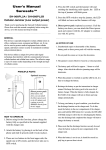
User's Manual
Thank you for purchasing the Suresafe RF (Radio
Frequency) Signal Detector. Please first read over this
manual for proper use, save this manual and keep it
handy.
This device applies with fuzzy scanning technology to
detect peeping cameras, bug, cellular phones and
other radio frequency devices. This device surely
avoids being peeped or tapped to protect privacy or
protect information being disclosed secretly.
This device has a new digital amplifier to heighten the
indication for the digital signals of Bluetooth, WLAN,
Wi-Fi, cellular phone and Digital Spread Spectrum
wireless products, etc.
Wire detection switch
* Specifications may change without notice
WARNING
Use this device as an auxiliary, supplemental help or aid to prevent the risks caused by hidden camera,
cellular phone or other wireless devices. This device does not take the place of all the supervisions.
Performance of this Radio frequency (RF) product will be affected by the circumstance of use. The
producer and marketing group accepts no liability for any loss or damage by malfunction or misuse.
NOTICE OF USE
1.If you are not going to use this device for a long time,
remove the batteries to avoid damage caused by
corrosion from battery leakage.
2.Unauthorized repair or dismantle of this device will
void all the warranties.
COPYRIGHT
No part of this manual may be reproduced, transmitted, transcribed, or translated into any language in any
form by any means, electrical or mechanical, including photocopying, recording, or information and
retrieval systems, without the express written permission of manufacturer. Products mentioned in this
manual are for identification purposes only. All brand names appearing in this manual may or may not be
registered trademarks or copyrights of their respective companies. The manufacturer reserves the right to
change or modify the specifications of any one or all of these products as deemed necessary at any time
without prior notification. The manufacturer may further revise this manual from time to time without
prior notice.
Copyright 2001-2010, Patent pending, All rights reserved.
Suresafe ™ ,Pro Hunter ™are trademark of the manufacturer
Made in Taiwan.
55GRVPK1A
08.2010
This device has 3 LEDs indicating the detected
signal strength. When detecting cellular phone or
peeping camera, the LED will light from Level 1 to
Level 2 to Level 3, and the beeping sound will
change from Slow to Rapid indicating the strength
of detected signal.
HOW TO OPERATE
1.Slide and remove the battery lid, install two AAA/UM-4
batteries matching correct (+) and (-) poles as
indicated, then slide the battery lid back.
2.Pull out the antenna and turn on the switch to upper
side.
3.The power LED will go Green to confirm the detector is
operated correctly.
detection light right-and-left slightly. If the location
of the reflection shifts as you shift, it is not a camera.
4.If the location of the reflection does not shift, then
you might have discovered the lens of a hidden
camera.
5.The ultra-bright LED is not suitable for continous light
up. Please switch off the ultra-bright LED once 3
minutes.
6.When this device detects signal of cellular phone or
wireless camera, the strength LED will light up, from
Level 1 (Yellow) -> Level 2 (Yellow) -> Level 3 (Red )
indicating the strength of detected signals.
7.Meanwhile, the buzzer will be beeping and the sound
will be changing from slow to rapid, indicating the
strength of detected signals.
WIRED CAMERA DETECTION
1.There is a Wire detection switch on the upper side,
press down the red button, it will active the ultra-bright
LEDs for scanning suspected areas. Press the switch
again, the red light will put out.
2.Office or private room has a lot of metal or optical
object with shinning surface which will reflect the
illuminated light. Few more practices will help identify
the lens of hidden camera.
3.When you find a suspected reflection, shake your
The signal waves of cellular phone is pulse wave, so
the LED of the detector will be blinking when the
detector detects someone uses cellular phone. And the
buzzer will go off discontinuously and small sound.
SENSITIVITY ADJUSTMENT
4.Before scanning an environment, please first set up
the sensitivity benchmark. Turn the sensitivity tuner to
+ (plus) side until the Level 1 LED goes Yellow, then
turn the sensitivity tuner to - (minus) side to decrease
the sensitivity until the Level 1 LED goes slightly
Yellow.
5.When you switch on this device and the strength LEDs
light up, it means the detecting benchmark is too
sensitive. Turn the sensitivity tuner to - (minus) side to
decrease the sensitivity until the Level 1 LED goes
slightly Yellow.
The signal waves of wireless camera and hidden
microphone is continuous wave, so the LED of the
detector will light up without blinking when the detector
detects a wireless camera or hidden microphone. And
the buzzer will go off continuously.
Wired camera
detection
Camera lens Original
Camera lens Illuminated
ANALOG / DIGITAL SELECT SWITCH
The signal of wireless camera, hidden
microphone and walki talki (2-way radio)
are analog signal. The signal of
Bluetooth, WLAN, Wi-Fi, cellular phone
and digital spread spectrum products are
digital signal.
Usually, set the A-D switch to A. When to detect analog
signals, the LED of the detector will light up without
blinking and the buzzer will go off continuously.
When to detect digital signals, the LED of the detector
will be blinking and the buzzer will go off discontinuously and small sound. Set the A-D switch to D,
it will have stronger indication for the digital signals of
Bluetooth, WLAN, cellular phone and Digital Spread
Spectrum wireless products, etc.
HOW TO DISTINGUISH IF IT IS A SIGNAL
OF WIRELESS
CAMERA OR HIDDEN
MICROPHONE OR CELLULAR PHONE?
Turn the sensitivity tuner to - (minus) side to decrease
the sensitivity and the detecting distance will be
shorter. Turn the sensitivity tuner to + (plus) side to
increase the sensitivity and the detecting distance will
be longer.
INTERFERENCE (BACKGROUND NOISE)
ELIMINATION
1.The sensitivity tuner is
also used to eliminate
the background noise
(interference).
2.If the scan environment
has other noises that
interfere with your
detector, the strength
indication LED will light up.
3.If this condition appears, adjust the sensitivity by
turning the sensitivity tuner to - (minus) side to
decrease the sensitivity until the Level 1 Yellow
LED slightly lights up.
4.In normal condition, when turning on the power, only
the power LED goes Green to confirm the detector
is in normal condition.