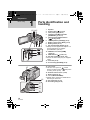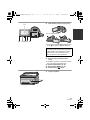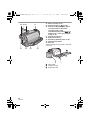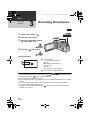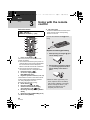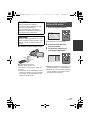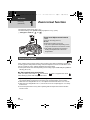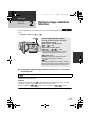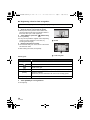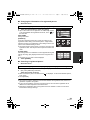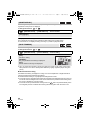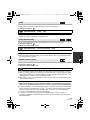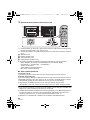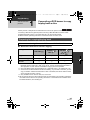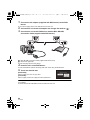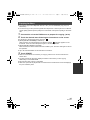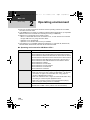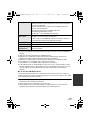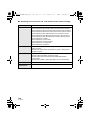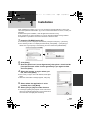
1
HDC-SD600EB-VQT2U82_mst.book 1 ページ 2010年4月15日 木曜日 午後3時2分 Operating Instructions High Definition Video Camera Model No. HDC-SD600 Before use, please read these instructions completely. Model number suffix “EB” denotes UK model. VQT2U82 until 2010/5/17 HDC-SD600EB-VQT2U82_mst.book 2 ページ 2010年4月15日 木曜日 午後3時2分 Information for Your Safety Dear Customer, We would like to take this opportunity to thank you for purchasing this Panasonic High Definition Video Camera. Please read these Operating Instructions carefully and keep them handy for future reference. Please note that the actual controls and components, menu items, etc. of your High Definition Video Camera may look somewhat different from those shown in the illustrations in these Operating Instructions. ∫ Caution for AC mains lead For your safety, please read the following text carefully. This appliance is supplied with a moulded three pin mains plug for your safety and convenience. A 5-ampere fuse is fitted in this plug. Should the fuse need to be replaced please ensure that the replacement fuse has a rating of 5-ampere and that it is approved by ASTA or BSI to BS1362. Check for the ASTA mark Ï or the BSI mark Ì on the body of the fuse. If the plug contains a removable fuse cover you must ensure that it is refitted when the fuse is replaced. If you lose the fuse cover the plug must not be used until a replacement cover is obtained. A replacement fuse cover can be purchased from your local dealer. 2 VQT2U82 CAUTION! IF THE FITTED MOULDED PLUG IS UNSUITABLE FOR THE SOCKET OUTLET IN YOUR HOME THEN THE FUSE SHOULD BE REMOVED AND THE PLUG CUT OFF AND DISPOSED OF SAFELY. THERE IS A DANGER OF SEVERE ELECTRICAL SHOCK IF THE CUT OFF PLUG IS INSERTED INTO ANY 13AMPERE SOCKET. If a new plug is to be fitted please observe the wiring code as stated below. If in any doubt please consult a qualified electrician. HDC-SD600EB-VQT2U82_mst.book 3 ページ 2010年4月15日 木曜日 午後3時2分 IMPORTANT The wires in this mains lead are coloured in accordance with the following code: Blue: Neutral, Brown: Live. As these colours may not correspond with the coloured markings identifying the terminals in your plug, proceed as follows: The wire which is coloured Blue must be connected to the terminal which is marked with the letter N or coloured Black or Blue. The wire which is coloured Brown must be connected to the terminal which is marked with the letter L or coloured Brown or Red. WARNING: DO NOT CONNECT EITHER WIRE TO THE EARTH TERMINAL WHICH IS MARKED WITH THE LETTER E, BY THE EARTH SYMBOL Ó OR COLOURED GREEN OR GREEN/YELLOW. THIS PLUG IS NOT WATERPROOF— KEEP DRY. Before use Remove the connector cover. How to replace the fuse The location of the fuse differ according to the type of AC mains plug (figures A and B). Confirm the AC mains plug fitted and follow the instructions below. Illustrations may differ from actual AC mains plug. 1. Open the fuse cover with a screwdriver. 2. Replace the fuse and close or attach the fuse cover. WARNING: TO REDUCE THE RISK OF FIRE, ELECTRIC SHOCK OR PRODUCT DAMAGE, ≥ DO NOT EXPOSE THIS APPARATUS TO RAIN, MOISTURE, DRIPPING OR SPLASHING AND THAT NO OBJECTS FILLED WITH LIQUIDS, SUCH AS VASES, SHALL BE PLACED ON THE APPARATUS. ≥ USE ONLY THE RECOMMENDED ACCESSORIES. ≥ DO NOT REMOVE THE COVER (OR BACK); THERE ARE NO USER SERVICEABLE PARTS INSIDE. REFER SERVICING TO QUALIFIED SERVICE PERSONNEL. CAUTION! ≥ DO NOT INSTALL OR PLACE THIS UNIT IN A BOOKCASE, BUILT-IN CABINET OR IN ANOTHER CONFINED SPACE. ENSURE THE UNIT IS WELL VENTILATED. TO PREVENT RISK OF ELECTRIC SHOCK OR FIRE HAZARD DUE TO OVERHEATING, ENSURE THAT CURTAINS AND ANY OTHER MATERIALS DO NOT OBSTRUCT THE VENTILATION VENTS. ≥ DO NOT OBSTRUCT THE UNIT’S VENTILATION OPENINGS WITH NEWSPAPERS, TABLECLOTHS, CURTAINS, AND SIMILAR ITEMS. ≥ DO NOT PLACE SOURCES OF NAKED FLAMES, SUCH AS LIGHTED CANDLES, ON THE UNIT. ≥ DISPOSE OF BATTERIES IN AN ENVIRONMENTALLY FRIENDLY MANNER. 3 VQT2U82 HDC-SD600EB-VQT2U82_mst.book 4 ページ 2010年4月15日 木曜日 午後3時2分 The socket outlet shall be installed near the equipment and easily accessible. The mains plug of the power supply cord shall remain readily operable. To completely disconnect this apparatus from the AC Mains, disconnect the power supply cord plug from AC receptacle. Warning Risk of fire, explosion and burns. Do not disassemble. Do not heat the batteries above the following temperatures or incinerate. Button-type battery 60 oC Battery pack 60 oC ∫ EMC Electric and magnetic compatibility This symbol (CE) is located on the rating plate. Use only the recommended accessories. ≥ Do not use any other AV multi cables and USB cables except the supplied one. ≥ Keep the Memory Card out of reach of children to prevent swallowing. ∫ Product identification marking Product Location High Definition Video Camera Battery holder AC adaptor Bottom 4 VQT2U82 ∫ Information for Users on Collection and Disposal of Old Equipment and used Batteries These symbols on the products, packaging, and/ or accompanying documents mean that used electrical and electronic products and batteries should not be mixed with general household waste. For proper treatment, recovery and recycling of old products and used batteries, please take them to applicable collection points, in accordance with your national legislation and the Directives 2002/96/EC and 2006/66/EC. By disposing of these products and batteries correctly, you will help to save valuable resources and prevent any potential negative effects on human health and the environment which could otherwise arise from inappropriate waste handling. For more information about collection and recycling of old products and batteries, please contact your local municipality, your waste disposal service or the point of sale where you purchased the items. Penalties may be applicable for incorrect disposal of this waste, in accordance with national legislation. For business users in the European Union If you wish to discard electrical and electronic equipment, please contact your dealer or supplier for further information. HDC-SD600EB-VQT2U82_mst.book 5 ページ 2010年4月15日 木曜日 午後3時2分 [Information on Disposal in other Countries outside the European Union] These symbols are only valid in the European Union. If you wish to discard these items, please contact your local authorities or dealer and ask for the correct method of disposal. Cd Note for the battery symbol (bottom two symbol examples): This symbol might be used in combination with a chemical symbol. In this case it complies with the requirement set by the Directive for the chemical involved. ∫ Indemnity about recorded content Panasonic does not accept any responsibility for damages directly or indirectly due to any type of problems that result in loss of recording or edited content, and does not guarantee any content if recording or editing does not work properly. Likewise, the above also applies in a case where any type of repair is made to the unit. ∫ Cards that you can use with this unit SD Memory Card, SDHC Memory Card and SDXC Memory Card ≥ 4 GB or more Memory Cards that do not have the SDHC logo or 48 GB or more Memory Cards that do not have the SDXC logo are not based on SD Memory Card Specifications. ≥ Refer to page 17 for more details on SD cards. ∫ For the purposes of these operating instructions ≥ SD Memory Card, SDHC Memory Card and SDXC Memory Card are referred to as the “SD card”. ≥ Functions that can be used for motion picture recording/motion picture playback are indicated by in these operating instructions. ≥ Functions that can be used for still picture recording (including the still picture recording in motion picture recording mode)/still picture playback are indicated by in these operating instructions. ≥ Pages for reference are indicated by an arrow, for example: l 00 5 VQT2U82 HDC-SD600EB-VQT2U82_mst.book 6 ページ 2010年4月15日 木曜日 午後3時2分 Contents Information for Your Safety.....................2 Accessories..............................................9 Preparation Before using [1] Parts identification and handling ...................................... 10 Setup [1] Power supply.............................. 13 Charging the battery .................... 13 Inserting/removing the battery ..... 14 Charging and recording time........ 15 Connecting to the AC outlet ......... 16 [2] Recording to a card ................... 17 Cards that you can use with this unit ................................. 17 Inserting/removing an SD card .... 18 [3] Turning the unit on/off ............... 19 Turning the unit on and off with the power button................... 19 Turning the unit on and off with the LCD monitor ................... 19 [4] Selecting a mode ....................... 20 [5] Adjusting LCD monitor.............. 21 How to use the touch screen ....... 21 Recording Yourself....................... 21 [6] Setting date and time................. 22 Basic Recording/Playback [1] Before recording ........................ 23 [2] Recording motion pictures ....... 24 [3] Recording still pictures ............. 26 Recording still pictures in motion picture recording mode ................ 27 [4] Intelligent auto mode ................. 28 [5] Motion picture/Still picture playback...................................... 30 6 VQT2U82 Setup [1] Using the menu screen ............. Using the quick menu .................. [2] Using the Setup Menu ............... [3] Using with the remote control......................................... Operation of direction buttons/ OK button..................................... 33 34 35 42 43 Advanced Recording (Advanced) [1] Zoom in/out function ................. Extra optical zoom ....................... [2] Optical image stabilizer function....................................... [3] AF/AE tracking ........................... [4] 1080/50p recording .................... [5] Recording functions of operation icons .......................... Operation icons............................ [6] Recording functions of menus ......................................... [7] Manual recording....................... White balance .............................. Manual shutter speed/ iris adjustment.............................. Manual focus adjustment............. 44 44 45 46 47 48 48 54 71 72 73 74 Playback (Advanced) [1] Playback Operations ................. 75 Motion picture playback using operation icon .............................. 75 Creating still picture from motion picture .......................................... 76 Highlight&Time frame index......... 77 Repeat playback .......................... 77 Resuming the previous playback....................................... 78 Zooming in on a still picture during playback (Playback zoom)........... 78 2010年4月15日 木曜日 午後3時2分 Setup [1] Installation ................................ 109 [2] Connecting to a PC.................. 111 About the PC display ................. 113 [1] Starting HD Writer AE 2.1 ........ 114 Reading the operating instructions of the software applications ....... 114 [2] If using Mac .............................. 115 Copy/Dubbing With this unit/other products [1] Connecting a DVD burner to copy to/play back a disc............ 95 Preparing for copying/ playing back ................................. 95 Copying to discs........................... 97 Playing back the copied disc...... 100 Managing the copied disc .......... 101 [2] Dubbing images onto other video device ............................. 102 Basic Using with a PC With a TV [1] Watching Video/Pictures on your TV .................................. 89 Connecting with a HDMI mini cable........................ 92 Connecting with the AV multi cable ........................ 92 [2] Playback using VIERA Link (HDAVI Control™) ....................... 93 Preparation [1] What you can do with a PC..... 103 End User License Agreement.... 105 [2] Operating environment ........... 106 Others Indications [1] Indications................................ 116 [2] Messages.................................. 119 About recovery........................... 120 Troubleshooting ..................................121 Cautions for use ..................................127 About copyright ...................................132 Recording modes/approximate recordable time ....................................133 Number of recordable pictures ..........134 Specifications ......................................136 Optional accessories ..........................140 Index .....................................................142 Advanced [1] Deleting scenes/still pictures ... 84 Dividing a scene to partially delete ........................................... 86 Deleting personal information ...... 87 Protecting scenes/still pictures..... 87 [2] DPOF setting .............................. 88 Before using Copy/Dubbing Editing With a PC With a PC [2] Various playback functions ...... 79 Playing back motion pictures/ still pictures by date ..................... 79 Face highlight playback/ Highlight playback/ Intelligent scene selection ............ 80 Changing the playback settings and playing back the slide show .............................. 83 Others HDC-SD600EB-VQT2U82_mst.book 7 ページ 7 VQT2U82 HDC-SD600EB-VQT2U82_mst.book 8 ページ 2010年4月15日 木曜日 午後3時2分 ∫ Sales and Support Information Customer Care Centre ≥ For customers within the UK: 0844 844 3852 ≥ For customers within the Republic of lreland: 01 289 8333 ≥ Visit our website for product information www.panasonic.co.uk ≥ E-mail: [email protected] Technical Support for AV Software ≥ For customers within the UK: 0844 844 3869 ≥ For customers within the Republic of Ireland: 01 289 8333 Direct Sales at Panasonic UK ≥ For customers: 0844 844 3856 ≥ Order accessory and consumable items for your product with ease and confidence by phoning our Customer Care Centre Monday–Thursday 9.00 a.m.–5.30 p.m., Friday 9.30 a.m.– 5.30 p.m. (Excluding public holidays) ≥ Or go on line through our Internet Accessory ordering application at www.pas-europe.com. ≥ Most major credit and debit cards accepted. ≥ All enquiries transactions and distribution facilities are provided directly by Panasonic UK Ltd. ≥ It couldn’t be simpler! ≥ Also available through our Internet is direct shopping for a wide range of finished products, take a browse on our website for further details. 8 VQT2U82 HDC-SD600EB-VQT2U82_mst.book 9 ページ 2010年4月15日 木曜日 午後3時2分 Accessories Check the accessories before using this unit. Keep the accessories out of reach of children to prevent swallowing. Product numbers correct as of Apr 2010. These may be subject to change. Battery pack VW-VBG130 AC adaptor VSK0698 AC cable K2CT39A00002 DC cable K2GJYDC00004 Remote control (Battery built-in) N2QAEC000024 AV multi cable K1HY12YY0004 USB cable K1HY04YY0032 Stylus pen VGQ0C14 Lens hood VDW2053 CD-ROM Software 9 VQT2U82 HDC-SD600EB-VQT2U82_mst.book 10 ページ Preparation 1 Before using 2010年4月15日 木曜日 午後3時2分 Parts identification and handling 1 2 3 4 1 234 5 6 7 8 9 10 11 12 14 13 15 16 17 18 19 20 10 VQT2U82 Speaker Power button [ ] (l 19) Inlet (cooling fan) (l 23) Intelligent auto/Manual button [iA/MANUAL] (l 28, 71) 5 Optical image stabilizer button [ /O.I.S.] (l 45) 6 1080/50p button [1080/50p] (l 47) 7 Battery release lever [BATT] (l 14) 8 Battery holder (l 14) 9 DC input terminal [DC IN] (l 16) ≥ Always use the supplied AC adaptor or a genuine Panasonic AC adaptor (VW-AD21EB-K; optional). 10 HDMI mini connector [HDMI] (l 89, 93) 11 USB terminal [ ] (l 96, 111) 12 AV multi connector (l 89, 102) ≥ Use the AV multi cable (only the supplied cable). 13 Card slot (l 18) 14 Access lamp [ACCESS] (l 18) 15 Lens cover ≥ The lens cover opens in motion picture recording mode or still picture recording mode. (l 20) 16 Remote control sensor (l 43) 17 Built-in flash (l 51) 18 Lens (LEICA DICOMAR) ≥ Please refer to page 23 for details about attaching the lens hood. 19 AF assist lamp (l 70) 20 Recording lamp (l 38) HDC-SD600EB-VQT2U82_mst.book 11 ページ 2010年4月15日 木曜日 午後3時2分 21 LCD monitor (Touch screen) (l 21) 21 ≥ It can open up to 90o. 22 23 24 25 26 ≥ It can rotate up to 180o A towards the lens or 90o B towards the opposite direction. Due to limitations in LCD production technology, there may be some tiny bright or dark spots on the LCD monitor screen. However, this is not a malfunction and does not affect the recorded picture. 22 Quick menu button [Q.MENU] (l 34) 23 Sub recording start/stop button (l 23) ≥ This button functions in the same manner as the recording start/stop button. 24 Adjust zoom buttons (l 44) 25 Menu button [MENU] (l 33) 26 Delete button [ ] (l 84) 27 Tripod receptacle 27 11 VQT2U82 HDC-SD600EB-VQT2U82_mst.book 12 ページ 28 29 30 32 33 28 Status indicator (l 19) 29 Photoshot button [ ] (l 26) 30 Zoom lever [W/T] (In motion picture recording mode or still picture recording mode) (l 44) Thumbnail display switch [ / ]/ Volume lever [sVOLr] (In playback mode) (l 32) 31 Internal microphones 32 Mode switch (l 20) 33 Recording start/stop button (l 24) 34 Shoulder strap fixture 35 Grip belt Adjust the length of the grip belt so that it fits your hand. 31 34 2010年4月15日 木曜日 午後3時2分 35 1 Flip the belt. 2 Adjust the length. 3 Replace the belt. 12 VQT2U82 HDC-SD600EB-VQT2U82_mst.book 13 ページ Preparation Setup 1 2010年4月15日 木曜日 午後3時2分 Power supply ∫ About batteries that you can use with this unit The battery that can be used with this unit is VW-VBG130/VW-VBG260/VW-VBG6. ≥ The unit has a function for distinguishing batteries which can be used safely. The dedicated battery (VW-VBG130/VW-VBG260/VW-VBG6) supports this function. The only batteries suitable for use with this unit are genuine Panasonic products and batteries manufactured by other companies and certified by Panasonic. (Batteries which do not support this function cannot be used). Panasonic cannot in any way guarantee the quality, performance or safety of batteries which have been manufactured by other companies and are not genuine Panasonic products. ≥ To use the VW-VBG6 for this unit, the battery pack holder kit VW-VH04 (optional) is required. It has been found that counterfeit battery packs which look very similar to the genuine product are made available to purchase in some markets. Some of these battery packs are not adequately protected with internal protection to meet the requirements of appropriate safety standards. There is a possibility that these battery packs may lead to fire or explosion. Please be advised that we are not liable for any accident or failure occurring as a result of use of a counterfeit battery pack. To ensure that safe products are used we would recommend that a genuine Panasonic battery pack is used. Charging the battery When this unit is purchased, the battery is not charged. Charge the battery before using this unit. Important: If the DC cable is connected to the AC adaptor, then the battery will not charge. Remove the DC cable from the AC adaptor. Charging lamp [CHARGE] A Lights up: Charging (Battery charging time: l 15) Goes off: Charging completed Flashing: Be sure to connect the unit correctly (l 129) 1 2 Connect the AC cable to the AC adaptor and the AC outlet. Insert the battery into the AC adaptor by aligning the arrows. 13 VQT2U82 HDC-SD600EB-VQT2U82_mst.book 14 ページ 2010年4月15日 木曜日 午後3時2分 ≥ We recommend using Panasonic batteries (l 9, 15, 140). ≥ If you use other batteries, we cannot guarantee the quality of this product. ≥ Do not heat or expose to flame. ≥ Do not leave the battery(ies) in an automobile exposed to direct sunlight for a long period of time with doors and windows closed. Inserting/removing the battery Install the battery by inserting it in the direction shown in the figure. Removing the battery Be sure to hold down the power button until the status indicator goes off. Then remove the battery while supporting the unit to prevent it dropping. Move the battery release lever in the direction indicated by the arrow and remove the battery when unlocked. A Insert the battery until it clicks and locks. BATT CAUTION Danger of explosion if battery is incorrectly replaced. Replace only with the same or equivalent type recommended by the manufacturer. Dispose of used batteries according to the manufacturer’s instructions. 14 VQT2U82 HDC-SD600EB-VQT2U82_mst.book 15 ページ 2010年4月15日 木曜日 午後3時2分 Charging and recording time ∫ Charging/Recording time ≥ Temperature: 25 oC/humidity: 60% Battery model number [Voltage/Capacity (minimum)] Supplied battery/ VW-VBG130 (optional) [7.2 V/1250 mAh] VW-VBG260 (optional) [7.2 V/2500 mAh] (optional)* VW-VBG6 [7.2 V/5400 mAh] Charging time 2 h 35 min 4 h 40 min 9 h 25 min Recording mode Maximum continuously recordable time Actual recordable time 1080/50p 1 h 40 min 1h HA, HG, HX 1 h 45 min 1 h 5 min HE 1 h 50 min 1 h 5 min 1080/50p 3 h 15 min 2h HA, HG, HX 3 h 25 min 2 h 5 min HE 3 h 25 min 2 h 10 min 1080/50p 8 h 10 min 5h HA, HG, HX 8 h 30 min 5 h 15 min HE 8 h 35 min 5 h 20 min * The battery pack holder kit VW-VH04 (optional) is necessary. ≥ These times are approximations. ≥ The indicated charging time is for when the battery has been discharged completely. Charging time and recordable time vary depending on the usage conditions such as high/low temperature. ≥ The actual recordable time refers to the recordable time when repeatedly starting/stopping recording, turning the unit on/off, moving the zoom lever etc. ≥ The batteries heat up after use or charging. This is not a malfunction. Battery capacity indication ≥ The display changes as the battery capacity reduces. # # # # If there is less than 3 minutes remaining, then will become red. If the battery discharges, then will flash. ≥ The remaining battery capacity is displayed when using the Panasonic battery that you can use for this unit. The actual time can vary depending on your actual use. ≥ If the actual remaining time exceeds 9 hours 59 minutes, the indication will stay green and will not change until the remaining time falls below 9 hours 59 minutes. ≥ When using the AC adaptor or batteries made by other companies, the remaining battery capacity will not be shown. 15 VQT2U82 HDC-SD600EB-VQT2U82_mst.book 16 ページ 2010年4月15日 木曜日 午後3時2分 Connecting to the AC outlet The unit is in the standby condition when the AC adaptor is connected. The primary circuit is always “live” as long as the AC adaptor is connected to an electrical outlet. Important: While the DC cable is connected to the AC adaptor, the battery will not charge. ≥ Do not use the AC cable with any other equipment as it is designed only for this unit. Also, do not use the AC cable from other equipment with this unit. DC IN 1 2 3 A DC output terminal B DC input terminal Insert the DC cable matching the [ ] mark of the DC input terminal. Connect the AC cable to the AC adaptor and the AC outlet. Connect the DC cable to the AC adaptor. Connect the DC cable to the DC input terminal [DC IN]. ≥ When removing the AC adaptor, be sure to hold down the power button until the status indicator goes off. Then remove the AC adaptor. 16 VQT2U82 HDC-SD600EB-VQT2U82_mst.book 17 ページ Preparation Setup 2 2010年4月15日 木曜日 午後3時2分 Recording to a card This unit (an SDXC compatible device) is compatible with SD Memory Cards, SDHC Memory Cards and SDXC Memory Cards. When using an SDHC memory card/SDXC memory card with other equipment, check the equipment is compatible with these memory cards. Cards that you can use with this unit Use SD cards conforming to Class 4 or higher of the SD Speed Class Rating* for motion picture recording. Card type Capacity 8 MB/16 MB SD Memory Card 32 MB/64 MB/ 128 MB/256 MB Motion picture recording Cannot be used. Cannot be guaranteed in operation. The recording may suddenly stop during motion picture recording depending on the SD card you use. (l 122) Can be used. 512 MB/1 GB/ 2 GB SDHC Memory Card SDXC Memory Card 4 GB/6 GB/8 GB/ 12 GB/16 GB/ 24 GB/32 GB Still picture recording Can be used. 48 GB/64 GB * The SD Speed Class Rating is the speed standard for successive writes. ≥ Please confirm the latest information about SD Memory Cards/SDHC Memory Cards/SDXC Memory Cards that can be used for motion picture recording on the following website. http://panasonic.jp/support/global/cs/ e_cam (This website is in English only.) ≥ 4 GB or more Memory Cards that do not have the SDHC logo or 48 GB or more Memory Cards that do not have the SDXC logo are not based on SD Memory Card Specifications. ≥ When the write-protect switch A on SD card is locked, no recording, deletion or editing will be possible on the card. ≥ Keep the Memory Card out of reach of children to prevent swallowing. 32 17 VQT2U82 HDC-SD600EB-VQT2U82_mst.book 18 ページ 2010年4月15日 木曜日 午後3時2分 Inserting/removing an SD card When using an SD card not from Panasonic, or one previously used on other equipment, for the first time on this unit, format the SD card. (l 40) When the SD card is formatted, all of the recorded data is deleted. Once the data is deleted, it cannot be restored. Caution: Check that the access lamp has gone off. Access lamp [ACCESS] A ≥ When this unit is accessing the SD card, the access lamp lights up. 1 2 Open the LCD monitor. Open the SD card/terminal cover and insert (remove) the SD card into (from) the card slot. ≥ Face the label side B in the direction shown in the illustration and press it straight in as far as it will go. ≥ Press the centre of the SD card and then pull it straight out. 3 Securely close the SD card/ terminal cover. ≥ Securely close it until it clicks. ≥ Do not touch the terminals on the back of the SD card. ≥ Do not apply strong shocks, bend, or drop the SD card. ≥ Electrical noise, static electricity or the failure of this unit or the SD card may damage or erase the data stored on the SD card. ≥ When the card access lamp is lit, do not: j Remove the SD card j Turn the unit off j Insert and remove the USB cable j Expose the unit to vibrations or shock Performing the above while the lamp is on may result in damage to data/SD card or this unit. 18 VQT2U82 ≥ Do not expose the terminals of the SD card to water, garbage or dust. ≥ Do not place SD cards in the following areas: j In direct sunlight. j In very dusty or humid areas. j Near a heater. j Locations susceptible to significant difference in temperature (condensation can occur). j Where static electricity or electromagnetic waves occur. ≥ To protect SD cards, return them to their cases when you are not using them. ≥ About disposing of or giving away the SD card. (l 130) HDC-SD600EB-VQT2U82_mst.book 19 ページ Preparation Setup 3 2010年4月15日 木曜日 午後3時2分 Turning the unit on/off You can turn the unit on and off using the power button or by opening and closing the LCD monitor. Turning the unit on and off with the power button Press the power button to turn on the unit To turn off the unit Hold down the power button until the status indicator goes off. A The status indicator lights. Turning the unit on and off with the LCD monitor Unit is turned on when the LCD monitor is opened, and unit is turned off when it is closed. During normal use, opening and closing of the LCD monitor can be conveniently used to turn the unit on/off. ∫ To turn on the unit ∫ To turn off the unit A The status indicator lights. B The status indicator goes off. ≥ The unit will not turn off while recording motion pictures even if the LCD monitor is closed. ≥ In the following cases, opening the LCD monitor does not turn on the unit. Press the power button to turn on the unit. j When the unit is purchased j When you have turned off the unit using the power button 19 VQT2U82 HDC-SD600EB-VQT2U82_mst.book 20 ページ Preparation Setup 4 2010年4月15日 木曜日 午後3時2分 Selecting a mode Change the mode to recording or playback. Operate the mode switch to change the mode to Motion picture recording mode (l 24) Still picture recording mode (l 26) Playback mode (l 30, 75) 20 VQT2U82 , or . HDC-SD600EB-VQT2U82_mst.book 21 ページ Preparation Setup 5 2010年4月15日 木曜日 午後3時2分 Adjusting LCD monitor How to use the touch screen You can operate by directly touching the LCD monitor (touch screen) with your finger. It is easier to use the stylus pen (supplied) for detailed operation or if it is hard to operate with your fingers. ∫ Touch Touch and release the touch screen to select icon or picture. ≥ Touch the centre of the icon. ≥ Touching the touch screen will not operate while you are touching another part of the touch screen. ∫ About the operation icons / / / : These icons are used to switch the menu and thumbnail display page, for item selection and setting etc. : Touch to return to the previous screen such as when setting menus. ≥ Do not touch the LCD monitor with hard pointed tips, such as ball point pens. ≥ Perform the touch screen calibration when the touch is not recognised or wrong location is recognised. (l 40) Recording Yourself ¬ Change the mode to or . Rotate the LCD monitor towards the lens side. ≥ The image is horizontally flipped as if you see a mirror image. (However the image recorded is the same as a normal recording.) ≥ Only some indications will appear on the screen. When appears, return the direction of the LCD monitor to normal position and check the warning/alarm indication. (l 119) 21 VQT2U82 HDC-SD600EB-VQT2U82_mst.book 22 ページ Preparation Setup 6 2010年4月15日 木曜日 午後3時2分 Setting date and time When the unit is turned on for the first time, a message asking you to set the date and time will appear. Select [YES] and perform steps 2 to 3 below to set the date and time. ¬ Change the mode to 1 or . Select the menu. : [SETUP] # [CLOCK SET] 2 Touch the date or time to be set, then set the desired value using / . A Displaying the World time setting (l 35): [HOME]/ [DESTINATION] ≥ The year can be set between 2000 and 2039. ≥ The 24-hour system is used to display the time. 3 Touch [ENTER]. ≥ The clock function starts at [00] seconds. ≥ A message prompting for World time setting may be displayed. Perform the World time setting by touching the screen. (l 35) ≥ Touch [EXIT] or press the MENU button to complete the setting. 22 VQT2U82 ≥ The date and time function is driven by a built-in lithium battery. ≥ When this unit is purchased, the clock is set. If the time display becomes [- -], the built-in lithium battery needs to be charged. To recharge the built-in lithium battery, connect the AC adaptor or attach the battery to this unit. Leave the unit as it is for approx. 24 hours and the battery will maintain the date and time for approx. 6 months. (The battery is still being recharged even if the unit is off.) WARNING THE LITHIUM BATTERY IN THIS EQUIPMENT MUST ONLY BE REPLACED BY QUALIFIED PERSONNEL. WHEN NECESSARY, CONTACT YOUR LOCAL PANASONIC SUPPLIER. HDC-SD600EB-VQT2U82_mst.book 23 ページ Basic Recording/ Playback 1 2010年4月15日 木曜日 午後3時2分 Before recording ∫ Basic camera positioning 1 Hold the unit with both hands. 2 Put your hand through the grip belt. 3 It is convenient to use sub recording start/stop button A when holding the unit around your waist. ≥ When recording, make sure your footing is stable and there is no danger of colliding with another person or object. ≥ When you are outdoors, record pictures with the sunlight behind you. If the subject is backlit, it will become dark in the recording. ≥ Keep your arms near your body and separate your legs for better balance. ≥ Do not cover the microphones or the cooling fan inlet with your hand etc. ∫ Basic motion picture recording ≥ The unit should normally be held steady when recording. ≥ If you move the unit when recording, do so slowly, maintaining a constant speed. ≥ The zoom operation is useful for recording subjects you cannot get close to, but overuse of zoom in and zoom out can make the resulting motion picture less enjoyable to watch. ∫ Attaching/Removing the lens hood This will reduce the extra light entering the lens in bright sunlight or backlight etc., making it possible to take clearer pictures. A Attaching the lens hood B Removing the lens hood ≥ If you use the Filter kit (optional) or the conversion lens (optional), remove the lens hood. 23 VQT2U82 HDC-SD600EB-VQT2U82_mst.book 24 ページ Basic Recording/ Playback 1 2 3 2 Change the mode to 2010年4月15日 木曜日 午後3時2分 Recording motion pictures . Open the LCD monitor. Press the recording start/stop button to start recording. A When you begin recording, ; changes to ¥. 4 Press the recording start/stop button again to pause recording. ≥ Still pictures can be recorded while recording the motion picture. (l 27) ≥ The images recorded between pressing the recording start/stop button to start recording and pressing it again to pause recording become one scene. ≥ Maximum number of recordable scenes: 3900 Maximum number of different dates: 200 (l 79) When either of them reaches to the maximum limit, more scenes cannot be recorded. (In the case of SD cards it is the maximum number of recordable scenes per card.) ≥ While recording is in progress, the recording will not stop even if the LCD monitor is closed. 24 VQT2U82 HDC-SD600EB-VQT2U82_mst.book 25 ページ 2010年4月15日 木曜日 午後3時2分 ∫ Screen indications in the motion picture recording mode 0h00m00s HG R 1h20m A Recording mode B Remaining time left for recording (When the remaining time is less than 1 minute, [R 0h00m] flashes red.) C Recording time elapsed Each time the unit is put into recording pause, the counter display will be reset to “0h00m00s”. About the compatibility of the recorded motion pictures Please refer to page 47 about 1080/50p ≥ They are not compatible with devices other than those that support AVCHD. Images cannot be played with equipment that does not support AVCHD (ordinary DVD recorders). Confirm that your equipment supports AVCHD by referring to the operating instructions. ≥ There are some cases where the recorded motion pictures cannot be played back, even if the device supports AVCHD. In such cases, play the recorded motion picture with this unit instead. 25 VQT2U82 HDC-SD600EB-VQT2U82_mst.book 26 ページ Basic Recording/ Playback 3 1 2 3 Change the mode to 4 Press the 2010年4月15日 木曜日 午後3時2分 Recording still pictures . Open the LCD monitor. Press the button halfway. (For auto focus only) button fully. Focus indication: A Focus indication ± (The white lamp flashes.): Focusing ¥ (The green lamp lights up.): When in focus No mark: When focusing is unsuccessful. B Focus area (area inside brackets) ≥ If you set the optical image stabilizer function (l 45) to / (MODE1), then the image stabilizer function will be more effective. ( MEGA (MEGA optical image stabilizer) will be displayed when the button is pressed halfway.) ≥ The AF assist lamp lights in dark places. ≥ Focus indication will change to registered focus icon when [FACE RECOG.] is set to [ON]. (l 59) ≥ It is recommended using a flash or tripod when recording still pictures in dark places because the shutter speed becomes slow. ≥ The screen will become darker when the button is pressed halfway if the shutter speed is 1/25 or slower. 26 VQT2U82 HDC-SD600EB-VQT2U82_mst.book 27 ページ 2010年4月15日 木曜日 午後3時2分 ∫ About the screen indications in still picture recording MEGA 14.2M R3000 : ß: ßj: : MEGA : : : 14.2M : R3000: : Still picture operation indicator (l 117) Flash (l 51) Flash level (l 51) Red eye reduction (l 51) MEGA optical image stabilizer (l 26) Optical image stabilizer (l 45) Quality of still pictures (l 68) Size of still pictures (l 67) Remaining number of still pictures (Flashes in red when [0] appears.) AF assist lamp (l 70) ∫ About the focus indication ≥ The focus indication indicates the status of the auto focus. ≥ The focus indication does not appear in manual focus mode. ≥ The focus indication does not appear or has difficulty focusing in the following cases. j When close subjects and far subjects are included in the same scene. j When the scene is dark. j When there is a bright part in the scene. j When the scene is filled with only horizontal lines. ∫ About the focusing area When there is a contrasting object ahead or behind the subject in the focus area, the subject may not be focused. If so, move the contrasting object out of the focus area. ≥ Focus area is not displayed in the following conditions. j When the intelligent auto mode (portrait) is used. j When AF/AE tracking is used. j When the Extra optical zoom is used. j When the unit determines that the AF assist lamp is necessary. Recording still pictures in motion picture recording mode You can record still pictures even in motion picture recording mode. ¬ Change the mode to . Press the button fully (press to the bottom) to take the picture. ≥ It is possible to record still pictures while recording motion pictures. (Simultaneous recording) ≥ Built-in flash, Red eye reduction, Selftimer (l 48) do not work. ≥ While recording motion pictures or during the PRE-REC operation, the following arrangements are applied so that motion picture recording takes preference over still picture recording. j Image quality is different from ordinary still pictures. j The remaining usable capacity (number of pictures that can be taken) indication does not appear. 27 VQT2U82 HDC-SD600EB-VQT2U82_mst.book 28 ページ Basic 4 Recording/ Playback 2010年4月15日 木曜日 午後3時2分 Intelligent auto mode The following modes appropriate for the condition are set just by pointing the unit to what you want to record. /MANUAL Intelligent auto/Manual button Press this button to switch intelligent auto mode/manual mode. ≥ Please refer to page 71 about manual mode. Mode Scene Effect Portrait When the object is a person Faces are detected and focused automatically, and the brightness is adjusted so it is recorded clearly. Scenery Recording outdoors The whole landscape will be recorded vividly without whiting out the background sky, which may be very bright. Under a spotlight Very bright object is recorded clearly. Low light Dark room or twilight It can record very clearly even in a dark room or twilight. Night portrait*2 Recording night portrait A person and the background are recorded with near real-life brightness. Night scenery*2 Recording night scenery You can record night scenery vividly by slowing the shutter speed. Macro*2 Recording zooming in on a flower etc. This allows recording while going near to the object of recording. / Other situations Contrast is adjusted automatically for clear image. Spotlight*1 *1 Normal *1 In motion picture recording mode only *2 In still picture recording mode only ≥ Depending on the recording conditions, the unit may not enter the desired mode. ≥ In the Portrait, Spotlight and Low light mode, one that is bigger and close to centre of the screen will be surrounded by an orange frame. (l 60) ≥ It is recommended using a tripod in night portrait and night scenery mode. 28 VQT2U82 HDC-SD600EB-VQT2U82_mst.book 29 ページ 2010年4月15日 木曜日 午後3時2分 ≥ Optical image stabilizer function (l 45) is set to Active mode/ON in all modes. ≥ Faces cannot be detected depending on the recording conditions, such as when faces are of certain sizes or at certain tilts or when digital zoom is used. ≥ The zoom microphone is set to [OFF] in the intelligent auto mode. (l 62) ∫ Intelligent auto mode When switching to intelligent auto mode, the auto white balance and auto focus operate and automatically adjust the colour balance and focusing. Depending on the brightness of the subject etc., the aperture and shutter speed are automatically adjusted for an optimum brightness. ≥ Colour balance and focus may not be adjusted automatically depending on light sources or scenes. If so, manually adjust these settings. (l 72, 74) Automatic white balance The illustration shows the range over which automatic white balance functions. 2) 10 000K 9 000K 8 000K 7 000K 3) If the automatic white balance is not functioning normally, adjust the white balance manually. (l 72) Auto focus The unit focuses automatically. ≥ Auto focus does not work correctly in the following situations. Record pictures in the manual focus mode. (l 74) j Recording distant and close-up objects at the same time j Recording a subject behind dirty or dusty window j Recording a subject that is surrounded by objects with glossy surfaces or by highly reflective objects For details on scene mode, refer to page 54. For how to set manual focus/white balance manually, refer to page 71-74. 4) 6 000K 5) 5 000K 6) 1) 4 000K 7) 3 000K 8) 2 000K 9) 10) 1 000K 1) The effective range of automatic white balance adjustment on this unit 2) Blue sky 3) Cloudy sky (rain) 4) TV screen 5) Sunlight 6) White fluorescent lamp 7) Halogen light bulb 8) Incandescent light bulb 9) Sunrise or sunset 10) Candlelight 29 VQT2U82 HDC-SD600EB-VQT2U82_mst.book 30 ページ Basic Recording/ Playback 5 2010年4月15日 木曜日 午後3時2分 Motion picture/Still picture playback 1 2 Change the mode to 3 Touch [VIDEO/SD CARD] or [PICTURE/SD CARD]. Touch the play mode select icon A. 4 . A [VIDEO/SD CARD] B [PICTURE/SD CARD] Touch the scene or the still picture to be played back. ≥ Next (previous) page can be displayed by touching / . 30 VQT2U82 HDC-SD600EB-VQT2U82_mst.book 31 ページ 5 2010年4月15日 木曜日 午後3時2分 Select the playback operation by touching the operation icon. A Operation icon 0h00m00s ≥ Touch icon. F / F to display/not-display the operation F Motion picture playback 1/;: 6: 5: ∫: 1: Playback/Pause Rewind playback Fast forward playback Stops the playback and shows the thumbnails. Displays the direct playback bar. (l 76) Still picture playback 1/;: 2;: ;1: ∫: Slide show (playback of the still pictures in numerical order) start/pause. Plays back the previous picture. Plays back the next picture. Stops the playback and shows the thumbnails. ∫ Play back 1080/50p recorded scenes (l 47) ≥ Change the mode to 1 and touch the play mode select icon. Touch [CHANGE VIDEO]. A 1080/50p appears. ≥ The motion picture media switches between normal and 1080/50p recorded scenes each time [CHANGE VIDEO] is touched. 2 Touch [VIDEO/SD CARD]. ≥ Scenes recorded in normal and 1080/50p cannot be viewed at the same time. ≥ The thumbnails are displayed on separate screens in motion picture playback mode. 31 VQT2U82 HDC-SD600EB-VQT2U82_mst.book 32 ページ 2010年4月15日 木曜日 午後3時2分 ∫ Change the thumbnail display ∫ Speaker volume adjustment While the thumbnail is displayed, the thumbnail display changes in the following order if the zoom lever or adjust zoom buttons are operated to side or side. 20 scenes () 9 scenes () 1 scene () Highlight&Time frame index* (l 77) Operate the volume lever or the adjust zoom buttons to adjust the speaker volume during motion picture playback. * Highlight&Time frame index can only set in motion picture playback mode. ≥ 9 scenes display returns if the unit is turned off or the mode is changed. ≥ When the thumbnail display is changed to 1 scene during motion picture playback, the recording date and time can be checked. Similarly, when the thumbnail display is changed to 1 still picture during still picture playback, the recording date and file number can be checked. Motion picture compatibility Towards “r”: Increases the volume Towards “s”: Decreases the volume ≥ Sound will be heard only during normal playback. ≥ If pause play is continued for 5 minutes, the screen returns to the thumbnails. ≥ The elapsed time for playback indication will be reset to “0h00m00s” each scene. Please refer to page 47 about 1080/50p. ≥ This unit is based on the AVCHD format. ≥ The video signal that can be played back on this unit is 1920k1080/50i, 1920k1080/25p or 1440k1080/50i. ≥ This unit may degrade or not play back motion pictures recorded or created on other products, and other products may degrade or not play back motion pictures recorded on this unit, even if the products support AVCHD. Still picture compatibility ≥ This unit is compliant with the unified standard DCF (Design rule for Camera File system) established by JEITA (Japan Electronics and Information Technology Industries Association). ≥ The file format of still pictures supported by this unit is JPEG. (Not all JPEG formatted files will be played back.) ≥ This unit may degrade or not play back still pictures recorded or created on other products and other products may degrade or not play back still pictures recorded on this unit. 32 VQT2U82 HDC-SD600EB-VQT2U82_mst.book 33 ページ Basic Setup 1 2 3 1 2010年4月15日 木曜日 午後3時2分 Using the menu screen Press the MENU button. 4 Touch the desired item to enter the setting. 5 Touch [EXIT] or press the MENU button to exit the menu setting. Touch the top menu A. Touch the submenu B. ∫ About ≥ Next (previous) page can be displayed by touching / . guide display After touching , touching the submenus and items will cause function descriptions and settings confirmation messages to appear. ≥ After the messages have been displayed, the guide display is cancelled. 33 VQT2U82 HDC-SD600EB-VQT2U82_mst.book 34 ページ 2010年4月15日 木曜日 午後3時2分 Using the quick menu This allows quick setting of some of the menus. 1 Press the Q.MENU button. The following menus can be set. Touch the desired menu. ≥ The items displayed differ depending on the position of the mode switch or settings. Icon 14.2M / 13.3M A 2 Function Page [REC MODE] l 55 [TIME LAPSE REC] l 56 [PICTURE SIZE] l 67 [DISPLAY] l 35 [POWER LCD] l 38 [GUIDE LINES] l 53 [MIC LEVEL] l 63 [MF ASSIST] l 74 [ZEBRA] l 64 [LUMINANCE] l 65 [HISTOGRAM] l 66 Touch the desired item to enter the setting. 13.3M 3 34 + ON A Touch [EXIT] or press Q.MENU button to exit the quick menu. VQT2U82 HDC-SD600EB-VQT2U82_mst.book 35 ページ Basic 2 Setup 2010年4月15日 木曜日 午後3時2分 Using the Setup Menu ≥ The items displayed differ depending on the position and settings of the mode switch. Select the menu. : [SETUP] # desired setting [DISPLAY] [OFF]/[ON] The screen indications are selected as shown in the illustration. ≥ It is possible to set from the quick menu. (l 34) [OFF] [ON] 1h30m A R 1h20m [CLOCK SET] Please refer to page 22. [SET WORLD TIME] It is possible to display and record the time at the travel destination by selecting your home region and the travel destination. 1 Touch [SET WORLD TIME]. ≥ If the clock is not set, adjust the clock to the current time. (l 22) ≥ When the [HOME] (your home region) is not set, the message appears. Touch [ENTER] and proceed to Step 3. 2 (Only when setting your home region) Touch [HOME]. ≥ Touch [ENTER]. 3 (Only when setting your home region) Touch / to select your home region and touch [ENTER]. ≥ Touch [SUMMER TIME SET] to set daylight saving time. appears and the summer time setting is turned on; the time difference from GMT is set forward by one hour. Touch [SUMMER TIME SET] again to return to the normal time setting. 4 (Only when setting the region of your travel destination) A The current time B The time difference from GMT (Greenwich Mean Time) Touch [DESTINATION]. ≥ Touch [ENTER]. 35 VQT2U82 HDC-SD600EB-VQT2U82_mst.book 36 ページ 2010年4月15日 木曜日 午後3時2分 ≥ When the home region is set for the first time, the screen for selecting home/travel destination appears after setting the home region successively. If the home region has already been set once, execute the menu operation for Step 1. 5 (Only when setting the region of your travel destination) Touch / to select your travel destination and touch [ENTER]. ≥ Touch [SUMMER TIME SET] to set daylight saving time. appears and the summer time setting is turned on. The clock and time difference from the home region time are set forward by one hour. Touch [SUMMER TIME SET] again to return to the normal time setting. ≥ Close the setting by pressing the MENU button. appears and the time of the travel destination is indicated. C The local time at the selected travel destination D The time difference between the travel destination and the home region To return the display to the home setting Set the home region using Step 1 to 3, and close the setting by touching [EXIT] or pressing the MENU button. ≥ If you cannot find your travel destination in the area shown on the screen, set it by using the time difference from your home region. [DATE/TIME] [OFF]/[D/T]/[DATE] It is possible to change the date and time display mode. ≥ You can also show or change the date and time display by repeatedly pressing the DATE/ TIME button on the remote control. [DATE FORMAT] [Y/M/D]/[M/D/Y]/[D/M/Y] It is possible to change the date format. [ECONOMY] [OFF]/[5 MINUTES] When about 5 minutes have passed without any operation, this unit automatically turns off to save battery life. ≥ The power save function will not activate when: j connected to AC adaptor j using the USB cable for PC, DVD burner etc. j PRE-REC is used 36 VQT2U82 HDC-SD600EB-VQT2U82_mst.book 37 ページ [QUICK POWER ON] 2010年4月15日 木曜日 午後3時2分 [OFF]/[ON] The unit is put into recording pause approx. 1 second when the unit is turned on with the mode set to or . ≥ Depending on the recording conditions, start time may be longer than 1 second in still picture recording mode. ≥ In the quick power on mode, the zoom magnification becomes 1k. [QUICK START] [OFF]/[ON] This unit will resume recording pause mode about 0.6 seconds after the LCD monitor is reopened. ≥ Start time will not shorten if there is no SD card inserted. ≥ Change the mode to or . 1 2 Set [QUICK START] to [ON]. Close the LCD monitor while the mode is set to or . The status indicator A flashes green and the unit goes into quick start standby mode. ≥ The lens cover does not close. 3 Open the LCD monitor. The status indicator A lights red and the unit is put into recording pause. ≥ When in quick start standby mode about 80% of the power used in recording pause mode is being consumed, so the recording time will be reduced. ≥ Quick start standby mode is cancelled if j about 5 minutes elapsed j mode is set to ≥ Time for quick start will be more than 0.6 seconds slower when digital cinema is used. ≥ Depending on the recording conditions, time for quick start may be more than 0.6 seconds slower in still picture recording mode. ≥ It may take some time for automatic white balance to adjust. ≥ In the quick start mode, the zoom magnification becomes 1k. ≥ If [ECONOMY] (l 36) is set to [5 MINUTES] and the unit automatically goes into quick start standby mode, close the LCD monitor and then open it again. ≥ Turn the unit off using the power button. ≥ Quick start standby mode cannot be released by the remote control. 37 VQT2U82 HDC-SD600EB-VQT2U82_mst.book 38 ページ [REMOTE CONTROL] 2010年4月15日 木曜日 午後3時2分 [OFF]/[ON] Please refer to page 42. [REC LAMP] [OFF]/[ON] The recording lamp lights up during recording and flashes when the unit receives a signal from the remote control or when the self-timer is counting down. When this is set to [OFF], it does not light during recording. [ALERT SOUND] [OFF]/ / Touch screen operation, start and stop of recording and unit on/off can be confirmed with this sound. (Volume low)/ (Volume high) 2 Beeps for 4 times When an error occurs. Check the sentence displayed on the screen. (l 119) [POWER LCD] +2 / +1 / 0 / -1 / A This makes it easier to view the LCD monitor in bright places including outdoors. ≥ These settings will not affect the images actually recorded. ≥ It is possible to set from the quick menu. (l 34) (Makes even brighter)/ +1 (Makes brighter)/ 0 (Normal)/ -1 (Makes less bright)/ *(Automatic adjustment) * It is not displayed in the manual mode or in the playback mode. +2 A ≥ When the AC adaptor is in use, the LCD monitor is set to +1 automatically. ≥ The recordable time will become shorter when you use this unit with the LCD monitor lit up. 38 VQT2U82 HDC-SD600EB-VQT2U82_mst.book 39 ページ 2010年4月15日 木曜日 午後3時2分 [LCD SET] It adjusts brightness and colour density on the LCD monitor. ≥ These settings will not affect the images actually recorded. 1 2 Touch [LCD SET]. Touch the desired setting item. [BRIGHTNESS]: Brightness of the LCD monitor [COLOUR]: Colour level of the LCD monitor 3 4 Touch / to adjust settings. Touch [ENTER]. ≥ Touch [EXIT] or press the MENU button to exit the menu screen. [AV MULTI] [COMPONENT]/[AV OUT] Please refer to page 92. [COMPONENT OUT] [576i]/[1080i] Please refer to page 92. [HDMI RESOLUTION] [AUTO]/[1080p]/[1080i]/[576p] Please refer to page 92. [VIERA Link] [OFF]/[ON] Please refer to page 93. [TV ASPECT] [16:9]/[4:3] Please refer to page 91. 39 VQT2U82 HDC-SD600EB-VQT2U82_mst.book 40 ページ 2010年4月15日 木曜日 午後3時2分 [INITIAL SET] Set to [YES] for changing the menu settings back to the default condition. ≥ Settings for [CLOCK SET] and [LANGUAGE] will not be changed. [FORMAT CARD] Please be aware that if a medium is formatted, then all the data recorded on the medium will be erased and cannot be restored. Back up important data on a PC, DVD disc etc. (l 95, 103) ≥ When formatting is complete, touch [EXIT] to exit the message screen. ≥ Perform a physical formatting of the SD card when the SD card is to be disposed/ transferred. (l 130) ≥ Do not turn this unit off or remove the SD card, while formatting. Do not expose the unit to vibrations or shock. Use this unit to format media. Do not format an SD card using any other equipment such as a PC. The card may not be used on this unit. [CARD STATUS] The amount of space left on the SD card can be checked. (Only when the mode is at the ) ≥ Touch [EXIT] or press the MENU button to close the indication. ≥ The SD card requires some space to store information and manage system files, so the actual usable space is slightly less than the indicated value. The usable space is generally calculated as 1 GB=1,000,000,000 bytes. The capacities of this unit, PCs and software are expressed as 1 GB=1,024k1,024k1,024=1,073,741,824 bytes. Therefore, the indicated value of the capacity appears to be smaller. [CALIBRATION] Perform the touch screen calibration if a different object to the one touched is selected. 1 Touch [CALIBRATION]. ≥ Touch [ENTER]. 2 Touch the [_] that appears on the screen with the supplied stylus pen. ≥ Touch [_] in sequence (up left # down left # down right # up right # centre). 3 Touch [ENTER]. ≥ Calibration cannot be performed when the LCD monitor is turned 180o. 40 VQT2U82 HDC-SD600EB-VQT2U82_mst.book 41 ページ [DEMO MODE] 2010年4月15日 木曜日 午後3時2分 [OFF]/[ON] This item is used to start the unit demonstration. (Only when the mode is at the or position) If [DEMO MODE] is switched to [ON] when there is no SD card inserted, the demonstration automatically starts. If any operation takes place, the demonstration is cancelled. However if no operations take place for approx. 10 minutes, the demonstration automatically starts again. To stop the demonstration, set [DEMO MODE] to [OFF] or insert an SD card. [O.I.S. DEMO] This item is used to start the optical image stabilizer demo. (Only when the mode is at the or position) Touch [O.I.S. DEMO], the demonstration automatically starts. When you touch [EXIT], the demonstration will be cancelled. [LANGUAGE] [English]/[Deutsch]/[Français]/[Italiano]/ [Nederlands]/[Svenska]/[Español]/[Polski]/[Česky]/ [Türkçe] You can select the language on the screen display and the menu screen. 41 VQT2U82 HDC-SD600EB-VQT2U82_mst.book 42 ページ Basic 3 Setup 2010年4月15日 木曜日 午後3時2分 Using with the remote control Select the menu. : [SETUP] # [REMOTE CONTROL] # [ON] 1 2 3 4 START/ STOP /VOL DATE/TIME EXT DISPLAY SEARCH PLAY SEARCH STILL ADV PAUSE STILL ADV SKIP STOP 5 6 7 SKIP MENU 10 Replace a button-type battery OK 1 Power on/off button [ ] Unit can be turned on/off when the LCD monitor is opened. ≥ Unit cannot be turned on by the power on/ off button when 36 hours have passed after the unit is turned off. Press the power button on the unit and turn the unit back on. ≥ Unit cannot be turned off when it is connected to the PC or the DVD burner. 2 Photoshot button [ ]* 3 On-screen display button [EXT DISPLAY] (l 91) 4 Playback operation buttons (l 30, 75) These buttons function in the same manner as the corresponding playback operation icon being displayed on screen. [Excluding skip playback (l 75)] 5 Delete button [ ]* 6 Direction buttons [3,4,2,1] 7 Zoom/volume/thumbnail display switch buttons [T, W, /VOL]* 8 Recording start/stop button [START/ STOP]* 9 Date/time button [DATE/TIME] (l 36) 10 Menu button [MENU]* VQT2U82 Remove the insulation sheet A before using. 8 9 11 42 11 OK button [OK] * means that these buttons function in the same manner as the corresponding buttons on the unit. 1 While pressing the stopper B, pull out the battery holder. 2 Set the button-type battery with its (i) mark facing upward and then put the battery holder back in place. ≥ When the button-type battery runs down, replace it with a new battery (part number: CR2025). The battery should normally last about 1 year, however this depends on how frequently the unit is used. HDC-SD600EB-VQT2U82_mst.book 43 ページ 2010年4月15日 木曜日 午後3時2分 CAUTION Danger of explosion if battery is incorrectly replaced. Replace only with the same or equivalent type recommended by the manufacturer. Dispose of used batteries according to the manufacturer’s instructions. Operation of direction buttons/OK button 1 Press a direction button. STILL ADV PAUSE SKIP STOP SKIP MENU OK Warning Keep the Button-Type battery out of the reach of children. Never put Button-Type battery in mouth. If swallowed call your doctor. ∫ Remote control usable range 15 STILL ADV ≥ Selected item will become yellow. 2 Select the item with the direction button. 3 Confirm the selection by pressing the OK button. STILL ADV PAUSE SKIP STOP 10 STILL ADV SKIP MENU 15 OK 15 A Remote control sensor Distance: Within approx. 5 m Angle: Approx. 10o up and 15o down, left, and right ≥ The remote control is intended for indoor operation. Outdoors or under strong light, the unit may not operate properly even within the usable ranges. ≥ Selection/confirmation of operation icons, thumbnail display etc. can be operated. ≥ Wherever you can touch with your finger can be operated by the remote control. (Excluding some functions) 43 VQT2U82 HDC-SD600EB-VQT2U82_mst.book 44 ページ Advanced 1 Recording (Advanced) 2010年4月15日 木曜日 午後3時2分 Zoom in/out function The maximum optical zoom ratio is 12k. The default setting of the [ZOOM MODE] is [Opt.Zoom 12k]. (l 55) ¬ Change the mode to or . Zoom lever/Adjust zoom buttons 6 W T T side: Close-up recording (zoom in) W side: Wide-angle recording (zoom out) ≥ The zoom speed varies depending on the range over which the zoom lever is moved. ≥ The adjust zoom buttons are useful for making fine adjustments to the zoom magnification. Extra optical zoom If the number of the recording pixels is set to anything other than the maximum number of recording pixels in still picture recording mode, the still picture can be recorded with a zoom ratio of a maximum of 25k without degrading the picture quality. ≥ Extra optical zoom ratio varies depending on the setting of [PICTURE SIZE] and [ASPECT RATIO]. (l 67, 68) ∫ Extra optical zoom mechanism When you set the picture size to 0.3M , the maximum 12.2M area is cropped to the centre 0.3M area, allowing a picture with a higher zoom effect. ≥ If you take your finger off the zoom lever during zoom operation, the operation sound may be recorded. When returning the zoom lever to the original position, move it quietly. ≥ When the zoom magnification is 12k, the subjects are focused at about 1.2 m or more. ≥ When the zoom magnification is 1k, this unit can focus on a subject approx. 4 cm away from the lens. ≥ The zoom speed does not vary when operating with the adjust zoom buttons and the remote control. 44 VQT2U82 HDC-SD600EB-VQT2U82_mst.book 45 ページ Advanced Recording (Advanced) 2 2010年4月15日 木曜日 午後3時2分 Optical image stabilizer function Optical image stabilizer can stabilize the image without decreasing the image quality as much. ¬ Change the mode to O.I.S. or . Optical image stabilizer button Pressing the button changes the optical image stabilizer setting. (Motion picture recording mode) # # OFF (Still picture recording mode) / # / # OFF ≥ Switch to manual mode before setting the Optical Image Stabilizer function to off. : Active mode This setting gives more stabilization and is suitable for recording when walking. : ON This setting is suitable for recording in a stable state such as scenery. We recommend recording with a tripod in motion picture recording mode. ∫ Changing the optical image stabilizer function when in still picture recording mode : [RECORD SETUP] # [O.I.S.] # [MODE1] or [MODE2] [MODE1]: The function works all the time. [MODE2]: The function works when the button is pressed. We recommend you are recording yourself or recording with a tripod in still picture recording mode. ≥ When in [MODE1], / appears. When in [MODE2], / appears. ≥ Stabilization may not be possible under strong shaking conditions. 45 VQT2U82 HDC-SD600EB-VQT2U82_mst.book 46 ページ Advanced Recording (Advanced) 3 2010年4月15日 木曜日 午後3時2分 AF/AE tracking It is possible to set the focus and exposure to the subject specified on the touch screen. The focus and exposure will keep following the subject automatically even if it moves. (Dynamic tracking) ¬ Change the mode to 1 Touch or . . ≥ will be displayed on the screen. ≥ When [FACE RECOG.] (l 57) is [ON] and a registered face is detected, the target is automatically locked. 2 Touch the object and lock the target. A Target frame ≥ When you touch the head of the object, the target frame on the head gets locked and tracking starts. ≥ Touch the object to be changed again when you want to change the target. ≥ When the intelligent auto mode is selected, the setting becomes (Normal) and touched object is tracked. Selection becomes (Portrait) when target frame is locked on a face. (It may turn to (Normal) even if the target is locked on the face when a spotlight is shining or with a dark scene.) 3 Start recording. ≥ When you touch [CANCEL], the tracking function will be cancelled. 46 VQT2U82 ∫ About target frame ≥ When target lock fails, the target frame blinks in red and then disappears. Touch a characteristic part (colour etc.) on the object to lock onto it again. ≥ When the button is pressed halfway in still picture recording mode, the focus is set to the object that is locked. The target frame turns green when it focuses, and the target cannot be changed. ≥ It may track different objects or may not lock the target depending on the recording conditions such as the following: j When the object is too large or too small j When colour of the object is similar to the background j When the scene is dark ≥ When the target is locked in still picture recording mode, the screen may become dark or the AF assist lamp may turn on. ≥ AF/AE tracking will be cancelled in the following cases. j When the mode is changed j When the unit is turned off j When the scene mode is set j Switch to intelligent auto mode/manual mode j Switch to recording of yourself. ≥ After setting [DISPLAY] to [OFF] if no operation is performed for a few seconds, the operation icon disappears. Touch the screen to display the icon again. When the AF/AE tracking is used, the icon does not disappear. HDC-SD600EB-VQT2U82_mst.book 47 ページ Advanced Recording (Advanced) 4 2010年4月15日 木曜日 午後3時2分 1080/50p recording This is a 1080/50p (1920k1080/50 progressive) recording mode that can record in maximum quality*. * This means the highest quality for this unit. ¬ Change the mode to . 1080 50p 1080/50p button To set to 1080/50p recording mode, press and hold the button until 1080/50p is displayed. ≥ To return to normal recording mode, press and hold the button until 1080/50p disappears. ≥ Please refer to page 133 about approximate recordable time. 1080/50p ≥ The scenes recorded in 1080/50p can be saved or played back by this unit or the HD Writer AE 2.1. 47 VQT2U82 HDC-SD600EB-VQT2U82_mst.book 48 ページ Advanced 5 Recording (Advanced) 2010年4月15日 木曜日 午後3時2分 Recording functions of operation icons Select the operation icons to add different effects to the images to be recorded. ¬ Change the mode to 1 or . Touch to display the operation icons on the screen. F F A ≥ Touch 1 at the bottom right of the screen to change the page and touch F / F to display/not-display the operation icon. 2 (e.g. Backlight compensation) Select an operation icon. F A ≥ Select the operation icon again to cancel the function. ≥ Refer to the respective pages for cancelling the following functions. j Smile shot (l 50) j Self-timer (l 52) j Built-in flash (l 51) Operation icons Fade*1 Intelligent contrast control*1, 2 PRE-REC PRE-REC*1 Smile shot*1 Built-in flash*3 Red eye reduction*2, 3 Self-timer*3 Intelligent exposure*2, 3 Backlight compensation Soft skin mode*2 Tele macro Guideline Colour night view*1, 2 48 VQT2U82 *1 It is not displayed in still picture recording mode. *2 It is not displayed in the intelligent auto mode. *3 It is not displayed in motion picture recording mode. ≥ If you turn off the unit or change the mode to , PRE-REC, backlight compensation, colour night view, selftimer and tele macro functions are cancelled. ≥ If you turn off the unit, the fade function is cancelled. ≥ It is possible to set from the menu. (Except for the PRE-REC and on/off of the Guideline) ≥ After setting [DISPLAY] to [OFF] if no operation is performed for a few seconds, the operation icon disappears. Touch the screen to display the icon again. HDC-SD600EB-VQT2U82_mst.book 49 ページ 2010年4月15日 木曜日 午後3時2分 Fade When you start recording, the image/audio gradually appears. (Fade in) When you pause recording, the image/audio gradually disappears. (Fade out) ≥ The fade setting is cancelled when the recording stops. (Fade in) ∫ To select the colour for fade in/out : [RECORD SETUP] # [FADE COLOUR] # [WHITE] or [BLACK] (Fade out) ≥ The thumbnails of scenes recorded using fade in become black (or white). Intelligent contrast control This brightens parts that are in shadow and difficult to see and suppresses white saturation in bright parts at the same time. Both bright and dark parts can be recorded clearly. ≥ If there are extremely dark or bright parts or the brightness is insufficient, the effect may not be clear. PRE-REC PRE-REC This prevents you from missing a shot. This allows recording of the pictures and sound to start approximately 3 seconds before the recording start/stop button is pressed. ≥ PRE-REC appears on the screen. ≥ Aim the unit at the subject beforehand. ≥ There is no beep sound. ≥ PRE-REC is cancelled in the following cases. j If you change the mode. j If you remove the SD card. j If you press the MENU button or 1080/50p button. j If you turn the unit off. j If you start recording. j After 3 hours have passed ≥ After setting PRE-REC, if recording starts in less than 3 seconds, or while the PRE-REC indication flashes within about 3 seconds after initiating the quick start operation, motion pictures taken 3 seconds before pressing the recording start/stop button cannot be recorded. ≥ Images displayed on the thumbnail in playback mode will differ from the motion pictures displayed at the start of playback. 49 VQT2U82 HDC-SD600EB-VQT2U82_mst.book 50 ページ 2010年4月15日 木曜日 午後3時2分 Smile shot When a smiling face is detected during motion picture recording, the unit automatically records a still picture. The icon changes each time it is touched. (ON) # (Face recognition) # OFF : : OFF: The unit records a still picture on detecting a smiling face. Still pictures are only recorded when the face of a person registered using face recognition (l 57) is detected. Cancel the setting. ≥ During smile shot recording, the face detected as a smiling face is surrounded by a green frame and / are red. ≥ does not function when [FACE RECOG.] is [OFF] or no one is registered. ≥ The face of the subject may not be detected correctly depending on the recording conditions. ≥ The number of recording pixels are 13.3M (4864k2736), 8.3 M (3840k2160) or 2.1 M (1920k1080). (l 67) ≥ When still pictures that have been recorded using the smile shot are displayed as thumbnails, the appears. ≥ When the AF/AE tracking function is target locking a face of the subject, still pictures are only recorded if a smiling face is detected on the locked subject. When the Smile Shot function is set to (Face Recognition), it will record only if a face of the subject registered with [FACE RECOG.] is locked as a target. 50 VQT2U82 HDC-SD600EB-VQT2U82_mst.book 51 ページ 2010年4月15日 木曜日 午後3時2分 Built-in flash When the button is pressed, the flash is activated and the picture will be recorded. Use the built-in flash in order to record still pictures in dark places. Each time the ß icon is selected, the indication changes by one setting in the following order: ß ([ON]) # ßA ([AUTO]) # ([OFF]) ≥ When the button is pressed halfway, the flash indicator will appear. ≥ The unit automatically determines if the flash is necessary even when it has been set to by detecting the ambient brightness. (If it determines that the flash is necessary, the indication lights up in red when the button is pressed halfway.) ∫ To adjust the brightness of the flash : [PICTURE] # [FLASH LEVEL] # desired setting [ßj]: Less bright [ßd0]: Normal [ßi]: Much brighter ≥ Set the flash to where using a flash is prohibited. ≥ The light from the flash may be blocked by the lens hood when the lens hood is attached. ≥ Do not use the flash with the ND filter (optional) or the conversion lens (optional) attached. ≥ If the ß indication etc. flashes when the button is pressed halfway, the flash is not activated. ≥ The available range of the flash is approx. 1 m to 2.5 m in dark places. ≥ Using the flash fixes a shutter speed to 1/500 or slower. Red eye reduction Reduces the phenomena where human eyes become red from flashes. ≥ The flash is activated 2 times. ≥ The red eye phenomenon tends to appear in certain recording conditions and more with some people than with others. ≥ When faces are detected in the intelligent auto mode, the red eye reduction is set to on. 51 VQT2U82 HDC-SD600EB-VQT2U82_mst.book 52 ページ 2010年4月15日 木曜日 午後3時2分 Self-timer This is for recording still pictures using the timer. Each time the icon is selected, the indication changes by one setting in the following order: Ø10 (Records after 10 seconds) # Ø2 (Records after 2 seconds) # setting cancelled ≥ When the button is pressed, a still picture is recorded after the Ø10 or Ø2 display and the recording lamp flashes for the time which has been set. After recording, the selftimer is cancelled. ≥ In auto focus mode, if the button is pressed halfway once and then fully, the lens focuses on the subject when the button is pressed halfway. If the button is pressed fully all at once, the lens focuses on the subject just before recording. To stop the timer midway through Press the MENU button. ≥ Setting the self-timer to Ø2 is a good way to prevent image shake when the pressed while using a tripod etc. button is Intelligent exposure This brightens dark parts so the image can be recorded clearly. ≥ If there are extremely dark parts or the brightness is insufficient, the effect may not be clear. Backlight compensation This makes the image brighter to prevent darkening of a backlit subject. Soft skin mode This makes skin colours appear softer for a more attractive appearance. This is more effective if you record a person closely from the torso up. ≥ If the background or anything else in the scene has colours similar to the skin colour, they will also be smoothed. ≥ If the brightness is insufficient, the effect may not be clear. ≥ If you record a person in the distance, the face may not be recorded clearly. In this case, cancel soft skin mode or zoom in on the face (close-up) to record. 52 VQT2U82 HDC-SD600EB-VQT2U82_mst.book 53 ページ 2010年4月15日 木曜日 午後3時2分 Tele macro A more impressive image can be obtained by focusing on the object only in close-up and shading off the background. ≥ The unit can focus on the subject at a distance of approx. 70 cm. ≥ If the magnification is 12k or less, then it is automatically set to 12k. ≥ The tele macro function is cancelled when the zoom magnification becomes lower than 12k. Guideline You can check if the image is level while recording or playing back motion pictures and still pictures. The function can also be used to estimate the balance of the composition. ≥ The guidelines do not appear on the images actually recorded. ∫ Selecting the type of Guideline : [RECORD SETUP] # [GUIDE LINES] # desired setting ≥ It is possible to set from the quick menu. (l 34) ∫ Displaying Guidelines at playback ≥ Change the mode to . : [VIDEO SETUP] # [GUIDE LINES] # desired setting ≥ To cancel the Guideline function during playback, set to [OFF]. Colour night view This function allows you to record colour images in very low light situations. (Minimum required illumination: approx. 1 lx) ≥ Recorded scene is seen as if frames were missed. ≥ If set in a bright place, the screen may become washed out for a while. ≥ Bright dots that are usually invisible may be seen, but this is not a malfunction. ≥ Using a tripod is recommended. ≥ In darker areas, auto focus may focus a bit slower. This is normal. 53 VQT2U82 HDC-SD600EB-VQT2U82_mst.book 54 ページ Advanced Recording (Advanced) 6 2010年4月15日 木曜日 午後3時2分 Recording functions of menus [SCENE MODE] When you record images in different situations, this mode automatically sets optimum shutter speeds and apertures. ≥ Change the mode to or . : [RECORD SETUP] # [SCENE MODE] # desired setting [OFF]: Cancel the setting 5Sports: To make fast moving scenes less shaky with slow playback and pause of playback Portrait: To make people stand out against the background Spotlight: Improved quality when subject is brightly illuminated. Snow: Improved image quality when shooting on snowy locations. Beach: To make blue in the sea or sky vibrant Sunset: To make red in the sunrise or sunset vibrant Fireworks: To capture the fireworks in the night sky beautifully Scenery: For spatial scenery Low light: For dark scenes, such as at dusk (In motion picture recording mode only) Night scenery: To capture the evening or night scenery beautifully. Night portrait: To capture a person and the background brightly. (In still picture recording mode only) ≥ (Sports/Portrait/Spotlight/Snow/Beach/ Sunset/Scenery) j The shutter speed is 1/6 or more in still picture recording mode. ≥ (Sunset/Low light) j The shutter speed is 1/25 or more in motion picture recording mode. ≥ (Sunset/Fireworks/Scenery/Night scenery) j Image may get blurry when close object is recorded. 54 VQT2U82 ≥ (Sports) j During normal playback, the image movement may not look smooth. j Colour and screen brightness may change under indoor lighting. j If the brightness is insufficient, the sports mode does not function. The display flashes. ≥ (Portrait) j Colour and screen brightness may change under indoor lighting. HDC-SD600EB-VQT2U82_mst.book 55 ページ ≥ (Fireworks) j The shutter speed is 1/25. j Image may get washed out when recorded in bright surrounding. 2010年4月15日 木曜日 午後3時2分 ≥ (Night scenery/Night portrait) j The shutter speed is 1/2 or more in still picture recording mode. j It is recommended using a tripod. ≥ (Night portrait) j The flash is set to [ON]. [ZOOM MODE] Set the maximum zoom ratio for the motion picture recording mode. ≥ Change the mode to . : [RECORD SETUP] # [ZOOM MODE] # desired setting [Opt.Zoom 12k]: Optical zoom only (Up to 12k) [i.Zoom 18k]: This zoom function allows you to maintain high-definition picture quality. (Up to 18k) [D.Zoom 30k]: Digital zoom (Up to 30k) [D.Zoom 700k]: Digital zoom (Up to 700k) ≥ The larger the digital zoom magnification, the more the image quality is degraded. ≥ This function cannot be used in still picture recording mode. [REC MODE] Switch the picture quality of the motion pictures to be recorded. ≥ Change the mode to . : [RECORD SETUP] # [REC MODE] # desired setting ≥ It is possible to set from the quick menu. (l 34) [HA]/[HG]/[HX]/[HE] A Image quality prioritised B Recording time prioritised ≥ Recordable time using the battery (l 15) ≥ This function’s default setting is HG mode. ≥ Please refer to page 133 about approximate recordable time. ≥ When the unit is moved a lot or moved quickly, or when a fast-moving subject is recorded (particularly when recording in HE mode), mosaic-type noise may appear at playback. 55 VQT2U82 HDC-SD600EB-VQT2U82_mst.book 56 ページ 2010年4月15日 木曜日 午後3時2分 [TIME LAPSE REC] A scene that moves slowly for long period of time is recorded frame by frame with an interval, and is recorded as a short time motion picture. A frame is recorded with a set recording interval. 25 frames will make up motion picture of 1 second. ≥ Change the mode to . ≥ Set [ZOOM MODE] to [Opt.Zoom 12k]. (l 55) : [RECORD SETUP] # [TIME LAPSE REC] # desired setting ≥ It is possible to set from the quick menu. (l 34) [OFF]: Cancel the setting. [1 SECOND]/[10 SECONDS]/[30 SECONDS]/[1 MINUTE]/[2 MINUTES]: Change the recording interval. ≥ appears on the screen. ≥ After recording, the setting of interval recording is cancelled. ≥ Audio cannot be recorded. Setup example Setup time (recording interval) Recording time Recorded time Sunset 1s Approx. 1 h Approx. 2 min Blooming 30 s Approx. 3 h Approx. 12 s ≥ Maximum recordable time is 12 hours. ≥ Still picture recording cannot be used. ≥ This function cannot be used in the 1080/50p recording mode. ≥ Recording mode cannot be changed when the interval recording is set. ≥ If you turn off the unit or change the mode to , this function is cancelled. ≥ The shortest motion picture recording time is 1 second. ≥ Colour balance and focus may not be adjusted automatically depending on light sources or scenes. If so, manually adjust these settings. (l 72, 74) 56 VQT2U82 HDC-SD600EB-VQT2U82_mst.book 57 ページ 2010年4月15日 木曜日 午後3時2分 [DIGITAL CINEMA] Use this function to record an image with vivid colour, like an image on a movie film. ≥ Change the mode to . ≥ Switch to manual mode. (l 71) ≥ Set the recording mode to HA or HG. (l 55) : [RECORD SETUP] # [DIGITAL CINEMA] # [ON] ≥ This function cannot be used in the intelligent auto mode or 1080/50p recording mode. ≥ The images may not appear smooth. [FACE RECOG.] Face recognition is a function for finding faces that resemble faces which have already been registered and automatically prioritising focus and exposure for those faces. This function makes it possible to keep the face of your loved ones in focus even when they are at the back or on the end of a line in a group picture. ≥ Change the mode to or . : [RECORD SETUP] # [FACE RECOG.] # desired setting [OFF]: Cancel the setting [ON]: The face recognition function is available [SET]: Face recognition registration/editing/cancellation 57 VQT2U82 HDC-SD600EB-VQT2U82_mst.book 58 ページ 2010年4月15日 木曜日 午後3時2分 ∫ Registering a face for face recognition [RECORD SETUP] # [FACE RECOG.] # [SET] # [SAVE] ≥ Up to a maximum of 6 people can be registered. 1 Align the person’s face with the guide. ≥ Take a picture of the persons face from the front, ensuring that their hair does not hide the outline of their face, their eyes or their eyebrows. 2 Touch [REC] or press the button fully. ≥ Touch [ENTER]. ≥ It may not be possible to register a face depending on the recording conditions. In this case, try recording the face again. 3 A Guide Entering the person’s name. ≥ Touch the text entry icon in the centre of the screen and enter the name. ≥ After entering the name, touch [Enter]. B Text entry icon Entering text Icon [A] etc. Description of operation Enters a character. Moves cursor left. Moves cursor right. [A/a] Switches between [A]/[a] (alphabet) and [&/1] (symbols/numbers). [Delete] Deletes a character. Deletes the previous character if the cursor is in an empty space. [Enter] Ends text entry. ≥ A maximum of 9 characters can be entered. 4 Touch [ENTER] to end registration. ≥ Touch [EXIT]. 58 VQT2U82 HDC-SD600EB-VQT2U82_mst.book 59 ページ 2010年4月15日 木曜日 午後3時2分 ∫ Changing the information of a registered person 1 Select the menu. [RECORD SETUP] # [FACE RECOG.] # [SET] # [EDIT] 2 Touch the desired item to enter the setting. ≥ Up to 3 face shots can be registered. To additionally register or to change/delete the registered face shots, touch or the face shot. [SET NAME]: Change the name. [PRIORITY]: Focus and exposure will be set in priority according to the registration order setting from the first person. Target will be locked according to the registration order setting from the first person when AF/AE tracking is active. ≥ Touch the face shot of the person you wish to promote in the registration order. This will promote the person forward in the order. [FOCUS ICON]: This changes the focus indication icon that appears during still picture recording. (Only displayed when face recognition is in use.) ≥ Touch the icon you wish to have displayed. 3 KEN 1 ANNA 4 JESSICA 2 MARY 6 5 CATHY 3 JOE Touch [ENTER]. ∫ Canceling a registered person 1 Select the menu. [RECORD SETUP] # [FACE RECOG.] # [SET] # [DELETE] or [DELETE ALL] ≥ Touching [DELETE ALL] cancels all the registered people. 2 (Only when [DELETE] is selected) Touch the person to cancel. ≥ When touched, the person is selected and touch again. ≥ Touch [ENTER]. is displayed. To cancel the selected person, ≥ Since face recognition searches for faces that resemble the registered faces, there is no guarantee of positive recognition. ≥ It may not be possible to correctly recognise a person who has been registered due to differences in facial expression and environment. ≥ Perform the registration again if recognition becomes unstable in cases such as when facial features change with age. 59 VQT2U82 HDC-SD600EB-VQT2U82_mst.book 60 ページ 2010年4月15日 木曜日 午後3時2分 [NAME DISPLAY] When a registered person is detected by face recognition during recording, the name registered for that person is displayed. ≥ Change the mode to or . : [RECORD SETUP] # [NAME DISPLAY] # desired number [OFF]/[1]/[2]/[3] ≥ Displayed name will disappear after a while. ≥ It is displayed according to the registration order setting from the first person. ≥ This function is not displayed during recording of yourself or playback mode. [FACE FRAMING] Detected faces appear with frames. ≥ Change the mode to or . : [RECORD SETUP] # [FACE FRAMING] # desired setting [OFF]: Cancel the setting. [PRIMARY]: Only the prioritised face framing is displayed. [ALL]: All face detection framings are displayed. ≥ Up to 15 frames are indicated. Larger faces and faces nearer to the centre of the screen take preference over others. When [FACE RECOG.] is [ON], registered people are given priority. ∫ Prioritised face framing Prioritised face framing is displayed in orange. Focus and adjustment of brightness will be performed against the prioritised face framing. ≥ Prioritised face framing is only displayed in intelligent auto mode. ≥ Focus will be set to prioritised face framing and the brightness adjusted when the unit is set to Portrait mode in intelligent auto mode. Focus will be set to prioritised face framing when the unit is in Spotlight or Low light modes. ≥ Focus will be set to prioritised face framing when the button is pressed halfway when recording still pictures. Prioritised face framing will turn to green when the focus is set. 60 VQT2U82 HDC-SD600EB-VQT2U82_mst.book 61 ページ 2010年4月15日 木曜日 午後3時2分 [AGS] If the unit continues to be tilted upside down from the normal horizontal position while recording motion pictures, it is automatically put into recording pause. ≥ Change the mode to . : [RECORD SETUP] # [AGS] # [ON] ≥ The AGS function may activate and cause the unit to pause the recording if you are recording a subject right above or right below you. [AUTO SLOW SHTR] You can record bright pictures even in dark places by slowing the shutter speed. ≥ Change the mode to . ≥ Switch to manual mode. (l 71) : [RECORD SETUP] # [AUTO SLOW SHTR] # [ON] ≥ The shutter speed is set to 1/25 or more depending on the surrounding brightness. ≥ This function cannot be used in still picture recording mode. ≥ When the shutter speed becomes 1/25, the screen may be seen as if frames are missed and afterimages may appear. [Digital Cinema Colour] Recording motion pictures with more vivid colours, using x.v.Colour™ technology. ≥ Change the mode to . ≥ Switch to manual mode. (l 71) : [RECORD SETUP] # [Digital Cinema Colour] # [ON] ≥ For more realistic colours, use an HDMI mini cable with a TV that supports the x.v.Colour™. ≥ When connecting this unit to a TV with the AV multi cable, the TV cannot detect the digital cinema colour setting on this unit automatically. We recommend connecting this unit to TVs compatible with x.v.Colour™ using an HDMI mini cable. ≥ When viewing on the TV with the digital cinema colour function, turn off the digital cinema colour function on the TV. ≥ This function cannot be used when switch to intelligent auto mode. ≥ When motion pictures recorded while this function is turned [ON] are played back with a TV not compatible with x.v.Colour™, colours may not be reproduced properly. ≥ To play back images recorded in the digital cinema colour with vivid colours of wider colour ranges, a device compatible with x.v.Colour™ is required. When these images are played back with devices other than ones compatible with x.v.Colour™, it is recommended to record the images after this function is turned [OFF]. ≥ x.v.Colour™ is a name for devices that are compatible with the xvYCC format, an international standard for expanded colour in motion pictures, and that follow the rules for signal transmission. 61 VQT2U82 HDC-SD600EB-VQT2U82_mst.book 62 ページ 2010年4月15日 木曜日 午後3時2分 [SHOOTING GUIDE] Message is displayed when this unit is moved rapidly. ≥ Change the mode to . : [RECORD SETUP] # [SHOOTING GUIDE] # [ON] When “CAMERA PANNING IS TOO FAST.” appears, move the unit slowly while recording. ≥ Message will not appear while pausing the recording. (Message will appear even if it is pausing the recording if [DEMO MODE] is set to [ON].) ≥ In some recording conditions, messages may not appear. [WIND NOISE CANCELLER] This will reduce the wind noise coming into the built-in microphones while maintaining the realism. ≥ Change the mode to . ≥ Switch to manual mode. (l 71) : [RECORD SETUP] # [WIND NOISE CANCELLER] # [ON] ≥ When switching to intelligent auto mode, [WIND NOISE CANCELLER] is set to [ON], and the setting cannot be changed. ≥ You may not see the full effect depending on the recording conditions. [ZOOM MIC] Directivity of the microphone is interlocked with the zoom operation. Sounds near the front of the unit are recorded more clearly if you zoom in (close-up) and surrounding sounds are recorded more realistically if you zoom out (wide angle). ≥ Change the mode to . ≥ Switch to manual mode. (l 71) : [RECORD SETUP] # [ZOOM MIC] # [ON] 62 VQT2U82 HDC-SD600EB-VQT2U82_mst.book 63 ページ 2010年4月15日 木曜日 午後3時2分 [MIC LEVEL] When recording, the input level from the built-in microphones can be adjusted. ≥ Change the mode to . ≥ Switch to manual mode. (l 71) 1 Select the menu. : [RECORD SETUP] # [MIC LEVEL] # desired setting [AUTO]: [SETr AGC is activated, and the recording level is adjusted automatically. ]/[SET]: The desired recording level can be set. ≥ It is possible to select the setting from the quick menu in manual mode. (l 34) The microphone level returns to the setting adjusted previously, and it cannot be set from the quick menu. 2 Touch level. / to adjust the microphone input ≥ Touch to activate/disactivate AGC. When AGC is activated, the icon is surrounded by yellow and the amount of sound distortion can be reduced. When AGC is disactivated, natural recording can be performed. ≥ Adjust the microphone input level so that the last 2 bars of the gain value are not red. (Otherwise, the sound is distorted.) Select a lower setting for microphone input level. 3 ≥ A Left B Right C Microphone input level Touch [ENTER] to determine the microphone input level and then touch [EXIT]. (Microphone input level meter) appears on the screen. ≥ When switching to intelligent auto mode, the setting is fixed to [AUTO] and cannot be changed. ≥ When [ZOOM MIC] is [ON], the volume will be different depending on the zoom rate. ≥ The microphone input level meter shows the larger of the inputs from the 2 built-in microphones. ≥ You cannot record with the audio completely muted. 63 VQT2U82 HDC-SD600EB-VQT2U82_mst.book 64 ページ 2010年4月15日 木曜日 午後3時2分 [PICTURE ADJUST] Adjust the quality of the image while recording. Adjust by outputting to a TV while adjusting the quality of the image. ≥ Change the mode to or . ≥ Switch to manual mode. (l 71) 1 Select the menu. 2 Touch the desired setting items. : [RECORD SETUP] # [PICTURE ADJUST] [SHARPNESS]: Sharpness of the edge [COLOUR]: Depth of the colour of the image [EXPOSURE]: Brightness of the image [WB ADJUST]: Picture colour balance 3 4 Touch / to adjust settings. Touch [ENTER]. ≥ Touch [EXIT] or press the MENU button to complete the settings. ≥ appears on the screen. [ZEBRA] Parts where white saturation (colour saturation) is likely to occur (extremely brightly lit or shiny parts) are displayed with diagonal lines (zebra pattern). ≥ Change the mode to or . ≥ Switch to manual mode. (l 71) : [RECORD SETUP] # [ZEBRA] # [ON] ≥ It is possible to set from the quick menu in manual mode. (l 34) A Zebra pattern ≥ You can record an image with little white saturation if you manually adjust the shutter speed or brightness (iris/gain) (l 73). ≥ The zebra pattern does not appear on the images actually recorded. 64 VQT2U82 HDC-SD600EB-VQT2U82_mst.book 65 ページ 2010年4月15日 木曜日 午後3時2分 [LUMINANCE] Displays the luminance level of the centre of the screen (luminance display frame) in %. It makes the adjustment of the brightness of the object easier, by checking the luminance level of the object, when recording same object in different surroundings. Adjust the brightness using [IRIS]. (l 73) ≥ Change the mode to or . ≥ Switch to manual mode. (l 71) : [RECORD SETUP] # [LUMINANCE] # desired setting ≥ It is possible to set from the quick menu in manual mode. (l 34) [OFF]: Cancel the setting. [ANYTIME]: Constantly display. [ON ADJUST]: Display only when [IRIS] is adjusted. (l 73) 50% A Luminance display frame B Luminance level ≥ Luminance level is displayed between [0%] and [99%]. It will be displayed as [99% ] when it is over 99%. ≥ Luminance is displayed while adjusting [IRIS] even if [DISPLAY] is set to [OFF]. 65 VQT2U82 HDC-SD600EB-VQT2U82_mst.book 66 ページ 2010年4月15日 木曜日 午後3時2分 [HISTOGRAM] A graph with brightness as horizontal axis and number of pixels at that brightness as vertical axis is displayed. It is possible to determine the exposure of the whole image by looking at the distribution in the graph. Adjust the brightness using [IRIS]. (l 73) ≥ Change the mode to or . ≥ Switch to manual mode. (l 71) : [RECORD SETUP] # [HISTOGRAM] # desired setting ≥ It is possible to set from the quick menu in manual mode. (l 34) [OFF]: Cancel the setting. [ANYTIME]: Constantly display. [ON ADJUST]: Display only when [IRIS] is adjusted. (l 73) ∫ Example of the display A Normal B Dark C Bright ≥ Histogram is displayed while adjusting [IRIS] even if [DISPLAY] is set to [OFF]. 66 VQT2U82 HDC-SD600EB-VQT2U82_mst.book 67 ページ 2010年4月15日 木曜日 午後3時2分 [PICTURE SIZE] The higher the number of pixels, the higher the clarity of the picture when printing. ≥ Change the mode to . : [PICTURE] # [PICTURE SIZE] # desired setting ≥ It is possible to set from the quick menu. (l 34) ≥ The number of recording pixels that can be set changes depending on selected screen aspect ratio. (l 68) ∫ Picture size and Maximum zoom ratio Aspect ratio 4:3 3:2 16:9 Picture size Extra optical zoom (l 44) 12.2M 4032k3024 –* 7.7M 3200k2400 13.2k 4.9M 2560k1920 16.5k 0.3M 640k480 25k 14.2M 4608k3072 –* 8.6M 3600k2400 13.2k 5.5M 2880k1920 16.5k 13.3M 4864k2736 –* 8.3 M 3840k2160 13.2k 5.3 M 3072k1728 16.5k ∫ Picture size in motion picture recording mode ≥ Change the mode to . : [PICTURE] # [PICTURE SIZE] # desired setting ≥ It is possible to set from the quick menu. (l 34) Aspect ratio 16:9 Picture size 13.3M 4864k2736 8.3 M 3840k2160 2.1 M 1920k1080 * Extra optical zoom cannot be used. The maximum zoom magnification is 12k. ≥ This function’s default settings are 14.2M in still picture recording mode and 13.3M in motion picture recording mode. ≥ Please refer to page 134 about the number of recordable pictures. ≥ The recording will become longer depending on the recording pixels. 67 VQT2U82 HDC-SD600EB-VQT2U82_mst.book 68 ページ 2010年4月15日 木曜日 午後3時2分 [QUALITY] Selecting the picture quality. ≥ Change the mode to or . : [PICTURE] # [QUALITY] # desired setting : : Still pictures with a high picture quality are recorded. Priority is given to the number of still pictures recorded. Still pictures are recorded in normal picture quality. [ASPECT RATIO] This allows you to select the aspect ratio of the pictures to suit printing or the playback method. ≥ Change the mode to . : [PICTURE] # [ASPECT RATIO] # desired setting 4:3: Aspect ratio of 4:3 television 3:2: Aspect ratio of conventional film camera or prints (such as L-size print) 16:9: Aspect ratio of high-definition television, etc. ≥ This function’s default setting is [3:2]. ≥ When the aspect ratio is set to [4:3] or [3:2], black bands may appear on the left and right of the screen. ≥ The edges of still pictures recorded on this unit with a 16:9 aspect ratio may be cut at printing. Check the printer or photo studio before printing. 68 VQT2U82 HDC-SD600EB-VQT2U82_mst.book 69 ページ 2010年4月15日 木曜日 午後3時2分 [HI-SPEED BURST] Recording is done continuously at the rate of 50 still pictures per second. Use this function to record an object with fast movement. ≥ Change the mode to . 1 Select the menu. : [PICTURE] # [HI-SPEED BURST] # desired setting [OFF]: Cancel the setting. [50 Frames/sec]: 180 still pictures are recorded continuously at the rate of 50 per second. The picture size is 2.1 M (1920k1080). 2 Press the Touch [Record] or [Delete]. [Record]: [Delete]: (Only when [Record] is selected in step 3) Touch [REC ALL] or [SELECT]. [REC ALL]: All pictures are stored. [SELECT]: Pictures are stored by specifying range. 5 (Only when [SELECT] is selected in step 4) Touch the range of pictures that will be stored. button. ≥ flashes in red during recording. ≥ First press the button halfway, then press it fully to set the focus and record. It will automatically focus if you press fully once, so it is convenient when recording objects moving back and forth. 3 4 Pictures are stored. All pictures are deleted. A Start point* B Finish point ≥ Previous (Next) page is displayed by touching / . * Only select the picture for start point if only 1 picture is to be stored. ≥ A confirmation message is displayed when [Enter] is touched after selecting the start point and finish point. Touch [YES] to store the pictures. ≥ If you turn off the unit or change the mode, this function is cancelled. ≥ The maximum number of times you can record on a media: 15 (In the case of SD cards it is the maximum number of recordable scenes per card.) ≥ Colour balance and brightness on the screen may change with some light sources such as fluorescent lamps. ≥ Image quality is different from ordinary still picture recording. 69 VQT2U82 HDC-SD600EB-VQT2U82_mst.book 70 ページ 2010年4月15日 木曜日 午後3時2分 [AF ASSIST LAMP] Illuminating the subject makes it easier for the camera to focus when recording in low light conditions that make focusing difficult. ≥ Change the mode to . ≥ Switch to manual mode. (l 71) : [PICTURE] # [AF ASSIST LAMP] # [AUTO] ≥ The available distance of the AF assist lamp is approx. 1.5 m. ≥ A conversion lens (optional) can block the AF assist lamp, and it will become harder to adjust the focus. ≥ When switching to intelligent auto mode, the setting is fixed to [AUTO] and cannot be changed. [SHTR SOUND] You can add a shutter sound when recording still pictures. ≥ Change the mode to . : [PICTURE] # [SHTR SOUND] # [OFF]/ / ≥ No shutter sound is emitted in motion picture recording mode. 70 VQT2U82 HDC-SD600EB-VQT2U82_mst.book 71 ページ Advanced Recording (Advanced) 7 ¬ Change the mode to 2010年4月15日 木曜日 午後3時2分 Manual recording or . Press the iA/MANUAL button to switch to manual mode. ≥ MNL appears on the screen. /MANUAL F FOCUS WB SHTR IRIS FOCUS WB SHTR IRIS Focus (l 74) White balance (l 72) Manual shutter speed (l 73) Aperture adjustment (l 73) Perform the setting by touching the desired item to be set. ≥ Touch 1 to change the page and the manual icon appears or disappears each time is touched. F F / 71 VQT2U82 HDC-SD600EB-VQT2U82_mst.book 72 ページ 2010年4月15日 木曜日 午後3時2分 White balance The automatic white balance function may not reproduce natural colours depending on the scenes or lighting conditions. If so, you can adjust the white balance manually. ≥ Press the iA/MANUAL button to switch to manual mode. (l 71) 1 2 Touch [WB]. Touch / to select white balance mode. ∫ To set the white balance manually 1 2 Select , fill the screen with a white subject. Touch and set the blinking . AWB F FOCUS WB SHTR IRIS ≥ Select the optimal mode by confirming the colour on the screen. Icon AWB Mode/Recording conditions Auto white balance adjustment Sunny mode Outdoors under a clear sky Cloudy mode Outdoors under cloudy sky Indoor mode 1 Incandescent light, video lights like in the studio, etc. Indoor mode 2 Colour fluorescent lamps, sodium lamps in gymnasiums etc. Manual adjustment mode ≥ Mercury-vapor lamps, sodium lamps, some fluorescent lights ≥ Lights used for wedding receptions at hotels, stage spotlights in theaters ≥ Sunrise, sunset, etc. ≥ To return to auto setting, set to AWB or press the iA/MANUAL button again. 72 VQT2U82 F FOCUS WB SHTR IRIS ≥ When the screen turns black instantly and the display stops flashing and then lights constantly, the setting is complete. ≥ If the display continues flashing, the white balance cannot be set. In this case, use other white balance modes. ≥ When the display flashes, the manual white balance previously adjusted is stored. Whenever recording conditions change, re-set the white balance. ≥ When setting both the white balance and the iris/gain, set the white balance first. ≥ AWB is not displayed on the screen when AWB is being set. HDC-SD600EB-VQT2U82_mst.book 73 ページ 2010年4月15日 木曜日 午後3時2分 Manual shutter speed/iris adjustment Shutter Speed: Adjust it when recording fast-moving subjects. Iris: Adjust it when the screen is too bright or too dark. ≥ Press the iA/MANUAL button to switch to manual mode. (l 71) 1 2 Touch [SHTR] or [IRIS]. Touch / settings. to adjust SHTR : Shutter speed: 1/50 to 1/8000 ≥ If [AUTO SLOW SHTR] is set to [ON], the shutter speed will be set between 1/25 and 1/8000. ≥ The shutter speed closer to 1/8000 is faster. ≥ The shutter speed will be set between 1/2 and 1/2000 in still picture recording mode. IRIS : Iris/Gain value: CLOSE !# (F16 to F1.7) !# OPEN !# (0dB to 18dB) ≥ Value closer to [CLOSE] darken the image. ≥ Value closer to [18dB] brighten the image. ≥ When the iris value is adjusted to brighter than [OPEN], it changes to the gain value. ≥ To return to auto setting, press the iA/ MANUAL button again. ≥ When setting both the shutter speed and the iris/gain value, set the shutter speed and then set the iris/gain value. Manual shutter speed adjustment ≥ When the shutter speed is set lower than 1/12 in the still picture recording mode, it is recommended using a tripod. Also, white balance cannot be set. The shutter speed will be set to 1/25 when the unit is turned on again or when the quick start is performed. ≥ You may see a band of light around the object that is shining very bright, or having very high reflection. ≥ During normal playback, image movement may not look smooth. ≥ If you record an extremely bright object or record under indoor lighting, colour and screen brightness may change or a horizontal line may appear on the screen. In this case, record in the intelligent auto mode or set the shutter speed to 1/100 in areas where the power supply frequency is 50 Hz, or 1/125 in areas of 60 Hz. Manual iris/gain adjustment ≥ Luminance level and histogram are displayed during the iris adjustment. (l 65, 66) ≥ If the gain value is increased, the noise on the screen increases. ≥ Depending on the zoom magnification, there are iris values that are not displayed. 73 VQT2U82 HDC-SD600EB-VQT2U82_mst.book 74 ページ 2010年4月15日 木曜日 午後3時2分 Manual focus adjustment If auto focusing is difficult due to the conditions, then use manual focus. ≥ Change the mode to or . ≥ Press the iA/MANUAL button to switch to manual mode. (l 71) 1 (When MF assist function is used) Select the menu. : [RECORD SETUP] # [MF ASSIST] # [ON] ≥ It is possible to set from the quick menu. (l 34) 2 3 Touch [FOCUS]. Touch [MF] to change to manual focus. ≥ MF appears on the screen. 4 Adjust the focus by touching MF / MF . MF MF MF MF F 74 VQT2U82 FOCUS WB SHTR IRIS The in-focus area is displayed in blue. The normal screen returns approximately 2 seconds after you finish bringing the subject into focus. ≥ When [MF ASSIST] is [OFF], the blue area is not displayed. ≥ To restore auto focus, touch [AF] in step 3 or press the iA/MANUAL button again. ≥ The blue display does not appear on the images actually recorded. HDC-SD600EB-VQT2U82_mst.book 75 ページ Advanced Playback (Advanced) 1 2010年4月15日 木曜日 午後3時2分 Playback Operations Motion picture playback using operation icon For details on the basic playback operations, refer to page 30. Playback operation Playback display Fast forward/ rewind playback During Playback Frame-by-frame playback The motion picture is advanced one frame at a time. Touch 5 during playback to fast forward. (Touch 6 to rewind.) ≥ The fast forward/rewind speed increases if you touch 5/6 again. (The display on the screen changes from 5 to .) ≥ Normal playback is restored when you touch . Press the : or 9 button during playback. (Operation is possible SEARCH PLAY SEARCH with the remote PAUSE STILL ADV STILL ADV control only.) SKIP STOP SKIP Skip playback (to the start of a scene) Slow-motion playback Operating steps During Pause ≥ When the operation icon disappears, touch the screen to display the icon again. With the playback paused, continue touching . ( is for slow rewind playback) Playback is slow while touching. ≥ Normal playback is restored when you touch . ≥ When slow-motion pictures are played back in reverse, they will be shown continuously at approximately 2/3rd the speed of normal playback (intervals of 0.5 seconds). With the playback paused, touch . (Touch to advance the frames one at a time in the reverse direction.) ≥ Normal playback is restored when you touch . ≥ When the frames are advanced one at a time in the reverse direction, they will be shown in intervals of 0.5 seconds. 75 VQT2U82 HDC-SD600EB-VQT2U82_mst.book 76 ページ Playback operation 2010年4月15日 木曜日 午後3時2分 Playback display Operating steps 1) During Playback Direct playback Touch 1 to display the direct playback bar A. 2) Touch the direct playback bar. ≥ The playback is paused and the image is skipped until the position you touched. ≥ Playback starts again when you release the touch screen. ≥ Touch 2 to display the operation icon. ≥ Direct playback bar cannot be operated with the remote control. Creating still picture from motion picture A single frame from the recorded motion picture can be saved as a still picture. Picture size of the still picture to be recorded is 2.1 M (1920k1080). 1 Pause at the scene you want to save as a still picture during playback. ≥ It is convenient to use slow-motion playback and frame-by-frame playback. 2 Press the button fully. ≥ Date the motion picture was recorded will be registered as date of the still picture. ≥ Quality will be different from the normal still picture. 76 VQT2U82 HDC-SD600EB-VQT2U82_mst.book 77 ページ 2010年4月15日 木曜日 午後3時2分 Highlight&Time frame index An image of one scene is displayed as a thumbnail at set search condition. Scene can be played back from any midway point of the scene you wish to see. ≥ Operate the zoom lever or the adjust zoom buttons to side and change over the thumbnail display to Highlight&Time frame index. (l 32) 1 Touch selected search condition. ≥ Next (previous) scene can be displayed by touching / . 2 Touch the desired search condition. [3 SECONDS]/[6 SECONDS]/[12 SECONDS]/ [MINUTES]/[FACE]/[HIGHLIGHT] ≥ When you select [FACE], thumbnails for sections of the motion picture in which faces were recognised will be displayed. ≥ A portion judged to be clearly recorded will be detected and displayed in thumbnail if you select [HIGHLIGHT]. 3 A Selected search condition B Scene selection (Only when [MINUTES] is selected) Touch / to set the time. ≥ It can be set up to a maximum of 60 minutes. ≥ Touch [ENTER]. 4 Touch the thumbnail to be played back. ≥ Next (previous) thumbnail can be displayed by touching / . Repeat playback Playback of the first scene starts after playback of the last scene finishes. : [VIDEO SETUP] # [REPEAT PLAY] # [ON] The indication appears on the full screen views. ≥ All the scenes are played back repeatedly. (When playing back motion pictures by date, all the scenes on the selected date are played back repeatedly.) 77 VQT2U82 HDC-SD600EB-VQT2U82_mst.book 78 ページ 2010年4月15日 木曜日 午後3時2分 Resuming the previous playback If playback of a scene was stopped halfway, the playback can be resumed from where it was stopped. : [VIDEO SETUP] # [RESUME PLAY] # [ON] If playback of a motion picture is stopped, scene. appears on the thumbnail view of the stopped ≥ The memorised resume position is cleared if you turn off the unit or change the mode. (The setting of [RESUME PLAY] does not change.) Zooming in on a still picture during playback (Playback zoom) You can zoom in by touching a still picture during playback. 1 Touch the part you wish to zoom in on during still picture playback. ≥ The still picture is zoomed in on, centering on the part you touched. With each touch, you zoom in further. (k1 # k2 # k4) 2 Move your position on the zoomed still picture by touching 3/4/2/1. ≥ The location of the zoom displays for about 1 second when zooming in (zooming out) or moving the displayed location. ≥ The more picture is enlarged, the more its quality deteriorates. A Displayed location of the zoom Zooming out from the zoomed still picture Touch ≥ Touch to zoom out. (k4 # k2 # k1) to return to normal playback (k1). ≥ You can also perform zoom operations using the zoom lever or the adjust zoom buttons. 78 VQT2U82 HDC-SD600EB-VQT2U82_mst.book 79 ページ Advanced Playback (Advanced) 2 2010年4月15日 木曜日 午後3時2分 Various playback functions Playing back motion pictures/still pictures by date The scenes or the still pictures recorded on the same day can be played back in succession. 1 Touch the date select icon. A Date select icon 2 Touch the playback date. The scenes or the still pictures recorded on the date selected are displayed as thumbnails. 3 Touch the scene or the still picture to be played back. ≥ Playing back of all the scenes or the still pictures returns if the unit is turned off or the mode is changed. ≥ Even if scenes are recorded on the same day, they are grouped separately in the following cases. –1, –2... is added after the recording date displayed on the screen. j When the number of scenes exceeds 99 j When the media is repaired j When the interval recording is used ≥ Even if still pictures are recorded on the same day, they are grouped separately in the following cases. j When the number of still pictures exceeds 999 j When pictures are recorded in hi-speed burst shooting mode ( is indicated after the date in the list by date). ≥ is displayed after the date in the list by date for the still pictures created from the motion picture. (l 76) 79 VQT2U82 HDC-SD600EB-VQT2U82_mst.book 80 ページ 2010年4月15日 木曜日 午後3時2分 Face highlight playback/Highlight playback/Intelligent scene selection A part can be extracted and played back even when not set to normal playback. 1 2 Touch . Touch the desired playback mode. [FACE HIGHLIGHT]: Giving priority to the parts with detected faces, the part that was recognised as clearly recorded is extracted from a long recording, and it can be played back in a short time with music added. [HIGHLIGHT]: Part that was recognised as clearly recorded is extracted from a long recording, and it can be played back in short time with music added. [INTEL. SCENE]: Scenes can be played back with music, excluding a portion of the scene judged to have failed to shoot due to fast movement of this unit, camera shake, or focus error. 3 Touch the desired item. ≥ When [FACE HIGHLIGHT]/[HIGHLIGHT] is selected [SCENE SETUP]: Select the scene or date to be played back. (l 81) [PRIORITY SETUP]*: Select the person registered for face recognition to be played back. (l 81) [PLAYBACK TIME]: Select the time to play back. (l 82) [MUSIC SELECT]: Select the music to be played on playback. (l 82) * This appears only when [FACE HIGHLIGHT] is selected. ≥ When [INTEL. SCENE] is selected [DATE SETUP]: Select the date to be played back. (l 82) [MUSIC SELECT]: Select the music to be played on playback. (l 82) 4 Touch [START]. ≥ When face highlight playback/highlight playback is selected, the playback time is displayed and playback is paused. 5 Select the playback operation. (l 30, 75) ≥ When the playback is finished or stopped, the screen to select [REPLAY], [SELECT AGAIN] or [EXIT] is displayed. Touch the desired item. 80 VQT2U82 HDC-SD600EB-VQT2U82_mst.book 81 ページ 2010年4月15日 木曜日 午後3時2分 ≥ Playing back of all the scenes returns if the unit is turned off or the mode is changed. (Highlight playback) ≥ Highlight playback cannot be performed with interval-recorded motion pictures. (l 56) (Intelligent scene selection) ≥ Up to 9 sections can be skipped for a single scene. ≥ When motion pictures are skipped, the image stops momentarily. ≥ Divided scene will not be skipped. ≥ For data that are edited with the editing function of HD Writer AE 2.1, the intelligent scene selection is disabled. ∫ Scene setting 1 2 Touch [SELECT SCENES] or [SELECT DATE]. (When [SELECT SCENES] is selected) Touch the scenes to be played back. ≥ Up to 99 scenes can be selected in succession. ≥ When touched, the scene is selected and is displayed. Touch the scene again to cancel the operation. (When [SELECT DATE] is selected) Touch the date to be played back. ≥ A maximum of 7 days can be selected. ≥ When touched, the date is selected and surrounded by red. Touch the date again to cancel the operation. 3 Touch [Enter]/[ENTER]. ∫ Priority settings 1 Touch [SELECTED FACE]. ≥ Touch [NONE], any detected face, including the face of person registered for face recognition, is given priority on playback. 2 (When [SELECTED FACE] is selected) Touch a face to specify. KEN 1 ANNA 2 MARY 3 ≥ You can specify up to 6 faces, which are to be played back in priority. JESSICA CATHY JOE ≥ When touched, the registered face is selected and surrounded by red. Touch the registered face again to cancel the operation. ≥ Touch [ENTER]. When a single face is specified, the name registered for that face is displayed. When multiple faces are specified, the number of faces is displayed. 4 5 6 81 VQT2U82 HDC-SD600EB-VQT2U82_mst.book 82 ページ 2010年4月15日 木曜日 午後3時2分 ∫ Playback time setting Touch the playback time to set. ≥ The playback time of [AUTO] is a maximum of approx. 5 minutes. ≥ Playback time may become shorter than the setting, or it may not even play back if the part recognised as clearly recorded is short. ∫ Date setting Touch the playback date. ∫ Music setting 1 Touch your favourite music. ≥ When [NO MUSIC] is selected, the audio recorded at the time of shooting is played back. ≥ To adjust the volume of music during playback or audio testing, operate the volume lever or the adjust zoom buttons. (l 32) 2 Touch [ENTER]. To test the music audio Touch [START]. ≥ Touch the other music option to change the music to be tested. ≥ When you touch [STOP], the music playback stops. 82 VQT2U82 HDC-SD600EB-VQT2U82_mst.book 83 ページ 2010年4月15日 木曜日 午後3時2分 Changing the playback settings and playing back the slide show 1 Touch 2 Touch the desired item. . [DATE SETUP]: Select the date to be played back. [SLIDES INTERVAL]: Selects the interval between still pictures at playback. [MUSIC SELECT]: Select the music to be played on playback. 3 (When [DATE SETUP] is selected) Touch the playback date. (When [SLIDES INTERVAL] is selected) Touch the interval of playback for the slide show. [SHORT]: Approx. 1 second [NORMAL]: Approx. 5 seconds [LONG]: Approx. 15 seconds (When [MUSIC SELECT] is selected) Touch the desired sound. ≥ To adjust the volume of music during playback of the slide show or audio testing, operate the volume lever or the adjust zoom buttons. (l 32) ≥ Touch [ENTER]. (To test the music audio) Touch [START] and start the audio testing. ≥ Touch the other music option to change the music to be tested. ≥ When you touch [STOP], the music playback stops. 4 5 Touch [START]. Select the playback operation. (l 30) ≥ When the playback is finished or stopped, the screen to select [REPLAY], [SELECT AGAIN] or [EXIT] is displayed. Touch the desired item. 83 VQT2U82 HDC-SD600EB-VQT2U82_mst.book 84 ページ Advanced Editing 1 2010年4月15日 木曜日 午後3時2分 Deleting scenes/still pictures Deleted scenes/still pictures cannot be restored, so perform appropriate confirmation of the contents before proceeding with deletion. ¬ Change the mode to . To delete by confirming images being played back Press the button while scenes or still pictures to be deleted are being played back. 0h00m00s F ∫ Deleting multiple scenes/still pictures from the thumbnail display 1 2 Press the button while the thumbnail view screen is displayed. Touch [ALL SCENES] or [SELECT]. ≥ When [ALL SCENES] is selected, all the scenes or still pictures on the selected media will be deleted. (In case of playing back scenes or still pictures by date, all the scenes or still pictures on the selected date will be deleted.) ≥ Protected scenes/still pictures cannot be deleted. 3 (Only when [SELECT] is selected in step 2) Touch the scene/still picture to be deleted. ≥ When touched, the scene/still picture is selected and the indication appears on the thumbnails. Touch the scene/still picture again to cancel the operation. ≥ Up to 99 scenes can be selected to be deleted. 4 (Only when [SELECT] is selected in step 2) Touch [Delete] or press the button. ≥ To continuously delete other scenes/still pictures, repeat steps 3-4. When you stop deleting halfway Touch [CANCEL] or press the MENU button while deleting. ≥ The scenes or still pictures that have already been deleted when the deletion is cancelled cannot be restored. To complete editing Press the MENU button. 84 VQT2U82 HDC-SD600EB-VQT2U82_mst.book 85 ページ 2010年4月15日 木曜日 午後3時2分 ≥ You can also delete scenes by pressing the MENU button, selecting [EDIT SCENE] # [DELETE] # [ALL SCENES] or [SELECT]. ≥ You can also delete still pictures by pressing the MENU button, selecting [PHOTO SETUP] # [DELETE] # [ALL SCENES] or [SELECT]. ≥ During face highlight playback, highlight playback, intelligent scene selection, or disc playback when connected to a DVD burner (optional), scenes/still pictures cannot be deleted. ≥ Scenes/still pictures which cannot be played back (the thumbnails are displayed as ) cannot be deleted. ≥ In case of [ALL SCENES], the deletion may take time if there are many scenes or still pictures. ≥ If you delete scenes recorded on other products or still pictures conforming to DCF standard with this unit, all the data related to the scenes/still pictures may be deleted. ≥ When still pictures recorded on an SD card by other products are deleted, a still picture (other than JPEG) that cannot be played back on this unit may be erased. 85 VQT2U82 HDC-SD600EB-VQT2U82_mst.book 86 ページ 2010年4月15日 木曜日 午後3時2分 Dividing a scene to partially delete To delete an unnecessary portion of a scene, first divide the scene and then delete the unnecessary portion. ≥ Change the mode to and touch the play mode select icon to select desired media to divide a scene. (l 30) 1 Select the menu. : [EDIT SCENE] # [DIVIDE] # [SET] 2 3 Touch the scene to be divided. Touch to set the dividing point. ≥ Using slow-motion playback or frame-by-frame playback makes it easy to search for the point where you want to divide the scene. (l 75) ≥ Touch [YES] to continue dividing the same scene. To continue dividing other scenes, touch [NO] and repeat steps 2-3. 4 5 0h00m00s Press the MENU button to complete dividing. Delete the unnecessary scene. (l 84) To delete all the divided points [DIVIDE] # [CANCEL ALL] ≥ The scenes that were deleted after division cannot be recovered. ≥ You cannot divide a scene if you are playing back a disc with a DVD burner (optional) connected, or if the number of scenes of a given date would exceed 99 scenes. ≥ It may not be possible to divide scenes with a short recording time. ≥ Data that has been recorded or edited on another device cannot be divided and the divided points cannot be deleted. ≥ If personal information in the divided scenes is deleted, the personal information is deleted when the divided scenes are cancelled. 86 VQT2U82 HDC-SD600EB-VQT2U82_mst.book 87 ページ 2010年4月15日 木曜日 午後3時2分 Deleting personal information Deletes face recognition information from scenes in which faces were recognised. ≥ Change the mode to . 1 Select the menu. : [VIDEO SETUP] # [DELETE PERSONAL INFO] 2 Touch the desired scenes to be deleted personal information. appears at scenes for which faces were recognised. Touch one of the scenes at which appears. ≥ will change to (red) when touched. Touch the (red) again to cancel the operation. ≥ Up to 99 scenes can be selected in succession. ≥ 3 Touch [Delete]. ≥ To continuously delete other personal information, repeat steps 2-3. ≥ Press the MENU button to complete the settings. When you stop deleting halfway Touch [CANCEL] or press the MENU button while deleting personal information. ≥ The personal information that have already been deleted when the deletion is cancelled cannot be restored. ≥ During face highlight playback, highlight playback, intelligent scene selection, or disc playback when connected to a DVD burner (optional), scenes/still pictures cannot be deleted. Protecting scenes/still pictures Scenes/still pictures can be protected so that they are not deleted by mistake. (Even if you protect some scenes/still pictures, formatting the media will delete them.) ≥ Change the mode to . 1 Select the menu. : [VIDEO SETUP] or [PHOTO SETUP] # [SCENE PROTECT] 2 Touch the scene/still picture to be protected. ≥ When touched, the scene/still picture is selected and the indication appears on the thumbnails. Touch the scene/still picture again to cancel the operation. ≥ Press the MENU button to complete the settings. ≥ When the disc playback is selected while a DVD burner (optional) is connected, scenes/ still pictures cannot be protected. 87 VQT2U82 HDC-SD600EB-VQT2U82_mst.book 88 ページ Advanced 2 Editing 2010年4月15日 木曜日 午後3時2分 DPOF setting You can write the data selecting still pictures to be printed and the number of prints (DPOF data) onto the SD card. ¬ Change the mode to and touch the play mode select icon to select [PICTURE/SD CARD]. (l 30) ∫ What is DPOF? DPOF (Digital Print Order Format) is a format which allows the user of a digital camera to define which captured images on the SD card are to be printed, together with information on the number of copies they wish to print. (Please note: Not all commercial printing services support this feature at this time.) 1 Select the menu. : [PHOTO SETUP] # [DPOF SET] # [SET] 2 3 Touch the still picture to be set. Touch prints. / to set the number of ≥ Up to 999 prints can be selected. (Prints for set number can be printed with a printer that supports DPOF.) ≥ To cancel the setting, set the number of prints to [0]. 4 Touch [ENTER]. ≥ To continuously set other still pictures, repeat steps 2-4. ≥ Press the MENU button to complete the settings. To cancel all DPOF settings [DPOF SET] # [CANCEL ALL] ≥ When the disc playback is selected while a DVD burner (optional) is connected, scenes/ still pictures cannot be set DPOF. ≥ You cannot add the recording date to pictures to be printed with the DPOF settings. 88 VQT2U82 HDC-SD600EB-VQT2U82_mst.book 89 ページ Advanced With a TV 1 2010年4月15日 木曜日 午後3時2分 Watching Video/Pictures on your TV Confirm the terminals on your TV and use a cable compatible with the terminals. Image quality may vary with the connected terminals. 1 High quality 2 HDMI terminal 3 Component terminal 4 Video terminal ≥ Use the supplied AV multi cable. Check the output settings when connecting the component terminal or the video terminal with the AV multi cable. (l 92) ≥ Use of the following Panasonic HDMI mini cables is recommended to connect the unit to the HDMI terminal. ≥ HDMI is the interface for digital devices. If you connect this unit to a HDMI compatible high definition TV and then play back the recorded high definition images, you can enjoy them in high resolution with high quality sound. 1 Connect this unit to a TV. A HDMI mini cable (optional) ≥ Be sure to connect to the HDMI terminal. B AV multi cable (supplied) ≥ If your TV is not equipped with AV Input Sockets, the 21-pin Adaptor C (optional) is necessary. Consult your dealer. Picture quality 1 High definition images when connecting to HDMI terminal 2 High definition images when connecting to component terminal compatible with 1080i Standard images when connecting to component terminal compatible with 576i 3 Standard images when connecting to video terminal 89 VQT2U82 HDC-SD600EB-VQT2U82_mst.book 90 ページ 2010年4月15日 木曜日 午後3時2分 ≥ Check that the plugs are inserted as far as they go. ≥ Always use a genuine Panasonic HDMI mini cable (RP-CDHM15, RP-CDHM30; optional). ≥ Do not use any other AV multi cables except the supplied one. ≥ When connecting to the component terminal of the TV, the yellow plug of the AV multi cable is not required. ≥ When connecting to the AV terminal of the TV, do not connect the component terminal plug of the AV multi cable. Image may not display when the component terminal plug is connected simultaneously. 2 Select the video input on the TV. ≥ Example: Select the [HDMI] channel with a HDMI mini cable. Select the [Component] or [Video 2] channel with an AV multi cable. (The name of the channel may differ depending on the connected TV.) ≥ Check the input setting (input switch) and the audio input setting on the TV. (For more information, please read the operating instructions for the TV.) 3 Change the mode to Cables to play back. Reference items A HDMI mini cable (optional) ≥ Connecting with a HDMI mini cable (l 92) ≥ Playback using VIERA Link (HDAVI Control™) (l 93) B AV multi cable (supplied) ≥ Connecting with the AV multi cable (l 92) 90 VQT2U82 HDC-SD600EB-VQT2U82_mst.book 91 ページ 2010年4月15日 木曜日 午後3時2分 ∫ To watch images on a regular TV (4:3) or when both sides of the images do not appear on the screen Change the menu setting to display the images correctly. (Check the TV setting.) [4:3] : [SETUP] # [TV ASPECT] # Example of images with a 16:9 aspect ratio on a regular TV (4:3) [TV ASPECT] setting [16:9] [4:3] ≥ If a wide-screen TV is connected, adjust the aspect setting on the TV. (Refer to the operating instructions of the TV for details.) ∫ To display the on-screen information on the TV When the EXT DISPLAY button on the remote control is pressed, the information displayed on the screen (operation icon and time code etc.) can be displayed/not displayed on the TV. ≥ It will not display when the unit is turned off. STOP /VOL DATE/TIME EXT DISPLAY SEARCH PLAY SEARCH STILL ADV PAUSE STILL ADV SKIP STOP SKIP ≥ When the AV multi cable is connected to this unit, the setup screen of the AV multi destination is displayed on the screen of this unit. Touch either [COMPONENT] or [AV OUT] in accordance with the terminal connecting to the TV. (l 92) ≥ If the HDMI mini cable and AV multi cable are connected at the same time, output will be prioritised in order of the HDMI mini cable, AV multi cable. Refer to the following support site for information about the Panasonic TVs that you can directly insert an SD card into the SD card slot on the TV and then play it back. http://panasonic.net/ ≥ It may not be possible to play back scenes on the TV depending on the recording mode. ≥ For details on how to play back, please read the operating instructions for the TV. 91 VQT2U82 HDC-SD600EB-VQT2U82_mst.book 92 ページ 2010年4月15日 木曜日 午後3時2分 Connecting with a HDMI mini cable Select the desired method of HDMI output. : [SETUP] # [HDMI RESOLUTION] # [AUTO]/[1080p]/[1080i]/[576p] ≥ [AUTO] determines the output resolution automatically based on information from the connected TV. If the images are not output on the TV when the setting is [AUTO], switch to the method [1080p], [1080i] or [576p] which enables the images to be displayed on your TV. (Please read the operating instructions for the TV.) ≥ Image will not display on TV for a few seconds in the following cases. j When the 1080/50p recording mode is turned on/off during motion picture recording mode j When [CHANGE VIDEO] is touched during motion picture playback mode Connecting with the AV multi cable AV multi connector output setting can be changed. : [SETUP] # [AV MULTI] # desired setting [COMPONENT]: When connecting to the component terminal [AV OUT]: When connecting to the video terminal Changing the component output setting : [SETUP] # [COMPONENT OUT] # desired setting [576i]: When connecting to the component terminal on the TV compatible with 576i. (Playback is in standard quality.) [1080i]: When connecting to the component terminal on the TV compatible with 1080i. (Playback is in high definition quality.) 92 VQT2U82 HDC-SD600EB-VQT2U82_mst.book 93 ページ Advanced With a TV 2 2010年4月15日 木曜日 午後3時2分 Playback using VIERA Link (HDAVI Control™) What is the VIERA Link? ≥ This function allows you to use your remote control for the Panasonic TV for easy operations when this unit has been connected to a VIERA Link compatible device using a HDMI mini cable (optional) for automatic linked operations. (Not all operations are possible.) ≥ VIERA Link is a unique Panasonic function built on a HDMI control function using the standard HDMI CEC (Consumer Electronics Control) specification. Linked operations with HDMI CEC compatible devices made by other companies are not guaranteed. When using devices made by other companies that are compatible with VIERA Link, refer to the operating instructions for the respective devices. ≥ This unit is compatible with VIERA Link Ver.5. VIERA Link Ver.5 is the newest Panasonic version and is also compatible with existing Panasonic VIERA Link devices. (As of Dec 2009) ¬ Change the mode to 1 . Select the menu. : [SETUP] # [VIERA Link] # [ON] ≥ If you are not using VIERA Link, set to [OFF]. 2 Connect this unit to a Panasonic TV compatible with VIERA Link with a HDMI mini cable. HDMI IN A HDMI mini cable (optional) B Panasonic TV compatible with VIERA Link ≥ It is recommended to connect this unit to an HDMI terminal other than the HDMI1 if there are 2 or more HDMI input terminals on the TV. ≥ VIERA Link must be activated on the connected TV. (Read the operating instructions of the TV for how to set etc.) ≥ Always use a genuine Panasonic HDMI mini cable (RP-CDHM15, RP-CDHM30; optional). 93 VQT2U82 HDC-SD600EB-VQT2U82_mst.book 94 ページ 3 2010年4月15日 木曜日 午後3時2分 Operate with the remote control for the TV. 1) 2) 1) Press the button up, down, left or right to select a scene or still picture to be played back, and then press the button in the centre to set it. 2) Activate the operation icons that are displayed on TV screen with the remote control for the TV. A Operation icons B Display operation icons C Cancel operation icons D Display/Cancel operation icons ≥ The following operations are available by pressing the colour buttons on the remote control. j Green: Switching the number of scenes/still pictures in thumbnail display (9 thumbnails > 20 thumbnails > 9 thumbnails...) Zoom in on still picture j Yellow: Deleting scenes/still pictures j Red: Zoom out from still picture ∫ Other linked operations Turning the unit off: If you use the remote control for the TV to turn off the power, this unit also turns off. Automatic input switching: If you connect with a HDMI mini cable and then turn on this unit, the input channel on the TV automatically switches to this unit’s screen. If the TV’s power is in standby status, it will turn on automatically (if [Set] has been selected for the TV’s [Power on link] setting). ≥ Depending on the HDMI terminal on the TV, the input channel may not switch automatically. In this case, use the remote control for the TV to switch the input channel. ≥ If you are unsure whether or not the TV and AV amplifier you are using are compatible with VIERA Link, read the operating instructions for the devices. ≥ Available linked operations between this unit and a Panasonic TV is different depending on the types of Panasonic TVs even if they are compatible with VIERA Link. Refer to the operating instructions of the TV for the operations that support on the TV. ≥ Operation is not possible with a cable that is not based on the HDMI standard. 94 VQT2U82 HDC-SD600EB-VQT2U82_mst.book 95 ページ Copy/Dubbing With this unit/other products 1 2010年4月15日 木曜日 午後3時2分 Connecting a DVD burner to copy to/play back a disc Motion pictures or still pictures recorded with this unit can be copied to a DVD disc by connecting a DVD burner (optional) to this unit using a Mini AB USB Connection Cable (supplied with DVD burner). The copied DVD disc can also be played back. ≥ Please read the operating instructions of the DVD burner for how to use it. Preparing for copying/playing back We recommend using Panasonic DVD burner VW-BN1/VW-BN2. ∫ About discs that can be used for copying Disc type DVD-RAM Copy*1 Additional Format*3 copy*2 DVD-RW +RW *4 / DVD-R / DVD-R DL / 4 +R * / 4 +R DL * ≤ ≤ ≤ ≤ — — ≤ ≤ — *1 Use a new disc. You can additionally copy only to a DVD-RAM. When you copy to DVD-RW, DVD-R, DVD-R DL, +RW, +R or +R DL, the disc is automatically finalised to allow playback on other devices and additional copying will not be possible. *2 Only DVD-RAM copied with the DVD burner or HD Writer AE 2.1 can additionally copy. *3 Connect this unit and a DVD burner before formatting. If you format a used disc, you can copy on that disc. Please be aware that if a disc is formatted, then all the data recorded on the disc will be erased. (l 101) *4 Only VW-BN2 can be used for +RW, +R, and +R DL. ≥ We recommend using the discs that have been recommended in the operating instructions of the DVD burner. Refer to the operating instructions of the DVD burner for details about recommended discs, disc handling etc. 95 VQT2U82 HDC-SD600EB-VQT2U82_mst.book 96 ページ 1 2010年4月15日 木曜日 午後3時2分 Connect the AC adaptor (supplied with DVD burner) to the DVD burner. ≥ You cannot supply power to the DVD burner from this unit. 2 3 Connect this unit to the AC adaptor and change the mode to Connect this unit to the DVD burner with the Mini AB USB Connection Cable (supplied with DVD burner). A Mini AB USB Connection Cable (supplied with DVD burner) B DVD burner (optional) ≥ Insert the plugs as far as they will go. 4 Insert the disc in the DVD burner. ≥ Insert the DVD disc with the recording side down when using the DVD burner. 5 Touch the desired item. [BURN DISC]: Refer to page 97 for how to copy discs. [PLAY DISC]: Refer to page 100 for how to play back the copied discs. To terminate the connection with the DVD burner Touch [EXIT]. ≥ Disconnect the Mini AB USB Connection Cable from this unit. 96 VQT2U82 . HDC-SD600EB-VQT2U82_mst.book 97 ページ 2010年4月15日 木曜日 午後3時2分 Copying to discs ≥ You cannot copy from multiple SD cards to 1 disc. (You can additionally copy only to a DVD-RAM.) ≥ You cannot copy motion pictures together with still pictures or motion pictures in a different picture quality (AVCHD picture quality and conventional normal picture quality) to the same disc. 1 2 Connect this unit to the DVD burner to prepare for copying. (l 96) Touch the desired items following the instructions on the screen. ≥ It will return to the previous step by touching . ≥ (When [SELECT SCENES] is selected) When touched, the scene/still picture is selected and the indication appears on the thumbnail. Touch the scene/still picture again to cancel the operation. ≥ (When [SELECT DATE] is selected) When touched, the date is selected and surrounded by red. Touch the date again to cancel the operation. ≥ Up to 99 scenes/99 dates can be selected in succession. 3 Touch [START]. ≥ When 2 or more discs are necessary for copying, follow the on-screen instructions to switch discs. ≥ You may need more discs than displayed number of discs when you are copying additionally to a used DVD-RAM. ≥ Eject the disc after copying is completed. ≥ When the copied disc is played back on another device and the list of scenes is displayed, they are ordered by date. 97 VQT2U82 HDC-SD600EB-VQT2U82_mst.book 98 ページ 2010年4月15日 木曜日 午後3時2分 ∫ About recording formats when copying motion pictures [AVCHD] ([HA]/[HG]/[HX]/[HE]): The scenes recorded in 1080/50p by this unit will be copied after converting to AVCHD picture quality. Normal scenes will be copied as high definition picture quality as recorded. ≥ When copying scenes recorded in 1080/50p, select the recording picture quality ([HA]/ [HG]/[HX]/[HE]). [Standard] ([XP]/[SP]): Images are converted into the original standard picture quality and then copied. ≥ Since XP has a higher picture quality compared to SP, the data capacity becomes large so that you may need more discs for copying than SP. Before you delete the data on the media after copying is complete, be sure to play back the discs to check that they have been copied to correctly. (l 100) Important Notice ≥ When connecting an optional DVD burner and this unit for copying a disc, do not insert a disc with recorded motion pictures in high definition picture quality into devices that do not support the AVCHD format. In some cases the disc may get stuck in the device. The disc will not play back on devices that do not support the AVCHD format. ≥ When inserting a disc containing recorded motion/still pictures into other devices, a message prompting you to format the disc may be displayed. Do not format the disc, since deleted data cannot be restored later. 98 VQT2U82 HDC-SD600EB-VQT2U82_mst.book 99 ページ 2010年4月15日 木曜日 午後3時2分 Approximate time for copying to a disc To copy motion pictures to the full capacity of a disc Disc type Copy time [AVCHD] DVD-RAM Approx. 50 min to 80 min DVD-RW*/ +RW* Approx. 35 min to 75 min DVD-R*/+R* Approx. 15 min to 45 min [Standard] ([XP]) [Standard] ([SP]) Approx. 90 min to 120 min Approx. 135 min to 180 min * Even if the data capacity to be copied is small, the time it takes for copying may be about the same as the time shown in the table. ≥ When copying motion pictures in standard picture quality to a disc, the recordable time of [Standard] ([XP]) is approx. 60 minutes and that of [Standard] ([SP]) is approx. 120 minutes. To copy approx. 600 MB still pictures (Picture size 14.2M ) Disc type Copy time DVD-RAM/DVD-RW/DVD-R/+RW/+R Approx. 10 min to 20 min To copy approx. 30 minutes of motion pictures recorded in 1080/50p converted to [AVCHD]/[Standard] Disc type Copy time DVD-RAM/DVD-RW/DVD-R/+RW/+R Approx. 45 min to 60 min ≥ Copy time of DVD-R DL/+R DL is approximately 2 to 3 times that of DVD-R/+R. ≥ Depending on the following conditions, the time it takes for copying may be longer than the above times. j When the number of recorded scenes is large j When the temperature of the DVD burner has become high 99 VQT2U82 HDC-SD600EB-VQT2U82_mst.book 100 ページ 2010年4月15日 木曜日 午後3時2分 ≥ The disc that was copied to can be played back by connecting this unit and a DVD burner. ≥ Do not turn off this unit or the DVD burner or disconnect the Mini AB USB Connection Cable while copying. Also, do not shake this unit or the DVD burner. ≥ It is impossible to stop copying halfway. ≥ The order in which the scenes were copied cannot be changed. ≥ Data that has been recorded on another device may not be copied. ≥ When 2 or more discs are necessary for copying, the last scene copied to a disc is automatically divided to fit the space on the disc. ≥ Copying may be completed using less discs than the number displayed if scenes were automatically divided. ≥ For discs being copied using [Standard] ([XP])/[Standard] ([SP]), you cannot select face highlight playback, highlight playback, intelligent scene selection and [HIGHLIGHT] or [FACE] of highlight & time frame index. ≥ The remaining copy time displayed while copying is the time for the disc 1. Playing back the copied disc ≥ Only discs that have been copied by connecting this unit to the DVD burner or created with HD Writer AE 2.1 can be played back. A Mini AB USB Connection Cable (supplied with DVD burner) 1 Connect this unit to the DVD burner to prepare for playback. (l 96) ≥ When playing back on a TV, connect this unit to the TV. (l 89) 2 Touch the scene or still picture to be played back and then play it back. ≥ The playback operation is performed the same as when playing back motion pictures or still pictures. (l 30, 75) ≥ It will return to Step 5 on page 96 when [RETURN] is selected in the thumbnail screen. ≥ It is also possible to switch the media to play back by touching the play mode select icon. It is possible to select [VIDEO/DISC] or [PICTURE/DISC] when the DVD burner is connected. ≥ Black bands may appear on the left and right of the screen when it is played back connected to a TV with 4:3 ratio. 100 VQT2U82 HDC-SD600EB-VQT2U82_mst.book 101 ページ 2010年4月15日 木曜日 午後3時2分 Managing the copied disc ≥ Connect this unit to the DVD burner and then touch [PLAY DISC]. (l 96) ∫ Formatting discs This is for initializing DVD-RAM, DVD-RW and +RW discs. Please be aware that if a disc is formatted, then all the data recorded on the disc will be erased. Back up important data on a PC etc. : [DISC SETUP] # [FORMAT DISC] ≥ When formatting is complete, touch [EXIT] to exit the message screen. ≥ Connect this unit and the DVD burner to format discs. You may no longer be able to use the discs if you format them on another device such as a PC etc. ∫ Auto protect You can protect (write protect) a DVD-RAM disc when copying motion pictures in high definition picture quality or DVD-RW disc when copying motion pictures or still pictures in high definition picture quality to the disc. 1 Select the menu. : [DISC SETUP] # [AUTO PROTECT] # [ON] ≥ If a disc that you copied to is inserted in another device without protecting it, a message may be displayed prompting you to format the disc. We recommend setting [AUTO PROTECT] to [ON] in order to prevent accidental deletion. 2 Copy to the disc. (l 97) ≥ After copying, the disc is write protected. To release the disc protection [DISC SETUP] # [CANCEL PROTECT] ≥ Touch [EXIT] and close the message screen after the auto protection is released. ∫ Displaying disc information Information such as the type of recorded disc, the number of recorded scenes and whether or not the disc is finalised is displayed. : [DISC SETUP] # [DISC STATUS] ≥ Touch [EXIT] to exit the information screen. 101 VQT2U82 HDC-SD600EB-VQT2U82_mst.book 102 ページ 2010年4月15日 木曜日 午後3時2分 Copy/Dubbing With this unit/other products 2 Dubbing images onto other video device Images played back on this unit can be dubbed onto a DVD recorder or video device. ≥ Images are dubbed in standard quality. ≥ Use the AC adaptor to free you from worrying about the battery running down. Change the video input on the video device and TV that this unit is connected to. ≥ The channel set will differ depending on the terminal to which the unit is connected. ≥ See the operating instructions of the video device for details. ≥ Insert the plugs as far as they will go. ≥ Do not use any other AV multi cables except the supplied one. A AV multi cable (supplied) ≥ If your recorder is not equipped with AV Input Sockets, the 21-pin Adaptor B (optional) is necessary. Consult your dealer. 1 Connect this unit to a video device and then change the mode to . 2 3 Start playback on this unit. Start recording on the connected device. ≥ To stop recording (dubbing), stop playback on this unit after stopping recording on the recorder. ≥ If the date and time display and function indication are not wanted, cancel them before dubbing. (l 36, 91) If the dubbed images are played back on a wide-screen TV, the images may be stretched vertically. In this case, refer to the operating instruction of the device you are connecting to or read the operating instructions of the wide-screen TV and set the aspect ratio to 16:9. 102 VQT2U82 HDC-SD600EB-VQT2U82_mst.book 103 ページ 2010年4月15日 木曜日 午後3時2分 With a PC Before using 1 What you can do with a PC HD Writer AE 2.1 You can copy the motion/still picture data to the HDD of PCs or write to media like Blu-ray discs (BD), DVD discs or SD cards using HD Writer AE 2.1, the software installed in the supplied CD-ROM. Refer to the operating instructions of HD Writer AE 2.1 (PDF file) for details on how to use it. ∫ Smart wizard The Smart wizard screen is automatically displayed when you connect this unit to a PC with HD Writer AE 2.1 installed. (l 111) Copy to PC: You can copy motion/still picture data to the HDD of PCs. Copy to disc: You can copy to disc in high definition picture quality or conventional standard picture quality (MPEG2 format). ≥ Select the function you wish to use and follow the on-screen instructions for easy copying. Available function Copying data to a PC Copying in BD/AVCHD format Data type Motion picture and still picture Software required CD-ROM (supplied): HD Writer AE 2.1 Copying in DVD-Video format: ≥ Converted to conventional standard quality (MPEG2 format). Editing: Editing motion picture data copied on an HDD of a PC ≥ Title, Transition, Delete partially, Divide Scene ≥ Converting the motion picture data to MPEG2 ≥ Converting part of motion picture into still picture Motion picture Playing back on a PC: Play back the motion picture data in high definition picture quality on a PC. Formatting discs: Depending on the type of disc that you use, formatting is necessary. 103 VQT2U82 HDC-SD600EB-VQT2U82_mst.book 104 ページ 2010年4月15日 木曜日 午後3時2分 Available function Data type Playing back on a PC Still picture Copying still pictures to a PC (l 113) Software required HD Writer AE 2.1 or Standard Windows picture viewer or a commercially available picture viewer Windows Explorer Refer to page 115 if using a Mac. Important Notice ≥ When using an SDXC Memory Card, check the following support site. http://panasonic.net/avc/sdcard/information/SDXC.html ≥ Do not insert a disc recorded in AVCHD format with HD Writer AE 2.1 in a device that does not support the AVCHD format. In some cases the disc may get stuck in the device. The disc will not play back on devices that do not support the AVCHD format. ≥ When inserting a disc containing recorded motion pictures into other devices, a message prompting you to format the disc may be displayed. Do not format the disc, since deleted data cannot be restored later. ≥ Motion pictures that have been recorded on another device cannot be written to the software supplied with this unit. To write motion picture data recorded with the Panasonic High Definition Video Camera sold previously, use the HD Writer supplied with the unit. ≥ We cannot guarantee operation if you use software other than that supplied to read motion picture. ≥ Do not start the software supplied with this unit and other software at the same time. Close any other software if you start the software supplied with this unit and close the software supplied with this unit if you start any other software. ∫ About Conversion assist function When you want to convert the recording quality and write to media, the “Conversion assist function”, which is a linking function between this unit and the HD Writer AE 2.1, is activated by connecting this unit to the PC with the USB cable. When the “Conversion assist function” is used, it is possible to write to media faster than when operating only on PC. ≥ Please refer to page 111 about the connection of this unit and a PC. ≥ Refer to the operating instructions of the software for details. 104 VQT2U82 HDC-SD600EB-VQT2U82_mst.book 105 ページ 2010年4月15日 木曜日 午後3時2分 End User License Agreement Before opening the CD-ROM package, please read the following. You (“Licensee”) are granted a license for the Software defined in this End User License Agreement (“Agreement”) on condition that you agree to the terms and conditions of this Agreement. If Licensee does not agree to the terms and conditions of this Agreement, promptly return the Software to Panasonic Corporation (“Panasonic”), its distributors or dealers from which you made the purchase. Article 1 License Licensee is granted the right to use the software, including the information recorded or described on the CD-ROM, instruction manuals, and any other media provided to Licensee (collectively “Software”), but all applicable rights to patents, copyrights, trademarks and trade secrets in the Software are not transferred to Licensee. Article 2 Use by a Third Party Licensee may not use, copy, modify, transfer or allow any third party, whether free of charge or not, to use, copy or modify the Software, except as expressly provided for in this Agreement. Article 3 Restrictions on Copying the Software Licensee may make a single copy of the Software in whole or a part solely for backup purpose. Article 4 Computer Licensee may use the Software only on one computer, and may not use it on more than one computer. Article 5 Reverse Engineering, Decompiling or Disassembly Licensee may not reverse engineer, decompile, or disassemble the Software, except to the extent either of them is permitted under law or regulation of the country where Licensee resides. Panasonic, or its distributors will not be responsible for any defects in the Software or damage to Licensee caused by Licensee’s reverse engineering, decompiling, or disassembly of the Software. Article 6 Indemnification The Software is provided “AS-IS” without warranty of any kind, either expressed or implied, including, but not limited to, warranties of non-infringement, merchantability and/or fitness for a particular purpose. Further, Panasonic does not warrant that the operation of the Software will be uninterrupted or error free. Panasonic or any of its distributors will not be liable for any damage suffered by Licensee arising from or in connection with Licensee’s use of the Software. Article 7 Export Control Licensee agrees not to export or re-export to any country the Software in any form without the appropriate export licenses under regulations of the country where Licensee resides, if necessary. Article 8 Termination of License The right granted to Licensee hereunder will be automatically terminated if Licensee contravenes any of the terms and conditions of this Agreement. In this event, Licensee must destroy the Software and related documentation together with all the copies thereof at Licensee’s own expense. 105 VQT2U82 HDC-SD600EB-VQT2U82_mst.book 106 ページ 2010年4月15日 木曜日 午後3時2分 With a PC Before using 2 Operating environment ≥ Even if the system requirements mentioned in these operating instructions are fulfilled, some PCs cannot be used. ≥ A CD-ROM drive is necessary to install the supplied software applications. (A compatible BD/DVD writer drive and media are necessary for writing to a BD/DVD.) ≥ Operation is not guaranteed in the following cases. j When 2 or more USB devices are connected to a PC, or when devices are connected through USB hubs or by using extension cables. j Operation on an upgraded OS. j Operation on an OS other than the one pre-installed. ≥ This software is not compatible with Microsoft Windows 3.1, Windows 95, Windows 98, Windows 98SE, Windows Me, Windows NT and Windows 2000. ∫ Operating environment for HD Writer AE 2.1 PC IBM PC/AT compatible PC OS Microsoft Windows XP Home Edition Service Pack 2/Service Pack 3 Microsoft Windows XP Professional Service Pack 2/Service Pack 3 Microsoft Windows Vista Home Basic Service Pack 1/Service Pack 2 Microsoft Windows Vista Home Premium Service Pack 1/Service Pack 2 Microsoft Windows Vista Business Service Pack 1/Service Pack 2 Microsoft Windows Vista Ultimate Service Pack 1/Service Pack 2 Microsoft Windows 7 Starter Microsoft Windows 7 Home Basic Microsoft Windows 7 Home Premium Microsoft Windows 7 Professional Microsoft Windows 7 Ultimate CPU Intel Pentium 4 2.8 GHz or higher (including compatible CPU) ≥ Intel Core 2 Duo 2.16 GHz or higher or AMD Athlon™ 64 X2 DualCore 5200+ or higher is recommended when using playback function or MPEG2 output function. ≥ Intel Core 2 Quad 2.6 GHz or higher is recommended when using the editing or continuous photo playback function. ≥ Intel Core i7 2.8 GHz or higher is recommended when playing back or using the editing function for 1080/50p RAM Windows Vista/Windows 7: 1 GB or more Windows XP: 512 MB or more (1 GB or more recommended) 106 VQT2U82 HDC-SD600EB-VQT2U82_mst.book 107 ページ 2010年4月15日 木曜日 午後3時2分 Display High Colour (16 bit) or more (32 bit or more recommended) Desktop resolution of 1024k768 pixels or more (1280k1024 pixels or more recommended) Windows Vista/Windows 7: DirectX 9.0c compatible video card (DirectX 10 recommended) Windows XP: DirectX 9.0c compatible video card Compatible with DirectDraw overlay PCI Express™k16 compatible recommended Free hard disk drive space Ultra DMA — 100 or more 450 MB or more (for installing the software) ≥ When writing to a DVD/BD/SD, more than double the amount of free space as the disc being created is necessary. Sound DirectSound Support Interface USB port [Hi-Speed USB (USB 2.0)] Other requirements Mouse or equivalent pointing device Internet connection ≥ Supplied CD-ROM is available for Windows only. ≥ Input is not supported in languages other than English, German, French and Simplified Chinese. ≥ Operation cannot be guaranteed on all BD/DVD drives. ≥ Operation is not guaranteed on Microsoft Windows Vista Enterprise, Windows XP Media Center Edition, Tablet PC Edition and Windows 7 Enterprise. ≥ Operation is not guaranteed on 64 bit editions of Windows XP and Windows Vista. ≥ This software is not compatible with a multi-boot environment. ≥ This software is not compatible with a multi-monitor environment. ≥ If using Windows XP, an administrative account user only can use this software. If using Windows Vista/Windows 7, administrative account and standard account users only can use this software. (An administrative account user should install and uninstall this software.) ∫ To use the HD Writer AE 2.1 You will need a high performance PC depending on the functions to be used. It may not properly play back or properly operate depending on the environment of the PC used. Refer to the operating environment and notes. ≥ Operation during the playback may become slow if the CPU or memory is not fulfilling the requirements of the operating environment. ≥ Always use the most current driver for the video card. ≥ Always make sure there is enough capacity on the HDD in the PC. It may become inoperable or the operation may stop suddenly if the capacity gets low. 107 VQT2U82 HDC-SD600EB-VQT2U82_mst.book 108 ページ 2010年4月15日 木曜日 午後3時2分 ∫ Operating environment for the card reader function (mass storage) PC IBM PC/AT compatible PC OS Microsoft Windows XP Home Edition Service Pack 2/Service Pack 3 Microsoft Windows XP Professional Service Pack 2/Service Pack 3 Microsoft Windows Vista Home Basic Service Pack 1/Service Pack 2 Microsoft Windows Vista Home Premium Service Pack 1/Service Pack 2 Microsoft Windows Vista Ultimate Service Pack 1/Service Pack 2 Microsoft Windows Vista Business Service Pack 1/Service Pack 2 Microsoft Windows Vista Enterprise Service Pack 1/Service Pack 2 Microsoft Windows 7 Starter Microsoft Windows 7 Home Basic Microsoft Windows 7 Home Premium Microsoft Windows 7 Professional Microsoft Windows 7 Ultimate CPU Windows Vista/Windows 7: 32-bit (k86) Intel Pentium III 1.0 GHz or higher processor Windows XP: Intel Pentium III 450 MHz or higher or Intel Celeron 400 MHz or higher RAM Windows 7: 1 GB or higher Windows Vista Home Basic: 512 MB or higher Windows Vista Home Premium/Business/Ultimate/Enterprise: 1 GB or higher Windows XP: 128 MB or higher (256 MB or more recommended) Interface USB port Other requirements Mouse or equivalent pointing device ≥ The USB equipment operates with the driver installed as standard in the OS. 108 VQT2U82 HDC-SD600EB-VQT2U82_mst.book 109 ページ 2010年4月15日 木曜日 午後3時2分 With a PC Setup 1 Installation When installing the software, log on to your computer as the Administrator or with a user name with equivalent authorization. (If you do not have authorization to do this, consult your manager.) ≥ Before starting the installation, close all applications that are running. ≥ Do not perform any other operations on your PC while the software is being installed. ≥ Explanation of operations and screens is based on Windows Vista. 1 Insert the CD-ROM into the PC. 2 3 Click [Next]. 4 Select the country or region where you live, then click [Next]. ≥ The following screen is displayed automatically. Click [Run setup.exe] # [Continue]. ≥ If the following screen is not displayed automatically, select [Start] # [Computer] (or double-click on [Computer] on the desktop), and then double-click [PANASONIC]. Read the [End User License Agreement], then place a check beside [I accept the terms of the license agreement] if you agree to them and click [Next]. ≥ If the country or region cannot be selected, select [PAL Area]. ≥ When the confirmation message appears, click [Yes]. 5 Select where the application is to be installed, then click [Next]. 6 Select [Yes] or [No] to create shortcut. ≥ A message regarding the playback in the environment used may be displayed depending on the performance of the PC used. Click [OK] after confirming. 109 VQT2U82 HDC-SD600EB-VQT2U82_mst.book 110 ページ 2010年4月15日 木曜日 午後3時2分 7 8 When installation is complete, some notes will appear. Check the contents, then close the window. Select [Yes, I want to restart my computer now.], then click [Finish]. The PC must be rebooted for the application to work. ∫ Uninstalling HD Writer AE 2.1 Follow the steps below to uninstall any software applications that you no longer require. 1 Select [Start] # [Control Panel] # [Uninstall a Program]. 2 Select [HD Writer AE 2.1], then click [Uninstall]. ≥ Proceed with the uninstallation by following the on-screen instructions. ≥ After uninstalling the software, be sure to reboot the PC. 110 VQT2U82 HDC-SD600EB-VQT2U82_mst.book 111 ページ 2010年4月15日 木曜日 午後3時2分 With a PC Setup 2 Connecting to a PC ≥ Connect this unit to the PC after the software applications are installed. ≥ Remove the supplied CD-ROM from your PC. A USB cable (supplied) 1 Connect this unit to the AC adaptor. ≥ It is possible to use it connected to the PC with the batteries only. ≥ Connect with the AC adaptor when using the Conversion assist function. 2 Turn on the unit. ≥ This function is available in all modes. 3 Connect this unit to a PC. ≥ Do not use any other USB cables except the supplied one. (Operation is not guaranteed with any other USB cables.) ≥ The Smart wizard screen is automatically displayed when HD Writer AE 2.1 is installed. ≥ This unit is automatically recognised as an external drive of the PC. (l 113) ≥ When HD Writer AE 2.1 is not installed, a USB function selection screen will appear. Touch [PC]. When you select an option other than [PC], reconnect the USB cable. ≥ When using an SDXC Memory Card, check the following support site. http://panasonic.net/avc/sdcard/information/SDXC.html 111 VQT2U82 HDC-SD600EB-VQT2U82_mst.book 112 ページ 2010年4月15日 木曜日 午後3時2分 ≥ When the unit is connected to a PC it cannot be turned off. Disconnect the USB cable, before turning this unit off. ≥ Do not disconnect the USB cable or the AC adaptor while the access lamp is on or card access icon ( ) appears on the unit screen. ≥ When performing reading/writing between a PC and an SD card, be aware that some SD card slots built into PCs and some SD card readers are not compatible with the SDHC memory card or SDXC memory card. ∫ To disconnect USB cable safely 1 Double click the icon in task tray displayed on the PC. ≥ Depending on your PC’s settings, this icon may not be displayed. 2 Select [USB Mass Storage Device] and click [Stop]. 3 Verify [MATSHITA HDC-SD600/SD USB Device] is selected and click [OK]. 112 VQT2U82 HDC-SD600EB-VQT2U82_mst.book 113 ページ 2010年4月15日 木曜日 午後3時2分 About the PC display When the unit is connected to a PC, it is recognised as an external drive. ≥ Removable disk (Example: ) is displayed in [Computer]. We recommend using HD Writer AE 2.1 to copy motion picture data. Using Windows Explorer or other programmes on the PC to copy, move or rename files and folders recorded with this unit will result in them being unusable with HD Writer AE 2.1. Example folder structure of an SD card: CAM_SD DCIM 100CDPFQ 101CDPFR 102CDPFS MISC PRIVATE AVCHD AVCHDTN BDMV IISVPL The following data will be recorded. 1 Up to 999 still pictures in JPEG format ([S1000001.JPG] etc.) 2 JPEG format still pictures recorded in hi-speed burst shooting mode 3 JPEG format still pictures created from the motion picture 4 The DPOF setting files 5 The motion picture thumbnails 6 AVCHD format motion picture files ([00000.MTS] etc.) 7 Files for intelligent scene selection playback ∫ Copying your still pictures to your PC Card reader function (mass storage) Still pictures recorded with this unit can be copied to the PC with Explorer or other programmes. 1 Double click the folder that contains the still pictures. ([DCIM] # [100CDPFQ] etc.) 2 Drag and drop the still pictures onto the destination folder (on the PC’s HDD). ≥ Do not delete the SD card’s folders. Doing so may make the SD card unusable in this unit. ≥ When data not supported by this unit has been recorded on a PC, it will not be recognised by this unit. ≥ Always use this unit to format SD cards. 113 VQT2U82 HDC-SD600EB-VQT2U82_mst.book 114 ページ 2010年4月15日 木曜日 午後3時2分 With a PC Using with a PC 1 Starting HD Writer AE 2.1 ≥ When using HD Writer AE 2.1 on Windows XP, log on to your computer as Administrator (or with a login name equally authorized). If you log on with a login name other than Administrator, you cannot use the applications. ≥ When using HD Writer AE 2.1 on Windows Vista/Windows 7, log on to your computer as Administrator (or with a login name equally authorized) or with the user name for a standard user account. If you log on with a user name for a guest user account, the software cannot be used. (On the PC) Select [Start] # [All Programs] # [Panasonic] # [HD Writer AE 2.1] # [HD Writer AE]. ≥ For details on how to use the software applications, read the PDF operating instructions of the software. Reading the operating instructions of the software applications ≥ You will need Adobe Acrobat Reader 5.0 or later or Adobe Reader 7.0 or later to read the PDF operating instructions. Select [Start] # [All Programs] # [Panasonic] # [HD Writer AE 2.1] # [Operating Instructions]. 114 VQT2U82 HDC-SD600EB-VQT2U82_mst.book 115 ページ 2010年4月15日 木曜日 午後3時2分 With a PC Using with a PC 2 If using Mac ≥ HD Writer AE 2.1 is not available for Mac. ≥ iMovie’09 supported. For details about iMovie’09, please contact Apple Inc. ≥ 1080/50p scenes cannot be imported to a Mac. ≥ Since iMovie’09 is not compatible with 1080/50p, it cannot acquire the scenes recorded in 1080/50p. Record in normal recording mode when importing to Mac. ∫ Operating environment PC Mac OS Mac OS X 10.5.8 Mac OS X 10.6 CPU Intel Core Duo Intel Core 2 Duo RAM 1 GB or more Interface USB port ≥ Even if the system requirements mentioned in these operating instructions are fulfilled, some PCs cannot be used. ≥ The USB equipment operates with the driver installed as standard in the OS. ≥ Supplied CD-ROM is available for Windows only. ∫ Copying still pictures on PC 1 Connect this unit to a PC via the supplied USB cable. ≥ The USB function selection screen will appear. 2 3 Touch [PC]. Double-click [CAM_SD] displayed on the desktop. ≥ Files are stored in [100CDPFQ] or [101CDPFR] folder etc. in the [DCIM] folder. 4 Using a drag-and-drop operation, move the pictures you want to acquire or the folder storing those pictures to any different folder on the PC. ∫ To disconnect USB cable safely Drag [CAM_SD] disk icon to the [Trash], and then disconnect the USB cable. ≥ Do not remove the SD card from this unit when this unit is connected to the PC using a USB cable. 115 VQT2U82 HDC-SD600EB-VQT2U82_mst.book 116 ページ 2010年4月15日 木曜日 午後3時2分 Others 1 Indications Indications ∫ Recording indications (White) Card recording possible status Motion picture recording mode 0h00m00s A MF HG1920 1/100 OPEN 0dB R 1h20m (Green) Recognising the card 1h30m ¥/; (Red) Recording ; (Green) Recording pause PRE-REC (l 49) PRE-REC 99%↑ 99 Interval recording (l 56) 12:34 15. 11. 2010 F Manual mode (l 71) MNL / / / / / / / / Intelligent auto mode (l 28) Still picture recording mode MNL MEGA A MF F 1h30m 14.2M R 3000 1/100 OPEN 0dB 0h00m00s MF Manual focus (l 74) / / / White balance (l 72) 99%↑ 99 1/100 Remaining battery power (l 15) R 1h20m Operation icon is displayed/ not displayed. (l 48) F AWB / F 1h30m / Remaining battery time (l 15) Remaining time for motion picture recording (l 25) Elapsed recording time (l 25) / Shutter speed (l 73) OPEN/F2.0 Iris value (l 73) 0dB Gain value (l 73) / / / / / / / / / / Scene mode (l 54) +2 / +1 / -1 / A Power LCD (l 38) / / / / / Image stabilizer (l 45) / AF/AE tracking (l 46) 15. 11. 2010 Date indication (l 22) 12:34 / Time indication (l 22) Zebra (l 64) World time setting (l 35) Picture adjustment (l 64) / Digital cinema (l 57) / Motion picture recording mode (l 55) 1080/50p 1080/50p recording (l 47) High-speed burst shooting (l 69) Digital cinema colour (l 61) AF assist lamp (l 70) 116 VQT2U82 HDC-SD600EB-VQT2U82_mst.book 117 ページ 2010年4月15日 木曜日 午後3時2分 ∫ Playback indications Zoom microphone (l 62) Wind noise canceller (l 62) / Smile shot (l 50) Microphone level (l 63) F Soft skin mode (l 52) Tele macro (l 53) Fade (White), Fade (Black) (l 49) Colour night view function (l 53) Intelligent contrast control (l 49) / / / / / Focus indication (l 26) Ø10/Ø2 Self-Timer recording (l 52) ß/ßA/ Flash (l 51) ßi/ßj Flash level (l 51) Operation icon is displayed/ not displayed. (l 30) Playback time (l 30) No.10 Scene number Repeat playback (l 77) Resume playback (l 78) 100-0001 1 Still picture folder/file name DPOF already set (to more than 1) (l 88) Protected motion pictures/ still pictures (l 87) Luminance level (l 65) ± (White)/¥ (Green)/ F 0h00m00s Intelligent exposure (l 52) 99% /7/8/9/:/ Display during playback (l 30, 75) Backlight compensation (l 52) / 1/;/5/ /6/ D/E/;1/2; 1080/50p 1080/50p recorded scene (l 31) Interval recorded scene (l 56) Still picture recorded using Smile shot (l 50) Red eye reduction (l 51) / Picture quality (l 68) 12.2M / 7.7M / 4.9M / 0.3M / 14.2M / 8.6M / 5.5M / 13.3M / 8.3 M / 5.3 M / 2.1 M Number of recording pixels for still pictures (l 27, 67, 69, 76) In playback mode, the picture size is not displayed for still pictures recorded with other products that have different picture sizes from the sizes shown above. R3000 Remaining number of still pictures (l 27) (White) Still picture recording possible status (Red) Recording still picture MEGA MEGA OIS (l 26) 117 VQT2U82 HDC-SD600EB-VQT2U82_mst.book 118 ページ 2010年4月15日 木曜日 午後3時2分 ∫ Indication of connection to other devices Accessing the card (l 112) ∫ Confirmatory indications –– (Time display) The built-in battery is low. (l 22) Warning for recording yourself (l 21) ∫ Confirmatory indications when a DVD burner is connected Disc playback (l 100) XP Scene copied in [Standard] ([XP]) SP Scene copied in [Standard] ([SP]) / / / / Disc type (l 95) Unusable disc 118 VQT2U82 / / HDC-SD600EB-VQT2U82_mst.book 119 ページ 2010年4月15日 木曜日 午後3時2分 Others Indications 2 Messages Major confirmation/error messages to be indicated on the screen in text. CHECK CARD. This card is not compatible or it cannot be recognised by the unit. If this message appears even though motion pictures and still pictures are recorded on an SD card, the card may be unstable. Reinsert the SD card, then turn the unit off and then on again. THIS BATTERY CANNOT BE USED. ≥ Use a battery that is compatible with this unit. (l 13) If using a Panasonic battery compatible with this unit, remove the battery and then insert it again. If the message appears even after repeating this several times, this unit needs repair. Detach the power and consult the dealer who you purchased this unit from. Do not attempt to repair it by yourself. ≥ You are attempting to connect an AC adaptor not compatible with this unit. Use the supplied AC adaptor. (l 16) PLEASE CHECK EXTERNAL DRIVE OR DISC. A disc that cannot be used when connecting the unit to the DVD burner has been inserted, or the DVD burner is not recognised properly. Connect the Mini AB USB Connection Cable again and insert a disc to copy the data. (l 95) 119 VQT2U82 HDC-SD600EB-VQT2U82_mst.book 120 ページ 2010年4月15日 木曜日 午後3時2分 About recovery If faulty management information is found, the messages may appear and a repair is performed. (Repairing may take time depending on the error.) SOME SCENES NEED REPAIRING. PLAY SCENES TO BE REPAIRED. (IRREPARABLE SCENES WILL BE DELETED.) ≥ The above message is displayed when abnormal management information is detected when the scenes are displayed in thumbnail. To perform the repair, touch the scene with in the thumbnail, and start the playback. Please be aware that if the repair fails, scenes with will be deleted. ≥ Use a sufficiently charged battery or the AC adaptor. ≥ Depending on the condition of the data, it may not be possible to completely repair the data. ≥ When data recorded on another device is recovered, it may not be possible to play back the data on this unit or the other device. ≥ If recovery fails, turn the unit off and on again after waiting a while. If recovery fails repeatedly, format a media on the unit. Please be aware that if a media is formatted, then all the data recorded on the media will be erased. ≥ If the thumbnail information is recovered, displaying the thumbnails may become slower. 120 VQT2U82 HDC-SD600EB-VQT2U82_mst.book 121 ページ 2010年4月15日 木曜日 午後3時2分 Others Troubleshooting Problem This unit cannot be turned on. This unit does not stay on long enough. Battery runs down quickly. Check points ≥ Charge the battery again to ensure it is sufficiently charged. (l 13) ≥ In cold places, the battery using time becomes shorter. ≥ The battery has a limited life. If the operating time is still too short even after the battery is fully charged, the battery has worn out and needs to be replaced. This unit is turned off automatically. ≥ If the unit turns off when you turn off the power to the TV using the TV remote control, the VIERA Link is at work. If you are not using the VIERA Link, set [VIERA Link] to [OFF]. (l 93) ≥ When this unit is connected to a DVD burner to copy or play back images (a disc is being accessed), the unit turns off automatically if the Mini AB USB Connection Cable is removed. A clicking sound is heard when the unit is shaken. ≥ This is the sound of the lens moving and is not a defect. This sound will no longer be heard when the unit is turned on and change the mode to or . Remaining battery indication is not displayed properly. ≥ The remaining battery capacity indication is an approximation. If the remaining battery capacity indication is not displayed correctly, fully charge the battery, discharge it and then charge it again. 121 VQT2U82 HDC-SD600EB-VQT2U82_mst.book 122 ページ 2010年4月15日 木曜日 午後3時2分 Problem This unit cannot be operated though it is turned on. This unit does not operate normally. Check points ≥ Remove the battery or AC adaptor, wait about 1 minute and then reconnect the battery or AC adaptor. Then about 1 minute later, turn on the unit again. (Conducting the above operation while the media is being accessed may damage the data on the media.) ≥ If normal operation is still not restored, detach the power connected, and consult the dealer who you purchased this unit from. Item other than the touched one is selected. ≥ Calibrate the touch screen. (l 40) The remote control does not function. ≥ [REMOTE CONTROL] of the [SETUP] is [OFF]. (l 42) ≥ The button-type battery of the remote control may be run out. Replace it with a new button-type battery. (l 42) The remaining time indication or the elapsed time indication is not shown. ≥ [DISPLAY] of the [SETUP] is [OFF]. (l 35) The unit arbitrarily stops recording. ≥ Use an SD card that can be used for motion picture recording. (l 17) ≥ The recordable time may have shortened due to the deterioration of the data writing speed or repeated recording and deletion. Using the unit, format the SD card. (l 40) ≥ If [AGS] is [ON], record in the normal horizontal position or set [AGS] to [OFF]. (l 61) Auto focus function does not work. ≥ Switch to intelligent auto mode. ≥ If you are trying to record a scene which is hard to bring into focus in auto focus mode, use the manual focus mode to adjust the focus. (l 29, 74) 122 VQT2U82 HDC-SD600EB-VQT2U82_mst.book 123 ページ 2010年4月15日 木曜日 午後3時2分 Problem Check points Colour balance of images is strange when recording in a place such as a gymnasium. ≥ In a place with multiple light sources, such as a gymnasium or a hall, set the white balance setting to (Indoor mode 2). If you cannot record clearly with the (Indoor mode 2), set it to (Manual adjustment mode). (l 72) Any scenes/still pictures cannot be played back. ≥ Any scenes/still pictures where the thumbnails are displayed as cannot be played back. Although this unit is correctly connected to a TV, images cannot be seen. ≥ Please read the operating instructions of your TV and select the channel that matches the input used for the connection. ≥ Change the [TV ASPECT] setting to match the aspect ratio of the TV. (l 91) ≥ Change the setting of the unit depending on the cable connecting to the TV. (l 92) The images are squeezed horizontally. Scenes cannot be deleted. ≥ Release the protect setting. (l 87) ≥ Any scenes/still pictures where the thumbnails are displayed as cannot be deleted. If the scenes/ still pictures are unnecessary, format the media to erase the data. (l 40) Please be aware that if a media is formatted then all the data recorded on the media is erased and cannot be recovered. Back up important data on a PC, disc etc. If the SD card is inserted in this unit, it is not recognised. ≥ If the SD card is formatted on a PC, it may not be recognised by this unit. Use this unit to format SD cards. (l 40) If the SD card is inserted in another device, it is not recognised. ≥ Check that the device is compatible with the capacity or type of SD card (SD Memory Card/SDHC Memory Card/SDXC Memory Card) that you inserted. Refer to the operating instructions of the device for details. 123 VQT2U82 HDC-SD600EB-VQT2U82_mst.book 124 ページ 2010年4月15日 木曜日 午後3時2分 Problem Check points Colour or brightness of the image changes, or you may see horizontal bars in the image. ≥ Colour or brightness of the image may change, or you may see horizontal bars in the image when the object is recorded under fluorescent light, mercury light or sodium light, etc., but this is not a malfunction. ≥ In motion picture recording mode, record in intelligent auto mode or set the shutter speed to 1/100 in areas where the power supply frequency is 50 Hz, or 1/125 in areas of 60 Hz. The LCD monitor flickers indoors. ≥ In still picture recording mode, this will not affect the recorded image. Object seems to be warped. White round spots like soap bubbles appear on the recorded picture. “ERROR OCCURRED. PLEASE TURN UNIT OFF, THEN TURN ON AGAIN.” is displayed. 124 VQT2U82 ≥ Object seems to be warped slightly when the object moves across the image very fast, but this is because the unit is using MOS for the image sensor. This is not a malfunction. ≥ If you take a picture with the flash in a dark place or indoors, white round spots may appear on the picture caused by the flash reflecting of particles of dust in the air. This is not a malfunction. A characteristic of this is that the number of round spots and their position differ in every picture. ≥ The unit has automatically detected an error. Restart the unit by turning off and on. ≥ The unit will be turned off in about 1 minute if the unit is not turned off and on. ≥ Repair is needed if it is repeatedly displayed even if it is restarted. Detach the power connected, and consult the dealer who you purchased this unit from. Do not attempt to repair the unit by yourself. HDC-SD600EB-VQT2U82_mst.book 125 ページ 2010年4月15日 木曜日 午後3時2分 Problem VIERA Link does not work. Check points [Setting on this unit] ≥ Connect with a HDMI mini cable (optional). (l 93) ≥ Press the MENU button, then touch [SETUP] # [VIERA Link] # [ON]. (l 93) ≥ Turn the unit off and then back on again. [Setting on other devices] ≥ If the TV input does not switch automatically, switch the input using the TV remote control. ≥ Check the VIERA Link setting on the connected device. ≥ Please refer to the operating instructions of the connected device. When connected by the USB cable, this unit is not detected by the PC. ≥ After re-inserting the SD card into the unit, reconnect the supplied USB cable. ≥ Select another USB terminal on the PC. ≥ Check the operating environment. (l 106) ≥ Connect the supplied USB cable again after restarting the PC and turning on this unit again. When the USB cable is disconnected, an error message will appear on the PC. ≥ To disconnect the USB cable safely, double-click the icon in the task tray and follow the instructions on the screen. The power of the DVD burner cannot be turned on. ≥ When the unit is connected to the DVD burner, use the respective AC adaptors for both this unit and the DVD burner. Cannot see the PDF operating instructions for HD Writer AE 2.1. ≥ You will need Adobe Acrobat Reader 5.0 or later or Adobe Reader 7.0 or later to read the PDF operating instructions for HD Writer AE 2.1. Cannot copy scenes on the SD card by connecting to other equipment with the USB cable. ≥ Other equipment might have not recognised the SD card. Unplug the USB cable once, and reconnect it. 125 VQT2U82 HDC-SD600EB-VQT2U82_mst.book 126 ページ 2010年4月15日 木曜日 午後3時2分 Problem Check points When this unit is connected to a TV in still picture recording mode, the picture on the TV may appear grainy. ≥ This is not a malfunction and does not affect the still pictures being recorded or played back. ∫ If scenes do not change smoothly when played back on another device The images may be still for several seconds at the joins between the scenes if the following operations are performed when multiple scenes have been continuously played back using another unit. ≥ Just how smoothly the scenes will be played back depends on the playback unit. Depending on the unit used, the images may stop moving and become still for a moment even when none of the following conditions are applicable. ≥ A continuous recording of motion picture data that exceeds 4 GB may momentarily stop at every 4 GB of data when played back with another device. ≥ It may not play back smoothly when the editing of scenes was done with the HD Writer AE 2.1, but it will play back smoothly if you set the seamless settings in the HD Writer AE 2.1. Refer to the operating instructions for the HD Writer AE 2.1. Principal reasons for not playing back smoothly ≥ When the scenes were recorded on different dates ≥ When scenes lasting under 3 seconds have been recorded ≥ When PRE-REC was used for recording ≥ When the interval recording is used ≥ When deleting scenes ≥ When selected scenes are copied to a disc in a connected DVD burner. ≥ When scenes recorded more than 99 scenes on the same date 126 VQT2U82 HDC-SD600EB-VQT2U82_mst.book 127 ページ 2010年4月15日 木曜日 午後3時2分 Others Cautions for use About this unit The unit and the SD card become warm during use. This is not a malfunction. Keep this unit as far away as possible from electromagnetic equipment (such as microwave ovens, TVs, video games etc.). ≥ If you use this unit on top of or near a TV, the pictures and/or sound on this unit may be disrupted by electromagnetic wave radiation. ≥ Do not use this unit near cell phones because doing so may result in noise adversely affecting the pictures and/or sound. ≥ Recorded data may be damaged, or pictures may be distorted, by strong magnetic fields created by speakers or large motors. ≥ Electromagnetic wave radiation generated by microprocessors may adversely affect this unit, disturbing the pictures and/or sound. ≥ If this unit is adversely affected by electromagnetic equipment and stops functioning properly, turn this unit off and remove the battery or disconnect AC adaptor. Then reinsert the battery or reconnect AC adaptor and turn this unit on. Do not use this unit near radio transmitters or high-voltage lines. ≥ If you record near radio transmitters or high-voltage lines, the recorded pictures and/or sound may be adversely affected. Make sure to use the supplied cords and cables. If you use optional accessories, use the cords and the cables supplied with them. Do not extend the cords and the cables. Do not spray insecticides or volatile chemicals onto the unit. ≥ If the unit is sprayed with such chemicals, its body may be marred and the surface finish may peel off. ≥ Do not leave rubber or plastic products in contact with the unit for a long time. When you use the unit in a sandy or dusty place such as a beach, do not let sand or fine dust get into the body and terminals of the unit. Also, keep the unit away from sea water. ≥ Sand or dust may damage the unit. (Care should be taken when inserting and removing a card.) ≥ If sea water splashes onto the unit, wipe off the water with a well wrung cloth. Then wipe the unit again with a dry cloth. When carrying the unit, do not drop or bump it. ≥ A strong impact can break the unit’s casing, causing it to malfunction. Cleaning ≥ Before cleaning, detach the battery or pull the AC cable from the AC outlet, and then wipe the unit with a soft, dry cloth. ≥ If the unit is very dirty, dip a cloth in water and squeeze firmly, and then wipe the unit with the damp cloth. Next, dry the unit with a dry cloth. ≥ Use of benzine, paint thinner, alcohol, or dishwashing liquid may alter the camera body or peel the surface finish. Do not use these solvents. ≥ When using a chemical dust cloth, follow the instructions that came with the cloth. 127 VQT2U82 HDC-SD600EB-VQT2U82_mst.book 128 ページ 2010年4月15日 木曜日 午後3時2分 Do not use the unit for surveillance purposes or other business uses. ≥ This unit was designed for consumer intermittent use. It was not intended for continuous use, or for any industrial or commercial application resulting in prolonged use. ≥ In certain situations, continuous use could cause the unit to overheat and cause a malfunction. Such use is strongly discouraged. When you are not going to use the unit for an extended time ≥ When storing the unit in a cupboard or cabinet, it is recommended that you place a desiccant (silica gel) in with it. 128 VQT2U82 About the battery The battery used in this unit is a rechargeable lithium-ion battery. It is susceptible to humidity and temperature and the effect increases the more the temperature rises or falls. In cold areas, the full charge indication may not appear or the low battery indication may appear about 5 minutes after starting use. At high temperatures, the protection function may be triggered, making it impossible to use the unit. Be sure to detach the battery after use. ≥ If the battery is left attached, a minute amount of current continues to flow even if the unit is off. Keeping the unit in this state may result in over discharge of the battery. This may result in you not being able to use the battery even after it is charged. ≥ The battery should be stored in the vinyl bag so metal does not come into contact with the terminals. ≥ The battery should be stored in a cool place free from humidity, with as constant temperature as possible. (Recommended temperature: 15 oC to 25 oC, Recommended humidity: 40% to 60%) ≥ Extremely high temperatures or low temperatures will shorten the life of the battery. ≥ If the battery is kept in high-temperature, high-humidity, or oily-smoky places, the terminals may rust and cause malfunctions. ≥ To store the battery for a long period of time, we recommend you charge it once every year and store it again after you have completely used up the charged capacity. ≥ Dust and other matter attached to the battery terminals should be removed. HDC-SD600EB-VQT2U82_mst.book 129 ページ 2010年4月15日 木曜日 午後3時2分 Prepare spare batteries when going out for recording. ≥ Prepare batteries appropriate to 3 to 4 times the period you are planning to record for. Cold places such as a ski resort can shorten the period which you can record for. If you drop the battery accidentally, check to see if the terminals are damaged. ≥ Attaching a battery with damaged terminals can damage the unit or AC adaptor. Do not throw old battery into fire. ≥ Heating a battery or throwing it into a fire may result in an explosion. If the operating time is very short even after the battery has been recharged, the battery has worn out. Please purchase a new battery. About the AC adaptor ≥ If the temperature of the battery is extremely high or extremely low, charging may take time or the battery may not be charged. ≥ If the charging lamp keeps flashing, make sure that the terminals of the battery or the AC adaptor are not exposed to dirt, foreign objects or dust, then reconnect them properly. Disconnect the AC cable from the AC outlet when you remove dirt, foreign objects or dust on the terminals of the battery or the AC adaptor. If the charging lamp is still flashing, the temperature of the battery may be extremely high or extremely low or something may be wrong with the battery or AC adaptor. Contact your dealer. ≥ If you use the AC adaptor near a radio, radio reception may be disturbed. Keep the AC adaptor 1 m or more away from the radio. ≥ When using the AC adaptor, it may generate whirring sounds. However, this is normal. ≥ After use, be sure to disconnect the AC adaptor. (If it is left connected, a minute amount of current is consumed.) ≥ Always keep the electrodes of the AC adaptor and battery clean. 129 VQT2U82 HDC-SD600EB-VQT2U82_mst.book 130 ページ 2010年4月15日 木曜日 午後3時2分 About the SD card When disposing of or giving away the SD card, note that: ≥ Formatting and deletion of this unit or computer only changes the file management information and does not completely delete the data in the SD card. ≥ It is recommended that the SD card is physically destroyed or the SD card is physically formatted using this unit when disposing of or giving away the SD card. To physically format the SD card, connect the unit via the AC adaptor, select [FORMAT CARD] # [YES] from the menu, and then press and hold the delete button on the screen below for about 3 seconds. When the SD card data deletion screen appears, select [YES], and then follow the on-screen instructions. ≥ The customer is responsible for the management of the data in the SD card. 130 VQT2U82 LCD monitor ≥ When the LCD monitor gets dirty, wipe it with a soft cloth, such as eye glass cleaner. ≥ Do not touch the LCD monitor with your finger nails, or rub or press with strong force. ≥ It may become hard to see or hard to recognise the touch when the LCD protection sheet is affixed. ≥ In a place with drastic temperature changes, condensation may form on the LCD monitor. Wipe it with a soft cloth, such as eye glass cleaner. ≥ When the unit has become very cold, for example due to storage in a cold area, its LCD monitor will be slightly darker than usual immediately after the unit is turned on. The normal brightness will be restored when the unit’s internal temperature rises. Extremely high precision technology is employed to produce the LCD Monitor screen featuring a total of approximately 230,000 dots. The result is more than 99.99% effective dots with a mere 0.01% of the dots inactive or always lit. However, this is not a malfunction and does not affect the recorded picture. HDC-SD600EB-VQT2U82_mst.book 131 ページ 2010年4月15日 木曜日 午後3時2分 About personal information After you have set up the face recognition function, personal information will be held in this unit and included in recorded images. ≥ When the unit is serviced, or given away/ disposed of, the personal information should be deleted in the interests of protecting personal information. (l 87) Indemnity ≥ Information, including personal information, may be changed or lost as a result of mistaken operation, static electricity effects, accident, breakage, repair or other handling. It should be noted before use that Panasonic does not accept any responsibility for direct or indirect problems which occur as the result of the change to or loss of the information including personal information. About condensation When condensation forms on the unit, the lens will cloud up and the unit may not work properly. Make every effort to ensure that condensation does not form. If it does form, take the actions described below. Causes of condensation Condensation takes place when the ambient temperature or humidity is changed as follows. ≥ When this unit is brought inside from the cold (e.g. a ski slope) to a warm room. ≥ When this unit is moved from an air-conditioned car to outside. ≥ When a cold room has been warmed up quickly. ≥ When cool wind from an air conditioner is directly blown onto this unit. ≥ After summer afternoon showers of rain. ≥ When this unit is in a very humid place where the air is thick with steam. (e.g. a heated swimming pool) Helpful hint If, for example, you have used this unit for recording on a ski slope and are taking it into a heated room, place the unit inside a plastic bag, remove as much of the air from inside the bag as possible, then seal the bag. Leave the unit for about an hour in the room so the temperature of the unit is close to the ambient temperature of the room, then use it. 131 VQT2U82 HDC-SD600EB-VQT2U82_mst.book 132 ページ 2010年4月15日 木曜日 午後3時2分 Others About copyright ∫ Carefully observe copyright laws Recording of pre-recorded tapes or discs or other published or broadcast material for purposes other than your own private use may infringe copyright laws. Even for the purpose of private use, recording of certain material may be restricted. ∫ Licenses ≥ SDXC Logo is a trademark of SD-3C, LLC. ≥ “AVCHD” and the “AVCHD” Logo are trademarks of Panasonic Corporation and Sony Corporation. ≥ Manufactured under license from Dolby Laboratories. Dolby and the double-D symbol are trademarks of Dolby Laboratories. ≥ HDMI, the HDMI Logo, and HighDefinition Multimedia Interface are trademarks or registered trademarks of HDMI Licensing LLC in the United States and other countries. ≥ HDAVI Control™ is a trademark of Panasonic Corporation. ≥ “x.v.Colour” is trademark. ≥ LEICA is a registered trademark of Leica Microsystems IR GmbH and DICOMAR is a registered trademark of Leica Camera AG. ≥ Microsoft®, Windows® and Windows Vista® are either registered trademarks or trademarks of the Microsoft Corporation in the United States and/or other countries. ≥ Microsoft product screen shot(s) reprinted with permission from Microsoft Corporation. ≥ IBM and PC/AT are registered trademarks of International Business Machines Corporation of the U.S. ≥ Intel®, Core™, Pentium® and Celeron® are the registered trademarks or trademarks of the Intel Corporation in the United States and other countries. 132 VQT2U82 ≥ AMD Athlon™ is a trademark of the Advanced Micro Devices, Inc. ≥ iMovie and Mac are trademarks of Apple Inc., registered in the U.S. and other countries. ≥ PowerPC is a trademark of International Business Machines Corporation. ≥ Other names of systems and products mentioned in these instructions are usually the registered trademarks or trademarks of the manufacturers who developed the system or product concerned. This product is licensed under the AVC patent portfolio license for the personal and non-commercial use of a consumer to (i) encode video in compliance with the AVC Standard (“AVC Video”) and/or (ii) decode AVC Video that was encoded by a consumer engaged in a personal and non-commercial activity and/or was obtained from a video provider licensed to provide AVC Video. No license is granted or shall be implied for any other use. Additional information may be obtained from MPEG LA, LLC. See http://www.mpegla.com. HDC-SD600EB-VQT2U82_mst.book 133 ページ 2010年4月15日 木曜日 午後3時2分 Others Recording modes/approximate recordable time ≥ SD cards are only mentioned with their main memory size. Recording mode 1080/50p HA HG HX HE Picture size 1920k1080 1920k1080 1920k1080 1920k1080 1920k1080 4 GB 19 min 30 min 40 min 1h 1 h 30 min 8 GB 40 min 1h 1 h 20 min 2h 3 h 20 min 16 GB 1 h 20 min 2h 2 h 40 min 4 h 10 min 6 h 40 min 32 GB 2 h 40 min 4 h 10 min 5 h 30 min 8 h 20 min 13 h 40 min SD card 48 GB 4h 6 h 20 min 8 h 10 min 12 h 30 min 20 h 20 min 64 GB 5 h 20 min 8 h 30 min 11 h 16 h 50 min 27 h 30 min A Image quality prioritised B Recording time prioritised ≥ The default setting is HG mode. ≥ Maximum continuously recordable time for one scene: 12 hours ≥ The recording is paused once when the recording time for one scene exceeds 12 hours, and the recording will automatically resume after a few seconds. ≥ If a recording with a lot movements is recorded, the recording time is reduced. ≥ The recordable time may be reduced if recording of short scene is repeated. ≥ Use time in the row of 4 GB in above table as a guideline for the time that can be copied onto one DVD disc (4.7 GB). 133 VQT2U82 HDC-SD600EB-VQT2U82_mst.book 134 ページ 2010年4月15日 木曜日 午後3時2分 Others Number of recordable pictures ≥ SD cards are only mentioned with their main memory size. (In still picture recording mode) Aspect ratio Picture size 4:3 12.2M 4032k3024 7.7M 3200k2400 4.9M 2560k1920 0.3M 640k480 Picture quality SD card 512 MB 70 110 110 180 180 290 3600 1 GB 140 220 220 360 360 580 7400 12000 2 GB 300 450 450 740 740 1200 15000 25000 4 GB 610 940 940 1500 1500 2400 30000 50000 8 GB 1200 1900 1900 3000 3000 4800 60500 102000 16 GB 2500 3900 3900 6200 6200 9700 122000 205000 24 GB 3600 5800 5800 9100 9100 14000 179000 301000 32 GB 5000 7900 7900 12500 12500 19500 246000 414000 48 GB 7200 11000 11000 18000 18000 28000 364000 613000 64 GB 10000 15800 15800 25000 25000 39000 492000 829000 Aspect ratio Picture size Picture quality 512 MB 1 GB 2 GB 4 GB 8 GB SD card 16 GB 24 GB 32 GB 48 GB 64 GB 134 VQT2U82 6100 3:2 14.2M 4608k3072 8.6M 3600k2400 5.5M 2880k1920 60 90 100 160 160 250 120 180 200 320 320 500 240 390 400 650 650 1000 500 800 850 1300 1300 2000 1000 1600 1700 2700 2700 4200 2100 3300 3400 5500 5500 8500 3100 4900 5100 8100 8100 12700 4200 6700 7000 11000 11000 17500 6200 9800 10000 16000 16000 25000 8400 13400 14000 22000 22000 35000 HDC-SD600EB-VQT2U82_mst.book 135 ページ 2010年4月15日 木曜日 午後3時2分 Aspect ratio Picture size Picture quality 512 MB 1 GB 2 GB 4 GB 8 GB SD card 16 GB 24 GB 32 GB 48 GB 64 GB 16:9 13.3M 4864k2736 8.3 M 3840k2160 5.3 M 3072k1728 65 100 100 160 160 270 130 200 200 320 320 540 270 400 400 700 700 1100 550 850 850 1420 1420 2200 1100 1700 1700 2800 2800 4500 2200 3400 3400 5600 5600 9000 3300 5100 5100 8400 8400 13000 4500 7000 7000 11500 11500 18200 6600 10000 10000 17000 17000 26000 9000 14000 14000 23000 23000 36400 (In motion picture recording mode) Aspect ratio Picture size Picture quality 512 MB 1 GB 2 GB 4 GB 8 GB SD card 16 GB 24 GB 32 GB 48 GB 64 GB 16:9 13.3M 4864k2736 8.3 M 3840k2160 2.1 M 1920k1080 65 100 100 160 440 690 130 200 200 320 900 1400 270 400 400 700 1800 2800 550 850 850 1420 3600 5600 1100 1700 1700 2800 7300 11000 2200 3400 3400 5600 14000 23000 3300 5100 5100 8400 21000 34000 4500 7000 7000 11500 29000 46000 6600 10000 10000 17000 44000 69000 9000 14000 14000 23000 59000 93000 ≥ The numbers shown in the table are approximations. ≥ The number of recordable pictures depends on whether and are used together and on the subject being recorded. ≥ Maximum number of recordable pictures that can be displayed is 99999. If the number of recordable pictures exceeds 99999, the number will not change when the picture is taken until the number of recordable pictures gets less than 99999. ≥ The memory capacity indicated on the label of an SD card is the total of the capacity for copyright protection and management and the capacity which can be used on the unit, a PC etc. 135 VQT2U82 HDC-SD600EB-VQT2U82_mst.book 136 ページ 2010年4月15日 木曜日 午後3時2分 Others Specifications High Definition Video Camera Information for your safety Power source: Power consumption: DC 9.3 V (When using AC adaptor) DC 7.2 V (When using battery) Recording: 5.8 W Signal system 1080/50p, 1080/50i Recording format 1080/50p: Original format HA/HG/HX/HE: AVCHD format compliant Image sensor 1/4.1 type (1/4.1z) 3MOS image sensor Total: 3050 Kk3 Effective pixels: Motion picture: 2530 Kk3 (16:9) Still picture: 2320 Kk3 (4:3), 2630 Kk3 (3:2), 2530 Kk3 (16:9) Lens Auto Iris, F1.5 to F2.8 Focal length: 3.45 mm to 41.4 mm Macro (Full range AF) 35 mm equivalent: Motion picture: 35 mm to 420 mm (16:9) Still picture: 38.8 mm to 466 mm (4:3) 35.7 mm to 428 mm (3:2) 35 mm to 420 mm (16:9) Minimum focus distance: Normal: Approx. 4 cm (Wide)/Approx. 1.2 m (Tele) Tele macro: Approx. 70 cm (Tele) Intelligent auto Macro: Approx. 1 cm (Wide)/Approx. 70 cm (Tele) Filter diameter 46 mm Zoom 12k optical zoom, 18k i.Zoom, 30k/700k digital zoom Monitor 6.7 cm (2.7z) wide LCD monitor (Approx. 230 K dots) 136 VQT2U82 HDC-SD600EB-VQT2U82_mst.book 137 ページ 2010年4月15日 木曜日 午後3時2分 Microphone Stereo (with a zoom microphone) Speaker 1 round speaker, dynamic type White balance adjustment Auto tracking white balance system Standard illumination 1,400 lx Minimum required illumination Approx. 1.6 lx (1/25 in low light mode) Approx. 1 lx with the colour night view function AV multi connector video output level Component video out put level: Y: 1.0 Vp-p, 75 h Pb: 0.7 Vp-p, 75 h Pr: 0.7 Vp-p, 75 h AV video output level: 1.0 Vp-p, 75 h, PAL system HDMI mini connector video output level HDMI™ (V.1.3a with x.v.Colour™) 1080p/1080i/576p AV multi connector audio output level (Line) 316 mV, 600 h, 2 ch HDMI mini connector audio output level Dolby Digital/Linear PCM USB Card reader function (No copyright protection support) Hi-Speed USB (USB 2.0), USB terminal Type Mini AB USB host function (for DVD burner) Flash Available range: Approx. 1.0 m to 2.5 m Dimensions 62 mm (W)k66 mm (H)k126 mm (D) (excluding projecting parts) Mass Approx. 325 g [without battery (supplied) and an SD card (optional)] Mass in operation Approx. 387 g [with battery (supplied) and an SD card (optional)] Operating temperature 0 oC to 40 oC Operating humidity 10% to 80% Battery operation time See page 15 137 VQT2U82 HDC-SD600EB-VQT2U82_mst.book 138 ページ 2010年4月15日 木曜日 午後3時2分 Motion pictures Recording media SD Memory Card (FAT12 and FAT16 system compliant) SDHC Memory Card (FAT32 system compliant) SDXC Memory Card (exFAT system compliant) Refer to page 17 for details on SD cards usable in this unit. Compression MPEG-4 AVC/H.264 Recording mode and transfer rate 1080/50p: Approx. 28 Mbps (VBR) HA: Approx. 17 Mbps (VBR) HG: Approx. 13 Mbps (VBR) HX: Approx. 9 Mbps (VBR) HE: Approx. 5 Mbps (VBR) Refer to page 133 for the recordable time. Picture size 1080/50p: 1920k1080/50p HA/HG/HX/HE: 1920k1080/50i Audio compression Dolby Digital Still pictures Recording media SD Memory Card (FAT12 and FAT16 system compliant) SDHC Memory Card (FAT32 system compliant) SDXC Memory Card (exFAT system compliant) Refer to page 17 for details on SD cards usable in this unit. Compression JPEG (Design rule for Camera File system, based on Exif 2.2 standard), DPOF corresponding Picture size Picture aspect [4:3]: 4032k3024/3200k2400/2560k1920/640k480 Picture aspect [3:2]: 4608k3072/3600k2400/2880k1920 Picture aspect [16:9]: 4864k2736/3840k2160/3072k1728/1920k1080 Refer to page 134 for the number of recordable pictures. 138 VQT2U82 HDC-SD600EB-VQT2U82_mst.book 139 ページ 2010年4月15日 木曜日 午後3時2分 AC adaptor Information for your safety Power source: Power consumption: DC output: AC 110 V to 240 V, 50/60 Hz 19 W DC 9.3 V, 1.2 A (Unit operation) DC 8.4 V, 0.65 A (Battery charging) Dimensions 92 mm (W)k33 mm (H)k61 mm (D) Mass Approx. 115 g Specifications may change without prior notice. 139 VQT2U82 HDC-SD600EB-VQT2U82_mst.book 140 ページ 2010年4月15日 木曜日 午後3時2分 Others Optional accessories Product numbers correct as of Apr 2010. These may be subject to change. Some optional accessories may not be available in some countries. AC adaptor (VW-AD21EB-K)*1 Battery pack (lithium/VW-VBG130) Battery pack (lithium/VW-VBG260) Battery pack (lithium/VW-VBG6)*2 ∫ Attaching the battery pack holder kit To use the VW-VBG6 for this unit, the battery pack holder kit/VW-VH04 (optional) is required. Battery pack holder kit (VW-VH04) HDMI mini cable (RP-CDHM15, RP-CDHM30) Wide conversion lens (VW-W4607H) Wide end conversion lens (VW-WE08H)*3 Filter kit (VW-LF46NE)*4 Video DC light (VW-LDC103E)*5 Light bulb for video DC light (VZ-LL10E) Shoe adaptor (VW-SK12E) DVD burner (VW-BN2) SD/SDHC/SDXC Memory Card (Refer to page 17) *1 The supplied DC cables cannot be used on this unit. *2 The battery pack holder kit/VW-VH04 (optional) is necessary. *3 When using the VW-WE08H, set the zoom to W (wide) side. The focus will be slightly out when it is set to T (tele) side, so remove the VW-WE08H when recording set to T (tele) side. *4 When using the VW-LF46NE, remove the lens hood (supplied) and set to the flash setting to (OFF). *5 The shoe adaptor/VW-SK12E (optional) is necessary. A VW-VBG6 B VW-VH04 1 Insert the DC cable to this unit. 2 Insert the battery to the battery holder. ≥ Do not pinch the DC cable with the LCD monitor. 140 VQT2U82 HDC-SD600EB-VQT2U82_mst.book 141 ページ 2010年4月15日 木曜日 午後3時2分 ∫ Attaching the conversion lens/ filter kit Attach the wide conversion lens (VW-W4607H; optional), the wide end conversion lens (VW-WE08H; optional), ND filter or MC protector of the Filter kit (VW-LF46NE; optional) in front of the lens. ≥ It is not possible to attach it to the front of the lens hood. (l 23) ≥ You will not be able to use the flash. Set the flash setting to (OFF). (l 51) Be careful about the following. When 2 lens accessories, such as the ND filter and wide conversion lens, are fitted and the zoom lever is pressed toward the W side, the 4 corners of an image will be darkened. (Vignetting) Attaching the lens cap (Included in the Filter Kit (VW-LF46NE; optional)) ≥ When the filter kit (VW-LF46NE; optional) is used, protect the lens surface while the unit is not used with the lens cap supplied with the filter kit. 141 VQT2U82 HDC-SD600EB-VQT2U82_mst.book 142 ページ 2010年4月15日 木曜日 午後3時2分 Index ∫ Numerics ∫E 1080/50p recording . . . . . . . . . . . . . . . 47 Economy . . . . . . . . . . . . . . . . . . . . . . .36 Extra optical zoom . . . . . . . . . . . . . . . .44 ∫A AC adaptor . . . . . . . . . . . . . . 13, 16, 129 AF assist lamp . . . . . . . . . . . . . . . . . . . 70 AF/AE tracking . . . . . . . . . . . . . . . . . . 46 Alert sound . . . . . . . . . . . . . . . . . . . . . 38 Anti-Ground-Shooting (AGS) . . . . . . . . 61 Aspect ratio . . . . . . . . . . . . . . . . . . . . . 68 Auto focus . . . . . . . . . . . . . . . . . . . . . . 29 Auto protect . . . . . . . . . . . . . . . . . . . . 101 Auto slow shutter . . . . . . . . . . . . . . . . . 61 Automatic face framing . . . . . . . . . . . . 60 Automatic white balance . . . . . . . . . . . 29 AV multi connector . . . . . . . . . 10, 89, 102 AV multi connector output . . . . . . . . . . 92 ∫F ∫B Backlight compensation . . . . . . . . . . . . 52 Battery . . . . . . . . . . . . . . . . . . . . 13, 128 Battery capacity indication . . . . . . . . . . 15 Gain . . . . . . . . . . . Grip belt . . . . . . . . . Guide display . . . . . Guideline . . . . . . . . ∫C ∫H Cancel protect . . . . . . . . . . . . . . . . . . 101 Card . . . . . . . . . . . . . . . . . . . . . . . . . . 17 Card status . . . . . . . . . . . . . . . . . . . . . 40 Changing the display style . . . . . . . . . . 36 Charging time . . . . . . . . . . . . . . . . . . . 15 Cleaning . . . . . . . . . . . . . . . . . . . . . . 127 Colour night view . . . . . . . . . . . . . . . . . 53 Component out . . . . . . . . . . . . . . . . . . 92 Component terminal . . . . . . . . . . . . . . 89 Conversion assist function . . . . . . . . . 104 Copy Disc . . . . . . . . . . . . . . . . . . . . . . . . 97 Dubbing . . . . . . . . . . . . . . . . . . . . 102 Creating still picture from motion picture . . . . . . . . . . . . . . . . . . . 76 HD Writer AE 2.1 . . . . . . . . . . . . 103, 114 HDMI mini connector . . . . . . . .10, 89, 93 HDMI resolution . . . . . . . . . . . . . . . . . .92 Highlight playback . . . . . . . . . . . . . . . .80 Highlight&Time frame index . . . . . . . . .77 Hi-speed burst shooting mode . . . . . . .69 Histogram . . . . . . . . . . . . . . . . . . . . . .66 ∫D Date and time display . . . . . . . . . . . . . 36 Date and time setting . . . . . . . . . . . . . . 22 Delete . . . . . . . . . . . . . . . . . . . . . . . . . 84 Deleting personal information . . . . . . . . 87 Demo mode . . . . . . . . . . . . . . . . . . . . 41 Digital cinema . . . . . . . . . . . . . . . . . . . 57 Digital cinema colour . . . . . . . . . . . . . . 61 Digital zoom . . . . . . . . . . . . . . . . . . . . 55 Direct playback . . . . . . . . . . . . . . . . . . 76 Disc status . . . . . . . . . . . . . . . . . . . . 101 Display . . . . . . . . . . . . . . . . . . . . . . . . 35 Divide . . . . . . . . . . . . . . . . . . . . . . . . . 86 DPOF setting . . . . . . . . . . . . . . . . . . . . 88 Dubbing . . . . . . . . . . . . . . . . . . . . . . 102 DVD burner . . . . . . . . . . . . . . . . . . . . . 95 142 VQT2U82 Face highlight playback . . . . . . . . . . . .80 Face recognition . . . . . . . . . . . . . . . . .57 Fade . . . . . . . . . . . . . . . . . . . . . . . . . .49 Fade colour . . . . . . . . . . . . . . . . . . . . .49 Flash . . . . . . . . . . . . . . . . . . . . . . . . . .51 Flash level . . . . . . . . . . . . . . . . . . . . . .51 Focus . . . . . . . . . . . . . . . . . . . . . .26, 74 Focus indication . . . . . . . . . . . . . . . . . .26 Format disc . . . . . . . . . . . . . . . . . . . .101 Formatting . . . . . . . . . . . . . . . . . .40, 101 Frame-by-frame playback . . . . . . . . . . .75 ∫G . . . . . . . . . . . . . . .73 . . . . . . . . . . . . . . .12 . . . . . . . . . . . . . . .33 . . . . . . . . . . . . . . .53 ∫I i.Zoom . . . . . . . . . . . . . . . . . . . . . . . . .55 Indications . . . . . . . . . . . . . . . . . . . . . 116 Initial setting . . . . . . . . . . . . . . . . . . . . .40 Intelligent auto (iA) mode . . . . . . . . . . .28 Intelligent contrast control . . . . . . . . . . .49 Intelligent exposure . . . . . . . . . . . . . . .52 Intelligent scene selection . . . . . . . . . . .80 Interval recording . . . . . . . . . . . . . . . . .56 Iris . . . . . . . . . . . . . . . . . . . . . . . . . . . .73 ∫L Language . . . . . . . LCD monitor . . . . . LCD set . . . . . . . . . Lens cap . . . . . . . . Lens hood . . . . . . . Luminance . . . . . . . . . . . . . . . . . . . . . .41 . . . . . . . . 11, 21, 130 . . . . . . . . . . . . . . .39 . . . . . . . . . . . . . .141 . . . . . . . . . . . . . . .23 . . . . . . . . . . . . . . .65 ∫M Manual focus . . . . . . . . . . . . . . . . . . . .74 Manual recording . . . . . . . . . . . . . . . . .71 Menu . . . . . . . . . . . . . . . . . . . . . . . . . .33 MF assist . . . . . . . . . . . . . . . . . . . . . . .74 Microphone level . . . . . . . . . . . . . . . . .63 Mode switch . . . . . . . . . . . . . . . . . . . . .20 Motion picture compatibility . . . . . . . . . .32 HDC-SD600EB-VQT2U82_mst.book 143 ページ 2010年4月15日 木曜日 午後3時2分 ∫N ∫T Name display . . . . . . . . . . . . . . . . . . . 60 Number of recordable pictures . . . . . . 134 Tele macro . . . . . . . . . . . . . . . . . . . . . .53 Touch screen . . . . . . . . . . . . . . . . . . . .21 Touch screen calibration . . . . . . . . . . . .40 Tripod receptacle . . . . . . . . . . . . . . . . . 11 TV aspect . . . . . . . . . . . . . . . . . . . . . .91 ∫O Operation icons . . . . . . . . . . . . . . . . . . 48 Optical image stabilizer Active mode . . . . . . . . . . . . . . . . . . 45 Optical image stabilizer demo . . . . . . . . 41 ∫P Picture adjustment . . . . . . . . . . . . . . . . 64 Picture quality . . . . . . . . . . . . . . . . . . . 68 Picture size . . . . . . . . . . . . . . . . . . . . . 67 Playback Operations . . . . . . . . . . . . . . 75 Playback zoom . . . . . . . . . . . . . . . . . . 78 Playing back motion pictures by date . . . . . . . . . . . . . . . . . . . . . . . . 79 Power button . . . . . . . . . . . . . . . . . . . . 19 Power LCD . . . . . . . . . . . . . . . . . . . . . 38 PRE-REC . . . . . . . . . . . . . . . . . . . . . . 49 ∫V VIERA Link . . . . . . . . . . . . . . . . . . . . .93 Volume adjustment . . . . . . . . . . . . . . . .32 ∫W White balance . . . . . . . . . . . . . . . . . . .72 Wind noise canceller . . . . . . . . . . . . . .62 World time setting . . . . . . . . . . . . . . . .35 ∫Z Zebra . . . . . . . . . . . . . . . . . . . . . . . . . .64 Zoom . . . . . . . . . . . . . . . . . . . . . . . . . .44 Zoom microphone . . . . . . . . . . . . . . . .62 Zoom mode . . . . . . . . . . . . . . . . . . . . .55 ∫Q Quick menu . . . . . . . . . . . . . . . . . . . . . 34 Quick power on . . . . . . . . . . . . . . . . . . 37 Quick start . . . . . . . . . . . . . . . . . . . . . . 37 ∫R Recordable time . . . . . . . . . . . . . 15, 133 Recording lamp . . . . . . . . . . . . . . . . . . 38 Recording modes . . . . . . . . . . . . . . . . 55 Recording time elapsed . . . . . . . . . . . . 25 Recovery . . . . . . . . . . . . . . . . . . . . . . 120 Red-eye reduction . . . . . . . . . . . . . . . . 51 Remaining number of still pictures . . . . 27 Remaining time left for recording . . . . . 25 Remote control . . . . . . . . . . . . . . . 38, 42 Repeat playback . . . . . . . . . . . . . . . . . 77 Resume playback . . . . . . . . . . . . . . . . 78 ∫S Scene mode . . . . . . . . . . . . . . . . . . . . 54 Scene protect . . . . . . . . . . . . . . . . . . . 87 SD Memory Card . . . . . . . . . . . . . . . . . 17 SD Speed Class Rating . . . . . . . . . . . . 17 SDHC Memory Card . . . . . . . . . . . . . . 17 SDXC Memory Card . . . . . . . . . . . . . . 17 Self-recording . . . . . . . . . . . . . . . . . . . 21 Self-timer recording . . . . . . . . . . . . . . . 52 Shooting guide . . . . . . . . . . . . . . . . . . 62 Shoulder strap fixture . . . . . . . . . . . . . . 12 Shutter sound . . . . . . . . . . . . . . . . . . . 70 Shutter speed . . . . . . . . . . . . . . . . . . . 73 Simultaneous recording . . . . . . . . . . . . 27 Skip playback . . . . . . . . . . . . . . . . . . . 75 Slide show . . . . . . . . . . . . . . . . . . 31, 83 Slow-motion playback . . . . . . . . . . . . . 75 Smile shot . . . . . . . . . . . . . . . . . . . . . . 50 Soft skin mode . . . . . . . . . . . . . . . . . . . 52 Still picture compatibility . . . . . . . . . . . . 32 Sub recording start/stop button . . . . . . . 23 143 VQT2U82 HDC-SD600EB-VQT2U82_mst.book 144 ページ 2010年4月15日 木曜日 午後3時2分 EU Pursuant to at the directive 2004/108/EC, article 9(2) Panasonic Testing Centre Panasonic Marketing Europe GmbH Winsbergring 15, 22525 Hamburg, Germany B VQT2U82 F0410KB0 ( 3000 ) Panasonic Corporation Web site: http://panasonic.net © Panasonic Corporation 2010