1
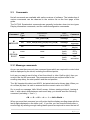
2.3.3 Version Command
Command
Sub
Type
Parameters
Data
Comment
V
Version
none
None
none
Displays
Version
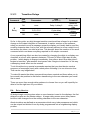
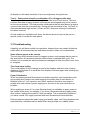
The version command returns 4 characters on the display which represent the
version of software being used. V224 means that you are using code version 2.24
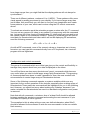
2.3.4 Maximum tubes command
Command
Sub
Type
Parameters
Z
Total tubes
none
None
Data
(binary)
Total number of
tubes(b)
Comment
Sets number of
tubes
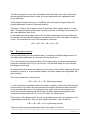
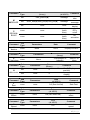
It is important for the code on each Smartsocket to know how many other tubes are
in the network and therefore this command is important. Because of the potentially
large number of tubes, the data must be sent as non-ASCII value, so for example the
correct command to use for an array of 16 tubes will be as follows.
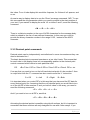
< Z > < 16 >
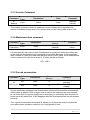
2.3.5 Forced enumeration
Command
N
eNumerate
Sub
Type
Parameters
Data
(Binary)
ND
none
0
NN
none
0
Comment
Pause 40mS (Displays
position)
Pause 40mS(Does not
display)
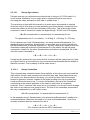
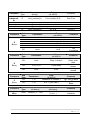
As was previously explained, the Smartsockets enumerate themselves automatically
when power is applied. With a larger array it may be the case that you are required
to use more than one power supply and in this case it is most likely that they will not
power up at the same time. If this happens then the Smartsockets will not enumerate
correctly
The manual enumeration command „N‟ allows you to force the array to enumerate
even after power has been turned on for a long period of time.
9|Page