1
SELCALL/TELCALL OPERATION
MESSAGE CALL
The Message Call mode allows you to send a text message (up to 64 characters of text) to a specific station.
Preparation
Rotate the CH Selector knob to select the channel to
be used for Message Call.
Disable the VOX and Clarifier features, if necessary.
Press the [SELCALL] key momentarily to activate
the Selcall system. The “
” icon will be illuminated on the LCD display.
Sending a Message Call
Rotate the Channel Selector knob to select the ID of
the station to which you wish to send the Message
Call. Available IDs are: the last-received ID, ten preprogrammed IDs, and “Auxiliary,” whereby you may
enter the desired ID using the keypad. To enter the
desired ID, rotate the CH Selector knob to “AUX,”
press the keypad’s [ENT] key, then enter the 4-digit
ID number from the keypad; finally press the [ENT]
key again.
Press the [CALL] key momentarily to enter the Call
Menu.
Rotate the CH Selector knob to select “MESSAGE.”
Press the [CALL] key again to display the last transmitted message. If you wish to edit the message:
Press the [ENT] key again, then press the keypad
to select the first digit of the message.
Example 1: Press the [1(MODE)] key repeatedly
to select the character “1” and any of the 27 available characters.
Example 2: Press the [2(NB)] key repeatedly to
toggle among the available characters associated
with that key: 2 A B C 2 …
Example 3: Press the [0(DIM)] key to toggle the
characters “0” and “space.”
Rotate the CH Selector knob one click clockwise
to move on to the next character.
If you make a mistake, press the [1(MODE)] key
to back-space the cursor, then re-enter the correct
letter, number, or symbol.
Repeat the above steps to program the remaining
letters or numbers of the desired message. A total
of 64 characters may be used in the message.
Press and hold the [1(MODE)] key to delete the
previously-stored data after the cursor.
Press the keypad’s [ENT] key to terminate the message.
Press the [CALL] key again to transmit the Message
Call.
VX-1700 OPERATING MANUAL
Receiving a Message Call
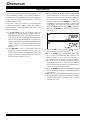
When the VX-1700 receives a Message Call matching your individual ID, a bell alarm will be heard, and
the “ ” icon will appear at the top center on the LCD,
and the received (called station’s) ID number and the
message will scroll across the display.
Press the PTT switch momentarily to cancel the Message Call mode, then press and hold in the PTT switch
and speak into the microphone in the usual fashion to
reply to the Message Call.
Press the [SELCALL] key again to re-activate the
Selcall system.
Page 19