1
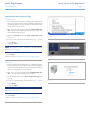
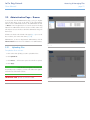
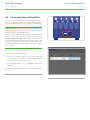
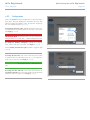
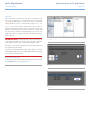
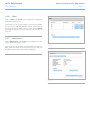
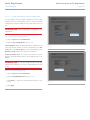
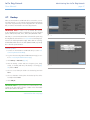
LaCie 5big Network
User Manual
Table of Contents
page 1
Table of Contents
1. Introduction................................................................................................................... 5
1.1. Box Content..................................................................................................................................... 6
1.2. Minimum System Requirements.......................................................................................................... 7
1.2.1. Windows Users....................................................................................................................... 7
1.2.2. Mac Users.............................................................................................................................. 7
1.3. Views of the 5big Network................................................................................................................. 8
1.4. Ethernet Cable.................................................................................................................................. 9
2. Setting Up Your LaCie 5big Network........................................................................... 10
2.1.
2.2.
2.3.
2.4.
2.5.
Turning On the 5big Network......................................................................................................... 11
Connecting the Ethernet Cable........................................................................................................ 12
Connecting Using LaCie Network Assistant....................................................................................... 13
Configuring the LaCie 5big Network on a Network Without a DHCP Server......................................... 15
Unmounting 5big Network Volumes................................................................................................. 16
3. Accessing & Managing Files........................................................................................ 17
3.1. Accessing Shared Folders................................................................................................................ 17
3.1.1. Other Connection Methods.................................................................................................... 18
3.2. FTP Access to Shares....................................................................................................................... 20
3.3. Administration Page – Browse.......................................................................................................... 21
3.3.1. Uploading Files..................................................................................................................... 21
3.3.2. Downloading Files................................................................................................................. 22
3.3.3. Deleting Files........................................................................................................................ 22
3.3.4. Logging Out......................................................................................................................... 22
3.4. Connecting External Hard Disks....................................................................................................... 23
4. Administering Your LaCie 5big Network..................................................................... 24
4.1. Accessing the Administration Page.................................................................................................... 25
4.1.1. Setting the Display Language................................................................................................. 26
4.1.2. Administration Home Page..................................................................................................... 26
4.2. Users............................................................................................................................................. 27
4.2.1. Adding Users........................................................................................................................ 28
4.2.2. Setting User Access to Shares................................................................................................. 29
4.2.3. Setting Group Membership.................................................................................................... 29
4.2.4. About Access Privileges.......................................................................................................... 30
4.2.5. Deleting User Accounts.......................................................................................................... 30
4.2.6. Editing User Accounts............................................................................................................ 30
4.3. Groups.......................................................................................................................................... 31
4.3.1. Adding Groups..................................................................................................................... 31
4.3.2. Setting Group Access to Shares.............................................................................................. 32
4.3.3. Deleting Groups................................................................................................................... 32
4.3.4. Editing Groups...................................................................................................................... 32
4.4. Shares........................................................................................................................................... 33
4.4.1. Creating Shares.................................................................................................................... 33
4.4.2. Deleting Shares..................................................................................................................... 34
4.4.3. Editing Shares....................................................................................................................... 34
4.5. System........................................................................................................................................... 35
4.5.1. Active Directory..................................................................................................................... 35
4.5.2. Configuration....................................................................................................................... 35
4.5.3. Network............................................................................................................................... 36
4.5.4. RAID.................................................................................................................................... 38
LaCie 5big Network
User Manual
Table of Contents
page 2
4.5.5. Disks.................................................................................................................................... 39
4.5.6. Status................................................................................................................................... 41
4.5.7. Maintenance......................................................................................................................... 41
4.5.8. System Log........................................................................................................................... 44
4.5.9. Wake on LAN (WOL)............................................................................................................. 45
4.6. Download...................................................................................................................................... 46
4.7. Backup.......................................................................................................................................... 47
4.8. Browse........................................................................................................................................... 48
4.9. Import (Snapshot)............................................................................................................................ 48
4.10.Multimedia..................................................................................................................................... 49
5. RAID and Disks............................................................................................................ 50
5.1.
5.2.
5.3.
5.4.
5.5.
5.6.
5.7.
Changing the RAID Level................................................................................................................. 50
RAID 0........................................................................................................................................... 51
RAID 5........................................................................................................................................... 52
RAID 5+Spare................................................................................................................................ 53
RAID 6........................................................................................................................................... 54
RAID 10......................................................................................................................................... 55
Installing a New Disk....................................................................................................................... 56
6. LED Indicators............................................................................................................. 57
7. Email Notification Triggers.......................................................................................... 58
8. Troubleshooting.......................................................................................................... 59
9. Contacting Customer Support...................................................................................... 61
8.1. LaCie Technical Support Contacts.................................................................................................... 62
10. Warranty Information................................................................................................ 63
LaCie 5big Network
User Manual
Copyrights
Copyright © 2009 LaCie. All rights reserved. No part of this publication may be
reproduced, stored in a retrieval system, or
transmitted in any form or by any means,
electronic, mechanical, photocopying, recording or otherwise, without the prior written consent of LaCie.
Trademarks
Apple, Mac, and Macintosh are registered trademarks of Apple Computer, Inc.
Microsoft, Windows 98, Windows 98 SE,
Windows 2000, Windows Millennium Edition, Windows XP and Windows Vista are
registered trademarks of Microsoft Corporation. Other trademarks mentioned in this
manual are the property of their respective
owners.
Changes
The material in this document is for information only and subject to change without
notice. While reasonable efforts have been
made in the preparation of this document
to assure its accuracy, LaCie assumes no
liability resulting from errors or omissions
in this document, or from the use of the information contained herein. LaCie reserves
the right to make changes or revisions in
the product design or the product manual
without reservation and without obligation
to notify any person of such revisions and
changes.
Canada Compliance Statement
This Class A digital apparatus meets all
requirements of the Canadian InterferenceCausing Equipment Regulations.
Foreword
page 3
FCC Statement
LaCie 5big Network
Tested to comply with FCC
standards for home or office
use
Manufacturer’s Declaration
for CE Certification
We, LaCie, solemnly declare that this product conforms to the following European
standards: Class B EN60950, EN55022,
EN50082-1, EN61000-3-2
This device complies with Part 15 of the
FCC Rules. Operation is subject to the following conditions:
With reference to the following conditions: 73/23/EEC Low Voltage Directive;
89/336/EEC EMC Directive
✦✦ The devices may not cause harmful
interference
This symbol on the product or
on its packaging indicates
that this product must not be
disposed of with your other
household waste. Instead, it is
your responsibility to dispose of your waste
equipment by handing it over to a designed
collection point for the recycling of waste
electrical and electronic equipment. The
separate collection and recycling of your
waste equipment at the time of disposal will
help to conserve natural resources and ensure that it is recycled in a manner that protects human health and the environment.
For more information about where you can
drop off your waste equipment for recycling, please contact your local city office,
your household waste disposal service, or
the shop where you purchased the product.
✦✦ The devices must accept any interference received, including interference
that may cause undesired operation.
NOTE: This equipment has been tested
and found to comply with the limits for a
Class B digital device, pursuant to Part 15
of the FCC Rules. These limits are designed
to provide reasonable protection against
harmful interference in a residential installation. This equipment generates, uses and
can radiate radio frequency energy and, if
not installed and used in accordance with
the instructions, may cause harmful interference to radio communications. However,
there is no guarantee that interference will
not occur in a particular installation. If this
equipment does cause harmful interference
to radio or television reception, which can
be determined by turning the equipment off
and on, the user is encouraged to try and
correct the interference by one or more of
the following measures:
✦✦ Reorient or relocate the receiving antenna.
✦✦ Increase the separation between the
equipment and receiver.
ROHS Compliance
✦✦ Connect the equipment into an outlet on a circuit different from that to
which the receiver is connected.
This product is ROHS compliant (European
Directive 2002/95/EC on the Restriction of
Hazardous Substances).
✦✦ Consult the dealer or an experienced
radio/TV technician for help.
Modifications to this product not authorized
by LaCie could void the FCC & Industry
Canada regulations and negate your authority to operate the product.
CAUTION: A shielded-type power cord
is required in order to meet FCC emission
limits and also to prevent interference to the
nearby radio and television reception. It is
essential that only the supplied power cord
be used.
LaCie 5big Network
User Manual
Health and Safety
Precautions
✦✦ Only qualified persons are authorized to carry out maintenance on
this device.
✦✦ Read this User Manual carefully and
follow the correct procedure when
setting up the device.
✦✦ Do not open your LaCie 5big Network or attempt to disassemble or
modify it. Never insert any metallic
object into the drive to avoid any risk
of electrical shock, fire, short-circuiting or dangerous emissions. Your LaCie 5big Network contains no userserviceable parts. If it appears to be
malfunctioning, have it inspected by
a qualified LaCie Technical Support
representative.
✦✦ Never expose your device to rain, or
use it near water, or in damp or wet
conditions. Never place objects containing liquids on the LaCie 5big Network, as they may spill into its openings. Doing so increases the risk of
electrical shock, short-circuiting, fire
or personal injury.
✦✦ Power requirements 100-240 V~,
1.44 A, 50-60 Hz, (supply voltage
fluctuations not exceeding ± 10%
of the nominal and transient overvoltages according to over-voltage
category II).
General Use Precautions
✦✦ Do not expose your device to temperatures outside the range of 5° C to
35° C (41° F to 95° F); or to operational humidity beyond 5-80%, noncondensing, or non-operating humidity beyond 10-90%, non-condensing.
Doing so may damage it or disfigure
its casing. Avoid placing your your device near a source of heat or exposing
it to sunlight (even through a window).
Inversely, placing your device in an
environment that is too cold or humid
may damage the unit.
✦✦ Always unplug the device from the
electrical outlet if there is a risk of
lightning or if it will be unused for an
extended period of time. Otherwise,
there is an increased risk of electrical
Foreword
page 4
shock, short-circuiting or fire.
✦✦ Use only the power supply shipped
with the device.
✦✦ Do not use the device near other
electrical appliances such as televisions or radios. Doing so may cause
interference which will adversely affect the operation of the other products.
✦✦ Do not place the device near sources
of magnetic interference, such as
computer displays, televisions or
speakers. Magnetic interference can
affect the operation and stability of
your device.
✦✦ Never use excessive force on your
device. If you detect a problem, see
the Troubleshooting section in this
manual.
IMPORTANT INFO: Any loss, corruption
or destruction of data while using a LaCie
drive is the sole responsibility of the user,
and under no circumstances will LaCie be
held liable for the recovery or restoration of
this data. To help prevent the loss of your
data, LaCie highly recommends that you
keep TWO copies of your data; one copy
on your external hard disk, for instance,
and a second copy either on your internal
hard disk, another external hard disk or
some other form of removable storage media. LaCie offers a complete line of CD and
DVD drives. If you would like more information on backup, please refer to our website.
IMPORTANT
INFO:
1GB
=
1,000,000,000
bytes.
1TB
=
1,000,000,000,000 bytes. Once formatted, the actual available storage capacity
varies depending on operating environment (typically 10-15% less).
LaCie 5big Network
User Manual
1.Introduction
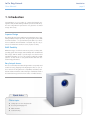
Congratulations on your purchase of a LaCie 5big Network. Designed to satisfy the data sharing and backup needs of small offices,
the LaCie 5big Network represents the new generation of shared
storage with security.
Superior Design
The advanced metal casing and thermoregulated fan ensure longlasting reliability and quiet operation. The glowing blue button adds
more than character—one push will back up the data of your choice
from an attached external hard disk. Sturdy disk trays are easy to
remove for maintenance and lock securely in place for safety.
RAID Flexibility
RAID technology is one of the best means to protect your data, while
providing greater data integrity and availability than standard hard
disk storage. With the ability to provide single error detection and
redundant information to recover the original if a disk fails, a RAID
system is an ideal means to safe-guard valuable data while also
stream-lining performance.
Easy Setup & Access
The new user-friendly LaCie Network Agent makes setup simple and
enables accessing, mapping and configuring the drives on your office’s network. The 5big Network’s compatibility with Mac®, Windows® and Linux machines without having to install drivers make it
the ideal file-sharing solution for home offices or small businesses.
Quick Links
Click a topic:
✦✦ Setting Up Your LaCie 5big Network
✦✦ Accessing & Managing Files
✦✦ RAID and Disks
✦✦ Troubleshooting
Introduction
page 5
LaCie 5big Network
User Manual
Introduction
page 6
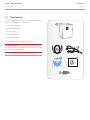
1.1. Box Content
Your LaCie 5big package contains the system tower and an accessories box containing items 2-6, listed below:
1. LaCie 5big Network
2. Cat 5E Ethernet cable
3. Power supply
4. Utilities CD-ROM
5. Quick Install Guide
6. 2-in-1 RAID mode change and drive lock tool
IMPORTANT INFO: Please save your packaging. In the event that
the 5big Network should need to be repaired or serviced, it must be
returned in its original packaging.
5big network
Network Family 1.0
User Manual
LaCie Software Utilities
Adobe® Reader ®
©
20
08
LaC
ie
com
, all ri
ghts reser ved. www.lacie.
Gigabit Ethernet 5-bay RAID
Design by Neil Poulton
1
28
712
Quick Install Guide
LaCie 5big Network
User Manual
1.2. Minimum System Requirements
1.2.1. Windows Users
✦✦ Windows 2000, Windows XP or Windows Vista
✦✦ 500MHz processor or higher
✦✦ 512MB RAM or greater
✦✦ Ethernet switch or hub (10/100 or better)
✦✦ Web browser (Internet Explorer®, Firefox™)
1.2.2. Mac Users
✦✦ Mac OS X 10.2
✦✦ 500 MHz G4 or higher, G5, Intel Core Duo or Intel Core 2
Duo
✦✦ 512MB RAM or greater
✦✦ Ethernet switch or hub (10/100 or better)
✦✦ Web browser (Internet Explorer®, Safari™, Firefox™)
IMPORTANT INFO: The 5big Network’s performance can be affected by such external forces as network activity, hardware, distance
and setup.
IMPORTANT INFO: For optimal performance, use a Gigabit Ethernet router and a Gigabit Ethernet board in your host computer.
Introduction
page 7
LaCie 5big Network
User Manual
Introduction
page 8
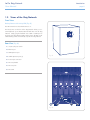
1.3. Views of the 5big Network
Front View
Backup Button with Activity LED (Fig. 01)
The LED remains lit to show that the drive is on.
The blue button on the front of the 5big Network allows you automatically back up an attached external hard drive onto the 5big
Network. Simply plug the hard disk into a USB or eSATA port on
the back of the 5big Network and push the button. All data on the
attached disk(s) will be automatically copied to the 5big Network.
Rear View (Fig. 02)
1. on/auto/off power switch
2. Ethernet port
3. USB expansion port
4. eSATA expansion ports (3)
Fig. 01
5. Power input connection
6. Drive tray handle
7. Drive tray lock
8. Drive LED
designed by neil poulton
on
auto
off
Fig. 02
LaCie 5big Network
User Manual
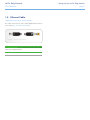
1.4. Ethernet Cable
Gigabit Ethernet Cables And Connectors
The cables and connectors used to attach Gigabit Ethernet devices
are as follows (Fig. 03 - Ethernet Cable Ends):
Fig. 03 - Ethernet Cable Ends
TECHNICAL NOTE: LaCie recommends Cat 5E or Cat 6 cables,
which support Gigabit Ethernet.
Setting Up Your LaCie 5big Network
page 9
LaCie 5big Network
User Manual
2.Setting Up Your LaCie 5big Network
Follow these steps to power on the LaCie 5big Network and to log
on to the administration pages.
Step 1 – 2.1. Turning On the 5big Network
Step 2 – 2.2. Connecting the Ethernet Cable
Step 3 – 2.3. Connecting Using LaCie Network Assistant
Setting Up Your LaCie 5big Network
page 10
LaCie 5big Network
User Manual
Setting Up Your LaCie 5big Network
page 11
2.1. Turning On the 5big Network
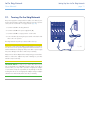
The power supply kit is composed of two cables: one cable (A) connects to the LaCie drive; and the other cable (B) connects to a power
outlet, such as a wall outlet or a surge protector (Fig. 04).
designed by
neil poulton
1. Connect Cable A to the 5big Network.
2. Connect Cable B to the power supply brick (C).
3. Connect Cable B to a surge protector or wall outlet.
4. Turn on the drive by moving the power switch on the back of the
drive to the “on” position.
o
o
off
The 5big Network may take up to 60 seconds to boot up.
CAUTION: Only use the AC adapter supplied with your specific LaCie device. Do not use a power supply from another LaCie device or
another manufacturer. Using any other power cable or power supply
may cause damage to the device and void your warranty.
Always remove the AC adapter before transporting your LaCie drive.
Failure to remove the adapter may result in damage to your drive
and will void your warranty.
TECHNICAL NOTE: You may use your LaCie drive when in a foreign country thanks to its 100-240 Volt power supply. To be able to
use this feature, you may need to purchase an appropriate adapter
or cord. LaCie accepts no responsibility for any damage to the drive
resulting from the use of an inappropriate adapter. Using an adapter
other than one authorized by LaCie will void your warranty.
Fig. 04
LaCie 5big Network
User Manual
Setting Up Your LaCie 5big Network
page 12
2.2. Connecting the Ethernet Cable
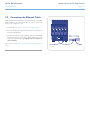
Unlike regular desktop hard drives, the 5big Network is accessible
when attached to your network and does not need to connect directly to your computer (Fig. 05).
1. Turn the drive on. See 2.1. Turning On the 5big Network.
2. Connect the Ethernet cable to the Ethernet port on the back of
the LaCie 5big Network.
3. Connect the other end of the Ethernet cable into an available
Ethernet port on your router. Allow a few moments for your network to recognize the drive (it may take up to 3 minutes on
some networks).
Now move on to step 3,2.3. Connecting Using LaCie Network Assistant.
on
auto
off
Fig. 05
LaCie 5big Network
User Manual
Setting Up Your LaCie 5big Network
page 13
2.3. Connecting Using LaCie
Network Assistant
LaCie Network Assistant detects all network attached storage devices on your network and gives you easy ways to connect to or
configure them.
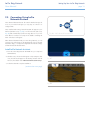
Once installed and running, Network Assistant will appear in your
task bar (Windows users, Fig. 07) or in the menu bar (Mac users,
Fig. 08) and automatically search for storage devices on your network. When a new device is found, an info bubble containing the
name of the device will appear.
Fig. 06 - LaCie Network Assistant Icon
When Network Assistant finds your LaCie 5big Network, you can
connect to any of the shares on the 5big Network, log in to the Administration Page, or configure the 5big Network’s network settings,
all from the Network Assistant menu.
Install LaCie Network Assistant:
1. Insert the LaCie 5big Network CD-ROM into your computer’s
CD-ROM drive.
2. Windows users, the CD should appear in My Computer. Mac
users, the CD should appear on the desktop. Double-click the
CD icon, then double-click “LaCie Network Assistant Setup”.
Fig. 07
3. Follow the Wizard to complete installation.
(continued on next page)
Fig. 08
LaCie 5big Network
User Manual
Setting Up Your LaCie 5big Network
page 14
Launch the Administration Page
Windows Users
1. Select LaCie Network Assistant in Start/Programs. A Network Assistant icon will appear in the system tray and Network Assistant will
automatically detect your LaCie 5big Network and any other LaCie
storage devices on your network.
2. Click on the icon in the system tray and select Configuration Window... from the LaCie 5big Network sub-menu (Fig. 09). The LaCie
Network Assistant page will open.
3. Under the Network tab, click the Web configuration page
link (Fig. 10).
Fig. 09
4. To log in to LaCie 5big Network administration (Fig. 11), enter:
Login: admin
Password: admin
NOTE: This password can be changed from the Administration
Page (refer to 4.2. Users).
5. Click Log on.
Continue to section 4. Administering Your LaCie 5big Network.
Fig. 10
Mac Users
1. Double click LaCie Network Assistant in your Applications folder.
An Network Assistant icon will appear in the menu bar and the Assistant will automatically detect your LaCie 5big Network and any
other LaCie storage devices on your network.
2. Click on the icon in the menu bar and select Configuration Window.... The LaCie Network Assistant page will open.
3. On the Network tab, click the Web configuration page link
(Fig. 10).
4. To log in to LaCie 5big Network administration (Fig. 11), enter:
Login: admin
Password: admin
NOTE: This password can be changed from the Administration
Page (refer to 4.2. Users).
5. Click Log on.
Continue to section 4. Administering Your LaCie 5big Network.
Fig. 11
LaCie 5big Network
User Manual
Setting Up Your LaCie 5big Network
page 15
2.4. Configuring the LaCie 5big
Network on a Network Without
a DHCP Server
Most home networking routers are DHCP servers, meaning the
router assigns an IP address to all devices on the network to allow
devices to find each other. If your network does not have DHCP
server, you may need to manually assign your LaCie 5big Network
an IP address and other network information.
The easiest way to modify your LaCie 5big Network’s network configuration is to use the LaCie Network Assistant. See section 2.3.
Connecting Using LaCie Network Assistant for information on installing the network configuration software.
Fig. 12
1. Start LaCie Network Assistant (see section 2.3. Connecting Using LaCie Network Assistant).
2. Windows Users: Click on the LaCie Network Assistant icon
in the system tray and select Configuration Window... (Fig.
12). The LaCie Network Assistant Configuration window opens
(Fig. 13).
Mac users: Click on the LaCie Network Assistant icon in the
menu bar and select Network Configuration... (Fig. 14). The
LaCie Network Assistant Configuration window opens (Fig. 13).
3. Click the Network tab.
4. Select Manual.
Fig. 13
TECHNICAL NOTE: If the fields (IP address, Subnet mask, etc.) are
filled when Automatic (DHCP) is selected, you do not need to make
manual settings. Leave Automatic selected.
5. Modify the network settings to work with your network.
6. Click Apply.
Fig. 14
LaCie 5big Network
User Manual
2.5. Unmounting 5big Network
Volumes
To physically turn the 5big Network off, see section 4.5.7.4. Shut
Down.
Mac Users:
Drag all mounted volume icons to the trash.
Windows Users:
If you have used the LaCie Network Assistant to MOUNT volumes
(i.e. if the volume has been assigned a letter in My Computer):
1. Right-click the LNA icon in the task bar and select Network
Configuration...
2. Select the Volumes tab.
3. Right-click a volume and select Unmount.
Alternately, if the volumes are not mounted (and so do not appear
in My Computer), simply close the Windows Explorer window to disconnect from the volume.
IMPORTANT INFO: After switching off the 5big Network, it takes
up to 20 seconds for the operating system to close all services and
for all components (LEDs, disks, fan and boards) to power off.
Setting Up Your LaCie 5big Network
page 16
LaCie 5big Network
User Manual
Accessing & Managing Files
page 17
3.Accessing & Managing Files
Use LaCie Network Assistant to access your shared folder(s) (see
section 2.3. Connecting Using LaCie Network Assistant).
You can also connect an external hard drive to use as a backup for
your LaCie 5big Network or as additional storage. External drives
appear as separate shares and are accessible by anyone on the network. For details, see 3.4. Connecting External Hard Disks.
3.1. Accessing Shared Folders
When your computer is connected to your local area network, LaCie Network Assistant will help you quickly connect to the shared
folder(s) on your LaCie 5big Network.
Fig. 15
To access shared folders (all users):
1. Run the LaCie Network Assistant (LNA). Click on the LNA icon
in the system tray (Windows users, Fig. 15) or menu bar (Mac
users, Fig. 16).
2. Select Share (default) or the name of any other share you have
created from the LNA menu. The share will open in a Windows
Explorer or Mac Finder window.
TECHNICAL NOTE: You may need to enter the username and
password for “share.” The defaults are:
Username: admin
Password: admin
Your system may remember this information and might not ask for it
during the same session.
See section 4.2.6. Editing User Accounts for information on changing
the User account information.
3. Simply drag and drop files to and from this window, just like a
regular folder.
Fig. 16
LaCie 5big Network
User Manual
Accessing & Managing Files
page 18
3.1.1. Other Connection Methods
Vista/XP/2000 Users – My Network Places
IMPORTANT INFO: If you have just turned on the LaCie 5big
Network, it may take a few moments for it to appear on the network.
To access the share in Windows, look in My Network Places, and
select Microsoft Windows Workgroup. By default, the 5big Network will be named LaCie 5big Network (Lacie-5big Network)
(Fig. 17).
Alternatively, you can access the share by typing the following in a
Windows explorer address field (Fig. 18.):
\\LaCie-5big\[share name]
\\[IP address]\[share name] Find the IP address by running the
LaCie Network Assistant (section 2.3. Connecting Using LaCie
Network Assistant).
Fig. 17
For FTP access, type:
ftp://LaCie-5big or ftp://[IP address]
In the logon window that opens, type:
Login: admin
Password: admin
(This user name and password is the factory default; if you have
already created a user, input your user name and password.)
The LaCie 5big Network will appear as a drive with one share folder
on the network.
Windows Me/2000
For Windows Me and Windows 2000 users, if you cannot find the
LaCie 5big Network from your workstation, try using the Windows
search tool.
From the Start menu, select Search, and then click on For Files or
Folders. In the Search Results window, select Computers.
In the Search for Computers dialog box, enter the server name
and click the Search Now button. By default, the LaCie 5big Network will be named “LaCie-5big” , and the share “SHARE”.
Fig. 18
LaCie 5big Network
User Manual
Mac OS X Users
From the Finder, select Go and then Connect to Server... In the
window that opens, type:
afp://lacie-5big.local or afp://[IP address]
And click Connect.
Mac OS 9.x Users
From the Apple menu, select Network Browser, Chooser or Connect to Server. In Chooser, click the Appleshare icon. Your server
should appear in the list with the default name “LaCie-5big”. Select
it and press OK.
Linux Users
Under KDE, open konqueror and type in the IP address of the LaCie
5big Network into the address field:
For FTP access – ftp:// [IP address]
For HTTP access – http:// [IP address]
For SMB/CIFS access (in order for this to method to work, the services need to be properly configured) – smb:// [IP address].
Accessing & Managing Files
page 19
LaCie 5big Network
User Manual
3.2. FTP Access to Shares
The FTP protocol is used to transfer files from one computer to another through a network, such as over the internet. This protocol
allows you to exchange files with your friends or relatives securely,
as only people to whom you have provided the user name and password will have access. FTP access also provides you a way to access
your files remotely.
In order to make your 5big Network accessible via the internet, configure your router to allow remote connections using FTP. This process varies depending on the router.
For the 5big Network to be accessible through the internet, port 21
needs to be forwarded to the 5big Network.
TECHNICAL NOTE: By default, FTP is enabled and therefore Share
is fully accessible via FTP. To turn FTP service off, refer to section
4.5.6. Status.
Accessing & Managing Files
page 20
LaCie 5big Network
User Manual
Accessing & Managing Files
page 21
3.3. Administration Page – Browse
To access files from the Administration page, just log in. Regular
users will have direct access to the shares on the 5big Network,
with no access to administrative features. The administrator can click
on Browse in the navigation bar to access files stored on the 5big
Network. The administrator will have access to all files. Other users
will only have access to the files to which the administrator has given
them access.
All shares are listed on the left side of the page (Fig. 19). To see the
files in a share, click on the share name (Fig. 20).
Administrators, to return to 5big Network administration, click the
Administration button. This is not available to non-administrators.
Fig. 19
3.3.1. Uploading Files
To upload a file to a share:
1. Click on the share (folder) you want to upload the file to.
2. Click Upload file.
3. Click Browse… a file browser opens. Select the file to upload.
4. Click Apply.
TECHNICAL NOTE: If the file does not appear in the folder after
the upload process is complete, just click on the folder name again to
refresh the view of the folder contents.
IMPORTANT INFO: Uploads are limited to 55MB.
Fig. 20
LaCie 5big Network
User Manual
Accessing & Managing Files
page 22
3.3.2. Downloading Files
To download a file:
1. Click on the share (folder) you want to download the file from.
2. Click on the file’s link (Fig. 21).
3. Internet Explorer: in the security warning window, click to allow the download. File saves to the default downloads directory.
4. FireFox and Safari: File downloads to the default downloads
directory.
3.3.3. Deleting Files
Fig. 21
To delete a file from a share:
1. Click on the share (folder) you want to delete the file from.
2. Select the file or files to delete.
3. Click Delete files (Fig. 22).
4. Click OK on the confirmation dialog.
3.3.4. Logging Out
Log out at any time by clicking Log out in the upper right corner of
the Administration Page (Fig. 23).
Fig. 22
Fig. 23
LaCie 5big Network
User Manual
Accessing & Managing Files
page 23
designed by neil poulton
3.4. Connecting External Hard Disks
You can connect an external USB or eSATA hard disk to back up the
data on your LaCie 5big Network or as a way to add storage capacity. Connected hard disks are accessed similarly to shared folders.
TECHNICAL NOTE: External hard disks must be formatted in one
of the supported systems in to mount on the LaCie 5big Network:
FAT32, NTFS, HFS+, EXT3, REISERFS or XFS.
In order to use an external hard drive to back up the 5big Network,
the drive must be formatted in one of the file formats listed above,
with the exception of NTFS. NTFS volumes cannot be used to
back up the 5big Network because this file system format is readonly when connected to the 5big Network. External drives can be
formatted to XFS through the Web administration page. For details,
see 4.5.5. Disks.
on
auto
off
Fig. 25
To connect an external hard disk:
1. Turn on your LaCie 5big Network.
2. Turn on the external hard disk (if it has a power button) and
connect its USB or eSATA cable to the USB or eSATA port on the
back of the LaCie 5big Network (Fig. 24).
3. In the Web Administration Page, click System and then on the
Disks tab.
The external hard drive will be listed (Fig. 25). For more information,
see 4.5.5. Disks.
Fig. 24
LaCie 5big Network
User Manual
Administering Your LaCie 5big Network
page 24
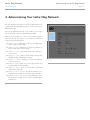
4.Administering Your LaCie 5big Network
The LaCie 5big Network features an easy-to-use Web-based tool for
configuring the drive and administering users, referred to here as the
Administration Page.
Accessing the Administration Page is easy, whether you’re using a
browser (all users) or the LaCie Network Assistant (LNA).
When you log in as “admin”, you will see a series of blue navigation
links on the left side of the page (Fig. 26) to help you navigate and
configure the LaCie 5big Network:
✦✦ Section 4.2. Users: Add, delete or edit users, including assignment of folder access privileges.
✦✦ Section 4.3. Groups: Add, delete or edit groups, add users to
groups, assign group access privileges
✦✦ Section 4.4. Shares: Create, delete or edit shares, change access restrictions
✦✦ Section 4.5. System: Change system settings, manage disks
and RAID settings, manage system updates
✦✦ Section 4.6. Download: Configure your LaCie 5big Network
to be a torrent server.
✦✦ Section 4.7. Backup: Back up your LaCie 5big Network onto
an external USB or eSATA hard drive
✦✦ Section 4.8. Browse: Access files and folders, upload and
download files, delete files
✦✦ Section 4.9. Import (Snapshot): Click the front button to automatically import the data on an attached external hard drive
✦✦ Section 4.10. Multimedia: Set up your 5big Network as a multimedia server, providing access to its files to compliant digital
media devices
Fig. 26
LaCie 5big Network
User Manual
Administering Your LaCie 5big Network
page 25
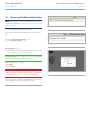
4.1. Accessing the Administration Page
NOTE: The easiest way to access the Administration Page is to use
LaCie Network Assistant (see section 2.3. Connecting Using LaCie
Network Assistant).
Fig. 27
To access the Administration Page with a browser:
In your browser’s URL (web address) field, type one of the following:
Mac users: http://lacie-5big.local. (Fig. 27)
PC users: http://lacie-5big (Fig. 27)
or
Fig. 28
http://IP address (Fig. 28)
Find the IP address by running the LaCie Network Assistant (section
2.3. Connecting Using LaCie Network Assistant).
TECHNICAL NOTE: The IP address of your LaCie 5big Network
may be different than the IP address shown in Fig. 28.
On the login page (Fig. 29), type:
Login: admin
Password: admin
IMPORTANT INFO: The login name and password are both set to
“admin” by default. The admin password can be changed, but not
the login name. See section 4.2. Users for more information.
If you are logged in as “admin”, the Administration Page will open.
For non-admin users the file browsing page will open.
Fig. 29
LaCie 5big Network
User Manual
Administering Your LaCie 5big Network
page 26
4.1.1. Setting the Display Language
The default display language is set to your browser’s language. If
your browser’s display language is not supported, 5big Network
administration will default to English. You can change the display
language at any time by selecting a language from the menu in the
upper right corner of the administration page (Fig. 30). This can be
done from the Log On page, as shown, so you can proceed from
the beginning in your own language.
English
Français
Deutsch
Italiano
Español
Dutch
Svenska
Dansk
Japanese
Fig. 30
4.1.2. Administration Home Page
When you log into LaCie 5big Network administration, the Home
page opens (Fig. 31). This page contains information about the status of the 5big Network.
The Fan Status indicator (a) will be in one of three states:
✦✦ Blue – the fan is on and working.
✦✦ Gray – the fan is off.
✦✦ Red – the fan has failed. The 5big Network will continue to
function with a failed fan, but overall system reliability is impacted. Contact your LaCie reseller or LaCie customer support in the even of a fan failure. See section 8.1. LaCie Technical Support Contacts.
The RAID Status indicator (b) will be in one of three states:
✦✦ Blue – the disks are on and working.
✦✦ Gray – disks are functional, but not accessible (for example,
data is being rebuilt).
✦✦ Red – RAID not functional. Check the Disk page (System >
Disk) for error messages.
Fig. 31
LaCie 5big Network
User Manual
Administering Your LaCie 5big Network
page 27
4.2. Users
Click on the Users link in the navigation bar to open the User Accounts page. Use this page to create, edit and delete user accounts.
Administrator Account
Only one user can have administrative privileges for the 5big Network. This user’s login name cannot be changed from “admin”, but
the password can be changed.
IMPORTANT INFO: The admin user can also enter an email address to which the 5big Network can send messages about important changes to the 5big Network’s status (see below).
To change the administrator’s password:
1. Click on the “admin” user in the user list on the Users page. The
“User profile Admin” page opens (a, Fig. 32).
2. Enter a new password in the “Password” field. Enter the password again in the “Confirm password” field.
3. Click Apply (b, Fig. 33).
Email Notifications
The administrator can provide an email address to which the 5big
Network will send notifications of important status changes, such as
disk failure (see chart in section 7. Email Notification Triggers).
TECHNICAL NOTE: The 5big Network has an integrated SMTP
server that sends emails through port 25. This service is thus disabled
if port 25 is blocked (as with Livebox, Orange, and France Telecom).
As many ISPs block this port, you must configure your router to authorize traffic through this port in order for this service to work.
Fig. 33 shows an email sent informing the administrator that the
5big Network’s temperature has reached critical levels and will be
automatically shutting down.
Fig. 32
From:
Subject:
Date:
To:
Chris Sutton <[email protected]>
Re: TR : [FiveBig-Rose] LaCie email notification
August 20, 2008 3:14:26 PM GMT+03:00
Edin Del Mar <[email protected]>
De : [email protected] [mailto:[email protected]]
Envoyé : mercredi 23 avril 2008 11:14
À : Edin Del Mar
Objet : [FiveBig-Rose] LaCie email notification
*
*
*
*
*
Machine:
Model:
IP address:
MAC address:
System time :
FiveBig-Rose
5big Network
192.168.8.48
8C:00:00:00:51:81
11:14:10 23 March 2008
This message is automatically generated by the LaCie email notification service.
The temperature of the drive(s) is critical: SYSTEM WILL NOW DO AN EMERGENCY SHUTDOWN
|
|
|
|
Temp
Temp
Temp
Temp
HDD1
HDD2
HDD3
HDD4
Fig. 33
=>
=>
=>
=>
43degC
39degC
36degC
43degC
Model:
Model:
Model:
Model:
SAMSUNGSP2504C
SAMSUNGSP2504C
SAMSUNGSP2504C
SAMSUNGSP2504C
Serial
Serial
Serial
Serial
Nb
Nb
Nb
Nb
:
:
:
:
S0YHJ1PP600041
S0YHJ1PP600045
S0YHJ1PP600273
S0YHJ1PP600305
|
|
|
|
LaCie 5big Network
User Manual
Administering Your LaCie 5big Network
page 28
4.2.1. Adding Users
To add a user account:
1. Click Add on the User Accounts page (Fig. 34). The User Profile
page opens (Fig. 35).
2. Enter a login name in the “Login” field.
IMPORTANT INFO: Login names are case-sensitive. (Ex. “User”
is not the same as “user”.)
3. Enter the user’s first and last name in the First name and Last
name fields. This information only appears to the administrator
as part of the User Profile on this page.
4. Check Password to require the user to log in with a password. If
the Password box is unchecked, the user can log in with a Login
name only.
Fig. 34
5. Enter a password in the “Password” and “Confirm password”
fields, if applicable.
TECHNICAL NOTE: Passwords cannot exceed 8 characters.
6. To enable the user account (allow the user to log in), select Enable from the Status menu.
7. Click the Apply button.
Fig. 35
LaCie 5big Network
User Manual
Administering Your LaCie 5big Network
page 29
4.2.2. Setting User Access to Shares
All of the shares on your 5big Network are listed on the Shares tab
of each user’s profile page. Shares have three access levels:
✦✦ Read & Write – users with Read & Write access can upload,
download and view files
✦✦ Read Only – users with Read only access can download and
view files but cannot upload files
✦✦ No Access
See section 4.2.4. About Access Privileges for more information.
To set user access to shares:
1. Click the Shares tab on the user’s User Profile page.
2. Select Read & Write, Read Only or No Access for each share
(Fig. 36). No Access is selected by default.
Fig. 36
4.2.3. Setting Group Membership
All of the groups on your 5big Network are listed on the Member
of tab of each user’s profile page. Users can belong to an unlimited
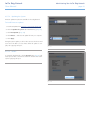
number of groups.
See section 4.2.4. About Access Privileges for more information.
To set user group membership:
1. Click the Member of tab on the user’s User Profile page.
2. Check the box for each group to which you want to assign the
user (a, Fig. 37).
IMPORTANT INFO: When you are done configuring the new user
click Apply to save your settings for the new user and to add the user
to the users list (b, Fig. 37).
Fig. 37
LaCie 5big Network
User Manual
Administering Your LaCie 5big Network
page 30
4.2.4. About Access Privileges
Access privileges can be assigned to users on an individual user
basis or on a group basis. User-level access is more restrictive.
Here is an example of the way access privileges work when a user
has different kinds of access to the same share as member of a
group and as an individual:
✦✦ User U belongs to groups G1 and G2, and has access to
share S.
✦✦ If G1 has read-only access to S and G2 has read-write access
to S, then U will have read-write access to S.
✦✦ If U has read-only access to S and G2 has read-write access
to S, then U will have read-only access.
Fig. 38
4.2.5. Deleting User Accounts
On the User Accounts page (Fig. 38), check the box beside each
user you want to delete (a) and click Remove (b).
4.2.6. Editing User Accounts
The administrator can edit the details of a user account at any time
by clicking on a user on the User Accounts page to view the user’s
profile (Fig. 39).
Fig. 39
LaCie 5big Network
User Manual
Administering Your LaCie 5big Network
page 31
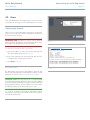
4.3. Groups
Click on the Groups link in the navigation bar to open the Groups
page (Fig. 40). Use this page to create, edit and delete groups.
If you use your 5big Network in an office setting where many different people from different departments need to have access to the
5big Network, setting up groups is a good way to organize users
and to give the most appropriate access to shares. You can specify which shares groups can access, which users belong to which
groups and enable or disable entire groups.
4.3.1. Adding Groups
To add a group:
1. Click Add on the Groups page (Fig. 41). The Group Profile
page opens (Fig. 42).
Fig. 40
2. Enter a name and description for the group. The description
only appears to the administrator as part of the Group Profile
on this page (a, Fig. 42).
3. Select “enabled” to activate the group as soon as your changes
are applied.
4. All user accounts on the 5big Network are listed in the User
column. Select the users you want to be in the group.
5. Click Apply (b, Fig. 42).
Fig. 41
Fig. 42
LaCie 5big Network
User Manual
Administering Your LaCie 5big Network
page 32
4.3.2. Setting Group Access to Shares
All of the shares on your 5big Network are listed on the Shares
tab of each group’s profile page. Shares have three access levels:
✦✦ Read & Write – groups with Read & Write access can upload,
download and save files
✦✦ Read Only – groups with Read only access can download
and open files but cannot save files
✦✦ No Access
See section 4.2.4. About Access Privileges for more information.
To set group access to shares (Fig. 43):
1. Click the Shares tab on the group’s Group Profile page (a).
Fig. 43
2. Select Read & Write, Read Only or No Access for each share
(b). No Access is selected by default.
3. Click Apply (c).
4.3.3. Deleting Groups
On the Groups page, check the box beside each group you want to
delete (a) and click Remove (b) (Fig. 44).
IMPORTANT INFO: Deleting a group does not delete the users
within the group. Go to the Users page to delete user accounts.
4.3.4. Editing Groups
The administrator can edit the details of a group’s profile at any
time by clicking on a group on the Groups page to view the group’s
profile.
Fig. 44
LaCie 5big Network
User Manual
Administering Your LaCie 5big Network
page 33
4.4. Shares
Click on the Shares link in the navigation bar to open the Shares
page (Fig. 45). Use this page to create, edit and delete shares.
4.4.1. Creating Shares
To create a share:
1. Click Add on the Shares page. The Share Details page opens
(Fig. 46).
2. Enter a name and description for the share (a). The description
only appears to the administrator as part of the Share Profile on
this page.
TECHNICAL NOTE: The share name cannot contain any of the following characters: \ / [ ] : | < > + = ; , ? * @ and space.
Fig. 45
3. Select Enabled from the Status menu to make the share accessible. Select Disabled to create the share but make it inaccessible (b).
4. To make the share accessible in read/write mode to anyone,
unclick the “Allow public read access” check box and click “Allow public read and write access” (c). No password is needed
to access the share. Select “Allow public read access” to require
a password for read/write access. Anyone can access an “Allow
public read access” share in read-only mode.
5. Select the protocols which will be used to access the share. You
can choose from Windows (SMB), Apple (AFP), FTP or HTTP (d).
Click the Apple Time Machine compatible button to allow
this share to be used as a target volume for backup using Time
Machine.
6. Click Apply (e).
Fig. 46
LaCie 5big Network
User Manual
Administering Your LaCie 5big Network
page 34
4.4.2. Deleting Shares
On the Shares page (Fig. 47), check the box beside each share you
want to delete (a) and click Remove (b). Deletion of the share could
take just a few seconds to several minutes, depending on the size
of the share.
CAUTION: Deleting a share deletes all files contained within the
share folder. Back up any data you want to save before deleting a
share.
4.4.3. Editing Shares
The administrator can edit the details of a group’s profile at any
time by clicking on a group on the Groups page to view the group’s
profile (Fig. 48).
Fig. 47
Fig. 48
LaCie 5big Network
User Manual
Administering Your LaCie 5big Network
page 35
4.5. System
In addition to the Configuration page, which is the main System
page, the System menu has four sub-sections: Network, Disk, Status
and Maintenance, each accessible from the navigation bar when
you click System.
4.5.1. Active Directory
The 5big Network can join a Microsoft Active Directory. Active Directory is the directory service that is included with Microsoft Windows Server 2003 and Microsoft Windows 2000 Server. By creating
a link between user accounts, mailbox accounts, and applications,
Active Directory simplifies the task of adding, modifying, and deleting user accounts. Integrating the 5big Network with your Active
Directory allows the 5big Network to streamline the creation of users, groups, and access privileges.
Fig. 49
To connect, click on System > Join Domain. Enter a domain
name, username, and password and click Join Domain (Fig. 49).
Once the 5big is connected to the domain, the administrator will be
able to add users or groups in the following way:
TECHNICAL NOTE: In order to assign access to a share to a user(s)
or group(s), the “Allow public read and write access“ button must be
unchecked.
1. Navigate to the Shares page.
2. Click on the share to which you wish to add users.
3. In the search field, add a user by one of the following methods:
Fig. 50
a. Type the name and click Add.
b. Typing a few characters of the username and click Search
(Fig. 50). In the list of found users, simply click the user.
Fig. 51
LaCie 5big Network
User Manual
Administering Your LaCie 5big Network
page 36
4.5.2. Configuration
Click on the System link in the navigation bar to open the Configuration page. This page displays basic information about the 5big
Network including the Machine name, the Windows workgroup,
time zone and date and time (a, Fig. 52).
To change the machine name, highlight the machine name (“LaCie-5big Network” by default), delete it and enter a new name.
Click Apply (b, Fig. 52)
IMPORTANT INFO: The machine name can only contain the following characters ‘a-z’, ‘A-Z’, ‘0-9’, ‘-’ and must begin with a letter.
To change the Windows workgroup, highlight the workgroup
name, delete it and enter a new name. Click Apply (b, Fig. 52).
Click the Enable the front blue light checkbox to toggle the light
on or off.
Fig. 52
To change the time zone, click on the current time zone location
to activate the time zone drop-down menu (a, Fig. 53) and select a
location in your time zone. Click Apply (b, Fig. 53).
TECHNICAL NOTE: The 5big Network has a 30-minute time-out
cycle.
To change the date and time, select a time zone and click the
Synchronize with PC button. The date and time will automatically
synchronize with your computer. Click Apply (b, Fig. 53).
Fig. 53
LaCie 5big Network
User Manual
Administering Your LaCie 5big Network
page 37
4.5.3. Network
The Network page allows you to choose how the IP address of the
5big Network is obtained, either automatically from a DHCP server
on your Network, or manually with settings that you input.
4.5.3.1. Obtain IP from DHCP Server
If your 5big Network is connected to a network with a DHCP server,
simply check the “Automatic IP from DCHP server” box (Fig. 54).
Your DHCP server will assign an IP address to the 5big Network
every time it connects to your network.
4.5.3.2. Configure IP Manually
This method is used when the LaCie 5big Network is connected to
a non-DHCP enabled network or if you have elected to manually
configure your IP (Fig. 55). In this case, you will need to manually
assign the correct network settings for your LaCie 5big Network.
Please check with your network administrator for more information
about your network and which parameters you should use. For more
information, see section 2.4. Configuring the LaCie 5big Network on
a Network Without a DHCP Server.
Fig. 54
IMPORTANT INFO: If the DHCP server’s automatic IP address
configuration function is selected/activated and there is no DHCP
server on the network, the 5big Network will check first the DHCP,
then the APIPA. If no address is found, an address ranging from
169.254.1.1 to 169.254.254.254 will be assigned.
IMPORTANT INFO: The 5big Network supports frame (i.e. packets) sizes larger than 1500 bytes on the Gigabit Ethernet interface
(Fig. 56). JumboFrame capability extends supported frame size to
9000 bytes (9KB). In general, the higher the frame size, the better
the network performance. Do not modify the JumboFrame size if
your network is not configured for JumboFrame functionality. Check
with your network administrator.
Fig. 55
Fig. 56
LaCie 5big Network
User Manual
Administering Your LaCie 5big Network
page 38
4.5.4. RAID
Use the disk page to change the RAID type and to view the status of
the 5big’s RAID configuration.
4.5.4.1. Changing the RAID mode
Select a RAID mode in the drop-down menu (a, Fig. 57) and click
the Format button (b). The front LED will blink blue for 2.5s and
pause for 0.5s until the RAID mode has fully changed. During the
rebuild, an approximate time remaining appears (Fig. 58).
CAUTION: Formatting erases ALL data on the 5big network. Back
up important files to another device before formatting.
Available RAID modes:
Fig. 57
4 Disks
5 Disks
RAID 0
RAID 0
RAID 5
RAID 5
RAID 5+Spare
RAID 5+Spare
RAID 6
RAID 6
RAID 10
RAID 6+Spare
RAID 10+Spare
Rebuild times:
The following chart shows the approximate time it takes to convert
from a RAID 0 array to another mode.
New Mode
Total Size
Approx. Time
RAID 5
2.5TB
10 hours
RAID 5
5TB
20 hours
RAID 5
7.5TB
30 hours
RAID 6
5TB
30 hours
RAID 5+Spare
2.5TB
10 hours
RAID 10+Spare
2.5TB
8 hours
RAID 6+Spare
2.5TB
15 hours
Fig. 58
TECHNICAL NOTE: If you purchased a 5big with four disks, when
adding a fifth disk, the system will recognize it as a “spare” drive. For
instance, if you have a RAID 5 array, you will automatically have a
RAID 5+Spare array.
LaCie 5big Network
User Manual
Administering Your LaCie 5big Network
page 39
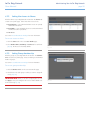
4.5.5. Disks
Attached external hard drives and their partitions appears as shares
on the Browse page. See section 3.1. Accessing Shared Folders.
Attaching external disks expands the available storage capacity
through the network.
TECHNICAL NOTE: When shares are created from partitioned external hard drive volumes, they are initially named with a series of
numbers and letters (a, Fig. 59). You can rename the shares on the
Shares page. The name of external drives will remain on the Shares
page even when the disk is not connected.
Once the drive is recognized, users can be assigned access just like
other shares (by default, users will have read/write access). See section 4.2. Users.
Formatting External Disks
In order to use an external drive to back up the 5big Network, it
must be formatted in FAT32 (4GB file size limitation), FAT (2GB file
size limitation), HFS+, EXT3, EXT2, REISERFS or XFS. NTFS volumes
cannot be used to back up the 5big Network because this file system
format is read-only when connected to the 5big Network.
It is possible to format external volumes into the XFS file system using
the 5big Network Web Administration pages. To format disks in XFS
from the Web Administration pages, click System > External disks
and click the Format disk button (b, Fig. 59). The disk will subsequently become available for backups. See 4.7. Backup for details.
IMPORTANT INFO: After reformatting a disk, you may have to
reboot the 5big Network and/or the USB hard drive in order for it to
be recognized by the system.
continued on the next page
Fig. 59
LaCie 5big Network
User Manual
Administering Your LaCie 5big Network
page 40
Partitions
If the external drive is partitioned, each volume will appear as one
share in the 5big Network (Fig. 60). By default, services (except FTP)
are activated. Added shares can thus be accessed in an Explorer
window (Windows users) or in a Finder window (Mac users, Fig. 60).
In Fig. 61, the volumes “LaCie1” and “LaCie2” (a) are volumes of
a partitioned external hard drive that is not connected to the 5big
Network, as indicated by the gray Status indicator (c) and italicized
text. The volumes “Scranton” and “Stamford” (b) are volumes of an
external drive that is currently connected, as indicated by the blue
Status indicators.
IMPORTANT INFO: External hard disks must be formatted in one
of the supported systems in order to mount on the LaCie 5big Network: FAT32, FAT, NTFS, HFS+, EXT3, EXT2, REISERFS or XFS.
Fig. 60
Note that you can reformat external drives to the XFS file system using
the 5big Network web interface.
However, the following limitations apply: NTFS disks are read-only,
and FAT/FAT32 disks have file size limits (2GB and 4GB, respectively)
due to their file system limitations.
Ejecting External Disks
To disconnect an external hard drive from the 5big Network, simply
click the Eject button on this page (Abb. 62).
Fig. 61
Fig. 62
LaCie 5big Network
User Manual
Administering Your LaCie 5big Network
page 41
4.5.6. Status
Click on Status under System in the navigation bar to display the
system Status page (Fig. 63).
On this page you can view the number of connected users, disable
file server services (SMB, AFP, and FTP) and view, download or delete the system log. To disable a service, simply click the Disable
button that corresponds to the service which you wish to disable, or
deselect it.
4.5.7. Maintenance
Click on Maintenance under System in the navigation bar to display the Maintenance page (Fig. 64).
On this page you can view basic system information, manage updates, restart or shutdown the system (only if the power switch is in
the AUTO position) and load new system configurations.
Fig. 63
Fig. 64
LaCie 5big Network
User Manual
Administering Your LaCie 5big Network
page 42
4.5.7.1. Saving and Loading System Configurations
It’s a good idea to save your system configuration in case the 5big
Network needs to be reformatted or reset. You can then reload the
configuration so that your settings, shares, groups and users are not
lost.
IMPORTANT INFO: Share content (files) is not saved in a configuration file.
To save the current configuration:
1. Click on System and then Maintenance.
2. Click the Save configuration button (Fig. 65).
Internet Explorer users: The XML defining the configuration will
open in the browser window. To save the configuration, select File
> Save as… In the Save as type menu in the Save As dialog, select
XML Files (*.xml) and choose a location to save the file.
Fig. 65
Firefox and Safari users: Your browser will save the file to the
browser’s default download location. The configuration file is an
XML file.
IMPORTANT INFO: Do not save configuration files on the 5big
Network alone. If data loss occurs, the configuration file may also
be lost.
To load a saved configuration:
1. Click on System and then Maintenance.
2. Click the Load Configuration button (Fig. 66).
3. Click Browse… and select a configuration file from your computer.
4. Click Apply.
Fig. 66
LaCie 5big Network
User Manual
Administering Your LaCie 5big Network
page 43
4.5.7.2. Updating the System
Firmware updates may become available for the 5big Network.
To install firmware updates:
1. Download updates from www.lacie.com/support/downloads/.
2. Click the Update the system tab in Maintenance (a, Fig. 67).
3. Click New Update (b, Fig. 67).
4. Click Browse… and select an update file from your computer.
5. Click Apply.
During the system update you will not have access to the device and
users will not be able to access shares. When the update is complete, the login page will open.
Fig. 67
4.5.7.3. Restart
To restart the 5big Network, click the Restart button (Fig. 68). The
restart process takes a few minutes. When the machine has restarted, the login page will open.
Fig. 68
LaCie 5big Network
User Manual
Administering Your LaCie 5big Network
page 44
4.5.7.4. Shut Down
There are two ways to disconnect the Ethernet connection:
✦✦ Move the power switch to the off position. The system will shut
down and power off. When the shutdown process is complete,
you can safely remove the Ethernet cable.
✦✦ Click the Shut Down button (Fig. 69). This option is available
ONLY if the power switch is set to the AUTO position.
IMPORTANT INFO: Any data transfers underway during a shut
down will be interrupted and data may be lost. Make sure no users are connected or transferring data to or from the 5big Network
before shutting down. 4.5.8. System Log
Fig. 69
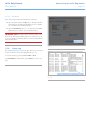
The system log allows you to review the type, date, time, source and
event ID of activities on the LaCie 5big Network (Fig. 70).
To view the system log, select System > Status > View.
Click Download to download the log or Delete to clear its contents.
Fig. 70
LaCie 5big Network
User Manual
Administering Your LaCie 5big Network
page 45
4.5.9. Wake on LAN (WOL)
This function enables you to enable waking the 5big Network remotely on the local area network (LAN). For WOL to work, the
power switch must be in the AUTO position. This function is accessed using the LaCie Network Assistant software. Follow these
steps to activate WOL:
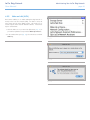
1. Click the LNA icon in your menu bar (Mac Users, Fig. 71) or
your task bar (Windows users) and click Wake Up a Device...
2. In the window that opens (Fig. 72), select the device and click
Wake up.
Fig. 71
Fig. 72
Fig. 73
LaCie 5big Network
User Manual
Administering Your LaCie 5big Network
page 46
4.6. Download
The LaCie 5big Network has the capability to act as a torrent client.
Torrent is a peer-to-peer file sharing system used to share large
files. Those in possession of a file act as seeders, and those who
download files are peers. Because peers simultaneously upload
already downloaded portions as they download and because of
the decentralized nature of the system, the torrent protocol reduces
bandwidth and hardware costs associated with sharing large files
through the internet.
Torrent files, which are freely available on the internet, contain tracking information and metadata about the files to be shared. The
process of downloading files using torrents involves downloading a
torrent file using your PC/Mac and importing it into a torrent client
(in this case, the 5big Network).
Fig. 74
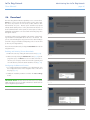
Access the Download menu by clicking the Download tab in the left
navigation menu.
Enabling and Initiating Torrent Downloads
1. Enable the service by clicking the Start Server button (Fig. 74).
2. Add a torrent by clicking the Add Torrent button (Fig. 75) In the
page that opens, click Browse to select a valid .torrent file located on your computer, rename the torrent file (optional), and
select the directory where the download will be saved (Fig. 76).
Fig. 75
Configuring the Bittorrent Function
1. To configure the bittorrent capability of your 5big Network, click
the Configuration button on the navigation menu on the left of
the page (Fig. 77).
2. Modify the available parameters and click the Save Settings
button.
TECHNICAL NOTE: Because the torrent client service uses bandwidth and system resources, multiple simultaneous downloads can
impact 5big Network performance.
Fig. 76
Fig. 77
LaCie 5big Network
User Manual
Administering Your LaCie 5big Network
page 47
4.7. Backup
When an external USB or eSATA hard disk is connected to your LaCie 5big Network, you can perform manual, bidirectional backups
of your files. Copy files from your LaCie 5big Network to the external
disk, or from the external disk to the LaCie 5big Network.
IMPORTANT INFO: In order to use an external drive to back
up the 5big Network, it must be formatted in one of the supported
systems: FAT32, FAT, NTFS, HFS+, EXT3, EXT2, REISERFS or XFS.
Note that you can reformat external drives to the XFS file system using
the 5big Network web interface. See 4.5.5. Disks for formatting steps.
Fig. 78
However, the following limitations apply: NTFS disks are read-only,
and FAT/FAT32 disks have file size limits (2GB and 4GB, respectively)
due to their file system limitations.
To back up files:
1. Connect an external USB or eSATA hard disk (see section 3.4.
Connecting External Hard Disks).
2. Log in to the LaCie 5big Network Administration Page (see section 4.1. Accessing the Administration Page).
3. Click Backup > Add Task (Fig. 78).
4. Give the backup a name and set its frequency (once, daily,
weekly, or monthly) and time (if the backup is recurring) (Fig.
79) and click Next.
5. Select a source folder (the folder to be backed up) and click
Next.
6. Select a destination folder (where the backed up files will be
located) and click Next.
7. Click Add job.
TECHNICAL NOTE: If copying a share to an external disk, the entire
contents of the share will be copied to a folder on the external disk
with the same name as the share.
continued on the next page
Fig. 79
LaCie 5big Network
User Manual
Administering Your LaCie 5big Network
page 48
8. If the frequency is set to “Once,” the backup will begin after a
few seconds. An in-progress backup will be indicated with yellow highlighting (Fig. 80).
9. Successful backups will no longer be highlighted and will show
the date the backup was last completed (Fig. 81).
TECHNICAL NOTE: Backups are incremental, which means that
future backups will only copy new or modified files.
TECHNICAL NOTE: Backed up data is neither compressed nor encrypted, and can be accessed from other computers or NAS (networkattached storage).
Fig. 80
4.8. Browse
Refer to section 3.3. Administration Page – Browse for details.
4.9. Import (Snapshot)
When you plug an external device to one of the 5big Network’s
ports and push the front button, the 5big Network will automatically
import (take a snapshot of) the data from the external device. The
imported data will be copied into an automatically created share
with a unique name (Fig. 82).
Fig. 81
Fig. 82
LaCie 5big Network
User Manual
Administering Your LaCie 5big Network
page 49
4.10.Multimedia
Thanks to its support of UPnP A/V and DLNA protocols, the 5big
Network can act as a multimedia server, providing access to its files
to compliant digital media appliances. Such appliances include
Playstation 3, Xbox360, many LCD TV and stereos, or Digital Media
Adapters (DMA).
To activate the UPnP and DLNA protocols, follow these steps:
1. Navigate to the Multimedia tab on the Administration page
and check the Enable Multimedia Content Sharing (Fig. 51).
2. Select which share(s) you would like to share with wireless devices.
3. Check the Rescan files box.
4. Click Apply.
Fig. 83
LaCie 5big Network
User Manual
RAID and Disks
page 50
5.RAID and Disks
The LaCie 5big network supports RAID levels 0 (default), 5, 5+spare,
6, 6+spare, and 10. Please see sections 5.2. RAID 0 to 5.6. RAID
10 for detailed information on 5big RAID levels. The following chart
sums up the strengths and weaknesses of each RAID level.
See section 5.7. Installing a New Disk for information on removing
and installing hard disks. See the following chapters 5.2. RAID 0 to
5.6. RAID 10 for more details on the different RAID modes.
RAID Mode
Capacity (4 disks)
Capacity (5 disks)
RAID 0
100%
100%
RAID 5
75%
80%
RAID 5+ Spare
50%
60%
RAID 6
50%
60%
RAID 6+ Spare
N/A
40%
RAID 10 50%
N/A
RAID 10+ Spare
N/A
40%
5.1. Changing the RAID Level
Refer to section 4.5.4. RAID.
Protection
IMPORTANT INFO: 1GB = 1,000,000,000 bytes. 1TB =
1,000,000,000,000 bytes. Once formatted, the actual available
storage capacity varies depending on operating environment (typically 10-15% less). For example, if the total disk size is 500 GB, the
formatted capacity should be approximately 465 GB. If the used
capacity is 145 GB, remaining capacity will be 320 GB.
LaCie 5big Network
User Manual
RAID and Disks
page 51
5.2. RAID 0
RAID 0
RAID 0 (also called Spanning mode in some LaCie devices), is the
fastest RAID mode. In a RAID 0 array, the available capacities of
each disk are added together so that one logical volume mounts on
the computer (Fig. 84).
A1
A2
A3
A4
B1
B2
B3
B4
B5
C1
D1
C2
D2
C3
D3
C4
D4
C5
D5
Disk 1
Disk 2
Disk 3
Disk 4
Disk 5
If one physical disk in the array fails, the data of all disks becomes
inaccessible because parts of the data have been written to all disks.
Applications
RAID 0 is ideal for users who need maximum speed and capacity.
Video editors working with very large files may use RAID 0 when
editing multiple streams of video for optimal playback performance.
A RAID 0 array is more suited for actively working with files (editing
video, for example) and should not be used as a single storage
backup solution or on mission critical systems.
How RAID 0 Capacity Is Calculated
Each disk in a RAID 0 system should have the same capacity.
Storage capacity in a RAID level 0 configuration is calculated by
multiplying the number of drives by the disk capacity, or C = n*d,
where:
C = available capacity
n = number of disks
d = disk capacity
For example, in a RAID 0 array with four drives each with a capacity of 1000GB, the total capacity of the array would be 4000GB:
C = (4*1000)
Fig. 84
A5
LaCie 5big Network
User Manual
RAID and Disks
page 52
5.3. RAID 5
RAID 5
In RAID 5, data is striped across all disks (minimum of three) and a
parity block for each data block (P in Fig. 85) is written on the same
stripe.
If one physical disk fails, the data from the failed disk can be rebuilt
onto a replacement disk. No data is lost in the case of a single
disk failure, but if a second disk fails before data can be rebuilt to a
replacement drive, all data in the array will be lost.
Applications
RAID 5 combines data safety with efficient use of disk space. Disk
failure does not result in a service interruption because data is read
from parity blocks. RAID 5 is useful for archiving and for people
who need performance and constant access to their data, like video
editors.
How RAID 5 Capacity Is Calculated
Each disk in a RAID 5system should have the same capacity.
Storage capacity in a RAID level 5 configuration is calculated by
subtracting the number of drives by one and multiplying by the disk
capacity, or
C = (n-1)*d
where:
C = available capacity
n = number of disks
d = disk capacity
For example, in a RAID 5 array with four drives each with a capacity of 1000GB, the total capacity of the array would be 3000GB:
C = (4-1)*1000
A1
A2
A3
A4
B1
B2
B3
Bp
Bp
B3
B4
C1
D1
Ep
Cp
C2
D1
Dp
E1
Cp
C2
D2
E2
C3
C3
D3
D3
E3
C4
D4
E4
Disk 1
Disk 2
Disk 3
Disk 4
Disk 5
Fig. 85
Ap
LaCie 5big Network
User Manual
RAID and Disks
page 53
5.4. RAID 5+Spare
RAID 5+Spare
RAID 5+Spare, is a RAID 5 array in which one disk is used as spare
to rebuild the system as soon as a disk fails. At least four disks are
required (Fig. 86).
If one physical disk fails, the data remains available because it is
read from the parity blocks. Data from a failed disk is rebuilt onto
the hot spare disk. When a failed disk is replaced, the replacement
becomes the new hot spare. No data is lost in the case of a single
disk failure, but if a second disk fails before the system can rebuild
data to the hot spare, all data in the array will be lost.
Applications
RAID 5+ Spare has good data safety but disk space is limited by
the presence of the hot spare which is not used until one of the
other disks fails. RAID 5+ is useful in settings where users must have
constant access to data because disk failure does not result in a service interruption. Disk failure does not require immediate attention
because the system rebuilds itself using the hot spare, but the failed
disk should be replaced as soon as possible.
How RAID 5+Space Capacity Is Calculated
Each disk in a RAID 5+Spare system should have the same capacity.
Storage capacity in a RAID 5+Spare configuration is calculated by
subtracting the number of drives by two and multiplying by the disk
capacity, or
C = (n-2)*d
where:
C = available capacity
n = number of disks
d = disk capacity
For example, in a RAID 5+Spare array with four drives each with
a capacity of 1000GB, the total capacity of the array would be
2000GB:
C = (4-2)*1000
A1
A2
A3
B1
B2
Bp
B3
C1
Dp
Cp
D1
C2
D2
C3
D3
Disk 1
Disk 2
Disk 3
Disk 4
Fig. 86
Ap
Spare
Disk 5
LaCie 5big Network
User Manual
RAID and Disks
page 54
5.5. RAID 6
RAID 6
In RAID 6, data is striped across all disks (minimum of four) and a
two parity blocks for each data block (p and q in Fig. 87) is written
on the same stripe. If one physical disk fails, the data from the failed
disk can be rebuilt onto a replacement disk. This Raid mode can
support up to two disk failures with no data loss. RAID 6 provides
for faster rebuilding of data from a failed disk.
A1
A2
A3
Ap
B1
B2
Bp
Bq
B3
C1
Dp
Cp
Dq
Cq
D2
C3
D3
C3
D3
Disk 1
Disk 2
Disk 3
Disk 4
Disk 5
Applications
RAID 6 provides data reliability with the addition of efficient rebuilding in the case of a failed drive. RAID 6 is therefore useful for people
who need serious security with less of an emphasis on performance.
How RAID 6 Capacity Is Calculated
Each disk in a RAID 6 system should have the same capacity.
Storage capacity in a RAID 6 configuration is calculated by subtracting the number of drives by two and multiplying by the disk
capacity, or
C = (n-2)*d
where:
C = available capacity
n = number of disks
d = disk capacity
For example, in a RAID 6 array with five drives each with a capacity of 1000GB, the total capacity of the array would be 3000GB:
C = (5-2)*1000
Fig. 87
Aq
LaCie 5big Network
User Manual
RAID and Disks
page 55
5.6. RAID 10
RAID 10
RAID 10 (also called RAID 1+0) is another RAID level that combines
the attributes of other levels, specifically RAID 1 and RAID 0. It is a
“stripe of mirrored sets”, meaning that data is striped across two
mirrored arrays (Fig. 88). The Striping occurs between arrays and the
mirroring occurs within the same array, which makes the rebuilding
very fast. RAID 10 arrays should have disks in multiples of four. For
LaCie products with five disks, in a RAID 10 array, the fifth disk will
either be a spare or will be unused. See the diagram at right.
RAID 0
RAID 1
A1
In a RAID 10 array, one disk from each mirrored pair can fail with
no data loss. However, the working disk in an array with a failed disk
becomes a weak point for the entire array. If the second disk in a
mirrored pair fails, the entire array is lost.
Applications
RAID 10 provides good speeds because of RAID 0 striping, but cuts
the available capacity of a device in half (assuming all disks in the
array have the same capacity).
How RAID 10 Capacity Is Calculated
Each disk in a RAID 10 system should have the same capacity.
Storage capacity in a RAID 10 configuration is calculated by multiplying the number of drives by the disk capacity and dividing by 2, or
C = n*d/2
where:
C = available capacity
n = number of disks
d = disk capacity
For example, in a RAID 10 array with four drives each with a capacity of 1000GB, the total capacity of the array would be 2000GB:
C = (4*1000)/2
Fig. 88
RAID 1
A1
A2
A2
A3
A3
A4
A4
A5
A7
A5
A7
A6
A8
A6
A8
Disk 1
Disk 2
Disk 3
Disk 4
LaCie 5big Network
User Manual
RAID and Disks
page 56
5.7. Installing a New Disk
To remove a disk:
1. The drive tray may be locked. To unlock it, use the 2-in-1 RAID
mode change and drive lock tool to turn the lock until the slot
is vertical (Fig. 89).
2. Draw out the drive tray by inserting your finger into the space
behind the drive tray handle and pulling to disengage the drive
(Fig. 90).
3. Grasp the drive tray handle and carefully extract the drive (Fig.
91).
To install a disk:
Fig. 89
off
Replacing a drive involves two main steps, installing the new drive
and initializing the new disk on the System > RAID page (see below).
CAUTION: After continuous use of the LaCie 5big network, drives
may be hot. Use caution when removing.
1. Carefully insert the drive tray into an empty drive bay. When the
drive tray is most of the way in and you feel resistance, press the
drive tray handle firmly until you feel the drive snap into place
and the drive tray handle is flush with the back of the 5big.
2. Use the 2-in-1 RAID mode change and drive lock tool to unlock
the drive.
off
Fig. 90
3. In the System > RAID page, you will see a message indicating
that the system has recognized a new disk and requesting user
validation.
4. The new disk will be added as a spare or as a part of a RAID
array and will begin to rebuild.
IMPORTANT INFO: In the event that an individual hard disk fails
in the LaCie 5big network, please contact your LaCie reseller or
LaCie Customer Support. Please replace a defective hard drive only
with a new drive provided by LaCie.
off
Fig. 91
LaCie 5big Network
User Manual
LED Indicators
page 57
6.LED Indicators
The LED indicators above the drive bays and the front LED indicate
drive status and activity. This section describes the behavior of the
LED indicators.
Front LED Color
Rear LED Color
Solid blue
Activity LED for working disk(s)
Drive working (read/write)
Blinking blue
(0.8s, 0.8s)
Activity LED for working disk(s)
(until they are fully initialized)
Occurs as the 5big Network is booting; will cease once the drives are
fully initialized
Activity LED for working disk(s)
RAID building; will cease once operation has concluded
Activity LED for working disk(s)
RAID rebuilding after new disk inserted; will cease once it has rebuilt
Long blue (2.5s),
short pause (0.25s)
Long blue (2.5s),
short red (0.25s)
Blinking red
(0.3s/0.3s)
for 3 seconds total
Long blue (2.5s), short red (0.25s) in
rebuilding disks
Activity LED for working disk(s)
Backup/import operation in progress; will cease once operation has
concluded
Activity LED for working disk(s) only
Damaged RAID; system working but non-functional disks need to be
replaced
Solid red for non-functional disks
During a backup operation, the external disk is full or not formatted
Activity LED for working disk(s)
Solid blue in functional disks
Solid red
5big Network State
During an import operation (triggered by pressing the front blue button),
the external disk is empty
Drive failure, RAID broken, data lost
Solid red in non-functional disks
N/A
System broken or not found.
continued on the next page
LaCie 5big Network
User Manual
Front LED Color
Blinking blue/red
(0.3s, 0.3s)
Solid red until it
goes to Stand by,
then OFF
Long red (2.5s),
short pause (0.25s)
LED Indicators
page 58
Rear LED Color
Activity LED for working disk(s)
5big Network State
Temperature alert (first level)
Temperature alert (critic level) – the product will switch to stand by mode
N/A
Activity LED for working disk(s)
Fan is not rotating
7.Email Notification Triggers
RAID Manager
1. Build started
Download Machine
1. Download completed
Fan Controller
1. Fan failed
Snapshot
1.Error creating share
2. Build completed
2.Fan now works
2.No external devices detected
3. Spare active
3.High temperature
3.External device not yet
mounted
4. Spare failed
5. Disk failed/disappeared
4. Critical temperature
5.Fan controller problem
6.No temperature sensed
4.Error copying
5. Copy successful
LaCie 5big Network
User Manual
Troubleshooting
page 59
8.Troubleshooting
In the event that your LaCie 5big Network is not working correctly,
please take a look at the Troubleshooting section on the following
pages and at the FAQs published on our web site – www.lacie.com.
One of these FAQs may provide an answer to your specific question. You can also visit the downloads page, where the most recent
software updates will be available –
www.lacie.com/support/downloads.
If you need further assistance, please contact your LaCie reseller or
LaCie Technical Support (see chapter 9. Contacting Customer Support for details).
Manual Updates
LaCie strives to give you the most up-to-date, comprehensive user
manuals possible. It is our goal to provide you with a friendly, easyto-use format that will help you quickly install and utilize the many
functions of your new device.
If your manual does not reflect the configurations of the product
that you purchased, please check our website for the most current
version available.
www.lacie.com
System Log
The system log allows you to review the type, date, time, source and
event ID of activities on the LaCie 5big Network. For more information, refer to chapter 4.5.8. System Log.
Problem
Question to Ask
Solution
The system is not
recognized by the
computer.
Does your computer’s configuration
meet the minimum system requirements?
Check section 1.2. Minimum System Requirements for more information.
Is the system’s power supply connected
and is the blue light on the front of the
drive on?
Make sure that the power supply is properly connected (see section
2.1.Turning on the 5big Network for details); that the system has been
powered on by moving the power switch on the back of the device to
the ON position; and that the outlet the power supply is connected to is
powered on or has a sufficient supply of power.
Is the blue light on the front of the
device flickering?
If the blue light is flickering or will not turn on, the power supply may be
defective. Please contact your LaCie reseller or LaCie Customer Support.
Did you follow the correct installation
steps?
Review the installation steps (2. Setting Up Your LaCie 5big Network).
Are both ends of the Ethernet cable
firmly connected?
Disconnect the Ethernet cable, wait 10 seconds and then reconnect.
Ensure that the interface connectors are properly aligned. The Ethernet
cable can only be inserted one way. Make sure it is correctly oriented.
Check that the Ethernet connectors are straight and fully seated in the
Ethernet ports.
Make sure that you use the Ethernet cord provided in the 5big Network
box.
LaCie 5big Network
User Manual
Troubleshooting
page 60
Problem
Question to Ask
The system
doesn’t appear on
the network.
By default the 5big Network is configured to retrieve its IP address from a DHCP server. If your network is managed
by a DHCP server and you cannot access your 5big Network, try checking your DHCP server’s log. To get the IP address, run LaCie Network Assistant, which is located on the LaCie Storage Utilities CD-ROM. If your network is NOT
managed by a DHCP server, the 5big Network uses its default IP address, which is 192.168.xx.100. To change this
IP address, use LaCie Network Assistant.
A user does not
have access to
the LaCie 5big
Network.
Solution
Is the IP address properly set?
For more information, please see section 3.1. Accessing Shared Folders.
Is your network DHCP enabled?
If your network is DHCP enabled, please refer to sections 2.3. Connecting
Using LaCie Network Assistant. If your network is not DHCP enabled, you
will need to manually configure the address; please see section 2.4. Configuring the LaCie 5big Network on a Network Without a DHCP Server.
Are you using AppleTalk under Mac
OS 9.x?
If you are using AppleTalk under Mac OS 9.x, ensure that the LaCie 5big
Network and the other clients on the network are in the same AppleTalk
zone.
Has the administrator created an account for the user?
In order for a another user to access the LaCie 5big Network, two conditions must be met: 1) the administrator must create and register a user
with the appropriate privileges; 2) the LaCie 5big Network must be connected to the network via Ethernet for additional users to access the drive.
LaCie 5big Network
User Manual
Contacting Customer Support
page 61
9.Contacting Customer Support
Before You Contact Technical Support
Read the User Manual and review the Troubleshooting section.
Try to isolate the problem. If possible, make the drive the only external device on the CPU, and make sure that all of the cables are
correctly and firmly attached.
If you have asked yourself all of the pertinent questions in the troubleshooting checklist, and you still can’t get your LaCie drive to work
properly, contact us via the contacts on the following page. Before
contacting us, make sure that you are in front of your computer and
that you have the following information on hand:
Information
Where to Find Information
LaCie 5big Network serial number
Located on a sticker at the back of drive or on the original packaging
LaCie 5big Network file format
Mac users: Select the hard drive icon and press Command + I, or press
the Control key and choose Get Info.
Windows users: Right click the hard drive icon and select Properties.
Macintosh/PC model
Operating system version
Processor speed
Computer memory
The brands and models of other internal and external peripherals installed on my computer
Mac users: Click on the Apple icon in the menu bar and select About
this Mac.
Windows users: Right click My Computer and select Properties >
General.
Mac users: Click on the Apple icon in the finder bar and select About
this Mac. Select More Info... The Apple System Profiler will launch and
will list your internal and external peripherals.
Windows users: Right click My Computer and select Properties >
Hardware.
LaCie 5big Network
User Manual
Contacting Customer Support
page 62
8.1. LaCie Technical Support Contacts
LaCie Asia, Singapore, and Hong Kong
Contact us at:
http://www.lacie.com/asia/contact/
LaCie Australia
Contact us at:
http://www.lacie.com/au/contact/
LaCie Belgium
Contact us at:
http://www.lacie.com/be/contact/ (Français)
LaCie Canada
Contact us at:
http://www.lacie.com/caen/contact/ (English)
LaCie Denmark
Contact us at:
http://www.lacie.com/dk/contact
LaCie Finland
Contact us at:
http://www.lacie.com/fi/contact/
LaCie France
Contact us at:
http://www.lacie.com/fr/contact/
LaCie Germany
Contact us at:
http://www.lacie.com/de/contact/
LaCie Italy
Contact us at:
http://www.lacie.com/it/contact/
LaCie Japan
Contact us at:
http://www.lacie.com/jp/contact/
LaCie Netherlands
Contact us at:
http://www.lacie.com/nl/contact/
LaCie Norway
Contact us at:
http://www.lacie.com/no/contact/
LaCie Spain
Contact us at:
http://www.lacie.com/es/contact/
LaCie Sweden
Contact us at:
http://www.lacie.com/se/contact
LaCie Switzerland
Contact us at:
http://www.lacie.com/chfr/contact/ (Français)
LaCie United Kingdom
Contact us at:
http://www.lacie.com/uk/contact/
LaCie Ireland
Contact us at:
http://www.lacie.com/ie/contact/
LaCie USA
Contact us at:
http://www.lacie.com/contact/
LaCie International
Contact us at:
http://www.lacie.com/intl/contact/
LaCie 5big Network
User Manual
10. Warranty Information
LaCie warrants your drive against any defect in material and workmanship, under normal use, for the period designated on your warranty certificate. In the event this product is found to be defective
within the warranty period, LaCie will, at its option, repair or replace
the defective drive. This warranty is void if:
✦✦ The drive was operated/stored in abnormal use or maintenance conditions;
✦✦ The drive is repaired, modified or altered, unless such repair,
modification or alteration is expressly authorized in writing by
LaCie;
✦✦ The drive was subjected to abuse, neglect, lightning strike,
electrical fault, improper packaging or accident;
✦✦ The drive was installed improperly;
✦✦ The serial number of the drive is defaced or missing;
✦✦ The broken part is a replacement part such as a pickup tray,
etc.
✦✦ The tamper seal on the drive casing is broken.
LaCie and its suppliers accept no liability for any loss of data during
the use of this device, or for any of the problems caused as a result.
LaCie will not, under any circumstances, be liable for direct, special
or consequential damages such as, but not limited to, damage or
loss of property or equipment, loss of profits or revenues, cost of
replacement goods, or expense or inconvenience caused by service
interruptions.
Any loss, corruption or destruction of data while using a LaCie drive
is the sole responsibility of the user, and under no circumstances
will LaCie be held liable for the recovery or restoration of this data.
Under no circumstances will any person be entitled to any sum
greater than the purchase price paid for the drive.
To obtain warranty service, call LaCie Technical Support. You will
be asked to provide your LaCie product’s serial number, and you
may be asked to furnish proof of purchase to confirm that the drive
is still under warranty.
All drives returned to LaCie must be securely packaged in their original box and shipped with postage prepaid.
IMPORTANT INFO: Register online for free technical support:
www.lacie.com/register
Warranty Information
page 63