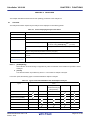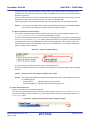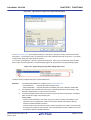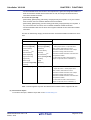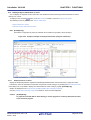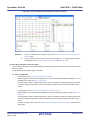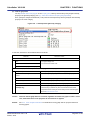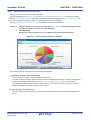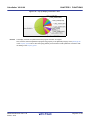
1
User's Manual
CubeSuite+ V2.00.00
Integrated Development Environment
User's Manual: Analysis
Target Device
78K0 Microcontroller
RL78 Family
78K0R Microcontroller
R8C Family
V850 Family
RX Family
All information contained in these matenals, including products and product specifications,
represents information on the product at the time of publication and is subject to change by
Renesas Electronics Corp. without notice. Please review the latest information published by
Renesas Electronics Corp. through various means, including the Renesas Electronics Corp.
website (http://www.renesas.com).
www.renesas.com
Rev.1.00 Feb 2013
Notice
1.
Descriptions of circuits, software and other related information in this document are provided only to illustrate the operation of
semiconductor products and application examples. You are fully responsible for the incorporation of these circuits, software,
and information in the design of your equipment. Renesas Electronics assumes no responsibility for any losses incurred by you
or third parties arising from the use of these circuits, software, or information.
2.
Renesas Electronics has used reasonable care in preparing the information included in this document, but Renesas Electronics
does not warrant that such information is error free. Renesas Electronics assumes no liability whatsoever for any damages
incurred by you resulting from errors in or omissions from the information included herein.
3.
Renesas Electronics does not assume any liability for infringement of patents, copyrights, or other intellectual property rights of
third parties by or arising from the use of Renesas Electronics products or technical information described in this document. No
license, express, implied or otherwise, is granted hereby under any patents, copyrights or other intellectual property rights of
Renesas Electronics or others.
4.
You should not alter, modify, copy, or otherwise misappropriate any Renesas Electronics product, whether in whole or in part.
Renesas Electronics assumes no responsibility for any losses incurred by you or third parties arising from such alteration,
modification, copy or otherwise misappropriation of Renesas Electronics product.
5.
Renesas Electronics products are classified according to the following two quality grades: “Standard” and “High Quality”. The
recommended applications for each Renesas Electronics product depends on the product’s quality grade, as indicated below.
“Standard”:
Computers; office equipment; communications equipment; test and measurement equipment; audio and visual
equipment; home electronic appliances; machine tools; personal electronic equipment; and industrial robots etc.
“High Quality”: Transportation equipment (automobiles, trains, ships, etc.); traffic control systems; anti-disaster systems; anticrime systems; and safety equipment etc.
Renesas Electronics products are neither intended nor authorized for use in products or systems that may pose a direct threat to
human life or bodily injury (artificial life support devices or systems, surgical implantations etc.), or may cause serious property
damages (nuclear reactor control systems, military equipment etc.). You must check the quality grade of each Renesas
Electronics product before using it in a particular application. You may not use any Renesas Electronics product for any
application for which it is not intended. Renesas Electronics shall not be in any way liable for any damages or losses incurred
by you or third parties arising from the use of any Renesas Electronics product for which the product is not intended by Renesas
Electronics.
6.
You should use the Renesas Electronics products described in this document within the range specified by Renesas Electronics,
especially with respect to the maximum rating, operating supply voltage range, movement power voltage range, heat radiation
characteristics, installation and other product characteristics. Renesas Electronics shall have no liability for malfunctions or
damages arising out of the use of Renesas Electronics products beyond such specified ranges.
7.
Although Renesas Electronics endeavors to improve the quality and reliability of its products, semiconductor products have
specific characteristics such as the occurrence of failure at a certain rate and malfunctions under certain use conditions. Further,
Renesas Electronics products are not subject to radiation resistance design. Please be sure to implement safety measures to
guard them against the possibility of physical injury, and injury or damage caused by fire in the event of the failure of a Renesas
Electronics product, such as safety design for hardware and software including but not limited to redundancy, fire control and
malfunction prevention, appropriate treatment for aging degradation or any other appropriate measures. Because the evaluation
of microcomputer software alone is very difficult, please evaluate the safety of the final products or systems manufactured by
you.
8.
Please contact a Renesas Electronics sales office for details as to environmental matters such as the environmental compatibility
of each Renesas Electronics product. Please use Renesas Electronics products in compliance with all applicable laws and
regulations that regulate the inclusion or use of controlled substances, including without limitation, the EU RoHS Directive.
Renesas Electronics assumes no liability for damages or losses occurring as a result of your noncompliance with applicable laws
and regulations.
9.
Renesas Electronics products and technology may not be used for or incorporated into any products or systems whose
manufacture, use, or sale is prohibited under any applicable domestic or foreign laws or regulations. You should not use
Renesas Electronics products or technology described in this document for any purpose relating to military applications or use
by the military, including but not limited to the development of weapons of mass destruction. When exporting the Renesas
Electronics products or technology described in this document, you should comply with the applicable export control laws and
regulations and follow the procedures required by such laws and regulations.
10. It is the responsibility of the buyer or distributor of Renesas Electronics products, who distributes, disposes of, or otherwise
places the product with a third party, to notify such third party in advance of the contents and conditions set forth in this
document, Renesas Electronics assumes no responsibility for any losses incurred by you or third parties as a result of
unauthorized use of Renesas Electronics products.
11. This document may not be reproduced or duplicated in any form, in whole or in part, without prior written consent of Renesas
Electronics.
12. Please contact a Renesas Electronics sales office if you have any questions regarding the information contained in this document
or Renesas Electronics products, or if you have any other inquiries.
(Note 1) “Renesas Electronics” as used in this document means Renesas Electronics Corporation and also includes its majorityowned subsidiaries.
(Note 2) “Renesas Electronics product(s)” means any product developed or manufactured by or for Renesas Electronics.
(2012.4)
How to Use This Manual
This manual describes the role of the CubeSuite+ integrated development environment for developing applications and
systems for RX family, V850 family, R8C family (Localised support), RL78 family, 78K0R microcontrollers, 78K0
microcontrollers, and provides an outline of its features.
CubeSuite+ is an integrated development environment (IDE) for RX family, V850 family, R8C family (Localised
support), RL78 family, 78K0R microcontrollers, 78K0 microcontrollers, integrating the necessary tools for the development phase of software (e.g. design, implementation, and debugging) into a single platform.
By providing an integrated environment, it is possible to perform all development using just this product, without the
need to use many different tools separately.
Readers
This manual is intended for users who wish to understand the functions of the
CubeSuite+ and design software and hardware application systems.
Purpose
This manual is intended to give users an understanding of the functions of the
CubeSuite+ to use for reference in developing the hardware or software of systems
using these devices.
Organization
This manual can be broadly divided into the following units.
CHAPTER 1 GENERAL
CHAPTER 2 FUNCTIONS
CHAPTER 3 CAUTIONS
APPENDIX A WINDOW REFERENCE
APPENDIX B INDEX
How to Read This Manual
It is assumed that the readers of this manual have general knowledge of electricity,
logic circuits, and microcontrollers.
Conventions
Data significance:
Higher digits on the left and lower digits on the right
Active low representation:
XXX (overscore over pin or signal name)
Note:
Footnote for item marked with Note in the text
Caution:
Information requiring particular attention
Remark:
Supplementary information
Numeric representation:
Decimal ... XXXX
Hexadecimal ... 0xXXXX
Related Documents
The related documents indicated in this publication may include preliminary versions.
However, preliminary versions are not marked as such.
Document Name
Document No.
CubeSuite+
Start
R20UT2444E
Integrated Development Environment
V850 Design
R20UT2134E
R8C Design
R20UT2135E
RL78 Design
R20UT2136E
78K0R Design
R20UT2137E
78K0 Design
R20UT2138E
RX Coding
R20UT2470E
V850 Coding
R20UT0553E
Coding for CX Compiler
R20UT2139E
R8C Coding
R20UT0576E
RL78, 78K0R Coding
R20UT2140E
78K0 Coding
R20UT2141E
RX Build
R20UT2472E
V850 Build
R20UT0557E
Build for CX Compiler
R20UT2142E
R8C Build
R20UT0575E
RL78, 78K0R Build
R20UT2143E
78K0 Build
R20UT0783E
RX Debug
R20UT2350E
V850 Debug
R20UT2144E
R8C Debug
R20UT0770E
RL78 Debug
R20UT2145E
78K0R Debug
R20UT0732E
78K0 Debug
R20UT0731E
Analysis
This manual
Message
R20UT2448E
User's Manual
Caution
The related documents listed above are subject to change without
notice. Be sure to use the latest edition of each document when
designing.
All trademarks or registered trademarks in this document are the property of their respective owners.
TABLE OF CONTENTS
CHAPTER 1 GENERAL ... 7
1.1 Summary ... 7
1.1.1 What is analyzed ... 7
1.1.2 Types of analysis information ... 8
1.2 Features ... 11
CHAPTER 2 FUNCTIONS ... 15
2.1
2.2
2.3
2.4
2.5
2.6
Overview ... 15
Display Function Information ... 20
Display Variable Information ... 21
Display Calling Relationships between Functions (Call Graph) ... 22
Display Class/Function/Variable Information ... 27
Customize Display Method ... 29
2.6.1 Set the columns to display ... 29
2.6.2 Change the order of the columns to display ... 31
2.6.3 Lock the specific column to display ... 32
2.6.4 Sort the analysis information ... 32
2.6.5 Filter the analysis information ... 32
2.7 Jump to Defined Location ... 35
2.8 Jump to Declared Location ... 37
2.9 Set Break Events ... 38
2.9.1 Set a breakpoint to a function ... 38
2.9.2 Set a break event to a variable ... 38
2.10 Register Watch-Expressions ... 40
2.11 Display List of Referencing Location ... 41
2.12 Import or Export Information File ... 42
2.13 Display Analysis Information in Chart ... 46
2.13.1 Graph transitions in values ... 46
2.13.2 Chart the function execution time ratios ... 61
2.14 Save Analysis Information ... 63
CHAPTER 3 CAUTIONS ... 65
3.1
3.2
3.3
3.4
3.5
3.6
Changing Active Project ... 65
Coverage Results ... 65
Real-time Sampling Analysis ... 65
Trace Data Analysis ... 66
When the Panel Is Opened during Execution of Program ... 66
When CC-RX (C++ Source Files) Is Used ... 67
APPENDIX A WINDOW REFERENCE ... 68
A.1 Description ... 68
APPENDIX B INDEX ... 187
CubeSuite+ V2.00.00
CHAPTER 1 GENERAL
CHAPTER 1 GENERAL
This chapter describes an overview of the analyze tool (Program Analyzer).
1.1
Summary
The analyze tool is a component provided by CubeSuite+. It supports the analysis of the behavior of programs developed for RX family, V850 family, R8C family (Localised support), RL78 family, 78K0R microcontrollers, 78K0
microcontrollers.
Remark
Localised support
"Localised support " refers to specific regions support only.
CubeSuite+ for R8C (including NC30) is shipped and supported to the following regions only.
- Renesas Electronics Hong Kong Limited
- Renesas Electronics (China) Co., Ltd.
- Renesas Electronics (Shanghai) Co., Ltd.
1.1.1
What is analyzed
The analyze tool only analyzes C/C++ source files (including header files) in a project being set to the active project in
the Project Tree panel.
Consequently, assembler source files are not analyzed. Note, however, that symbols defined in assembler source files
that are referenced from C/C++ source files are analyzed.
Cautions 1.
2.
C++ source files are only supported by CC-RX.
The analyze tool cannot be used in the debug-dedicated project (see "CubeSuite+ Integrated
Development Environment User's Manual: Start").
3.
[CA850]
Files in K&R format are not analyzed.
Remark
It is possible to forcibly display the function/variable information for C/C++ source files and header files in a
project other than the active project by importing information files (function list file (*.mtfl)/variable list file
(*.mtvl)) (see "2.12 Import or Export Information File" for details).
Among the above files that can be analyzed, only desired files can be selected as the files to be analyzed or files not to
be analyzed to improve the efficiency of analysis.
The function information and variable information in the files not to be analyzed is not displayed in the panels (except
for the Analysis Chart panel) provided by the analyze tool.
Only the function information and variable information in the files to be analyzed is displayed in the panels (except for
the Analysis Chart panel) provided by the analyze tool.
Use any of the following methods to specify files to be analyzed and files not to be analyzed (use a convenient method
for the analysis purpose).
(1) When the files not to be analyzed are specified (default):
- On the [Settings] tab in the Property panel, specify [Files not to analyze] with the [Select specification method
of files to analyze] property in the [Analysis Object] category.
- In the same category above, click the [...] button that appears at right edge in the column when [Files not to
analyze] property is selected.
- On the Select Files not To Analyze dialog box opened, select the files not to be analyzed.
R20UT2447EJ0100 Rev.1.00
Feb 01, 2013
Page 7 of 192
CubeSuite+ V2.00.00
CHAPTER 1 GENERAL
(2) When the files to be analyzed are specified:
- On the [Settings] tab in the Property panel, specify [Files to analyze] with the [Select specification method of
files to analyze] property in the [Analysis Object] category.
- In the same category above, click the [...] button that appears at right edge in the column when [Files to analyze] property is selected.
- On the Select Files To Analyze dialog box opened, select the files to be analyzed.
1.1.2
Types of analysis information
The analyze tool acquires, analyzes, and displays the following two types of information.
(1) Static analysis information
This is the function information/variable information that can be displayed when a build has completed without any
compiler or assembler errors. This is the result of analyzing the load module and cross reference information generated by the build tool.
For this reason, in order to acquire static analysis information, you should configure your build tool to generate
cross reference information when performing the build. The analyze tool does, however, provide the following
property that forces the build tool to generate cross reference information:
- Property panel >> [Settings] tab >> [General] category >> [Enable static analysis information] property
By setting this property to [Yes], it is possible to generate cross reference information regardless of the build tool's
configuration. Note that if this property is set to [No] (default), the current setting in the build tool will take precedence.
(2) Dynamic analysis information
This is the function information or variable information provided as a result of analyzing trace, real-time RAM monitoring, or coverage data acquired by the debug tool.
For this reason, you should enable Trace function, RRM function/pseudo RRM function, or Coverage function to
acquire dynamic analysis information. The analyze tool does, however, provides the following property that automatically enables all of the above functions of the debug tool.
- Property panel >> [Settings] tab >> [General] category >> [Enable dynamic analysis information] property
By setting this property to [Yes], it is possible to use the above debug tool's functions regardless of the debug tool's
configuration. Note that if this property is set to [No] (default), the current setting in the debug tool will take precedence.
Cautions 1.
You must connect to the debug tool after the completion of the setting above.
It is necessary to re-connect to the debug tool if you change this setting during debugging.
2.
Functions that the debug tool does not support cannot be enabled.
For some debug tools, the following functions are mutually exclusive. In that case, the priority is as follows:
Trace function > RRM function/pseudo RRM function > Coverage function
3.
The dynamic analysis information cannot be acquired when the program analyzer tool or
task analyzer tool provided by "RI series" is used.
R20UT2447EJ0100 Rev.1.00
Feb 01, 2013
Page 8 of 192
CubeSuite+ V2.00.00
CHAPTER 1 GENERAL
The dynamic analysis information that each debug tool's function provides to the analyze tool is as follows.
(a) Trace function
This function is used to collect an execution history of the program as a trace data.
The trace function provides the following dynamic analysis information:
- Execution time (including a proportion of total execution time and average execution time)
- Execution count (including access type (read count, write count, and so on))
- Variable values (including maximum values and minimum values)
- Graph data (when the method for acquiring the graph data is Trace data analysis)
Cautions 1.
[IECUBE][Simulator]
Perform the following setting on the Property panel of the debug tool to acquire the execution time correctly:
- [Debug Tool Settings] tab >> [Trace] category >> [Clear trace memory before running]
property >> [Yes] (default)
2.
[IECUBE[V850E1][V850ES]][E20[RX]]
If [Start Trace]/[Stop Trace] from the context menu on the Trace panel is selected during
execution of a program, then an invalid value will be displayed as the execution time.
3.
[IECUBE[78K0]]
Since the trace time tag feature is not supported, execution time of functions and
graphs by Trace data analysis cannot be displayed.
4.
[E1/E20[RL78]][EZ Emulator[RL78]]
Since branch origin addresses can only be acquired from the trace data, only the [Execution Count] item in the Function List panel/Call Graph panel is supported.
Remarks 1.
[IECUBE[V850E1][V850ES]]
Some of the trace functions, RRM functions and coverage functions are mutually exclusive.
For this reason, it is necessary to specify the function to take precedence in the [Use for trace
data] property of the [Trace] category. When doing so, if this property is set to other than
[Trace] ([RRM] or [Coverage]), the trace functions necessary to acquire dynamic analysis
information will still be enabled.
2.
[IECUBE2]
Some of the trace functions, timer functions and coverage functions are mutually exclusive.
For this reason, it is necessary to specify the function to take precedence in the [Use for trace
data] property of the [Trace] category. When doing so, if this property is set to other than
[Trace] ([Timer] or [Coverage]), the trace functions necessary to acquire dynamic analysis
information will still be enabled.
(b) RRM function/pseudo RRM function
This function permits you to read the contents of memory (variables/registers/ addresses) in real-time while
executing the program.
The RRM function/pseudo RRM function provides the following dynamic analysis information:
- Graph data (when the method for acquiring the graph data is Real-time sampling analysisNote)
Note [E1/E20[RL78]]
If the selected microcontroller incorporates a Smart Analog IC and the debug tool is in the Data collection mode, graph data is not acquired through real-time sampling analysis. Instead a sampling method
specific to Smart Analog is used to acquire data and display graphs.
R20UT2447EJ0100 Rev.1.00
Feb 01, 2013
Page 9 of 192
CubeSuite+ V2.00.00
Remark
CHAPTER 1 GENERAL
The target area from which you can read using the RRM function/pseudo RRM function varies
depending on the microcontroller being selected in the project and the debug tool used.
For details on the relationship between the RRM function/pseudo RRM function and their target
area, see "CubeSuite+ Integrated Development Environment User's Manual: Debug".
(c) Coverage function
This function is used to perform coverage measurements.
The coverage function provides the following dynamic analysis information:
- Code coverage
- Data coverage
Caution
[IECUBE[V850]][IECUBE2[V850E2]]
A data coverage measurement does not supported.
R20UT2447EJ0100 Rev.1.00
Feb 01, 2013
Page 10 of 192
CubeSuite+ V2.00.00
1.2
CHAPTER 1 GENERAL
Features
The features of the analyze tool are shown below.
- Displaying function information
The following information about functions is displayed:
Static analysis information (e.g. function name, file name, attribute, return type, reference count, etc.) and Dynamic
analysis information (e.g. execution count, execution time, code coverage, etc.).
- Displaying variable information
The following information about variables is displayed:
Static analysis information (e.g. variable name, file name, attribute, type, reference count, etc.) and Dynamic analysis information (e.g. read count, write count, data coverage, etc.).
R20UT2447EJ0100 Rev.1.00
Feb 01, 2013
Page 11 of 192
CubeSuite+ V2.00.00
CHAPTER 1 GENERAL
- Displaying the call graph
A tree-structured chart (call graph) indicating calling relationships between functions in the program is displayed.
- Displaying class information/function information/variable information
The class information [CC-RX], function information and variable information in the program are displayed in a tree
structure.
R20UT2447EJ0100 Rev.1.00
Feb 01, 2013
Page 12 of 192
CubeSuite+ V2.00.00
CHAPTER 1 GENERAL
- Linked operation with debug tool
The following operations can be performed on the debug tool from the various panels of the analyze tool.
- Jump to the location where the specified function or variable is defined
Function List panel/Variable List panel/Call Graph panel/Class/Member panel
- Set a break event at the specified function or variable
Function List panel/Variable List panel
- Register a watch expression for the specified variable
Variable List panel
- View list of locations referencing function/variable
You can find and display a list of locations referencing a function/variable.
- Graph analysis information
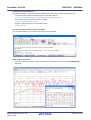
- A line chart indicating changes in values of variables or of data collected for Smart Analog [E1/E20[RL78]] is
displayed.
R20UT2447EJ0100 Rev.1.00
Feb 01, 2013
Page 13 of 192
CubeSuite+ V2.00.00
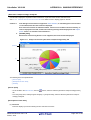
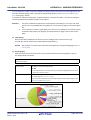
CHAPTER 1 GENERAL
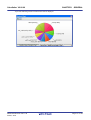
- A pie chart indicating function execution time ratios is displayed.
R20UT2447EJ0100 Rev.1.00
Feb 01, 2013
Page 14 of 192
CubeSuite+ V2.00.00
CHAPTER 2 FUNCTIONS
CHAPTER 2 FUNCTIONS
This chapter describes the main features and operating procedures of the analyze tool.
2.1
Overview
The analysis information acquired by the analyze tool is displayed on the following panels.
Table 2-1. Panels Displaying Analysis Information
Panel
Description
Function List panel
Displays the function information.
Variable List panel
Displays the variable information.
Analysis Chart panel
Displays charts of the function information and the variable information.
[Variable Value Changing Chart] tab
Displays changes in values of variables or data collected
for Smart Analog [E1/E20[RL78]]Note 1 (line chart).
[Execution Time(Percentage) Chart]
Displays function execution time ratios (pie chart).
tab
Call Graph panel
Displays calling relationships between functions (call graph).
Class/Member panel
Displays the class information [CC-RX]Note 2, function information and variable information in a tree
structure.
Variable Value Changing
Zooms in on the chart displayed in the [Variable Value Changing Chart] tab.
Chart (zoomed in) panel
Notes 1.
[E1/E20[RL78]]
Data collection for Smart Analog is supported only when the selected microcontroller incorporates a Smart
Analog IC.
2.
[CC-RX]
The class information is provided only when C++ source files are subject to analysis.
In the each panel, the following types of function/variable are subject to analysis.
Table 2-2. Types of Functions/Variables That Are Subject to Analysis
Types
Panel
Function List
Variable List
Analysis Chart
Call Graph
Class/Member
Variable Value Changing
Chart (zoomed in)
Global function
-
-
Static function
-
-
Member function [CC-RX]Note 1
-
-
Global variable
-
Static variable inside a file
-
Static variable inside a function
-
Local variable
-
R20UT2447EJ0100 Rev.1.00
Feb 01, 2013
-
-
-
-
Page 15 of 192
CubeSuite+ V2.00.00
CHAPTER 2 FUNCTIONS
Types
Panel
Function List
Variable List
Analysis Chart
Call Graph
Class/Member
Variable Value Changing
Chart (zoomed in)
IOR/SFRNote 2
-
Class variable [CC-RX]Note 1
Instance variable
Notes 1.
[CC-RX]Note 1
-
-
-
-
[CC-RX]
This is a function/variable that exists only in C++ source files.
2.
IOR [RX][V850]
SFR [R8C(Localised support)][RL78][78K0R][78K0]
By validating this analysis information, it is possible to search for unused functions and variables, and processing that
is creating bottlenecks, allocate memory effectively to reduce code size, and the like.
The basic operation sequence of the analyze tool is as follows:
(1) Start CubeSuite+
Launch CubeSuite+ from the [Start] menu of Windows.
Remark
For details on "Start CubeSuite+", see "CubeSuite+ Integrated Development Environment User's Manual: Start".
(2) Set a project
Create a new project, or load an existing one.
Remark
For details on "Set a project", see "CubeSuite+ Integrated Development Environment User's Manual:
Start".
(3) Create a load module
Create a load module by running a build after setting of the active project and the build tool to be used.
Caution
Run a build after setting the [Enable static analysis information] property in the [General] category on the [Settings] tab of the Property panel to [Yes], in order to generate the cross reference
information required for the analyze tool without depending on the configuration of the buildtool being used (see "(1) Static analysis information").
Remarks 1.
For details on "Create a load module", see "CubeSuite+ Integrated Development Environment
User's Manual: Build" of the compiler to use.
2.
If the build completes without compiler or assembler errors, then at this point the Static analysis
information can be displayed in the Function List panel/Variable List panel/Call Graph panel/Class/
Member panel.
(4) Execute downloading
Connect CubeSuite+ to the debug tool after configuring the operational environment of the debug tool, and then
download the load module created in steps (3) to the debug tool.
R20UT2447EJ0100 Rev.1.00
Feb 01, 2013
Page 16 of 192
CubeSuite+ V2.00.00
Caution
CHAPTER 2 FUNCTIONS
Connect to the debug tool after setting the [Enable dynamic analysis information] property in
the [General] category on the [Settings] tab of the Property panel to [Yes], in order to acquire
the dynamic information necessary for the analyze tool without depending on the configuration
of the debug tool being used (see "(2) Dynamic analysis information").
Remark
For details on "Execute downloading", see "CubeSuite+ Integrated Development Environment User's
Manual: Debug" of the microcontroller used.
(5) Execute programs
Execute the program on the debug tool.
Remark
For details on "Execute programs", see "CubeSuite+ Integrated Development Environment User's Manual: Debug" of the microcontroller used.
(6) Specify the files to be analyzed
If necessary, specify the files to be analyzed by the analyze tool (see "1.1.1 What is analyzed").
(7) Display Function Information
Display the Function List panel in order to validate the acquired function information.
The Function List panel can be operated as follows, in accordance with the purpose.
Note that if the program is modified during debugging, the operation is repeated via (3), above.
(a) Customize Display Method
Change the display method (e.g. set which columns to display and the sorting order) on the panels.
(b) Jump to Defined Location
Jump to the location where the function on the panel has been defined.
(c) Set a breakpoint to a function
Set a breakpoint to the function on the panel.
(d) Display List of Referencing Location
Find and display a list of locations referencing the function on the panel.
Remark
It is also possible to display the function information defined in other than the active project.
For detailed instructions on displaying function information, see "2.12 Import or Export Information
File".
(8) Display Variable Information
Display the Variable List panel in order to validate the acquired variable information.
The Variable List panel can be operated as follows, in accordance with the purpose.
Note that if the program is modified during debugging, the operation is repeated via (3), above.
(a) Customize Display Method
Change the display method (e.g. set which columns to display and the sorting order) on the panels.
(b) Jump to Defined Location
Jump to the location where the function on the panel has been defined.
R20UT2447EJ0100 Rev.1.00
Feb 01, 2013
Page 17 of 192
CubeSuite+ V2.00.00
CHAPTER 2 FUNCTIONS
(c) Set a break event to a variable
Set a break event with access condition to the variable on the panel.
(d) Register Watch-Expressions
Register variables to the Watch panel (Watch1) as watch-expressions.
(e) Display List of Referencing Location
Find and display a list of locations referencing the variable on the panel.
Remark
It is also possible to display the function information defined in other than the active project.
For detailed instructions on displaying function information, see "2.12 Import or Export Information
File".
(9) Display Calling Relationships between Functions (Call Graph)
Display the Call Graph panel in order to validate the relationship between functions.
The Call Graph panel can be operated as follows, in accordance with the purpose.
(a) Jump to Defined Location
Jump to the location where the function/variable on the call graph has been defined.
(b) Search for a function/variable
Search for an arbitrary function/variable existing in the call graph.
(10) Display Class/Function/Variable Information
Display the Class/Member panel in order to validate the class information [CC-RX], function information and variable information.
The Class/Member panel can be operated as follows, in accordance with the purpose.
(a) Jump to Defined Location
Jump to the location where the class/function/variable on the tree has been defined.
(b) Jump to Declared Location
Jump to the location where the class/function/variable on the tree has been declared.
Remark
[CC-RX]
The class information is provided only when C++ source files are subject to analysis.
(11) Display Analysis Information in Chart
Display acquired function information/variable information in a chart.
Note that if the program is modified during debugging, the operation is repeated via (3), above.
(a) Graph transitions in values
Display the relationship between values of variable/register/address or of data collected for Smart AnalogNote
and time in a line chart.
Note [E1/E20[RL78]]
This feature is supported only when the selected microcontroller incorporates a Smart Analog IC.
(b) Chart the function execution time ratios
Display a pie chart of the function execution time ratios.
R20UT2447EJ0100 Rev.1.00
Feb 01, 2013
Page 18 of 192
CubeSuite+ V2.00.00
CHAPTER 2 FUNCTIONS
(12) Save Analysis Information
Save the acquired analysis information to a file.
(13) Save the project file
Save the setting information of the project to the project file.
Remark
For details on "Save the project file", see "CubeSuite+ Integrated Development Environment User's
Manual: Start".
R20UT2447EJ0100 Rev.1.00
Feb 01, 2013
Page 19 of 192
CubeSuite+ V2.00.00
2.2
CHAPTER 2 FUNCTIONS
Display Function Information
Display the function information (function name, file name, attribute, reference count, execution count, code coverage,
etc.) in the program.
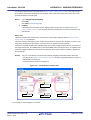
The latest function information that can currently be displayed (see "1.1.2 Types of analysis information") is displayed
on the following Function List panel, which is opened by clicking the
button on the Main window's toolbar.
Note, however, that the function information in the files not to be analyzed is not displayed in this panel (see "1.1.1
What is analyzed").
See the Function List panel for details on each of the function information items displayed.
Caution
[CA850][CA78K0R][CA78K0]
When a clean is executed in the build tool, the contents currently being displayed in this panel will
be cleared.
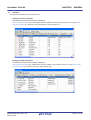
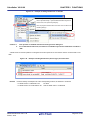
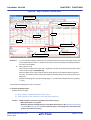
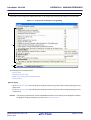
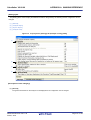
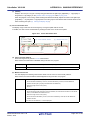
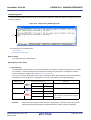
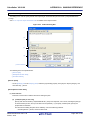
Figure 2-1. Display Function Information (Function List Panel)
Toolbar
Current row mark
Remarks 1.
The display contents are updated each time program execution is stopped.
Note, however, that if the [Refresh at program stop] property in the [General] category on the [Settings]
tab of the Property panel is set to other than [Yes] (default), the information will be updated in
accordance with the setting on the Property panel.
2.
The value of the information that has been changed because of the execution of a program is shown
highlighted (the color depends on the configuration in the [General - Font and Color] category of the
Option dialog box). To reset the highlighting, click the
3.
The current row mark (
button on the toolbar.
) indicates the current row.
The following operations can be performed on the function with the current row mark.
- Jump to Defined Location
- Set Break Events
- Display List of Referencing Location
4.
Information for functions defined outside the active project, and which are never referenced from the
active project, is ordinary not displayed in the Function List panel.
For detailed instructions on displaying function information in this case, see "2.12 Import or Export
Information File".
R20UT2447EJ0100 Rev.1.00
Feb 01, 2013
Page 20 of 192
CubeSuite+ V2.00.00
2.3
CHAPTER 2 FUNCTIONS
Display Variable Information
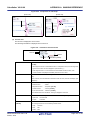
Display the variable information (variable name, file name, attribute, read count, write count, data coverage, etc.) in the
program.
The latest variable information that can currently be displayed (see "1.1.2 Types of analysis information") is displayed
on the following Variable List panel, which is opened by clicking the
button on the Main window's toolbar.
Note, however, that the variable information in the files not to be analyzed is not displayed in this panel (see "1.1.1
What is analyzed").
See the Variable List panel for details on each of the variable information items displayed.
Caution
[CA850][CA78K0R][CA78K0]
When a clean is executed in the build tool, the contents currently being displayed in this panel will
be cleared.
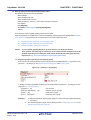
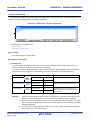
Figure 2-2. Display Variable Information (Variable List Panel)
Toolbar
Current row mark
Remarks 1.
The display contents are updated each time program execution is stopped.
Note, however, that if the [Refresh at program stop] property in the [General] category on the [Settings]
tab of the Property panel is set to other than [Yes] (default), the information will be updated in
accordance with the setting on the Property panel.
2.
The value of the information that has been changed because of the execution of a program is shown
highlighted (the color depends on the configuration in the [General - Font and Color] category of the
Option dialog box). To reset the highlighting, click the
3.
The current row mark (
button on the toolbar.
) indicates the current row.
The following operations can be performed on the function with the current row mark.
- Jump to Defined Location
- Set Break Events
- Display List of Referencing Location
- Graph transitions in values
4.
Information for functions defined outside the active project, and which are never referenced from the
active project, is ordinary not displayed in the Variable List panel.
For detailed instructions on displaying function information in this case, see "2.12 Import or Export
Information File".
R20UT2447EJ0100 Rev.1.00
Feb 01, 2013
Page 21 of 192
CubeSuite+ V2.00.00
2.4
CHAPTER 2 FUNCTIONS
Display Calling Relationships between Functions (Call Graph)
You can display a tree-structured chart (call graph) that represents calling relationships between functions in the program based on the acquired function information.
The latest call graph that can currently be displayed (see "1.1.2 Types of analysis information") is displayed on the following Call Graph panel, which is opened by clicking the
button on the Main window's toolbar.
Note, however, that the function information and variable information in the files not to be analyzed is not displayed in
this panel (see "1.1.1 What is analyzed").
See the Call Graph panel for details on the call graph displayed.
Cautions 1.
If the debug tool used does not support the Trace function, or if the debug tool's trace function
is not enabled, then the Dynamic analysis information (e.g. the execution count/read count/
write count) cannot be displayed in the call graph.
2.
[CA850][CA78K0R][CA78K0]
If a clean is executed in the build tool, the call graph currently being displayed will be erased.
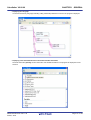
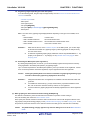
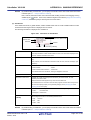
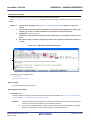
Figure 2-3. Display Calling Relationships between Functions (Call Graph Panel: Whole View)
Toolbar
Panel control area
[Parent Function Name] combo box
[Target Function Name] combo box
Function boxes
The following operations can be performed on the call graph displayed.
(1) Change a parent function
By default, the first function to appear named "mainNote" or containing the word "main" is considered to be the parent function, and that function is placed on the left edge of the call graph in a box format (function box).
Select a function from the drop-down list of the [Parent Function Name] combo box to change the parent function
to be displayed in call graph.
R20UT2447EJ0100 Rev.1.00
Feb 01, 2013
Page 22 of 192
CubeSuite+ V2.00.00
CHAPTER 2 FUNCTIONS
Note main: [V850][RL78][78K0R][78K0]
reset: [RX]
start: [R8C(Localised support)]
Remark
[V850E2]
If the selected microcontroller version supports multi-core, you can select "PEn" in the [Parent Function
Name] combo box. In this case, the call graph will only be displayed for the functions executed in the
selected PEn.
(2) Display the parent and child functions of the specified function
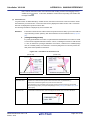
By clicking the
button on the panel control area, the call graph is switched to the details view that displays the
parent functions and child functions of the function currently being specified with the [Target Function Name]
combo box.
In the details view, when global variables, static variables inside a file or static variables inside a function accessed
from the target function exist, these variables are also displayed as variable boxes.
To switch to the default view mode (whole view), click the
button again.
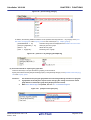
Figure 2-4. Display Parent and Child Functions (Call Graph Panel: Details View)
Target function
Parent functions
Child functions
Variable box
(3) Jump to defined location
By double-clicking on a function box/variable box in the call graph, you can jump to the location of the source text
where that function/variable is defined (see "2.7 Jump to Defined Location").
(4) Pop-up display of the function/variable information
When the mouse cursor is hovered over a function box/variable box in the call graph, information about that function/variable appears in a pop-up.
Caution
This function cannot be used while scrolling via the mouse dragging is being enabled by the
button on the panel control area.
R20UT2447EJ0100 Rev.1.00
Feb 01, 2013
Page 23 of 192
CubeSuite+ V2.00.00
CHAPTER 2 FUNCTIONS
Figure 2-5. Pop-up Display of Function/Variable Information
[Function box]
[Variable box]
(5) Search for a function/variable
You can search for an arbitrary function/variable existing in the call graph.
To do this, click the
button on the Call Graph panel's toolbar to open the Call Graph Search dialog box.
In this dialog box, follow the steps below.
Figure 2-6. Search for Functions (Call Graph Dialog Box)
(a) Specify [Function/Variable Name]
Specify a function name/variable name to search.
You can either type character strings directly into the text box (up to 2046 characters), or select one from the
input history via the drop-down list (up to 10 items).
Next, to specify conditions for the specified character strings, select the desired conditions in the [Condition]
combo box ([contains] is selected by default).
Searches are case-insensitive if the [Case-sensitive] check box is selected.
Remark
You can also specify the function name/variable name with any one of the following methods.
- Drag and drop an arbitrary row of the Function List panel/Variable List panel to this area.
- Drag and drop an arbitrary character strings to this area.
R20UT2447EJ0100 Rev.1.00
Feb 01, 2013
Page 24 of 192
CubeSuite+ V2.00.00
CHAPTER 2 FUNCTIONS
(b) Specify [Class Name] [CC-RX]
If required as a search parameter for a function/variable, you can specify the class name to which a member
function/member variable to search belongs.
You can either type character strings directly into the text box (up to 2046 characters), or select one from the
input history via the drop-down list (up to 10 items).
Next, to specify conditions for the specified character strings, select the desired conditions in the [Condition]
combo box ([contains] is selected by default).
Searches are case-insensitive if the [Case-sensitive] check box is selected.
Remark
You can also specify the class name with any one of the following methods.
- Drag and drop an arbitrary character strings to this area.
(c) Specify [Parent Count]
If required as a search parameter for a function, you can specify the number of parent functions to search.
You can either type a value directly into the text box (settable range: 0 to 65535), or select one from the input
history via the drop-down list (up to 10 items).
Next, to specify conditions for the specified value, select the desired conditions in the [Condition] combo box
([equals] is selected by default).
(d) Specify [Child Count]
If required as a search parameter for a function, you can specify the number of child functions to search.
You can either type a value directly into the text box (settable range: 0 to 65535), or select one from the input
history via the drop-down list (up to 10 items).
Next, to specify conditions for the specified value, select the desired conditions in the [Condition] combo box
([equals] is selected by default).
(e) Click the [Search Backward]/[Search Forward] button
When the [Search Backward] button is clicked, the search uses the specified conditions, starting from the function name/variable name at the bottom of the call graph, and proceeding upward. The corresponding function
box/variable box is highlighted.
When the [Search Forward] button is clicked, the search uses the specified conditions, starting from the function name/variable name at the top of the call graph, and proceeding downward. The corresponding function
box/variable box is highlighted.
If a function box/variable box has been selected on the Call Graph panel, then the search starts from the corresponding function, moving upward/downward.
Figure 2-7. Location Where Function Has Been Found
Mark indicating found location
Remarks 1.
The display contents are updated each time program execution is stopped.
Note, however, that if the [Refresh at program stop] property in the [General] category on the [Settings]
R20UT2447EJ0100 Rev.1.00
Feb 01, 2013
Page 25 of 192
CubeSuite+ V2.00.00
CHAPTER 2 FUNCTIONS
tab of the Property panel is set to other than [Yes] (default), the information will be updated in accordance with the setting on the Property panel.
2.
A function/variable whose source file does not exist in the project can be displayed in the call graph if
the [Display the function/variable without definition at Call Graph panel] property in the [General] category on the [Settings] tab of the Property panel is set to [Yes].
R20UT2447EJ0100 Rev.1.00
Feb 01, 2013
Page 26 of 192
CubeSuite+ V2.00.00
2.5
CHAPTER 2 FUNCTIONS
Display Class/Function/Variable Information
You can display the class information [CC-RX], function information and variable information in the program by using a
tree structure.
These information is displayed on the following Class/Member panel, which is opened by clicking the
button on
the Main window's toolbar.
Note, however, that the class information [CC-RX], function information and variable information in the files not to be
analyzed is not displayed in this panel (see "1.1.1 What is analyzed").
See the Class/Member panel for details on the tree displayed.
Cautions 1.
[CC-RX]
The class information is provided only when C++ source files are subject to analysis.
2.
[CA850][CA78K0R][CA78K0]
If a clean is executed in the build tool, the contents of this panel being displayed will be erased.
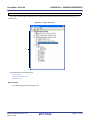
Figure 2-8. Display Class Information (Class/Member Panel)
Toolbar
[View Setting] combo box
Panel control area
Classes/categories tree area
Functions/variables list area
The acquired information is displayed in the classes/categories tree area (top) and the functions/variables list area (bottom). When a node on the tree displayed in the classes/categories tree area is selected, the information of the node (e.g.
function names/variable names defined in the selected node) will be displayed in the functions/variables list area.
You can use the [View Setting] combo box in the panel control area to classify the items in the classes/categories tree
into the following five groups.
Table 2-3. Classification Methods for Tree on Class/Member Panel
Items of List
Description
Category group (default)
Classifies and displays classes, interfaces, and other types.
Access group
Classifies and displays nodes by their access specifiers specified in their classes, etc..
Namespace group
Classifies and displays nodes by namespaces in which the class and other elements are defined.
R20UT2447EJ0100 Rev.1.00
Feb 01, 2013
Page 27 of 192
CubeSuite+ V2.00.00
CHAPTER 2 FUNCTIONS
Items of List
Description
File group
Classifies and displays nodes by the files in which the class and other elements are defined.
Alphabet group
Displays nodes in alphabetical order.
Remarks 1.
The following operations can be performed on the node currently being selected.
- Jump to Defined Location
- Jump to Declared Location
2.
[CC-RX]
When the mouse cursor is hovered over a node (except for a category node), "Namespace name" to
which the node belongs appears in a pop-up.
R20UT2447EJ0100 Rev.1.00
Feb 01, 2013
Page 28 of 192
CubeSuite+ V2.00.00
2.6
CHAPTER 2 FUNCTIONS
Customize Display Method
The following operations will enable you to customize the displaying of items (columns) and the analysis information on
the Function List panel/Variable List panel.
All operations refer to the header area of each panel (the area where the column labels are displayed).
- Set the columns to display
- Change the order of the columns to display
- Lock the specific column to display
- Sort the analysis information
- Filter the analysis information
Remark
In the Column Chooser dialog box, click the [Default] button to return all the customizations you have performed via the operations above to the default values.
2.6.1
Set the columns to display
You can show or hide any of the items (columns) displayed on the Function List panel/Variable List panel.
(1) Restricting the columns displayed
(2) Adding columns to display
(1) Restricting the columns displayed
There are two ways to perform this operation, as shown below.
(a) Performing the operation from the panel
Use the mouse to drag and drop the items to hide off of the panel.
Figure 2-9. Restricting Columns Displayed (Operation from Panel)
Use mouse to drag and drop items
to hide off panel
(b) Performing the operation from the Column Chooser dialog box
On the left edge of the panel's header area, click the
button to open the Column Chooser dialog box, and
then clear the check boxes of the names of the items to hide.
R20UT2447EJ0100 Rev.1.00
Feb 01, 2013
Page 29 of 192
CubeSuite+ V2.00.00
CHAPTER 2 FUNCTIONS
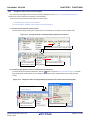
Figure 2-10. Restricting Columns Displayed (Operation from Column Chooser Dialog Box)
Click this button to open the Column
Chooser dialog box.
Clear the check boxes
of the items to hide
(2) Adding columns to display
On the left edge of the panel's header area, click the
button to open the Column Chooser dialog box, and then
select the check boxes of the names of the columns to display, or drag and drop them directly from the dialog box
to the information display area on the panel using the mouse.
Figure 2-11. Adding Columns to Display (Clearing Check Boxes in Column Chooser Dialog Box)
Click this button to open the Column
Chooser dialog box.
Select the check boxes of
the items to display
Figure 2-12. Adding Columns to Display (Dragging and Dropping from Column Chooser Dialog Box)
Click this button to open the Column
Chooser dialog box.
Drag and drop using the mouse
R20UT2447EJ0100 Rev.1.00
Feb 01, 2013
Page 30 of 192
CubeSuite+ V2.00.00
2.6.2
CHAPTER 2 FUNCTIONS
Change the order of the columns to display
You can change the display order of the items (columns) displayed on the Function List panel/Variable List panel.
There are two ways to perform this operation, as shown below.
There are two ways to perform this operation, as shown below.
(1) Performing the operation from the panel
(2) Performing the operation from the Column Chooser dialog box
(1) Performing the operation from the panel
Use the mouse to drag and drop the column name to move directly to an arbitrary column (header area).
Figure 2-13. Change the Order of Displayed Items (Operation from Panel)
Drag the column name to move using the mouse
This mark indicates the
Drop on the destination column
position after movement
(2) Performing the operation from the Column Chooser dialog box
On the left edge of the panel's header area, click the
button to open the Column Chooser dialog box, and then
drag and drop the column names to move directly to the desired column (header area) on the panel using the
mouse.
Figure 2-14. Change the Order of Displayed Items (Operation from Column Chooser Dialog Box)
Click this button to open the Column
Chooser dialog box.
This mark indicates the
Drag and drop using the mouse
position after movement
R20UT2447EJ0100 Rev.1.00
Feb 01, 2013
Page 31 of 192
CubeSuite+ V2.00.00
2.6.3
CHAPTER 2 FUNCTIONS
Lock the specific column to display
You can set specified items (columns) to always be displayed on the Function List panel/Variable List panel, even if the
screen display is scrolled.
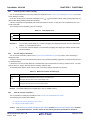
To do this, use the mouse to click the lock display icons (
/
) of the desired column name (clicking repeatedly tog-
gles the item display between locked and unlocked).
Columns configured for locked display are locked at the leftmost column, so they will not be scrolled even if the user
scrolls horizontally.
The meanings of the lock display icons are as follows:
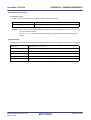
Table 2-4. Lock Display Icons
Icon
Description
Indicates that the display is not locked (default).
Indicates that the display is locked.
Remarks 1.
You can also lock the display of a column by dragging and dropping it between two items with locked
displays, or to the rightmost column.
2.
You can also unlock the display of a locked item by dragging and dropping it between two items with
unlocked displays.
2.6.4
Sort the analysis information
You can sort the information values on the Function List panel/Variable List panel by column, and in ascending or
descending order.
To do this, use the mouse to click the desired column name (clicking repeatedly toggles the sort order between ascending and descending).
If the items to sort are numbers (decimal or hexadecimal), then the information is sorted by numerical value. For other
types of data (e.g. strings), the information is sorted by character code.
The following mark appears by the column name of the column that the information is sorted on:
Table 2-5. Marks that Indicate Sorted Display
Mark
Description
Indicates that the information is being sorted in ascending order.
Click again with the mouse to sort in descending order.
Indicates that the information is being sorted in descending order.
Click again with the mouse to sort in ascending order.
Remark
2.6.5
Click while holding down the [Shift] key to sort on multiple columns.
Filter the analysis information
You can set filters for displaying information on the Function List panel/Variable List panel.
The following types of filters are available.
(1) Filtering via custom settings for each column
(2) Filtering results linked to panel
Caution
The Filtering via custom settings for each column and the Filtering results linked to panel are mutually exclusive functions. For this reason, the two filtering functions described here cannot be
R20UT2447EJ0100 Rev.1.00
Feb 01, 2013
Page 32 of 192
CubeSuite+ V2.00.00
CHAPTER 2 FUNCTIONS
enabled simultaneously (when one of the filters is active, setting the other filter will disable the first
one).
(1) Filtering via custom settings for each column
Configure a custom filter for each column, and display the acquired information.
To do this, click on the filter icon (
/
) of the target column name, then select the following menu item.
Table 2-6. Filter Display Settings
Item
Description
(All)
Does not set filter (resets filter display).
Displays all information.
(Custom)
Opens the Filter Settings dialog box to set detailed filtering conditions.
Only information matching the conditions specified in this dialog will be displayed.
(Blanks)
Displays empty ("-") fields.
(NonBlanks)
Does not display empty ("-") fields.
Information list
All acquired information is displayed in a list as strings.
Only values matching the string selected from the list are displayed.
Select [(Custom)] to open the Filter Settings dialog box. Use this dialog box to set up to two condition groups. Both
conditions can be linked into a single filtering condition via the logical operator buttons ([AND] / [OR]).
Use the top condition-specification area if you only wish to specify one filtering condition.
Figure 2-15. Filtering via Custom Settings for Each Column (Filter Settings Dialog Box)
Condition 1
Condition 2
Enter comparison values
Select the condition for the comparison
(numbers/strings) directly
value from the drop-down list
The meanings of the filter icons are as follows:
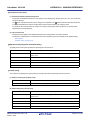
Table 2-7. Filter Icons
Icon
Description
Indicates that no filtering is taking place (default).
Indicates that the information is being filtered.
R20UT2447EJ0100 Rev.1.00
Feb 01, 2013
Page 33 of 192
CubeSuite+ V2.00.00
CHAPTER 2 FUNCTIONS
(2) Filtering results linked to panel
(a) Linking with the Project Tree panel
(b) Linking with the Editor panel
(c) Linking with the Debug Manager panel [V850E2]
Caution
If "(1) Filtering via custom settings for each column" is configured while the information is
being filtered via the method described below, linking displays that have been taking place will
be reset.
Remark
The three filtering functions described below can be used simultaneously.
(a) Linking with the Project Tree panel
Only display values for functions/variables in a file/category selected in the Project Tree panel.
To do this, click the
button on the Function List panel/Variable List panel toolbar to enable this filtering
function, then from the Project Tree panel, select the desired file(s)/category(s). Click this button again to disable this function. The relationship between the selections in the Project Tree panel and the filtered functions/
variables is as follows:
Table 2-8. Filtering Linked to Project Tree Panel
Selection
Display
Single file in active project
Functions/variables defined in single file
Multiple files in active project
Functions/variables defined in multiple files
Single category in active project
Functions/variables defined in single category
Multiple categories in active project
Functions/variables defined in multiple categories
Combination of files and categories in
Functions/variables defined in the selected files and categories
active project
Other than the above
All functions/variables defined in files included in the active project
Caution
Assembler source files cannot be analyzed.
Remark
If a header file is selected, then functions/variables defined in that header file are displayed.
(b) Linking with the Editor panel
Only display information for functions/variables starting with the word at the caret position in the Editor panel.
To do this, click the
button on the Function List panel/Variable List panel toolbar to enable this filtering
function, then move the caret to the desired function/variable name in the Editor panel. Click this button again
to disable this function. Note, however, that if there is no word at the caret position (e.g. if it is at a space or tab
character), then the display will not be filtered linked to the Editor panel.
(c) Linking with the Debug Manager panel [V850E2]
Only display information for functions/variables in the common region and PE selected in the Debug Manager
panel.
To do this, click the
button on the Function List panel/Variable List panel toolbar to enable this filtering
function. Click this button again to disable this function. Note, however, that if the selected microcontroller
version does not support multi-core, then this function will be invalid.
R20UT2447EJ0100 Rev.1.00
Feb 01, 2013
Page 34 of 192
CubeSuite+ V2.00.00
2.7
CHAPTER 2 FUNCTIONS
Jump to Defined Location
You can jump to the location where the function, variable, or class [CC-RX], etc. on the Function List panel/Variable
List panel/Call Graph panel/Class/Member panel is defined.
Cautions 1.
[CC-RX]
When C++ source files are subject to analysis, the defined location information on member
functions defined in a template function or a template class cannot be obtained. Therefore, the
following operation is invalid for them; except however, when the template function is defined
with a static declaration, and defined outside a class.
2.
[CC-RX]
If the target of the following operation is a member of an enumeration type, then a jump will be
made to the defined location of the enumeration type. Note, however, that it is not possible to
jump to the defined location of a member of an anonymous enumeration type via the member
node.
3.
[CX][NC30(Localised support)]
It is not possible to jump to the defined location of a type via a struct type/union type/enum type
node. Furthermore, it is not possible to jump to the defined location of a member of a struct type/
union type via the member node.
4.
[CA850]
This jump function may not be performed correctly if "#pragma directive" (like examples below)
is described following "#include statement" in the source text.
In this case, move "#pragma directive" before the description of "#include statement".
Examples 1.
2.
#pragma task TASK_A
#pragma interrupt INTP0 functionA
(1) Jump to the Editor panel
When the jump is executed, the source file in which the target is defined opens in the Editor panel, and the caret
moves to the line where it is defined.
To do this, perform the following operation.
Panel
Target
Function List panel
A line of function
Variable List panel
A line of variable
Call Graph panel
- A function box
Operation
Double-click
Double-clickNote
- A variable box
R20UT2447EJ0100 Rev.1.00
Feb 01, 2013
Page 35 of 192
CubeSuite+ V2.00.00
CHAPTER 2 FUNCTIONS
Panel
Class/Member panel
Target
On the classes/categories tree area
Operation
Select [Jump to Source] from the context menu.
- A namespace node [CC-RX]
- A class name node [CC-RX]
- An interface name node [CC-RX]
- A struct type name node
- An union type name node
- An enum type name node
On the functions/variables list area
Double-click
- A function name node
- A variable name node
- A macro name node
- An alternative name node
- An enum member name node
Note If scrolling via the mouse dragging is being enabled by the
button on the panel control area, this oper-
ation cannot be used. In this case, select [Jump to Source] from the context menu after selecting the target,
or disable the scroll function temporarily, then perform the operation above.
(2) Jump to the Disassemble panel/Memory panel
When the jump is executed, the disassembly data/memory list corresponding to the starting address of the target
opens in the Disassemble panel (Disassemble1)/Memory panel (Memory1), and the caret moves to the corresponding location (note, however, that this is only possible while connecting to the debug tool).
To do this, perform the following operation.
Panel
Function List panel
Variable List panel
Call Graph panel
Target
A line of function
A line of variable
- Jump to the Disassemble panel:
Note 1
Select [Jump to Disassemble] from the context
menu.
- A function box
- A variable box
Class/Member panel
Operation
On the functions/variables list areaNote 2
- Jump to the Memory panel:
Select [Jump to Memory] from the context
menu.
- A function name node
- A variable name node
- A macro name node
- An alternative name node
- An enum member name node
Notes 1.
2.
You can jump to only the Memory panel.
Neither a node on the classes/categories tree area nor a node of an instance variable can be target for
this function.
R20UT2447EJ0100 Rev.1.00
Feb 01, 2013
Page 36 of 192
CubeSuite+ V2.00.00
2.8
CHAPTER 2 FUNCTIONS
Jump to Declared Location
You can jump to the location of the source text where the function, variable, or class [CC-RX], etc. on the Class/Member panel is declared.
Caution
[CC-RX]
When C++ source files are subject to analysis, the reference information for functions/variables that
are referenced in a member function defined in a template function or a template class cannot be
obtained. Therefore, the following operation is invalid for them; except however, when the template
function is defined with a static declaration, and defined outside a class.
When the jump is executed, the source file in which the target is declared opens in the Editor panel, and the caret
moves to the line of the function prototype declaration (for C source files) or the line of the function prototype declaration
inside class declaration (for C++ source files).
To do this, perform the following operation.
Target
On the classes/categories tree area
Operation
Select [Jump to Declaration of Source] from the context menu.
- A namespace node [CC-RX]
- A class name node [CC-RX]
- An interface name node [CC-RX]
- A struct type name node
- An union type name node
- An enum type name node
On the functions/variables list area
- A function name node
- A variable name node
- A macro name node
- An alternative name node
- An enum member name node
Remark
The line to which the caret moves may be the same as the line of the result of selecting [Jump to Source]
(see "2.7 Jump to Defined Location").
R20UT2447EJ0100 Rev.1.00
Feb 01, 2013
Page 37 of 192
CubeSuite+ V2.00.00
2.9
CHAPTER 2 FUNCTIONS
Set Break Events
You can set a break event in the debug tool at a function/variable on the Function List panel/Variable List panel.
- Set a breakpoint to a function
- Set a break event to a variable
2.9.1
Set a breakpoint to a function
Set a breakpoint at the start of the function on the Function List panel (the first executable line in the function).
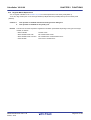
To do this, select the row in which the target function is displayed (make sure that the current row mark (
) appears to
the left of the selected row), then from the context menu, select [Set Break to Function].
Caution
This operation is disabled while disconnecting from the debug tool.
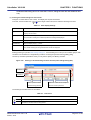
A breakpoint set via this operation is managed in the Events panel as an event whose name is "Break at start of function".
Figure 2-16. Example of Setting Breakpoint in Events Panel
Remarks 1.
2.
If there is already a breakpoint set at the corresponding location, the behavior is as follows:
- If a breakpoint in a valid state is set:
No effect
- If a breakpoint in an invalid state is set:
Sets the breakpoint to a valid state
[CC-RX]
If the target function is a template function and multiple addresses corresponding to its template function exist, then the breakpoints will be set to all the addresses.
2.9.2
Set a break event to a variable
Set a break event with access condition to a variable on the Variable List panel.
To do this, select the row in which the target variable is displayed (make sure that the current row mark (
) appears to
the left of the selected row), then from the context menu, select one of the following and then press the [Enter] key.
- [Access Break] >> [Set Variable Read Break to]: Sets a break event with read access condition.
- [Access Break] >> [Set Variable Write Break to]: Sets a break event with write access condition.
- [Access Break] >> [Set Variable R/W Break to]:
Sets a break event with read/write access condition.
Note that at this time, you can specify the value in the text box in the context menu.
In this case, execution will only break if it is accessed with the specified value. If you press [Enter] key without entering
a value in the text box, then execution will break when the target variable is accessed, regardless of the value.
R20UT2447EJ0100 Rev.1.00
Feb 01, 2013
Page 38 of 192
CubeSuite+ V2.00.00
CHAPTER 2 FUNCTIONS
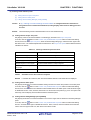
Figure 2-17. Example of Setting Break Event on Variable
After setting the variable "global_b" to the current row enter a
value in [Access Break] >> [Set Variable Write Break to] from the
context menu, then press the [Enter] key.
Here, the program will break when the value "0xb" is written to the
variable "global_b".
Cautions 1.
2.
This operation is disabled while disconnecting from the debug tool.
For combination break events, this function is available only when the combination condition is
"OR".
A break event set via this operation is managed in the Events panel as an event whose name is "Access break to variable".
Figure 2-18. Example of Setting Break Event (Access Type) in Events Panel
Remark
If there is already a breakpoint set at the corresponding location, the behavior is as follows:
- If a break event in a valid state is set:
No effect
- If a break event in an invalid state is set:
Sets the break event to a valid state
R20UT2447EJ0100 Rev.1.00
Feb 01, 2013
Page 39 of 192
CubeSuite+ V2.00.00
2.10
CHAPTER 2 FUNCTIONS
Register Watch-Expressions
You can register variables on the Variable List panel as watch-expressions in the Watch panel (Watch1).
To do this, drag and drop the row of the target variable (multiple selections possible) directly onto the Watch panel
(Watch1).
Cautions 1.
2.
Remark
This operation is disabled while disconnecting from the debug tool.
This operation is disabled for the [*Total*] row.
The name of the watch-expression registered in the Watch panel differs depending on the type of the target
variable, as follows:
- Global variable:
"variable name"
- Static variable inside a file:
"file name#variable name"
- Static variable inside a function:
"file name#function name#variable name"
- Class variable:
"class name::variable name"
R20UT2447EJ0100 Rev.1.00
Feb 01, 2013
Page 40 of 192
CubeSuite+ V2.00.00
2.11
CHAPTER 2 FUNCTIONS
Display List of Referencing Location
You can find and display a list of locations referencing a function/variable on the Function List panel/Variable List panel.
To do this, select the row in which the target function/variable is displayed (multiple selections possible), then from the
context menu, select [Find All References].
The results of the search are output to the next Output panel's [Find References] tab.
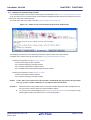
Figure 2-19. Sample List of Locations Referencing Function (Output Panel)
The following information about the referencing locations is output to the list as the search results.
For details on the output format, see the section of the Output panel's [Find References] tab.
- Performing the operation from the Function List panel
- Location where target function is defined
- List of locations referencing the target function
- List of functions called within the target function
- List of variables referenced (read/write) inside the target function
- Performing the operation from the Variable List panel
- Location where target variable is defined
- List of locations referencing the target variable
Caution
Code in C/C++ source files that is referenced but is eliminated by the preprocessor during compilation (e.g. via "#if" or "#ifdef" statements) is not output as referenced locations.
Remarks 1.
When the function name/variable name on this panel is double-clicked, the Editor panel appears and
the caret moves to the line where the function/variable is defined.
2.
You can save the contents displayed on this Output panel's [Find References] tab to a text file (*.txt) by
selecting [Save Output-Find References As...] from the [File] menu.
R20UT2447EJ0100 Rev.1.00
Feb 01, 2013
Page 41 of 192
CubeSuite+ V2.00.00
2.12
CHAPTER 2 FUNCTIONS
Import or Export Information File
Information for functions or variables defined outside the active project, and which are never referenced from the active
project, is ordinary not displayed in the Function List panel/Variable List panel.
In this case, it is possible to force this information to be displayed by importing an information file that saves the information about a function/variable you need.
The following types of information files are available.
Table 2-9. Types of Information Files
Information FIle Name
Function list file(*.mtfl)
Contents
Stores the information about the following items on the Function List panel.
[Function Name], [Class Name][CC-RX], [Namespace][CC-RX], [File Name], [File Path], [PE
Information]Note, [Access Specifier][CC-RX], [Attribute], [Return Type], [Arguments Count], [Arguments], [Code Size[Bytes]], [Stack Size[Bytes]]
Variable list file(*.mtvl)
Stores the information about the following items on the Variable List panel.
[Variable Name], [Class Name][CC-RX], [Namespace][CC-RX], [File Name], [Function Name],
[File Path], [PE Information]Note, [Access Specifier][CC-RX], [Attribute], [Type], [Members],
[Size[Bytes]]
Note This item appears only when the selected microcontroller version supports multi-core.
The procedure for doing this is as follows:
(1) Generate (Export) information file
(a) Export an information file manually
This operation will generate an information file with only the functions/variables needed to be imported.
To do this, first make the project in which the target functions/variables are defined the active project, then display the necessary information of the target functions/variables in the Function List panel/Variable List panel.
Next, select all the rows displaying the target functions/variables in this panel (multiple rows can be selected
by holding down the [Shift]/[Ctrl] key while selecting), then from the [File] menu, select [Save Function List
Data As...]/[Save Variable List Data As...]. The following Save As dialog box opens.
Figure 2-20. Export Information File Manually (Example of Function List File)
R20UT2447EJ0100 Rev.1.00
Feb 01, 2013
Page 42 of 192
CubeSuite+ V2.00.00
CHAPTER 2 FUNCTIONS
In the [Save in] area of the above dialog box, select a folder of your choice in which to save the generated
information file, then select "Function List File (*.mtfl)" or "Variable List File (*.mtvl)" from the drop-down list in
the [Files of type] area.
Next, enter a file name of your choice for the information file in the [File name] area. Note, however, that the
file extension must be "mtfl" for a function list file, and "mtvl" for a variable list file.
Click the [Save] button to generate the information file in the specified folder, with the specified file name.
Remark
If you also need information about functions/variables defined outside the active project specified
here, then generate a separate information file using the same procedure.
(b) Export information files automatically
This operation will automatically generate information files with all the functions/variables displayed in the
Function List panel/Variable List panel each time a build/rebuild is executed.
To do this, specify [Yes] with the [Export the functions and variables] property in the [Import / Export] category
on the [Settings] tab of the Property panel, and then specify a file name of your choice for the information files
in the [Export file name for functions]/[Export file name for variables] property. Note, however, that the file
extension must be "mtfl" for a function list file, and "mtvl" for a variable list file. If you specify a relative path,
specify the project folder as the base.
Figure 2-21. [Import / Export] Category
The above setting completes the automatic export of the information file.
Execute a build/rebuild to generate the information file automatically in the specified folder, with the specified
file name.
Caution
Only the current active project is subject to this export.
Remark
The following placeholders are supported in the [Export file name for functions]/[Export file name
for variables] property.
- %ProjectName%:
Replaces itself with the project name.
- %ActiveProjectName%: Replaces itself with the active project name.
(2) Import the information file
Import the information file you generated (exported).
To do this, set the [Import files] property in the [Import / Export] category on the [Settings] tab of the Property panel.
When the [Import files] property is selected, a [...] button appears. When this button is clicked the following Path
Edit dialog box opens.
Figure 2-22. [Import files] Property in [Import / Export] Category
R20UT2447EJ0100 Rev.1.00
Feb 01, 2013
Page 43 of 192
CubeSuite+ V2.00.00
CHAPTER 2 FUNCTIONS
Figure 2-23. Specification of Import Files (Path Edit Dialog Box)
In the Path Edit dialog box, in the [Path(One path per one line)] area, specify the names of the information files
generated in (1) (including the path), one path per line (up to 259 characters per line/up to 64 lines). If you specify
a relative path, specify the project folder as the base.
You can also use the [Browse...] button to specify information files. After you have entered the names of all the
files to import, click the [OK] button. The specified paths appear as sub-properties of the [Import files] property.
Figure 2-24. [Import files] Property (After Adding Import Files)
The above setting completes the import of the information file.
Remarks 1.
2.
The following placeholders are supported in the Path Edit dialog box.
- %ProjectName%:
Replaces itself with the project name.
- %MicomToolPath%:
Replaces itself with the absolute path of the CubeSuite+ install folder.
The information files that have been exported by CubeSuite (CubeSuite function list file (*.csfl)/
CubeSuite variable list file (*.csvl)) can also be imported.
3.
If a function/variable with the same name exists in a import file and an active project, the determination is made according to the following rules.
C source files:
- If the file names are different, and "static" (only lower case) is included in the attribute in the
import file, then it is interpreted as a static function/static variable, and loaded as different
function information/variable information.
- If the file names are the same and the function names are different, and "static" (only lower case)
is included in the attribute in the import file, then it is interpreted as a static variable in a function,
and loaded as different variable information.
R20UT2447EJ0100 Rev.1.00
Feb 01, 2013
Page 44 of 192
CubeSuite+ V2.00.00
CHAPTER 2 FUNCTIONS
- Functions/variables other than the above are interpreted as a global function/global variable or a
static function/static variable with the same name in a file, and merged as identical function
information/variable information.
C++ source files [CC-RX]:
- [Class Name], [Namespace], [File Name], and [Arguments] are compared. If any one of these
does not match, then it is loaded as different function information.
- [Class Name], [Namespace], [Function Name], [File Name], and [Arguments] are compared. If
any one of these does not match, then it is loaded as different variable information.
- Functions/variables other than the above are merged as identical function information/variable
information.
The rules for determining merging as identical function information/variable information are as follows:
Items
Function
Rules
Variable
The precedence is as follows:
[Class Name][CC-RX]
[Class Name][CC-RX]
[Namespace][CC-RX]
[Namespace][CC-RX]
[Function Name]
[File Name]
Note, however, that if there is function
[File Pass]
[Function Name]
information/variable information from multiple
[PE Information]
[File Path]
import files to merge, then the function
[Stack Size[Bytes]]
[PE Information]Note
information/variable information of the last file to
[Arguments Count]
[Access Specifier][CC-RX]
[Arguments]
[Attribute]
[Return Type]
[Type]
[Access Specifier][CC-RX]
[Members]
Note
"Active project value" > "Import file value"
be imported is loaded.
If a value does not exist in either the active
project or import file, then it is left blank ("-").
[Attribute]
[Code Size[Bytes]]
[Size[Bytes]]
The precedence is as follows:
"Import file value" > "Active project value"
Note, however, that if there is function
information/variable information from multiple
import files to merge, then the function
information/variable information of the last file to
be imported is loaded.
If a value does not exist in either the active
project or import file, then it is left blank ("-").
Note This item appears only when the selected microcontroller version supports multi-core.
(3) Cancel the file import
To cancel the file import, delete the import files on the Path Edit dialog box.
R20UT2447EJ0100 Rev.1.00
Feb 01, 2013
Page 45 of 192
CubeSuite+ V2.00.00
2.13
CHAPTER 2 FUNCTIONS
Display Analysis Information in Chart
You can display the acquired function information and variable information (including the data information for Smart
AnalogNote) in a chart.
To display a chart, click the
button on the Main window's toolbar to open the Analysis Chart panel.
The following content is graphed in the Analysis Chart panel.
- Graph transitions in values
- Chart the function execution time ratios
Note [E1/E20[RL78]]
This feature is supported only when the selected microcontroller incorporates a Smart Analog IC.
Figure 2-25. Example of Graphs for Analysis Information (Analysis Chart Panel)
2.13.1
Graph transitions in values
Display the relationship between registered variable/register/address/other values and time by a graph (line chart).
Furthermore, when the selected microcontroller incorporates a Smart Analog IC, by enabling the Data collection mode
on the debug tool, it is possible to display the collected data for Smart Analog by a graph [E1/E20[RL78]].
Graphs are displayed in the Analysis Chart panel's [Variable Value Changing Chart] tab.
See the [Variable Value Changing Chart] tab for details on each of the area displayed.
Caution
[E1/E20[RL78]]
To graph the collected data for Smart Analog, a monitor program for collecting data must be linked
to the execution program.
R20UT2447EJ0100 Rev.1.00
Feb 01, 2013
Page 46 of 192
CubeSuite+ V2.00.00
CHAPTER 2 FUNCTIONS
Figure 2-26. Graph of Transition in Variable Values
Graph control area
Cursor selection buttons
Trigger information
Splitter
Cursor-B
Cursor-A
Cursor information area
Splitter
Channel number
Variable name check box
Channel information area
Remarks 1.
You can change the display range of the cursor information area and channel information area by moving the splitter with the mouse. In addition, these areas can be shown/hidden by clicking the mark on
the center of their splitters.
2.
Data collection mode
This mode is the debug tool's feature that is supported only when the selected microcontroller incorporates a Smart Analog IC [E1/E20[RL78]].
When the debug tool is in this mode, the data for Smart Analog can be collected while a program is
executed. This mode becomes valid by performing the following setting on the Property panel of the
debug tool:
[Debug Tool Settings] tab >> [Smart Analog] category >> [Collect data during the execution] property
>> [Yes]
The procedure for displaying the chart is as follows:
(1) Register graphing targets
Register the item to graph.
(a) When graphing variable/register/address/other values
(b) When graphing the data collected for Smart Analog [E1/E20[RL78]]
Caution
Graphing targets cannot be registered in the condition below:
- During execution of a program
- When the [Analysis method] property in the [General] category on the [Variable Value Changing] tab of the Property panel is set to [Load from file] (i.e. when graphs are restored from the
analysis chart data file (*.mtac))
R20UT2447EJ0100 Rev.1.00
Feb 01, 2013
Page 47 of 192
CubeSuite+ V2.00.00
CHAPTER 2 FUNCTIONS
(a) When graphing variable/register/address/other values
The following types of items can be registered.
- Global variable
- Static variable inside a file
- Static variable inside a function
- Class variable (only when C++ source files are subject to analysis)
- CPU register
- IOR [RX][V850]
- SFR [R8C(Localised support)][RL78][78K0R][78K0]
- Address
There are three ways to register graphing targets, shown below.
When the registration is completed, the name of the registered graphing target will be displayed at the Variable
name check box corresponding to the channel number in the channel information area.
<1> Registering targets separately (on the Property panel)
<2> Registering targets separately (from the other panel)
<3> Reflecting the Watch panel (auto registration)
Caution
You can register graphing targets for up to 16 channels, one target per channel.
Note, however, that there may be restrictions on the number and size of targets that can be
graphed, depending on the debug tool used and the method by which the graph data was
acquired (see "(2) Select the method for acquiring the graph data").
<1> Registering targets separately (on the Property panel)
Enter the name of the target directly from the keyboard into the [Variable/Address 1 - 16] property in the
[Channel 1 - 16] category on the [Variable Value Changing] tab of the Property panel.
Figure 2-27. [Channel1 - 16] Category
In addition, the following detailed conditions can be specified with the [Channel 1 - 16] category for each
target (see “(4) Display graphs“).
- [Type/Size 1 - 16]:
Type and size
- [Value per grid[Val/Div] 1 - 16]:
Value per grid unit in graph
- [Offset 1 - 16]:
Offset value of graph
- [Color 1 - 16] property:
Rendering color of graph
Remarks 1.
To delete the registered graphing target, delete the value of the above [Variable/Address
1 - 16] property.
2.
The registered graphing target name is displayed at the Variable name check box on the
[Variable Value Changing Chart] tab.
R20UT2447EJ0100 Rev.1.00
Feb 01, 2013
Page 48 of 192
CubeSuite+ V2.00.00
CHAPTER 2 FUNCTIONS
<2> Registering targets separately (from the other panel)
From the following panel, drag and drop the target directly onto the Channel number or Variable name
check box in this tab.
- Variable List panelNote
- Editor panel
- CPU register panel
- IOR panel [RX][V850]
- SFR panel [R8C(Localised support)][RL78][78K0R][78K0]
- Watch panel
Note The name of the graphing target displayed differs depending on the type of the variable, as follows:
- Global variable:
"variable name"
- Static variable inside a file:
"file name#variable name
- Static variable inside a function:
"file name#function name#variable name"
- Class variable:
"class name::variable name"
Remarks 1.
Other than the above, on the Variable List panel or the Editor panel, you can also register the selected variable as a graphing target, by selecting [Register to Analysis Chart]
from the context menu.
2.
To delete the registered graphing target, delete the value of the [Variable/Address 1 - 16]
property in the [Channel 1 - 16] category on the [Variable Value Changing] tab of the
Property panel.
<3> Reflecting the Watch panel (auto registration)
By clicking the [Reflect] button on this tab, you can automatically register watch-expressions currently
being registered in the Watch panel (Watch1) as graphing targets.
Up to 16 watch-expressions in the Watch panel (Watch1), from top to bottom can be registered. If fewer
than 16 watch-expressions have been registered, only the registered number are registered.
Caution
Clicking the [Reflect] button will cause the information of graphing targets being registered to be deleted (the graph being displayed will be erased).
Remarks 1.
Categories themselves are not registered, but variables and other elements within categories are.
2.
If a variable has child nodes (e.g. arrays and structures), expanded variables and the
like, such as structure members and array indices, are not registered.
3.
If a name matches a graphing target that has already registered, then it will be registered
twice.
(b) When graphing the data collected for Smart Analog [E1/E20[RL78]]
This feature is enabled only when the selected microcontroller incorporates a Smart Analog IC.
First, set the debug tool used to the Data collection mode.
Next, specify the channel numbers in which the data is received from a device with the [Data collection channel] property in the [Smart Analog] category on the [Variable Value Changing] tab of the Property panel. In the
drop-down list, select the check box of the channel number to be used (up to 8 channels can be selected).
Caution
The [Smart Analog] category appears only when the debug tool is set in the Data collection
mode.
R20UT2447EJ0100 Rev.1.00
Feb 01, 2013
Page 49 of 192
CubeSuite+ V2.00.00
CHAPTER 2 FUNCTIONS
Figure 2-28. [Smart Analog] Category
In addition, the following detailed conditions can be specified with the [Channel 1 - 16] category on the [Variable Value Changing] tab of the Property panel for each channel (see “(4) Display graphs“).
- [Variable/Address 1 - 16]:
Character strings that are displayed at the Variable name check box
- [Value per grid[Val/Div] 1 - 16]:
Value per grid unit in graph
- [Offset 1 - 16]:
Offset value of graph
- [Color 1 - 16] property:
Rendering color of graph
Figure 2-29. [Channel1 - 16] Category [E1/E20[RL78]]
(2) Select the method for acquiring the graph data
There are three ways to acquire the data for graphing, as shown below.
Specify the method with the [Analysis method] property in the [General] category on the [Variable Value Changing]
tab of the Property panel.
Cautions 1.
2.
The method for acquiring the graph data cannot be changed during execution of a program.
If graph data has already been acquired, then changing this setting will cause the stored
graph data to be deleted (the graph being displayed will be erased).
3.
When Trace data analysis is specified, also see "3.4 Trace Data Analysis".
Figure 2-30. [Analysis method] Property
R20UT2447EJ0100 Rev.1.00
Feb 01, 2013
Page 50 of 192
CubeSuite+ V2.00.00
CHAPTER 2 FUNCTIONS
Table 2-10. Method for Acquiring Graph Data
Method for Acquiring Graph Data
Real-time sampling analysis
Description
Select [Real-time sampling] in this property.
This method displays graphs based on the data acquired via the RRM function/
pseudo RRM function of the debug tool (default).
Note, however, that if the debug tool is set in the Data collection mode, then the
data will be collected using a sampling methodNote for Smart Analog.
Therefore, select this item When graphing the data collected for Smart Analog
[E1/E20[RL78]].
Trace data analysis
Select [Analysis of trace data] in this property.
This method displays graphs based on the trace data acquired via the Trace
function of the debug tool.
This item does not appear when any one of the following:
- The debug tool does not support the trace function.
- The debug tool is set in the Data collection modeNote.
Load from file
Select [Load from file] in this property.
This method restores graphs by loading the analysis chart data file (*.mtac) that
have been saved (see “(6) Save the graph data to restore the graph).
Note [E1/E20[RL78]]
The following property setting on the Property panel is required.
- [Variable Value Changing] tab >> [Smart Analog] category >> [Sampling interval[ms]] property
The differences depending on the method for acquiring graph data are as follows:
Table 2-11. Differences Depending on Method for Acquiring Graph Data
Differences
Graph display
Real-time Sampling Analysis
Trace Data Analysis
Possible when the debug tool is in any of the
Possible when Trace function of the debug tool
following states:
is enabled
- RRM function/pseudo RRM function is
enabled
- Data collection mode
Chart type
One of the followingNote 1
Step-plot line chart (fixed)
- Step-plot line chart
- Normal line chart
Registration of
Before execution of a program
graphing targets
Not dependent on the execution timing
because analysis is based on trace data
Number of targets
Dependent on the size of the target area of
If Point Trace events are used:
that can be graphed
RRM functionNote 2.
Dependent on the maximum number of
enabled eventsNote 3 in the debug tool
Size of targets that
- Less than or equal to 4 bytes
can be graphed
- Less than or equal to 4 bytes [RX][V850]
- Less than or equal to 2 bytes
[RL78][78K0R][78K0]
Time display range
The execution time, from the start to the end
Time registered as trace data
of program execution (Run-Break time)
Time display format
XXXsXXXms
XXXsXXXmsXXXμsXXXns
Real-time update
Possible
Impossible
R20UT2447EJ0100 Rev.1.00
Feb 01, 2013
Page 51 of 192
CubeSuite+ V2.00.00
CHAPTER 2 FUNCTIONS
Differences
Real-time Sampling Analysis
Trace Data Analysis
Transition points of
Not possible to identify accurate time/change
Matches actual timing (can be checked from
value
points, because they depend on the specified
Pop-up display)
sampling intervalNote 4.
Note
- It may not be possible to identify the sampling interval, depending on the number of
graphing targets registered.
- It may not be possible to acquire graph
data. if acquiring data has failed, lines
between transition points are not displayed
but only the time information is displayed
(see “(a) Graph“).
It is not possible to analyze changes in values
in the following case:
- In regions where the variable is assigned to a
register via compiler optimizations
- When a 2-byte region is written in units of 1
byte, or a 4-byte region is written in units of 1
or 2 bytes
- When the external trace/OCD internal trace of
the debug tool being used does not support
trace data of the access type (read/write)
(because the graph is rendered by analyzing
trace data of the access type.)
Notes 1.
This depends on the following setting on the Property panel:
- [Variable Value Changing] tab >> [General] category >> [Chart type] property
2.
[E20(JTAG)[RX600 Series]][IECUBE[V850]][MINICUBE2[78K0]][EZ Emulator[78K0]]
Some restrictions apply to the size and the number of the target area for the RRM function. For details
on "the target area for the RRM function", see "CubeSuite+ Integrated Development Environment
User's Manual: Debug" of the microcontroller used.
3.
The number of events that can be set to "valid state" simultaneously differs depending on the
microcontroller and the debug tool. For details on "Maximum number of enabled events", see
"CubeSuite+ Integrated Development Environment User's Manual: Debug" of the microcontroller used.
4.
If RRM function/pseudo RRM function is used:
- Debug tool's Property panel >> [Debug Tool Settings] tab >> [Access Memory While Running] category >>
[Display update interval[ms]] property
If the debug tool is in the Data collection mode:
- Property panel >> [Variable Value Changing] tab >> [Smart Analog] category >> [Sampling interval[ms]] property
(3) Use the trigger function
If you specify Real-time sampling analysis, you can control the timing with which the graph is displayed in response
to the specified trigger. You can use this trigger function to display the graph with the appearance of an oscillioscope.
The trigger function can be configured in the [Trigger] category on the [Variable Value Changing] tab of the Property panel.
Your configuration contents will be listed on this tab as the trigger information.
Caution
The properties in the [Trigger] category cannot be changed during execution of a program.
R20UT2447EJ0100 Rev.1.00
Feb 01, 2013
Page 52 of 192
CubeSuite+ V2.00.00
CHAPTER 2 FUNCTIONS
Figure 2-31. Setting of Trigger Function ([Trigger] Category)
(a) [Use trigger function]
Specify whether to use the trigger function from the drop-down list.
Select [Yes] to use the trigger function ([No] is selected by default).
(b) [Trigger mode]
Specify the trigger mode (the timing at which graphs are updated) from the drop-down list.
Auto
Updates the graph display cyclically in real time (default).
When a trigger signal is received, the data immediately prior to the trigger signal is graphed to the
left of the trigger position, and the data immediately after the trigger signal is graphed to the right of
the trigger position.
When the graph reaches the right edge of the graph area, the graph resumes scrolling to the left,
and the graph display is updated.
Single
Only updates the graph display upon the first trigger signal from the start of sampling.
When a trigger signal is received, the data immediately prior to the trigger signal is graphed to the
left of the trigger position, and the data immediately after the trigger signal is graphed to the right of
the trigger position.
When the graph reaches the right edge of the graph area, the graph display stops updating and
samplingNote.
Normal
Only updates the graph display upon trigger signals.
When a trigger signal is received, the data immediately prior to the trigger signal is graphed to the
left of the trigger position, and the data immediately after the trigger signal is graphed to the right of
the trigger position.
When the graph reaches the right edge of the graph area, the graph display stops updating.
Because sampling does not stop, the graph display is updated upon the next trigger signal.
Note The sampling is stopped regardless of whether [Sync] or [Manual] is selected in the [Start/stop real-time
sampling] property in the [General] category on the [Variable Value Changing] tab of the Property panel.
Remark
Triggers are suspended while the graph is being updated in response to a trigger signal. A trigger
signal received during this time will not cause the graph display to be updated. In [Auto] and [Single] modes, trigger signals are ignored while triggers are suspended. In [Normal] mode, the graph
is updated in response to the latest trigger signal when trigger suspension is lifted.
(c) [Trigger source]
Specify the variable (channel) that is the source of trigger signal.
Select a channel between ch1 and ch16 from the drop-down list ([ch1] is selected by default).
(d) [Trigger level]
Specify the threshold value for determining as a trigger signal.
R20UT2447EJ0100 Rev.1.00
Feb 01, 2013
Page 53 of 192
CubeSuite+ V2.00.00
CHAPTER 2 FUNCTIONS
The variable (channel) specified for [Trigger source] determines whether a trigger signal is recognized, according to whether the value exceeds the threshold set here.
Directly enter a value with a decimal or hexadecimal number in the range "minimum trigger source" to "maximum trigger source" (floating-point decimals allowed) ([0] is selected by default).
Remark
The trigger level is displayed on the right part of graphs as the trigger mark (
).
The trigger level can be changed by dragging on this trigger mark (note, this operation is disabled
during execution of a program).
(e) [Direction of trigger edge]
Specify the direction of the threshold value specified with [Trigger level] from the drop-down list.
The variable (channel) specified for [Trigger source] determines whether a trigger signal is recognized, according to whether the value exceeds the threshold in the direction set here.
Rising
Generates a trigger signal when the value of [Trigger source] changes from less than [Trigger level]
to greater than or equal to [Trigger level] (default).
Falling
Generates a trigger signal when the value of [Trigger source] changes from greater than [Trigger
level] to less than or equal to [Trigger level].
Both
Generates a trigger signal when both “Rising“ and “Falling“.
(f) [Trigger position]
Specify the position on the X axis for rendering the location at which the trigger signal occurred (i.e. position
where the data is graphed after a trigger signal occurs).
Directly enter a value with a decimal number in the following range ([0s] is selected by default).
Note that if the unit (s, ms, us, ns: case insensitive) is omitted, it will be handled as "ms".
- 0 to "(the value of the [Time per grid[Time/Div]] property) x 10"
Remark
The trigger position is displayed on the upper part of graphs as the trigger mark (
).
The trigger position can be changed by dragging on this trigger mark (note, this operation is
disabled during execution of a program).
(g) [Trigger mark color]
Specify the color of the trigger marks (
/
) that indicate the trigger level and the trigger position.
Specify with the color selection combo box or directly enter the value in decimal number/hexadecimal number
(prefix "0x" is needed) or the color name (see "About the specification of the color:") ([Color Orange] is
selected by default).
(4) Display graphs
After you have executedNote and stopped the program, the latest graph for the registered graphing target is displayed (default).
Note, however, that no graphs will be displayed if the corresponding data could not be acquired.
Graphs are updated when:
- [Real-time sampling analysis]
Each time of the specified sampling interval, even if a program is running.
You can control (toggle) the start/stop of a real-time sampling manually via the [Sampling] button on this tab,
by performing the following setting on the Property panel.
- [Variable Value Changing] tab >> [General] category >> [Start/stop real-time sampling] property >> [Manual]
R20UT2447EJ0100 Rev.1.00
Feb 01, 2013
Page 54 of 192
CubeSuite+ V2.00.00
CHAPTER 2 FUNCTIONS
- [Trace data analysis]
Each time program execution is stopped. Note, however, that if the [Refresh at program stop] property in the
[General] category on the [Settings] tab of the Property panel is set to other than [Yes] (default), the information will be updated in accordance with the setting on the Property panel.
Note [E1/E20[RL78]]
Click the
button on the debug toolbar to operate the debug tool in the Data collection mode (all execution-
related buttons other than the
button are disabled). For details on Smart Analog function, see "CubeSuite+
Integrated Development Environment User's Manual: Debug".
Cautions 1.
If the acquired graph data exceeds the buffer capacity (10000 plots), then the oldest graph
data is overwritten by the new graph data (ring buffer system).
In this case, part of the graph rendering will be blank.
2.
When Real-time sampling analysis is selected, if acquiring graph data has failed, lines
between transition points are not displayed but only the time information is displayed (see
"(a) Graph").
3.
[E1/E20[RL78]]
If you run the program by the debug tool in the Data collection mode, change the [Data
collection channel] property in the [Smart Analog] category on the [Variable Value Changing] tab of the Property panel, and run the program again in the data collection mode, the
first transition point in the graph may be incorrect.
Remark
There are limitations to the trace memory area of the debug tool.
Consequently, if the graph is displayed via Trace data analysis, then we recommend setting a Point
Trace event for the graphing target in the Watch panel, in order to display transitions of values over a
wider range.
The display of this graph can be configured as follows.
(a) Limitation of graphs displayed
You can select the graph to be displayed.
In the default condition, all graphs of channels where the graphing target is being registered are displayed.
To hide a graph, clear the Variable name check box corresponding to its channel number.
(b) Selection of the chart type
When Real-time sampling analysis is selected, you can select the chart type to be displayed.
To change the chart type, set the [Chart type] property in the [General] category on the [Variable Value
Changing] tab of the Property panel (note, however, that if Trace data analysis is selected, then the chart type
is fixed to [Step line chart]).
Line chart
Creates a graph linking each plot via straight lines (default).
Step line chart
Creates a graph linking each plot via perpendicular lines (step-plot chart).
R20UT2447EJ0100 Rev.1.00
Feb 01, 2013
Page 55 of 192
CubeSuite+ V2.00.00
CHAPTER 2 FUNCTIONS
Figure 2-32. Chart Type
[Line chart]
Remark
[Step line chart]
You can also specify the rendering color of a graph for each channel individually. To make the setting, set the [Color 1-16] property in the [Channel 1-16] category on the same tab.
(c) Setting the display range
The graph is displayed by dividing the X and Y axes into a 10 x 10 grid.
<1> Use the auto adjustment function (default)
According to the obtained graph data, optimum values are calculated for the time per unit grid (Time/Div)
for the X axis and the value per unit grid (Val/Div)/offset value for the Y axis as described below (default)
to display a graph.
- X axis (time)
The grids are automatically adjusted so that the specified number of value transition pointsNote on
the graph fit inside the rendering area (between the left and right ends).
- Y axis (value)
The grids are automatically adjusted so that the upper and lower ends of the rendering area correspond to the maximum and minimum values of the graph data, respectively.
Note In the default condition, 20 points are specified. This value can be changed via the [Number of
transition location for auto adjustment] property in the [General] category on the [Variable Value
Changing] tab of the Property panel.
Cautions 1.
The auto adjustment function is disabled when the trigger function is used or the
debug tool is set in the Data collection mode.
2.
The auto adjustment function becomes invalid when the following operation is
performed (the [Auto adjustment] property in the [General] category on the [Variable Value Changing] tab of the Property panel will be changed to [None]).
- The [Time/Div] label or [Val/Div] label on the Analysis Chart panel is doubleclicked.
- The display range is changed with the mouse operation (see "Set the display
range manually").
Remark
The timing at which the auto adjustment is conducted can be specified with the [Auto adjustment] property in the [General] category on the [Variable Value Changing] tab of the Property
panel.
<2> Set the display range manually
First, specify [None] with the [Auto adjustment] property in the [General] category on the [Variable Value
Changing] tab of the Property panel. Then, specify the following value.
- X axis (time)
R20UT2447EJ0100 Rev.1.00
Feb 01, 2013
Page 56 of 192
CubeSuite+ V2.00.00
CHAPTER 2 FUNCTIONS
You can specify the time per unit grid for all channels. To make the setting, set the [Time per
grid[Time/Div]] property, in the [General] category on the [Variable Value Changing] tab of the Property panel.
- Y axis (value)
You can specify the value per unit grid or the offset value for each channel individually. To make the
setting, set the [Value per grid[Val/Div] 1 - 16] property or the [Offset 1-16] property, in the [Channel
1 - 16] category on the [Variable Value Changing] tab of the Property panel.
You can also change the values above by any one of the following mouse operations.
Note, however, that these operations are disabled during execution of a program.
- The time per unit grid (Time/Div)
- Double-clicking on the [Time/Div] label in the Analysis Chart panel has the same effect as the
automatic adjustment function on the X axis.
- In the graph area, move the mouse wheel forward or backward while holding down the [Ctrl] key.
- The value per unit grid (Val/Div) or the offset value
- Double-clicking on the [Val/Div] label in the Analysis Chart panel has the same effect as the automatic adjustment function on the Y axis.
- Select a graph (the mark of transition points transforms into
), and then move the mouse
wheel forward or backward while holding down the [Ctrl] key.
- Offset value
- Click and vertically drag the mouse while pressing the [Shift] key with the mouse cursor placed
over any of the transition points in the graph (the mouse cursor transforms into the
icon).
Pressing the [Esc] key during dragging the mousecancels changing the offset value.
(5) Validate the graph data
You can perform the following operations on the displayed graph as needed.
Caution
These operations below are disabled during execution of a program.
(a) Pop-up display at a transition point
Check the information about transition points in the graph.
When the mouse cursor is hovered over a transition point on the graph, information about that location
appears in a pop-up.
Note, however, that the content displayed will differ depending on the method for acquiring the graph data (see
"(i) Pop-up display").
Figure 2-33. Pop-up Display at Transition Point
[Real-time sampling analysis]
Remark
[Trace data analysis]
When the [Location] information is shown in a pop-up, you can display the applicable location in the
Editor panel by double-clicking the transition point (except for a graph that was restored by loading
the analysis chart data file (*.mtac)).
R20UT2447EJ0100 Rev.1.00
Feb 01, 2013
Page 57 of 192
CubeSuite+ V2.00.00
CHAPTER 2 FUNCTIONS
(b) Cursor measurement
You can check the time and value at the position of Cursor-A/Cursor-B on the graph.
You can get a cursor measurement for the X axis (time) or Y axis (value).
Measurements appear in a list in the cursor information area on this tab (see "(4) Cursor information area").
To perform this measurement, first use the cursor selection button ([X Axis (Time)] button/[Y Axis (Value)] button) to select the target axis to measure. Then, set Cursor-A and Cursor-B to the desired location on the graph
by using the following operations (the cursors are hidden by default).
Cursor
Setting (Show)
Clear Setting (Hide)
Cursor-A
[Ctrl] key + click
[Ctrl] key + double-click
Cursor-B
[Ctrl] key + right-click
[Ctrl] key + right-double-click
Remark
You can change the color of each cursor via the [Cursor-A color]/[Cursor-B color] property in the
[General] category on the [Variable Value Changing] tab of the Property panel.
(c) Zoom
You can zoom in on any location on the graph.
In the graph control area, select the zoom 1 - 4 check boxes (multiple selections allowed) to open the Variable
Value Changing Chart (zoomed in) panel for the checked number(s), and view the specified range in a
zoomed display (you can open up to four Variable Value Changing Chart (zoomed in) panels).
Figure 2-34. Zoom
[Zoom] combo box
Zoom 1 - 4 check box
To set the zoom range, select the number of the Variable Value Changing Chart (zoomed in) panel in the
[Zoom] combo box, then click and drag with the mouse to select the zoom area. During this time, you can
reset the zoom range by using the same operation, as long as Zoom frame appears indicating the drag region
displayed on the graph.
To cancel the zoom range setting, press the [ESC] key during dragging.
To clear the set range, double-click somewhere in the graph area (a transition point is not included).
See the Variable Value Changing Chart (zoomed in) panel for details on zoomed views.
R20UT2447EJ0100 Rev.1.00
Feb 01, 2013
Page 58 of 192
CubeSuite+ V2.00.00
CHAPTER 2 FUNCTIONS
Figure 2-35. Zoom (Variable Value Changing Chart (zoom in) Panel)
Remarks 1.
You can set separate zoom ranges for each of four Variable Value Changing Chart (zoomed
in) panel views.
2.
You can change the color of each zoom frame via the [Zoom-1 - 4 color] property in the [General] category on the [Variable Value Changing] tab of the Property panel.
(6) Save the graph data to restore the graph
You can restore the graph currently being displayed by loading the analysis chart data file (*.mtac) which saves the
data of the graph.
The procedure for restoring the graph is as follows:
(a) Save the graph data
- For the graph on the [Variable Value Changing Chart] tab
When the graph to be saved are being displayed on this tab, select [Save Analysis Chart Data As...] from
the [File] menu to open the Save As dialog box.
On this dialog box, select “Analysis Chart Data (*.mtac)” in the [Save as type] area and specify the name
of new file in the [File name] area, and then click the [Save] button (note that the file extension must be
"mtac").
- For the graph on the Variable Value Changing Chart (zoomed in) panel
When the graph to be saved are being displayed on this panel, select [Save] button to open the Save As
dialog box.
On this dialog box, select “Analysis Chart Data (*.mtac)” in the [Save as type] area and specify the name
of new file in the [File name] area, and then click the [Save] button (note that the file extension must be
"mtac").
However, the graph data saved on the Variable Value Changing Chart (zoomed in) panel is limited to the
zoom range.
R20UT2447EJ0100 Rev.1.00
Feb 01, 2013
Page 59 of 192
CubeSuite+ V2.00.00
CHAPTER 2 FUNCTIONS
(b) Load the graph data
On the [Variable Value Changing] tab of the Property panel, select [Load from file] in the [Analysis method]
property in the [General] category (see “(2) Select the method for acquiring the graph data“).
Then, specify the analysis chart data file (*.mtac) that was saved previously with the [Analysis chart data file]
property in the same category.
Figure 2-36. Load Graph Data ([General] Category)
At this time, data items to be saved/restored are as follows:
Data Item
Restored Location
Graph data for each channel
Value
- The graph display area
Time
- The channel information area
Information about display or non-display
The values of the properties on the [Variable Value Changing] tab in the Property panel
Time per unit grid
[General] category >> [Time per grid[Time/Div]] property
The name of variable registered in each
[Channel 1 - 16] category >> [Variable/Address 1 - 16] property
channel
Type/size for each channel
[Channel 1 - 16] category >> [Type/Size 1 - 16] property
Value per unit grid for each channel
[Channel 1 - 16] category >> [Value per grid[Val/Div] 1 - 16] property
Offset value for each channel
[Channel 1 - 16] category >> [Offset 1 - 16] property
Sampling interval
[Smart Analog] category >> [Sampling interval[ms]] property
[E1/E20[RL78]]
Note that saving is possible only when the selected microcontroller
incorporates a Smart Analog IC and the debug tool has collected graph
data in the Data collection mode.
Caution
Channels without graph data are not saved, regardless of whether the graph is visible. In this
case, the default values of the properties for that channel are applied.
Remark
See "2.14 Save Analysis Information" for details about saving graph data for purposes other than
restoring graphs.
R20UT2447EJ0100 Rev.1.00
Feb 01, 2013
Page 60 of 192
CubeSuite+ V2.00.00
2.13.2
CHAPTER 2 FUNCTIONS
Chart the function execution time ratios
Display a pie chart of the function execution time ratios.
The chart is displayed in the Analysis Chart panel's [Execution Time(Percentage) Chart] tab, based on the currently
acquired Dynamic analysis information (equivalent to [Execution Time(Percentage)[%]] in the Function List panel). If the
trace memory is empty, the message "There is no execution time information." will appear.
See the [Execution Time(Percentage) Chart] tab for details on each of the area displayed.
Cautions 1.
When the debug tool to use does not support the Trace function, or when the debug tool's trace
function is not enabled, this chart cannot be displayed.
2.
[IECUBE [78K0]]
Because the trace time tag function is not supported, this chart cannot be displayed.
Figure 2-37. Chart of Function Execution Time Ratios
The following operations can be performed on the call graph displayed.
(1) Specify the number of functions to display
You can change the number of functions displayed in the chart.
To do this, specify the number in the [The number of functions displaying in the Execution Time(Percentage) Chart]
property in the [Analysis Chart] category on the [Settings] tab of the Property panel (set to [10] by default).
The targets are graphed in ranking order of highest proportion of execution time taken. Functions exceeding the
number specified here are displayed together under "Others".
(2) Pop-up display of execution time
When the mouse cursor is hovered over a function, information about that function's execution time appears in a
pop-up.
R20UT2447EJ0100 Rev.1.00
Feb 01, 2013
Page 61 of 192
CubeSuite+ V2.00.00
CHAPTER 2 FUNCTIONS
Figure 2-38. Pop-up Display of Execution Time
Remark
The display contents are updated each time program execution is stopped.
Note, however, that if the [Refresh at program stop] property in the [General] category on the [Settings] tab
of the Property panel is set to other than [Yes] (default), the information will be updated in accordance with
the setting on the Property panel.
R20UT2447EJ0100 Rev.1.00
Feb 01, 2013
Page 62 of 192
CubeSuite+ V2.00.00
2.14
CHAPTER 2 FUNCTIONS
Save Analysis Information
You can save the contents of the Function List panel, Variable List panel, Analysis Chart panel, Call Graph panel, and
Variable Value Changing Chart (zoomed in) panel to a file.
(1) Save function information
To do this, with the focus on the Function List panel, select [Save Function List Data As...] from the [File] menu.
The Save As dialog box opens; perform the operation from this dialog.
The following file formats can be specified when saving the information.
Text file (*.txt)
Text format
CSV(Comma-Separated Variables) (*.csv)
CSV format
Microsoft Office Excel Workbook (*.xls)
Microsoft Office Excel book format
Function List file (*.mtfl)
File format to import the function information (see "2.12 Import or Export
Information File".)
Caution
Only the items/analysis information currently displayed in the panel can be saved.
(2) Save variable information
To do this, with the focus on the Variable List panel, select [Save Variable List Data As...] from the [File] menu. The
Save As dialog box opens; perform the operation from this dialog.
The following file formats can be specified when saving the information.
Text file (*.txt)
Text format
CSV(Comma-Separated Variables) (*.csv)
CSV format
Microsoft Office Excel Workbook (*.xls)
Microsoft Office Excel book format
Variable List file (*.mtvl)
File format to import the variable information (see "2.12 Import or Export
Information File".)
Caution
Only the items/analysis information currently displayed in the panel can be saved.
(3) Save graph information
To do this, with the focus on the Analysis Chart panel, select [Save Analysis Chart Data As...] from the [File] menu,
or with the focus on the Variable Value Changing Chart (zoomed in) panel, click the [Save] button. The Save As
dialog box opens; perform the operation from this dialog.
The following file formats can be specified when saving the information.
Text file (*.txt)
Text format
CSV(Comma-Separated Variables) (*.csv)
CSV format
Microsoft Office Excel Workbook (*.xls)
Microsoft Office Excel book format
Analysis Chart Data (*.mtac)Note 1
Analysis chart data file
Bitmap (*.bmp)
Bitmap format (32-bit) (graphic file format)
JPEG (*.jpg)
JPEG format (graphic file format)
PNG (*.png)
PNG format (graphic file format)
EMF(*.emf)Note 2
EMF format (Graphic file format)
R20UT2447EJ0100 Rev.1.00
Feb 01, 2013
Page 63 of 192
CubeSuite+ V2.00.00
Notes 1.
2.
CHAPTER 2 FUNCTIONS
This format is only applied to the [Variable Value Changing Chart] tab of the Analysis Chart panel.
Only the area of graph rendering is saved (trigger marks, channel information, etc. cannot be saved).
Cautions 1.
For the Analysis Chart panel, only the contents of the currently displayed tab will be saved.
2.
When the graphic file format is selected, only the part currently being displayed in the panel
will be saved.
(4) Save call graph information
To do this, with the focus on the Call Graph panel, select [Save Call Graph Data As...] from the [File] menu. The
Save As dialog box opens; perform the operation from this dialog.
The following file formats can be specified when saving the information.
Note that when "(Only the visible part)" is selected, only the part currently being displayed in the panel will be
saved.
Bitmap(Only the visible part) (*.bmp)
Bitmap format (32-bit) (graphic file format)
JPEG(Only the visible part) (*.jpg)
JPEG format (graphic file format)
PNG(Only the visible part) (*.png)
PNG format (graphic file format)
Bitmap (*.bmp)
Bitmap format (32-bit) (graphic file format)
JPEG (*.jpg)
JPEG format (graphic file format)
PNG (*.png)
PNG format (graphic file format)
EMF (*.emf)
EMF format (graphic file format)
Caution
All part of the call graph may not successfully be saved as a graphic file format if the project is
too big.
Remark
If the zoom function has been applied, then the image will be saved at the current zoom ratio (except for
EMF format).
R20UT2447EJ0100 Rev.1.00
Feb 01, 2013
Page 64 of 192
CubeSuite+ V2.00.00
CHAPTER 3 CAUTIONS
CHAPTER 3 CAUTIONS
This chapter describes cautions for using the analyze tool.
3.1
Changing Active Project
If you change the active project, it is possible that nothing will be shown in the Function List panel/Variable List panel/
Call Graph panel/Class/Member panel, because no cross reference file has been generated.
If this happens, rebuild after setting the [Enable static analysis information] property in the [General] category on the
[Settings] tab of the Property panel to [Yes]. The contents of the panel will be updated.
3.2
Coverage Results
The results of code coverage and data coverage store the program’s execution results. If you repeatedly download,
execute, and stop your program, then the results for the repeated actions will be displayed.
To clear the coverage results, select [Clear Coverage Information] from the context menu of the Editor panel/Disassemble panel, and then click the
button on the Function List panel/Variable List panel.
If you change the program and execute a build, the allocation addresses of the functions and variables may differ from
those of the previous builds. If this happens, coverage ratio will appear for functions that have not been executed, and for
variables that have not been read or written.
3.3
Real-time Sampling Analysis
When graph data of a 2-, 4-, or 8-byte variable is to be acquired through Real-time sampling analysis, the process of
assigning a value to the variable may be divided into two steps (see "Example When using the RL78 microcontroller:").
If sampling of the variable takes place between the two steps, an incorrect value may be read out because the assignment is not completed.
Example When using the RL78 microcontroller:
In this example, if sampling takes place before "(2)" is executed, the value of variable "value_a" in which
only the assignment to the two lower-order bytes has been completed is read out.
[C source text]
long int
value_a = 0;
// Definition of a 4-byte variable
void func(void)
{
value_a = 4000000000;
// Assignment to a 4-byte variable
}
[Assembly instructions for the assignment processing above]
MOVW
AX, #2800H
MOVW
!_value_a, AX
MOVW
AX, #0EE6BH
MOVW
!_value_a+2, AX
R20UT2447EJ0100 Rev.1.00
Feb 01, 2013
;(1): Assignment to the two lower-order bytes of variable "value_a"
;(2): Assignment to the two upper-order bytes of variable "value_a"
Page 65 of 192
CubeSuite+ V2.00.00
3.4
CHAPTER 3 CAUTIONS
Trace Data Analysis
Notes on acquisition of graph data through Trace data analysis are listed below.
- If you mix a Point Trace event and a Trace event specified sections, then the instruction line at the end of the
Trace event specified section may be applied to subsequent Point Trace event. For this reason, although [Location] in the pop-up display on the graph should be "-", an invalid file name and line number may appear.
- bit-type, Boolean-type, and _Bool-type variables and structure bit-fields are analyzed in byte units. In cases where
bit-type, Boolean-type, and _Bool-type variables and structure bit-fields are allocated to the same address, even a
point where access to a single variable or structure bit-field occurs is recorded as a transition point in the graph.
Double-clicking on the transition point will jump to the source line of another variable that is allocated to the same
address.
If a structure bit-field is assigned to several bytes, some of the information on the byte access is not included in the
output trace data. This portion is displayed as a lost section (see "(a) Graph") in the graph since the value of the
variable cannot be analyzed.
3.5
When the Panel Is Opened during Execution of Program
(1) Function List panel/Variable List panel
The updated static analysis information will be displayed. The dynamic analysis information is not updated.
(2) Analysis Chart panel
- If this panel has been never opened since CubeSuite+ was launched:
[Variable Value Changing Chart] tab
Nothing will be displayed.
[Execution Time(Percentage) Chart] tab
Nothing will be displayed.
- If this panel has been opened once since CubeSuite+ was launched:
[Variable Value Changing Chart] tab
- Real-time sampling analysis:
The graph will be updated at the specified sampling interval.
- Trace data analysis:
The previous display contents will be displayed.
[Execution Time(Percentage) Chart] tab
The previous display contents will be displayed.
(3) Call Graph panel
- If this panel has been never opened since CubeSuite+ was launched:
The updated static analysis information will be displayed. The dynamic analysis information is not updated.
- If this panel has been opened once since CubeSuite+ was launched:
The previous display contents will be displayed.
(4) Class/Member panel
The updated static analysis information will be displayed. The dynamic analysis information is not updated.
(5) Variable Value Changing Chart (zoomed in) panel
The previous display contents will be displayed.
R20UT2447EJ0100 Rev.1.00
Feb 01, 2013
Page 66 of 192
CubeSuite+ V2.00.00
3.6
CHAPTER 3 CAUTIONS
When CC-RX (C++ Source Files) Is Used
(1) Function List panel
- The following cautions apply to template functions and member functions defined in template classes.
- "(No Definition)" will appear in the [File Name] column.
- Only the types will be displayed in the Arguments column. The argument names will not be displayed.
- "-" will appear in the [Start Address] and [End Address] columns of member functions defined in template
classes. If "-" appears in the [Start Address] column, you will not be able to jump to the Editor panel, Disassemble panel, or Memory panel.
- [Find All References] from the context menu does not display the locations of definitions. Information
about the referencing functions and variables is also not displayed.
- This feature does not count the number of function references in template functions and member functions defined in template classes. Similarly, reference information does not appear via [Find All References] from the context menu.
- It is not possible to set breakpoints at the start of member functions defined in template classes via [Set
Break to Function] from the context menu.
- If a member function defined in a class declaration is only declared and not used, the filename will not be displayed. It will be treated as a function with no defined location.
- If you specify a function parameter with a class type, "-" will be displayed in the [Start Address], [End Address]
and [Code Size[Bytes]] columns.
- If you define a function with an argument of type signed char, and an overloaded function with an argument of
type char, "-" will be displayed in the [Start Address], [End Address] and [Code Size[Bytes]] columns.
(2) Variable List panel
- This feature does not display static variables defined in template functions or member functions defined in
template classes.
- This feature does not count the number of variable references in template functions and member functions
defined in template classes.
- The compiler changes the types of const variables without an extern/volatile declaration to constants. As a
result, they will not appear in the Variable List as variables.
- Global variables with the same name defined in anonymous namespaces in different files will be treated as
having the same type.
- [Address] and [Size[Bytes]] of anonymous structures and anonymous unions cannot be displayed.
(3) Call Graph panel
- By default, template functions and member functions defined in template classes do not appear in this panel.
To display them, on the [Settings] tab of the Property panel, set the [Display the function/variable without definition at Call Graph panel] property of the [General] category to [Yes].
- Functions called from/variables referenced from template functions and member functions defined in template
classes do not appear in this panel.
(4) Class/Member panel
- Namespace aliases are not displayed.
- [Jump to Source] or [Jump to Declaration of Source] from the context menu is disabled when template functions or member functions defined in template classes are selected.
R20UT2447EJ0100 Rev.1.00
Feb 01, 2013
Page 67 of 192
CubeSuite+ V2.00.00
APPENDIX A WINDOW REFERENCE
APPENDIX A WINDOW REFERENCE
Appendix A provides detailed explanations of windows/panels/dialog boxes used by the analyze tool.
A.1
Description
The analyze tool has the following windows, panels and dialog boxes.
Table A-1. Window/Panel/Dialog Box List
Window/Panel/Dialog Box Name
Description
Main window
This is the first window to open when CubeSuite+ is launched.
Project Tree panel
Displays the components of the project in a tree structure.
Property panel
Displays detailed information on the analyze tool and changes the settings of the information.
Function List panel
Displays the acquired function information.
Variable List panel
Displays the acquired variable information.
Analysis Chart panel
Displays charts of the acquired function information and variable information.
Call Graph panel
Displays calling relationships between functions (call graph).
Class/Member panel
Displays the acquired class information [CC-RX]Note, function information and variable
information in a tree structure.
Variable Value Changing Chart
Zooms in on the specified range on the chart.
(zoomed in) panel
Output panel
Displays operation logs for various components provided by CubeSuite+ and the reference list for functions/variables.
Select Files not To Analyze dialog
Specifies files not to analyze.
box
Select Files To Analyze dialog box
Specifies files to analyze.
Path Edit dialog box
Specifies the information file (function list file (*.mtfl)/variable list file (*.mtvl)) to import.
Open File dialog box
Selects a file to restore graphs.
Column Chooser dialog box
Changes the order of the display items and the setting of display/non-display for the
Function List panel/Variable List panel.
Call Graph Search dialog box
Searches for a function/variable exists in the call graph displayed in the Call Graph
panel.
Filter Settings dialog box
Specifies the filter conditions to display the information on the Function List panel/Variable List panel.
Save As dialog box
Saves the contents of the Function List panel/Variable List panel/Call Graph panel/
Analysis Chart panel to a file with a name.
Generates the information file (function list file (*.mtfl)/variable list file (*.mtvl)).
Note [CC-RX]
The class information is provided only when C++ source files are subject to analysis.
R20UT2447EJ0100 Rev.1.00
Feb 01, 2013
Page 68 of 192
CubeSuite+ V2.00.00
APPENDIX A WINDOW REFERENCE
Main window
This is the first window to open when CubeSuite+ is launched.
In this window. you can open panels for the analyze tool.
Figure A-1. Main Window
(1)
(2)
(3)
The following items are explained here.
- [How to open]
- [Description of each area]
[How to open]
- From the Windows [start] menu, select [All Programs] >> [Renesas Electronics CubeSuite+] >> [CubeSuite+].
R20UT2447EJ0100 Rev.1.00
Feb 01, 2013
Page 69 of 192
CubeSuite+ V2.00.00
APPENDIX A WINDOW REFERENCE
[Description of each area]
(1) Menubar
(a) [View]
The [View] menu for the analyze tool provides the following items and functions (default).
Output
Opens the Output panel.
Program Analyzer
The following cascade menus are displayed to open panels for the analyze tool.
Function List
Opens the Function List panel.
Variable List
Opens the Variable List panel.
Analysis Chart
Opens the Analysis Chart panel.
Call Graph
Opens the Call Graph panel.
Class/Member
Opens the Class/Member panel.
(2) Toolbar
The toolbar for the analyze tool provides the following items and functions (default).
Opens the Function List panel.
The function of this item is the same as that of [Function List] in the [View] menu.
Opens the Variable List panel.
The function of this item is the same as that of [Variable List] in the [View] menu.
Opens the Analysis Chart panel.
The function of this item is the same as that of [Analysis Chart] in the [View] menu.
Opens the Call Graph panel.
The function of this item is the same as that of [Call Graph] in the [View] menu.
Opens the Class/Member panel.
The function of this item is the same as that of [Class/Member] in the [View] menu.
(3) Panel display area
This area consists of multiple panels, each dedicated to a different purpose.
See the following sections for details on a panel used by the analyze tool.
- Project Tree panel
- Property panel
- Function List panel
- Variable List panel
- Analysis Chart panel
- Call Graph panel
- Class/Member panel
- Variable Value Changing Chart (zoomed in) panel
- Output panel
R20UT2447EJ0100 Rev.1.00
Feb 01, 2013
Page 70 of 192
CubeSuite+ V2.00.00
APPENDIX A WINDOW REFERENCE
Project Tree panel
This panel is used to display components of the project (microcontroller, design tool, build tool, debug tool, etc.) in a
tree structure.
Figure A-2. Project Tree Panel
(1)
The following items are explained here.
- [How to open]
- [Description of each area]
- [Context menu]
[How to open]
- From the [View] menu, select [Project Tree].
R20UT2447EJ0100 Rev.1.00
Feb 01, 2013
Page 71 of 192
CubeSuite+ V2.00.00
APPENDIX A WINDOW REFERENCE
[Description of each area]
(1) Project tree area
Project components are displayed in tree view with the following given node.
Node
Description
Program Analyzer (Analyze Tool)
Remark
This is the analyze tool to use.
When the node is selected, the detailed information (property) is displayed in the Property panel, and
you can change the settings.
The Property panel can be opened by double-clicking on the node when the Property panel is not
opened.
[Context menu]
The following context menu items are displayed by right clicking the mouse on [Program Analyzer (Analyze Tool)] node.
Function List
Opens the Function List panel.
Variable List
Opens the Variable List panel.
Analysis Chart
Opens the Analysis Chart panel.
Call Graph
Opens the Call Graph panel.
Class/Member
Opens the Class/Member panel.
Property
Opens the Property panel containing the information for the analyze tool.
R20UT2447EJ0100 Rev.1.00
Feb 01, 2013
Page 72 of 192
CubeSuite+ V2.00.00
APPENDIX A WINDOW REFERENCE
Property panel
This panel is used to display the detailed information on the analyze tool and change the settings of the information.
Figure A-3. Property Panel (Example of Using [V850])
(1)
(2)
The following items are explained here.
- [How to open]
- [Description of each area]
- [[Edit] menu (Property panel-dedicated items)]
- [Context menu]
[How to open]
- On the Project Tree panel, select the [Program Analyzer (Analyze Tool)] node, and then select [Property] from the
[View] menu.
- On the Project Tree panel, select the [Program Analyzer (Analyze Tool)] node, and then select [Property] from the
context menu.
Remark
If the Property panel has been opened, the detailed information on the analyze tool is displayed by selecting
the [Program Analyzer (Analyze Tool)] node on the Project Tree panel.
R20UT2447EJ0100 Rev.1.00
Feb 01, 2013
Page 73 of 192
CubeSuite+ V2.00.00
APPENDIX A WINDOW REFERENCE
[Description of each area]
(1) Detailed information display/change area
In this area, the detailed information on the analyze tool is displayed by category in the list. Also, you can directly
change its settings.
The
mark indicates all the items in the category are expanded. The
mark indicates all the items are shrink.
You can expand/shrink the items by clicking these marks or double-clicking the category name.
For details on the information/how to setup in the category and property items contained in it, see the section
explaining the corresponding tab.
(2) Tab selection area
Categories for the display of the detailed information are changed when each tab is selected.
In this panel, a following tab is contained (see the section explaining the tab for details on the display/setting).
- [Settings] tab
- [Variable Value Changing] tab
[[Edit] menu (Property panel-dedicated items)]
The [Edit] menu for this panel provides the following items and functions.
Undo
Undoes the latest property value editing being done.
Cut
Deletes the selected character string(s) and copies them to the clipboard while editing the
property value.
Copy
Copies the contents of the selected range to the clipboard as character string(s).
Paste
Pastes the contents of the clipboard to the property value while editing the property value.
Delete
Deletes the selected character string(s) while editing the property value.
Select All
Selects all the character strings in the selected property while editing the property value.
[Context menu]
The context menu displayed by right-clicking on this panel provides the following items and functions.
(1) While not editing the property value
Reset to Default
Restores the selected setting of the property item to default value.
Reset All to Default
Restores all the selected settings of the property items on the tab to default value.
(2) While editing the property value
Undo
Undoes the latest property value editing being done.
Cut
Deletes the selected character string(s) and copies them to the clipboard while editing the
property value.
Copy
Copies the contents of the selected range to the clipboard as character string(s).
Paste
Pastes the contents of the clipboard to the property value while editing the property value.
Delete
Deletes the selected character string(s) while editing the property value.
Select All
Selects all the character strings in the selected property while editing the property value.
R20UT2447EJ0100 Rev.1.00
Feb 01, 2013
Page 74 of 192
CubeSuite+ V2.00.00
APPENDIX A WINDOW REFERENCE
[Settings] tab
The [Setting] tab is used to display the detailed information categorized by the following and the configuration can be
changed.
(1) [General]
(2) [Analysis Object]
(3) [Import / Export]
(4) [Analysis Chart]
Figure A-4. Property Panel: [Settings] Tab (Example of Using [V850])
(1)
(2)
(3)
(4)
[Description of each category]
(1) [General]
The general information on the analyze tool is displayed and its configuration can be changed.
R20UT2447EJ0100 Rev.1.00
Feb 01, 2013
Page 75 of 192
CubeSuite+ V2.00.00
APPENDIX A WINDOW REFERENCE
Enable static analysis
Select whether the analyze tool should force output of cross reference information when per-
information
forming a build in order to obtain the cross-reference information necessary to acquire Static
analysis information, ignoring the property settingNote 1 on the build tool specifying whether to
output cross reference information.
Default
No
Modifying
Select from the drop-down list.
Available
Yes
values
Ignores the build tool's property settings, and forces the output
of cross reference information.
No
Gives priority to the build tool's property settings.
Enable dynamic analysis
Select whether to forcibly enable the functions of the debug toolNote 2 ignoring the property
information
settings (enabled/disabled) of those functions that are necessary for the analyze tool to
acquire the Dynamic analysis information.
Default
No
Modifying
Select from the drop-down list.
Available
Yes
values
Ignores the debug tool's property settings, and enables the
debug tool's functions forcibly.
No
Gives priority to the debug tool's property settings.
Accumulate result of
Select whether to display the cumulative value for each program execution for the execution
analysis
count and execution time as the analysis information.
The target items for this property are as follows:
- Function List panel
[Execution Count]/[Execution Time[unit]]
- Variable List panel
[Read Count]/[Write Count]/[Read/Write Count]/[Minimum Value]/[Maximum Value]
- Call Graph panel
Execution count]/Read count/Write count
Default
No
Modifying
Select from the drop-down list.
Available
Yes
values
Displays the sum of the measurements from the last program
execution and from this one.
No
Displays the measurements for each program execution.
If the value is changed from [Yes] to [No], then the current analysis results will be cleared, and the measured values displayed.
Include the prototype
Select whether to target the prototype declaration as the information of the function references
declaration as references
when displaying a list of locations referencing a function (see "2.11 Display List of Referencing Location").
Default
Yes
Modifying
[CA850][CA78K0R][CA78K0]
Changes not allowed
[CC-RX][CX][NC30(Localised support)]
Select from the drop-down list.
Available
values
R20UT2447EJ0100 Rev.1.00
Feb 01, 2013
Yes
Displays the prototype declaration.
No
Does not display the prototype declaration.
Page 76 of 192
CubeSuite+ V2.00.00
Refresh at program stop
APPENDIX A WINDOW REFERENCE
Select whether to update the contents of the Function List panel/Variable List panel/Analysis
Chart panel/Call Graph panel when the program stops executing.
Default
Yes
Modifying
Select from the drop-down list.
Available
Yes
values
Updates the contents of the panel after the program execution is
stopped.
No
Does not update the contents of the panel even if the program
execution is stopped.
Unit of time
Specify
Enables the
individually
the panel by clicking this button).
button on each panel (updates the contents of
Select the time unit for the analyze tool.
Default
ns
Modifying
Select from the drop-down list.
Available
ns
values
Displays the time in nanosecond units.
The value is rounded to integer number.
μs
Displays the time in microsecond units.
The value is rounded to three decimal places.
ms
Displays the time in millisecond units.
The value is rounded to three decimal places.
s
Displays the time in second units.
The value is rounded to three decimal places.
h:min:s
Delimits arguments by
new line
Select whether to display the [Arguments] items in the Function List panel with newlines.
Default
No
Modifying
Select from the drop-down list.
Available
Yes
Displays in multiple lines, one value per line.
No
Displays without newlines, comma (",") separated.
values
Display the SFR / IOR
Displays the time as "hours, minutes (0 - 59), seconds (0 - 59)".
Select whether to display the SFR/IOR on the Variable List panel by treating it as a variable.
Default
No
Modifying
[CA850][CX][CA78K0R][CA78K0]
Select from the drop-down list.
[CC-RX][NC30(Localised support)]
Changes not allowed
Available
values
Yes
Displays the SFR/IOR.
No
Does not display the SFR/IOR.
Display the function/vari-
Select whether to display the function/variable without definition (i.e. a function/variable whose
able without definition at
source file does not exist) in the Call Graph panel.
Call Graph panel
Default
No
Modifying
Select from the drop-down list.
Available
Yes
Displays the function without definition.
No
Does not display the function without definition.
values
R20UT2447EJ0100 Rev.1.00
Feb 01, 2013
Page 77 of 192
CubeSuite+ V2.00.00
APPENDIX A WINDOW REFERENCE
Output function informa-
Select whether to output the information file for STFNote 3 to the folder specified with "[Com-
tion at program stop
mon Options] tab >> [Output File Type and Path] category >> [Intermediate file output folder]
[V850]
property" on the property panel of the build tool to use.
Default
No
Modifying
Select from the drop-down list.
Available
Yes
values
When [Yes] is selected, the contents of the Function List panel
currently being displayed is output to a file (if the Function List
panel is not displayed, the information acquired from the last
trace data is output).
Thereafter, the information acquired from the last trace data is
output to the file each time program execution is stopped.
Note that the file is always overwritten.
No
Frees memory of host
Does not output the information file for STF.
Select whether to free memory of the host machine when all of the panels provided by the
machine when all panels
analyze too (Function List panel, Variable List panel, Analysis Chart panel, Call Graph panel,
are closed
Class/Member panel, and Variable Value Changing Chart (zoomed in) panel) are closed.
Default
Yes
Modifying
Select from the drop-down list.
Available
Yes
values
Frees the memory of the host machine when all panels provided by the analyze tool are closed so that the other
CubeSuite+ plug-in tools operate stably.
Note that after memory is freed, it may take some time to open a
panel of the analyze tool next time.
No
Does not free the memory of the host machine even when all
panels provided by the analyze tool are closed.
The time required to open a panel of the analyze tool next time
will be reduced.
Ask whether cancel the
Select whether to save the memory capacity by deleting the result of analysis or to display the
result of analysis or not
incomplete result of analysis without deleting it when an insufficient memory error occurs dur-
when out of memory error
ing a processing of analysis.
occurred
Note, however, that the operation of CubeSuite+ may become unstable if the result of analysis
is not deleted.
Default
Yes
Modifying
Select from the drop-down list.
Available
Yes
values
Displays a message dialog box prompting you to select whether
or not to delete the result of analysis when an insufficient
memory error occurs.
No
Does not display a message dialog box and deletes the result of
analysis when an insufficient memory error occurs.
Notes 1.
The settings on the following property of your build tool's Property panel.
- [CC-RX][NC30(Localised support)]
[Compile Options] tab >> [Others] category >> [Output cross reference information] property
- [CX]
[Common Options] tab >> [Output File Type and Path] category >> [Output cross reference information] property
R20UT2447EJ0100 Rev.1.00
Feb 01, 2013
Page 78 of 192
CubeSuite+ V2.00.00
APPENDIX A WINDOW REFERENCE
- [CA850]
[Cross Reference Options] tab >> [Cross Reference Tool] category >> [Output cross reference information] property
- [CA78K0R][CA78K0]
[Compile Options] tab >> [List File] category >> [Output cross reference list file] property
2.
This applies to the following debug tool's functions (in the order of priority).
- Trace function
- Real-time display update function (RRM function/pseudo RRM function)
- Coverage function
The corresponding property settings differ depending on the selected microcontroller and debug tool.
For details on how to enable these functions, see "CubeSuite+ Integrated Development Environment
User's Manual: Debug" of the microcontroller used.
3.
The same information as the content on the Function List panel is output to the STF information file
(FuncInfo.csv) (including information for items that are currently hidden).
(2) [Analysis Object]
The detailed information on analysis objects is displayed and its configuration can be changed.
For details on the analysis objects, see "1.1.1 What is analyzed".
Select specification
method of files to analyze
Select the specification method of files to analyze by the analyze tool.
Default
Files not to analyze
Modifying
Select from the drop-down list.
Available
Files not to analyze
Specifies files not to analyze.
Files to analyze
Specifies files to analyze.
values
Files not to analyze
Specify files that are not the subject of analysis.
This property appears only when the [Select specification method of files to analyze] property
is set to [Files not to analyze].
Default
Files not to analyze[0]
Modifying
Specify with the Select Files not To Analyze dialog box.
The Select files not to analyze dialog box is opened by clicking the [...] button
that appears at right edge in the column when this property is selected (no
files can be specified on the Property panel).
Files to analyze
Specify files that are the subject of analysis.
This property appears only when the [Select specification method of files to analyze] property
is set to [Files to analyze].
Default
Modifying
Files to analyze[0]
Specify with the Select Files To Analyze dialog box.
The Select files to analyze dialog box is opened by clicking the [...] button that
appears at right edge in the column when this property is selected (no files can
be specified on the Property panel).
(3) [Import / Export]
The detailed information on import/export functions is displayed and its configuration can be changed.
For details on the import/export function, see "2.12 Import or Export Information File".
R20UT2447EJ0100 Rev.1.00
Feb 01, 2013
Page 79 of 192
CubeSuite+ V2.00.00
Import files
APPENDIX A WINDOW REFERENCE
Specify the file to import.
The following placeholders are supported:
%ProjectName%:
Replaces itself with the project name.
%MicomToolPath%: Replaces itself with the absolute path of the CubeSuite+ install folder.
The reference point of the relative path is the project folder.
Note that if the same file is specified, only the file that is first specified will be imported.
The name of the file to import is displayed as the subproperty.
Default
Import files [0]
Modifying
Specify with the Path Edit dialog box.
The Path Edit dialog box is opened by clicking the [...] button that appears at
right edge in the column when this property is selected (no files can be specified on the Property panel).
Available
Up to 64 files
values
Export the functions and
Select whether to generate the information files (function list file (*.mtfl)/variable list file
variables
(*.mtvl)) with the contents of the Function List panel/Variable List panel when a build or
rebuild is performed.
Default
No
Modifying
Select from the drop-down list.
Available
Yes
Generates the information files.
No
Does not Generate the information files.
values
Export file name for func-
Specify the name of the function list file (*.mtfl) to be generated. The extension (*.mtfl) can-
tions
not be changed. If the extension is omitted, "mtfl" is appended.
Note that if this property is left blank, no files will be generated.
The following placeholders are supported:
%ProjectName%:
Replaces itself with the project name.
%ActiveProjectName%: Replaces itself with the active project name.
The reference point of the relative path is the project folder.
Note that if this property is left blank, no files will be generated.
This property appears only when the [Export the functions and variables] property is set to
[Yes].
Default
%ProjectName%.mtfl
Modifying
Directly enter from the keyboard.
Available
Up to 259 characters
values
R20UT2447EJ0100 Rev.1.00
Feb 01, 2013
Page 80 of 192
CubeSuite+ V2.00.00
APPENDIX A WINDOW REFERENCE
Export file name for vari-
Specify the name of the variable list file (*.mtvl) generated. The extension (*.mtvl) cannot be
ables
changed. If the extension is omitted, "mtvl" is appended.
Note that if this property is left blank, no files will be generated.
The following placeholders are supported:
%ProjectName%:
Replaces itself with the project name.
%ActiveProjectName%: Replaces itself with the active project name.
The reference point of the relative path is the project folder.
This property appears only when the [Export the functions and variables] property is set to
[Yes].
Default
%ProjectName%.mtvl
Modifying
Directly enter from the keyboard.
Available
Up to 259 characters
values
(4) [Analysis Chart]
The detailed information on analysis graphs is displayed and its configuration can be changed.
For details on the analysis graph, see "2.13 Display Analysis Information in Chart".
Caution
The contents of the Analysis Chart panel is updated automatically if you change the setting of
the property in this category.
The number of functions
Specify the number of the functions displayed on the [Execution Time(Percentage) Chart] tab
displaying in the Execu-
of the Analysis Chart panel.
tion Time(Percentage)
The function with a large ratio of the execution time is displayed in the graph by priority, and
Chart
the remainder is collectively displayed as "Others".
Default
10
Modifying
Directly enter from the keyboard.
Available
Integer number between 1 and 100
values
R20UT2447EJ0100 Rev.1.00
Feb 01, 2013
Page 81 of 192
CubeSuite+ V2.00.00
APPENDIX A WINDOW REFERENCE
[Variable Value Changing] tab
The [Variable Value Changing] tab is used to display the detailed information on graphs displayed in the [Variable Value
Changing Chart] tab of the Analysis Chart panel categorized by the following and the configuration can be changed.
(1) [General]
(2) [Trigger]
(3) [Smart Analog] [E1/E20[RL78]]
(4) [Channel 1 - 16]
Figure A-5. Property Panel: [Variable Value Changing] Tab (Example of Using [E1[RL78]])
(1)
(2)
(3)
(4)
R20UT2447EJ0100 Rev.1.00
Feb 01, 2013
Page 82 of 192
CubeSuite+ V2.00.00
APPENDIX A WINDOW REFERENCE
[Description of each category]
(1) [General]
The general information on graphs is displayed and its configuration can be changed.
Analysis method
Select the method for acquiring the graph data (see “(2) Select the method for acquiring the
graph data“).
Default
Real-time sampling
Modifying
Select from the drop-down list.
Note that changes cannot be made during execution of a program.
Available
Real-time sampling
values
Displays graphs based on the data acquired via the
RRM function/pseudo RRM function of the debug tool.
Note, however, that if the debug tool is set in the Data
collection modeNote 1, then the data will be collected
using a sampling method for Smart Analog.
Analysis of trace
Displays graphs based on the trace data acquired via
data
the Trace function of the debug tool.
This does not appear when any one of the following:
- The debug tool does not support the trace function.
- The debug tool is set in the Data collection modeNote 1.
Load from file
Displays graphs by loading the analysis chart data file
(*.mtac) that has been saved.
Analysis chart data file
Specify the analysis chart data file (*.mtac) to restore graphs.
The following placeholders are supported:
%ProjectName%:
Replaces itself with the project name.
%MicomToolPath%: Replaces itself with the absolute path of the CubeSuite+ install folder.
The reference point of the relative path is the project folder.
This property appears only when the [Analysis method] property is set to [Load from file].
Default
Blank
Modifying
Specify with the Open File dialog box.
The OpenFile dialog box is opened by clicking the [...] button that appears at
right edge in the column when this property is selected (no files can be specified on the Property panel).
Available
One file (*.mtac)
values
Start/stop real-time sam-
Select whether the start/stop of the real-time sampling synchronizes to the start/stop of a pro-
pling
gram execution.
This property appears only when the [Analysis method] property is set to [Real-time sampling].
Default
Sync
Modifying
Select from the drop-down list.
Available
Sync
Synchronizes to the start/stop of a program execution.
Manual
Does not synchronize to the start/stop of a program execution. It
values
can be controlled via the [Sampling] button on the [Variable Value
Changing Chart] tab.
R20UT2447EJ0100 Rev.1.00
Feb 01, 2013
Page 83 of 192
CubeSuite+ V2.00.00
Auto adjustment
APPENDIX A WINDOW REFERENCE
Select whether to calculate the optimum values from the obtained graph data and specify
them in the [Time per grid[Time/Div]] property and [Value per grid[Val/Div] 1 - 16]/[Offset 1 16] properties for the X and Y axes of the graph (see "(c) Setting the display range").
[E1/E20[RL78]]
This property does not appear when the debug tool is set in the Data collection modeNote 1.
Default
Only during program stop
Note that [None] is fixed to this property if the [Analysis method] property is set
to [Load from file] or the [Use trigger function] property is set to [Yes].
Modifying
Select from the drop-down list.
Available
Always
Always adjusts the graph display automatically.
Only during pro-
Automatically adjusts the graph display only when pro-
gram stop
gram execution stops.
None
Does not adjust the graph display automatically.
values
Number of transition
Specify the number of value transition points to be displayed in the rendering area when the
location for auto
graph display is automatically adjusted.
adjustment
This property does not appear when the [Auto adjustment] property is set to [None].
Default
20
Modifying
Directly enter from the keyboard.
Available
The value in decimal numberr within the following range.
values
Time per grid[Time/Div]
- 1 to 1000
Specify the time for each of the 10 units (grid segments) that the grid area is divided into.
This property is enabled only when the [Auto adjustment] property is set to [None].
Default
1ms
Note that the value loaded from the file is set to this property if [Load from file]
is specified with the [Analysis method] property.
Modifying
Directly enter from the keyboard.
Available
Any one of the following (1ns to 10s: in decimal number)Note 2.
values
- 1 to 10s
- 1 to 10000ms
- 1 to 10000000μs
- 1 to 10000000000ns
Chart type
Select the chart type (i.e. the format of lines between transition points).
Default
Depends on the specification of the [Analysis method] property.
- When [Real-time sampling] is specified:
Line chart
- When [Analysis of trace data] is specified:
Step line chart (fixed)
Modifying
Depends on the specification of the [Analysis method] property.
- When [Real-time sampling] is specified:
Select from the drop-down list.
- When [Analysis of trace data] is specified:
Changes not allowed
Available
values
R20UT2447EJ0100 Rev.1.00
Feb 01, 2013
Line chart
Displays the graph in a normal line chart.
Step line chart
Displays the graph in a step-plot line chart.
Page 84 of 192
CubeSuite+ V2.00.00
Specify foreground color
and background color
APPENDIX A WINDOW REFERENCE
Select whether to select the foreground color and background color of the graph.
Default
No
Modifying
Select from the drop-down list.
Available
Yes
Selects the foreground color and background color of the graph.
No
Does not select the foreground color and background color of the
values
graph (i.e. uses the setting of background color for the [Default] item
in the Option dialog box).
Background color
Specify the background colorNote 3 of the graph.
This property appears only when the [Specify foreground color and background color] property is set to [Yes].
Default
The setting of background color for the [Default] item in the Option dialog box.
Modifying
Specify with the color selection combo box or directly enter from the keyboard.
Available
When directly enter from the keyboard:
values
The value in decimal number/hexadecimal number (prefix "0x" is needed) or
the color name (see "About the specification of the color:").
Background color(Lost
section)
Specify the background colorNote 3 of the graph in a lost section (see "(a) Graph").
This property appears only when the [Specify foreground color and background color] property is set to [Yes].
Default
The setting of background color for the [Lost] item in the Option dialog box.
Modifying
Specify with the color selection combo box or directly enter from the keyboard.
Available
When directly enter from the keyboard:
values
The value in decimal number/hexadecimal number (prefix "0x" is needed) or
the color name (see "About the specification of the color:").
Foreground color
Specify the foreground colorNote 3 of the graph.
This property appears only when the [Specify foreground color and background color] property is set to [Yes].
Default
The setting of font color for the [Default] item in the Option dialog box.
Modifying
Specify with the color selection combo box or directly enter from the keyboard.
Available
When directly enter from the keyboard:
values
The value in decimal number/hexadecimal number (prefix "0x" is needed) or
the color name (see "About the specification of the color:").
Cursor-A -B color
Specify the color of the Cursor-A and Cursor-B.
Default
Cursor-A: PaleGreen
Cursor-B: PaleTurquoise
Modifying
Specify with the color selection combo box or directly enter from the keyboard.
Available
When directly enter from the keyboard:
values
The value in decimal number/hexadecimal number (prefix "0x" is needed) or
the color name (see "About the specification of the color:").
R20UT2447EJ0100 Rev.1.00
Feb 01, 2013
Page 85 of 192
CubeSuite+ V2.00.00
Zoom-1 - 4 color
APPENDIX A WINDOW REFERENCE
Specify the color of the Zoom-1 to the Zoom-4.
Default
Zoom-1: 64, 255,10,79
Zoom-2: 64, 91, 228, 22
Zoom-3: 64, 5, 109, 239
Zoom-4: 64, 255, 84, 28
Modifying
Specify with the color selection combo box or directly enter from the keyboard.
Available
When directly enter from the keyboard:
values
The value in decimal number/hexadecimal number (prefix "0x" is needed) or
the color name (see "About the specification of the color:").
Notes 1.
[E1/E20[RL78]]
This feature is supported only when the selected microcontroller incorporates Smart Analog IC.
2.
If the unit (case insensitive) is omitted, when [Real-time sampling] is selected in the [Analysis method]
property, it will be handled as "ms". In other cases, it will be handled as "ns".
When this property is changed, if the value of the [Trigger position] property is greater than "the value of
this property x 10", then "the value of this property x 10" is automatically specified to the [Trigger position] property.
3.
The color specified in this property will also be reflected to the foreground color/background color of the
Variable Value Changing Chart (zoomed in) panel.
(2) [Trigger]
The information on the trigger function is displayed and its configuration can be changed (see "(3) Use the trigger
function").
Use trigger function
Select whether to display the graphs by using the trigger function.
Default
No
Modifying
Depends on the specification of the [Analysis method] property.
- When [Real-time sampling] is specified:
Select from the drop-down list.
- When [Analysis of trace data] or [Load from file] is specified:
Changes not allowed
Note that changes cannot be made during execution of a program.
Available
values
Trigger mode
Yes
Uses the trigger function.
No
Does not use the trigger function.
Select the trigger mode (the timing at which graphs are updated).
This property appears only when the [Use trigger function] property is set to [Yes].
Default
Modifying
Auto
Select from the drop-down list.
Note that changes cannot be made during execution of a program.
Available
Auto
values
Re-renders the graph cyclically. Also clears and re-renders the
graph upon receipt of a trigger signal.
Single
Only renders the graph upon the first trigger signal from the start of
sampling.
Normal
R20UT2447EJ0100 Rev.1.00
Feb 01, 2013
Only re-renders the graph upon receipt of a trigger signal.
Page 86 of 192
CubeSuite+ V2.00.00
Trigger source
APPENDIX A WINDOW REFERENCE
Select the variable (channel) that is the source of a trigger signal.
This property appears only when the [Use trigger function] property is set to [Yes].
Default
ch1
Modifying
Select from the drop-down list.
Note that changes cannot be made during execution of a program.
Available
Any one of the channels (ch1 to ch16)
values
Trigger level
Select the trigger level (i.e. the threshold value for determining as a trigger signal).
This property appears only when the [Use trigger function] property is set to [Yes].
Default
0
Modifying
Select from the drop-down list.
Note that changes cannot be made during execution of a program.
Available
values
The value in decimal number/hexadecimal number within the following range.
“The minimum value of the trigger variable (Trigger source)“ to “The maximum value of the trigger variable (Trigger source)“
Values in floating point notation can also be specified.
Direction of trigger edge
Select the direction of the trigger edge.
This property appears only when the [Use trigger function] property is set to [Yes].
Default
Rising
Modifying
Select from the drop-down list.
Note that changes cannot be made during execution of a program.
Available
Rising
values
Generates a trigger signal when the value of Trigger source
changes from less than Trigger level to greater than or equal to
Trigger level.
Falling
Generates a trigger signal when the value of Trigger source
changes from greater than Trigger level to less than or equal to
Trigger level.
Both
Trigger position
Generates a trigger signal when both “Rising“ and “Falling“.
Specify the trigger position (i.e. the horizontal position that indicates the location at which a
trigger signal has been generated).
This property appears only when the [Use trigger function] property is set to [Yes].
Default
0s
Modifying
Directly enter from the keyboard.
Note that changes cannot be made during execution of a program.
Available
values
Trigger mark color
The value in decimal number within the following rangeNote.
- 0 to "(the value of the [Time per grid[Time/Div]] property) x 10"
Specify the color of the trigger marks that indicate trigger level and the trigger position.
This property appears only when the [Use trigger function] property is set to [Yes].
Default
Color Orange
Modifying
Specify with the color selection combo box or directly enter from the keyboard.
Note that changes cannot be made during execution of a program.
Available
When directly enter from the keyboard:
values
The value in decimal number/hexadecimal number (prefix "0x" is needed) or
the color name (see "About the specification of the color:").
R20UT2447EJ0100 Rev.1.00
Feb 01, 2013
Page 87 of 192
CubeSuite+ V2.00.00
APPENDIX A WINDOW REFERENCE
Note If the unit (s, ms, us/μs, ns: case insensitive) is omitted, it will be handled as "ms".
If the specified value is greater than "the value of [Time per grid[Time/Div]] x 10", then "the value of [Time
per grid[Time/Div]] x 10" is automatically specified to this property.
(3) [Smart Analog] [E1/E20[RL78]]
The information on the Smart Analog function is displayed and its configuration can be changed.
Caution
This category appears only when the selected microcontroller incorporates Smart Analog IC
and the debug tool is set to the Data collection mode.
Sampling interval[ms]
Specify the sampling interval in ms unit to collect the data by using Smart Analog function.
Before the debug tool starts acquiring data in the Data collection mode, the value of the symbol (r_dbg_graph.c#static_e1_waveout_rate) is replaced with the value specified for this property.
Default
10
Modifying
Directly enter from the keyboard.
Note that changes cannot be made during execution of a program.
Available
0 to 1000 in decimal number
values
Data collection channel
Select channels to collect the data.
Before the debug tool starts acquiring data in the Data collection mode, the value of the symbol (r_dbg_graph.c#static_e1_waveout_flag) is replaced with the value specified for this property.
Default
All check boxes are not selected
Modifying
Select check boxes from the drop-down list.
Note that changes cannot be made during execution of a program.
Available
ch1 to ch8 (multiple selections possible)
values
(4) [Channel 1 - 16]
The information on the graphing target that is registered in each channel is displayed and its configuration can be
changed (see "(1) Register graphing targets").
Caution
If [Load from file] has been specified with the [Analysis method] property, then the values
loaded from the file are reflected to the properties in this category and these values cannot be
changed.
R20UT2447EJ0100 Rev.1.00
Feb 01, 2013
Page 88 of 192
CubeSuite+ V2.00.00
Variable/Address 1 - 16
APPENDIX A WINDOW REFERENCE
Specify the name of a variable or an address expression that is registered as a graphing target
(see “(1) Register graphing targets“).
Note that the values of all properties in this category will be changed to the default value if the
value of this property is changed.
[E1/E20[RL78]]
When the debug tool is in the Data collection mode, character strings specified in this property are only displayed as a label for the Variable name check box (they are not handled as
a graphing target).
Default
Blank
Modifying
Directly enter from the keyboard.
Note that changes cannot be made during execution of a program.
Available
Up to 2046 charactersNote 1
values
Type/Size 1 - 16
Select the type and size of the variable/address to register.
[E1/E20[RL78]]
This property does not appear when the debug tool is in the Data collection mode.
Default
Auto
Modifying
Select from the drop-down list.
Note that changes cannot be made during execution of a program.
Available
values
Any one of the following:
- AutoNote 2
- signed 1byte(8bits)
- signed 2bytes(16bits)
- signed 4bytes(32bits)
- unsigned 1byte(8bits)
- unsigned 2bytes(16bits)
- unsigned 4bytes(32bits)
Value per grid[Val/Div] 1 -
Select the value for each of the 10 units (grid segments) that the grid area is divided into.
16
This property is enabled only when the [Auto adjustment] property is set to [None].
Default
(“The maximum value of the variable” - “The minimum value of the variable”) / 10
Note that the value loaded from the file is set to this property if [Load from
file] is specified with the [Analysis method] property.
[E1/E20[RL78]]
When the debug tool is in the Data collection mode: 409.5
Modifying
Select from the drop-down list.
Note that changes cannot be made during execution of a program.
Available
values
The value in decimal number/hexadecimal number within the following range:
“The minimum positive value of the variable“ to
(“The maximum value of the variable“ - “The minimum value of the variable“)
Values in floating point notation can also be specified.
R20UT2447EJ0100 Rev.1.00
Feb 01, 2013
Page 89 of 192
CubeSuite+ V2.00.00
Offset 1 - 16
APPENDIX A WINDOW REFERENCE
Specify the offset of the graph.
The graph of the variable value to which this offset value is added is rendered.
This property is enabled only when the [Auto adjustment] property is set to [None].
Default
0
[E1/E20[RL78]]
When the debug tool is in the Data collection mode: -2048
Modifying
Directly enter from the keyboard.
Available
The value in decimal number within the following range:
values
“The minimum value of the float type (Approx. -3.4028235e+38)“ to
“The maximum value of the float type (Approx. 3.4028235e+38)“
Values with decimals can also be specified.
Color 1 - 16
Specify the rendering color of the graph.
Default
Depends on the number (1 - 16)Note 3
Modifying
Specify with the color selection combo box or directly enter from the keyboard.
Available
When directly enter from the keyboard:
values
The value in decimal number/hexadecimal number (prefix "0x" is needed) or
the color name (see "About the specification of the color:").
Notes 1.
The input format is as follows (same as the input format of the Watch panel):
Note the following, however, when registering items.
- If the variable name of a structure, union, or array is registered, it cannot be graphed. For structures, unions, and arrays, the member name or element must be specified.
- Immediate addresses are registered with a size of 1 byte.
Input Format
Value to be Acquired
Variable name of C language
Value of C language variable
Variable-expression[Variable-expression]
Element of array
Variable-expression.Member name
Member of structures/unions
Variable-expression->Member name
Member of structures/unions that pointer designates
*Variable-expression
Value of pointer variable
CPU register name
Value of the CPU register
I/O register name
I/O register value
[RX][V850]
SFR register name
SFR register value
[R8C(Localised support)][RL78][78K0R][78K0]
2.
Label, EQU symbol and immediate address
Values of label, EQU symbol and immediate address
Bit symbol
Bit symbol value
A judgment is automatically made in order of address expression, register name, IOR/SFR name, variable name by the debug tool. If a address expression is determined, it will be handled as "signed
1byte(8bits)".
3.
The relationship between channel numbers and colors is as follows:
Number
Color
αRGB value in 32 bits
Number
Color
αRGB value in 32 bits
1
Red
0xC0FF0A4F
9
Yellowgreen
0xC0BEE02F
R20UT2447EJ0100 Rev.1.00
Feb 01, 2013
Page 90 of 192
CubeSuite+ V2.00.00
Remark
APPENDIX A WINDOW REFERENCE
Number
Color
αRGB value in 32 bits
Number
Color
αRGB value in 32 bits
2
Green
0xC05BE416
10
Blueviolet
0xC05510FF
3
Blue
0xC0056DFF
11
Pink
0xC0FF97E4
4
Orange
0xC0FF541C
12
Brown
0xC0913A37
5
Lightblue
0xC04FC1FF
13
Ocher
0xC0C68E15
6
Purple
0xC0A932FF
14
Darkgreen
0xC0317F0C
7
Yellow
0xC0FFD91C
15
Darkbrown
0xC060493E
8
Redviolet
0xC0FF30A5
16
Grey
0xC072808E
About the specification of the color:
You can specify one of the following.
Note, however, that if you specify the alpha value indicating transparency, then it is assumed that
"255(0xff)" (opaque) was specified.
- 32-bit value (assigning each 8-bit segment, from high to low, to the αRGB values)
Example: 0xC0FF0A4F
- 24-bit value (assigning each 8-bit segment, from high to low, to the RGB values)
Example: 0xFF0A4F
- Four eight-bit values, delimited by commas (assigning values from left to right to αRGB)
Example: 192, 255, 10, 79
- Three eight-bit values, delimited by commas (assigning values from left to right to RGB)
Example: 255, 10, 79
- Using general English color words (case insensitive)
Example: Blue
R20UT2447EJ0100 Rev.1.00
Feb 01, 2013
Page 91 of 192
CubeSuite+ V2.00.00
APPENDIX A WINDOW REFERENCE
Function List panel
This panel is used to display the acquired function information.
The following types of function are displayed in this panel.
- Global function
- Static function
- Member function (only when C++ source files are subject to analysis)
Note, however, that the function information in the files not to be analyzed is not displayed in this panel (see "1.1.1
What is analyzed").
See "2.1 Overview" for details on how to display the function information.
Caution
[CA850][CA78K0R][CA78K0]
When a clean is executed in the build tool, the contents currently being displayed in this panel will
be cleared.
Remark
This panel can be zoomed in and out by
in the tool bar, or by moving the mouse wheel
forward or backward while holding down the [Ctrl] key.
Figure A-6. Function List Panel
[Toolbar]
(1)
(2)
The following items are explained here.
- [How to open]
- [Description of each area]
- [Toolbar]
- [[File] menu (Function List panel-dedicated items)]
- [[Edit] menu (Function List panel-dedicated items)]
- [Context menu]
[How to open]
- On the toolbar in the Main window, click the
button.
- From the [View] menu, select [Program Analyzer] >> [Function List].
R20UT2447EJ0100 Rev.1.00
Feb 01, 2013
Page 92 of 192
CubeSuite+ V2.00.00
APPENDIX A WINDOW REFERENCE
[Description of each area]
(1) Header area
(a) Column name
The name of the item of the acquired function information is displayed.
Marks (icons) that are displayed at the name of the item indicate as follows:
Mark (Icon)
Meaning
/
Indicates whether there is a sort order setting (see "2.6.4 Sort the analysis information").
/
Indicates whether there is a filter display setting (see "2.6.5 Filter the analysis information").
/
Indicates whether display is locked (see "2.6.3 Lock the specific column to display").
Indicates that a message relating to information about this item has been output to the Output
panel. Hover the mouse over it to display a pop-up with the last message to be output.
Remark
Columns to display can be customized via mouse operations in this area.
- Set the columns to display
- Change the order of the columns to display
- Lock the specific column to display
(b) Button
Opens the Column Chooser dialog box in order to sort and show/hide the items (columns) displayed in the panel, and return customized settings to the defaults (see "2.6 Customize Display
Method").
(2) Information area
This area displays the acquired function information.
The analyze tool acquires two types of function information: Static analysis information and Dynamic analysis information. The timing when each type of information can be displays differs (see "1.1.2 Types of analysis information").
When the active project is changed while displaying the function information, the function information of the target
project is displayed. Note, however, that if the cross reference information has not been generated in the project or
the analyze tool is not supported by the project, nothing is displayed on this panel.
The value of the information that has been changed because of the execution of a program is shown highlighted
(the color depends on the configuration in the [General - Font and Color] category of the Option dialog box). To
reset the highlighting, click the
button on the toolbar.
The items and details acquired as function information are as follows:
R20UT2447EJ0100 Rev.1.00
Feb 01, 2013
Page 93 of 192
CubeSuite+ V2.00.00
Item
Function Name
APPENDIX A WINDOW REFERENCE
Type
Contents
Static
Displays the name of the global function, the file-internal static function or the mem-
analysis
ber function (function that is defined with class type) that is defined/referenced in
the C/C++ source file.
The maximum display characters is as follows:
- [CC-RX]:
1024 characters
- [CA850]:
1022 characters
- [CX]:
2046 characters
- [NC30(Localised support)]:1024 characters
- [CA78K0R][CA78K0]:
249 characters
The meanings of an icon displayed is as follows:
-
: Function
-
: Member function [CC-RX]
-
: Template function [CC-RX]
[CC-RX]
If the function is a const member function/volatile member function, then "const"/
"volatile" is displayed immediately after the function name.
Class Name
Static
Displays the name of the class to which the function belongs.
[CC-RX]
analysis
If it is a template class, then the number of template arguments are also displayed
in the format of "class name<T: the number of template arguments>".
Note, however, that if the function is not a member function, or if analysis was not
completed, then this will be blank.
Namespace
Static
Displays the name of the namespace to which the function belongs.
[CC-RX]
analysis
If the namespace is nested, then it is displayed in the format of "namespace
name::namespace name". If it is an anonymous namespace, then "<unnamed>"is
displayed.
Note, however, that if analysis was not completed, then this will be blank.
File Name
Static
Displays the file name (without path) of the C/C++ source file where the function is
analysis
defined.
Note, however, that if it is not defined in a C/C++ source file in project, or if analysis
was not completed, then this will display "(No Definition)".
If it is defined in a header file, then the name of the header file is displayed.
File PassNote 1
Static
Displays the absolute path of the C/C++ source file where the function is defined.
analysis
Note, however, that if it is not defined in a C/C++ source file in project, or if analysis
was not completed, then this will be blank.
If it is defined in a header file, then the absolute path of the header file is displayed.
PE Information
Static
[V850E2]
analysis
Displays the following information about PE in which the function is executed.
- In PEn:
PEn
- In common PE:
Common
- Unknown:
-
Note that this item appears only when the selected microcontroller version supports
multi-core.
R20UT2447EJ0100 Rev.1.00
Feb 01, 2013
Page 94 of 192
CubeSuite+ V2.00.00
Item
Note 1
Import
APPENDIX A WINDOW REFERENCE
Type
Static
analysis
Contents
Displays the following information about the source of the function information.
- If it was acquired from inside an active project
"Original" is displayed.
- If it was acquired from an import file
The names of all import files are displayed.
- If it was acquired from inside an active project and an import file
"Original" and the names of all import files are displayed.
See "2.12 Import or Export Information File" for details on the import function.
Access Specifier
Static
Displays the access specifier being declared to the member function.
[CC-RX]
analysis
Note, however, that this will display "-" if analysis is not complete.
The following access specifiers can be displayed.
public, private, protected
Attribute
Static
Displays the function's symbol attributes/symbol-modifier attributes.
analysis
If there are multiple attributes, then they are displayed separated by commas (",").
Note, however, that this will display "-" if analysis is not complete.
The following attributes can be displayed.
- [CC-RX]
static, interrupt, inline, template, virtual, abstract
- [CA850]
static
- [CX]
static, interrupt, inline
- [NC30(Localised support)]
static, interrupt, inline
- [CA78K0R]
static, callt, interrupt, near, far, rtos task, rtos interrupt
- [CA78K0]
static, callt, callf, noauto, norec, interrupt, bank, rtos task, rtos interrupt
Return Type
Static
Displays the return type of the functionNote 2.
analysis
Note, however, that this will display "-" if analysis is not complete.
The maximum number of pointers that can be displayed is as follows:
- [CC-RX]:
No limit
- [CA850]:
6
- [CX]:
8
- [NC30(Localised support)]: No limit
- [CA78K0R][CA78K0]:
Arguments CountNote 1
7
Static
Displays the number of arguments of the function in decimal number notation.
analysis
If the function has a variable argument parameter, then the number of arguments
defined at the location where the function is defined is displayed.
Note, however, that this will display "-" if analysis is not complete.
R20UT2447EJ0100 Rev.1.00
Feb 01, 2013
Page 95 of 192
CubeSuite+ V2.00.00
Item
Arguments
APPENDIX A WINDOW REFERENCE
Type
Contents
Static
Displays the argument type and formal argument name of the functionNote 2.
analysis
If there are multiple arguments, then they are displayed separated by commas (",").
If the function has a variable argument parameter, then the argument type and
argument name defined at the location where the function is defined are displayed.
If there are no arguments, then "void" is displayed.
Note, however, that this will display "-" if analysis is not complete.
The maximum number of pointers that can be displayed is as follows (the first
dimension of an array is handled as a pointer):
- [CC-RX]:
No limit
- [CA850]:
6
- [CX]:
8
- [NC30(Localised support)]: No limit
- [CA78K0R][CA78K0]:
Code Size[Bytes]
8
Static
Displays the function's code size in decimal number notation.
analysis
Note, however, that this will display "-" if analysis is not complete.
Stack Size[Bytes]
Static
Displays the function's stack size in decimal number notation.
[V850]
analysis
Note, however, that this will display "-" if analysis is not complete.
[RL78]
[CA78K0R][CA78K0]
[78K0R]
The value displayed here is stack size secured by the compiler in the first func-
[78K0]
tion or first basic block. For this reason, it will be different from the stack size displayed by the stack usage tracer. It also does not include the stack size used by
CALL/PUSH/POP instruction inside the function.
Start Address
Static
Displays the function's start address in hexadecimal number notation.
analysis
The number of digits to display is equivalent to the maximum address value of the
selected microcontroller.
Note, however, that this will display "-" if analysis is not complete.
[NC30(Localised support)]
Since the start address of a system library function cannot be acquired, this will
always display "-".
End Address
Note 1
Static
Displays the end address of the function aligned in ROM in hexadecimal number
analysis
notation.
The number of digits to display is equivalent to the maximum address value of the
selected microcontroller.
Note, however, that this will display "-" if analysis is not complete.
R20UT2447EJ0100 Rev.1.00
Feb 01, 2013
Page 96 of 192
CubeSuite+ V2.00.00
Item
Reference Count
APPENDIX A WINDOW REFERENCE
Type
Contents
Static
Displays the number of times the function is referenced in the program, in decimal
analysis
number notation. Prototype declarations are also counted as references.
Code in C/C++ source files that is referenced but is eliminated by the preprocessor
during compilation (e.g. via "#if" or "#ifdef" statements) is not included in the number of references (it is also not output by the search results from [Find All References] in the context menu).
Note, however, that this will display "-" if analysis is not complete.
[CA850][CA78K0R][CA78K0]
If a prototype declaration of function C is placed or function C is referenced via
assignment to the pointer to the function somewhere between the definitions of
functions A and B, function C is counted as a function referenced by function A.
[CA78K0R][CA78K0]
The function names included in "#pragma directive" are also counted as references.
[CC-RX][CX][NC30(Localised support)]
References to functions via assignment to function pointers are not included in
the reference count.
Execution Count
Dynamic
Displays the number of times the function was executed (called) as a result of pro-
[IECUBE]
analysis
gram execution, in decimal number notationNote 3.
[IECUBE2]
This function counts the number of times that the instruction located at the address
[E1/E20[RL78]]
allocated to the function label is executed. For this reason, an invalid value may be
[EZ Emulator[RL78]]
displayed if the measurement starts midway through the execution of a function.
[Simulator]
Note, however, that this will display "-" if the debug tool's Trace function is disabled,
or analysis is not complete.
[E1/E20[RL78]][EZ Emulator[RL78]]
The execution count is calculated according to the following conditions, because
only the branch origin address can be acquired from the trace data.
For this reason, the execution count of a function whose size is unknown or a
function which is being called from an interrupt processing cannot be calculated.
- If the result of disassembling the branch origin instruction is a CALL/CALLT
instruction, then the execution count of the function containing the branch origin
address of the next trace frame is added.
Execution Time[unit]
Dynamic
Displays the execution time of the function (the time executing the code in the func-
[IECUBE[V850]]
analysis
tion body, not including subroutines)Note 3, 4.
[IECUBE[RL78]]
The unit of time can be changed by selecting [Unit of Time] from the [Toolbar], or
[IECUBE[78K0R]]
from the Property panel's [Settings] tab, in the [General] category, changing the
[IECUBE2]
[Unit of time] property (see the [Unit of time] property in the Property panel for
[Simulator]
details on the time-display format).
Note, however, that this will display "-" if the debug tool's Trace function is disabled,
or analysis is not complete.
Execution Time(Per-
Dynamic
Displays the proportion of total execution time (range that could be obtained as
centage)[%]
analysis
trace data) taken by the execution time of the target function, rounded to the near-
[IECUBE[V850]]
est two decimal places, in the range 0.00 to 100.00Note 3, 4.
[IECUBE[RL78]]
The level of shading of the cell's background color indicates the proportion.
[IECUBE[78K0R]]
Note, however, that this will display "-" if the debug tool's Trace function is disabled,
[IECUBE2]
or analysis is not complete.
[Simulator]
R20UT2447EJ0100 Rev.1.00
Feb 01, 2013
Page 97 of 192
CubeSuite+ V2.00.00
APPENDIX A WINDOW REFERENCE
Item
Type
Contents
Execution Time(Aver-
Dynamic
Displays the average execution time of the function ("execution time" / "number of
age)[unit]
analysis
executions")Note 3, 4.
[IECUBE[V850]]
The results of calculation are displayed rounded to the nearest nanosecond.
[IECUBE[RL78]]
The unit of time can be changed by selecting [Unit of Time] from the [Toolbar], or
[IECUBE[78K0R]]
from the Property panel's [Settings] tab, in the [General] category, changing the
[IECUBE2]
[Unit of time] property.
[Simulator]
The unit of time can be changed by selecting [Unit of Time] from the [Toolbar], or
from the Property panel's [Settings] tab, in the [General] category, changing the
[Unit of time] property (see the [Unit of time] property in the Property panel for
details on the time-display format).
Note, however, that this will display "-" if the debug tool's Trace function is disabled,
or analysis is not complete.
Code Coverage[%]
Dynamic
Displays the code coverage ratio of the function (C0: "number of bytes of code exe-
[IECUBE]
analysis
cuted in the address range" / "function's code size" x 100)Note 5.
The level of shading of the cell's background color indicates the code coverage.
[IECUBE2]
[Simulator]
Note, however, that this will display "-" if the debug tool's Coverage function is disabled, or analysis is not complete.
Notes 1.
This item does not appear by default.
See "2.6.1 Set the columns to display" for details on how to display this item.
2.
[CC-RX][CA850][CA78K0R][CA78K0]
If including an alternative name by using "#define" or "typedef", then not the alternative name but the
original type is displayed.
[NC30(Localised support)]
If including an alternative name by using "#define", then not the alternative name but the original type is
displayed. If including an alternative name by using "typedef", then the alternative name is displayed.
[CX]
If including an alternative name by using "typedef", the following types are displayed.
Original Type of "typedef"
- unsigned long
Type Displayed
unsigned long
- unsigned int
- signed long
long
- signed int
- long
- int
- unsigned short
unsigned short
- signed short
short
- short
- unsigned char
unsigned char
- char (when "-Xchar=unsigned" option is specified)
- signed char
char
- char (when "-Xchar=unsigned" option is not specified)
3.
Set the [Accumulate result of analysis] property in the [General] category on the [Settings] tab of the
Property panel to [Yes] to display the cumulative value for each program execution.
R20UT2447EJ0100 Rev.1.00
Feb 01, 2013
Page 98 of 192
CubeSuite+ V2.00.00
4.
APPENDIX A WINDOW REFERENCE
The execution time does not include the execution time of the runtime libraries provided by the compiler. If the current setting of the debug tool does not allow clearing of the trace memory before tracing
starts, the execution time value will be incorrect.
5.
The code coverage ratio is calculated with the cumulative value for each program execution.
If you need to reset the code coverage ratio, select [Clear Coverage Information] from the context menu
of the Editor panel or Disassemble panel, and then click the
button.
Furthermore, as the result of a build after editing the program, if the function's allocated address is different from its allocated address at the time of the previous build, the code coverage ratio for the function that has not been executed may be displayed.
In the bottom of the [Function Name] item, the following information for each file is shown as [*Total*].
Note that "(No Definition)" displayed in the [File Name] item is treated as one file.
Figure A-7. [*Total*] Display (Function List Panel)
Display
*Total*
Type
-
Item
File Name
File
PassNote
Contents
The target file name
File pass of the target file
Code Size[Bytes]
Total of the function's code size in the target file
Reference Count
Total number of times functions are referenced in the target file
Execution Count
Total number of times functions were executed in the target file
Execution Time[unit]
Total of the execution time of functions in the target file
Execution
The proportion of total execution time (range that could be obtained as
Time(Percent-
trace data) taken by the execution time of functions in the target file
age)[%]
Code Coverage[%]
The code coverage ratio of functions in the target file
Note This item does not appear by default.
See "2.6.1 Set the columns to display" for details on how to display this item.
Cautions 1.
[IECUBE[V850]][IECUBE2]
If step execution (step in and step over execution) was performed, the values output in the
time tags of the trace data will be invalid.
As a result, the [Execution Time[unit]] / [Execution Time(Percentage)[%]] / [Execution
Time(Average)[unit]] items will be invalid.
Moreover, the [Code Coverage[%]] item does not appear when the coverage board is not
mounted on IECUBE to be used.
2.
[IECUBE[RL78]][IECUBE[78K0R]]
"0" is output as the first trace-data time tag during program execution.
For this reason, if the user repeatedly starts and stops execution, or performs step execution, the [Execution Time[unit]] / [Execution Time(Percentage)[%]] / [Execution Time(Average)[unit]] items will be invalid.
R20UT2447EJ0100 Rev.1.00
Feb 01, 2013
Page 99 of 192
CubeSuite+ V2.00.00
3.
APPENDIX A WINDOW REFERENCE
[IECUBE [78K0]]
The following items are not supported.
[Execution Time[unit]] / [Execution Time(Percentage)[%]] / [Execution Time(Average)[unit]]
4.
[CC-RX][CX][NC30(Localised support)]
Unused static functions deleted via compiler optimization cannot be displayed in the panel.
5.
[CA78K0R][CA78K0]
If a source file with the same name exists in a project, the build tool rewrites the cross reference information of them. Therefore, the information of other than the source file that has
been compiled last in files with the same name cannot be acquired.
6.
Values of the following items for the system library functions cannot be acquired.
[Return Type]/[Arguments Count]/[Arguments]/[Code Size[Bytes]]/[Stack Size[Bytes]]/[End
Address]/[Execution Time[unit]]/[Execution Time(Percentage)[%]]/[Execution Time(Average)[unit]]/[Code Coverage[%]]
7.
Items of the Dynamic analysis information do not appear while disconnecting from the
debug tool (default).
Remarks 1.
The following will be displayed if you define a static function in a header file, and include it from
more than one source file.
- [CA850]
Information for the header file is displayed on one line, and information for all source files is displayed on another line.
- [CC-RX][CX][NC30(Localised support)][CA78K0R][CA78K0]
Information for the header file and all source files is displayed on one line.
2.
[CC-RX]
The display contents of the line for the definition of a template function and the line for the function
using a template function are as follows:
//
// Function using the template function
//
int templatet_use(void)
{
short
result = 0;
short
s = 100;
char
c = 200;
result += template_func(s, c);
return result;
}
//
// Definition of the template function
//
template <typename T1, typename T2> T1 template_func(T1 t1, T2 t2)
{
T1
result = 10;
result
+= t1 + t2;
return
result;
}
R20UT2447EJ0100 Rev.1.00
Feb 01, 2013
Page 100 of 192
CubeSuite+ V2.00.00
APPENDIX A WINDOW REFERENCE
Examples 1.
2.
3.
Display contents for the line for the definition of the template function
[Return Type] :
-
[Arguments]:
-
[Function Name]:
Template_func<T:2>
Display contents for the line for the function using the template function
[Return Type]:
short
[Arguments]:
short t1, char t2
[Function Name]:
Template_func<T:2>
The display of each type of information can be customized as follows:
- Sort the analysis information
- Filter the analysis information
4.
The current row mark (
) on the left edge of this area indicates that the column in question is the
current row.
The following operations can be performed on the current row:
- Jump to Defined Location
- Set Break Events
- Display List of Referencing Location
[Toolbar]
The toolbar provides the following items and functions.
Acquires the latest data from the debug tool, and updates the contents of this panel.
Displays the latest information automatically by acquiring the information each time program execution
stops.
Note that this item is disabled when the [Refresh at program stop] property in the [General] category on
the [Settings] tab of the Property panel is set to other than [Specify Individually] (this button is locked in
accordance with the setting on the Property panel).
Resets highlighting of values that have been changed by executing a program.
Note that this item is disabled during execution of a program.
Displays only the information for functions in a file(s)/category(s) currently selected in the Project Tree
panel (see "(a) Linking with the Project Tree panel").
Displays only the information for functions starting with the word at the caret position in the Editor panel
(see "(b) Linking with the Editor panel").
Displays only the information for functions in the common region and PE currently selected in the
[V850E2]
Debug Manager panel (see "(c) Linking with the Debug Manager panel [V850E2]").
Note that this item is disabled when the selected microcontroller version does not support multi-core. or
while disconnecting from the debug tool.
Unit of Time
The following cascade menus are displayed to specify the time unit for the analyze tool.
The setting of the [Unit of time] property in the [General] category on the [Settings] tab of the Property
panel is specified by default.
The time unit set in this toolbar is reflected in the Property panel.
H:M:S
Displays the time as "hours, minutes (0 - 59), seconds (0 - 59)".
Second
Displays the time in second units. The value is rounded to three decimal places.
Millisecond
Displays the time in millisecond units. The value is rounded to three decimal places.
Microsecond
Displays the time in microsecond units. The value is rounded to three decimal places.
Nanosecond
Displays the time in nanosecond units. The value is rounded to integer number.
R20UT2447EJ0100 Rev.1.00
Feb 01, 2013
Page 101 of 192
CubeSuite+ V2.00.00
APPENDIX A WINDOW REFERENCE
[[File] menu (Function List panel-dedicated items)]
The [File] menu for this panel provides the following items and functions.
Save Function List Data
Overwrites the contents of this panel to the previously saved file (see "2.14 Save Analysis Information").
Note that when the file has never been saved or the file is write disabled, the same operation is applied as the selection in [Save Function List Data As...].
Save Function List Data As...
Opens the Save As dialog box to newly save the contents of this panel to the specified text
file (see "2.14 Save Analysis Information").
Print...
Opens the Windows dialog box to print the contents currently being displayed in this panel.
[[Edit] menu (Function List panel-dedicated items)]
The [Edit] menu for this panel provides the following items and functions.
Copy
Copies the contents of the selected column (multiple selections possible) to the clipboard
as character strings separated by tabs.
Note that the contents of the clipboard cannot be pasted to this panel.
Select All
Selects all the columns being displayed in this panel.
[Context menu]
The context menu displayed by right-clicking on this panel provides the following items and functions.
Find All References
Displays a list of the locations referencing the function(s) of the selected row(s), in the Output panel's [Find References] tab (see "2.11 Display List of Referencing Location").
Set Break to Function
Sets a breakpoint at the first line of the function at the current row (the first executable line
in the target function) (see "2.9.1 Set a breakpoint to a function").
Note that this item is disabled while disconnecting from the debug tool.
Jump to Source
Opens the Editor panel and displays the source file in which the function of the current row
is defined (see "2.7 Jump to Defined Location").
Jump to Disassemble
Opens the Disassemble panel (Disassemble1) and displays the disassemble data corresponding to the start address of the function of the current row (see "2.7 Jump to Defined
Location").
Note that this item is disabled while disconnecting from the debug tool.
Jump to Memory
Opens the Memory panel (Memory1) and displays the memory list corresponding to the
start address of the function of the current row (see "2.7 Jump to Defined Location").
Note that this item is disabled while disconnecting from the debug tool.
Copy
Copies the contents of the selected row(s) to the clipboard as character strings separated
by tabs.
Note that the contents of the clipboard cannot be pasted to this panel.
R20UT2447EJ0100 Rev.1.00
Feb 01, 2013
Page 102 of 192
CubeSuite+ V2.00.00
APPENDIX A WINDOW REFERENCE
Variable List panel
This panel is used to display the acquired variable information.
The following types of variable are displayed in this panel.
- Global variable
- Static variable inside a file
- Static variable inside a function
- IOR[RX][V850]
- SFR[R8C(Localised support)][RL78][78K0R][78K0]
- Class variable (only when C++ source files are subject to analysis)
Note, however, that the variable information in the files not to be analyzed is not displayed in this panel (see "1.1.1
What is analyzed").
See "2.1 Overview" for details on how to display the variable information.
Caution
[CA850][CA78K0R][CA78K0]
When a clean is executed in the build tool, the contents currently being displayed in this panel will
be cleared.
Remark
This panel can be zoomed in and out by
in the tool bar, or by moving the mouse wheel
forward or backward while holding down the [Ctrl] key.
Figure A-8. Variable List Panel
[Toolbar]
(1)
(2)
The following items are explained here.
- [How to open]
- [Description of each area]
- [Toolbar]
- [[File] menu (Variable List panel-dedicated items)]
- [[Edit] menu (Variable List panel-dedicated items)]
- [Context menu]
[How to open]
- On the toolbar in the Main window, click the
button.
- From the [View] menu, select [Program Analyzer] >> [Variable List].
R20UT2447EJ0100 Rev.1.00
Feb 01, 2013
Page 103 of 192
CubeSuite+ V2.00.00
APPENDIX A WINDOW REFERENCE
[Description of each area]
(1) Header area
(a) Column name
The name of the item of the acquired variable information is displayed.
Marks (icons) that are displayed at the name of the item indicate as follows:
Mark (Icon)
Meaning
/
Indicates whether there is a sort order setting (see "2.6.4 Sort the analysis information").
/
Indicates whether there is a filter display setting (see "2.6.5 Filter the analysis information").
/
Indicates whether display is locked (see "2.6.3 Lock the specific column to display").
Indicates that a message relating to information about this item has been output to the Output
panel. Hover the mouse over it to display a pop-up with the last message to be output.
Remark
Columns to display can be customized via mouse operations in this area.
- Set the columns to display
- Change the order of the columns to display
- Lock the specific column to display
(b) Button
Opens the Column Chooser dialog box in order to sort and show/hide the items (columns) displayed in the panel, and return customized settings to the defaults (see "2.6 Customize Display Method").
(2) Information area
This area displays the acquired variable information.
The analyze tool acquires two types of function information: Static analysis information and Dynamic analysis information. The timing when each type of information can be displays differs (see "1.1.2 Types of analysis information").
When the active project is changed while displaying the variable information, the variable information of the target
project is displayed. Note, however, that if the cross reference information has not been generated in the project or
the analyze tool is not supported by the project, nothing is displayed on this panel.
The value of the information that has been changed because of the execution of a program is shown highlighted
(the color depends on the configuration in the [General - Font and Color] category of the Option dialog box). To
reset the highlighting, click the
button on the toolbar.
The items and details acquired as variable information are as follows:
R20UT2447EJ0100 Rev.1.00
Feb 01, 2013
Page 104 of 192
CubeSuite+ V2.00.00
Item
APPENDIX A WINDOW REFERENCE
Type
Variable Name
Contents
Static
Displays the name of the global variable, the static variable inside a file, the static
analysis
variable inside a function or the class variable (static member variable of a class
type) that is defined/referenced in the C/C++ source file.
Moreover, displays the name of SFR/IOR being used in the program when the [Display the SFR/IOR] property in the [General] category on the [Settings] tab of the
Property panel is set to [Yes] (except for [CC-RX][NC30(Localised support)]).
The maximum display characters is as follows:
- [CC-RX]:
1024 characters
- [CA850]:
1022 characters
- [CX]:
2046 characters
- [NC30(Localised support)]: 1024 characters
- [CA78K0R][CA78K0]:
249 characters
The meanings of icons displayed are as follows:
-
:
Variable
-
:
Member variable [CC-RX]
-
:
IOR [RX][V850]/SFR [RL78][78K0R][78K0]
[CC-RX]
If an anonymous union is used, then this will display "<unnamed_N>" as the variable name (N: A number from 1 automatically provided in appearance order).
Class Name
Static
Displays the name of the class to which the variable belongs.
[CC-RX]
analysis
If it is a template class, then the number of template arguments are also displayed
in the format of "class name<T: the number of template arguments>".
Note, however, that if the variable is not a member variable, or if analysis was not
completed, then this will be blank.
Namespace
Static
Displays the name of the namespace to which the variable belongs.
[CC-RX]
analysis
If the namespace is nested, then it is displayed in the format of "namespace
name::namespace name". If it is an anonymous namespace, then "<unnamed>"is
displayed.
Note, however, that if analysis was not completed, then this will be blank.
File Name
Static
Displays the file name (without path) of the C/C++ source file where the variable is
analysis
definedNote 1.
Note, however, that if it is not defined in a C/C++ source file in project, or if analysis
was not completed, then this will display "(No Definition)".
If it is defined in a header file, then the name of the header file is displayed.
[CA78K0R][CA78K0]
If a line with a variable described in "extern declaration" and a line with the variable definition exist in the same file, the information of the variable definition cannot be acquired. Consequently, in this case, this item will display "(No
Definition)".
Function Name
Note 1
Static
Displays the name of the function where the variable is defined.
analysis
Note, however, this will be blank for other than a static variable inside a function.
[CC-RX]
In addition to the above, the argument types of the function are also displayed in
parentheses "( )". If the function is a const member function/volatile member
function, then "const"/"volatile" is displayed immediately after the function name.
R20UT2447EJ0100 Rev.1.00
Feb 01, 2013
Page 105 of 192
CubeSuite+ V2.00.00
Item
File Path
Note 1
APPENDIX A WINDOW REFERENCE
Type
Contents
Static
Displays the absolute path of the C/C++ source file where the variable is defined.
analysis
Note, however, that if it is not defined in a C/C++ source file in project, or if analysis
was not completed, then this will be blank.
If it is defined in a header file, then the absolute path of the header file is displayed.
PE Information
Static
Displays the following information about PE from which the variable can be
[V850E2]
analysis
accessed.
- From PEn:
PEn
- From common PE: Common
- Unknown:
-
Note that this item appears only when the selected microcontroller version supports
multi-core.
Note 1
Import
Static
analysis
Displays the following information about the source of the variable information.
- If it was acquired from inside an active project
"Original" is displayed.
- If it was acquired from an import file
The names of all import files are displayed.
- If it was acquired from inside an active project and an import file
"Original" and the names of all import files are displayed.
See "2.12 Import or Export Information File" for details on the import function.
Access Specifier
Static
Displays the access specifier being declared to the member variable.
[CC-RX]
analysis
Note, however, that this will display "-" if analysis is not complete.
The following access specifiers can be displayed.
public, private, protected
Attribute
Static
Displays the variable's symbol attributes/symbol-modifier attributes.
analysis
If there are multiple attributes, then they are displayed separated by commas (",").
Note, however, that this will display "-" if analysis is not complete.
The following attributes can be displayed.
- [CC-RX]
static, const, volatile, restrict
- [CA850]
static
- [CX]
static, ior, const, volatile
- [NC30(Localised support)]
static, const, volatile
- [CA78K0R]
static, const, volatile, sreg, rwsfr, rosfr, wosfr, near, far
- [CA78K0]
- static, const, volatile, sreg, rwsfr, rosfr, wosfr
R20UT2447EJ0100 Rev.1.00
Feb 01, 2013
Page 106 of 192
CubeSuite+ V2.00.00
Item
Type
APPENDIX A WINDOW REFERENCE
Type
Contents
Note 2
Static
Displays the type of the variable
analysis
.
If including an alternative name by using "#define statement" or "typedef statement", then not the alternative name but the type is displayed.
Note, however, that this will display "-" if analysis is not complete.
The maximum number of pointers that can be displayed is as follows (up to 4
dimensions for an array can be displayed):
- [CC-RX]:
No limit
- [CA850]:
6
- [CX]:
8
- [NC30(Localised support)]: No limit
- [CA78K0R][CA78K0]:
Members
8
Static
Displays the members of the structure/union.
analysis
If there are multiple members, then they are displayed separated by commas (",").
Note, however, that this will display "-" if other than structures/unions or analysis is
not complete.
[NC30(Localised support)]
The members of an anonymous structure (structure without a tag) cannot be displayed.
Address
Static
Displays the variable's allocated address in hexadecimal number notation.
analysis
The number of digits to display is equivalent to the maximum address value of the
selected microcontroller.
Note, however, that this will display "-" if analysis is not complete.
Size[Bytes]
Static
Displays the variable's size in decimal number notation.
analysis
Note, however, that this will display "-" for bit variables or the like that cannot be displayed in bytes, or if analysis is not complete.
[CC-RX][NC30(Localised support)]
Variables that are defined only and not referenced will be eliminated by compiler
optimization. For this reason, this will display "0" for such variables.
Reference Count
Static
Displays the number of times the variable is referenced in the program, in decimal
analysis
number notation.
The location where the variable is defined is also counted. The totals for structures,
unions, and arrays are displayed at the variable level (references to individual
members and array elements are not shown).
Code in C/C++ source files that is referenced but is eliminated by the preprocessor
during compilation (e.g. via "#if" or "#ifdef" statements) is not included in the number of references (it is also not output by the search results from [Find All References] in the context menu).
Note, however, that this will display "-" if analysis is not complete.
[CC-RX][CX][NC30(Localised support)]
In the definition of variables, a line with an assignment statement (e.g. "int variable = 10") is counted.
"variable++;" is interpreted as "variable = variable + 1". Therefore, this variable is
counted twice.
Read Count
Dynamic
Displays the number of times the variable was read, in decimal number notationNote 3, 4.
[IECUBE]
analysis
For structures and unions, reads are counted at the structure/union variable level
[IECUBE2]
(the number of reads at the individual member and element levels are not shown).
[Simulator]
Note, however, that this will display "-" if the debug tool's Trace function is disabled,
or if analysis is not complete.
R20UT2447EJ0100 Rev.1.00
Feb 01, 2013
Page 107 of 192
CubeSuite+ V2.00.00
Item
APPENDIX A WINDOW REFERENCE
Type
Contents
Write Count
Dynamic
Displays the number of times the variable was written, in decimal number nota-
[IECUBE]
analysis
tionNote 3, 4.
[IECUBE2]
For structures and unions, writes are counted at the structure/union variable level
[Simulator]
(the number of writes at the individual member and element levels are not shown).
Note, however, that this will display "-" if the debug tool's Trace function is disabled,
or if analysis is not complete.
Read/Write CountNote 1
Dynamic
Displays the number of times the variable was read/written, in decimal number
[IECUBE]
analysis
notationNote 3, 4.
[IECUBE2]
For structures and unions, reads/writes are counted at the structure/union variable
[Simulator]
level (the number of reads/writes at the individual member and element levels are
not shown).
It may not be possible to analyze reads/writes of variables is segments where
variables have been assigned to registers via compiler optimization. For this
reason, reads/writes in such sections will not be counted.
Note, however, that this will display "-" if the debug tool's Trace function is disabled,
or if analysis is not complete.
Minimum Value
Dynamic
Displays the minimum measurement time from the results of program execution, in
[IECUBE]
analysis
decimal number notationNote 3.
Note, however, that this will display "-" if for bit type variables/boolean type vari-
[IECUBE2]
ables/Bool type variables/structures/unions/arrays/pointer, if the debug tool's Trace
[Simulator]
function is disabled, or if analysis is not complete.
[CC-RX][CA850][CX]
Only a variable/IOR less than or equal to 4 bytes can be displayed.
[CA78K0R][CA78K0]
Only a variable/SFR less than or equal to 2 bytes can be displayed.
Maximum Value
Dynamic
Displays the maximum measurement time from the results of program execution, in
[IECUBE]
analysis
decimal number notationNote 3.
[IECUBE2]
Note, however, that this will display "-" if for bit type variables/boolean type vari-
[Simulator]
ables/Bool type variables/structures/unions/arrays/pointer, if the debug tool's Trace
function is disabled, or if analysis is not complete.
[CC-RX[CA850][CX]
Only a variable/IOR less than or equal to 4 bytes can be displayed.
[CA78K0R][CA78K0]
Only a variable/SFR less than or equal to 2 bytes can be displayed.
Data Coverage[%]
Dynamic
Displays the data coverage ratio of the variable ("number of bytes accessed in the
[IECUBE[RL78]]
analysis
address range" / "variable size" x 100)Note 5.
[IECUBE[78K0R]]
The level of shading of the cell's background color indicates the data coverage.
[IECUBE[78K0]]
Note, however, that this will display "-" if the debug tool's Coverage function is dis-
[Simulator]
abled, or if analysis is not complete.
Notes 1.
This item does not appear by default.
See "2.6.1 Set the columns to display" for details on how to display this item.
2.
[CC-RX][CA850][CA78K0R][CA78K0]
If including an alternative name by using "#define" or "typedef", then not the alternative name but the
original type is displayed.
[NC30(Localised support)]
If including an alternative name by using "#define", then not the alternative name but the original type is
displayed. If including an alternative name by using "typedef", then the alternative name is displayed.
R20UT2447EJ0100 Rev.1.00
Feb 01, 2013
Page 108 of 192
CubeSuite+ V2.00.00
APPENDIX A WINDOW REFERENCE
[CX]
If including an alternative name by using "typedef", the following types are displayed.
Original Type of "typedef"
Type Displayed
- unsigned long
unsigned long
- unsigned int
- signed long
long
- signed int
- long
- int
- unsigned short
unsigned short
- signed short
short
- short
- unsigned char
unsigned char
- char (when "-Xchar=unsigned" option is specified)
- signed char
signed char
- char (when "-Xchar=unsigned" option is not specified)
3.
Set the [Accumulate result of analysis] property in the [General] category on the [Settings] tab of the
Property panel to [Yes] to display the cumulative value for each program execution.
4.
The calculation is based on the acquired trace data. So for example, if one write to a 4-byte area was
output in the trace data as the upper 2 bytes and the lower 2 bytes, then two times will be displayed.
5.
The data coverage ratio is calculated with the cumulative value for each program execution.
If you need to reset the data coverage ratio, select [Clear Coverage Information] from the context menu
of the Editor panel or Disassemble panel, and then click the
button.
Furthermore, as the result of a build after editing the program, if the variable's allocated address is different from its allocated address at the time of the previous build, the data coverage ratio for the variable that has not been accessed may be displayed.
In the bottom of the [Variable Name] item, the following information for each file is shown as [*Total*].
Note that "(No Definition)" displayed in the [File Name] item is treated as one file.
Figure A-9. [*Total*] Display (Variable List Panel)
R20UT2447EJ0100 Rev.1.00
Feb 01, 2013
Page 109 of 192
CubeSuite+ V2.00.00
Display
*Total*
APPENDIX A WINDOW REFERENCE
Type
-
Item
File Name
Note
Contents
The target file name
File Pass
File pass of the target file
Size[Bytes]
Total of the variable's size in the target file
Reference Count
Total number of times variables are referenced in the target file
Read Count
Total number of times variables were read in the target file
Write Count
Total number of times variables were written in the target file
Read/Write Count
Total number of times variables were read/written in the target file
Data Coverage[%]
The data coverage ratio of variables in the target file
Note This item does not appear by default.
See "2.6.1 Set the columns to display" for details on how to display this item.
Cautions 1.
The [Read Count]/[Write Count]/[Read/Write Count]/[Data Coverage[%]] item for a bit type
variable/boolean type variable/_Bool type variable/bit field structure is measured by counting the number of accesses to the address that the variable is being allocated.
Consequently, if bit type variables/boolean type variables/_Bool type variables/bit field
structures are allocated to the same address, these items above will display the same
value.
2.
[CA850]
If there are assembler instructions coded between "#pragma asm" and "#pragma endasm",
then the registers and instructions coded in that location will be displayed as variables.
3.
[CC-RX][CX][NC30(Localised support)]
Unused variables deleted via compiler optimization are not displayed.
4.
[CA78K0R][CA78K0]
If a source file with the same name exists in a project, the build tool rewrites the cross reference information of them. Therefore, the information of other than the source file that has
been compiled last in files with the same name cannot be acquired.
5.
Items of the Dynamic analysis information do not appear while disconnecting from the
debug tool (default).
Remarks 1.
If static variables inside a function with the same name are declared in a function, they are handled
as follows:
[CA850][CA78K0R][CA78K0]
- [Variable Name]/[File Name]/[Function Name]/[File Path]/[Import]
The information of the variable that is first declared in a function is displayed.
- [Reference Count]
All number of times the variable declared in a function is referenced is displayed.
- Items other than listed above
The information of the variable that is last declared in a function is displayed.
[CC-RX][CX][NC30(Localised support)]
- [Type]/[Members]
The information of the variable that is first declared in a function is displayed.
- Items other than listed above
The information of the variable that is first declared in a function is displayed.
R20UT2447EJ0100 Rev.1.00
Feb 01, 2013
Page 110 of 192
CubeSuite+ V2.00.00
2.
APPENDIX A WINDOW REFERENCE
The following will be displayed if you define a static variable in a header file, and include it from
more than one source file.
- [CA850]
Information for the header file is displayed on one line, and information for all source files is displayed on another line.
- [CC-RX][CX][NC30(Localised support)]
Information for the header file and all source files is displayed on one line.
"?" will be displayed in the [Type] item.
- [CA78K0R][CA78K0]
Information for the header file and all source files is displayed on one line.
"-" will be displayed in the [Type] item.
3.
The display of each type of information can be customized as follows:
- Sort the analysis information
- Filter the analysis information
4.
The current row mark (
) on the left edge of this area indicates that the column in question is the
current row.
The following operations can be performed on the current row:
- Jump to Defined Location
- Register Watch-Expressions
- Display List of Referencing Location
- Graph transitions in values
[Toolbar]
The toolbar provides the following items and functions.
Acquires the latest data from the debug tool, and updates the contents of this panel.
Displays the latest information automatically by acquiring the information each time program execution stops.
Note that this item is disabled when the [Refresh at program stop] property in the [General] category on the
[Settings] tab of the Property panel is set to other than [Specify Individually] (this button is locked in accordance with the setting on the Property panel).
Resets highlighting of values that have been changed by executing a program.
Note that this item is disabled during execution of a program.
Displays only the information for variables in a file(s)/category(s) currently selected in the Project Tree panel
(see "(a) Linking with the Project Tree panel").
Displays only the information for variables starting with the word at the caret position in the Editor panel (see
"(b) Linking with the Editor panel").
Displays only the information for variables in the common region and PE currently selected in the Debug Man[V850E2]
ager panel (see "(c) Linking with the Debug Manager panel [V850E2]").
Note that this item is disabled when the selected microcontroller version does not support multi-core. or while
disconnecting from the debug tool.
[[File] menu (Variable List panel-dedicated items)]
The [File] menu for this panel provides the following items and functions.
Save Variable List Data
Overwrites the contents of this panel to the previously saved file (see "2.14 Save Analysis Information").
Note that when the file has never been saved or the file is write disabled, the same operation is applied as the selection in [Save Variable List Data As...].
R20UT2447EJ0100 Rev.1.00
Feb 01, 2013
Page 111 of 192
CubeSuite+ V2.00.00
Save Variable List Data As...
APPENDIX A WINDOW REFERENCE
Opens the Save As dialog box to newly save the contents of this panel to the specified text
file (see "2.14 Save Analysis Information").
Print...
Opens the Windows dialog box to print the contents currently being displayed in this panel.
[[Edit] menu (Variable List panel-dedicated items)]
The [Edit] menu for this panel provides the following items and functions.
Copy
Copies the contents of the selected column (multiple selections possible) to the clipboard
as character strings separated by tabs.
Note that the contents of the clipboard cannot be pasted to this panel.
Select All
R20UT2447EJ0100 Rev.1.00
Feb 01, 2013
Selects all the columns being displayed in this panel.
Page 112 of 192
CubeSuite+ V2.00.00
APPENDIX A WINDOW REFERENCE
[Context menu]
The context menu displayed by right-clicking on this panel provides the following items and functions.
Find All References
Displays a list of the locations referencing the variable(s) of the selected row(s), in the Output panel's [Find References] tab (see "2.11 Display List of Referencing Location").
Register to Analysis Chart
Registers the variable(s) of the selected row(s) to the Analysis Chart panel (see "2.13.1
Graph transitions in values").
Note that this item is disabled while disconnecting from the debug tool.
Access Break
The following cascade menus are displayed to set a break eventNote with access condition
(see "2.9.2 Set a break event to a variable").
Note that this item is disabled while disconnecting from the debug tool.
[RX]
This item is disabled if the combination break condition is not “OR”.
Set Variable Read Break to
Sets a break event with read access condition to the variable of the current row.
Set Variable Write Break to
Sets a break event with write access condition to the variable of the current row.
Set Variable R/W Break to
Sets a break event with read/write access condition to the variable of the current row.
Register to Watch1
Registers the variable(s) of the selected row(s) to the Watch panel (Watch1) as watchexpression(s) (see "2.10 Register Watch-Expressions").
Note that this item is disabled while disconnecting from the debug tool.
Jump to Source
Opens the Editor panel and displays the source file in which the variable of the current row
is defined (see "2.7 Jump to Defined Location").
Jump to Memory
Opens the Memory panel (Memory1) and displays the memory list from the start address
of the variable of the current row (see "2.7 Jump to Defined Location").
Note that this item is disabled while disconnecting from the debug tool.
Copy
Copies the contents of the selected row(s) to the clipboard as character strings separated
by tabs.
Note that the contents of the clipboard cannot be pasted to this panel.
Note [RX]
For combination break events, this item is valid only when the combination condition is "OR".
R20UT2447EJ0100 Rev.1.00
Feb 01, 2013
Page 113 of 192
CubeSuite+ V2.00.00
APPENDIX A WINDOW REFERENCE
Analysis Chart panel
This panel is used to display charts of the acquired function information and variable information (including the data
information for Smart AnalogNote).
See "2.13 Display Analysis Information in Chart" for details on how to display the chart in this panel.
Note [E1/E20[RL78]]
This feature is supported only when the selected microcontroller incorporates Smart Analog IC.
Figure A-10. Analysis Chart Panel
[Toolbar]
(1)
(2)
The following items are explained here.
- [How to open]
- [Description of each area]
- [Toolbar]
- [[File] menu (Analysis Chart panel-dedicated items)]
[How to open]
- On the toolbar in the Main window, click the
button.
- From the [View] menu, select [Program Analyzer] >> [Analysis Chart]
[Description of each area]
(1) Chart area
This area displays a chart relating to the acquired function information/variable information.
R20UT2447EJ0100 Rev.1.00
Feb 01, 2013
Page 114 of 192
CubeSuite+ V2.00.00
APPENDIX A WINDOW REFERENCE
(2) Tab selection area
The type of chart is switched when a tab is selected.
In this panel, a following tab is contained (see the section explaining the tab for details on the display/setting).
- [Variable Value Changing Chart] tab
- [Execution Time(Percentage) Chart] tab
Remark
A
mark is displayed on the tab if a message relating to the chart information has been output to the
Output panel.
[Toolbar]
The toolbar provides the following items and functions.
Acquires the latest data from the debug tool, and updates the contents of this panel.
Note that this item is disabled if no registered variables exist.
Displays the latest information automatically by acquiring the information each time program execution
stops.
Note that this item is disabled if the [Refresh at program stop] property in the [General] category on the
[Settings] tab of the Property panel is set to other than [Specify Individually] (this button is locked in
accordance with the setting on the Property panel).
[[File] menu (Analysis Chart panel-dedicated items)]
The [File] menu for this panel provides the following items and functions.
Save Analysis Chart Data
Overwrites the contents that are displayed on the currently selected tab to the previously
saved file (see "2.14 Save Analysis Information").
Note that when the file has never been saved or the file is write disabled, the same operation is applied as the selection in [Save Analysis Chart Data As...].
Save Analysis Chart Data As...
Opens the Save As dialog box to newly save the contents that are displayed on the currently selected tab to the specified file (see "2.14 Save Analysis Information").
R20UT2447EJ0100 Rev.1.00
Feb 01, 2013
Page 115 of 192
CubeSuite+ V2.00.00
APPENDIX A WINDOW REFERENCE
[Variable Value Changing Chart] tab
Use this tab to display the relationship between registered variable/register/address/other values and time by a graph
(line chart).
Furthermore, when the selected microcontroller incorporates Smart Analog IC, by enabling Data collection mode on the
debug tool, it is possible to display the collected data for Smart Analog by a graph [E1/E20[RL78]].
You can zoom in on the range specified in this panel, using the Variable Value Changing Chart (zoomed in) panel.
See "2.13.1 Graph transitions in values" for details on how to display graphs on this tab.
Caution
[IECUBE[V850E1][V850ES]][E20[RX]]
If [Stop Trace]/[Start Trace] of the context menu on the Trace panel is selected during a program execution, an invalid chart may be displayed.
Remarks 1.
2.
See “(4) Display graphs“ for details on when graphs on this tab are updated.
You can restore graphs currently being displayed on this tab by loading the analysis chart data file
(*.mtac) which saves the data of the graphs (see “(6) Save the graph data to restore the graph“).
3.
The Channel information area and Cursor information area can be shown/hidden by clicking the mark
on the center of their splitter.
Figure A-11. Analysis Chart Panel: [Variable Value Changing Chart] Tab
(1)
(4)
Splitter
(2)
Splitter
(3)
The following items are explained here.
- [How to open]
- [Description of each area]
- [Toolbar]
[How to open]
- On the toolbar in the Main window, click the
R20UT2447EJ0100 Rev.1.00
Feb 01, 2013
button, and then select the [Variable Value Changing Chart] tab.
Page 116 of 192
CubeSuite+ V2.00.00
APPENDIX A WINDOW REFERENCE
- From the [View] menu, select [Program Analyzer] >> [Analysis Chart], and then select the [Variable Value Changing Chart] tab.
[Description of each area]
(1) Graph control area
Figure A-12. Graph Control Area
(a) [Analysis method]
(b) [Sampling] button
(c) [Reflect] button
(d) [Zoom] combo box
(e) Zoom 1 - 4 check box
(a) [Analysis method]
Displays the analysis method currently being specified with the [Analysis method] property in the [General] category on the [Variable Value Changing] tab of the Property panel (see “(2) Select the method for acquiring the
graph data“).
Display Contents
Description
Sampling
Indicates that [Real-time sampling] is selected.
Trace
Indicates that [Analysis of trace data] is selected.
File
Indicates that [Load from file] is selected.
(b) [Sampling] button
Manually controls (toggles) the start/stop of the real-time sampling.
Note, however, that this button is available only when the following conditions are being satisfie:
- The debug tool is connected to CubeSuite+.
- Real-time sampling analysis is selected as the analysis method.
- [Manual] is selected in the [Start/stop real-time sampling] property in the [General] category on the [Variable Value Changing] tab of the Property panel.
Caution
If sampling is restarted, the stored graph data will be deleted (the graph being displayed will
be erased).
(c) [Reflect] button
Automatically registers watch-expressions currently being registered in the Watch panel (Watch1) as graphing
target.
Up to 16 watch-expressions in the Watch panel (Watch1), from top to bottom are registered (see “<3>
Reflecting the Watch panel (auto registration)“).
Note, however, that this button is available only when the following conditions are being satisfied:
- The debug tool is connected to CubeSuite+.
- The program is halted.
- Real-time sampling analysis or Trace data analysis is selected as the analysis method.
- [E1/E20[RL78]]
Data collection mode is invalid on the debug tool.
R20UT2447EJ0100 Rev.1.00
Feb 01, 2013
Page 117 of 192
CubeSuite+ V2.00.00
Caution
APPENDIX A WINDOW REFERENCE
If this button is clicked, the information on the registered graphing targets will be deleted
(the graph being displayed will be erased).
(d) [Zoom] combo box
When selecting the zoom range, select the number of the Variable Value Changing Chart (zoomed in) panel
(Zoom1 - 4) (see “(c) Zoom“).
Note, however, that this combo box is disabled during execution of a program.
(e) Zoom 1 - 4 check box
Specifies the Variable Value Changing Chart (zoomed in) panel to be displayed.
Select the check box of the corresponding number to open the Variable Value Changing Chart (zoomed in)
panel (Variable Value Changing Chart (zoomed in)1 - 4) (multiple selections possible).
In the default condition, no check boxes are selected.
(2) Chart area
Figure A-13. Chart Area
(f) Trigger information
(h) Trigger position
(a) Graph
(g) Trigger level
(e) Y axis (value)
(b) X axis (time)
(j) Cursor-A
(k) Zoom frame
(c) [Time/Div]
(j) Cursor-B
(d) Latest time
This area displays the relationship between values (Y axis (value) and X axis (time)) in the registered graphing target, in a line chart.
The function of each item displayed in this area is as follows.
Caution
If Trace data analysis is selected, the changes to variables are not displayed when they occur
while the variable is assigned to a register due to compiler optimization.
Remark
If the acquired graph data exceeds the buffer capacity (10000 plots), then the oldest graph data is overwritten by the new graph data (ring buffer system). In this case, part of the graph rendering will be
blank.
R20UT2447EJ0100 Rev.1.00
Feb 01, 2013
Page 118 of 192
CubeSuite+ V2.00.00
APPENDIX A WINDOW REFERENCE
(a) Graph
The graph shows how the value of a target registered for each channel changes as the program execution proceeds. If acquisition of graph data through Real-time sampling analysis fails, however, only time information is
provided with no connection lines. Such period is called a lost section and appears in the graph after the program has stopped as shown below (the background color of graphs depends on the [Background color(Lost
section)] property in the [General] category on the [Variable Value Changing] tab of the Property panel).
If the debug tool has failed to acquire any single unit of data regardless of the current display range of graphs,
the following message appears in the Output panel.
“RRM lost or buffer overflow has occurred, during data sampling.“
Figure A-14. View of Section Where Acquisition of Graph Data Has Failed
Lost section
Remarks 1.
Lost section
Acquisition of graph data may fail for the following reasons.
- The target variable without a scope definition is outside the current scope at the time of sampling because it is a static variable inside a file or function.
- [E1/E20[RL78]]
Some data has been lost while the debug tool is in the Data collection mode.
- Other than the above (see "3.4 Trace Data Analysis")
2.
The rendering color of the graph for each channel can be changed individually via the [Color 116] property in the [Channel 1-16] category on the [Variable Value Changing] tab of the Property panel.
3.
If Real-time sampling analysis is selected, the format of the line chart can be changed via the
[Chart type] property in the [General] category on the [Variable Value Changing] tab of the
Property panel (see "(b) Selection of the chart type").
(b) X axis (time)
Displays the passage of time.
Grid lines divided in ten are displayed. The time per unit grid (Time/Div) for all channels can be specified with
the [Time per grid[Time/Div] property in the [General] category on the [Variable Value Changing] tab of the
Property panel (see "(c) Setting the display range"). The time display range depends on the method for
acquiring the graph data (see "Table 2-11. Differences Depending on Method for Acquiring Graph Data").
(c) [Time/Div]
Displays the value specified in the [Time per grid[Time/Div] property in the [General] category on the [Variable
Value Changing] tab of the Property panel.
R20UT2447EJ0100 Rev.1.00
Feb 01, 2013
Page 119 of 192
CubeSuite+ V2.00.00
APPENDIX A WINDOW REFERENCE
Note that only while program execution is stopped, double-clicking on this label automatically adjusts the [Time
per grid[Time/Div]] property to an optimum value so that the specified number of value transition points of the
graph fit inside the rendering area (between the left and right ends) (see "(c) Setting the display range").
(d) Latest time
Displays the latest time corresponding to the graph data.
(e) Y axis (value)
Displays the values of the registered graphing target.
Grid lines divided in ten are displayed. The value per unit grid (Val/Div) for each channel can be specified with
the [Value per grid[Val/Div] 1 - 16] property in the [Channel 1 - 16] category on the [Variable Value Changing]
tab of the Property panel.
While the program is stopped, the axis line representing the origin (Value = 0) will be displayed as a dotted line
in the rendering color of each channel.
Caution
The display range of Y axis (value) depends on the [Value per grid[Val/Div] 1 - 16] property
and [Offset 1 - 16] property setting, but if the obtained value is greater than the maximum or
less than the minimum, nothing is displayed on the graph for that segment.
Regardless of a range of current graph display, if a channel whose obtained values are
always outside of the display range exists, then the message will be displayed on the Output panel.
Remark
The offset value for each channel can be specified in unit grids of Y axis with the [Offset 1 - 16]
property in the [Channel 1 - 16] category on the [Variable Value Changing] tab of the Property
panel.
(f) Trigger information
Displays the contents currently being set in the [Trigger] category on the [Variable Value Changing] tab of the
Property panel if the trigger function is used (see “Use the trigger function“).
“-“ will be displayed in this area if the trigger function is not used.
Remark
If Windows XP (English edition) is used for a host machine, the arrow mark indicating the direction
of trigger edge may be displayed incorrectly in this area. In this case, follow the procedure
described below to avoid this problem.
- Select the [Start] menu of Windows >> [Control Panel] >> [Regional and Language Options].
- On the [Regional and Language Options] dialog box displayed, select the [Language] tab.
- On the [Language] tab, select the [Install files for East Asian languages] check box in the [Supplemental language support] field, and then click the [OK] button.
(g) Trigger level
Indicates the trigger level when the trigger function is used (see “Use the trigger function“).
The value of the trigger level can be changed by dragging this trigger mark with the mouse.
Note, however, that this operation is disabled during execution of a program.
(h) Trigger position
Indicates the trigger position when the trigger function is used (see “Use the trigger function“).
The value of the trigger position can be changed by dragging this trigger mark with the mouse.
Note, however, that this operation is disabled during execution of a program.
R20UT2447EJ0100 Rev.1.00
Feb 01, 2013
Page 120 of 192
CubeSuite+ V2.00.00
APPENDIX A WINDOW REFERENCE
(i) Pop-up display
When the mouse cursor is hovered over a transition location on the graph, the information about that location
appears in a pop-up.
The display format is as follows:
[Real-time sampling analysis]
ch1 - 16: Value name
Value: Data value
Time: Data value
[Trace data analysis]
ch1 - 16: Value name
Value: Data value, Location: File name(Line number)
Time: Data value
[Real-time sampling analysis]
Caution
[Trace data analysis]
This function is disabled during execution of a program.
Remarks 1.
The [Location] information is only displayed both when the graph data is acquired via Trace
data analysis and when the transition location information exists in the graph data (if the information does not exist, "-" will be displayed). In this case, furthermore, you can display the
applicable location in the Editor panel by double-clicking the transition point (except for a
graph that was restored by loading the analysis chart data file (*.mtac)).
Note, however, that the [Location] information may be invalid value when the graph data is
acquired by simultaneously using a Trace event and a Point Trace event in the debug tool.
2.
The [Time] information is displayed in the following format:
- Real-time sampling analysis:
XXXsXXXms
- Trace data analysis:
XXXsXXXmsXXXμsXXXns
(j) Cursor
These two cursors (Cursor-A and Cursor-B) are used to check the time and value on the X axis (time) or Y axis
(value).
Under Cursor selection buttons, select the [X Axis (Time)] button to perform a cursor measurement for the X
axis (time), and the [Y Axis (Value)] button to perform it for the Y axis (value).
The measurement results are listed in the Cursor information area.
Use the following operations to show or hide the cursors (the cursors are hidden by default).
Cursor
Setting (Show)
Clear Setting (Hide)
Cursor-A
[Ctrl] key + mouse click
[Ctrl] key + mouse double-click
Cursor-B
[Ctrl] key + mouse right-click
[Ctrl] key + mouse right-double-click
R20UT2447EJ0100 Rev.1.00
Feb 01, 2013
Page 121 of 192
CubeSuite+ V2.00.00
Cautions 1.
2.
APPENDIX A WINDOW REFERENCE
Cursor-A and Cursor-B are not displayed during execution of a program.
When the [X Axis (Time)] button is selected for the target axis, you cannot set the cursors in the area on the left of "0s", regardless of whether the graph data exists.
Remark
The color of each cursor can be changed via the [Cursor-A color]/[Cursor-B color] property in the
[General] category on the [Variable Value Changing] tab of the Property panel.
(k) Zoom frame
Indicates the zoom range displayed in the Variable Value Changing Chart (zoomed in) panel (see "(c)
Zoom").
You can specify different zoom ranges for four different Variable Value Changing Chart (zoomed in) panels by
selecting the panel numbers in the [Zoom] combo box.
Remark
The color of each zoom frame can be changed via the [Zoom-1 - 4 color] property in the [General]
category on the [Variable Value Changing] tab of the Property panel.
(3) Channel information area
The display range of this area can be changed by moving the splitter with the mouse.
In addition, this area can be shown/hidden by clicking the mark on the center of the splitter.
Figure A-15. Channel Information Area
(a) Channel number
(b) Variable name check box
(c) [Val/Div]
(a) Channel number
Displays the channel number (ch1 to ch16).
Remark
[E1/E20[RL78]]
If the debug tool is in Data collection mode, the icon displayed here changes to
from
.
(b) Variable name check box
Displays the name of a variable (including register name/address expression) currently being registered in the
channel as a graphing target, in a check box format ("none" will be displayed if no graphing target is registered).
The character color of the variable name is the same as the rendering color of the graph.
Select the check box to display the graph corresponding to the variable (multiple selections possible).
In the default condition, all check boxes where the graphing target is being registered are selected.
Caution
[E1/E20[RL78]]
When the debug tool is in Data collection mode, the variable name displayed here is not target for graphing.
Remarks 1.
2.
See “(1) Register graphing targets“ for details on how to register the graphing target.
The color of the graph for each channel can be changed individually via the [Color 1-16] property in the [Channel 1-16] category on the [Variable Value Changing] tab of the Property panel.
R20UT2447EJ0100 Rev.1.00
Feb 01, 2013
Page 122 of 192
CubeSuite+ V2.00.00
APPENDIX A WINDOW REFERENCE
(c) [Val/Div]
Displays “the value per unit grid“ currently being specified with the [Value per grid[Val/Div] 1 - 16] property in
the [Channel 1-16] category on the [Variable Value Changing] tab of the Property panel.
When the program is not running, double-clicking this label automatically adjusts the values of the [Value per
grid[Val/Div] 1 - 16] and [Offset 1-16] properties so that the graph for the selected channel will be shown in the
entire rendering area (see "(c) Setting the display range").
(4) Cursor information area
The display range of this area can be changed by moving the splitter with the mouse.
In addition, this area can be shown/hidden by clicking the mark on the center of the splitter.
Figure A-16. Cursor Information Area
(a) Cursor selection buttons
(b) Measurement result
(a) Cursor selection buttons
Select the target axis to perform a Cursor measurement.
Note, however, that this button is disabled during execution of a program.
X Axis (Time)
Set the cursor measurement target to the X axis (time) (default).
Y Axis (Value)
Set the cursor measurement target to the Y axis (value).
(b) Measurement result
This area displays the following measurement result from the cursor-A and cursor-B positions.
Note, however, that the information below disappears during execution of a program.
Time
- When the target is the X axis (time)
Shows the time indicated by cursor-A, the time indicated by cursor-B, and the difference
between the two (the cycle [Hz] calculated from the difference).
- When the target is the Y axis (value)
Shows "-"
ch1 - 16
- When the target is the X axis (time)
Shows the value at the time when cursor-A indicates, the value at the time when cursor-B indicates, and the difference between the two.
- When the target is the Y axis (value)
Shows the value indicated by cursor-A, the value indicated by cursor-B, and the difference
between the two.
If no value can be obtained, "-" will be displayed.
R20UT2447EJ0100 Rev.1.00
Feb 01, 2013
Page 123 of 192
CubeSuite+ V2.00.00
APPENDIX A WINDOW REFERENCE
[Toolbar]
The toolbar provides the following items and functions.
Note that all these items are disabled during execution of a program.
Acquires the latest data from the debug tool, and updates the contents of this panel.
Note that this item is disabled if no registered variables exist.
Displays the latest information automatically by acquiring the information each time program execution stops.
Note that this item is disabled if the [Refresh at program stop] property in the [General] category on the [Settings] tab of the Property panel is set to other than [Specify Individually] (this button is locked in accordance
with the setting on the Property panel).
R20UT2447EJ0100 Rev.1.00
Feb 01, 2013
Page 124 of 192
CubeSuite+ V2.00.00
APPENDIX A WINDOW REFERENCE
[Execution Time(Percentage) Chart] tab
Use this tab to display the acquired function information in a pie chart of the function execution times.
See "2.13.2 Chart the function execution time ratios" for details on how to display graphs on this tab.
Cautions 1.
If the debug tool used does not support the Trace function, or if the debug tool's trace function
is not enabled, then this chart cannot be displayed.
Even if the trace function is enabled-condition, if there is no trace data in the trace memory, no
chart is displayed on this tab, and then the following message will be displayed on the Output
panel: "There is no execution time information."
2.
[IECUBE [78K0]]
Because the trace time tag function is not supported, this chart cannot be displayed.
Figure A-17. Analysis Chart Panel: [Execution Time(Percentage) Chart] Tab
[Toolbar]
(1)
The following items are explained here.
- [How to open]
- [Description of each area]
- [Toolbar]
[How to open]
- On the toolbar in the Main window, click the
button, and then select the [Execution Time(Percentage) Chart]
tab.
- From the [View] menu, select [Program Analyzer] >> [Analysis Chart], and then select the [Execution Time(Percentage) Chart] tab.
[Description of each area]
(1) Chart area
This area displays a pie chart indicating function execution time ratios.
R20UT2447EJ0100 Rev.1.00
Feb 01, 2013
Page 125 of 192
CubeSuite+ V2.00.00
APPENDIX A WINDOW REFERENCE
You can change the number of functions to display by setting from the [The number of functions displaying in the
Execution Time(Percentage) Chart 1-4] property in the [General] category on the [Settings] tab of the Property
panel (set to [10] by default).
The targets are charted in ranking order of highest proportion of execution time taken. Functions exceeding the
number specified here are displayed together under "Others".
Remarks 1.
The colors of labels and background of a chart depend on the settings of "font color" and "background color" for the [Default] item in the [General - Font and Color] category of the Option dialog
box.
2.
You can expand or shrink the graph display from 10 to 100 % by rotating the mouse wheel forward
or backward while pressing the [Ctrl] key (note that this does not apply to the font size of each
label).
(a) Label display
Each function label is displayed in the format "Function-name[proportion of execution time (%)]".
For static files, the file name is also included inside the parentheses ( ).
Remark
The proportion of execution time is the same as the [Execution Time(Percentage)[%]] in the Function List panel.
(b) Pop-up display
When the mouse cursor is hovered over the chart, information about that function appears in a pop-up.
The display format is as follows:
Function name
Execution time [unit]
Function name
Indicates the name of the target function.
[CC-RX]
If the target function is a member function, then this will be displayed in the format of
"Class name::Function name".
Execution time [unit]
Indicates the execution time of the target function (this is the same value as the [Execution Time[unit]] in the Function List panel).
The [Unit] can be changed by the [Unit of time] property in the [General] category on the
[Settings] tab of the Property panel.
R20UT2447EJ0100 Rev.1.00
Feb 01, 2013
Page 126 of 192
CubeSuite+ V2.00.00
APPENDIX A WINDOW REFERENCE
[Toolbar]
The toolbar provides the following items and functions.
Note that all these items are disabled during execution of a program.
Acquires the latest data from the debug tool, and updates the contents of this panel.
Note that this item is disabled if no registered variables exist.
Displays the latest information automatically by acquiring the information each time program execution
stops.
Note that this item is disabled if the [Refresh at program stop] property in the [General] category on the
[Settings] tab of the Property panel is set to other than [Specify Individually] (this button is locked in accordance with the setting on the Property panel).
R20UT2447EJ0100 Rev.1.00
Feb 01, 2013
Page 127 of 192
CubeSuite+ V2.00.00
APPENDIX A WINDOW REFERENCE
Call Graph panel
This panel is used to display the tree-structured chart (call graph) that indicates calling relationships between functions.
The following types of function/variable are displayed in this panel.
- Global function
- Static function
- Member function (only when C++ source files are subject to analysis)
- Global variable
- Static variable inside a file
- Static variable inside a function
- IOR [RX][V850]
- SFR [R8C(Localised support)][RL78][78K0R][78K0]
- Class variable (only when C++ source files are subject to analysis)
Note, however, that the function information and variable information in the files not to be analyzed is not displayed in
this panel (see "1.1.1 What is analyzed").
See "2.4 Display Calling Relationships between Functions (Call Graph)" for details on how to display the call graph.
Cautions 1.
If the debug tool to use does not support the Trace function, or if the debug tool's trace function
is not enabled, then the Dynamic analysis information (e.g. the execution count/read count/
write count) in the call graph cannot be displayed.
2.
[CA850][CA78K0R][CA78K0]
If a clean is executed in the build tool, the call graph currently being displayed will be erased.
3.
[CC-RX]
A constructor/destructor of a class type that was implicitly called in C++ source files is not
shown in the call graph.
Remarks 1.
A function/variable whose source file does not exist in the project can be displayed in the call graph if
the [Display the function/variable without definition at Call Graph panel] property in the [General] category on the [Settings] tab of the Property panel is set to [Yes].
2.
This panel can be zoomed in and out (10 to 109 %) by
in the Panel control area, or by moving
the mouse wheel forward or backward while holding down the [Ctrl] key.
R20UT2447EJ0100 Rev.1.00
Feb 01, 2013
Page 128 of 192
CubeSuite+ V2.00.00
APPENDIX A WINDOW REFERENCE
Figure A-18. Call Graph Panel (Whole View)
[Toolbar]
(1)
(2)
The following items are explained here.
- [How to open]
- [Description of each area]
- [Toolbar]
- [[File] menu (Call Graph panel-dedicated items)]
- [[Edit] menu (Call Graph panel-dedicated items)]
- [Context menu]
[How to open]
- On the toolbar in the Main window, click the
button.
- From the [View] menu, select [Program Analyzer] >> [Call Graph].
[Description of each area]
(1) Panel control area
Toggles whether scrolling of content is enabled by dragging the panel directly. By default,
scrolling is disabled.
Note that if scrolling is enabled, then the shape of the mouse cursor will change, and a function/variable will be neither highlighted (shown in selected state) nor reflected in the [Target
Function Name] combo box even if clicking on a Function box/Variable box with mouse.
There will also not be a Pop-up display with information about the function.
Changes the call graph's zoom ratio. A number between 10 and 109 can be selected (by
default, 100 is specified).
You can also change the zoom by rotating the mouse wheel forward or backward while pressing the [Ctrl] key.
Changes the call graph's zoom ratio. Each click of one of the buttons decrements/increments
the value of the zoom slider by 1.
R20UT2447EJ0100 Rev.1.00
Feb 01, 2013
Page 129 of 192
CubeSuite+ V2.00.00
APPENDIX A WINDOW REFERENCE
Automatically changes the call graph's zoom ratio. The call graph is enlarged or shrunk in
accordance with the size of the panel, so that the entire call graph can be displayed.
Resets the zoom ratio of the call graph to the default value of 100.
Selects the parent function to target for display in the call graph (it will be at the top of the call
[Parent Function Name]
combo box
(Left combo box)
graph) from the drop-down listNote 1. By default, the first function to appear named "mainNote
2"
or containing the word "main" is specified as the parent function (if there is no correspond-
ing function, it will be empty).
Selects the function to highlight (show in selected state) on the call graph from the following
[Target Function Name]
drop-down list.
- If the [Parent Function Name] combo box is empty
combo box
(Right combo box)
Whole view:
The names of all functions in the program
Details view:
The names of all functions currently being shown
- If a parent function is specified with the [Parent Function Name] combo box
Whole view:
The names of functions called by that parent function
(including child and grandchild functions)
Details view:
The names of all functions currently being shown
When a function box is clicked in the call graph, the function is highlighted (unless scrolling
via the mouse dragging is enabled by the
button), and then the function's name is also
reflected in this combo box.
The function box being highlighted
(shown in selected state)
Switches to the details view that displays the parent functions and child functions of the
function currently being selected (specified with the [Target Function Name] combo box) (toggle).
Note that this item is disabled during execution of a program.
Notes 1.
[V850E2]
If the selected microcontroller version supports multi-core, you can select "PEn". In this case, the call
graph will only be displayed for the functions executed in the selected PEn.
2.
main: [V850][RL78][78K0R][78K0]
reset: [RX]
start: [R8C(Localised support)]
(2) Call graph area
This area displays a call graph indicating calling relationships between functions that have been acquired from the
cross reference information.
A call graph has the following two view modes that can be toggled by clicking the
button.
- Whole view (default)
By default, the first function to appear named "mainNote 1" or containing the word "main" is considered to be the
parent function, and that function is placed on the left edge of the call graph (the corresponding parent function
name will be displayed in the [Parent Function Name] combo box). If there is no corresponding function
name, then the functions in the program that are not called by any other functions (reference count = 0) will be
considered to be parent functions, and they will be placed on the leftmost edge (the [Parent Function Name]
combo box will be empty).
Next, the child functions, grandchild functions, and so on will be placed on the call graph, from left to right (they
will be arranged from top to bottom, with the functions to appear first shown topmost).
R20UT2447EJ0100 Rev.1.00
Feb 01, 2013
Page 130 of 192
CubeSuite+ V2.00.00
APPENDIX A WINDOW REFERENCE
If an arbitrary parent function is specified in the [Parent Function Name] combo boxNote 2, then only the functions called by that function will appear in the call graph. If the combo box is empty, then all functions in the
program will appear in the call graph.
Notes 1.
main: [V850][RL78][78K0R][78K0]
reset: [RX]
start: [R8C(Localised support)]
2.
[V850E2]
If the selected microcontroller version supports multi-core and "PEn" is selected in the [Parent
Function Name] combo box, the call graph will only be displayed for the functions executed in the
selected PEn.
- Details view
The parent functions and child functions of the function currently being specified with the [Target Function
Name] combo box are displayed.
The parent functions, the target function and the child functions are placed on the call graph, from left to right
(they will be arranged from top to bottom, with the functions to appear first shown topmost).
Furthermore, if global variables, static variables inside a file or static variables inside a function accessed from
the target function exist, the variables also is placed immediately below the target function, as variable boxes
(when the multiple variables exist, they will be arranged from top to bottom, with the variables to appear first
shown topmost).
Remark
Any one of the following events will cause that the call graph is switched to whole view mode.
- The value of the [Parent Function Name] combo box has been changed (including the result of a
build/rebuild in the build tool).
- A clean has been executed in the build tool.
Figure A-19. Call Graph Panel (Details View)
Target function
Parent functions
Child functions
Variable box
The composition of the call graph is as follows.
R20UT2447EJ0100 Rev.1.00
Feb 01, 2013
Page 131 of 192
CubeSuite+ V2.00.00
APPENDIX A WINDOW REFERENCE
Figure A-20. Composition of Call Graph
[Whole view]
[Details view]
(c) Connection line
(a) Function box
(b) Variable box
(c) Connection line
(a) Function box
(a) Function box
The function is displayed in a box format.
The following information is displayed in a function box.
Figure A-21. Information of Function Box
Function name
Definition
Attribute
Condition
Function name
PE information [V850E2]
Indicates the name of the target function.
[CC-RX]
- If the target function is a overloaded function or a template function, then the argument
types of the function are also displayed in parentheses "( )".
- If the target function is a const member function/volatile member function, then
"const"/"volatile" is displayed immediately after the function name.
Definition
Indicates the location at which the target function is defined with "File name(Line number)".
Note, however, that if the definition information does not exist, then this will display "(No
Definition)".
Attribute
Indicates the attribute of the target function.
- Static function:
<static>
- Template function:
<template> [CC-RX]
- Virtual function:
<virtual> [CC-RX]
- Pure virtual function: <abstract> [CC-RX]
If the attribute other than the above, nothing is displayed in this area.
Condition
The current state of the target function is shown in the following background colors.
- Light blue:
Not executed
- Purple:
Executed
PE Information
If the selected microcontroller version supports multi-core, PE in which the target func-
[V850E2]
tion is assigned is shown in the following shadow colors.
- Gray:
Common
- Red:
PE1
- Green: PE2
R20UT2447EJ0100 Rev.1.00
Feb 01, 2013
Page 132 of 192
CubeSuite+ V2.00.00
Remark
APPENDIX A WINDOW REFERENCE
By double-clicking a function box, you can jump to the location of the source text where the function
is defined (see "2.7 Jump to Defined Location").
Note, however, that this function cannot be used while scrolling via the mouse dragging is being
enabled by the
button. In this case, select the target function with the [Target Function Name]
combo box, then select [Jump to Source] from the context menu.
(b) Variable box
In the details view mode, a global variable, a static variable inside a file or a static variable inside a function
accessed from the target function is displayed in a box format.
The following information is displayed in a variable box.
Figure A-22. Information of Variable Box
Reference count
(Read count, Write count)
Variable name
Definition
Attribute
Condition
Variable name
PE information [V850E2]
Indicates the name of the target variable.
If the target variable is a static variable inside a function, then this will be displayed in the
format of "Variable name#Function name".
Definition
Indicates the location at which the target variable is defined with "File name(Line number)".
Note, however, that if the definition information does not exist, then this will display "(No
Definition)".
Attribute
Indicates the attribute of the target variable.
- Static variable:
<static>
- Static variable inside a function:
<static local>
If the attribute other than the above, nothing is displayed in this area.
Reference count
Indicates the number of times of static references.
Read count, Write count
Indicates the number of times dynamic references (R: read accesses, W: write
accesses) have been made.
Note that this information appears only when the trace data exist.
This information is the cumulative value for each program execution when the [Accumulate result of analysis] property in the [General] category on the [Settings] tab of the
Property panel is set to [Yes].
Condition
The current state of the target function is shown in the following background colors.
- Green:
Not referenced
- Red purple: Referenced
PE Information
If the selected microcontroller version supports multi-core, PE in which the target vari-
[V850E2]
able is assigned is shown in the following shadow colors.
- Gray:
Common
- Red:
PE1
- Green: PE2
Remark
By double-clicking a variable box, you can jump to the location of the source text where the variable
is defined (see "2.7 Jump to Defined Location").
R20UT2447EJ0100 Rev.1.00
Feb 01, 2013
Page 133 of 192
CubeSuite+ V2.00.00
APPENDIX A WINDOW REFERENCE
Note, however, that this function cannot be used while scrolling via the mouse dragging is being
enabled by the
button. In this case, disable the scroll function temporarily, then double click
the target variable.
(c) Connection line
If a given function is called statically by another function, then the function boxes of the two functions will be
shown linked by a connection line. Connection lines are only displayed for static function calls. Connection
lines are not displayed for dynamic function calls.
The following information is displayed by each connection line.
Remarks 1.
If there are no static function calls but there are dynamic function calls (e.g. if function calls are
only made using function pointers), then this information can be confirmed in the Pop-up display.
2.
[CA850][CA78K0R][CA78K0]
If a prototype declaration of function C is placed between the definitions of functions A and B,
a connection line appears between functions A and C, indicating that function A calls function
C. Also, for other than a prototype declaration of a function, a reference to a variable (assignment to a variable pointer) or a reference to a function (assignment to a function pointer variable) is the same operation as the above.
Figure A-23. Information of Connection Line
[Whole view]
Reference count (Execution count)
Reference count
Execution count
[Details view]
Reference count (Execution count)
Indicates the number of times of static calls.
Indicates the number of times dynamic calls have been made, in parentheses "( )".
Note that this information appears only when the trace data exist.
This information is the cumulative value for each program execution when the [Accumulate
result of analysis] property in the [General] category on the [Settings] tab of the Property panel
is set to [Yes].
Recursive call
R20UT2447EJ0100 Rev.1.00
Feb 01, 2013
A connection line and reference count is displayed as follows when a function calls itself.
Page 134 of 192
CubeSuite+ V2.00.00
APPENDIX A WINDOW REFERENCE
Circular call
As an example, say that there are functions A, B, and C. If A calls B, which calls C, which then
calls A (A -> B -> C -> A), then although connection lines will be displayed for the calls of A to B
and B to C, no connection line will be shown for the call of C to A. Instead, the following line segment will only be shown, to indicate a circular call.
You can check information about functions in a circular call via the Pop-up display.
(d) Pop-up display
When the mouse cursor is hovered over a function box/variable box, information about that function/variable
appears in a pop-up.
The display format is as follows:
Caution
This function cannot be used while scrolling via the mouse dragging is being enabled by
the
button.
<1> Function box
Function name: Function name
Location: File name(Line number)
@absolute path of the file
Recursive call count: Reference count(Execution: Execution count)
Circular call count
Function name: Reference count(Execution: Execution count)
Function name: Reference count(Execution: Execution count)
...
Dynamic call count
Function name: Count
Function name: Count
...
R20UT2447EJ0100 Rev.1.00
Feb 01, 2013
Page 135 of 192
CubeSuite+ V2.00.00
APPENDIX A WINDOW REFERENCE
Function name
Indicates the name of the target function.
[CC-RX]
- When the target function is a grobal function or static function:
If the target function belongs to a namespace (except for a global namespace/anonymous namespace), then this will be displayed in the format of "Namespace
name::Function name".
Moreover, if the target function is a overloaded function or a template function, then
this will be followed by the argument types of the function in parentheses "( )".
- When the target function is a member function:
If the target function belongs to a namespace (except for a global namespace/anonymous namespace), then this will be displayed in the format of "Namespace
name::Class name::Function name". Otherwise this will be displayed in the format of
"Class name::Function name".
Moreover, if the target function is a overloaded function or a template function, then
Function name will be followed by the argument types of the function in parentheses
"( )". If the target function is a const member function/volatile member function, then
"const"/"volatile" is displayed immediately after the function name.
Location
Indicates the location at which the target function is defined.
Note, however, that if the definition information does not exist, then this will display "(No
Definition)".
Recursive call count
Circular call count
This item is displayed only if the target function is a recursive call.
Reference count:
Number of recursive calls made
Execution count:
Number of executions (only if there is trace data)
This item is displayed only if there are circular function calls from the target function. If
there are multiple target functions, that at most 4 will be listed.
Function name:
Dynamic call count
Name of function in circular call
Reference count:
Number of circular calls made
Execution count:
Number of executions (only if there is trace data)
This item is displayed only if there are only dynamic function calls, and no static function
calls. If there are multiple target functions, that at most 4 will be listed.
Remark
Function name:
Name of dynamic call function
Count:
Number of executions
The cumulative value for each program execution is displayed as the execution count when
the [Accumulate result of analysis] property in the [General] category on the [Settings] tab of
the Property panel is set to [Yes].
<2> Variable box
Variable name: Variable name
Location: File name(Line number)
@absolute path of the file
R20UT2447EJ0100 Rev.1.00
Feb 01, 2013
Page 136 of 192
CubeSuite+ V2.00.00
Variable name
APPENDIX A WINDOW REFERENCE
Indicates the name of the target variable.
If the target variable is a static variable inside a function, then this will be displayed in the
format of "Function name#Variable name".
[CC-RX]
- When the target variable is a grobal variable or static variable inside a file:
If the target variable belongs to a namespace (except for a global namespace/anonymous namespace), then this will be displayed in the format of "Namespace name::Variable name".
- When the target variable is a class variable:
If the target variable belongs to a namespace (except for a global namespace/anonymous namespace), then this will be displayed in the format of "Namespace name::Class
name::Variable name". Otherwise this will be displayed in the format of "Class
name::Variable name".
- When the target variable is a static variable inside a function:
If the target variable belongs to a namespace (except for a global namespace/anonymous namespace), then this will be displayed in the format of "Namespace
name::Function name#Variable name". Otherwise this will be displayed in the format of
"Function name#Variable name".
If the target variable is a class variable, then this will be displayed in the format of "Class
name::Function name#Variable name".
Location
Indicates the location at which the target variable is defined.
Note, however, that if the definition information does not exist, then this will display "(No
Definition)".
[Toolbar]
The toolbar provides the following items and functions.
Acquires the latest data from the debug tool, and updates the contents of this panel.
Note that this item is disabled during execution of a program.
Displays the latest information automatically by acquiring the information each time program execution
stops.
Note that this item is disabled if the [Refresh at program stop] property in the [General] category on the
[Settings] tab of the Property panel is set to other than [Specify Individually] (this button is locked in
accordance with the setting on the Property panel).
Opens the Call Graph Search dialog box to search for a function/variable existing on this panel.
[[File] menu (Call Graph panel-dedicated items)]
The [File] menu for this panel provides the following items and functions.
Save Call Graph Data
Overwrites the contents of this panel to the previously saved file (see "2.14 Save Analysis Information").
Note that when the file has never been saved or the file is write disabled, the same operation is applied as the selection in [Save Call Graph Data As...].
Save Call Graph Data As...
Opens the Save As dialog box to newly save the contents of this panel to the specified text
file (see "2.14 Save Analysis Information").
R20UT2447EJ0100 Rev.1.00
Feb 01, 2013
Page 137 of 192
CubeSuite+ V2.00.00
APPENDIX A WINDOW REFERENCE
[[Edit] menu (Call Graph panel-dedicated items)]
The [Edit] menu for this panel provides the following items and functions.
Find...
Opens the Call Graph Search dialog box to search for a function/variable currently existing
on this panel.
[Context menu]
The context menu displayed by right-clicking on this panel provides the following items and functions.
Jump to Source
Opens the Editor panel and displays the source file in which the function/variable currently
being selected is defined (see "2.7 Jump to Defined Location").
Jump to Disassemble
Opens the Disassemble panel (Disassemble1) and displays the disassemble data corresponding to the start address of the function/variable currently being selected (see "2.7
Jump to Defined Location").
Note that this item is disabled while disconnecting from the debug tool.
Jump to Memory
Opens the Memory panel (Memory1) and displays the memory list corresponding to the
start address of the function/variable currently being selected (see "2.7 Jump to Defined
Location").
Note that this item is disabled while disconnecting from the debug tool.
Jump to Function/Variable List
Opens the Function List panel/Variable List panel and selects the function /variable currently being selected.
Detail View
Switches to the details view that displays the parent functions and child functions of the
function currently being selected (specified with the [Target Function Name] combo box).
Note that this item is disabled during execution of a program.
R20UT2447EJ0100 Rev.1.00
Feb 01, 2013
Page 138 of 192
CubeSuite+ V2.00.00
APPENDIX A WINDOW REFERENCE
Class/Member panel
This panel is used to display the class information [CC-RX], function information and variable information in a tree
structure.
The following types of function/variable are displayed in this panel.
- Global function
- Static function
- Member function (only when C++ source files are subject to analysis)
- Global variable
- Static variable inside a file
- Class variable (only when C++ source files are subject to analysis)
- Instance variable (only when C++ source files are subject to analysis)
Note, however, that the class information [CC-RX], function information and variable information in the files not to be
analyzed is not displayed in this panel (see "1.1.1 What is analyzed").
See "2.5 Display Class/Function/Variable Information" for details on how to display the class information [CC-RX],
function information and variable information.
Cautions 1.
[CC-RX]
The class information is provided only when C++ source files are subject to analysis.
2.
[CA850][CA78K0R][CA78K0]
If a clean is executed in the build tool, the contents of this panel being displayed will be erased.
Figure A-24. Class/Member Panel
[Toolbar]
(1)
(2)
(3)
R20UT2447EJ0100 Rev.1.00
Feb 01, 2013
Page 139 of 192
CubeSuite+ V2.00.00
APPENDIX A WINDOW REFERENCE
The following items are explained here.
- [How to open]
- [Description of each area]
- [Toolbar]
- [[Edit] menu (Class/Member panel-dedicated items)]
- [Context menu]
[How to open]
- On the toolbar in the Main window, click the
button.
- From the [View] menu, select [Program Analyzer] >> [Class/Member].
[Description of each area]
(1) Panel control area
Selects a classification method for the tree from the drop-down list.
[View Setting] combo box
- Category group (default)
(Left combo box)
- Access group
- Namespace group
- File group
- Alphabet group
Selects the last node that was selected.
Note that this item is disabled if there are no node selections in the history, or during execution of a program.
Selects the node that was selected before the
button was clicked.
Note that this item is disabled if there are no node selections in the history that were
selected via
button, or during execution of a program.
Specifies the character strings to search via the
[Target Name] combo box
/
button (case-insensitive).
You can either type character strings directly from the key board (up to 512 characters),
or select one from the input history via the drop-down list (up to 10 items).
(Left combo box)
Note that this item is disabled during execution of a program.
Searches up in the last tree to have focus for nodes containing the string specified in the
[Target Name] combo box, and selects the node that is found.
Note that this button is disabled if the [Target Name] combo box is left blank, or during
execution of a program.
Searches down in the last tree to have focus for nodes containing the string specified in
[Target Name] combo box, and selects the node that is found.
Note that this button is disabled if the [Target Name] combo box is left blank, or during
execution of a program.
Remark
After typing character strings to search, to press the [Enter] key is the same function as clicking the
button, and to press the [Shift] + [Enter] key is the same function as clicking the
button.
(2) Classes/Categories tree area
This area used to display the class and other information defined by the program in tree format.
Information about the node being selected in this tree appears in the Functions/Variables list area.
You can use the [View Setting] combo box to classify the display into the following five groups.
R20UT2447EJ0100 Rev.1.00
Feb 01, 2013
Page 140 of 192
CubeSuite+ V2.00.00
APPENDIX A WINDOW REFERENCE
- Category group (default)
- Access group
- Namespace group
- File group
- Alphabet group
The node name and their order in the tree are as follows.
Note however, that if information could not be obtained, or there are no child nodes to display, then that node will
not appear in the tree.
You can expand/shrink the node with a child node by double-clicking it.
(a) Category group (default)
This classifies and displays classes, interfaces and other types.
Node
Note
Typedefs
Global Functions and Variables
Define Macros and Constants
[CA78K0R][CA78K0]
Namespaces
[CC-RX]
Namespace name
[CC-RX]
Class
Class nameNote 1
Base Types
Base type (Class/Interface/Struct type) name
Derived Types
Derived type (Class/Interface/Struct type) name
Inner Types
Inner type (Class/Interface/Struct type/Union type/Enum type) name
Interfaces
[CC-RX]
Interface nameNote 1
Base Types
Base type (Class/Interfaces/Struct type) name
Derived Types
Derived type (Class/Interface/Struct type) name
Inner Types
Inner type (Class/Interface/Struct type/Union type/Enum type) name
Struct Types
Except [CA850]
Struct type nameNote 1, 2
Union Types
Union type nameNote 3
Enum Types
Enum type name
Notes 1.
[CC-RX]
These are displayed in the following access specifier order, together with icons denoting the
access specifier (nodes with the same access specifier are displayed in alphabetical order).
R20UT2447EJ0100 Rev.1.00
Feb 01, 2013
Page 141 of 192
CubeSuite+ V2.00.00
APPENDIX A WINDOW REFERENCE
Access Specifier
public
Icon
None
protected
private
2.
[CC-RX]
Base Types node, Derived Types node and Inner Types node are displayed as necessary.
3.
[CC-RX]
Inner Types node is displayed as necessary.
(b) Access group
This classifies and displays nodes by their access specifiers specified in their classes, etc..
Nodes of the same type are displayed in alphabetical order.
Node
Note
Typedefs
Global Functions and Variables
Define Macros and Constants
[CA78K0R][CA78K0]
public
[CC-RX]
Class nameNote 1
Interface nameNote 1
Struct type nameNote 1
Union type nameNote 2
Enum type name
protected
[CC-RX]
Class nameNote 1
Interface nameNote 1
Struct type nameNote 1
Union type nameNote 2
Enum type name
private
[CC-RX]
Class nameNote 1
Interface nameNote 1
Struct type nameNote 1
Union type nameNote 2
Enum type name
Notes 1.
[CC-RX]
Base Types node, Derived Types node and Inner Types node are displayed as necessary.
2.
[CC-RX]
Inner Types node is displayed as necessary.
(c) Namespace group
This classifies and displays nodes by the namespaces in which the class or other elements are defined.
Nodes of the same type are displayed in the access specifier order (see "(a) Category group (default)"), and
nodes with the same access specifier are displayed in alphabetical order.
R20UT2447EJ0100 Rev.1.00
Feb 01, 2013
Page 142 of 192
CubeSuite+ V2.00.00
APPENDIX A WINDOW REFERENCE
Node
Note
Namespace nameNote 1
Typedefs
Global Functions and Variables
Define Macros and Constants
[CA78K0R][CA78K0]
Class nameNote 2
[CC-RX]
Interface name
Note 2
Struct type nameNote 2
Union type name
Except [CA850]
Note 3
Enum type name
Notes 1.
Function, classes, and other elements that do not belong to any namespace (including when they
are in C source file) are displayed in the same manner, in the "(Global)" instead of "Namespace
name". If an element is defined in an anonymous namespace, its "Namespace name" will be
"(Anonymous:<File name>)", and it will be displayed in the same way.
2.
[CC-RX]
Base Types node, Derived Types node and Inner Types node are displayed as necessary.
3.
[CC-RX]
Inner Types node is displayed as necessary.
(d) File group
This classifies and displays the files in which the class or other elements are defined.
Nodes of the same type are displayed in the access specifier order (see "(a) Category group (default)"), and
nodes with the same access specifier are displayed in alphabetical order.
Node
File name
Note
Note 1
Typedefs
Global Functions and Variables
Define Macros and Constants
Class name
Note 2
[CA78K0R][CA78K0]
[CC-RX]
Interface nameNote 2
Struct type nameNote 2
Except [CA850]
Union type nameNote 3
Enum type name
Notes 1.
2.
The icon displayed differs depending on the type of the file.
[CC-RX]
Base Types node, Derived Types node and Inner Types node are displayed as necessary.
3.
[CC-RX]
Inner Types node is displayed as necessary.
R20UT2447EJ0100 Rev.1.00
Feb 01, 2013
Page 143 of 192
CubeSuite+ V2.00.00
APPENDIX A WINDOW REFERENCE
(e) Alphabet group
This displays nodes in alphabetical order, regardless of their classes or access specifiers.
Node
Note
Typedefs
Global Functions and Variables
Define Macros and Constants
Class name
Note 1
[CA78K0R][CA78K0]
[CC-RX]
These are displayed in
alphabetical order.
Interface nameNote 1
Struct type nameNote 1
Except [CA850]
Union type nameNote 2
Enum type name
Notes 1.
[CC-RX]
Base Types node, Derived Types node and Inner Types node are displayed as necessary.
2.
[CC-RX]
Inner Types node is displayed as necessary.
Cautions 1.
Typedefs node/Global Functions and Variables node/Define Macros and Constants node is
not displayed if no information displayed in the Functions/Variables list area exist.
2.
[CC-RX]
When C++ source files are subject to analysis, the alternative name of a namespace is not
displayed.
3.
[CX]
The bit field structure type and union type cannot be displayed.
4.
[CA850][NC30(Localised support)]
Define Macros and Constants node is not displayed because constants (i.e. variables with a
const declaration) cannot be distinguished (these are treated as variables).
Remarks 1.
When the mouse cursor is hovered over a xxx name node (except for a file name node), the
namespace name to which it belongs appears in a pop-up. However, if it belongs to a global
namespace or an anonymous namespace, then "-" or "<unnamed>" will appear.
If the mouse cursor is hovered over a namespace name node, the namespace name to which it
belongs (upper namespace name) will appear.
2.
About Namespace name node:
If an element contains an internal namespace, it is displayed in the form "enveloping Namespace
name::internal Namespace name".
Example
3.
namespace Name:
Name
internal namespace:
Name::SubName
About Class name node:
If it is a template class, then the type information is added.
If an element is an internal class, it is displayed in the form "enveloping Class name::internal Class
name".
Example
R20UT2447EJ0100 Rev.1.00
Feb 01, 2013
class Sub:
Sub
template<class T> class List:
List<T>
internal class:
Main::SubInMain
Page 144 of 192
CubeSuite+ V2.00.00
4.
APPENDIX A WINDOW REFERENCE
About Class/Interface/Struct type:
Base Types, Derived Types, and Inner Types are only shown for classes/interfaces that are direct
descendants (if there are multiple such types, they are all shown).
5.
If Class name/Interface name/Struct type name/Union type name/Enum type name is an anonymous (i.e. it has no tag name), then it will be displayed in the format of "<unnamed_N>" (N: A number from 1 automatically provided in appearance order).
6.
You can jump to the corresponding node (Class name node, Interface name node, etc. in the same
tree) by double-clicking a node displayed under the Base Types node/Derived Types node/Inner
Types node.
7.
You can jump to the location where the node currently being selected is defined or declared (see
"2.7 Jump to Defined Location"/"2.8 Jump to Declared Location").
(3) Functions/Variables list area
This area displays the information of the node currently being selected in the Classes/Categories tree area (e.g.
function names/variable names that are defined in the node).
The relationship between the selection in the Classes/Categories tree area and the display contents of this area is
as follows:
Node Selection
Display Contents of This area
Typedefs
Alternative name
Global Functions and Variables
Global function name
Note
Static function name
Global variable name
Static variable inside a file name
Define Macros and Constants
Macro name
[CA78K0R][CA78K0]
Constant
Class name
Interface name
Alternative name
[CC-RX]
Member function name
Struct type name (C++ source file)
Class variable name
Instance variable name
Constant
Union type name (C++ source file)
Alternative name
[CC-RX]
Member function name
Instance variable name
Constant
Struct type name (C source file)
Member variable name
Union type name (C source file)
Member variable name
Enum type name
Enum member nameNote
Namespace name
Except [CA850]
None
File name
Other than above
Note [CX][NC30(Localised support)]
Members of enumeration cannot be displayed.
R20UT2447EJ0100 Rev.1.00
Feb 01, 2013
Page 145 of 192
CubeSuite+ V2.00.00
Caution
APPENDIX A WINDOW REFERENCE
Nothing is displayed in this area if functions/variables to be displayed do not exist or nothing is
being selected in the Classes/Categories tree area.
Remarks 1.
When the mouse cursor is hovered over a xxx name node (except for a file name node), the
namespace name to which it belongs appears in a pop-up. However, if it belongs to a global
namespace or an anonymous namespace, then "-" or "<unnamed>" will appear.
If the mouse cursor is hovered over a namespace name node, the namespace name to which it
belongs (upper namespace name) will appear.
2.
[CC-RX][CX][NC30(Localised support)]
Argument types are added to function names.
Example
int main(void):
main(void)
void main_sub01(int local_a, int local_b, int local_c): main_sub01(int, int, int)
template<class T> T max(T a, T b):
3.
max<T>(T, T)
[CC-RX]
These are displayed in the following access specifier order, together with icons denoting the
access specifier type (nodes with the same access specifier are displayed in alphabetical order).
However, if the tree is classified by File group, then they are all displayed in alphabetical order.
Access Specifier
public
Icon
None
protected
private
4.
[CC-RX]
For template functions, the line for the definition of a template function and the line for the function
using a template function are displayed individually.
5.
[CA78K0][CA78K0R]
If "only a type-definition (structure/union/enumeration), without a variable-declaration" and "an
anonymous type (structure/union/enumeration)" is described consecutively, "a member of the
anonymous type" is treated as a member of "only a type-definition, without a variable-declaration".
In the case of the following example, mem01, mem02, num01, and num02 are displayed in this
area as the members of the structure "def_only_str".
struct def_only_str {
char
mem01;
short
mem02;
};
struct {
short
num01;
int
num02;
} anonymous_struct
6.
[CA78K0][CA78K0R]
If a structure/union/enumeration is defined in a structure/union/enumeration, a member described
after the definition line is treated as a member of the structure/union/enumeration defined in the
structure/union/enumeration.
In the case of the following example, mem01 (as the member of the structure "SType") and inn01,
mem02, and mem03 (as the member of the structure "InnerType") are displayed in this area.
R20UT2447EJ0100 Rev.1.00
Feb 01, 2013
Page 146 of 192
CubeSuite+ V2.00.00
APPENDIX A WINDOW REFERENCE
struct SType {
char
mem01;
struct
InnerType {
char
inn01;
} mem02;
int
mem03;
} struct01;
7.
You can jump to the location where the node currently being selected is defined or declared (see
"2.7 Jump to Defined Location"/"2.8 Jump to Declared Location").
[Toolbar]
The toolbar provides the following items and functions
Acquires the latest data from the debug tool, and updates the contents of this panel.
[[Edit] menu (Class/Member panel-dedicated items)]
The [Edit] menu for this panel provides the following items and functions.
Copy
Copies the contents of the selected node to the clipboard as character strings.
Select All
Selects all the nodes being displayed in the Functions/Variables list area.
[Context menu]
The context menu displayed by right-clicking on this panel provides the following items and functions.
Jump to Source
Opens the Editor panel and displays the source file in which the node currently being
selected is defined (see "2.7 Jump to Defined Location").
Jump to Declaration of Source
Opens the Editor panel and displays the source file in which the node currently being
selected is declared (see "2.8 Jump to Declared Location").
Jump to Disassemble
Opens the Disassemble panel (Disassemble1) and displays the disassemble data corresponding to the start address of the node currently being selected in the Functions/Variables list area (see "2.7 Jump to Defined Location").
Note that this item is disabled while disconnecting from the debug tool.
[CC-RX]
This item is disabled if a node that indicates a instance variable is selected.
Jump to Memory
Opens the Memory panel (Memory1) and displays the memory list corresponding to the
start address of the node currently being selected in the Functions/Variables list area (see
"2.7 Jump to Defined Location").
Note that this item is disabled while disconnecting from the debug tool.
[CC-RX]
This item is disabled if a node that indicates a instance variable is selected.
Jump to Function/Variable List
Opens the Function List panel/ Variable List panel and selects the function/variable of the
node currently being selected.
[CC-RX]
This item is disabled if a node that indicates a instance variable is selected.
Copy
R20UT2447EJ0100 Rev.1.00
Feb 01, 2013
Copies the contents of the selected node to the clipboard as character strings.
Page 147 of 192
CubeSuite+ V2.00.00
APPENDIX A WINDOW REFERENCE
Variable Value Changing Chart (zoomed in) panel
This panel is used to zoom in on the specified range on the chart displayed in the [Variable Value Changing Chart] tab
of the Analysis Chart panel.
Up to a maximum of four of these panels can be opened. Each panel is identified by the names "Variable Value
Changing Chart (zoomed in)1 - 4" on the title bar. From these panels, you can zoom in on the specified range individually.
See "(c) Zoom" for details on how to display the chart on this panel.
Cautions 1.
2.
Remarks 1.
The graph on this panel cannot be updated during execution of a program.
The graphing target cannot be registered/deleted on this panel.
The display contents of this panel are updated when:
- Each time the graph displayed in the [Variable Value Changing Chart] tab of the Analysis Chart
panel is updated (except for the real-time display update)
- The zoom range is set or cleared
- The analysis chart data file (*.mtac) is loaded
2.
You can restore graphs currently being displayed on this panel by loading the analysis chart data file
(*.mtac) which saves the data of the graphs (see “(6) Save the graph data to restore the graph“).
Figure A-25. Variable Value Changing Chart (zoomed in) Panel (Default)
(1)
(2)
Splitter
Splitter
You can display/hide the Channel information area and the Cursor information area by clicking the mark on the center
of the splitter on this panel.
R20UT2447EJ0100 Rev.1.00
Feb 01, 2013
Page 148 of 192
CubeSuite+ V2.00.00
APPENDIX A WINDOW REFERENCE
Figure A-26. Variable Value Changing Chart (zoomed in) Panel
(1)
Splitter
(2)
Splitter
(3)
(4)
The following items are explained here.
- [How to open]
- [Description of each area]
[How to open]
- On the [Variable Value Changing Chart] tab of the Analysis Chart panel, select the zoom 1 - 4 check box.
[Description of each area]
(1) Graph control area
Figure A-27. Graph Control Area
(a) [Data source]
(b) [Zoom]
(c) [Save] button
(a) [Data source]
Displays the data source of the graph currently being displayed.
From chart data (online)
Indicates that the data source is the graph currently being displayed in the [Variable Value
Changing Chart] tab.
From file (offline)
Indicates that the data source is the information form the loaded analysis chart data file
(*.mtac).
R20UT2447EJ0100 Rev.1.00
Feb 01, 2013
Page 149 of 192
CubeSuite+ V2.00.00
APPENDIX A WINDOW REFERENCE
(b) [Zoom]
Indicates the color of the zoom frame currently being specified with the [Zoom-1 - 4 color] property in the [General] category on the [Variable Value Changing] tab of the Property panel.
(c) [Save] button
Opens the Save As dialog box to save the contents currently being displayed on this panel to the specified file
(see "2.14 Save Analysis Information").
(2) Chart area
Figure A-28. Chart Area
(e) Trigger information
(d) Y axis (value)
(a) X axis (time)
(g) Cursor-A
(g) Cursor-B
(b) [Time/Div]
(c) Latest time
This area displays a zoomed view of the range selected on the graph in the [Variable Value Changing Chart] tab of
the Analysis Chart panel.
The function of each item displayed in this area is as follows.
(a) X axis (time)
Displays the passage of time.
(b) [Time/Div]
Displays the time per grid unit (10% of the total time for the zoom range set in the [Variable Value Changing
Chart] tab of the Analysis Chart panel). This value cannot be changed.
(c) Latest time
Displays the latest time corresponding to the zoom range set in the [Variable Value Changing Chart] tab of the
Analysis Chart panel.
(d) Y axis (value)
Displays the values of the registered graphing target.
R20UT2447EJ0100 Rev.1.00
Feb 01, 2013
Page 150 of 192
CubeSuite+ V2.00.00
APPENDIX A WINDOW REFERENCE
The value per grid unit (Val/Div) is 10% of the value (difference between maximum and minimum) for the zoom
range set in the [Variable Value Changing Chart] tab of the Analysis Chart panel for each channel (cannot be
changed).
If the origin (value = 0) exists in the zoom range, the axis line represented it will be displayed as a dotted line in
the rendering color of each channel.
Caution
If the graph data obtained from the data source exceeds the minimum/maximum of the display range above, then nothing will be displayed on the graph for that segment.
(e) Trigger information
Displays the contents currently being set in the [Trigger] category on the [Variable Value Changing] tab of the
Property panel if the trigger function is used (see “Use the trigger function“).
“-“ will be displayed in this area if the trigger function is not used.
(f) Pop-up display
When the mouse cursor is hovered over a transition location on the graph, the information about that location
appears in a pop-up.
See "(i) Pop-up display" for details on its display format.
Caution
This function is disabled during execution of a program.
(g) Cursor
These two cursors (Cursor-A and Cursor-B) are used to check the time and value on the X axis (time) or Y axis
(value).
Under Cursor selection button, select the [X Axis (Time)] button to perform a cursor measurement for the X
axis (time), and the [Y Axis (Value)] button to perform it for the Y axis (value).
The measurement results are listed in the Cursor information area.
Use the following operations to show or hide the cursors (the cursors are hidden by default).
Cursor
Setting (Show)
Clear Setting (Hide)
Cursor-A
[Ctrl] key + mouse click
[Ctrl] key + mouse double-click
Cursor-B
[Ctrl] key + mouse right-click
[Ctrl] key + mouse right-double-click
Caution
Cursor-A and Cursor-B are not displayed during execution of a program.
(3) Channel information area
The display range of this area can be changed by moving the splitter with the mouse.
In addition, this area can be shown/hidden by clicking the mark on the center of the splitter (by default, this area is
hidden).
Figure A-29. Channel Information Area
(a) Variable name check box
(b) [Val/Div]
R20UT2447EJ0100 Rev.1.00
Feb 01, 2013
Page 151 of 192
CubeSuite+ V2.00.00
APPENDIX A WINDOW REFERENCE
(a) Variable name check box
Displays the name of a variable (including register name/address expression) currently being registered in a
channel as a graphing target, in a check box format ("none" will be displayed if no graphing target is registered).
The character color of the variable name is the same as the rendering color of the graph.
Select the check box to display the graph corresponding to the variable (multiple selections possible).
In the default condition, the settings of the data source are reflected to these check boxes.
Note, however, that this operation is disabled during execution of a program.
(b) [Val/Div]
Displays “the value per unit grid“ currently being specified with the [Value per grid[Val/Div] 1 - 16] property in
the [Channel 1-16] category on the [Variable Value Changing] tab of the Property panel.
(4) Cursor information area
The display range of this area can be changed by moving the splitter with the mouse.
In addition, this area can be shown/hidden by clicking the mark on the center of the splitter (by default, this area is
hidden).
Figure A-30. Cursor Information Area
(a) Cursor selection button
(b) Measurement result
(a) Cursor selection button
Select the target axis to perform a Cursor measurement.
Note, however, that this button is disabled during execution of a program.
X Axis (Time)
Set the cursor measurement target to the X axis (time) (default).
Y Axis (Value)
Set the cursor measurement target to the Y axis (value).
(b) Measurement result
This area displays the following measurement result from the cursor-A and cursor-B positions.
Note, however, that the information below disappears during execution of a program.
Time
- When the target is the X axis (time)
Shows the time indicated by cursor-A, the time indicated by cursor-B, and the difference
between the two (the cycle [Hz] calculated from the difference).
- When the target is the Y axis (value)
Shows "-"
ch1 - 16
Shows the value at the time when cursor-A indicates, the value at the time when cursor-B indicates, and the difference between the two.
If no value can be obtained, "-" will be displayed.
R20UT2447EJ0100 Rev.1.00
Feb 01, 2013
Page 152 of 192
CubeSuite+ V2.00.00
APPENDIX A WINDOW REFERENCE
Output panel
This panel is used to display operation logs for various components (analyze tool, design tool, build tool, debug tool,
etc.) provided by CubeSuite+ and a list of locations that refer to the specified function/variable.
See "2.11 Display List of Referencing Location" for details on how to output lists of locations referencing a function or
variable.
Remark
This panel can be zoomed in and out by
in the tool bar, or by moving the mouse wheel
forward or backward while holding down the [Ctrl] key.
Figure A-31. Output Panel
(1)
(2)
The following items are explained here.
- [How to open]
- [Description of each area]
- [[File] menu (Output panel-dedicated items)]
- [[Edit] menu (Output panel-dedicated items)]
- [Context menu]
[How to open]
- From the [View] menu, select [Output].
[Description of each area]
(1) Message area
This area displays operation logs for various components (analyze tool, design tool, build tool, debug tool, etc.)
provided by CubeSuite+ and a list of places that refer to the specified function/variable.
For details on the contents displayed in this area, see the section explaining the corresponding tab.
(2) Tab selection area
The origin of messages is changed when each tab is selected.
The following tabs are available for the analyze tool.
- [All Messages] tab
- [Program Analyzer] tab
- [Find References] tab
Remark
When the new message is output, "*" mark is displayed to the left of the tab name.
R20UT2447EJ0100 Rev.1.00
Feb 01, 2013
Page 153 of 192
CubeSuite+ V2.00.00
APPENDIX A WINDOW REFERENCE
[[File] menu (Output panel-dedicated items)]
The [File] menu for this panel provides the following items and functions.
Save Output-Tab Name
Overwrites the contents that are displayed on the currently selected tab to the preciously
saved text file (*.txt).
Note that when the file has never been saved or the file is write disabled, the same operation is applied as the selection in [Save Output-Tab Name As....].
Save Output-Tab Name As...
Opens the Save As dialog box to newly save the contents that are displayed on the currently selected tab to the specified text file (*.txt).
[[Edit] menu (Output panel-dedicated items)]
The [Edit] menu for this panel provides the following items and functions.
Copy
Copies the contents of the selected range to the clipboard as character string(s).
Select All
Selects all the messages displayed on the currently selected tab.
Find...
Opens the Find and Replace dialog box.
Replace...
Opens the Find and Replace dialog box.
[Context menu]
The context menu displayed by right-clicking on this panel provides the following items and functions.
Copy
Copies the contents of the selected range to the clipboard as character string(s).
Select All
Selects all the messages displayed on the currently selected tab.
Clear
Deletes all the messages displayed on the currently selected tab.
Tag Jump
Opens the Editor panel and jumps to the number of the corresponding line in the corresponding file of the message at the caret position.
Stop Searching
Cancels the current search operation.
However, this item is not displayed when a search is not being executed.
Help for Message
Displays help for the message on the current caret position.
This item only applies to warning messages and error messages.
R20UT2447EJ0100 Rev.1.00
Feb 01, 2013
Page 154 of 192
CubeSuite+ V2.00.00
APPENDIX A WINDOW REFERENCE
[All Messages] tab
This tab is used to display operation logs for all components (analyze tool, design tool, build tool, debug tool, etc.) provided by CubeSuite+.
Figure A-32. Output Panel: [All Messages] Tab
(1)
The following items are explained here.
- [How to open]
- [Description of each area]
[How to open]
- From the [View] menu, select [Output].
[Description of each area]
(1) Message area
This area displays operation logs for all components (analyze tool, design tool, build tool, debug tool, etc.) provided
by CubeSuite+. Note that messages that the analysis tool output during analysis are not displayed on this tab
(these messages are displayed only on the [Program Analyzer] tab).
The colors of message display differ with the type of message as shown below (character colors and background
colors depend on the configuration in the [General - Font and Color] category of the Option dialog box).
Message Type
Normal message
Warning message
Error message
Display Example (Default)
Character color
Black
Background color
White
Character color
Blue
Background color
Standard color
Character color
Red
Background color
Remarks 1.
Light gray
Description
Displayed with information notices
Displayed with warnings about operations
Displayed when there is a critical error, or
when execution is not possible due to a operational mistake
When the output message is double-clicked, or the [Enter] key is pressed with the caret over the
message, the Editor panel appears and the destination line number of the file is displayed.
R20UT2447EJ0100 Rev.1.00
Feb 01, 2013
Page 155 of 192
CubeSuite+ V2.00.00
2.
APPENDIX A WINDOW REFERENCE
Help with regard to the message in the line is shown by selecting [Help for Message] in the context
menu or pressing the [F1] key while the caret is in the line where the warning message or the error
message is displayed.
3.
You can save the contents displayed on this tab to a text file (*.txt) by selecting [Save Output-All
Messages As...] from the [File] menu.
R20UT2447EJ0100 Rev.1.00
Feb 01, 2013
Page 156 of 192
CubeSuite+ V2.00.00
APPENDIX A WINDOW REFERENCE
[Program Analyzer] tab
This tab is used to display only operation logs for the analyze tool out of those for various components (analyze tool,
design tool, build tool, debug tool, etc.) provided by CubeSuite+.
Figure A-33. Output Panel: [Program Analyzer] Tab
(1)
The following items are explained here.
- [How to open]
- [Description of each area]
[How to open]
- From the [View] menu, select [Output].
[Description of each area]
(1) Message area
This area displays only operation logs for the analyze tool out of those for various components (analyze tool,
design tool, build tool, debug tool, etc.) provided by CubeSuite+.
The colors of message display differ with the type of message as shown below (character colors and background
colors depend on the configuration in the [General - Font and Color] category of the Option dialog box).
Message Type
Normal message
Warning message
Error message
Display Example (Default)
Character color
Black
Background color
White
Character color
Blue
Background color
Standard color
Character color
Red
Background color
Remarks 1.
Light gray
Description
Displayed with information notices
Displayed with warnings about operations
Displayed when there is a critical error, or
when execution is not possible due to a operational mistake
When the output message is double-clicked, or the [Enter] key is pressed with the caret over the
message, the Editor panel appears and the destination line number of the file is displayed.
2.
Help with regard to the message in the line is shown by selecting [Help for Message] in the context
menu or pressing the [F1] key while the caret is in the line where the warning message or the error
message is displayed.
3.
You can save the contents displayed on this tab to a text file (*.txt) by selecting [Save Output-Program Analyzer As...] from the [File] menu.
R20UT2447EJ0100 Rev.1.00
Feb 01, 2013
Page 157 of 192
CubeSuite+ V2.00.00
APPENDIX A WINDOW REFERENCE
[Find References] tab
Use this tab to display a list of locations referencing the specified function/variable.
See "2.11 Display List of Referencing Location" for details on how to output lists of locations referencing a function or
variable.
Cautions 1.
This tab does not appear if the Display List of Referencing Location operation is never performed.
2.
Code in C/C++ source files that is referenced but is eliminated by the preprocessor during compilation (e.g. via "#if" or "#ifdef" statements) is not output as referenced locations.
3.
[CX][NC30(Localised support)]
Reference of a function that is assignment to function pointers is not output as referenced locations.
4.
Each time a search is made for referencing locations, the output list of referencing locations is
cleared.
Figure A-34. Output Panel: [Find References] Tab
(1)
The following items are explained here.
- [How to open]
- [Description of each area]
[How to open]
- From the [View] menu, select [Output].
[Description of each area]
(1) Message area
This area displays the following list of locations referencing a function/variable on the Function List panel/Variable
List panel (see "2.11 Display List of Referencing Location").
Remarks 1.
When the function name/variable name on this tab is double-clicked, the Editor panel appears and
the caret moves to the line where the function/variable is defined.
2.
The color of the highlighted target function name and target variable name depends on the [Highlight] item in the [General - Font and Color] category of the Option dialog box.
R20UT2447EJ0100 Rev.1.00
Feb 01, 2013
Page 158 of 192
CubeSuite+ V2.00.00
3.
APPENDIX A WINDOW REFERENCE
You can save the contents displayed on this tab to a text file (*.txt) by selecting [Save Output-Find
References As...] from the [File] menu.
(a) Output format of list of locations referencing a function
The contents of the search results consist of the following parts:
Figure A-35. Output Format of List of Locations Referencing Function
Start of finding all references
Target: Target function name
A
Definition: File name (Number of lines):
Line 1of the location
Reference(Execution Count: Number): File name (Number of lines):
Line 1of the location:
:
A list of the functions which are being called by function Target function name:
B
Calling function name
:
A list of the variables doing a reference (read / write) by function Target function name:
C
Reference variable name
:
End of finding all references
The location at which the target function is defined and a list of locations referencing the target function
Target
Definition
Indicates the name of the target function.
Indicates the location at which the target function is defined.
Note that if the information cannot be acquired from the cross reference file, then "None" is displayed.
File name (Number of
Indicates the file nameNote 1 at which the location in question
lines)
exists. The number in parentheses indicates the number of lines
(line number) in the file.
Line 1 of the location
A
Displays a 1-line excerpt from the file at the location.
At this time, the target function name is highlighted.
Reference
Lists the locations referencing the target function. If there is the Dynamic analysis information,
then the number of times the target function is executed is included in parentheses ( ).
Note that if the information cannot be acquired from the cross reference file, then "None" is displayed.
File name (Number of
Indicates the file nameNote 1 at which the location in question
lines)
exists. The number in parentheses indicates the number of lines
(line number) in the file.
Line 1 of the location
Displays a 1-line excerpt from the file at the location.
At this time, the target function name is highlighted.
A list of functions called within the target function
B
Calling function
Lists the names of functions called within the target function.
name
If no functions are called, then "None" is displayed.
A list of variables referenced (read/written) inside the target function
C
Reference vari-
Lists the names of variables referenced (read/written) inside the target functionNote 2.
able name
If no variables are referenced, then "None" is displayed.
R20UT2447EJ0100 Rev.1.00
Feb 01, 2013
Page 159 of 192
CubeSuite+ V2.00.00
Notes 1.
APPENDIX A WINDOW REFERENCE
When the [File path] item is being displayed on the Function List panel (this item is not displayed by
default), the absolute path of the file appears.
2.
[CA850][CA78K0R][CA78K0]
If a reference to variable C is placed between the definitions of functions A and B, variable C is output as a function referenced by function A. Also, for other than a reference to a variable, a prototype declaration of a function or a reference to a function (assignment to a function pointer variable)
is the same operation as the above.
Figure A-36. Example of List of Locations Referencing Function (without Dynamic Analysis Information)
Figure A-37. Example of List of Locations Referencing Function (with Dynamic Analysis Information)
(b) Output format of list of locations referencing a variable
The output search results consist of the location where the target variable is defined, and a list of locations referencing the target variable.
Figure A-38. Output Format of List of Locations Referencing Variable
Start of finding all references
Target: Target variable name
Definition: File name (Number of lines):
Line 1of the location
Reference (Read/Write Count:Number): File name (Number of lines):
Line 1of the location
:
End of finding all references
Target
Indicates the name of the target variable.
R20UT2447EJ0100 Rev.1.00
Feb 01, 2013
Page 160 of 192
CubeSuite+ V2.00.00
Definition
APPENDIX A WINDOW REFERENCE
Indicates the location at which the target variable is defined.
Note that if the information cannot be acquired from the cross reference file, then "None" is displayed.
File name (Number
Indicates the file nameNote at which the location in question exists. The num-
of lines)
ber in parentheses indicates the number of lines (line number) in the file.
Line 1 of the location
Displays a 1-line excerpt from the file at the location.
At this time, the target variable name is highlighted.
Reference
Lists the locations referencing the target variable. If there is the Dynamic analysis information, then the number of times the target variable has been read/written is included in parentheses ( ).
Note that if the information cannot be acquired from the cross reference file, then "None" is displayed.
File name (Number
Indicates the file nameNote at which the location in question exists. The num-
of lines)
ber in parentheses indicates the number of lines (line number) in the file.
Line 1 of the location
Displays a 1-line excerpt from the file at the location.
At this time, the target variable name is highlighted.
Note When the [File path] item is being displayed on the Variable List panel (this item is not displayed by
default), the absolute path of the file appears.
Remarks 1.
How lines with variables described in "extern declaration" are handled depending on the compiler currently used is as follows:
- [CC-RX][CX][NC30(Localised support)]
A line with a variable described in "extern declaration" is handled as "Reference".
- [CA850]
A line with a variable described in "extern declaration" is handled as "Definition".
- [CA78K0R][CA78K0]
A line with a variable described in "extern declaration" is handled as "Reference".
Furthermore, if a line with a variable described in "extern declaration" and a line with the variable definition exist in the same file, then "None" is displayed in "Definition".
2.
[CX]
In the definition of variables, a line with an assignment statement (e.g. "int variable = 10") is
handled as "Reference".
Figure A-39. Example of List of Locations Referencing Variable (without Dynamic Analysis Information)
Figure A-40. Example of List of Locations Referencing Variable (with Dynamic Analysis Information)
R20UT2447EJ0100 Rev.1.00
Feb 01, 2013
Page 161 of 192
CubeSuite+ V2.00.00
APPENDIX A WINDOW REFERENCE
Select Files not To Analyze dialog box
This dialog box is used to specify the files not to be analyzed by the analyze tool (see "1.1.1 What is analyzed").
The function information and variable information in the files specified not to be analyzed on this dialog box are not displayed in the following panels:
- Function List panel
- Variable List panel
- Call Graph panel
- Class/Member panel
Figure A-41. Select Files not To Analyze Dialog Box
(1)
(2)
(3)
[Function buttons]
The following items are explained here.
- [How to open]
- [Description of each area]
- [Function buttons]
[How to open]
- On the [Settings] tab in the Property panel, select the [Files not to analyze] property in the [Analysis Object] category, and then click the [...] button.
R20UT2447EJ0100 Rev.1.00
Feb 01, 2013
Page 162 of 192
CubeSuite+ V2.00.00
APPENDIX A WINDOW REFERENCE
[Description of each area]
(1) Header area
This area displays the column name (File Name, Category, and Defined Symbol Count) of the file information.
You can change the display order of the columns displayed by dragging and dropping the column name to an arbitrary column.
Furthermore, you can sort the contents in the File information display area by clicking each column name (clicking
repeatedly cycles the sort order between ascending, descending and the default display (i.e. in the order on the
project tree)). In this case, if the items to sort are numbers (decimal or hexadecimal), then the file information is
sorted by numerical value, for other types of data (e.g. strings), the file information is sorted by character code.
Caution
The display order of the columns and the order of the contents in the file information area cannot be restored. This dialog box is always opened in the default condition.
(2) File information display area
This area displays a list of C/C++ source file names currently being registered in the project and their information.
(a) [File Name]
Displays the C/C++ source file name or the category name (surrounded by "()").
Specify the check boxes of each file name not to analyze that file.
Does not analyze this file.
Analyzes this file.
Remarks 1.
If a check box of a category name is cleared, then all of the check boxes of the file names that
belong to the category will be cleared.
2.
When the mouse cursor is hovered over a file name, the full path of the file and the path including the tree node name that is displayed in the project tree appear in a pop-up.
(b) [Category]
Displays the category name to which the corresponding C/C++ source file is registered in the project tree.
When a category name is displayed in the [File Name], "File" is displayed (if it is a root category, "-" is displayed).
(c) [Defined Symbol Count]
Displays the total number (decimal number) of the functions and variables that are defined in the corresponding C/C++ source file or category.
However, if the number of the defined symbols cannot be obtained, then "-" will be displayed.
(3) [All Select / All Deselect] check box
Select this check box to select all of the check boxes in [File] column.
Conversely, remove the check of this check box to remove all of the checks in [File] column.
Indicates that all of the check boxes in [File] column is being selected.
Indicates that all of the check boxes in [File] column is not being selected or all of the check boxes in [File] column is not being cleared.
Indicates that no check box in [File] column is being selected (default).
R20UT2447EJ0100 Rev.1.00
Feb 01, 2013
Page 163 of 192
CubeSuite+ V2.00.00
APPENDIX A WINDOW REFERENCE
[Function buttons]
Button
Function
OK
Sets the specified file(s) to the file(s) not to be analyzed then closes the dialog box.
Cancel
Ignores the setting and closes this dialog box.
Help
Displays the help of this dialog box.
R20UT2447EJ0100 Rev.1.00
Feb 01, 2013
Page 164 of 192
CubeSuite+ V2.00.00
APPENDIX A WINDOW REFERENCE
Select Files To Analyze dialog box
This dialog box is used to specify the files to be analyzed by the analyze tool (see "1.1.1 What is analyzed").
Only the function information and variable information in the files specified to be analyzed on this dialog box are displayed in the following panels:
- Function List panel
- Variable List panel
- Call Graph panel
- Class/Member panel
Figure A-42. Select Files To Analyze Dialog Box
(1)
(2)
(3)
[Function buttons]
The following items are explained here.
- [How to open]
- [Description of each area]
- [Function buttons]
[How to open]
- On the [Settings] tab in the Property panel, select the [Files to analyze] property in the [Analysis Object] category,
and then click the [...] button.
R20UT2447EJ0100 Rev.1.00
Feb 01, 2013
Page 165 of 192
CubeSuite+ V2.00.00
APPENDIX A WINDOW REFERENCE
[Description of each area]
(1) Header area
This area displays the column name (File Name, Category, and Defined Symbol Count) of the file information.
You can change the display order of the columns displayed by dragging and dropping the column name to an arbitrary column.
Furthermore, you can sort the contents in the File information display area by clicking each column name (clicking
repeatedly cycles the sort order between ascending, descending and the default display (i.e. in the order on the
project tree)). In this case, if the items to sort are numbers (decimal or hexadecimal), then the file information is
sorted by numerical value, for other types of data (e.g. strings), the file information is sorted by character code.
Caution
The display order of the columns and the order of the contents in the file information area cannot be restored. This dialog box is always opened in the default condition.
(2) File information display area
This area displays a list of C/C++ source file names currently being registered in the project and their information.
(a) [File Name]
Displays the C/C++ source file name or the category name (surrounded by "()").
Specify the check boxes of each file name to analyze that file.
Analyzes this file.
Does not analyze this file.
Remarks 1.
If a check box of a category name is cleared, then all of the check boxes of the file names that
belong to the category will be cleared.
2.
When the mouse cursor is hovered over a file name, the full path of the file and the path including the tree node name that is displayed in the project tree appear in a pop-up.
(b) [Category]
Displays the category name to which the corresponding C/C++ source file is registered in the project tree.
When a category name is displayed in the [File Name], "File" is displayed (if it is a root category, "-" is displayed).
(c) [Defined Symbol Count]
Displays the total number (decimal number) of the functions and variables that are defined in the corresponding C/C++ source file or category.
However, if the number of the defined symbols cannot be obtained, then "-" will be displayed.
(3) [All Select / All Deselect] check box
Select this check box to select all of the check boxes in [File] column.
Conversely, remove the check of this check box to remove all of the checks in [File] column.
Indicates that all of the check boxes in [File] column is being selected.
Indicates that all of the check boxes in [File] column is not being selected or all of the check boxes in [File] column is not being cleared.
Indicates that no check box in [File] column is being selected (default).
R20UT2447EJ0100 Rev.1.00
Feb 01, 2013
Page 166 of 192
CubeSuite+ V2.00.00
APPENDIX A WINDOW REFERENCE
[Function buttons]
Button
Function
OK
Sets the specified file(s) to the file(s) to be analyzed then closes the dialog box.
Cancel
Ignores the setting and closes this dialog box.
Help
Displays the help of this dialog box.
R20UT2447EJ0100 Rev.1.00
Feb 01, 2013
Page 167 of 192
CubeSuite+ V2.00.00
APPENDIX A WINDOW REFERENCE
Path Edit dialog box
This dialog box is used to specify the file when importing an information file (function list file (*.mtfl)/variable list file
(*.mtvl)).
See "2.12 Import or Export Information File" for details on the import function.
Figure A-43. Path Edit Dialog Box
(1)
(2)
(3)
[Function buttons]
The following items are explained here.
- [How to open]
- [Description of each area]
- [Function buttons]
[How to open]
- On the [Settings] tab in the Property panel, select the [Import files] property in the [Import / Export] category, and
then click the [...] button.
[Description of each area]
(1) Path edit area
This area is used to edit or add the file name including the path.
(a) [Path(One path per one line)]
Specify each function list file (*.mtfl)/variable list file (*.mtvl) to be imported, one to a line, including the path (up
to 259 characters per line, and up to 64 lines can be specified). If you specify a relative path, specify the
project folder as the base.
The file names including the path can be added by one of the following methods.
- Click the [Browse...] button, and then select a file.
R20UT2447EJ0100 Rev.1.00
Feb 01, 2013
Page 168 of 192
CubeSuite+ V2.00.00
APPENDIX A WINDOW REFERENCE
- Drag and drop a file using such as Explorer.
(b) [Browse...] button
Opens a dialog box to specify files to be imported.
The selected file name is added to [Path(One path per one line)].
Caution
If an extremely long absolute path is specified as a relative path, an error could occur when
clicking the [OK] button. In this case, designate the absolute path.
(2) [Permit non-existent path] check box
Checks whether the specified path and file name exist when the [OK] button is clicked.
Does not check whether the specified path and file name exist when the [OK] button is clicked (default).
(3) [Placeholder] area
This area is used to list the placeholders that can be specified to the calling property of this dialog box (ascending
order). Double-click a line to display the placeholder adding "%" as a pre-fix/post-fix in the path edit area.
(a) [Placeholder]
Displays the placeholder.
(b) [Value]
Displays the character strings that is replaced by the placeholder.
(c) [Description]
Displays the description of the placeholder.
Caution
This area appears only when the calling property of this dialog box supports the placeholder
function.
Remark
The available placeholders depend on the calling property of this dialog box. See the explanation of the
calling property for details on the available placeholders.
[Function buttons]
Button
Function
OK
Sets the specified file(s) to the [Import files] property then closes the dialog box.
Cancel
Ignores the setting and closes this dialog box.
Help
Displays the help of this dialog box.
R20UT2447EJ0100 Rev.1.00
Feb 01, 2013
Page 169 of 192
CubeSuite+ V2.00.00
APPENDIX A WINDOW REFERENCE
Open File dialog box
This dialog box is used to select the analysis chart data file (*.mtac) to restore graphs.
Figure A-44. Open File Dialog Box
(1)
(2)
(3)
[Function buttons]
(4)
The following items are explained here.
- [How to open]
- [Description of each area]
- [Function buttons]
[How to open]
- On the [Variable Value Changing] tab in the Property panel, select the [Analysis chart data file] property in the
[General] category, and then click the [...] button.
[Description of each area]
(1) [Look in] area
Select the folder which contains the file you want to open.
(2) List of files area
This area shows the list of files that meet the conditions specified in [Look in] and [Files of type] areas.
(3) [File name] area
Specify the name of the file to be opened.
R20UT2447EJ0100 Rev.1.00
Feb 01, 2013
Page 170 of 192
CubeSuite+ V2.00.00
APPENDIX A WINDOW REFERENCE
(4) [Files of type] area
Select the type of the file to be opened.
Analysis Chart Data(*.mtac)
Analysis chart data file
[Function buttons]
Button
Function
Open
Loads the specified file, and then restores graphs.
Cancel
Closes this dialog box.
R20UT2447EJ0100 Rev.1.00
Feb 01, 2013
Page 171 of 192
CubeSuite+ V2.00.00
APPENDIX A WINDOW REFERENCE
Column Chooser dialog box
This dialog box is used to sort, show/hide the items (columns) displayed on the Function List panel/Variable List panel.
If the Customize Display Method operation has been performed on one of the panels, then this dialog can also be used
to reset these customizations to the default settings.
Figure A-45. Column Chooser Dialog Box (For Function List Panel)
(1)
[Function buttons]
Figure A-46. Column Chooser Dialog Box (For Variable List Panel)
(1)
[Function buttons]
R20UT2447EJ0100 Rev.1.00
Feb 01, 2013
Page 172 of 192
CubeSuite+ V2.00.00
APPENDIX A WINDOW REFERENCE
The following items are explained here.
- [How to open]
- [Description of each area]
- [Function buttons]
[How to open]
- On the Function List panel, click the
button.
- On the Variable List panel, click the
button.
[Description of each area]
(1) Item list area
This area displays a list of all items (columns) that can be displayed in the Function List panel/Variable List panel
(the items (columns) that can be displayed differ according to the microcontroller and the debug tool used).
The display order of the items in this list, and the state of checkboxes, are the same as the current sort order and
visible/hidden status in the corresponding panel.
Specify the check boxes of each item to show or hide that item on the panel.
Displays this item on the panel.
Does not display this item on the panel.
Indicates that a message relating to information about this item has been output to the Output panel. Hover the
mouse over it to display a pop-up with the last message to be output.
[Function buttons]
Button
Function
Default
Resets the display order and visible/hidden settings for each item in the Function List
panel/Variable List panel to their default values.
Close
Remark
Closes this dialog box.
The default display status for each item is as follows.
The order of [Item] in the table corresponds to the display order of items (columns) on each panel.
Note that all display locking, display filtering, and other customization will be cleared.
The available items are also limited depending on the microcontroller and debug tool used.
Table A-2. Default Display Status (Function List Panel)
Item
Status
While Disconnecting from
While Connecting to
Debug Tool
Debug Tool
Function Name
Display
Display
Class Name
Display
Display
Non-display
Non-display
Display
Display
[CC-RX]
Namespace
[CC-RX]
File Name
R20UT2447EJ0100 Rev.1.00
Feb 01, 2013
Page 173 of 192
CubeSuite+ V2.00.00
APPENDIX A WINDOW REFERENCE
Item
File Path
Status
While Disconnecting from
While Connecting to
Debug Tool
Debug Tool
Non-display
Non-display
Display
Display
Import
Non-display
Non-display
Access Specifier
Display
Display
Attribute
Display
Display
Return Type
Display
Display
Arguments Count
Non-display
Non-display
Arguments
Display
Display
Code Size[Bytes]
Display
Display
Stack Size[Bytes]
Display
Display
Start Address
Display
Display
End Address
Non-display
Non-display
Reference Count
Display
Display
Execution Count
Non-display
Display
Non-display
Display
Non-display
Display
Non-display
Display
Non-display
Display
PE
InformationNote
[V850E2]
[CC-RX]
[V850]
[RL78]
[78K0R]
[78K0]
[IECUBE]
[IECUBE2]
[Simulator]
Execution Time[unit]
[IECUBE[V850]]
[IECUBE[RL78]]
[IECUBE[78K0R]]
[IECUBE2]
[Simulator]
Execution Time(Percentage)[%]
[IECUBE[V850]]
[IECUBE[RL78]]
[IECUBE[78K0R]]
[IECUBE2]
[Simulator]
Execution Time(Average)[unit]
[IECUBE[V850]]
[IECUBE[RL78]]
[IECUBE[78K0R]]
[IECUBE2]
[Simulator]
Code Coverage[%]
[IECUBE]
[IECUBE2]
[Simulator]
R20UT2447EJ0100 Rev.1.00
Feb 01, 2013
Page 174 of 192
CubeSuite+ V2.00.00
APPENDIX A WINDOW REFERENCE
Note [V850E2]
This item appears only when the selected microcontroller version supports multi-core.
Table A-3. Default Display Status (Variable List Panel)
Item
Status
While Disconnecting from
While Connecting to
Debug Tool
Debug Tool
Variable Name
Display
Display
Class Name
Display
Display
Non-display
Non-display
File Name
Display
Display
Function Name
Non-display
Non-display
File Path
Non-display
Non-display
PE InformationNote
Non-display
Display
Import
Non-display
Non-display
Access Specifier
Display
Display
Attribute
Display
Display
Type
Display
Display
Members
Display
Display
Address
Display
Display
Size[Bytes]
Display
Display
Reference Count
Display
Display
Read Count
Non-display
Display
Non-display
Display
Non-display
Non-display
Non-display
Display
Non-display
Display
[CC-RX]
Namespace
[CC-RX]
[V850E2]
[CC-RX]
[IECUBE]
[IECUBE2]
[Simulator]
Write Count
[IECUBE]
[IECUBE2]
[Simulator]
Read/Write Count
[IECUBE]
[IECUBE2]
[Simulator]
Minimum Value
[IECUBE]
[IECUBE2]
[Simulator]
Maximum Value
[IECUBE]
[IECUBE2]
[Simulator]
R20UT2447EJ0100 Rev.1.00
Feb 01, 2013
Page 175 of 192
CubeSuite+ V2.00.00
APPENDIX A WINDOW REFERENCE
Item
Data Coverage[%]
Status
While Disconnecting from
While Connecting to
Debug Tool
Debug Tool
Non-display
Display
[IECUBE[RL78]]
[IECUBE[78K0R]]
[IECUBE[78K0]]
[IECUBE2]
[Simulator]
Note [V850E2]
This item appears only when the selected microcontroller version supports multi-core.
R20UT2447EJ0100 Rev.1.00
Feb 01, 2013
Page 176 of 192
CubeSuite+ V2.00.00
APPENDIX A WINDOW REFERENCE
Call Graph Search dialog box
This dialog box is used to search for a function/variable existing in the call graph displayed in the Call Graph panel.
Caution
Searches can be performed only for functions/variables (function boxes/variable boxes) that appear
in a call graph.
Figure A-47. Call Graph Search Dialog Box
(1)
(2)
[Function buttons]
The following items are explained here.
- [How to open]
- [Description of each area]
- [Function buttons]
[How to open]
- On the toolbar of the Call Graph panel, click the
button.
- Focus the Call Graph panel, and then select [Find...] from the [Edit] menu.
[Description of each area]
(1) [Search condition] area
Configure the search conditions.
If multiple search conditions are specified, then only a function/variable meeting all conditions will be searched.
(a) [Function/Variable Name]
Specify a function name/variable name to search.
You can either type character strings directly into the text box (up to 2046 characters), or select one from the
input history via the drop-down list (up to 10 items).
The previous specified function name/variable name is displayed by default (if it does not exist, then this is left
blank).
R20UT2447EJ0100 Rev.1.00
Feb 01, 2013
Page 177 of 192
CubeSuite+ V2.00.00
APPENDIX A WINDOW REFERENCE
<1> [Condition]
From the following drop-down list, select the condition for the character strings specified with [Function/
Variable Name].
equals
Searches for the function names/variable names that exactly matches the specified string.
begins with
Searches for function names/variable names starting with the specified string.
ends with
Searches for function names/variable names ending with the specified string.
contains
Searches for function names/variable names containing the specified string (default).
Remark
You can also specify the function name/variable name with any one of the following methods.
- Drag and drop an arbitrary row of the Function List panel/Variable List panel to this area.
- Drag and drop an arbitrary character strings to this area.
(b) [Class Name] [CC-RX]
If required as a search parameter for a function/variable, you can specify the class name to which a member
function/member variable to search belongs.
You can either type character strings directly into the text box (up to 2046 characters), or select one from the
input history via the drop-down list (up to 10 items).
The previous specified class name is displayed by default (if it does not exist, then this is left blank).
<1> [Condition]
From the following drop-down list, select the condition for the character strings specified with [Class
Name].
equals
Searches for the function names/variable names that belong to the class exactly matching
the specified string.
begins with
Searches for function names/variable names that belong to the class starting with the specified string.
ends with
Searches for function names/variable names that belong to the class ending with the specified string.
contains
Searches for function names/variable names that belong to the class containing the specified string (default).
Remark
You can also specify the class name with any one of the following methods.
- Drag and drop an arbitrary character strings to this area.
(c) [Case-sensitive]
Specify whether to search for characters specified in [Function/Variable Name]/[Class Name] [CC-RX] in casesensitive.
Searches with the specified characters in case-sensitive.
Searches with the specified characters in not case-sensitive (default).
(d) [Parent Count]
If required as a search parameter for a function, you can specify the number of parent functions to search.
You can either type a value directly into the text box (settable range: 0 to 65535), or select one from the input
history via the drop-down list (up to 10 items).
R20UT2447EJ0100 Rev.1.00
Feb 01, 2013
Page 178 of 192
CubeSuite+ V2.00.00
APPENDIX A WINDOW REFERENCE
The previous specified value is displayed by default (if it does not exist, then this is left blank).
<1> [Condition]
From the following drop-down list, select the condition for the numeric value specified with [Parent
Count].
is greater than
Searches for the names of functions with more (greater than) the specified number of parent functions.
is greater than or
Searches for the names of functions with at least as many (greater than or equal to) the
equals to
specified number of parent functions.
equals to
Searches for the names of functions with the same number of (equal to) the specified number of parent functions (default).
is less than or
Searches for the names of functions with at least as less (greater than or equal to) the
equals to
specified number of parent functions.
is less than
Searches for the names of functions with less (greater than) the specified number of parent
functions.
(e) [Child Count]
If required as a search parameter for a function, you can specify the number of child functions to search.
You can either type a value directly into the text box (settable range: 0 to 65535), or select one from the input
history via the drop-down list (up to 10 items).
The previous specified value is displayed by default (if it does not exist, then this is left blank).
<1> [Condition]
From the following drop-down list, select the condition for the numeric value specified with [Child Count].
is greater than
Searches for the names of functions with more (greater than) the specified number of child
functions.
is greater than or
Searches for the names of functions with at least as many (greater than or equal to) the
equals to
specified number of child functions.
equals to
Searches for the names of functions with the same number of (equal to) the specified number of child functions (default).
is less than or
Searches for the names of functions with at least as less (greater than or equal to) the
equals to
specified number of child functions.
is less than
Searches for the names of functions with less (greater than) the specified number of child
functions.
(2) [Preview] area
This area displays all part of the call graph.
If the area currently displayed in the Call Graph panel is a portion of the entire call graph, then that area is shown in
a red frame.
R20UT2447EJ0100 Rev.1.00
Feb 01, 2013
Page 179 of 192
CubeSuite+ V2.00.00
APPENDIX A WINDOW REFERENCE
[Function buttons]
Button
Search Backward
Function
The search uses the specified conditions, starting from the function name/variable name at
the bottom of the call graph, and proceeding upward. The corresponding function box/variable box is highlighted.
If a function box/variable box has been selected on the Call Graph panel, then the search
starts from the corresponding function/variable, moving upward.
Note that if an illegal value is specified, or the program is executing, then a message will
appear, and the function/variable search will not be performed. If focus moves to this dialog
box from a panel other than the Call Graph panel or the Call Graph panel is hidden, then this
button will be disabled.
Search Forward
The search uses the specified conditions, starting from the function name/variable name at
the top of the call graph, and proceeding downward. The corresponding function box/variable box is highlighted.
If a function box/variable box has been selected on the Call Graph panel, then the search
starts from the corresponding function/variable, moving downward.
Note that if an illegal value is specified, or the program is executing, then a message will
appear, and the function/variable search will not be performed. If focus moves to this dialog
box from a panel other than the Call Graph panel or the Call Graph panel is hidden, then this
button will be disabled.
Cancel
Cancels the function search and closes this dialog box.
Help
Displays the help for this dialog box.
R20UT2447EJ0100 Rev.1.00
Feb 01, 2013
Page 180 of 192
CubeSuite+ V2.00.00
APPENDIX A WINDOW REFERENCE
Filter Settings dialog box
This dialog box is used to set the filter conditions when filtering the display of analysis information on the Function List
panel/Variable List panel.
Caution
The filtering configured via this dialog box and the Filtering results linked to panel are mutually
exclusive functions.
For this reason, the two filtering functions here cannot be enabled simultaneously (when one of the
filters is active, setting the other filter will disable all filters set to date).
See "2.6.5 Filter the analysis information" for details on the display-filter.
Figure A-48. Filter Settings Dialog Box
(1)
(2)
(1)
[Function buttons]
The following items are explained here.
- [How to open]
- [Description of each area]
- [Function buttons]
[How to open]
- On the Function List panel/Variable List panel, click the filter icon (
/
), and then select the [(Custom)].
[Description of each area]
Configure the filter conditions.
In the First condition setting area (top)/Second condition setting area (bottom), you can specify up to two conditions.
Use the Logical operator buttons ([AND]/[OR]) to set the two conditions as a single filter condition.
(1) First condition setting area (top)/Second condition setting area (bottom)
(a) Comparison value (left combo box)
You can either type the comparison value of for the filter (number or string) directly via the keyboard (up to
2048 characters), or select one from the input history via the drop-down list (maximum 10 items).
By default, the comparison value set in the current target item is displayed.
(b) Condition (right combo box)
Select the condition for the comparison value specified in (a) above, from the drop-down list.
By default, the condition set in the current target item is selected.
R20UT2447EJ0100 Rev.1.00
Feb 01, 2013
Page 181 of 192
CubeSuite+ V2.00.00
APPENDIX A WINDOW REFERENCE
Item
Comparison Value
Numerical Value
no condition
Note
Character String
Compared as numerical value
Compared as character string
equals
does not equal
is greater than
is greater than or equal to
is less than
is less than or equal to
begins with
Compared as character string
does not begin with
ends with
does not end with
contains
does not contain
Note If [no condition] is selected, then the comparison value will be ignored (not set as a condition).
Caution
Use the top condition-specification area if you only wish to specify one filtering condition.
(2) Logical operator buttons
Select the logical relationship holding between the conditions specified in the First condition setting area (top)/Second condition setting area (bottom) via the following option button.
AND
Only information meeting both condition 1 and condition 2 is displayed.
This is mutually exclusive to the [OR] button.
OR
Only information meeting either condition 1 or condition 2 is displayed.
This is mutually exclusive to the [AND] button.
[Function buttons]
Button
OK
Function
Displays the analysis information in the Function List panel/Variable List panel under the
specified filtering conditions.
If the Filtering results linked to panel was performed, then all display-filters linked to the
panel conducted prior to this are deleted.
Cancel
Ignores the setting and closes this dialog box.
Help
Displays the help of this dialog box.
R20UT2447EJ0100 Rev.1.00
Feb 01, 2013
Page 182 of 192
CubeSuite+ V2.00.00
APPENDIX A WINDOW REFERENCE
Save As dialog box
This dialog box is used to save the contents of the Function List panel/Variable List panel/Analysis Chart panel/Call
Graph panel/Variable Value Changing Chart (zoomed in) panel/Output panel to a specified file.
Figure A-49. Save As Dialog Box
(1)
(2)
(3)
[Function buttons]
(4)
The following items are explained here.
- [How to open]
- [Description of each area]
- [Function buttons]
[How to open]
- Focus the Function List panel, and then select [Save Function List Data As...] from the [File] menu.
- Focus the Variable List panel, and then select [Save Variable List Data As...] from the [File] menu.
- Focus the Analysis Chart panel, and then select [Save Analysis Chart Data As...] from the [File] menu.
- Focus the Call Graph panel, and then select [Save Call Graph Data As...] from the [File] menu.
- Focus the Variable Value Changing Chart (zoomed in) panel, and then select the [Save] button.
- Focus the Output panel, and then select [Save Output - Tab Name As...] from the [File] menu.
[Description of each area]
(1) [Save in] area
Select the folder to save the panel contents in the file.
(2) List of files area
This area displays a list of files matching the conditions selected in [Save in] and [Save as type].
(3) [File name] area
Specify the file name to save.
R20UT2447EJ0100 Rev.1.00
Feb 01, 2013
Page 183 of 192
CubeSuite+ V2.00.00
APPENDIX A WINDOW REFERENCE
(4) [Save as type] area
The following file types are displayed. Select the type of file to save.
Note that when the CSV format is selected, the data is saved with entries separated by commas (,). If the data
contains commas, each entry is surrounded by double quotes (" ") in order to avoid illegal formatting.
(a) From the Function List panel
Text file (*.txt)
Text format
CSV(Comma-Separated Variables) (*.csv)
CSV format
Microsoft Office Excel Workbook (*.xls)
Microsoft Office Excel book format
Function List file (*.mtfl)
File format to import the function information (see "2.12 Import or
Export Information File".)
Caution
Only items (column) and analysis information (rows) currently being displayed in the panel
will be saved.
(b) From the Variable List panel
Text file (*.txt)
Text format
CSV(Comma-Separated Variables) (*.csv)
CSV format
Microsoft Office Excel Workbook (*.xls)
Microsoft Office Excel book format
Variable List file (*.mtvl)
File format to import the variable information (see "2.12 Import or
Export Information File".)
Caution
Only items (column) and analysis information (rows) currently being displayed in the panel
will be saved.
(c) From the Analysis Chart panel/Variable Value Changing Chart (zoomed in) panel
Text file (*.txt)
Text format
CSV(Comma-Separated Variables) (*.csv)
CSV format
Microsoft Office Excel Workbook (*.xls)
Microsoft Office Excel book format
Analysis Chart Data (*.mtac)Note 1
Analysis chart data file
Bitmap (*.bmp)
Bitmap format (32-bit) (graphic file format)
JPEG (*.jpg)
JPEG format (graphic file format)
PNG (*.png)
PNG format (graphic file format)
EMF (*.emf)Note 2
EMF format (Graphic file format)
Notes 1.
2.
This format is only applied to the [Variable Value Changing Chart] tab of the Analysis Chart panel.
Only the area of graph rendering is saved (trigger marks, channel information, etc. cannot be
saved).
Cautions 1.
For the Analysis Chart panel, only the contents of the currently displayed tab will be
saved.
R20UT2447EJ0100 Rev.1.00
Feb 01, 2013
Page 184 of 192
CubeSuite+ V2.00.00
2.
APPENDIX A WINDOW REFERENCE
When the graphic file format is selected, only the part currently being displayed in the
panel will be saved.
The items to be saved in the format other than the graphic file are as follows (except for the analysis chart data
file (*.mtac), see “(6) Save the graph data to restore the graph“):
- [Variable Value Changing Chart] tab
- Real-time sampling analysis
[Items]:
Time
Value(Variable name)
Value(Variable name)
...
Remark
Value(Variable name): Outputs always the value of the variable (if the value designates
an unknown, this field is left blank).
- Trace data analysis
[Items]:
Time
Remark
Value(Variable name)
Value(Variable name)
...
Location
Value(Variable name): Outputs only the variable whose value has been changed (if the
value designates an unknown, this field is left blank).
Location: If the information does not exist, this field is left blank.
- [Execution Time(Percentage) Chart] tab
[Items]:
Function Name
Percentage[%]
Time
(d) From the Call Graph panel
Bitmap(Only the visible part) (*.bmp)
Bitmap format (32-bit) (graphic file format)
JPEG(Only the visible part) (*.jpg)
JPEG format (graphic file format)
PNG(Only the visible part) (*.png)
PNG format (graphic file format)
Bitmap (*.bmp)
Bitmap format (32-bit) (graphic file format)
JPEG (*.jpg)
JPEG format (graphic file format)
PNG (*.png)
PNG format (graphic file format)
EMF (*.emf)
EMF format (graphic file format)
Caution
All part of the call graph may not successfully be saved as a graphic file format if the project
is too big.
Remarks 1.
When "(Only the visible part)" is selected, only the part currently being displayed in the panel
will be saved.
2.
If the zoom function has been applied, then the image will be saved at the current zoom ratio
(except for EMF format).
(e) For the Output panel
Text file (*.txt)
R20UT2447EJ0100 Rev.1.00
Feb 01, 2013
Text format
Page 185 of 192
CubeSuite+ V2.00.00
APPENDIX A WINDOW REFERENCE
[Function buttons]
Button
Function
Save
Saves the file with the specified name.
Cancel
Closes this dialog box.
R20UT2447EJ0100 Rev.1.00
Feb 01, 2013
Page 186 of 192
CubeSuite+ V2.00.00
APPENDIX B INDEX
APPENDIX B INDEX
A
Filter Settings dialog box ... 181
Active project ... 42
Filters for displaying information ... 32
Analysis Chart panel ... 114
Function execution time ratios ... 61
[Execution Time(Percentage) Chart] tab ... 125
Function list file ... 168
[Variable Valu Changing Chart] tab ... 116
Function List panel ... 92
Analysis method ... 50
Ascending order ... 32
G
Auto adjustment functio ... 56
Graphing target ... 47
B
I
Break event ... 38
Import ... 42, 168
Breakpoint ... 38
Information file ... 42
C
J
Call Graph panel ... 128
Jump to the defined location ... 35, 37
Call Graph Search dialog box ... 177
Circular call ... 135
Class/Member panel ... 139
Code coverage ratio ... 98
Column Chooser dialog box ... 172
Coverage function ... 10
Cross reference information ... 8, 76
Current row mark ... 38, 101, 111
D
Data collection mode ... 47
Data coverage ratio ... 108
L
List of referencing location ... 41, 158
Lock display icon ... 32
M
Main window ... 69
Menubar ... 70
Method for acquiring graph data ... 51
O
Open File dialog box ... 170
Output panel ... 153
Defined location ... 35, 37
[All Messages] tab ... 155
Descending order ... 32
[Find References] tab ... 158
Details view ... 131
[Program Analyzer] tab ... 157
Display range ... 56
Dynamic analysis information ... 8
P
Path Edit dialog box ... 168
E
Export ... 42
F
Features ... 11
Filter icon ... 33
R20UT2447EJ0100 Rev.1.00
Feb 01, 2013
Pie chart ... 61, 125
Pop-up display ... 57
Project Tree panel ... 71
Property panel ... 73
[Settings] tab ... 75
Page 187 of 192
CubeSuite+ V2.00.00
APPENDIX B INDEX
[Variable Value Changing] tab ... 82
R
Real-time sampling analysis ... 51
Recursive call ... 134
RRM function ... 51
RRM function/pseudo RRM function ... 9
Runtime library ... 99
S
Save As dialog box ... 183
Select Files not To Analyze dialog box ... 162
Select Files To Analyze dialog box ... 165
Smart Analog ... 46
Static analysis information ... 8
Structure ... 107
T
Toolbar ... 70
Trace data analysis ... 51
Trace function ... 9, 51
Trigger edge ... 54
Trigger function ... 52
Trigger level ... 53
Trigger mark ... 54, 120
Trigger mode ... 53
Trigger position ... 54
Trigger source ... 53
U
Union ... 107
V
Variable list file ... 168
Variable List panel ... 103
Variable Value Changing Chart (zoomed in) panel ... 148
W
Watch-expression ... 40
Whole view ... 130
Window reference ... 68
R20UT2447EJ0100 Rev.1.00
Feb 01, 2013
Page 188 of 192
Revision Record
Description
Rev.
Date
Page
1.00
Feb 01, 2013
-
Summary
First Edition issued
CubeSuite+ V2.00.00 User's Manual:
Analysis
Publication Date: Rev.1.00
Published by:
Feb 01, 2013
Renesas Electronics Corporation
http://www.renesas.com
SALES OFFICES
Refer to "http://www.renesas.com/" for the latest and detailed information.
Renesas Electronics America Inc.
2880 Scott Boulevard Santa Clara, CA 95050-2554, U.S.A.
Tel: +1-408-588-6000, Fax: +1-408-588-6130
Renesas Electronics Canada Limited
1101 Nicholson Road, Newmarket, Ontario L3Y 9C3, Canada
Tel: +1-905-898-5441, Fax: +1-905-898-3220
Renesas Electronics Europe Limited
Dukes Meadow, Millboard Road, Bourne End, Buckinghamshire, SL8 5FH, U.K
Tel: +44-1628-651-700, Fax: +44-1628-651-804
Renesas Electronics Europe GmbH
Arcadiastrasse 10, 40472 Düsseldorf, Germany
Tel: +49-211-65030, Fax: +49-211-6503-1327
Renesas Electronics (China) Co., Ltd.
7th Floor, Quantum Plaza, No.27 ZhiChunLu Haidian District, Beijing 100083, P.R.China
Tel: +86-10-8235-1155, Fax: +86-10-8235-7679
Renesas Electronics (Shanghai) Co., Ltd.
Unit 204, 205, AZIA Center, No.1233 Lujiazui Ring Rd., Pudong District, Shanghai 200120, China
Tel: +86-21-5877-1818, Fax: +86-21-6887-7858 / -7898
Renesas Electronics Hong Kong Limited
Unit 1601-1613, 16/F., Tower 2, Grand Century Place, 193 Prince Edward Road West, Mongkok, Kowloon, Hong Kong
Tel: +852-2886-9318, Fax: +852 2886-9022/9044
Renesas Electronics Taiwan Co., Ltd.
13F, No. 363, Fu Shing North Road, Taipei, Taiwan
Tel: +886-2-8175-9600, Fax: +886 2-8175-9670
Renesas Electronics Singapore Pte. Ltd.
80 Bendemeer Road, Unit #06-02 Hyflux Innovation Centre Singapore 339949
Tel: +65-6213-0200, Fax: +65-6213-0300
Renesas Electronics Malaysia Sdn.Bhd.
Unit 906, Block B, Menara Amcorp, Amcorp Trade Centre, No. 18, Jln Persiaran Barat, 46050 Petaling Jaya, Selangor Darul Ehsan, Malaysia
Tel: +60-3-7955-9390, Fax: +60-3-7955-9510
Renesas Electronics Korea Co., Ltd.
11F., Samik Lavied' or Bldg., 720-2 Yeoksam-Dong, Kangnam-Ku, Seoul 135-080, Korea
Tel: +82-2-558-3737, Fax: +82-2-558-5141
© 2012 Renesas Electronics Corporation. All rights reserved.
Colophon 1.3
© 2013 Renesas Electronics Corporation and Renesas Solutions Corp.
Colophon 1.3
CubeSuite+ V2.00.00
R20UT2447EJ0100