1
Go beyond your work capabilities
with print innovation.
To keep up with the fast-paced business world, workplaces are embracing bring your own device (BYOD) policies. This trend is leading to
more efficient, more seamless operations and highly productive employees using smartphones, tablets and cloud computing in the office.
Businesses now want to extend that same smart technology to all devices. Printers are expected to have the same functionalities and
interoperability as cutting-edge mobile devices, and businesses are seeking print solutions that can be easily managed while delivering
powerful performance at reduced costs.
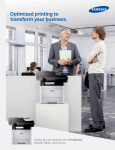
Samsung’s new multifunction printer (MFP), the ProXpress M4580FX, provides smart usability that allows users to work faster and
more efficiently using intuitive, easy-to-use controls. And with high-performance and resource-efficient features, this MFP can meet
the printing needs of work groups that depend on reliable, cost-competitive document handling solutions, while lowering total cost of
ownership (TCO).
Work smarter using the latest in
intelligent touch features.
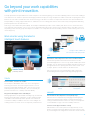
Quick Print
Direct Web
Access
Touch & Slide UI
on 10.1" Color
Touchscreen
Real
Preview
10.1"
Thumbnail
Preview
*The app store will be available in the
Samsung Partner Portal beginning Q1 2015.
USE
Samsung User
Interface Center
Convenient
Applications
and Widgets
powered by Android™
Expand Use with Independent Functions and Extensibility
The interface provides the Real Preview function from the
preloaded applications, such as Copy, Send and Box (Document
Storage). You can further extend usability with direct web access
through the browser to quickly print various web content, such
as maps, pictures, emails and more, all without a PC.
Plus you can access more useful features and solutions by
downloading them through the Samsung printing app store.*
TOUCH
Touch to Print, Just Like on a Tablet
The ProXpress M4580FX offers ease of use through the
Samsung UX Center. The Samsung UX Center is a user
interface powered by Android, and is the very first smart
Android printing UX in the industry. This user-friendly UI
provides intuitiveness, usability and extendibility.
Enjoy Preloaded Applications and Widgets
Printing applications are preloaded, including Copy, Scan/Send,
Box (Document Storage), Job Status, Counter, Settings, Build
Job, Address Book and Help, which provide users with more
convenient usability. In addition, there are custom widgets for
creating instant, one-touch access to frequently used functions.
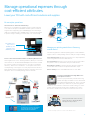
UX Personalization
(My Page)
Quick Custom Apps
(UI Configuration)
MANAGE
Personalize the User Experience through My Page
Enhance the user experience by arranging and managing the
environment with My Page. Simply customize the My Page
settings and Quick Menu for each user, and you can keep track
of an individual’s usage, control accessibility and more.
Create Custom Apps and UIs in a Snap
Administrators can create quick custom apps directly on the
devices. Instantly respond to different customers with one click
by customizing the UI configuration, which takes under a minute.
2