1
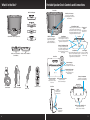
What’s in the Box?
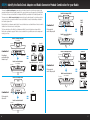
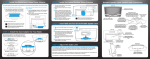
Portable Speaker Dock Controls and Connections
Front View
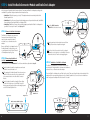
Radio Dock Adapters
power
volume
aux in
volume
power
Radio Dock Connector
Connector for your Radio.
(Interchangeable for different
model Radios.)
aux in
XM/SXM1 (Pre-installed)
Volume/Mute Control
Sliding a finger in a circular motion
on the volume control increases or
decreases the volume level. Pressing
twice mutes the audio and a circle of
blue lights will flash while muted.
SXM2
XMp3
SiriusXM BB2 Portable Speaker Dock
Power Button
Pressing and holding until the
Power On light is on turns the
power On. Pressing and holding
again turns the power Off.
Radio Dock Adapter
Provides alignment and
support for your Radio.
(Interchangeable for
different model Radios.)
SIRIUS
Top View
power
Radio Connector Module A
(Pre-installed)
Radio Connector Module B
Rear View
Volume Level
Lights
Lights indicate
volume level.
volume
aux in
Power On/Low Battery Light
The light is steady blue when
the Portable Speaker Dock is
powered on; the light blinks
Aux In Button
Aux In Light
when the batteries are nearly
Pressing and holding until the Aux In When on, Portable
discharged.
light is on switches audio output to Speaker Dock is set
Aux In input. Pressing and holding
to Aux In input.
again switches to satellite radio.
Antenna Storage
Storage area for the
Indoor/Outdoor Home Antenna.
mute
select
antenna
band/
fav
memo/
info
menu
display
Indoor/Outdoor
Home Antenna
Home Power Adapter
Power Cord
14V DC
Remote Control
Antenna Connection
Connection for the
Indoor/Outdoor Home
Antenna.
14V DC Power Connection
Connection for the
Home Power Adapter.
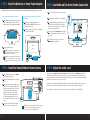
Battery Compartment
Requires 8 C size alkaline
batteries (sold separately).
Bottom View
Side View
Aux In
Connection for
audio from an
external device.
aux in
Headphones
Connection for
headphones.
2
Antenna Cable Storage
Storage area for the
Indoor/Outdoor Home
Antenna cable.
Radio Connector Module Lock
Locks and unlocks the
Radio Connector Module.
3