1
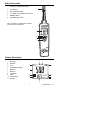
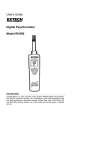
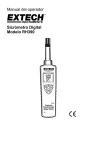
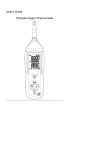
Meter Description
1.
Humidity & Temperature Sensor
2.
LCD Display
3.
Power ON/OFF button
4.
°F/°C/WBT (wet bulb)/Dew Point button
5.
MIN/MAX button
6.
HOLD/Backlight button
1
Note: The battery compartment is located
on the rear of the instrument
2
3
6
5
4
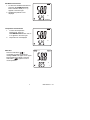
Display Description
Relative Humidity %
Dew Point
3. Wet Bulb
4. °C/°F
5. Temp/WB/DP Display
6. Maximum
7. Minimum
8. Low Battery
9. Hold
10. RH% Display
11. Auto Off
1.
6
7
2.
9
MAX MIN
1
10
°C °F
Dewpoint
WetBulb
8
11
4
2
3
5
3
RH390-EU-EN V2.2 2/11