1
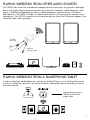
ADJUST VOLUME SEPARATELY IN DIFFERENT ZONES
In order to be able to have the same music at different volumes in different rooms/areas, you can
divide each House Code into 3 different volume zones. Each zone can have a different volume. This
is very useful if, for example, you want to have one volume level in the living room and a somewhat
lower volume in the kitchen. You can have as many LIVING speakers in each zone as you want, or
just one pair. The zone volume can easily be controlled from the remote control unit.
HOUSE CODE 1
Speaker and transmitter set to
same House Code (channel).
SOURCE
Zone B
Zone A
29
Zone volume
Living LV22
08
Zone volume
Living LV22 + LV-SUB FLAT
Zone C
15
Zone volume
LV22 + LV33
Note:
1.All the LV22 speakers are assigned to Zone A and have a volume level of 17 by default.
2.Each House Code (1, 2 and 3) can be split into up to 3 zones (A, B and C).
3.You can have as many speakers as you like on each House Code, and as many as you want in each zone.
A zone does not have to be just one room, but can, for example, be a whole floor in a house.
USING MULTIPLE TRANSMITTERS AND SPEAKERS
SIMULTANEOUSLY WITH HOUSE CODE 1, 2 OR 3
Transmitter: House Code 1
Speakers: House Code 1
Transmitter: House Code 3
Speakers: House Code 3
The House Codes (channels) can be used to share the wireless network between up to two separate networks. This makes it possible to simultaneously play music from various audio sources from
two different transmitters on different pairs of LIVING speakers.
10