1
Table of Contents
1. Introduction .................................................................................................... 1
1.1. What is pure::variants? ......................................................................... 1
1.2. Other related documents ....................................................................... 2
2. Getting Started ................................................................................................ 3
2.1. Software Requirements ......................................................................... 3
2.2. Software Installation ............................................................................. 3
2.2.1. How to install the software ......................................................... 3
2.2.2. Installation Problems ................................................................. 3
2.3. Obtaining and Installing a License ......................................................... 3
2.4. The Variant Management Perspective .................................................... 4
2.5. Using Feature Models ........................................................................... 4
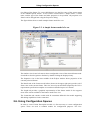
2.6. Using Configuration Spaces .................................................................. 5
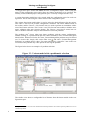
2.7. Viewing and Exporting Configuration Results ........................................ 7
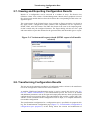
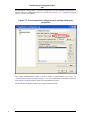
2.8. Transforming Configuration Results ...................................................... 7
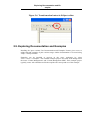
2.9. Exploring Documentation and Examples ............................................... 9
3. Concepts ...................................................................................................... 11
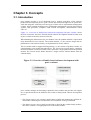
3.1. Introduction ....................................................................................... 11
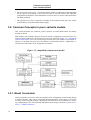
3.2. Common Concepts in pure::variants models ......................................... 12
3.2.1. Model Constraints ................................................................... 12
3.2.2. Element Restrictions ................................................................ 13
3.2.3. Element Relations ................................................................... 13
3.2.4. Element Attributes ................................................................... 13
3.3. Feature Models .................................................................................. 16
3.3.1. Feature Attributes .................................................................... 17
3.4. Family Models ................................................................................... 17
3.4.1. Structure of the family model ................................................... 17
3.4.2. Sample family model ............................................................... 18
3.4.3. Restrictions in Family Models .................................................. 20
3.4.4. Relations in Family Models ...................................................... 20
3.5. Model Evaluation ............................................................................... 21
3.5.1. Evaluation Algorithm .............................................................. 22
3.5.2. Automatic Selection Problem Resolving ................................... 23
3.6. Model Transformation ........................................................................ 24
3.6.1. The Transformation Process ..................................................... 24
3.6.2. pure::variants Transformation Input .......................................... 25
3.7. Model Validation ............................................................................... 26
3.7.1. XML Schema Model Validation ............................................... 27
3.7.2. Model Check Framework ......................................................... 27
4. Tasks ........................................................................................................... 31
4.1. Generating Variants with Model Transformations ................................ 31
4.1.1. Using the Standard Transformation ........................................... 31
4.1.2. Using XSLT for the Transformation ......................................... 33
5. Graphical User Interface ................................................................................ 37
5.1. Getting Started with Eclipse ................................................................ 37
5.2. Variant Management Perspective ........................................................ 38
5.3. Editors ............................................................................................... 39
5.3.1. Common Editor Actions .......................................................... 40
5.3.2. Common Editor Pages ............................................................. 41
5.3.3. Feature Model Editor ............................................................... 55
5.3.4. Family Model Editor ............................................................... 57
5.3.5. Variant Description Model Editor ............................................. 58
5.3.6. Configuration Space Editor ...................................................... 60
v