1
1 INFORMATION ON THIS DOCUMENT
Validity
This document is valid for the Sunny WebBox from hardware version M1 and firmware version 1.61.
2 SAFETY
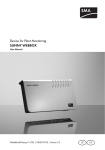
The Sunny WebBox is a data logger that records and logs the data of a PV system and makes it available for
retrieval.
Only operate the Sunny WebBox using the supplied plug-in power supply and in the specified voltage range.
The Sunny WebBox is only to be used with original accessories or accessories that are explicitly recommended
by SMA*. Only use the Sunny WebBox for the purposes described in this document.
For safety reasons, it is not permitted to modify the product or install components that are not explicitly
recommended or distributed by SMA for the product. Unauthorized modifications and installations are forbidden
and will void all warranty claims. Any use of the product other than described in the Intended Use section does
not qualify as appropriate. The type label must remain permanently attached to the product. Only use the product
in accordance with the information provided in the enclosed documentation. Any other use can result in personal
injury or property damage.
Quick Reference Guide for Commissioning
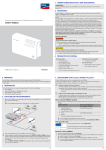
SUNNY WEBBOX
Before installing or using the product, read and observe all instructions, safety precautions and warning
messages in this document and in the product documentation on the enclosed CD.
* SMA = SMA America LLC, SMA Solar Technology Canada Inc
Safety Precautions
8"3/*/(
Danger to life due to electric shock
Lethal voltages are present in the device and in the plug-in power supply.
• Do not open the device or the plug-in power supply.
• Only use the device indoors and in a dry environment. Keep it away from liquids.
$"65*0/
Risk of injury due to incorrect cable routing
Incorrectly routed cables may cause a tripping hazard.
• Install the cabling in such a way that no one can step on or trip over it.
3 SYSTEM REQUIREMENTS
Operating system
•
•
•
•
•
Recommended Display Resolution
Microsoft Windows 7
Microsoft Windows Vista
Microsoft Windows XP SP2
Linux from kernel version 2.6.12* (KDE)
MacOS from version 10.6
•
1,024 pixels x 768 pixels
Web browser
•
•
Internet Explorer from version 8
Firefox from version 3.6
* with Sun Java Runtime Environment (JRE) from version 6
SWebBox-IS-en-13 | Version 1.3
AMERICAN ENGLISH
2
4 PREPARATION
7 CONFIGURING WITH THE SUNNY WEBBOX ASSISTANT
This quick reference guide will guide you through the commissioning stages of the Sunny WebBox.
Observe also the information on set-up/mounting location in the Sunny WebBox user manual.
The Sunny WebBox Assistant will guide you through the configuration of the Sunny WebBox.
Install the Sunny WebBox Assistant on the computer. Use the enclosed CD or download the
Sunny WebBox Assistant from the download area at www.SMA-Solar.com.
5 UNPACKING
Enabling JavaScript in the web browser
The user interface of the Sunny WebBox and the Sunny WebBox Assistant require JavaScript in order to
correctly display and run contents and functions.
• Enable JavaScript in your web browser. If necessary, refer to the help section of your web browser.
For commissioning, you will need the following items from the packaging:
• Sunny WebBox
• Plug-in power supply with travel adapter
• Blue network cable (Ethernet crossover cable)
• Red network cable (patch cable)
Commissioning all nodes
If you wish to integrate the Sunny WebBox in the local network without the Dynamic Host Configuration
Protocol (DHCP), commission all the nodes of your local network. The Sunny WebBox Assistant will help
assign a free IP address.
6 COMMISSIONING
1. Use the red network cable to connect the Sunny WebBox and a node connected to the computer
(e.g. router, network switch, hub).
or
Use the blue network cable to connect the Sunny WebBox directly to a computer.
Starting the Sunny WebBox Assistant
1. Launch the appropriate Sunny WebBox Assistant start-up file for your operating system:
Operating system
Sunny WebBox Assistant start-up file
•
•
•
Microsoft Windows 7
Microsoft Windows Vista
Microsoft Windows XP SP2
Sunny-WebBox-Assistant.exe
•
•
Linux*
MacOS
Sunny-WebBox-Assistant.jar
* with Sun Java Runtime Environment (JRE) from version 6
☑ The Sunny WebBox Assistant opens in the web browser.
✖ If the Sunny WebBox Assistant does not open, see the section TROUBLESHOOTING.
Menu Overview
Select this button to open the menu Settings.
Starts the Sunny WebBox search
Selects the program language
Searching for the Sunny WebBox
2. Connect the plug-in power supply to the Sunny WebBox and plug into an outlet.
☑ The Sunny WebBox starts and is ready for operation as soon as the LEDs REPORT, SYSTEM and POWER
are glowing green. The start-up procedure can take up to 90 seconds. With Sunny WebBox devices from
hardware version M1 and from firmware version 1.61, the start-up procedure can take up to 240 seconds.
3. If the LEDs REPORT, SYSTEM or POWER are not glowing green, see the TROUBLESHOOTING section
(see Section 8, page 2).
3
2. Accept the license agreement and click [Next].
3. If the Sunny WebBox has not yet been commissioned, commission it (see Section 6, page 1) and select
[Next].
☑ The Sunny WebBox Assistant starts searching for Sunny WebBox devices in your network.
✖ If the Sunny WebBox Assistant cannot find the Sunny WebBox, see the TROUBLESHOOTING section
(see Section 8, page 2).
Configuring the Sunny WebBox
4. Select the Sunny WebBox to be configured.
5. Select [Configure the WebBox].
☑ The Sunny WebBox Assistant will guide you through the basic settings of the Sunny WebBox. Follow the
instructions of the Sunny WebBox Assistant.
4
8 TROUBLESHOOTING
9 CONTACT
The POWER LED is off
If you have technical problems with our products, contact the SMA Service Line. We require the following
information in order to provide you with the necessary assistance:
There is no voltage supply to the Sunny WebBox.
• Ensure that the Sunny WebBox is connected to the voltage supply.
The SYSTEM LED is glowing permanently red
To restart the Sunny WebBox, remove the plug-in power supply of the Sunny WebBox from the outlet, wait a few
minutes, and reinsert it.
If the problem is not solved with a restart, contact the SMA Service Line.
•
•
•
•
Operating system of your computer
Firmware version of the Sunny WebBox
Software version of the Sunny WebBox Assistant
Type of communication interface between Sunny WebBox and the inverters
The Sunny WebBox does not establish a connection via the DSL router.
Australia
With DSL routers of certain manufacturers, the connection may be aborted when the router switches to
energy-saving mode.
• Deactivate the energy-saving mode of the DSL router.
• Use the "LAN 1" port of the DSL router since the energy-saving mode for this port is usually deactivated by
default.
SMA Australia Pty Ltd.
Sydney
Belgien/Belgique/België
SMA Benelux BVBA/SPRL
Mechelen
Vide España (Espanha)
SMA Central & Eastern Europe
s.r.o.
Praha
Ver España
Se Deutschland (Tyskland)
SMA Solar Technology AG
Niestetal
The Sunny WebBox Assistant does not open
Error message: http://localhost:4145/s/init
There is no standard web browser set up on your operating system.
• Set up a standard web browser on your operating system. If necessary, refer to the help section of your
operating system.
There is no web browser installed.
• Install a supported web browser on your operating system.
Brasil
Česko
Chile
Danmark
Deutschland
The Sunny WebBox Assistant cannot find the Sunny WebBox
•
•
•
IPv6 is possibly not supported by other network components (e.g. proxy server, WLAN router). Connect the
Sunny WebBox directly to the computer with the blue network cable and repeat the search.
The Sunny WebBox is in another network area that cannot be accessed. Connect the Sunny WebBox
directly to the computer with the blue network cable and repeat the search.
A firewall is blocking the connection to the Sunny WebBox. Deactivate the firewall during commissioning or
enable the necessary connection (protocols: HTTP, UDP on port 80). If necessary, refer to the help section
of the firewall and repeat the search.
IPv6 cannot be activated in Windows XP
•
•
You require administrator rights on your computer in order to activate IPv6. After activating IPv6, restart the
computer and start the Sunny WebBox Assistant.
Activate IPv6 manually in Windows XP SP2 (see the Sunny WebBox user manual).
España
France
India
Italia
5
Κύπρος/
Kıbrıs
Luxemburg/Luxembourg
Magyarország
Nederland
Österreich
Perú
Polska
Portugal
România
Schweiz
Slovensko
South Africa
United Kingdom
Ελλάδα
България
대한민국
Βλέπε Ελλάδα/
Bkz. Ελλάδα (Yunanistan)
Siehe Belgien
Voir Belgique
lásd Česko (Csehország)
zie Belgien (België)
Siehe Deutschland
Ver España
Patrz Česko (Czechy)
SMA Solar Technology Portugal,
Unipessoal Lda
Lisboa
Vezi Česko (Cehia)
Siehe Deutschland
pozri Česko (Česká republika)
SMA Solar Technology
South Africa Pty Ltd.
Centurion (Pretoria)
SMA Solar UK Ltd.
Milton Keynes
SMA Hellas AE
Αθήνα
Вижте Ελλάδα (Гърция)
SMA Solar (Thailand) Co., Ltd.
Isento de taxas em
Portugal:
Internacional:
SMA Solar India Pvt. Ltd.
Mumbai
SMA Italia S.r.l.
Milano
1800 SMA AUS
(1800 762 287)
+61 2 9491 4200
+420 235 010 417
Medium Power Solutions
Wechselrichter:
+49 561
Kommunikation:
9522-1499
+49 561
9522-2499
SMA Online Service Center:
www.SMA.de/Service
Hybrid Energy Solutions
Sunny Island:
+49 561 9522-399
PV-Diesel
+49 561
Hybridsysteme:
9522-3199
Power Plant Solutions
Sunny Central:
+49 561 9522-299
Llamada gratuita en 900 14 22 22
España:
Internacional:
+34 902 14 24 24
Medium Power Solutions
Onduleurs :
+33 472 09 04 40
Communication :
+33 472 09 04 41
Hybrid Energy Solutions
Sunny Island :
+33 472 09 04 42
Power Plant Solutions
Sunny Central :
+33 472 09 04 43
+91 22 61713888
+39 02 8934-7299
6
800 20 89 87
+351 2 12 37 78 60
08600 SUNNY
(08600 78669)
International:
+27 (12) 643 1785
+44 1908 304899
801 222 9 222
International:
+30 212 222 9 222
+66 2 670 6999
中国
SMA Technology Korea Co., Ltd. +82 2 508-8599
서울
SMA Beijing Commercial
+86 10 5670 1350
Company Ltd.
北京
+971 2 234-6177
SMA Middle East LLC
United States/Estados Unidos
SMA America, LLC
Rocklin, CA
SMA Ibérica Tecnología Solar,
S.L.U.
Barcelona
SMA France S.A.S.
Lyon
Toll free for
Australia:
International:
+32 15 286 730
+1 877-MY-SMATech
(+1 877-697-6283)*
+1 916 625-0870**
Canada/Canadá
SMA Canada, Inc.
Toronto
+1 877-MY-SMATech
(+1 877-697-6283)***
* toll free for USA, Canada and Puerto Rico / Llamada gratuita en EE. UU., Canadá y Puerto Rico
** international / internacional
*** toll free for Canada / gratuit pour le Canada
Other countries
International SMA Service Line
Niestetal
Toll free worldwide: 00800 SMA SERVICE
(+800 762 7378423)
7
8