1
2. Setup
Step 5 Setup and Check
Starting the system
The ECH(PCI)SF-H4A/H7A/F7A/H13A/F13A is turned on and off in sync with the PC’s power supply.
When the PC detects the expansion adapter, the ECH(PCI)SF-H4A/H7A/F7A/H13A/F13A is turned on.
Turning on the system
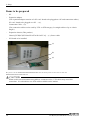
(1) Plug the power plug of the ECH(PCI)SF-H4A/H7A/F7A/H13A/F13A into a wall outlet.
You do not need to press the POWER switch on the front panel (*1).
(2) The power supply of a PC is turned ON.
(3) As soon as the expansion adapter is recognized by the PC, the ECH(PCI)SFH4A/H7A/F7A/H13A/F13A is turned on automatically.
(4) Make sure that the POWER LED on the ECH(PCI)SF-H4A/H7A/F7A/H13A/F13A and the LINK
LED on the RJ-45 connector is on.
Turning off the system
(1) The power supply of a PC is turned OFF.
(2) The ECH(PCI)SF-H4A/H7A/F7A/H13A/F13A is turned off in synchronization with the PC’s power
supply.
*1 Pressing the POWER switch on the front panel of the ECH(PCI)SF-H4A/H7A/F7A/H13A/F13A
turns on the ECH(PCI)SF-H4A/H7A/F7A/H13A/F13A or puts it to sleep. Use the switch, for
example, to turn on only the ECH(PCI)SF-H4A/H7A/F7A/H13A/F13A.
CAUTION
-
Do not turn on or off the ECH(PCI)SF-H4A/H7A/F7A/H13A/F13A with the PC main unit powered.
Doing so cancels the detection of the bus adapter. When turning the expansion chassis on back,
restart the PC main unit.
-
If you turn on the PC after turning it off, keep a time interval of at least 10 seconds in between. If the
power OFF-to-ON interval is too short, the expansion chassis may fail to be turned on.
16
ECH(PCI)SF-H4A/H7A/F7A/H13A/F13A