1
To prevent damage to the Installing
telephone, be sure
unplug the extension line
thetoKX-T7601/KX-T7603
before you set up or remove the USB Module or the Add-on Key Module.
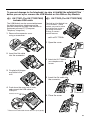
KX-T7601 (For KX-T7633/7636)
includes USB cable
The USB Module can be connected between
the digital proprietary telephone and the
personal computer through USB interface to
implement personal CTI (Computer
Telephony Integration).
1 Remove the connector cover
KX-T7603 (For KX-T7633/7636)
The Add-on Key Module has
12 CO buttons. These
buttons are used to seize
an outside line, make a
call using One-touch
Dialing, or access
certain features.
using a screwdriver.
<with a KX-T7636>
1 Open the cover.
2 Insert the flat cable
into the connector.
2 Attach the KX-T7603 to
your telephone with
screws.
3 Couple both hinges
and slide in the
unit.
3 Insert the flat cable into
the connector.
4 Push down the cover until it locks,
and connect the USB cable to
USB port.
Connect to PC
L
4 Close the cover.
LL
PU
* Please use a USB cable shorter than 3 m (3.28 yards).
15