1
Software Support
3.1
Support DVD information
3
The contents of the support DVD are subject to change at any time without notice. Visit
www.asus.com for updates.
3.1.1
Running the support DVD
Ensure that you have an Administrator account before running the support DVD in
Windows® 7, Windows® 8, Windows® 8.1, or Windows® 10 OS.
To run the support DVD:
1.
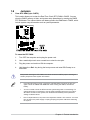
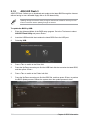
Place the Support DVD into the optical drive.
2. In the AutoPlay dialog box, click Run Instv2.exe.
If Autorun is NOT enabled in your computer, browse the contents of the support DVD to locate
the file SETUP.EXE. Double-click to run the support DVD.
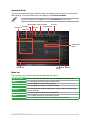
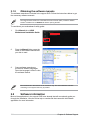
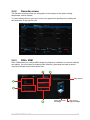
Support DVD main menu
Shows the available device drivers
if the system detects installed
devices. Install the necessary
drivers to use the devices.
Click to display the applications
and other software that the
motherboard supports.
Contains the list of supplementary
user manuals. Click an item to
open the folder of the user guide
Click to display product
related information.
Click to select
an item to install
Click to display the ASUS contact information
Click to browse the file list of the suport CD
Click to install the selected items
ASUS TROOPER B150 D3
3-1