1
MCG 3900
Inventory Management System
Software Features & Functions
Flexible User Configuration
Desktop Layout, Background, Form Design and Printed Reports,
Field Loop Interface Control
Client/Server Operation,
Communications Protocol,
Software Plug-ins,
Host Communications,
Alarm and Tank Movement Colors,
Group/Product Codes may be remotely updated via network.
Screen and Report layouts may also be remotely updated.
Dynamic Forms Generator
The system administrator may easily modify the default displays, or even create custom data-entry and
tabular display forms. Forms automatically scale to the current screen resolution. Global color themes are
also supported.
Dynamic Report Generator
Version 5 now has the capability for producing custom printed reports. Using the same technology as the
Dynamic Forms Generator, completely user-designed report layouts may be developed and installed into the
main program’s menus and toolbar. This flexibility allows the MCG3900 to easily handle reporting requirements
not accommodated by the standard report library.
Dynamic Menu & Toolbar
The pull-down menu system and toolbar configurations may be modified at any time by the administrator.
Updates to these crucial user interface functions can even be made remotely via a local-area network (LAN)
or the Internet.
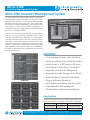
SiteView Display
Version 5 supports a brand-new user-programmable SiteView display. This scrollable, zooming bird’s-eye view
of a facility provides a complete real-time graphical view of tank levels, temperatures, and alarm status.
Site graphics may be provided in .BMP or .JPG graphic formats, and may consist of satellite imagery, CAD
or scanned artwork, or even a hand-drawn picture. Virtual tank objects can be applied to each image,
using standard drag-and-drop techniques. Multiple views of different portions of a particular facility (or even
multiple facilities) may be displayed simultaneously on-screen.
Trending Display
Archived (historical) tank data may be viewed using the Trending Display. This color-coded display will graph
multiple data items simultaneously, and a mouse-based pointer system allows the operator to determine the
values of the selected data items at any point on the graph, and the time at which the values were acquired.
Trending data is stored in a Microsoft Access-compatible database.
5911 Butterfield Road Hillside, IL 60162 • tel: (708) 236-6000 • fax: (708) 236-6006
[email protected] • www.ljtechnologies.com • ISO 9001: 2008 Certified
2
Rev: MCG 3900-3A