1
Temperature Humidity Meter
User’s Manual
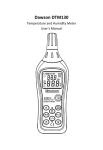
Sensor
Display
screen
Dew-point
Power
Wet-bulb
Ambient
temperature
Max-min
Data holding
Data preserving
Data recall
Automatic
power-off
Backlight
-1-
Unit switch
Brief Introduction
This is a battery meter for measuring relative
humidity and temperature. It can display three
types of temperatures around the sensor’s air via
several convenient procedures: The ambient
temperature, the dew-point temperature and the
wet bulb temperature.
-2-
Display Screen
⑧
⑦
①
⑥
②
⑤
③
④
NO.
explanation
1
Low battery
2
Automatic power-off mark
3
Display wet bulb temperature or dew-point
temperature
4
Temperature measurement unit
5
Relative humidity measurement unit
6
MEM, RAM position number
7
Max-min
8
Hold function actived.The screen freezes the
current reading
-3-
Operation
notice
when moving the meter from one atmosphere
with extreme temperature or humidity to another,
you need to wait for its stability.
Press
to start the meter and read the
measurements displayed by °C or °F. Press
,
to switch.
DEWPOINT&WETBULB
When starting the meter, the ambient temperature
appears on the screen. To obtain DP, press a first
time
, and press
for a second time
, WB is switched. Press
a third time, to get the
ambient temperature back. A corresponding
signal will be shown on the screen indicating DP
and WB.
-4-
Holding
Hold
the
button
Press
to
freeze
the current reading, and stop the
meter from displaying the measurem
ents. When the
(HOLD) function is
actived,the screen dysplays
.To
continue reading the mesured value,press
again
.
Max-min
Pressing
, Max-min is set up, and max
updates constantly, press
-5-
again, it is min.
The two stations can be switched. If turn off, you
need to press
for two seconds; a sound
shows that this function has been turned off. Max
means that the peak of temperature and humidity,
while min is the lowest reading.
Saving and transferring the measurements
This meter is able to save 99 groups reading for
transferring. Press
to save the reading, and its
location displays at the screen’s upper right corner. After
two seconds, the meter comes back to the normal state;
If RAM is filled fully, the meter will cover the stored
data from No.1 RAM and keep the reading.
When transferring the saved figure, press
enter MEM check-up. At this time,
and
to
are
used to change the page. To exit it, press
again. In the state of check-up, press
-6-
for
five seconds and “00”is displayed at the screen’s right
upper corner, which means RAM is cleared.
Automatic power-off
To prolong the life-span of the battery, this meter
offers an automatic power-off function, and it closes
without operation in 30 minutes. This function is
approved. Just press
measurement, and
if closing it for longer
disappears. Do it again, the
automatic power-off is on.
The backlight
Press
to start the backlight, press
again
to close the backlight. If starting without automatic
power-off, it will close after 15 seconds.
-7-
Maintenance
Replace the batteries
The meter is charged with four 1.5(AAA type)
batteries. When
appears, the batteries should
be replaced as soon as possible. Follow the
instructions:
1. unscrew the top of the entrance.
2. Get the batteries out.
3. Install four unused AAA batteries in
accordance with polarity descripted at the
bottom.
4. reload the entrance and fasten the screw.
-8-
Specification
Ambient temperature
Range: -20 to 60°C (-4 to 140°F)
Precision: ±0.5°C (0 to 45°C)
±1.0°C(-20 to 0°C,45 to 60°C)
Resolution: 0.1°C/°F
Update rate: 400ms
sensor’s type: High-Precision digital sensor
(SHT75)
RH
Range: 0 to 100%RH
Accuracy : ±2.0% RH(10% to 90%)
±3.0% RH(0% to 10%,90% to 100%)
Resolution: 0.1%
Update rate: 400ms
Sensor’s type: High-precision digital sensor
(SHT75)
WB
Range: -20 to 60°C (-4 to 140°F)
Precision : ±0.5°C (0 to 45°C)
±1.0°C(-20 to 0°C,45 to 60°C)
-9-
Resolution: 0.1°C/°F
Update rate: 400ms
DP
Range: -50 to 60°C (-58 to 140°F)
precision : ±0.5°C (0 to 45°C)
±1.0°C(-50 to 0°C,45 to 60°C)
Resolution: 0.1°C/°F
Update rate: 400ms
RAM: 99 data point
Power: 4 AAA batteries
Weight/size: 190g (batteries included)
184mm×60mm×29mm
- 10 -
HYS006409
- 11 -