1
English
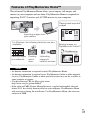
Learning more about the camera (“Help Guide”)
“Help Guide” is an on-line manual. You can read the “Help
Guide” on your computer or smartphone.
Refer to it for in-depth instructions on the many functions of
the camera.
URL:
http://rd1.sony.net/help/dsc/1515/h_zz/
Viewing the Guide
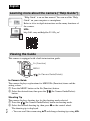
This camera is equipped with a built-in instruction guide.
Fn (Function)
MENU
/
(In-Camera Guide/Delete)
In-Camera Guide
The camera displays explanations for MENU/Fn (Function) items and the
setting values.
1 Press the MENU button or the Fn (Function) button.
2 Select the desired item, then press the / (In-Camera Guide/Delete)
button.
GB
2
Shooting Tip
The camera displays shooting tips for the shooting mode selected.
1 Press the / (In-Camera Guide/Delete) button in shooting mode.
2 Select the desired shooting tip, then press z on the control wheel.
The shooting tip is displayed.
• You can scroll the screen using v/V and change shooting tips using b/B.