1
PC 286 only
An even more extreme way to improve DOS performance is to
select PC 286 only. This menu selection actually prevents the
Amiga from booting at all. The GVP/PC286 gets all of the
system's resources and does not have to contend with display
or I/O operations happening in AmigaDOS at all.
Exiting Configure
When ready, select Project/Quit from the Configure menu bar
or click the close box in the main window. If no changes have
been made, the program will exit peacefully to the Workbench
screen.
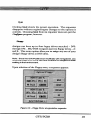
If even one configuration option has been modified, you will
be presented with a requester asking if you want to save the
new settings into your configuration file. Indicating Tes will
cause the file to be written. If you choose not to save the file,
click No and the program will exit cleanly.
56
GVP/PC286