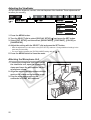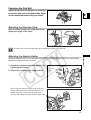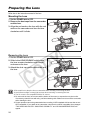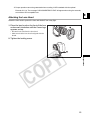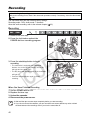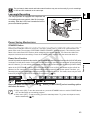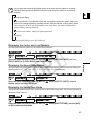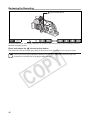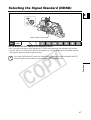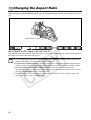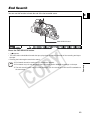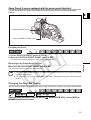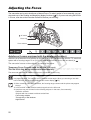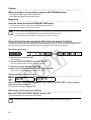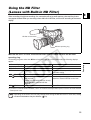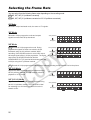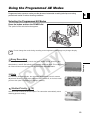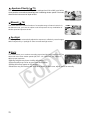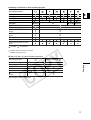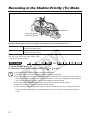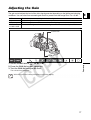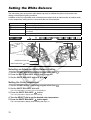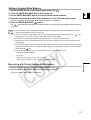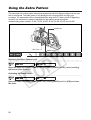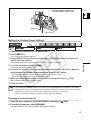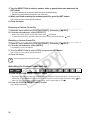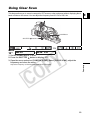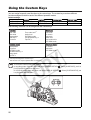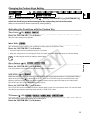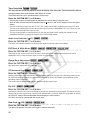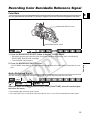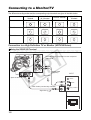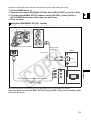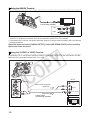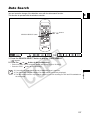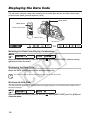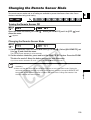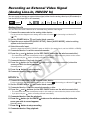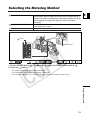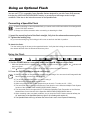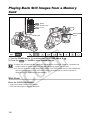
1
PUB. DIM-720 HD VIDEO CAMERA RECORDER Instruction Manual CAMÉSCOPE ET LECTEUR VIDÉO HD Manuel d’instruction VIDEOCÁMARA Y GRABADORA HD Manual de Instrucciones Mini English Français Español Digital Video Cassette A NTSC Important Usage Instructions Introduction WARNING: TO REDUCE THE RISK OF FIRE OR ELECTRIC SHOCK, DO NOT EXPOSE THIS PRODUCT TO RAIN OR MOISTURE. WARNING: TO REDUCE THE RISK OF ELECTRIC SHOCK AND TO REDUCE ANNOYING INTERFERENCE, USE THE RECOMMENDED ACCESSORIES ONLY. COPYRIGHT WARNING: Unauthorized recording of copyrighted materials may infringe on the rights of copyright owners and be contrary to copyright laws. Digital Video Camcorder, XL H1A Systems. This device complies with Part 15 of the FCC Rules. Operation is subject to the following two conditions: (1) This device may not cause harmful interference, and (2) this device must accept any interference received, including interference that may cause undesired operation. Note: This equipment has been tested and found to comply with the limits for class B digital device, pursuant to Part 15 of the FCC Rules. These limits are designed to provide reasonable protection against harmful interference in a residential installation. This equipment generates, uses and can radiate radio frequency energy and, if not installed and use in accordance with the instructions, may cause harmful interference to radio communications. However, there is no guarantee that interference will not occur in a particular installation. If this equipment does cause harmful interference to radio or television reception, which can be determined by turning the equipment off and on, the user is encouraged to try to correct the interference by one or more of the following measures: • Reorient or relocate the receiving antenna. • Increase the separation between the equipment and receiver. • Connect the equipment into an outlet on a circuit different from that to which the receiver is connected. • Consult the dealer or an experienced radio/TV technician for help. Use of shielded cable is required to comply with class B limits in Subpart B of Part 15 of FCC Rules. Do not make any changes or modifications to the equipment unless otherwise specified in the manual. If such changes or modifications should be made, you could be required to stop operation of the equipment. Canon U.S.A. Inc. One Canon Plaza, Lake Success, NY 11042, U.S.A. Tel No. (516)328-5600 CAUTION: TO PREVENT ELECTRIC SHOCK, MATCH WIDE BLADE OF PLUG TO WIDE SLOT, FULLY INSERT. Important Warning CAUTION RISK OF ELECTRIC SHOCK DO NOT OPEN CAUTION: TO REDUCE THE RISK OF ELECTRIC SHOCK, DO NOT REMOVE COVER (OR BACK). NO USERSERVICEABLE PARTS INSIDE. REFER SERVICING TO QUALIFIED SERVICE PERSONNEL. 2 The lightning flash with arrowhead symbol, within an equilateral triangle, is intended to alert the user to the presence of uninsulated “dangerous voltage” within the product’s enclosure, that may be of sufficient magnitude to constitute a risk of electric shock to persons. The exclamation point, within an equilateral triangle, is intended to alert the user to the presence of important operating and maintenance (servicing) instructions in the literature accompanying the product. IMPORTANT SAFETY INSTRUCTIONS In these safety instructions the word “product” refers to the Canon Digital Video Camcorder XL H1A and all its accessories. 1. Read Instructions — All the safety and operating instructions should be read before the product is operated. 2. Retain Instructions — The safety and operating instructions should be retained for future reference. 3. Heed Warnings — All warnings on the product and in the operating instructions should be adhered to. 4. Follow Instructions — All operating and maintenance instructions should be followed. 5. Cleaning — Unplug this product from the wall outlet before cleaning. Do not use liquid or aerosol cleaners. The product should be cleaned only as recommended in this manual. 6. Accessories — Do not use accessories not recommended in this manual as they may be hazardous. 8. Water and Moisture — Hazard of electric shock — Do not use this product near water or in rainy/moist situations. 9. Placing or Moving — Do not place on an unstable cart, stand, tripod, bracket or table. The product may fall, causing serious injury to a child or adult, and serious damage to the product. A product and cart combination should be moved with care. Quick stops, excessive force, and uneven surfaces may cause the product and cart combination to overturn. 10. Power Sources — The CA-920 Compact Power Adapter should be operated only from the type of power source indicated on the marking label. If you are not sure of the type of power supply to your home, consult your product dealer or local power company. Regarding other power sources such as battery power, refer to instructions in this manual. 11. Polarization — The CA-920 Compact Power Adapter is equipped with a polarized 2-prong plug (a plug having one blade wider than the other). The 2-prong polarized plug will fit into the power outlet only one way. This is a safety feature. If you are unable to insert the plug fully into the outlet, try reversing the plug. If the plug still fails to fit, contact your electrician to replace your obsolete outlet. Do not defeat the safety purpose of the polarized plug. E 13. Outdoor Antenna Grounding — If an outside antenna is connected to the product, be sure the antenna is grounded so as to provide some protection against voltage surges and built-up static charges. Section 810 of the National Electrical Code, ANSI / NFPA No. 70—1984, provides information with respect to proper grounding of the mast and supporting structure, grounding of the lead-in wire to an antenna discharge unit, size of grounding conductors, location of antenna discharge unit, connection to grounding electrodes, and requirements for the grounding electrode. See figure 1. Fig.1 EXAMPLE OF ANTENNA GROUNDING AS PER NATIONAL ELECTRICAL CODE ANTENNA LEAD IN WIRE GROUND CLAMP Introduction 7. Avoid magnetic or electric fields — Do not use the camera close to TV transmitters, portable communication devices or other sources of electric or magnetic radiation. They may cause picture interference, or permanently damage the camera. 12. Power Cord Protection — Power cords should be routed so that they are not likely to be walked on or pinched by items placed upon or against them. Pay particular attention to plugs and the point from which the cords exit the product. ANTENNA DISCHARGE UNIT (NEC SECTION 810-20) GROUNDING CONDUCTORS ELECTRIC SERVICE EQUIPMENT (NEC SECTION 810-21) GROUND CLAMPS NEC - NATIONAL ELECTRICAL CODE POWER SERVICE GROUNDING ELECTRODE SYSTEM (NEC ART 250. PART H) 14. Lightning — For added protection of this product during a lightning storm, or when it is left unattended and unused for long periods of time, disconnect it from the wall outlet and disconnect the antenna. This will prevent damage to the product due to lightning and power-line surges. 15. Power Lines — An outside antenna system should not be located in the vicinity of overhead power lines or other electric light or power circuits, or where it can fall into such power lines or circuits. When installing an outside antenna system, extreme care should be taken to keep from touching such power lines or circuits as contact with them might be fatal. 16. Overloading — Do not overload wall outlets and extension cords as this can result in a risk of fire or electric shock. 17. Objects and Liquid Entry — Never push objects of any kind into this product through openings as they may touch dangerous voltage points or short out parts that could result in a fire or electric shock. Be careful not to spill liquid of any kind onto the product. 18. Servicing — Do not attempt to service this product yourself as opening or removing covers may expose you to dangerous voltage or other hazards. Refer all servicing to qualified service personnel. 3 19. Damage Requiring Service — Disconnect this product from the wall outlet and all power sources including battery, and refer servicing to qualified service personnel under the following conditions: a. When the power-supply cord or plug is damaged. b. If any liquid has been spilled onto, or objects have fallen into, the product. c. If the product has been exposed to rain or water. d. If the product does not operate normally even if you follow the operating instructions. Adjust only those controls that are covered by the operation instructions. Improper adjustment of other controls may result in damage and will often require extensive work by a qualified technician to restore the product to its normal operation. e. If the product has been dropped or the cabinet has been damaged. f. When the product exhibits a distinct change in performance. This indicates a need for service. 20. Replacement Parts — When replacement parts are required, be sure the service technician has used replacement parts that are specified by Canon or that have the same characteristics as the original part. Unauthorized substitutions may result in fire, electric shock or other hazards. 21. Safety Check — Upon completion of any service or repairs to this product, ask the service technician to perform safety checks to determine that the product is in safe operating order. When replacement of power supply is required, please return it to the responsible nearest Canon Service Center and please replace it with the same type number CA-920. The Adapter can be used with a power supply between 100 and 240 V AC. Contact your Canon dealer for information about plug adapter for overseas use. 4 Using this Manual Thank you for purchasing the Canon XL H1. Please read this manual carefully before you use the camcorder and retain it for future reference. Should your camcorder fail to operate correctly, refer to the Troubleshooting table ( 144). E Conventions Used in this Manual : Precautions related to the camcorder operation. : Additional topics that complement the basic operating procedures. : Reference page number. Capital letters are used to refer to buttons on the camcorder or the wireless controller. [ ] are used to refer to menu items displayed on the screen. The Canon HD Video 5.4-108 mm L IS II Zoom Lens supplied with the Lens Kit is referred to as “HD 20x L IS Lens”. The illustrations show the camcorder with the HD 20x L IS Lens attached. “Screen” refers to the viewfinder screen. “Card” or “Memory card” refers to an SD memory card or a MultiMediaCard (MMC). Setting the Time Zone, Date and Time Introduction Set the time zone, date and time when you first start using your camcorder, or if the built-in rechargeable battery has completely discharged. Setting the Time Zone/Daylight Saving Time Operating modes MENU ( Menu item showing at its default position 34) SYSTE YSTEM/ M/ D/TIME D/ TIME SET T.ZONE/ T.Z ONE/DST DST•••N.Y N.Y. 1. Press the MENU button. 2. Turn the SELECT dial to select [SYSTEM/ ] and press the SET button. 3. Select [D/TIME SET ] and then select [T.ZONE/DST] and press the SET button. The time zone setting appears. The default setting is New York. 4. Turn the SELECT dial to select the setting option that represents your time zone and press the SET button. To adjust for daylight saving time, select the time zone with the next to the area. Setting the Date and Time MENU ( 34) SYSTE YSTEM/ M/ D/TIME D/ TIME SET D/TIME D/T IME SET SET••• JAN.1,2 JAN.1,2005 005 12 12:00 :00 PM Available functions depend on the operating mode and are indicated as follows: : Function can be used in this mode. : Function cannot be used in this mode. Trademark Acknowledgements • Canon is a registered trademark of Canon Inc. • is a trademark. • HDV and the logo are trademarks of Sony Corporation and Victor Company of Japan, Ltd. (JVC). • is a trademark. • Windows® is either a trademark or registered trademark of Microsoft Corporation in the United States and/or other countries. • Other names and products not mentioned above may be trademarks or registered trademarks of their respective companies. 5 About the HD/HDV and SD/DV Specifications Throughout the manual we will distinguish between the video signal standards used by the camera section of the XL H1, and the recording standards used by the recorder section of the XL H1. The video signal can be set to HD (high definition) or SD (standard definition) specifications. The recording standard on the tape will be HDV (high definition) or DV, respectively. Camera Section HD/SD HD/SD SDI Terminal HD/SD Recorder Section HDV/DV Playback Signal HDV/DV 6 HDV/DV Terminal HDV/DV Contents Introduction Important Usage Instructions............................................................................................................................. 2 Important Safety Instructions............................................................................................................................. 3 Using this Manual .............................................................................................................................................. 5 Checking the Supplied Accessories .................................................................................................................. 9 Components Guide.......................................................................................................................................... 10 E Preparations Preparing the Power Supply............................................................................................................................ 16 Preparing the Camcorder ................................................................................................................................ 19 Preparing the Lens .......................................................................................................................................... 24 Using the Wireless Controller .......................................................................................................................... 28 Loading/Unloading a Cassette ........................................................................................................................ 29 Inserting/Removing a Memory Card................................................................................................................ 30 Changing Settings with the MENU Button....................................................................................................... 31 Setting the Time Zone, Date and Time............................................................................................................ 41 Recording 7 Introduction Recording ........................................................................................................................................................ 42 Selecting the Signal Standard (HD/SD)........................................................................................................... 47 Changing the Aspect Ratio.............................................................................................................................. 48 End Search...................................................................................................................................................... 49 Zooming .......................................................................................................................................................... 50 Adjusting the Focus ......................................................................................................................................... 52 Using the ND Filter (Lenses with Built-in ND Filter)......................................................................................... 55 Selecting the Frame Rate................................................................................................................................ 56 Setting the Time Code..................................................................................................................................... 58 Synchronizing the Camcorder’s Time Code .................................................................................................... 60 Setting the User Bit.......................................................................................................................................... 62 Audio Recording .............................................................................................................................................. 63 Image Stabilizer (Lenses Equipped with Image Stabilizer).............................................................................. 68 Using the Programmed AE Modes .................................................................................................................. 69 Recording in the Shutter-Priority (Tv) Mode .................................................................................................... 72 Recording in the Aperture-Priority (Av) Mode.................................................................................................. 73 Recording in the Manual Mode........................................................................................................................ 74 Adjusting the Exposure.................................................................................................................................... 75 Using AE Shift ................................................................................................................................................. 76 Adjusting the Gain ........................................................................................................................................... 77 Setting the White Balance ............................................................................................................................... 78 Using the Zebra Pattern .................................................................................................................................. 80 Using the Skin Detail Function ........................................................................................................................ 81 Using the Custom Preset................................................................................................................................. 82 Using Clear Scan............................................................................................................................................. 89 Using the Custom Keys ................................................................................................................................... 90 Recording Color Bars/Audio Reference Signal ............................................................................................... 93 Using the Faders ............................................................................................................................................. 94 Using the Digital Video Control........................................................................................................................ 95 Other Camcorder Functions/Settings .............................................................................................................. 96 Playback Playing Back a Tape ........................................................................................................................................ 98 Connecting to a Monitor/TV........................................................................................................................... 100 Audio Output ................................................................................................................................................. 104 Returning to a Pre-marked Position .............................................................................................................. 105 Index Search ................................................................................................................................................. 106 Date Search .................................................................................................................................................. 107 Displaying the Data Code.............................................................................................................................. 108 Changing the Remote Sensor Mode ............................................................................................................. 109 Editing Recording an External Video Signal (Analog Line-In, HDV/DV In)................................................................ 110 Converting Analog Signals into Digital Signals (Analog-Digital Converter) ................................................... 112 Connecting to a Computer (IEEE1394) ......................................................................................................... 113 Using a Memory Card Selecting the Image Quality/Size................................................................................................................... 114 File Numbers ................................................................................................................................................. 115 Recording Still Images on a Memory Card .................................................................................................... 116 Selecting the Drive Mode .............................................................................................................................. 119 Selecting the Metering Method...................................................................................................................... 121 Using an Optional Flash ................................................................................................................................ 122 Reviewing a Still Image Right after Recording .............................................................................................. 123 Playing Back Still Images from a Memory Card ............................................................................................ 124 Erasing Images.............................................................................................................................................. 126 Protecting Images.......................................................................................................................................... 127 Initializing a Memory Card ............................................................................................................................. 128 Print Order Settings ....................................................................................................................................... 129 Additional Information Settings Retained at Power Off or STANDBY Mode ..................................................................................... 130 Screen Displays............................................................................................................................................. 132 List of Messages............................................................................................................................................ 136 Maintenance/Others ...................................................................................................................................... 137 Troubleshooting............................................................................................................................................. 144 System Diagram ............................................................................................................................................ 147 Optional Accessories..................................................................................................................................... 149 Specifications ................................................................................................................................................ 152 Index.............................................................................................................................................................. 155 Audio Block Diagram ..................................................................................................................................... 157 8 Checking the Supplied Accessories Body Kit CA-920 Compact Power Adapter DC-920 DC Coupler Two AA (R6) Batteries Color Viewfinder Microphone Unit Adapter Holder DTC-1000 Component Video Cable Stereo Cable E BP-950G Battery Pack SDC-16M SD Memory WL-D5000 Wireless Card Controller Camcorder Dust Cap SS-1000 Shoulder Strap Introduction Additional Accessories Supplied with the Lens Kit Canon HD Video 5.4-108 mm L IS II Zoom Lens (with soft case) Lens Cap Lens Dust Cap Lens Hood The serial number of this product can be found at the battery attachment unit of the camcorder. Write down the number and other information here and retain this book as a permanent record of your purchase to aid identification in case of theft. Date of Purchase: Model Name: XL H1 A Purchased From: Serial No.: Dealer Address Dealer Phone No.: 9 Components Guide XL H1 Left side view POWER dial External control mode VCR/PLAY mode Power off Auto Shutter-Priority Aperture-Priority Recording Manual programs Spotlight Night Easy Recording LIGHT button END SEARCH button ( 49) MODE SELECT switch ( 48) FRAME RATE switch ( 56) AUDIO MONITOR button ( 67, 104) POWER indicator Side panel ( 135) Color viewfinder socket ( 19) FU-1000 Monochrome Viewfinder socket ( 150) EVF PEAKING/EVF MAGNIFYING buttons ( 53) EXP. LOCK button ( 75) LENS RELEASE switch ( 24) SET button ( 31) IRIS dial ( 73)/SELECT dial ( 31) (record review) button ( 46) BARS/FADE SELECT button ( 93) BARS/FADE ON/OFF button ( 93) MENU button ( 31) GAIN dial ( 75) WHITE BALANCE dial ( 78) WHITE BALANCE button ( 78) STANDBY button ( 43) INPUT SELECT switch (CH3, CH4) ( 66) REC LEVEL switch (CH3, CH4) ( 67) INPUT SELECT switch (CH1, CH2) ( 64) REC LEVEL switch (CH1, CH2) ( 67) REC CH SELECT switch (CH1, CH2) ( 64) CH1/CH2 dials ( 67) FRONT MIC ATT. switch (CH1, CH2) ( 64) CH3/CH4 dials ( 67) LIGHT Button Press the LIGHT button to illuminate the side panel for approximately 10 seconds. Keep the button pressed for at least 3 seconds, to keep the panel illuminated until you press the LIGHT button once more to turn the backlight off. 10 Left side view E Introduction Dioptric adjustment lever ( 21) STEREO/MONO microphone selector ( Lock lever ( 20) Eye cup ( 20) Color viewfinder ( 19-22) Lock release button ( 21) Viewfinder cable ( 19) Zoom ring ( 50) Lens hood ( 25) Focus ring ( 52) 64) RESET button Memory card slot ( 30) ND filter operating ring ( 55) ND filter unlock button ( 55) STABILIZER ON/OFF switch ( 68) POSITION PRESET switch ( 51) AF switch ( 52)/ POSITION PRESET ON/SET switch ( Focus selector ( 53) 51) 11 Right side view S-video terminal ( 102) Video terminal (BNC) ( 102) RCA/BNC selector ( 102) Video terminal (RCA) ( 102) AUDIO 2 terminals (RCA) ( 66) AUDIO 1 terminals (RCA) ( 64) Terminal cover Battery attachment unit ( 16) BATT. RELEASE button ( 16) HD/SD SDI terminal ( 100) GEN.LOCK terminal ( 60) TC OUT terminal ( 60) 12 TC IN terminal ( 60) Serial number Screw hole for adapter holder ( 23) AE SHIFT dial ( 76) LOCK lever ( 43) FRONT MIC terminals ( 22) Microphone cable ( 22) Lens hood locking screw ( 25) Grip zoom lever ( 50) PHOTO button ( 116) Cassette compartment ( 29) Front view E Back view Introduction Tally lamp ( 97) Remote sensor ( 28, 109) Grip belt ( 23) Attachment sockets for the optional TA-100 Tripod Adapter ( 150) Tripod socket* Viewfinder cable ( 19) Remote sensor ( 28, 109) Start/stop button ( 42) Microphone locking screw ( 22) Strap mount ( 23) XLR input terminals ( 65, 66) SHUTTER buttons ( 72) PHONES LEVEL dial (phones) terminal HDV indicator ( 47) HDV/DV IN/OUT terminal ( 102, 110, 113) terminal LINE/MIC switch ( 65, 66) +48V switch ( 65, 66) MIC ATT. switch ( 64, 66) TAPE/CARD switch ( 116) CARD access indicator ( 116) ZOOM SPEED switch ( 50) ZOOM SPEED dial ( 50) Start/stop button ( 42) COMPONENT OUT terminal ( 101) * Do not use tripods with fastening screws longer than 5.5 mm (0.2 in.) as it may damage the camcorder. About the Terminal (LANC) stands for Local Application Control Bus System. The terminal allows you to connect and control connected devices. Connect only devices with the mark to the terminal. Operation cannot be guaranteed for connections with devices not bearing the mark. Some buttons of connected devices may not operate or may operate differently than the buttons on the camcorder. 13 Top view (pause) button ( 98) / DRIVE MODE button ( 119) (stop) button ( 98,110) / (metering mode) button ( 121) (rewind) button ( 98) / - button ( 124) (play) button ( 98) / SLIDESHOW button ( 124) (fast forward) button ( 98) / + button ( 87, 124) REC (record) button ( 110) Screw holes for adapter holder ( 23) Tally lamp ( 97) 14 Remote sensor ( 28, 109) Handle zoom lever ( 50) Viewfinder locking screw ( 19) Microphone ( 22) Advanced accessory shoe ( 66, 122) Start/stop button ( 42) PHOTO button ( 116) CUSTOM PRESET SELECT button ( 85) CUSTOM PRESET ON/OFF button ( 85) EVF DISPLAY button ( 45) CUSTOM KEYS ( 90) EJECT switch ( 29) WL-D5000 Wireless Controller E Introduction PHOTO button ( 116) START/STOP button ( 42) MENU button ( 31) TV SCREEN button ( 132) SLIDESHOW button ( 124) DATA CODE button ( 108) INDEX WRITE button ( 91) AUDIO MONITOR button ( 67, 104) END SEARCH button ( 49) SEARCH SELECT button ( 106, 107) REC PAUSE button ( 110) REW button ( 98) ZERO SET MEMORY button ( 105) button ( 98) PAUSE button ( 98) REMOTE SET button ( 109) AV DV button ( 112) Zoom buttons ( 50) Menu selection buttons ( 31) SET button ( 31) - button ( 124) + button ( 87, 124) MIX BALANCE buttons ( 104) / buttons ( 106, 107) PLAY button ( 98) FF button ( 98) button ( 98) STOP button ( 98) button ( 98) SLOW button ( 98) 15 Preparing the Power Supply Preparations Charging the Battery Pack Disconnect the DC coupler from the power adapter before charging. Remove the terminal cover of the battery pack. 1. Connect the power cord to the adapter. 2. Plug the power cord into a power outlet. 3. Attach the battery pack to the adapter. • Press lightly and slide the battery pack in the direction of the arrow until it clicks. • The charge indicator starts flashing. The indicator will stay on when the charging is complete. 4. When the charging is complete, remove the battery pack from the adapter. 5. Unplug the power cord from the power outlet and disconnect it from the adapter. Attaching the Battery Pack 1. Turn the POWER dial to OFF. 2. Attach the battery pack to the camcorder. Press lightly and slide the battery pack up, in the direction of the arrow until it clicks. 3. Remove the battery pack after use. Holding the BATT.RELEASE button pressed down, slide the battery pack down to remove it. 16 Charge indicator Using a Household Power Outlet 1. Turn the POWER dial to OFF. 2. Attach the DC coupler to the camcorder. E Press lightly and slide the DC coupler up, in the direction of the arrow until it clicks. 3. Connect the power cord to the power adapter. 4. Plug the power cord into a power outlet. 5. Connect the DC coupler to the adapter. 6. Detach the DC coupler after use. Holding the BATT.RELEASE button pressed down, slide the DC coupler down to remove it. About the Built-in Rechargeable Lithium Battery Disconnect the DC coupler from the power adapter when charging a battery pack. Turn off the camcorder before connecting or disconnecting the power adapter. If the adapter is used close to a TV, it may cause picture interference. Move the adapter away from the TV or the antenna cable. Do not connect to the power adapter any products not expressly recommended. If you connect a faulty power adapter or battery pack, the charge indicator turns off and the charging will stop. The charge indicator informs you about the charge status. 0-50%: Flashes once every second 50-75%: Flashes twice every second More than 75%: Flashes 3 times every second 100%: Continuously on 17 Preparations This camcorder has a built-in rechargeable lithium battery to retain the date, time and other settings. The built-in battery is recharged every time you use the camcorder. However, when you use the camcorder for only short times or do not use it for a period of over 3 months, it will become totally depleted. In that case, recharge the built-in battery by powering the camcorder from a power outlet and leaving it with the POWER dial set to OFF for at least 24 hours. Charging, Recording and Playback Times The following times are approximate and vary according to the charging, recording and playback conditions. Battery Pack Charging Time with the CA-920 Compact Power Adapter HDV Recording and Playback Times Maximum HD 20x L Supplied color viewfinder Recording Time IS Lens Optional FU-1000 monochrome viewfinder Typical Recording HD 20x L Supplied color viewfinder Time* IS Lens Optional FU-1000 monochrome viewfinder Playback Time Supplied color viewfinder DV Recording and Playback Times Maximum HD 20x L Supplied color viewfinder Recording Time IS Lens Optional FU-1000 monochrome viewfinder 20x L IS Supplied color viewfinder Lens Optional FU-1000 monochrome viewfinder 16x Supplied color viewfinder Manual Optional FU-1000 Zoom monochrome viewfinder Lens 3x Zoom Supplied color viewfinder Lens XL Optional FU-1000 monochrome viewfinder Typical Recording HD 20x L Supplied color viewfinder Time* IS Lens Optional FU-1000 monochrome viewfinder 20x L IS Supplied color viewfinder Lens Optional FU-1000 monochrome viewfinder 16x Supplied color viewfinder Manual Optional FU-1000 Zoom monochrome viewfinder Lens 3x Zoom Supplied color viewfinder Lens XL Optional FU-1000 monochrome viewfinder Playback Time Supplied color viewfinder BP-930 145 min. BP-945 220 min. BP-950G BP-970G 235 min. 320 min. 140 min. 210 min. 295 min. 405 min. 105 min. 165 min. 230 min. 315 min. 80 min. 115 min. 155 min. 210 min. 60 min. 90 min. 125 min. 170 min. 165 min. 250 min. 350 min. 480 min. 155 min. 230 min. 335 min. 455 min. 120 min. 180 min. 250 min. 350 min. 140 min. 210 min. 300 min. 415 min. 110 min. 170 min. 235 min. 320 min. 160 min. 250 min. 340 min. 465 min. 120 min. 190 min. 260 min. 360 min. 130 min. 195 min. 295 min. 400 min. 105 min. 165 min. 230 min. 315 min. 85 min. 130 min. 175 min. 240 min. 65 min. 100 min. 135 min. 190 min. 80 min. 115 min. 155 min. 215 min. 60 min. 95 min. 125 min. 175 min. 90 min. 140 min. 175 min. 240 min. 70 min. 105 min. 140 min. 195 min. 75 min. 110 min. 150 min. 210 min. 60 min. 90 min. 125 min. 170 min. 180 min. 275 min. 375 min. 510 min. * Approximate times for recording with repeated operations such as start/stop, zooming, power on/off. Actual time may be shorter. We recommend charging the battery pack in temperatures between 10 °C and 30 °C (50 °F and 86 °F). A lithium ion battery pack can be charged at any charge state. Unlike conventional battery packs, you do not need to completely use or discharge it before charging. We recommend that you prepare battery packs 2 to 3 times longer than you think you might need. To conserve battery power, turn off the camcorder instead of leaving it in record pause mode. 18 Preparing the Camcorder Attaching and Detaching the Color Viewfinder Unit E Attaching the Color Viewfinder Unit 1. Slide the viewfinder unit onto the bracket and tighten the locking screw. 2. Connect the viewfinder cable to the upper socket of the camcorder body. 3. Hook the viewfinder cable onto the cable clamp. Insert the cable plug straight into the camcorder socket. Preparations Detaching the Viewfinder Unit 1. Detach the viewfinder cable. 2. Loosen the locking screw and slide the viewfinder unit off the bracket. 19 Attaching and Detaching the Eye Cup You can change the position of the eye cup for use with either the left or right eye. Detach the eye cup and reattach it when changing the position of the eye cup for right or left eye use. Attaching the Eye Cup Align the hole for the dioptric adjustment lever with the lever, and pull the eye cup into position. Right eye use Left eye use Detaching the Eye Cup Detach the eye cup as shown in the illustration. Adjusting the Position of the Viewfinder The viewfinder position can be changed (right/left, forward/backward). When storing the camcorder in the optional HC-3200 System Case, adjust the viewfinder to the right and lock it. Right/Left Adjustment Loosen the locking screw, move the viewfinder to the right/left and tighten the screw. 20 Forward/Backward Adjustment Loosen the locking lever, move the viewfinder forward/backward and tighten the lever. Dioptric Adjustment Turn on the camcorder and adjust the dioptric adjustment lever. E Prevent direct sunlight from getting in the viewfinder. The viewfinder LCD may become damaged due to concentration of the light by the lens. Pay special attention when mounting the camcorder on a tripod, or during transportation. Using the Viewfinder as LCD Panel You can use the viewfinder as an LCD panel by opening the eyepiece adapter. Press the lock release button and open the eyepiece adapter. Preparations Make sure to close the eyepiece adapter when you are not using the viewfinder as an LCD panel. The screen is slightly brighter when you open the eyepiece adapter. 21 Adjusting the Viewfinder You can adjust the brightness, contrast, color and sharpness of the viewfinder. These adjustments will not affect your recording. MENU ( 31) DISPLAY SETUP / EVF SETUP BRIGHTNESS••• CONTRAST••••• COLOR•••••••• SHARPNESS•••• 1. Press the MENU button. 2. Turn the SELECT dial to select [DISPLAY SETUP/ ] and press the SET button. 3. Select [EVF SETUP] and then select [BRIGHTNESS], [CONTRAST], [COLOR] or [SHARPNESS]. 4. Adjust the setting with the SELECT dial and press the SET button. • After the adjustment you will return to the [EVF SETUP] submenu. Change additional settings in the same way as necessary. • For more details regarding the [EVF BW MODE] setting refer to ( 92). 5. Press the MENU button to close the menu. Attaching the Microphone Unit 1. Loosen the microphone locking screw on the viewfinder unit, open the microphone clamp and insert the microphone into the microphone clamp. 2. Align the mark on the microphone with the mark on the clamp and tighten the screw. 3. Plug the microphone cable to the camcorder’s FRONT MIC terminals. 22 Fastening the Grip Belt Adjust the grip belt so that you can reach the zoom lever with your index and middle finger, and the start/stop button with your thumb. E Attaching the Shoulder Strap Pass the ends through the strap mount and adjust the length of the strap. Be careful not to drop the camcorder when adjusting the strap or the grip belt. Attaching the Adapter Holder Preparations Attach the adapter holder to use the optional CH-910 Dual Battery Charger/Holder or a commercially available wireless microphone receiver. 1. Attach the adapter holder and secure it by tightening the screws. 2. Adjust the position of the support bars. Stop lever Support bars When using the optional CH-910, hook it onto the support bars and secure it with the stop lever. To detach the CH-910, press the stop lever in the direction of the arrow and pull it off the support bars. 23 Preparing the Lens Refer also to the instruction manual of the lens. Mounting the Lens 1. Set the POWER dial to OFF. 2. Remove the dust caps from the camcorder and the lens. 3. Align the red mark on the lens with the red mark on the camcorder and turn the lens clockwise until it clicks. Removing the Lens 1. Set the POWER dial to OFF. 2. Slide in the LENS RELEASE switch, turn the lens counter-clockwise until it stops and remove the lens. 3. Attach the dust caps to the camcorder and the lens. Be careful not to drop the lens or camcorder when mounting or removing the lens. Avoid direct sunlight or strong light sources when mounting or removing the lens. The XL mount is not compatible with the VL mount. Do not touch the lens, lens mount and the interior of the mount, or expose them to dust or dirt. If necessary, clean the lens with a dry, soft lens-cleaning cloth. Make sure to turn off the camcorder while cleaning the lens. Proper operation cannot be guaranteed when recording in HDV standard with lenses that are not HDV compatible. If you attach to the camcorder a lens that is not HDV compatible, the messages “THIS LENS HAS NO STILL SHOOTING CAPABILITY” and “HD INCOMPATIBLE LENS” will appear. 24 Proper operation cannot be guaranteed when recording in HDV standard with the optional Extender XL 1.6x. The message “HD INCOMPATIBLE LENS” will appear when using the extender, even with an HDV compatible lens. E Attaching the Lens Hood Attach the lens hood to protect the lens and shade it from stray light. 1. Place the lens hood on the front of the lens and screw it clockwise until the Canon logo appears on top. • Be careful not to deform the lens hood. • Make sure that the lens hood is aligned with the thread. 2. Tighten the locking screw. Preparations 25 Adjusting the Flange Back (Lenses without a built-in flange back adjustment function) The flange back can be adjusted to correct the focus during telephoto and wide zooming. The flange back can be adjusted automatically by the camcorder (AF) or manually (MF). Different flange back adjustment values can be memorized and can also be saved as backup. You can store flange back settings for up to 10 lenses. Preparations 1. Set the frame rate to 60i or 30F. 2. Turn the camcorder facing the subject and secure it in place. Place the camcorder at a distance of at least 1 m (3.3 ft.) from the subject. Avoid subjects that are difficult to focus on at the widest angle. 3. Zoom out to full wide angle. 4. Set the POWER dial to Av and set the aperture to full open. 5. Zoom in to full telephoto. Make sure the subject remains in the center of the frame both, in full zoom out and full zoom in. 6. Check that the exposure conditions are appropriate. If necessary, use the ND filter. AF Adjustment 1. 2. 3. 4. 5. Press the MENU button. Turn the SELECT dial to select [CAMERA SETUP] and press the SET button. Select [FB] and then select [ AF ADJUST]. When the confirmation screen appears, press the SET button to begin the adjustment. Once the message “FB ADJUSTMENT SUCCESSFUL” is displayed, press the MENU button to close the menu. MF Adjustment 1. 2. 3. 4. 5. Press the MENU button. Turn the SELECT dial to select [CAMERA SETUP] and press the SET button. Select [FB] and then select [ MF ADJUST]. When the confirmation screen appears, press the SET button to begin the adjustment. The camcorder will zoom in to full telephoto. When the message “ADJUST FOCUS & PUSH ” appears, focus as necessary and press the SET button. 6. The camcorder will zoom out to full wide angle. When the message “ADJUST FOCUS & PUSH ” appears, focus as necessary and press the SET button. 7. Once the message “FB ADJUSTMENT SUCCESSFUL” is displayed, press the MENU button to close the menu. 26 Resetting the flange back adjustments This procedure will reset the stored flange back adjustment value for the mounted lens. 1. 2. 3. 4. 5. Press the MENU button. Turn the SELECT dial to select [CAMERA SETUP] and press the SET button. Select [FB] and then select [SET DEFAULT]. Select [YES] and press the SET button. Press the MENU button to close the menu. E In the following cases the flange back cannot be adjusted correctly and the camcorder will return to the flange back adjustment selection screen. - In the AF adjustment the camcorder cannot focus. - The lens was removed during the flange back adjustment. Preparations 27 Using the Wireless Controller When you press the buttons on the wireless controller, point it at one of the camcorder’s remote sensors. The camcorder has three remote sensors: two at the front and one at the back. Inserting the Batteries The wireless controller operates with two AA (R6) batteries. 1. Open the battery cover. 2. Insert the batteries following the + and – markings. 3. Close the battery cover. The camcorder and wireless controller are equipped with 2 remote sensor modes ( 109). If the wireless controller does not work, check if the camcorder and wireless controller are set to the same mode. When the camcorder cannot be operated with the wireless controller, or when it can only be operated at very close range, replace the batteries. Make sure to replace both batteries at the same time. The wireless controller may not work properly when the remote sensor is located under strong light sources or direct sunlight. 28 Loading/Unloading a Cassette Use only videocassettes marked with the logo. For recording in HDV we recommend you use videocassettes compatible with the HDV standard. E 1. Slide the EJECT switch to open the cassette compartment cover. The cassette compartment opens automatically. 2. Load/unload the cassette. • Insert the cassette straight, fully into the compartment with the window facing out. • Unload the cassette by pulling it straight out. Preparations 3. Close the cassette compartment cover. Press the mark on the cover. Do not interfere with the cassette compartment while it is opening or closing automatically. Be careful not to get your fingers caught in the cassette compartment. If the camcorder is connected to a power source, cassettes can be loaded/unloaded even if the POWER dial is set to OFF. 29 Inserting/Removing a Memory Card You can use SD memory cards or commercially available MultiMediaCards (MMC) with this camcorder. The SD memory card has a protect switch to prevent accidental erasure. Inserting the Card 1. Set the POWER dial to OFF. 2. Open the memory card slot cover. 3. Insert the memory card straight, all the way into the card slot. 4. Close the card slot cover. Do not force the cover closed if the card is not correctly inserted. Removing the Card Do not forcefully remove the memory card without first pushing it in to release it. 1. Set the POWER dial to OFF. Make sure that the CARD indicator is not flashing before you turn off the camcorder. 2. Open the memory card slot cover. 3. Push the memory card to release it and then remove the memory card. 4. Close the card slot cover. This camcorder is compatible with SD Memory Cards or MultiMediaCards (MMC) only. Do not use any other type of memory cards. Proper operation cannot be guaranteed for all memory cards. Turn off the camcorder before inserting or removing the memory card. Otherwise, it may result in lost data. If you use memory cards other than the supplied one, make sure to initialize them with the camcorder ( 128). 30 Changing Settings with the MENU Button Many of the camcorder’s functions can be changed from the onscreen menu. E SELECT dial SET button MENU button Selecting Menus and Settings Press the MENU button to open the menu. Turn the SELECT dial to select a submenu and press the SET button. Turn the SELECT dial to select a menu item and press the SET button. Turn the SELECT dial to select a setting option and press the SET button. Press the MENU button to close the menu. The , and displays in green at the bottom of the screen will give you additional indications about what buttons to operate during each menu setting. Pressing the MENU button at any time closes the menu. Unavailable items will appear grayed out. You may find it more convenient to use the wireless controller to operate the menu. Press the MENU button on the wireless controller to open or close the menu. Use the menu selection buttons of the wireless controller instead of the SELECT dial, and press the SET button on the wireless controller to save the settings or make a selection. 31 Preparations 1. 2. 3. 4. 5. Menu and Default Settings Default settings are shown in boldface. CAMERA MENU Submenu SIGNAL SETUP CAMERA SETUP *Only in Standard Definition (SD). Menu Item TIME CODE EXT.SYNC GENLCK ADJUST T.CODE OUT COMP. OUT SDI OUTPUT SDI SPEC. 24F MODE SEL* ZEBRA ZEBRA LEVEL SKIN D.SET F SPEED PSET2 CLEAR SCAN FB 1 2 Setting Options FRAME DROP, NON-DROP SETTNG COUNT-UP REC-RUN, REC-RUN PS., FREE-RUN1 START VALUE SET, RESET OFF, GENLOCK, GENLOCK+TC -1023 – +1023 ON, OFF 480i, 1080i/480i ON, OFF AUTO, SD LOCKED 2:3, 2:3:3:2 ON, OFF 70, 75, 80, 85, 90, 95, 100 HUE CHROMA AREA Y LEVEL SKIN DETAIL OFF, LOW , MIDDLE , HIGH LOW, MIDDLE, HIGH AF ADJUST MF ADJUST SET DEFAULT Cannot be selected in Standard Definition (SD) if the frame rate is set to 24F. Can only be selected when a lens with focus preset function is mounted. 32 58 58 58 61 61 60 101 101 101 57 80 80 81 81 54 89 26 26 27 CAMERA MENU Submenu CUSTOM PRESET Menu Item EDIT 82 E Preparations Setting Options SELECT CP 1 PRESET_A, 2 PRESET_B, 3 PRESET_C, 4 PRESET_D, 5 PRESET_E, 6 PRESET_E TUNE RENAME PROTECT RESET RETURN GAMMA NORMAL, CINE1, CINE2 KNEE AUTO, LOW, MIDDLE, HIGH BLACK STRETCH, MIDDLE, PRESS MASTER PED. -9 ~ +9 SETUP LEVEL -9 ~ +9 SHARPNESS -9 ~ +9 H DTL FREQ LOW, MIDDLE, HIGH DTL HV -9 ~ +9 BALANCE CORING -9 ~ +9 NR1 OFF, LOW, MIDDLE, HIGH NR2 OFF, LOW, MIDDLE, HIGH COLOR MAT. NORMAL, CINE1, CINE2 COLOR GAIN -9 ~ +9 COLOR PHASE -9 ~ +9 R GAIN -9 ~ +9 G GAIN -9 ~ +9 B GAIN -9 ~ +9 RG MATRIX -9 ~ +9 RB MATRIX -9 ~ +9 GR MATRIX -9 ~ +9 GB MATRIX -9 ~ +9 BR MATRIX -9 ~ +9 BG MATRIX -9 ~ +9 SELECT CP SAVE POSITION EXECUTE RETURN IMPORT SELECT POSITION EXECUTE RETURN 87 87 33 CAMERA MENU Submenu RECORDING SETUP AUDIO SETUP *Only in Standard Definition (SD). Menu Item REC MODE* UB REC UB SELECT IMG QUALITY IMAGE SIZE STILL I. REC Setting Options SP, LP INT. USR-BIT, EXT. USR-BIT 00 00 00 00, TIME, DATE SUPER FINE, FINE, NORMAL L 1440x1080, S 640x480 OFF, ON, ON+CP DATA FILE NOS. AUDIO MODE RESET, CONTINUOUS HDV 2CH, 4CH DV 48kHz 2CH, 32kHz 2CH, 32kHz 4CH OFF, -12dB, -20dB NORMAL, LINE OUT ON , OFF OFF, 12dB 1kHz TONE AUD.M.SET WIND SCREEN R-XLR GAINUP DISPLAY SETUP/ AUDIO LOCK* EVF SETUP SYSTEM/ LEV/CENT MRK ASPECT GUIDE SAFETY ZONE TV SCREEN AUDIO LEVEL LANGUAGE OBJ DST UNIT ZOOM IND. GUIDE INFO UB DISPLAY CUSTOM KEY 1 CUSTOM KEY 2 WL. REMOTE TALLY LAMP POWER SAVE D/TIME SET LED ON/OFF CHAR. REC DV CONTROL IRIS DIAL 34 LOCK MODE, UNLOCK MODE EVF BW MODE ON, OFF BRIGHTNESS CONTRAST COLOR SHARPNESS OFF, LEVEL MARK, CENT. MARK OFF, 4:3, 13:9, 14:9, 1.66:1, 1.75:1, 1.85:1, 2.35:1 OFF, 80%, 90% ON, OFF ON, OFF ENGLISH, , m (meter), ft (feet) BAR, NUMBER OFF, CUSTOM KEYS, D/T DISPLAY ON, OFF TIME CODE, INDEX WRITE, ZEBRA, VCR STOP, TV SCREEN, TC HOLD, AUDIO LEVEL, EVF BW MODE, FB, FLIP EVF, (NONE) TIME CODE, INDEX WRITE, ZEBRA, VCR STOP, TV SCREEN, TC HOLD, AUDIO LEVEL, EVF BW MODE, CP BKWD KEY, FB, FLIP EVF, (NONE) 1, 2, OFF ON, BLINK, OFF ON, OFF T.ZONE/DST DATE/TIME DATE FORMAT ON, OFF ON, OFF ON , OFF UP OPEN, DOWN OPEN 96 62 62 114 114 88, 117 115 63 93 67 64 64, 66 63 92 22 45 45 45 132 67 97 97 51 41 62 91 109 97 43 41 41 97 96 96 95 73 VCR/PLAY MENU Submenu SIGNAL SETUP RECORDING SETUP AUDIO SETUP Menu Item TIME CODE PLAYBACK STD T.CODE OUT COMP. OUT SDI OUTPUT SDI SPEC. AV DV HD DOWN-CONV REC MODE* UB SELECT IMG QUALITY HD STILL SIZ FILE NOS. SEL AUDIO CH MIX SELECT AUDIO MODE WIND SCREEN R-XLR GAINUP Setting Options FRAME DROP, NON-DROP SETTNG COUNT-UP REC-RUN, REC-RUN PS., FREE-RUN1 START VALUE SET, RESET AUTO, HDV, DV ON, OFF 480i, 1080i/480i ON, OFF AUTO, SD LOCKED ON, OFF ON, OFF SP, LP 00 00 00 00, TIME, DATE SUPER FINE, FINE, NORMAL LW 1920x1080, SW 848x480 RESET, CONTINUOUS CH 1/3 /CH 2/4 , CH 1/3 /CH 1/3 , CH 2/4 /CH 2/4 VARIABLE, FIXED 48kHz 2CH, 32kHz 2CH, 32kHz 4CH ON , OFF OFF, 12dB 58 58 58 98 60 101 101 101 112 102 96 62 114 114 115 104 104 63 64 64, 66 Cannot be selected in Standard Definition (SD) if the frame rate is set to 24F. HD DOWN CONVERT: Selects whether to down-convert the video signal output from the HDV/DV terminal while playing back a tape recorded in HDV standard. Standard of the tape [HD DOWN-CONV] being played back Setting HDV DV [ON] [OFF] [ON] [OFF] [AUTO] DV HDV DV DV [PLAYBACK STD] Setting [HDV] DV HDV No output No output E [DV] No output No output DV DV The down-converted output video signal will always be 60 fps interlaced, regardless of the frame rate of the original recording. Even if the audio was recorded on all 4 channels, only channels 1 and 2 will be output. 35 Preparations 1 *Only in Standard Definition (SD). VCR/PLAY MENU Submenu DISPLAY SETUP/ Menu Item EVF SETUP TV SCREEN AUDIO LEVEL DISPLAYS CUSTOM KEYS DATA CODE SYSTEM/ LANGUAGE 6 SEC.DATE UB DISPLAY CUSTOM KEY 1 CUSTOM KEY 2 WL. REMOTE TALLY LAMP D/TIME SET LED ON/OFF 36 Setting Options EVF BW MODE ON, OFF BRIGHTNESS CONTRAST COLOR SHARPNESS ON, OFF ON, OFF ON, OFF <PLAYBK> ON, OFF DATE, TIME, DATE & TIME, CAMERA DATA, CAM. & D/T ENGLISH, , ON, OFF ON, OFF TIME CODE, TV SCREEN, DATA CODE, AUDIO LEVEL, TC HOLD, EVF BW MODE, (NONE) TIME CODE, TV SCREEN, DATA CODE, AUDIO LEVEL, TC HOLD, EVF BW MODE, (NONE) 1, 2, OFF ON, BLINK, OFF T.ZONE/DST DATE/TIME DATE FORMAT ON, OFF 92 22 132 67 132 90 108 97 108 62 91 109 97 41 41 97 96 CARD CAMERA MENU Submenu SIGNAL SETUP CAMERA SETUP Menu Item GENLOCK GENLCK ADJUST COMP. OUT SDI OUTPUT SDI SPEC. ZEBRA ZEBRA LEVEL SKIN D.SET F SPEED PSET1 FB FOCUS PRI. REVIEW 1 Setting Options ON, OFF -1023 – +1023 480i, 1080i/480i ON, OFF AUTO, SD LOCKED ON, OFF 70, 75, 80, 85, 90, 95, 100 HUE CHROMA AREA Y LEVEL SKIN DETAIL OFF, LOW , MIDDLE HIGH LOW, MIDDLE, HIGH AF ADJUST MF ADJUST SET DEFAULT ON, OFF OFF, 2 sec., 4 sec., 6 sec., 8 sec., 10 sec. 61 61 101 101 101 80 80 81 , E 81 54 26 26 27 117 123 Can only be selected when a lens with focus preset function is mounted. Preparations 37 CARD CAMERA MENU Submenu CUSTOM PRESET RECORDING SETUP AUDIO SETUP 38 Menu Item EDIT IMG QUALITY IMAGE SIZE FILE NOS. WIND SCREEN R-XLR GAINUP Setting Options SELECT CP 1 PRESET_A, 2 PRESET_B, 3 PRESET_C, 4 PRESET_D, 5 PRESET_E, 6 PRESET_E TUNE RENAME PROTECT RESET RETURN KNEE AUTO, LOW, MIDDLE, HIGH BLACK STRETCH, MIDDLE, PRESS SHARPNESS -9 ~ +9 H DTL FREQ LOW, MIDDLE, HIGH DTL HV -9 ~ +9 BALANCE CORING -9 ~ +9 COLOR GAIN -9 ~ +9 COLOR PHASE -9 ~ +9 R GAIN -9 ~ +9 G GAIN -9 ~ +9 B GAIN -9 ~ +9 RG MATRIX -9 ~ +9 RB MATRIX -9 ~ +9 GR MATRIX -9 ~ +9 GB MATRIX -9 ~ +9 BR MATRIX -9 ~ +9 BG MATRIX -9 ~ +9 SELECT CP SAVE POSITION EXECUTE RETURN IMPORT SELECT POSITION EXECUTE RETURN SUPER FINE, FINE, NORMAL LW 1920x1080, SW 848x480, L 1440x1080, S 640x480 RESET, CONTINUOUS ON , OFF OFF, 12dB 82 87 87 114 114 115 64 64, 66 CARD CAMERA MENU Submenu DISPLAY SETUP/ Menu Item EVF SETUP SYSTEM/ LEV/CENT MRK OBJ DST UNIT ZOOM IND. TV SCREEN GUIDE INFO LANGUAGE CUSTOM KEY 1 CUSTOM KEY 2 WL. REMOTE POWER SAVE D/TIME SET LED ON/OFF IRIS DIAL Setting Options EVF BW MODE ON, OFF 92 BRIGHTNESS 22 CONTRAST COLOR SHARPNESS OFF, LEVEL MARK, CENT. MARK 45 m (meter), ft (feet) 97 BAR, NUMBER 51 ON, OFF 132 OFF, CUSTOM KEYS, D/T DISPLAY 41 ENGLISH, , 97 ZEBRA, TV SCREEN, EVF BW MODE, FB, FLIP EVF, 91 (NONE) ZEBRA, TV SCREEN, EVF BW MODE, CP BKWD KEY, FB, FLIP EVF, (NONE) 1, 2, OFF 109 ON, OFF 43 T.ZONE/DST 41 DATE/TIME 41 DATE FORMAT 97 ON, OFF 96 UP OPEN, DOWN OPEN 73 E Preparations 39 CARD VCR/PLAY MENU Submenu SIGNAL SETUP Menu Item Setting Options COMP. OUT 480i, 1080i/480i SDI OUTPUT ON, OFF SDI SPEC. AUTO, SD LOCKED CARD OPERATIONS PRINT ORDERS NO, YES ALL ERASE ERASE ALL IMAGES NO, YES INITIALIZE CANCEL, EXECUTE After pressing the SET button while displaying a still image: IMAGE ERASE CANCEL, ERASE PROTECT ON, OFF PRINT ORDER 0 ~ 99 COPIES SLIDESHOW CANCEL, START META DATA CP IMPORT SELECT POSITION EXECUTE RETURN DISPLAY SETUP/ EVF EVF BW MODE ON, OFF BRIGHTNESS CONTRAST COLOR SHARPNESS TV SCREEN ON, OFF DISPLAYS ON, OFF <PLAYBK> CUSTOM KEYS ON, OFF DATA CODE DATE, TIME, DATE & TIME, CAMERA DATA, CAM. & D/T LANGUAGE ENGLISH, , SYSTEM/ CUSTOM KEY 1 TV SCREEN, DATA CODE, EVF BW MODE, (NONE) CUSTOM KEY 2 TV SCREEN, DATA CODE, EVF BW MODE, (NONE) WL. REMOTE 1, 2, OFF D/TIME SET T.ZONE/DST DATE/TIME DATE FORMAT LED ON/OFF ON, OFF FIRMWARE UPDATE - 40 101 101 101 129 126 128 126 127 129 124 82 92 22 132 132 90 108 97 91 109 41 41 97 96 - Setting the Time Zone, Date and Time Set the time zone, date and time when you first start using your camcorder, or if the built-in rechargeable battery has completely discharged. E Setting the Time Zone/Daylight Saving Time MENU ( 31) SYSTEM/ D/TIME SET T.ZONE/DST•••N.Y. 1. Press the MENU button. 2. Turn the SELECT dial to select [SYSTEM/ ] and press the SET button. 3. Select [D/TIME SET ] and then select [T.ZONE/DST] and press the SET button. The time zone setting appears. The default setting is New York. 4. Turn the SELECT dial to select the setting option that represents your time zone and press the SET button. To adjust for daylight saving time, select the time zone with the next to the area. Setting the Date and Time ( 31) SYSTEM/ 5. Select [D/TIME SET D/TIME SET••• JAN.1,2005 12:00 PM D/TIME SET Preparations MENU ] and press the SET button. The year display starts flashing. 6. Turn the SELECT dial to select the year, and press the SET button. • The next part of the display starts flashing. • Set the month, day, hours and minutes in the same way. 7. Press the MENU button to close the menu and to start the clock. Displaying the Date and Time during Recording You can display the date and time in the lower left corner of the screen. MENU ( 31) DISPLAY SETUP/ GUIDE INFO•••OFF Open the menu and select [DISPLAY SETUP/ DISPLAY] and close the menu. ]. Select [GUIDE INFO], set it to [D/T If you do not use the camcorder for a period of approximately 3 months, the built-in rechargeable battery will become totally depleted and the date and time settings will be lost. In that case, recharge the built-in battery ( 17) and set the time zone, date and time again. 41 Recording Recording Before You Begin Recording Make a test recording first to check if the camcorder operates correctly. If necessary, clean the video heads ( 138). The camcorder ships with the following factory settings: Recording mode - HDV; Audio mode - 2 channels About the audio recording, refer to the relevant chapter ( 63). Recording 1. Remove the lens cap. 2. Press the lock button and set the POWER dial to a recording program. 3. Press the start/stop button to begin recording. • The camcorder is equipped with 3 start/stop buttons: one on the carrying handle, one on the side grip and one at the front. • The tally lamp and the REC lamp on the viewfinder will light up. • Press the start/stop button again to pause recording. When You Have Finished Recording 1. 2. 3. 4. Set the POWER dial to OFF. Replace the lens cap. Unload the cassette. Disconnect the power source. Wait until the tape counter stops completely before you start recording. If you do not remove the cassette, you can record the next scene without any noise or blank sections between the recordings even if you turn the camcorder off. 42 The end search, date search and index search functions may not work correctly if you mix recordings in HDV and DV standards on the same tape. Low-angle Recording The carrying handle is equipped with a duplicate set of recording and zoom controls, ideal for low-angle recording. Slide the LOCK lever towards the lens to prevent accidental operation. E LOCK lever Start/stop button Zoom lever Power Saving Mechanisms STANDBY Button Pressing the STANDBY button for more than 1 second in record pause or VCR STOP mode activates the power save mode (The message “ENTERING POWER STANDBY” will be displayed). This shuts the power down to the camera and VCR sections while maintaining the camera settings. The camcorder retains the exposure lock and color bars settings. Press the STANDBY button again to turn the camcorder back on. Power Save Function MENU ( 31) SYSTEM/ POWER SAVE•••ON Open the menu and select [SYSTEM/ and close the menu. ]. Select [POWER SAVE], select a setting option When set to [ON]: To turn the camcorder on, press the STANDBY button or set the POWER dial to OFF and then back to a recording program. When set to [OFF]: To start recording, press the start/stop button. To go into record pause mode, use the custom key ( 90). 43 Recording In order to protect the tape and video heads, the camcorder will enter the power save mode (VCR STOP) after 3 minutes in record pause mode. If left 2 more minutes without any operation, the camcorder will automatically shut off. However, you can activate or deactivate the camcorder’s automatic shut-off with the [POWER SAVE] option in the [SYSTEM/ ] submenu. Even if the power save is set to [ON], the camera section will still be powered, so the camcorder will retain camera settings such as aperture and shutter speed. Therefore, you can adjust the camera section without worrying about the automatic shut-off. This mode, where only the VCR is shut off (VCR STOP) can also be assigned to a custom key ( 90). Screen Displays during Recording Time code You can select between drop frame or non-drop frame time code ( 58). Remaining tape Indicates the remaining time of the tape in minutes. “ END” flashes when the tape reaches the end. • When the time left is less than 15 seconds, the remaining tape time may not appear. • Depending on the tape, the indication may not be displayed correctly. Remaining battery charge The battery symbol indicates the charge status of the battery pack. •“ ” starts flashing in red when the battery pack is empty. • When you attach an empty battery pack, the power may turn off without displaying “ ”. • The actual battery charge may not be indicated accurately depending on the condition under which the battery pack and camcorder are used. 44 SHUTTER lamp Lights up when the shutter speed is changed from the following: 60i 1/60 of a second 30F 1/30 of a second 24F 1/48 of a second 1/60 of a second REC lamp Lights up during recording. The REC lamp starts flashing when the remaining tape is less than 5 minutes (it does not flash when the remaining tape information is not displayed on the screen.) GAIN lamp Lights up when the AGC (auto gain control) is set to -3 dB or +3 dB or higher. You can select the amount of information shown on the screen from full, partial or no display. Repeatedly pressing the EVF DISPLAY button will cycle through the options in the following sequence. E Normal screen display Audio level indicator, zoom indicator, center and level markers, aspect ratio guides, safety zone guides, EVF peaking/magnifying, recording program, EXP lock, ND filter, custom preset, shutter speed, aperture, AE shift, gain, white balance, color bars, faders, skin detail, Speedlite flash charge indicator, warning, date/time* Center and level markers, safety zone guides, date/time* No display * When [GUIDE INFO] is set to [D/T DISPLAY]. Displaying the Center and Level Markers Use the center and level markers to accurately frame subjects. MENU ( 31) DISPLAY SETUP / LEV/CENT MRK•••CENT. MARK Open the menu and select [DISPLAY SETUP/ ]. Select [LEV/CENT MRK], set it to [CENT. MARK] or [LEVEL MARK] and close the menu. Use the aspect ratio guides as an indication to accurately frame subjects. You can select to display the aspect guides for 4:3, 13:9, 14:9, 1.66:1, 1.75:1, 1.85:1 or 2.35:1 (Cinemascope). MENU ( 31) DISPLAY SETUP / ASPECT GUIDE••••OFF Open the menu and select [DISPLAY SETUP/ setting option and close the menu. ]. Select [ASPECT GUIDE], select a Displaying the Safety Zone Guide The safety zone guide shows a frame including 80% or 90% of the screen area. Use it as an indication to accurately frame subjects. MENU ( 31) DISPLAY SETUP / SAFETY ZONE••••••OFF Open the menu and select [DISPLAY SETUP/ or [90%] and close the menu. ]. Select [SAFETY ZONE], set it to [80%] 45 Recording Displaying the Aspect Ratio Guides Reviewing the Recording (record review) button In record pause mode, this function allows you to review the last few seconds of your recording to check if it has been recorded properly. Press and release the (record review) button. The camcorder rewinds the tape, plays back the last few seconds, and returns to record pause mode. If the current video signal standard is different from the signal standard in which the tape was recorded, the recording will not be played back correctly. 46 Selecting the Signal Standard (HD/SD) E MODE SELECT switch Set the MODE SELECT switch to the desired position. • HD: To record on the tape in HDV standard or to use the camcorder as a high-definition (HD) camera. • SD 16:9, SD 4:3: To record on the tape in DV standard or to use the camcorder as a standard-definition (SD) camera. Select the aspect ratio as desired. If you set the [LED ON/OFF] option in the [SYSTEM/ ] submenu to [ON], the MODE SELECT switch will light on in blue when you set the MODE SELECT switch to HD. Recording 47 SD Changing the Aspect Ratio When recording in standard definition (SD), you can change the aspect ratio of your recording to 16:9 or 4:3. MODE SELECT switch Set the MODE SELECT switch to SD 16:9 or SD 4:3. The camcorder’s viewfinder has a 16:9 aspect ratio. If you select the 4:3 aspect ratio, the picture will appear in the center of the screen with black side panels. If you change the position of the MODE SELECT switch while recording, the aspect ratio will not change immediately. It changes once you pause recording. TV sets with S1-Video terminals: Recording made with a 16:9 aspect ratio will automatically be played in widescreen mode if you connect the camcorder to the TV using the S1-VIDEO terminal. TV sets equipped with the ID-1 System: Recording made with a 16:9 aspect ratio will automatically be played in widescreen mode whether you connect the camcorder to the TV using the S(S1-) VIDEO terminal or the VIDEO terminal. When recording in 4:3, you can attach the optional RC-72 Ratio Converter (0.8x) to achieve the same angle of view of the 16:9 aspect ratio. 48 End Search You can use this function to locate the end of the last recorded scene. E END SEARCH button Press the END SEARCH button. • “ ” appears. • The camcorder rewinds/fast forwards the tape, plays back the last few seconds of the recording and stops the tape. • Pressing the button again cancels the search. 49 Recording End search cannot be used once you unload the cassette. End search may not work properly if there is a blank section between recordings on the tape. The end search function may not work correctly if you mix recordings in HDV and DV standards on the same tape. Zooming You can operate the zoom from either the side grip or the carrying handle. You can also use the zoom ring on the zoom lens or the zoom buttons on the wireless controller. Zoom lever Zoom buttons Zoom ring ZOOM SPEED dial ZOOM SPEED switch Move the zoom lever toward W to zoom out (wide-angle). Move it toward T to zoom in (telephoto). About the Variable Zoom Speeds Zoom lever on the side grip: When the ZOOM SPEED switch is set to CONSTANT, the zoom speed itself does not change, but you can select one of 16 levels of zoom speed with the ZOOM SPEED dial (a number indicating the level will be displayed next to the zoom indicator). When the ZOOM SPEED switch is set to VARIABLE, the zoom speed will depend on how you operate the zoom lever: Pressing softly will result in a slower zoom; pressing harder in a faster zoom. Zoom speed with the HD 20x L IS Lens (from wide-angle to telephoto): CONSTANT: Level 1: approx. 60 seconds Level 16: approx. 3.5 seconds VARIABLE: approx. 3.5–60 seconds The actual zoom speed varies depending on the lens. Zoom ring: The zoom speed depends on how fast you turn the zoom ring. Zoom buttons on the carrying handle: The zoom speed itself does not change, but it can be set to one of 16 levels with the ZOOM SPEED dial. This is the same zoom speed setting as when the ZOOM SPEED switch is set to CONSTANT. Zoom buttons on the supplied wireless controller: The zoom speed is constant and cannot be adjusted. 50 Zoom Preset (Lenses equipped with the zoom preset function) This function enables any given zoom setting to be memorized and to return to that zoom setting instantly. E POSITION PRESET switch POSITION PRESET ON/SET switch Presetting the Zoom 1. Set the POSITION PRESET switch to ZOOM. 2. Move the POSITION PRESET ON/SET switch to SET. The preset zoom position appears in yellow on the zoom indicator. Returning to the Preset Zoom Position The camcorder returns to the preset zoom position. The preset setting is canceled when you attach the optional Extender XL 1.6x or mount a lens with a different magnification. The camcorder uses the zoom speed of the CONSTANT setting when returning to the preset zoom position. Changing the Zoom Bar Display You can select to display the zoom position as a normal zoom bar or to display a numeric value instead. MENU ( 31) DISPLAY SETUP / ZOOM IND. •••••• BAR Open the menu and select [DISPLAY SETUP/ [NUMBER] and close the menu. ]. Select [ZOOM IND.], set it to [BAR] or 51 Recording Move the POSITION PRESET ON/SET switch to ON. Adjusting the Focus The camcorder can be set to Autofocus or Manual Focus. To make it easier to focus manually, you can also make use of the Peaking and Magnifying display functions ( 53). If you are not using the HD 20x L IS Lens, refer also to the instruction manual of the lens you are using. AF switch Focus ring Focus selector Autofocus (Lenses equipped with the autofocus function) Autofocus is set when the focus selector on the lens is set to AF. The camcorder uses the TTL autofocus system with a focusing range of 2 cm (0.8 in.) (at wide-angle from the front of the lens barrel) to . The camcorder focuses on the subject in the center of the screen. Temporary Focus Override (with the HD 20x L IS Lens) Turn the focus ring during autofocus to focus manually. The camcorder will return to autofocus as soon as you release the focus ring. When recording under bright conditions, the camcorder sets a small aperture value, and the picture may appear blurred. This may be more noticeable at wide-angle. When you are using a lens with built-in ND filter, turn it on/off according to the screen display ( 55). When recording under dark conditions, the focusing range narrows and the picture may appear blurred. In 30F and 24F mode, autofocus takes longer than in the 60i mode. Autofocus may not work well on the following subjects. In that case, focus manually. -Reflective surfaces -Subjects with low contrast or without vertical lines -Fast moving subjects -Through dirty or wet windows -Night scenes 52 Manual focus E EVF PEAKING/ EVF MAGNIFYING buttons AF switch/POSITION PRESET ON/SET switch Focus selector 1. Lenses equipped with autofocus function: Slide the focus selector on the lens to M. “MF” is displayed on screen. 2. Zoom in to telephoto. 3. Turn the focus ring to adjust the focus. 4. Operate the zoom to reframe the subject. If you focus manually and then leave the camcorder with the power turned on, you may lose the focus on your subject. This possible slight shift in focus is due to a rise in temperature in the camcorder interior and the lens. Check the focus before resuming shooting or adjust the flange back as necessary ( 26). Press the Recording Temporary Autofocus AF switch on the lens in the direction of AF and hold it. The autofocus is activated as long as you hold the When using the AF switch. AF switch, make sure the POSITION PRESET switch is set to OFF. When using an HDV compatible lens: The focal distance to the subject will be displayed for approx. 3 seconds when you switch from autofocus to manual focus or when you operate the focus ring in the manual focus mode. It will also be displayed with the focus preset. You can select to display the focal distance in meter or ft. The focal distance will not be displayed when the optional Extender XL 1.6x is attached to the camcorder. Use the distance display as an estimate. When using a lens with a limited zoom range, the accuracy display will appear grayed out. -: Over infinity focus : Infinity focus The manual focus cannot be selected in the Easy Recording mode. Even if you set the focus selector on the lens to M, the autofocus will still be activated. Peaking and Magnifying Display Functions In order to make manual focusing easier, you can use two display functions: Peaking emphasizes the outlines of the subject creating a clearer contrast, and Magnifying enlarges the viewfinder image. You can also combine both for a greater effect. 53 Peaking While recording or in record pause, press the EVF PEAKING button. • The outlines of the subject will be emphasized. • Press the button again to cancel the function. Magnifying In record pause, press the EVF MAGNIFYING button. • The central part of the screen will be magnified approximately 2x. • Press the button again to cancel the function. The Peaking and Magnifying functions will not affect your recordings but the magnified picture will be output as is to the HD/SD SDI terminal and the HDV/DV terminal. The Magnifying function will be canceled as you start recording. Focus Preset (Lenses equipped with the focus preset function) This function enables a focus setting to be memorized and to return to that focus setting instantly. You can also select the speed at which the camcorder returns to the preset focus setting. Presetting the Focus 1. Set the focus selector to M. “MF” appears. 2. Set the POSITION PRESET switch to FOCUS. The focus preset speed currently selected appears. 3. Adjust the focus with the focus ring. 4. Move the POSITION PRESET ON/SET switch to SET. “MF” and the focus preset speed display turn yellow. Setting the Focus Preset Speed MENU ( 31) CAMERA SETUP F SPEED PSET• HIGH Open the menu and select [CAMERA SETUP]. Select [F SPEED PSET], select a setting option and close the menu. The selected speed appears next to “MF”. Returning to the Preset Focus Setting Move the POSITION PRESET ON/SET switch to ON. The camcorder returns to the preset focus setting. The preset setting resets to OFF when you turn the camcorder off or remove the lens. 54 Using the ND Filter (Lenses with Built-in ND Filter) When recording in bright surroundings, the camcorder will set a small aperture value and the picture may appear blurred.When you are using a lens with built-in ND filter, turn it on/off according to the screen display. E ND filter unlock button ND filter operating ring With the HD 20x L IS Lens: Press the ND filter unlock button and turn the ND filter operating ring. In recording programs other than M Manual and if the gain is not set to automatic, the following displays appear: What it means ND filter is not activated ND filter is activated Built-in ND filter incorrect setting “ND ND “ ” flashes ” flashes ND “ ” flashes ND filter required Lenses with ND filter on/off: External ND filter required Lenses with selectable ND filter density: Higher density or external ND filter required Built-in ND filter not required What you should do Turn the ND filter operating ring to select a suitable setting Turn on the ND filter Select a higher density built-in ND filter or attach an external ND filter to the lens* Turn off the ND filter * If you have no external ND filter available, use the Tv mode and set a high shutter speed, or use the Av mode and set a small aperture value. Depending on the scene, the color may change when turning the ND filter on/off. In such case, setting a custom white balance may be effective ( 79). 55 Recording Screen display No display “ND” “ND” flashes in red Selecting the Frame Rate You can select from the following frame rates depending on the recording mode: HD 60i, 30F, 24F (2:3 pulldown-converted) SD 60i, 30F, 24F (2:3 pulldown-converted or 2:3:3:2 pulldown-converted) 60i Mode Records in 60 fps interlaced mode, the same as TV signals. 30F Mode Records in 30 fps progressive mode and outputs signals converted into 60 fps interlaced. 30F (camera) 60i (tape) A B C D E F G H I J a abbc cdde e f f gghh i i j j 24F Mode HD Records in 24 fps progressive mode. During playback the signals are down-converted to 60 fps interlaced using the 2:3 pulldown method. While recording, if the HDV/DV terminal is set to HDV output, the output signal will be in 24 fps progressive. The signal output from the HD/SD SDI terminal and the COMPONENT OUT (D-) terminal will be down-converted to 60 fps using the 2:3 pulldown method. 24F (camera) A B C D E F G H 60i (tape) A B C D E F G H 60i (play back) a a b b b c c d d d e e f f f g g h h h SD Records in 24 fps progressive mode like movie cameras, creating a true cinematic feel to the picture. 24F (2:3) Mode Signals are down-converted to 60 fps interlaced using the 2:3 pulldown method. This 24F mode is suited for playback on a TV screen. 24F (camera) 60i (tape) A B C D E F G H a abbbc cddde e f f f gghhh 24F (2:3:3:2) Mode Signals are down-converted to 60 fps interlaced using the 2:3:3:2 pulldown method. This 24F mode is ideal for extracting true 24 frames per second in order to transfer to film. 56 24F (camera) 60i (tape) A B C D E F G H a abbbc c cdde e f f f ggghh E FRAME RATE switch Selecting the Frame Rate Set the FRAME RATE switch to the desired position. • i: 60i Mode, F1: 30F Mode, F2: 24F Mode. • The selected frame rate appears on-screen. If you change the position of the FRAME RATE switch while recording, the frame rate will not change immediately. It changes once you pause recording. SD Selecting the 24F Pulldown Mode ( 31) CAMERA SETUP Recording MENU 24F MODE SEL•2:3 Open the menu and select [CAMERA SETUP]. Select [24F MODE SEL], select a setting option and close the menu. • [2:3]: “24F” appears in white. • [2:3:3:2]: “24F” appears in orange. If you are using an editing system that does not support the 2:3:3:2 pulldown method, make sure to record in 24F 2:3 pulldown mode. 57 Setting the Time Code Selecting the Frame Setting In 60i and 30F mode, you can select between drop frame or non-drop frame time code. MENU ( 31) SIGNAL SETUP TIME CODE FRAME SETTNG•DROP Open the menu and select [SIGNAL SETUP]. Select the [TIME CODE] submenu and then [FRAME SETTNG]. Select a setting option and close the menu. When you select the [NON DROP] setting or when you select 24F frame rate in SD mode, “NDF” will appear on the side panel display. Selecting the Run Options When recording in a mode other than 24F in SD mode, you can select from record run (REC-RUN), record run preset (REC-RUN PS.) and free-run (FREE-RUN) time codes. In 24F (in SD) mode, you can select from record run or record run preset. With record run, the time code runs only when you are recording. With free run, the time code runs regardless of the operation of the camcorder. You can select the start point for the free-run and the record run preset time codes. MENU ( 31) SIGNAL SETUP TIME CODE COUNT-UP•••••REC-RUN 1. Open the menu and select [SIGNAL SETUP]. Select the [TIME CODE] submenu and then [COUNT-UP]. Select a setting option and close the menu. [REC-RUN]: Close the menu. [REC-RUN PS.], [FREE-RUN]: Continue the procedure below to set the start point. 2. Select [SET]. The hours display flashes. 3. Set the time code’s starting value. Turn the SELECT dial to set the value for the hours and press the SET button. The next field of the display starts flashing. Set the value for the minutes, seconds and frames in the same way. 4. Close the menu. About the time code display - [REC-RUN]: The time code will be displayed with an R next to it. - [REC-RUN PS.]: The time code will be displayed in blue with a P next to it. - [FREE-RUN]: The time code will be displayed in blue with an F next to it. - External Time Code: The time code will be displayed in blue with an E next to it. - Time Code Hold: The time code will be displayed in blue with an H next to it. - Playback: No time code display. When setting the free-run time code, the time code starts to run the moment you press the MENU button in the middle of the setting, or when you press the SET button after setting the value for “frames” in step 3. To reset the time code to [00:00:00:00], select [RESET] in step 2. 58 In 24F (in SD) mode, the “frames” value of the time code is set in multiples of 5. When you change the frame rate from 60i/30F to 24F, the “frames” value of the time code will automatically become a multiple of 5. When you mix drop frame and non-drop frame time codes (including 24F frame rate in SD mode), the time code at the point where the recording starts may be discontinuous. When recording over existing scenes: When a time code discontinuity occurred near the recording start point, the time code at the point where the recording starts may be discontinuous. As long as the built-in rechargeable lithium battery is charged, the free-run time code continues to run even if you disconnect the battery pack. E Recording 59 Synchronizing the Camcorder’s Time Code You can synchronize this camcorder’s time code to an external time code generator. Also you can include in the recording the user bit signal received from the TC IN terminal ( 62). The camcorder offers the following synchronization options. Genlock The V phase and H phase of the camcorder’s time code generator will be synchronized to the external signal being received from the GEN.LOCK terminal. Time Code IN An external SMPTE-standard LTC timing signal received from the TC IN terminal will be recorded as the time code on the tape. The user bit of the external timing signal can also be recorded on tape. Time Code OUT The camcorder’s internal time code is sent out from the TC OUT terminal as a standard LTC timing signal. Select whether to send out the camcorder’s time code signal with the [T.CODE OUT] option in the [SIGNAL SETUP] submenu. When you set [T.CODE OUT] to [ON], “TC OUT” will appear on the side panel display. * Genlock Time Code/User bit IN Time Code OUT ** * In SD mode, Time Code IN is not available if you select the 24F frame rate (the mode will be canceled and the TC IN display on the side panel will disappear). ** The time code sent out will be the time code as recorded on the tape. Connection Diagram GENLOCK IN TC IN Reference video signal* SMPTE-standard LTC timing signal * As a reference video signal input you can use either an HD Y signal or an NTSC composite video signal. 60 Selecting the Synchronization Method MENU ( 31) SIGNAL SETUP E EXT. SYNC•••OFF Open the menu and select [SIGNAL SETUP]. Select [EXT. SYNC], select a setting option and close the menu. 61 Recording If you select the [GENLOCK+TC] synchronization method, the [FRAME SETTNG] and [COUNTUP] settings of the camcorder will be ignored and the external time code’s drop-frame bit will be used instead (if the external time code is non-drop frame, “NDF” will appear on the side panel display). Once the Genlock and Time Code IN synchronization stabilizes (after approx. 10 seconds), the external time code lock will be retained even if you disconnect the cable from the TC IN terminal. However, the external time code lock will be lost if you turn the camcorder off, set the camcorder to mode or change the position of the FRAME RATE switch. If during [GENLOCK+TC] synchronization the Genlock input signal is not appropriate or there is no Genlock input signal, the external time code being recorded on tape may be incorrect. When recording in SD mode, Time Code IN is not available if you select the 24F frame rate (the mode will be canceled and the “TC IN” display on the side panel will disappear). Genlock synchronization is not possible when the signal standard of the camcorder (HD/SD) is different from that of the external Genlock signal. The phase difference between the external Genlock signal and the camcorder is initially set to 0; it can be adjusted within the range of approx. ±0.4 H (-1023 to +1023) with the [GENLCK ADJUST] option in the [SIGNAL SETUP] submenu. [GENLOCK] will not be available if the MODE SELECT switch is set to HD and the [SDI SPEC.] option is set to [SD LOCKED]. When you select [GENLOCK] or [GENLOCK+TC], “GENLOCK” will flash on the side panel display. It will keep flashing even when an external Genlock signal is being received. The “GENLOCK” display will stop flashing and stay on when the phase synchronization stabilizes. When you select [GENLOCK+TC], “TC IN” will appear on the side panel display. When “TC IN” appears on the side panel: While an external time code is being received, “EXT LOCK” will appear on the side panel display. Setting the User Bit The user bit display can be selected from the date or the time of recording, or an identification code consisting of 8 characters in the hexadecimal system that is useful for labeling tapes. There are sixteen possible characters: the numbers 0 to 9 and the letters A to F. If a user bit is being received along with an external time code, you can also choose to record the external user bit on tape. MENU ( 31) RECORDING SETUP UB SELECT•••00 00 00 00 1. Open the menu and select [RECORDING SETUP]. Select [UB SELECT], select a setting option and press the SET button. If you selected [00 00 00 00], the user bit set/reset options appear; continue with the procedure below. Otherwise, close the menu. If you selected [00 00 00 00]: 2. Select [SET]. The first part of the display flashes. 3. Turn the SELECT dial to select a number or letter and press the SET button. • The next character of the user bit starts flashing. • Set the rest of the user bit in the same way. 4. Close the menu. To reset the user bit to [00 00 00 00], select [CLEAR] in step 2. The user bit can be recorded when recording with the camcorder or from analog devices. The user bit set in the camcorder cannot be recorded when recording from digital devices (DV or HDV). Displaying the User Bit MENU ( 31) DISPLAY SETUP/ UB DISPLAY•OFF Open the menu and select [DISPLAY SETUP/ close the menu. ]. Select [UB DISPLAY], set it to [ON] and Recording an External User Bit MENU ( 31) RECORDING SETUP UB REC•••INT.USR-BIT Open the menu and select [RECORDING SETUP]. Select [UB REC], select [EXT.USR-BIT] and close the menu. 62 Audio Recording When recording on the tape in either HDV or DV standard, you can select to record audio in only two channels or all four channels simultaneously. E HDV The audio transfer rate is 384 Kbps when recording on 2 channels, and 384 Kbps (192 Kbps / 2 channels) when recording on all 4 channels. The sampling frequency is 48 kHz in all modes. DV You can choose to record in 16 bit audio mode (sampling frequency 48 kHz), or 12 bit audio mode (sampling frequency 32 kHz). When recording in 12 bit audio mode, you can further select to record on only 2 channels — leaving two channels free for audio dubbing later; or to record on all 4 channels simultaneously. Tape Recording Standard Setting Option Audio Recording Mode 2CH MPEG1 Audio Layer2 HDV (384 kbps) 4CH MPEG2 Audio Layer2 (384 kbps) 48kHz 2CH PCM 16 bit DV 32kHz 2CH PCM 12 bit 32kHz 4CH SD Sampling Frequency 48 kHz 32 kHz Audio Lock MENU ( 31) AUDIO SETUP AUDIO LOCK•••UNLOCK MODE Open the menu and select [AUDIO SETUP]. Select [AUDIO LOCK], select a setting option and close the menu. Selecting the Audio Mode HDV 2CH, 4CH DV 48kHz 2CH, 32kHz 2CH, 32kHz 4CH MENU ( 31) AUDIO SETUP AUDIO MODE•••48kHz 2CH (DV) AUDIO MODE•••2CH (HDV) Open the menu and select [AUDIO SETUP]. Select [AUDIO MODE], select a setting option and close the menu. 63 Recording You can select to lock the sampling rates of audio and video to record them in a synchronized fashion (LOCK MODE), or to record them independently of each other (UNLOCK MODE). Using the Wind Screen With the supplied microphone (only), you can reduce the sound of wind recorded from the front microphone. MENU ( 31) AUDIO SETUP WIND SCREEN•••ON Open the menu and select [AUDIO SETUP]. Select [WIND SCREEN], select a setting option and close the menu. Recording on Channels 1 and 2 Select the audio input from FRONT MIC (supplied microphone), AUDIO1 (RCA terminals) or REAR (XLR terminals). Refer also to the Audio Block Diagram ( 157). When Using the Front Microphone Set the INPUT SELECT switch to FRONT MIC. • You can select the microphone setting with the STEREO/MONO switch on the microphone itself. In the MONO position, the same monaural audio signal will be recorded on channels 1 and 2. • If necessary, turn on the microphone attenuator (20 dB) by setting the FRONT MIC ATT. switch to ATT. When Connecting to the RCA terminals of AUDIO1 (Line-in Recording) 1. Connect the device to the RCA terminals of AUDIO1. 2. Set the INPUT SELECT switch to AUDIO1. 64 When Connecting to the XLR terminals 1. Connect a microphone to the XLR terminals. To supply a microphone with phantom power, set the +48V switch to ON. Make sure to connect the microphone first, before turning on the phantom power. Keep the microphone connected when turning off the phantom power. E 2. Set the INPUT SELECT switch to REAR. 3. Set the REC CH SELECT switch to CH1 or CH1·CH2. Input terminal CH1/3 CH2/4 Position of the REC CH SELECT switch CH1 CH1·CH2 CH1 CH1·CH2 Recorded channel Channel 1 Channel 1+ Channel 2 Channel 2 ––– 4. Set the LINE/MIC switch to the appropriate position depending on the input signal. The setting of the LINE/MIC switch applies simultaneously to channels 1 and 2. 5. If necessary, turn on the microphone attenuator (20 dB) by setting the MIC ATT. switch to ATT. The microphone attenuator will only be effective when the LINE/MIC switch is set to MIC. 6. For 12dB gain-up: Open the menu and select [AUDIO SETUP]. Select [R-XLR GAINUP], set it to [12dB] and close the menu. When connecting a microphone that does not support phantom power, make sure to set the +48V switch to OFF. Otherwise the microphone may be damaged. Recording 65 Recording on Channels 3 and 4 Select the audio input from SHOE (optional MA-300 Microphone Adapter), AUDIO2 (RCA terminals) or REAR (XLR terminals). Refer also to the Audio Block Diagram ( 157). Make sure to set [AUDIO MODE] to [4 CH] when recording on the tape in HDV standard, or [32kHz 4CH] when recording in DV standard. When Connecting to the Advanced Accessory Shoe 1. Attach the optional MA-300 Microphone Adapter to the advanced accessory shoe. • With the MA-300, you can use balanced microphones on all 4 channels. • Refer also to the MA-300 instruction manual. 2. Set the INPUT SELECT switch to SHOE. The MA-300 does not support phantom power. When using the MA-300 only the MIC LEVEL signal can be input. The MA-100 and MA-200 microphone adapters cannot be used with this camcorder. When Connecting to the RCA terminals of AUDIO2 (Line-in Recording) 1. Connect the device to the RCA terminals of AUDIO2. 2. Set the INPUT SELECT switch to AUDIO2. When Connecting to the XLR terminals 1. Connect a microphone to the XLR terminals. To supply a microphone with phantom power, set the +48V switch to ON. Make sure to connect the microphone first, before turning on the phantom power. Keep the microphone connected when turning off the phantom power. 2. Set the INPUT SELECT switch to REAR. 3. Set the LINE/MIC switch to the appropriate position depending on the input signal. The setting of the LINE/MIC switch applies simultaneously to channels 3 and 4. 4. If necessary, turn on the microphone attenuator (20 dB) by setting the MIC ATT. switch to ATT. The microphone attenuator will only be effective when the LINE/MIC switch is set to MIC. 5. For 12 dB gain-up: Open the menu and select [AUDIO SETUP]. Select [R-XLR GAINUP], set it to [12dB] and close the menu. 66 When connecting a microphone that does not support phantom power, make sure to set the +48V switch to OFF. Otherwise the microphone may be damaged. E Adjusting the Audio Recording Level CH1, CH2, CH3, CH4 dials REC LEVEL switch AUDIO MONITOR button Hiding/Displaying the Audio Level Indicator on the Screen MENU ( 31) DISPLAY SETUP/ AUDIO LEVEL••ON Open the menu and select [DISPLAY SETUP/ option and close the menu. ]. Select [AUDIO LEVEL], select a setting The audio level indicator can also be turned on/off with the custom key ( 90). Recording Automatic Audio Adjustments Set the REC LEVEL switch to A. Manual Audio Adjustments 1. Set the REC LEVEL switch to M. 2. When recording on 4 channels, press the AUDIO MONITOR button and select CH1/2 or CH3/4. Repeatedly pressing the button will cycle through the settings in the following order: CH1/2, CH3/4, CH1+3/2+4. Do not select CH1+3/2+4 when adjusting the level. 3. Turn the respective CH1, CH2, CH3 or CH4 dial to adjust the audio level. We recommend using headphones when adjusting the audio level. If the input level is too high, audio may become distorted even if the audio level indicator is displaying an appropriate level. You can select to synchronize the audio signal with the video signal by adding an equal amount of delay to the audio. Open the menu and select [AUDIO SETUP]. Select [AUD.M.SET], set it to [LINE OUT] and close the menu. If you wish to monitor audio in real time, select [NORMAL]. In either setting, the audio and video signals recorded on tape will be synchronized. 67 Image Stabilizer (Lenses Equipped with Image Stabilizer) You can select to activate or turn off the image stabilizer depending on the recording conditions. STABILIZER ON/OFF switch Move the STABILIZER ON/OFF switch to OFF. The image stabilizer cannot be turned off in the Easy Recording mode. We recommend turning off the image stabilizer when mounting the camcorder on a tripod. The image stabilizer is designed to compensate for a normal degree of camcorder shake. The image stabilizer may not be effective when attaching an optional Extender. : The image stabilizer will be activated while half-pressing the PHOTO button to lock the autofocus. 68 Using the Programmed AE Modes Programmed auto exposure modes provide advanced automated recording techniques ensuring professional results in various shooting conditions. E Selecting the Programmed AE Modes Press the button and turn the POWER dial. POWER dial The symbol of the selected mode appears. Do not change the mode during recording as the brightness of the image may change abruptly. Easy Recording Recording The camcorder automatically controls the focus, shutter speed, aperture, gain, white balance, and AE Shift allowing you to simply point and shoot. This mode locks all of these features and options, making them fixed and unadjustable. Auto Like the Easy Recording mode, the camcorder automatically controls camera adjustments allowing you to simply point and shoot. However, in the Auto mode, you have the option of adjusting the settings manually. Shutter-Priority ( 72) Use this mode to select the shutter speed. The camcorder automatically sets a matching aperture setting. 69 Aperture-Priority ( 73) Use this mode to select between 7 aperture settings–from f/1.6 to f/9.5 (or to full iris close)–and the camcorder automatically sets a matching shutter speed. This mode allows for the best control of depth of field. Manual ( 74) This mode offers the creative freedom of a complete range of manual controls. In the Manual mode, you have the option to set the exposure at any combination of shutter speed and aperture levels. Spotlight The Spotlight mode automatically adjusts the exposure to effectively record images and/or subjects lit by a spotlight or other concentrated light source. Night This mode allows you to continue recording even when light levels begin to fall. The camcorder uses lower shutter speeds (60i, 30F: 1/4–1/500; 24F: 1/3–1/500) to deliver proper exposure. p Moving subjects may leave a trailing afterimage. Picture quality may not be as good as in other modes. White points may appear on the screen. Autofocus may not work as well as in other modes. In such case, adjust the focus manually. 70 Availability of functions in each recording program Recording programs EXP. LOCK button IRIS dial SHUTTER button AE SHIFT dial GAIN dial WHITE BALANCE dial Custom preset adjustments CUSTOM PRESET SELECT button CUSTOM PRESET ON/OFF button Skin detail Clear Scan Frequency selection of Clear Scan : Available 1: 2: 1 E 1 1 1 (0) (auto) (auto) (0 dB) 2 (0) (auto) 2 : Not available Available when the exposure is locked. Available during clear scan. HD 20x L IS, 20x L IS, 16x IS II and 3x zoom lens Recording program Recording Manual focus ring Zoom ring Image Stabilizer* ND filter Focus mode AF switch/PUSH AF button Modes other than (on) (autofocus) * Not available with the 3x zoom lens. 71 Recording in the Shutter-Priority (Tv) Mode POWER dial SHUTTER button SHUTTER button Available shutter speeds when recording movies depend on the selected frame rate: 60i/30F 24F 1/4*, 1/8, 1/15, 1/30, 1/60, 1/100, 1/250, 1/500, 1/1000, 1/2000, 1/4000, 1/8000, 1/15000, CS (clear scan) 1/3*, 1/6, 1/12, 1/24, 1/48, 1/60, 1/100, 1/250, 1/500, 1/1000, 1/2000, 1/4000, 1/8000, 1/15000, CS (clear scan) Available shutter speeds when recording still images: 1/4*, 1/8, 1/15, 1/30, 1/60, 1/100, 1/250, 1/500 * Only with the HD 20x L IS Lens. 1. Set the POWER dial to Tv. 2. Select the shutter speed with the SHUTTER or button. Other settings such as the aperture are set automatically. The shutter speed changes when you lock and change the exposure. When the gain is set to automatic, the shutter speed number flashes on the screen if the selected shutter speed is not suitable for the recording conditions. In such case, readjust the shutter speed. If you are using an ND filter, turn it off first and readjust the shutter speed. The image quality may decrease to some extent when using slow shutter speeds. Autofocus may not work when using slow shutter speeds. When recording under artificial light sources such as fluorescent, mercury or halogen lamps, the screen may flicker depending on the shutter speed. To avoid the flicker, set the shutter speed to 1/100. 72 Recording in the Aperture-Priority (Av) Mode IRIS dial E POWER dial Available aperture values (with the HD 20x L IS lens) F1.6, F2.0, F2.8, F4.0, F5.6, F8.0, F9.5, CLOSE 1. Set the POWER dial to Av. 2. Select the aperture with the IRIS dial. You can select the direction in which turning the IRIS dial will adjust the aperture values, using the [IRIS DIAL] option of the [SYSTEM/ ] submenu. 73 Recording Other settings such as the shutter speed are set automatically. The aperture changes when you lock and change the exposure. When the gain is set to automatic, the aperture number flashes on the screen when the selected aperture is not appropriate for the recording condition. In such case, readjust the aperture. When the built-in ND filter of a lens is activated, the picture may become dark when you set a high F number. In such case, turn the ND Filter off first and readjust the aperture. Recording in the Manual Mode You can set the exposure at any combination of shutter speed and aperture levels. POWER dial IRIS dial SHUTTER button SHUTTER button Available settings Shutter speed 1/4*, 1/8, 1/15, 1/30, 1/60, 1/75, 1/90, 1/100, 1/120, 1/150, 1/180, 1/210, (60i/30F Frame rates) 1/250, 1/300, 1/360, 1/420, 1/500, 1/600, 1/720, 1/840, 1/1000, 1/1200, 1/1400, 1/1700, 1/2000, 1/2300, 1/2600, 1/3000, 1/4000, 1/8000, 1/15000, CS (clear scan) 1/3*, 1/6, 1/12, 1/24, 1/48, 1/60, 1/75, 1/90, 1/100, 1/120, 1/150, 1/180, 1/210, 1/250, 1/300, 1/360, 1/420, 1/500, 1/600, 1/720, 1/840, 1/1000, 1/1200, (24F Frame rate) 1/1400, 1/1700, 1/2000, 1/2300, 1/2600, 1/3000, 1/4000, 1/8000,1/15000, CS (clear scan) 1/4*, 1/8, 1/15, 1/30, 1/60, 1/75, 1/90, 1/100, 1/120, 1/150, 1/180, 1/210, 1/250, 1/300, 1/360, 1/420, 1/500 Aperture (with the HD 20x L IS lens) F1.6, F1.8, F2.0, F2.2, F2.4, F2.6, F2.8, F3.2, F3.4, F3.7, F4.0, F4.4, F4.8, F5.2, F5.6, F6.2, F6.7, F7.3, F8.0, F8.7, F9.5, CLOSE * Only with the HD 20x L IS Lens. 1. Set the POWER dial to M. The exposure indicator appears. 2. Select the aperture with the IRIS dial. You can select the direction in which turning the IRIS dial will adjust the aperture values, using the [IRIS DIAL] option of the [SYSTEM/ ] submenu. 3. Select the shutter speed with the SHUTTER 74 or button. Adjusting the Exposure EXP. LOCK button E POWER dial GAIN dial IRIS dial SHUTTER button SHUTTER button Exposure Lock 1. Set the POWER dial to , Tv or Av. 2. Press the EXP. LOCK button. • The exposure indicator appears. Use the exposure indicator as an estimate. • The mark above the indicator denotes the automatic exposure setting. The mark of the indicator denotes the current exposure setting within ±2 stops (beyond 2 stops, the marker will blink). You can select from 21 aperture settings (with the HD 20x L IS lens). The setting can be adjusted in 1/4 stop steps. However, only the following numbers are displayed on the screen: F1.6, F2.0, F2.8, F4.0, F5.6, F8.0, F9.5, CLOSE. Select the aperture with the IRIS dial. Changing the Shutter Speed after Exposure Lock You can select from 13 shutter speeds (with the HD 20x L IS lens). Select the shutter speed with the SHUTTER or button. Changing the Gain after Exposure Lock You can select from 6 gain levels. 1. Press the GAIN dial so that it pops out. 2. Turn the GAIN dial to adjust the level. The selected level appears. 75 Recording Changing the Aperture after Exposure Lock Using AE Shift You can use the AE Shift control to manually override the automatic exposure system to darken or lighten the image. Select from 13 AE levels (+2.0, +1.5, +1.0, +0.75, +0.5, +0.25, ±0, -0.25, -0.5, -0.75, -1.0, -1.5, -2.0). AE SHIFT dial POWER dial 1. Set the POWER dial to , Tv or Av. 2. Turn the AE SHIFT dial to adjust the level. The selected level appears. 76 Adjusting the Gain The gain control adjusts the level of the video signal generated depending on the lighting and shooting conditions. You can select from automatic gain control or preset levels that range from -3 to +18 dB. -3 dB Auto 0 dB +3 dB/+6 dB/ +12 dB/+18 dB E For the lowest noise recording for indoor, low light or low contrast scenes. Automatic adjustment of gain. For lifelike night scenes or scenes under artificial lighting. Increases the brightness in indoor or low-light scenes. Increases the depth of field. POWER dial GAIN dial Recording 1. Set the POWER dial to , Tv, Av or M. 2. Press the GAIN dial so that it pops out. 3. Turn the GAIN dial to adjust the level. The selected level appears. With some gain level settings the picture may flicker slightly. 77 Setting the White Balance The camcorder uses an electronic white balance process to calibrate the picture for accurate color display under different lighting conditions. In addition to the fully automated mode, white balance modes include an indoor mode, an outdoor mode, a color temperature setting and two user presets that can be memorized. Auto (Outdoor) (Indoor) K (Color temperature) Preset 1, 2 Automated adjustment of white balance Bright sunlight (5,600ºK) Incandescent light (3,200ºK) Setting depending on the hue of a specific lighting (2,800 - 12,000ºK in 100ºK increments) Custom preset (3,200 - 5,600ºK) POWER dial Zoom lever heet White s r e or pap Zoom ring WHITE BALANCE dial WHITE BALANCE button Selecting an Automated White Balance Setting 1. Set the POWER dial to a recording program other than 2. Press the WHITE BALANCE dial so that it pops out. 3. Set the WHITE BALANCE dial to A, or . . Setting the Color Temperature 1. Set the POWER dial to a recording program other than 2. Set the WHITE BALANCE dial to K. . The color temperature currently set will be displayed. 3. Press the WHITE BALANCE button. The color temperature display will start flashing. 4. Turn the SELECT dial to set the desired color temperature. 5. Press the WHITE BALANCE button again. The color temperature display stops flashing and stays on. 78 Setting a Custom White Balance 1. 2. 3. 4. Set the POWER dial to a recording program other than . Press the WHITE BALANCE dial so that it pops out. Set the WHITE BALANCE dial to one of the custom preset numbers. Point the camcorder at a white object and zoom in until it fills the whole screen. E Keep the camcorder zoomed at the white object until step 5 is completed. 5. Press the WHITE BALANCE button. The “ ” symbol and the selected preset number flash on the screen and stop flashing when the setting is complete. As long as the built-in rechargeable lithium battery is charged, the camcorder retains the custom white balance setting even if you turn it off. When you set the custom white balance: very rarely and depending on the light source, “ ” may keep flashing. The result will still be better than with the auto setting. Perform the custom white balance setting procedure in a sufficiently well lit place. Readjust the custom white balance if you turn the built-in ND filter on/off or when the light source has changed. The following custom preset settings take precedence, and will override the white balance set with the procedure above: The Color Matrix [CMX] setting, the 3 R/G/B Gain settings, and the 6 R/G/B Matrix settings ( 83). The custom white balance may provide better results in the following cases: - Changing lighting conditions - Close-ups - Subjects in a single color (sky, sea or forest) - Under mercury lamps or certain types of fluorescent lights Recording Recording with Preset Custom White Balance 1. Set the POWER dial to a recording program other than . 2. Turn the WHITE BALANCE dial to select a preset number. The preset custom white balance is activated. 79 Using the Zebra Pattern This camcorder has a zebra pattern feature that shows black and white diagonal stripes over the area that is overexposed. The zebra pattern is only displayed on the screen and will not affect your recordings. The zebra pattern will not be displayed while using the EVF Peaking and EVF Magnifying functions. Use this feature to guide the adjustment of the aperture and shutter speed. Available zebra pattern settings: 70 IRE, 75 IRE, 80 IRE, 85 IRE, 90 IRE, 95 IRE, and 100 IRE. POWER dial SET button MENU button Selecting the Zebra Pattern Level MENU ( 31) CAMERA SETUP ZEBRA LEVEL••75 Open the menu and select [CAMERA SETUP]. Select [ZEBRA LEVEL], select a setting option and close the menu. Activating the Zebra Pattern MENU ( 31) CAMERA SETUP ZEBRA••••••••OFF Open the menu and select [CAMERA SETUP]. Select [ZEBRA], set it to [ON] and close the menu. 80 Using the Skin Detail Function With the skin detail function, areas in the picture that have skin-tone characteristics will be detected, and the details in these areas will be softened in order to conceal skin imperfections. On the viewfinder, those skin areas will be identified by a zebra pattern alternating with the normal picture (on a connected TV or computer screen a white pattern will appear instead). You can adjust the hue, chroma, area and Y level as required, to determine the areas that will be detected as skin areas. E Activating the Skin Detail Function MENU ( 31) CAMERA SETUP SKIN D.SET SKIN DETAIL••OFF Open the menu and select [CAMERA SETUP] and [SKIN D.SET]. Select [SKIN DETAIL], set it to [HIGH ], [MIDDLE ] or [LOW ] and close the menu. “ ” appears. Determining the Skin Area MENU ( 31) CAMERA SETUP SKIN D.SET R CHROMA•••••••••••- + AREA•••••••••••••- + Y LEVEL••••••••••- + Recording HUE••••••••••••• G Open the menu and select [CAMERA SETUP] and [SKIN D.SET]. Select [HUE], [CHROMA], [AREA] or [Y LEVEL], adjust the levels and close the menu. • HUE: Adjust the hue for detection of the skin area. Adjusting to [R] detects reddish skin color, and to [G] detects greenish skin color. • CHROMA: Adjust the color saturation for detection of the skin area. Adjusting to [+] detects more vivid skin tones, and to [-] detects paler skin tones. • AREA: Adjust the color range for detection of the skin area. Adjusting to [+] detects a wide color range, and to [-] detects a narrow color range. • Y LEVEL: Adjust the brightness for detection of the skin area. Adjusting to [+] detects brighter skin color, and to [-] detects darker skin color. 81 Using the Custom Preset You can define preset levels for 23 recording specifications used when recording on tape (17 when recording still images on the memory card). Up to 6 custom presets can be stored on the camcorder, and up to 20 can be stored on the memory card. You can copy the camcorder’s custom presets to the memory card. Also, while you are recording on the tape and simultaneously record a still image on the memory card, the current recording specifications can be saved as a custom preset on the card. Later you can load that custom preset from the memory card to the camcorder. The recording specifications that can be saved in a custom preset: Gamma curve*, knee, black stretch/press, master pedestal*, setup level*, sharpness, horizontal detail frequency, horizontal/vertical detail balance, coring, NR1*, NR2*, color matrix*, color gain, color phase, R gain, G gain, B gain, R-G matrix, R-B matrix, G-R matrix, G-B matrix, B-R matrix and B-G matrix. * Available only when recording on the tape. Gamma Curve [GAM] (only in CAMERA mode) You can select from [NORMAL], [CINE1] or [CINE2]. Output [NORMAL] [CINE1] [CINE2] Input Representation of the setting Knee Point Adjustment [KNE] Adjust the dynamic range (knee point) in the highlight area of the image to prevent overexposure. You can select from [AUTO], [HIGH], [MIDDLE] or [LOW]. Output [HIGH] [MIDDLE] [LOW] Black Stretch/Black Press [BLK] Adjust the dynamic range in the black area of the image. You can select from [STRETCH], [MIDDLE] or [PRESS]. [STRETCH] emphasizes contrast in the dark area, while [PRESS] enhances or deepens darkness. [STRETCH] [MIDDLE] [PRESS] Representation of the setting 82 Input Master Pedestal [PED] (only in CAMERA mode) Adjust the master pedestal level in the range -9 to +9. E Setup Level [SET] (only in CAMERA mode) Adjust the setup level in the range -9 to +9. • Depending on the value set for the master pedestal [PED], the setup level may not be able to take a negative value. In that case, adjusting the setup value within a certain value range will have no effect. Sharpness [SHP] Adjust the sharpness level in the range -9 to +9. Horizontal Detail Frequency [HDF] You can select from [HIGH], [MIDDLE] or [LOW]. Horizontal/Vertical Detail Balance [DHV] Adjust the horizontal/vertical detail balance in the range -9 (only horizontal) to +9 (only vertical). Coring [COR] Adjust the detail noise level in the range -9 to +9. Recording Noise Reduction 1 [NR1] (only in CAMERA mode) You can select from [OFF], [HIGH], [MIDDLE] or [LOW]. • With the [HIGH] setting moving subjects may leave a trailing afterimage. • When picture noise is already low due to the gain settings, the noise reduction function may not be noticeable. Noise Reduction 2 [NR2] (only in CAMERA mode) Results in an effect similar to applying the skin detail function over the whole picture. You can select from [OFF], [HIGH], [MIDDLE] or [LOW]. • Unlike with the NR1 setting, a trailing afterimage will not appear. Color Matrix [CMX] (only in CAMERA mode) You can select from [NORMAL], [CINE1] or [CINE2]. Color Gain [CGN] Adjust the color saturation level in the range -9 to +9. 83 Color Phase [CPH] Adjust the color phase in the range -9 to +9. R Gain [RGN] Adjust the red level in the range -9 to +9. G Gain [GGN] Adjust the green level in the range -9 to +9. B Gain [BGN] Adjust the blue level in the range -9 to +9. R-G Matrix [RGM] Adjust the level in the range -9 to +9. R-B Matrix [RBM] Adjust the level in the range -9 to +9. G-R Matrix [GRM] Adjust the level in the range -9 to +9. G-B Matrix [GBM] Adjust the level in the range -9 to +9. B-R Matrix [BRM] Adjust the level in the range -9 to +9. B-G Matrix [BGM] Adjust the level in the range -9 to +9. 84 CUSTOM PRESET ON/OFF button CUSTOM PRESET SELECT button E SELECT dial MENU button Setting the Custom Preset Settings MENU ( 31) CUSTOM PRESET EDIT SELECT CP 1. Open the menu and select [CUSTOM PRESET]. 2. Select [ EDIT]. The custom preset submenu appears. 3. Select [SELECT CP] and then select the name of the custom preset file where you want to store the settings. After making the selection you will return to the custom preset edit submenu. Recording 4. From the edit submenu, select [TUNE]. The custom preset items list appears. 5. From the list, select an item you want to adjust and press the SET button. Make the adjustment or the selection as necessary and press the SET button. • During the adjustment you can verify the effect of each item on the screen. • Repeat this step to adjust all the items you want to adjust. 6. When you finish adjusting all the items in the custom preset, select [ RTN]. You will return to the custom preset submenu. 7. Close the menu. The custom preset items appear in one screen as 3-letter abbreviations followed by the current setting value. As you move between the items with the SELECT dial, the full name of the currently selected item and its current value will be displayed at the bottom of the screen. When you attempt to change a protected setting, “ ” starts flashing. Renaming a Custom Preset File 1. Open the menu and select [CUSTOM PRESET], followed by [ 2. From the edit submenu, select [RENAME]. EDIT]. The first character of the custom preset file name will start flashing. 85 3. Turn the SELECT dial to select a number, letter or punctuation mark and press the SET button. • The next character of the custom preset file name will start flashing. • Set the rest of the custom preset file in the same way. 4. When you finish renaming the custom preset file, press the SET button. You will return to the custom preset submenu. 5. Close the menu. Protecting a Custom Preset File 1. Open the menu and select [CUSTOM PRESET], followed by [ 2. From the edit submenu, select [PROTECT]. EDIT]. • Next to the custom preset number the protect mark will appear. • To cancel the protection, repeat the procedure for a custom preset file with the mark. Resetting a Custom Preset File 1. Open the menu and select [CUSTOM PRESET], followed by [ 2. From the edit submenu, select [RESET]. EDIT]. A confirmation screen will appear. 3. Turn the SELECT dial to select [YES] and press the SET button. You will return to the custom preset submenu. 4. Close the menu. A protected preset file cannot be reset. Activating the Custom Preset Settings 1. Press the CUSTOM PRESET SELECT button. • Repeatedly pressing the button will cycle through the available custom preset files. You can also set a custom key as [CP BKWD KEY] to cycle through the options in reverse order (from last to first) ( 90). • When you are not using the custom preset setting, set the camcorder to “CP ”. 2. Press the CUSTOM PRESET ON/OFF button. The setting is activated. 86 Copying a Custom Preset File to the Memory Card 1. Open the menu and select [CUSTOM PRESET], followed by [ ]. 2. From the copy submenu, select [SELECT CP] and then select the name of the custom preset file you want to copy to the card. 3. Select [SAVE POSITION] and select the filename under which you want to store the file on the memory card. E • Up to 20 custom preset files can be stored on the memory card. If you try to save more than 20 custom preset filed one of the files on the card will be overwritten (you can select which file to overwrite). • If there are no custom preset files saved on the memory card the file name will become NEW_FILE. 4. Select [EXECUTE] and in the confirmation screen select [YES] to copy the file. 5. Close the menu. Loading a Custom Preset File from the Memory Card 1. Open the menu and select [CUSTOM PRESET], followed by [ ]. 2. From the copy submenu, select [IMPORT] and then select the name of the custom preset file you want to load to the camcorder. 3. Select [SELECT POSITION] and select the preset number under which you want to store the file in the camcorder. 4. Select [EXECUTE] and in the confirmation screen select [YES] to load the file. 5. Close the menu. Recording Loading a Custom Preset File from a Still Image to the Camcorder 1. Select the still image that contains the custom preset file you want to load. Use the + / - buttons to move between the still images. 2. Open the menu and select [META DATA CP], followed by [ ]. 3. Select [SELECT POSITION] and select the preset number under which you want to store the file on the camcorder. 4. Select [EXECUTE] and in the confirmation screen select [YES] to load the file. 5. Close the menu. 87 Saving the Custom Preset Settings in Use with a Still Image on the Memory Card In mode, you can save the custom preset settings currently being used on the memory card along with a still image of the recording. This is very useful when you want to load the custom preset file later by selecting the still image of that specific scene. Open the menu and select [RECORDING SETUP]. Select [STILL I. REC], set it to [ON + CP DATA] and close the menu. While you are recording on the tape, press the PHOTO button. The custom preset currently in effect will be saved to the memory card along with a still image of the current scene. When saving the custom preset currently in use embedded in a still image, the number of custom preset files you can save is not limited to 20 files but you can record as many still images/CP files as the free available memory on the memory card will allow you. 88 Using Clear Scan This feature allows you to record a computer’s CRT screen or other equipment without displaying black band or flicker on the screen. You can adjust the frequency from 60.1 Hz to 203.9 Hz. E POWER dial SHUTTER MENU ( 31) CAMERA SETUP buttons CLEAR SCAN•••60.1Hz 1. Set the POWER dial to Tv or M. 2. Press the SHUTTER button to display “CS”. 3. Open the menu and select [CAMERA SETUP]. Select [CLEAR SCAN], adjust the frequency and close the menu. Recording Adjust the frequency so that the black band does not appear. 89 Using the Custom Keys You can assign frequently used functions to the custom keys. The custom keys can have different functions assigned to them in each of the different operation modes. Default settings: CUSTOM KEY 1 CUSTOM KEY 2 TIME CODE INDEX WRITE TV SCREEN DATA CODE ZEBRA TV SCREEN TV SCREEN DATA CODE The following functions can be assigned to the custom keys: Time code Index write Zebra pattern VCR stop 2 TV screen Time code hold 2 Audio level EVF B&W mode CP backward key 1,2 Flip EVF 2 Zebra pattern TV screen EVF B&W mode CP backward key 1,2 Flange back Flip EVF 2 1 2 Time code TV screen Data code Audio level Time code hold 2 EVF B&W mode TV screen Data code EVF B&W mode Can only be assigned to Custom Key 2. This function can only be operated with a custom key. To check the current custom key settings: In recording mode: Open the menu and select [DISPLAY SETUP/ ]. Select [GUIDE INFO], set it to [CUSTOM KEYS] and close the menu. In VCR/PLAY mode: Open the menu and select [DISPLAY SETUP/ ]. Select [CUSTOM KEYS], set it to [ON] and close the menu. 90 Changing the Custom Keys Setting MENU ( 31) SYSTEM/ E CUSTOM KEY 1•INDEX WRITE Open the menu and select [SYSTEM/ ]. Select [CUSTOM KEY 1] or [CUSTOM KEY 2], select the function you wish to assign to the custom key and close the menu. When you do not wish to use the custom keys, select [(NONE)]. Activating the Functions with the Custom Key Time Code ( 58) Press the CUSTOM KEY (1 or 2) button. The time code setting menu appears. Index Write You can add an index signal to your recording for easy search in VCR/PLAY mode. Press the CUSTOM KEY (1 or 2) button. • The index signal will be recorded for approx. 6 seconds. • When the camcorder is in record pause mode, the index signal will be written when you start recording. An index signal cannot be added or erased later. Zebra Pattern ( 80) Recording Press the CUSTOM KEY (1 or 2) button. The zebra pattern is activated. Press the button again to deactivate it. VCR STOP ( 43) When the camcorder is in record pause mode, you can turn off the recorder section. If the [POWER SAVE] option in the [SYSTEM/ ] submenu is set to OFF, even in VCR STOP mode, the camera section is still powered, allowing you to adjust the camera settings without worrying about the tape or the video heads. VCR STOP can only be operated with the custom keys. Press the CUSTOM KEY (1 or 2) button. The VCR STOP mode is activated. Press the button again to return to record pause mode. You can also start recording by pressing the start/stop button directly in VCR STOP mode. TV Screen ( 132) You can show the camcorder display on a connected TV. Press the CUSTOM KEY (1 or 2) button. 91 Time Code Hold You can press the custom key button to freeze the display of the time code. The time code will continue running normally even while the time code display is on hold. Time Code Hold can only be operated with the custom keys. Press the CUSTOM KEY (1 or 2) button. • Pressing the custom key button again will reactivate the normal display of the time code. • While on hold, the time code will be displayed with an H next to it and “HOLD” appears on the side panel display. • The time code being output from the TC OUT, SDI, LANC and HDV/DV terminals will not be put on hold. The time code superimposed on the video signal output from the COMPONENT OUT (D-) Terminal or the Video/S-Video terminals will be put on hold. • The time code hold will be canceled when you turn the camcorder on/off, change the operation mode CAMERA/VCR/PLAY or change the position of the TAPE/CARD switch. Audio Level Indicator ( 67) Press the CUSTOM KEY (1 or 2) button. The audio level indicator appears. Press the button again to hide the audio level indicator. EVF Black & White Mode Press the CUSTOM KEY (1 or 2) button. The image on the screen will be shown in black & white (on-screen displays and indicators will still be displayed in color). Press the button again to return to color display. Flange Back Adjustment Press the CUSTOM KEY (1 or 2) button. The flange back adjustment menu appears. CP Backward Key Press the CUSTOM KEY 2 button. Usually, pressing the CUSTOM PRESET SELECT button will cycle forwards to the following custom preset file. After activating the Custom Preset Direction, pressing the button will instead cycle backwards to the preceding custom preset file. The Custom Preset Direction can only be operated with the custom keys. Flip EVF Press the CUSTOM KEY (1 or 2) button. Activating the function will reverse the displayed image both upside/down and right/left. This affects only the display and the video signal being output from all terminals will not change. With HDV compatible XL lenses, the FLIP EVF function will be deactivated while displaying the menu screens. FLIP EVF can only be operated with the custom keys. Data Code ( 108) Press the CUSTOM KEY (1 or 2) button. The data code appears. Press the button again to hide the data code. 92 Recording Color Bars/Audio Reference Signal Color Bars You can generate and record SMPTE (Society of Motion Picture and Television Engineers) color bars. E BARS/FADE SELECT button BARS/FADE ON/OFF button 1. Press the BARS/FADE SELECT button to display “COLOR BARS”. • Repeatedly pressing the button will cycle through the options in the following order: COLOR BARS, WHITE FADE, BLACK FADE, no display. • “COLOR BARS” starts flashing. 2. Press the BARS/FADE ON/OFF button. Audio Reference Signal You can record a 1 kHz audio reference signal (-12 dB or -20 dB) along with the color bars. MENU ( 31) AUDIO SETUP 1 kHz TONE••••OFF Open the menu and select [AUDIO SETUP]. Select [1kHz TONE], select the audio signal and close the menu. • The selected audio reference signal sounds. • If you select [OFF] the current audio input (microphone, line in, etc.) will be recorded as the audio signal. 93 Recording “COLOR BARS” stops flashing, and the color bars appear. Press the button again to deactivate the color bars. Using the Faders You can choose to fade to/from white or to/from black. 1. While recording or in record pause mode, press the BARS/FADE SELECT button to display “WHITE FADE” or “BLACK FADE”. • Repeatedly pressing the button will cycle through the options in the following order: COLOR BARS, WHITE FADE, BLACK FADE, no display. • The selected fader display starts flashing. 2. Press the BARS/FADE ON/OFF button. The selected fader display stops flashing. 3. Press the start/stop button. • Record pause: the recording will fade in and start. • During recording: the recording will fade out and stop. • After the fade-in/out the fader display will start flashing again. To activate the fader again, press the BARS/FADE ON/OFF so the fader display will stay continuously on. 94 Using the Digital Video Control This feature enables the XL H1 to control the record and stop functions of a connected IEEE1394 storage/recording device. The device must comply with the IEEE1394 AV/C protocol. E Windows XP (SP2) users can use the CONSOLE software (sold separately) to download video and audio recordings (in HDV or DV standards) from the camcorder to the computer’s hard disk. For details refer to the software’s help modules. MENU ( 31) SYSTEM/ DV CONTROL•••OFF 1. Open the menu and select [SYSTEM/ ]. Select [DV CONTROL], set it to [ON] and close the menu. 2. Press the start/stop button. When the XL H1 is in record pause mode: XL H1: Recording Connected device: Recording When the XL H1 is recording: XL H1: Record pause mode Connected device: Record pause mode When the XL H1 is not ready for recording (no cassette loaded etc.) Connected device: Recording/record pause mode After loading a cassette while the connected device is recording: The status of the connected device is indicated as follows: Connected device is recording Connected device is in record pause or stop mode ––– Connected device is in a mode other than record pause or stop [DV CONTROL] is set to [ON], but no DV device is connected xxx min Recording on the computer’s hard disk While both the XL H1 and a connected device are recording, if the XL H1 stops recording because of a condition other than pressing the start/stop button (e.g., if the tape has reached its end), the connected device will continue recording. When connecting two XL H1s with a DV cable, make sure to set [DV CONTROL] of the connected device to [OFF]. Up to 2 other devices can be connected to the XL H1 for DV control. With some non-Canon devices: The DV control may not work properly depending on the connected device. As long as the built-in rechargeable lithium battery is charged, the camcorder retains the DV control setting even if you turn the power off. Make sure to check the setting after using the DV control function, as the tape in the connected device may be overwritten. 95 Recording XL H1: Recording Connected device: Continues recording Pressing the start/stop button again: XL H1: Record pause mode Connected device: Record pause mode Other Camcorder Functions/Settings Changing the Recording Mode (SP/LP) When recording in Standard Definition (SD mode) only, you can choose between SP (standard play) and LP (long play). LP extends the tape usage by 1.5 times. MENU ( 31) RECORDING SETUP REC MODE•••••SP To change to LP mode, open the menu and select [RECORDING SETUP]. Select [REC MODE], set it to [LP] and close the menu. Depending on the tape and its usage condition, the picture and sound recorded in LP mode may be distorted. We recommend using the SP mode for important recordings. If you record in both SP and LP modes on the same tape, the playback picture may become distorted, and the time code may not be written correctly. If you play back a tape that has been recorded in LP mode with another digital device on this camcorder, or vice versa, the picture and sound may become distorted. Superimposing the Screen Displays Character recording is a feature that allows for the superimposition of meta data - year, month, day, hour and minute - permanently burned on to the video. This is ideal for surveillance and law enforcement use. MENU ( 31) SYSTEM/ CHAR. Open the menu and select [SYSTEM/ the menu. REC••••OFF ]. Select [CHAR. REC], set it to [ON] and close Make sure to set [CHAR. REC] to [OFF] when you do not wish to superimpose the screen displays. Superimposed screen displays cannot be erased later. When you activate the superimposed screen displays you cannot change the [TV SCREEN] setting; Also, the [COMP. OUT] setting will change to [1080i/480i] and the [480i] setting option cannot be selected. Turning Off the LED Indicators This option will turn off the POWER, CARD access, HD selection and HDV/DV Terminal indicators as well as the tally lamp, even when the camcorder is operating. MENU ( 31) SYSTEM/ LED ON/OFF••••OFF Open the menu and select [SYSTEM/ the menu. 96 ]. Select [LED ON/OFF], set it to [OFF] and close Turning Off the Tally Lamps MENU ( 31) SYSTEM/ TALLY E LAMP•••ON Open the menu and select [SYSTEM/ the menu. ]. Select [TALLY LAMP], set it to [OFF] and close The tally lamps still light up when the camcorder receives a signal from the wireless controller. Changing the Display Language The language used in the camcorder displays and menu items can be changed to Simplified Chinese or Japanese. MENU ( 31) DISPLAY SETUP / LANGUAGE •••ENGLISH To change the display language, open the menu and select [DISPLAY SETUP/ [LANGUAGE ], select a language and close the menu. ]. Select If you have mistakenly changed the language, follow the mark next to the menu item to change the setting. The displays “ ” and “ ” at the bottom of the screen refer to the button names on the camcorder and will not change when you change the language. Changing the Date Format MENU ( 31) SYSTEM/ D/TIME SET DATE FORMAT •• Open the menu and select [SYSTEM/ ]. Select the [D/TIME SET select [DATE FORMAT]. Select a date format and close the menu. JAN. 1,2005 ] submenu and then Changing the Distance Units When using an HDV compatible lens the focal distance to the subject will be displayed for approx. 3 seconds when you switch from autofocus to manual focus or when you operate the focus ring in the manual focus mode. You can select to display the distance in metric or imperial units. MENU ( 31) DISPLAY SETUP / OBJ DST UNIT ••• m (meter) Open the menu and select [DISPLAY SETUP/ (meter)] or [ft (feet)] and close the menu. ]. Select [OBJ DST UNIT], set it to [m The focal distance will not be displayed when the optional Extender XL 1.6x is attached to the camcorder. 97 Recording You can select between three date formats. For example, [JAN. 1, 2005], [1. JAN. 2005] and [2005. 1. 1]. Playing Back a Tape Playback If the playback picture is distorted, clean the video heads using a Canon Head Cleaning Cassette or a commercially available digital video head-cleaning cassette ( 138). Select a playback standard according to the tape you wish to play back. REC SEARCH +/– buttons 1. Set the POWER dial to . 2. Open the menu and select [SIGNAL SETUP]. Select [PLAYBACK STD] and set it to [AUTO], [HDV] or [DV] to match the tape you wish to playback. 3. Close the menu. Special Playback Modes HDV (Playback Pause) To pause playback, press the during normal playback. (Rewind Playback) / button on the camcorder or the PAUSE button on the wireless controller (Fast Forward Playback) Press down and hold the or button on the camcorder or the REW or FF button on the wireless controller during normal playback, rewind or fast forward to enter the fast playback at 8x the normal playback speed. (Reverse Playback) Press the button on the wireless controller during normal playback. Press the to normal playback. 98 (play) button to return (Frame Advance) Plays back frame-by-frame. Repeatedly press the button on the wireless controller during playback pause. Hold the button pressed down to enter the continuous frame advance playback. E (Slow Forward) Plays back at about 1/3 normal speed. Press the SLOW button on the wireless controller during normal or reverse playback. Press the (play) button to return to normal playback. DV (Playback Pause) To pause playback, press the during normal playback. (Rewind Playback) / button on the camcorder or the PAUSE button on the wireless controller (Fast Forward Playback) Plays back the tape at 9.5 times normal speed (forward or reverse). Press down and hold the or button on the camcorder or the REW or FF button on the wireless controller during normal playback, rewind or fast forward to enter the fast playback at 8x the normal playback speed. (Frame Reverse) / (Frame Advance) Plays back frame-by-frame. Press the or button on the wireless controller repeatedly during playback pause. Hold the button pressed down to enter the continuous frame advance/reverse playback. (Slow Reverse) / (Slow Forward) Plays back at about 1/3 normal speed. Press the SLOW button on the wireless controller during normal or reverse playback. Press the (play) button to return to normal playback. (Reverse Playback) x2 (Reverse x2 Playback) / 2x (play) button to return (Forward x2 Playback) Plays back at 2 times normal speed. Press the button on the wireless controller during normal or reverse playback. Press the (play) button to return to normal playback. The sound will be muted during special playback. The picture may become distorted during some special playback modes. The camcorder stops the tape automatically after 3 minutes in playback pause mode to protect the tape and video heads. In fast forward playback, rewind playback and reverse playback of a tape recorded in HDV mode, the picture may be distorted. The picture may be slightly distorted at the switch point between recordings in HDV and DV standards on the tape. 99 Playback Press the button on the wireless controller during normal playback. Press the to normal playback. Connecting to a Monitor/TV The different recording modes and the corresponding output terminals are given in the table below: HD HD/SD SDI Terminal 1920x1080 COMPONENT OUT HDV/DV Terminal (D-) Terminal D3 (1440x1080) MPEG TS SD in 4:3 640x480 D1 (SD) Normal DV (SD) SD in 16:9 640x480 D1 (SD) DV (SD) (S-) VIDEO Terminals Connection to a High Definition TV or Monitor (HDTV/HiVision) 1 Using the SD/HD SDI Terminal The audio signal is separate from the component video signal Stereo Cable (supplied) INPUT Signal flow Open the terminal cover VIDEO L AUDIO R BNC Cable (commercially available) Signal flow 100 S (S1)-VIDEO Activate the HD/SD SDI output and select the appropriate video output option (HD or SD). 1. Set the POWER dial to . 2. Open the menu and select [SIGNAL SETUP]. Select [SDI OUTPUT] and set it to [ON]. 3. From the same [SIGNAL SETUP] submenu select [SDI SPEC.]. Select [AUTO] or [SD LOCKED] to match the video output you wish to use. 4. Close the menu. E 2 Using the COMPONENT OUT (D-) Terminal Open the terminal cover Stereo Cable (supplied) Signal flow INPUT VIDEO L AUDIO R S (S1)-VIDEO Red Playback Green Blue DTC-1000 Component Video Cable (supplied) Signal flow Select the appropriate component video signal depending on the TV or monitor you connect. Open the menu and select [SIGNAL SETUP]. Select [COMP. OUT], select a setting option and close the menu. 101 3 Using the HDV/DV Terminal DV Cable (commercially available) 4-pin 6-pin • When connecting the camcorder to a monitor TV that supports DV, you may need to carry out a procedure on the TV to recognize the camera. Refer to the instruction manual of the TV or monitor. • If necessary, turn on the DV conversion and select whether to convert a tape recorded in HD to SD with the following procedure. Open the menu and select [SIGNAL SETUP]. Select [HD DOWN-CONV], select a setting option and close the menu. 4 Using the S-VIDEO or VIDEO Terminal If connecting to a TV, set the input selector to VIDEO. If connecting to a VCR, set the input selector to LINE. Refer also to the instruction manual of the TV or VCR. Open the terminal cover INPUT VIDEO Stereo Cable (supplied) L Signal flow AUDIO R Signal flow S-Video Cable (commercially available) 102 S (S1)-VIDEO We recommend powering the camcorder from a household power outlet. When connecting to the RCA terminal, set the RCA/BNC selector down to RCA. When connecting to the BNC terminal, set the RCA/BNC selector up to BNC. TV sets with S1-Video terminals: Recording made with a 16:9 aspect ratio ( 48) will automatically be played in widescreen mode if you connect the camcorder to the TV using the S1VIDEO terminal. TV sets equipped with the ID-1 System: Recording made with a 16:9 aspect ratio ( 48) will automatically be played in widescreen mode whether you connect the camcorder to the TV using the S(S1-) VIDEO terminal or the VIDEO terminal. In fast forward playback, rewind playback and reverse playback of a tape recorded in HDV mode, the picture may be distorted. E Connection to a Normal TV or Monitor (Non-HDTV/HiVision) 1 Using the COMPONENT OUT (D-)Terminal Refer to the connection diagram in the previous section ( 101). Select the appropriate component video signal depending on the TV or monitor you connect. Open the menu and select [SIGNAL SETUP]. Select [COMP. OUT], select a setting option and close the menu. 2 Using the S-VIDEO or VIDEO Terminal Refer to the connection diagram in the previous section ( 102). If connecting to a TV set the input selector to VIDEO. If connecting to a VCR, set the input selector to LINE. Refer also to the instruction manual of the TV or VCR. 103 Playback We recommend powering the camcorder from a household power outlet. When connecting to the RCA terminal, set the RCA/BNC selector down to RCA. When connecting to the BNC terminal, set the RCA/BNC selector up to BNC. TV sets with S1-Video terminals: Recording made with a 16:9 aspect ratio ( 48) will automatically be played in widescreen mode if you connect the camcorder to the TV using the S1VIDEO terminal. TV sets equipped with the ID-1 System: Recording made with a 16:9 aspect ratio ( 48) will automatically be played in widescreen mode whether you connect the camcorder to the TV using the S(S1-) VIDEO terminal or the VIDEO terminal. In fast forward playback, rewind playback and reverse playback of a tape recorded in HDV mode, the picture may be distorted. Audio Output AUDIO2 RCA terminals SET button SELECT dial AUDIO1 RCA terminals MENU button AUDIO MONITOR button Selecting the Audio Output of the RCA Terminals Press the AUDIO MONITOR button. Repeatedly pressing the button will cycle through the options in the following sequence: CH 1/2 , CH 3/4 and CH 1/2 / CH 3/4 . Selecting the Audio Channels MENU ( 31) AUDIO SETUP SEL AUDIO CH•CH 1/3 / CH 2/4 Open the menu and select [AUDIO SETUP]. Select [SEL AUDIO CH], select a setting option and close the menu. Selecting the Audio Mix MENU ( 31) AUDIO SETUP MIX SELECT•••VARIABLE 1. Open the menu and select [AUDIO SETUP]. Select [MIX SELECT], set it to [VARIABLE] or [FIXED] and close the menu. 2. If you selected [VARIABLE], adjust the mix balance with the MIX BALANCE CH1/2 and CH3/4 buttons on the wireless controller. 104 Returning to a Pre-marked Position If you wish to return to a particular scene later, mark the point with the zero set memory, and the tape will stop at that point when you rewind/fast forward the tape. E This function is operated with the wireless controller. REW button ZERO SET MEMORY button STOP button 1. Press the ZERO SET MEMORY button at the point you wish to return to later. • The tape counter is reset to 0:00:00 and the mark appears. • To cancel, press the ZERO SET MEMORY button again. 2. After you finish playing back the tape, rewind the tape. • “ RTN” appears. • The tape stops automatically at “0:00:00” and the • The tape counter changes to time code. mark disappears. Playback The zero set memory may not function correctly if the time code has not been recorded consecutively. The zero set memory function may not work correctly if you mix recordings in HDV and DV standards on the same tape. 105 Index Search With the index search you can locate any point you have marked beforehand with an index signal ( 91). This function is operated with the wireless controller. / buttons SEARCH SELECT button 1. Press the SEARCH SELECT button to display “INDEX SEARCH”. “ ” appears. 2. Press the or button to begin searching. • Press more than once to search for further index signals (up to 10 times). • Press the STOP button to stop searching. Playback may start slightly before or after the index signal. The index search function may not work correctly if you mix recordings in HDV and DV standards on the same tape. 106 Date Search You can locate the change of the date/time zone with the date search function. E This function is operated with the wireless controller. / buttons SEARCH SELECT button 1. Press the SEARCH SELECT button to display “DATE SEARCH”. “ ” appears. 2. Press the or button to begin searching. • Press more than once to search for further date changes (up to 10 times). • Press the STOP button to stop searching. 107 Playback A recording of longer than a minute per date/time zone is required. The date search may not function if the data code is not correctly displayed. The date search function may not work correctly if you mix recordings in HDV and DV standards on the same tape. Displaying the Data Code The camcorder maintains a data code containing the recording date and time and other camera data such as shutter speed, gain and exposure (f-stop). MENU button MENU button DATA CODE button SELECT dial SET button Selecting the Data Code Display Combination MENU ( 31) DISPLAY SETUP / DATA CODE••••DATE & TIME Open the menu and select [DISPLAY SETUP/ option and close the menu. ]. Select [DATA CODE], select a setting Displaying the Data Code Press the DATA CODE button on the wireless controller. The data code will not display the next time you turn on the camcorder. Six-Second Auto Date The date and time appear for 6 seconds when you begin playback, or to indicate that the date or time zone has changed. MENU ( 31) DISPLAY SETUP / 6SEC.DATE••••OFF Open the menu and select [DISPLAY SETUP/ close the menu. 108 ]. Select [6SEC.DATE], set it to [ON] and Changing the Remote Sensor Mode Two remote sensor modes and an off setting are available to prevent interference from other Canon wireless controllers being used nearby. E Turning the Remote Sensor Off MENU ( 31) SYSTEM/ WL.REMOTE•••• Open the menu and select [SYSTEM/ close the menu. “ 1 ]. Select [WL.REMOTE], set it to [OFF ] and ” appears. Changing the Remote Sensor Mode MENU ( 31) SYSTEM/ WL.REMOTE•••• 1 1. On the camcorder, open the menu and select [SYSTEM/ it to [ 2] and close the menu. ]. Select [WL.REMOTE], set The selected mode appears for a few seconds. 2. On the wireless controller, press and hold the REMOTE SET button. Press the ZOOM T button for mode 2. Keep the button pressed for over 2 seconds. If you have set the camcorder to mode 1, press the ZOOM W button for mode 1. 109 Playback The wireless controller returns to mode 1 when you replace the batteries. Change the mode if necessary. Make sure that the camcorder and wireless controller are set to the same mode. Display the camcorder’s mode by pressing any button on the wireless controller (except the REMOTE SET button) and set the wireless controller’s mode to the same mode. Change the batteries if the wireless controller still does not work. Recording an External Video Signal (Analog Line-In, HDV/DV In) Editing You can record on the tape an external video signal, either from the analog video input (SD standard) or from the HDV/DV input (SD or HD standard). Analog Line-In You can select the audio channels to be recorded along with the video signal. 1. Connect the camcorder to the analog video device. For the connection diagram to an analog device refer to Section 4 of Connecting to a Monitor/TV ( 102). 2. Set the POWER dial to and load a blank cassette. 3. Open the menu and select [AUDIO SETUP]. Select [AUDIO MODE], select a setting option and close the menu. 4. Select the audio input. Select the input with the INPUT SELECT switch of AUDIO1 (for analog line-in, set it to AUDIO1 or REAR). 5. Connected device: Load the recorded cassette. 6. Press the and buttons (or the REC PAUSE button on the wireless controller). • The camcorder enters the record pause mode. In this mode you can monitor the picture on the screen. • If you press only the button, recording will start immediately. 7. Connected device: Play back the tape. 8. Press the button (or the PAUSE button on the wireless controller) when the scene you wish to record appears. Recording starts. 9. Press the button to stop recording. 10. Connected device: Stop playback. HDV/DV In 1. Connect the camcorder to the external video device. For the connection diagram to a digital device refer to Section 3 of Connecting to a Monitor/TV ( 102). 2. Set the POWER dial to and load a blank cassette. 3. Connected device: Load the recorded cassette or disc. 4. Press the and buttons (or the REC PAUSE button on the wireless controller). • The camcorder enters the record pause mode. In this mode you can monitor the picture on the screen. • If you press only the button, recording will start immediately. 5. Connected device: Start the playback. 6. Press the button (or the PAUSE button on the wireless controller) when the scene you wish to record appears. Recording starts. 7. Press the button to stop recording. 8. Connected device: Stop playback. 110 Recording is not possible unless the [PLAYBACK STD] option is set to [AUTO] ( 35). E Copyright Signal Certain software tapes are copyright protected. If you attempt to play back such tape, “COPYRIGHT PROTECTED PLAYBACK IS RESTRICTED” appears and you will not be able to view the contents of the tape. If you attempt to record from such tape via the DV terminal, “COPYRIGHT PROTECTED DUBBING RESTRICTED” appears and you will not be able to record the contents of the tape. We recommend powering the camcorder from a household power outlet. Editing 111 Converting Analog Signals into Digital Signals (Analog-Digital Converter) Using the camcorder you can convert analog video input signals to a digital video signal (SD standard) and output it through the HDV/DV terminal. MENU ( 31) SIGNAL SETUP AV DV••••••••OFF Open the menu and select [SIGNAL SETUP]. Select [AV DV], set it to [ON] and close the menu. Depending on the signal sent from the connected device, the conversion from analog to digital signals might not work properly (e.g., signals that include copyright protective signals or anomalous signals such as ghost signals). For normal use, set [AV DV] to [OFF]. If it is set to [ON], digital signals cannot be input via the camcorder’s HDV/DV terminal. Depending on the software and the specifications of your computer, you may not be able to transfer converted signals via the HDV/DV terminal. We recommend powering the camcorder from a household power outlet. You can also press the AV DV button on the wireless controller. Repeatedly pressing the controller’s button will toggle the AV DV conversion on and off. 112 Connecting to a Computer (IEEE1394) To connect the camcorder to a computer you need to ensure the following requirements: a computer equipped with an IEEE1394 (DV) terminal and video editing software with video capturing capability installed. For the minimum system requirements for video editing, refer to the instruction manual of the video editing software. E Windows XP (SP2) users can use the CONSOLE software (sold separately) to download video and audio recordings (in HDV or DV standards) from the camcorder to the computer’s hard disk. For details refer to the software’s help modules. IEEE1394 terminal DV cable (commercially available) 4-pin 6-pin Operation may not work correctly depending on the software and the specifications/settings of your computer. If the computer freezes while you have connected the camcorder, disconnect and reconnect the DV cable. Should the problem persist, disconnect the cable, turn both the camcorder and the computer off and the on again and reconnect them. Make sure that the computer video capturing system is compatible with the video signal standard you are using. If the computer is not compatible with the signal standard of the camcorder's video output, the camcorder may not be correctly detected or may not operate properly. 113 Editing Refer also to the instruction manual of the computer. Adjust the [PLAYBACK STD] and [HD DOWN-CONV] settings in the SIGNAL SETUP submenu in accordance with the video signal standards of the connected computer. When outputting the camcorder’s video signal to the computer: - HDV video output: In the SIGNAL SETUP menu set the [PLAYBACK STD] setting to [HDV] and the [HD DOWN-CONV] setting to [OFF]. - DV video output: In the SIGNAL SETUP menu set the [PLAYBACK STD] setting to [DV]. - DV video output of a recording originally made in HDV standard: In the SIGNAL SETUP menu set the [PLAYBACK STD] setting to [HDV] and the [HD DOWN-CONV] setting to [ON]. When inputting a video signal from the computer to the camcorder: - HDV video input: In the SIGNAL SETUP menu set the [PLAYBACK STD] setting to [HDV] and the [HD DOWN-CONV] setting to [OFF]. - DV video input: In the SIGNAL SETUP menu set the [PLAYBACK STD] setting to [DV]. Selecting the Image Quality/Size Using a Memory Card Changing the Still Image Quality You can choose from Superfine, Fine and Normal. MENU ( 31) RECORDING SETUP IMG QUALITY••FINE Open the menu and select [RECORDING SETUP]. Select [IMG QUALITY], select a setting option and close the menu. Changing the Still Image Size You can choose from 1920 x 1080, 848 x 480, 1440 x 1080 and 640 x 480 pixels. MENU ( 31) RECORDING SETUP IMAGE SIZE•••1440x1080 Open the menu and select [RECORDING SETUP]. Select [IMAGE SIZE], select a setting option and close the menu. Still images are recorded on the memory card using JPEG compression. Number of still images that can be recorded on a memory card: Image Size LW 1920 x 1080 SW 848 x 480 L 1440 x 1080 S 640 x 480 Image Quality Super Fine Fine Normal Super Fine Fine Normal Super Fine Fine Normal Super Fine Fine Normal 16MB 9 14 25 45 70 140 10 15 35 65 95 170 Number of Images 128MB 90 135 265 455 645 1295 120 180 350 595 865 1555 512MB 365 550 1080 1845 2615 5230 485 725 1425 2410 3485 6280 File Size per Image 1390kB 930kB 480kB 280kB 200kB 100kB 1050kB 710kB 360kB 210kB 150kB 80kB - These figures are approximate. They vary according to the recording condition and the subject. - The total number of still images that can be recorded will decrease if you store custom preset files on the card. 114 File Numbers Still images are automatically assigned file numbers from 0101 to 9900, and stored in folders containing up to 100 images. Folders are numbered from 101 to 998. RESET CONTINUOUS E The file number will be reset each time a new memory card is inserted. If the memory card already contains image files, the consecutive file number will be assigned. The camcorder memorizes the file number of the last image and assigns the consecutive file number to the next image, even when a new memory card is inserted. (If a higher file number already exists on the memory card, the consecutive number will be assigned.) There will be no duplication of file numbers. This is useful for organizing images on a computer. * * Only when playing back a tape. MENU ( 31) RECORDING SETUP FILE NOS.••••CONTINUOUS To change the setting, open the menu and select [RECORDING SETUP]. Select [FILE NOS.], set it to [RESET] and close the menu. Using a Memory Card 115 Recording Still Images on a Memory Card You can record still images with the camcorder, from a tape in the camcorder. You can also record a still image on the memory card while you record a movie on the tape. PHOTO button Card access indicator TAPE/CARD switch 1. Turn the POWER dial to a recording program and move the TAPE/CARD switch to 2. Press the PHOTO button halfway. . • The symbol turns green once the focus is adjusted. The picture may appear out of focus for a moment while the camcorder is focusing. • While the PHOTO button is half-pressed you can also use the focusing ring to adjust the focus. • Exposure is locked. • When you press the PHOTO button on the wireless controller, recording starts immediately. 3. Press the PHOTO button fully. • The symbol disappears. • The CARD access indicator flashes and the card access display appears. Do not turn off the camcorder, change the position of the TAPE/CARD switch or the POWER dial, open the memory card cover or remove the memory card while the CARD access indicator is flashing. Doing so could result in data damage. When you are using an SD Memory Card, make sure that the protect switch is set to allow recording. 116 When the Focus-Priority mode is set to [ON]: When you press the PHOTO button fully before the symbol turns green, it may take up to 2 seconds (4 seconds in the Night recording program) until the focus is adjusted. If the subject is not suitable for autofocus, the camcorder locks the focus. In that case, adjust the focus manually with the focusing ring. When the Focus-Priority mode is set to [OFF]: In step 2, turns green, and focus and exposure are locked. About the Power Save function: In mode: In order to save power when the camcorder is powered with a battery pack, the camcorder will automatically enter the power save mode if you do not operate it for 5 minutes. With the [POWER SAVE] option in the [SYSTEM/ ] menu you can select if the power will be turned off (set it to [ON]) or not (set it to [OFF]). If you set the power save option to [ON] and the computer automatically powered off, in order to resume recording press the STANDBY button or turn the POWER dial to OFF and then back to a recording mode. E Turning Off the Focus-Priority Mode Turn off the Focus Priority mode if you wish to record a still image as soon as you press the PHOTO button. MENU ( 31) CAMERA SETUP FOCUS PRI.•••ON Open the menu and select [CAMERA SETUP]. Select [FOCUS PRI.], set it to [OFF] and close the menu. Recording a Still Image on a Memory Card While Recording Movies on a Tape When you are recording a movie on a tape, you can simultaneously record the same picture as a still image on the memory card. If you select [ON+CP DATA] as the still image recording setting, you can embed the custom preset settings currently in use embedded in a still image of the current picture. This is useful if you later want to load the custom preset settings you used when recording a specific scene. MENU ( 31) RECORDING SETUP STILL I. REC•OFF The still image cannot be recorded on a memory card when a fader is activated. “ ” appears if you press the PHOTO button while [STILL I. REC] is set to [OFF]. 117 Using a Memory Card 1. Open the menu and select [RECORDING SETUP]. Select [STILL I. REC], set it to [ON] or [ON+CP DATA] and close the menu. 2. While you are recording a movie, press the PHOTO button. Capturing a Still Image from a Tape While you are playing back a tape, you can capture the same picture as a still image on the memory card. MENU ( 31) RECORDING SETUP STILL I. REC•OFF 1. Open the menu and select [RECORDING SETUP]. Select [STILL I.REC], set it to [ON] or [ON+CP DATA] and close the menu. 2. While you are playing back the tape, press the PHOTO button. Screen Displays during Still Image Recording Metering Method Icon Indicates the metering mode currently selected for recording still images. Drive Mode Icon Indicates the drive mode currently selected for recording still images. Remaining Card Capacity for Still Images flashing in red: No card in green: 6 or more images in yellow: 1 to 5 images in red: No more images • The indication may not decrease even though a recording has been made, or may decrease by 2 images at once. • All indicators are displayed in green when a memory card is played back. “ ” Card Access Display Indicates that the camcorder is writing on the memory card. Image Quality and Size Indicates the quality and size currently selected for recording still images. 118 Selecting the Drive Mode Continuous Shooting High-Speed Continuous AEB (Auto Exposure Bracketing) Single Captures a quick series of still images while you hold the PHOTO button pressed down. For the number of frames per second, refer to the table below. The camcorder records a still image in three different exposures (dark, normal, light in 1/2 EV steps). Records a single still image when you press the PHOTO button. E DRIVE MODE button PHOTO button Changing the Drive Mode 1. Set the POWER dial to a recording program other than and move the TAPE/CARD switch to . 2. Press the DRIVE MODE button to switch between the drive modes. The setting changes with each press of the button. Continuous Shooting/High-Speed Continuous Shooting Press and hold the PHOTO button. A series of still images will be recorded as long as you hold the PHOTO button pressed down. Still Image Size LW 1920 x 1080 SW 848 x 480 L 1440 x 1080 S 640 x 480 Frames per Second Normal speed High speed 3 frames 5 frames 3 frames 5 frames 3 frames 5 frames 3 frames 5 frames Maximum Number of Continuous Shots 30 images 60 images 30 images 60 images These figures are approximate and vary with the recording conditions and subjects. Sufficient space on the memory card is required. Continuous shooting stops when card is full. 119 Using a Memory Card Maximum number of continuous shots at one time: Auto Exposure Bracketing Press the PHOTO button. Three still images in different exposures are recorded to the memory card. Make sure that there is sufficient space on the memory card. 120 Selecting the Metering Method EVALUATIVE CENT.WEIGHT.AVERAGE SPOT Appropriate for standard shooting conditions, including backlit scenes. The camcorder divides images into several zones for light metering. It evaluates the position and brightness of the subject, background, direct light or backlight, and adjusts the exposure of the main subject accordingly. Averages the light metered from the entire screen, giving more weight to the subject in the center. Meters the area within the spot AE point frame. E button PHOTO button 1. Set the POWER dial to 2. Press the button. , Tv, Av or M, and move the TAPE/CARD switch to . • The setting changes with each press of the button. • The symbol of the currently selected setting is displayed. • If you selected (SPOT), the AE point frame appears in the center of the screen. Using a Memory Card 121 Using an Optional Flash You can use E-TTL II compatible Canon Speedlite flashes designed for use with Canon SLR cameras, including the 420EX/430EX/550EX/580EX models, to record natural still images under low light conditions. Refer also to the instruction manual of the Speedlite flash. Connecting a Speedlite Flash When connecting a Canon Speedlite flash you cannot use the Off-Camera Shoe Cord designed for Canon EOS SLR cameras. Always turn off the camcorder when connecting or detaching the flash. 1. Insert the mounting foot of the flash straight, fully into the advanced accessory shoe. 2. Tighten the locking ring. As you turn the locking ring, the locking pin will come out and lock the flash in position. To detach the flash: Turn the locking ring all the way to the opposite direction. Verify that the locking pin was released and only then detach the flash from the advanced accessory shoe. Using the Flash 1. Set the POWER dial to a recording mode other than M and turn on the flash. • While the Speedlite flash is charging, the indicator will flash in white. Once charged, the stay on in green. • If the indicator keeps flashing in white for a long time, replace the flash’s batteries. indicator will 2. Press the PHOTO button to record a still image. Wait until the flash is charged before recording the still image. You can record a still image while the flash is charging, but the flash will not go off. Turn off the Speedlite flash when you are not using it. The flash will not go off during exposure lock. While using the flash, the shutter speeds that can be set in Tv mode are 1/4 - 1/500. The camcorder does not support the Bounce Flash function or the Wireless Multiple Flash System function of the Speedlite 420EX/430EX/550EX/580EX flashes. The camcorder does not support the ST-E2 Wireless Speedlite Flash Transmitter or the Wireless Master/Slave Control function of the Speedlite 420EX/430EX/550EX/580EX flashes. When recording under very dark conditions, as you keep the PHOTO button pressed halfway the AF assist lamp of the Speedlite flash may light on (if recording with autofocus). The Speedlite flash will not go off when the drive mode is set to Auto Exposure Bracketing. 122 Reviewing a Still Image Right after Recording You can select to display a still image for 2, 4, 6, 8 or 10 seconds after it has been recorded. MENU ( 31) CAMERA SETUP E REVIEW •••••••2SEC Open the menu and select [CAMERA SETUP]. Select [REVIEW], select a setting option and close the menu. A still image is displayed as long as you hold the PHOTO button after recording. The still image operations menu appears when you press the SET button while you are reviewing a still image, or when you press the SET button right after recording. In this menu, you can protect ( 127) or erase ( 126) the image. [REVIEW] cannot be selected when (continuous shooting), (high-speed continuous shooting) or (auto exposure bracketing) is selected. Using a Memory Card 123 Playing Back Still Images from a Memory Card - button SLIDE SHOW button + button TAPE/CARD switch POWER dial 1. Turn the POWER dial to and move the TAPE/CARD switch to 2. Press the +/– button to move between images. . Images not recorded with this camcorder, uploaded from a computer, edited on a computer and images whose file names have been changed may not be played back correctly. Do not turn off the camcorder, change the position of the TAPE/CARD switch or the POWER dial, open the memory card cover or remove the memory card while the card access indicator is flashing. Doing so could result in data damage. Slide Show Press the SLIDE SHOW button. • Images are played back one after another. • Press the button again to stop the slideshow. 124 Index Screen 1. Move the zoom lever toward W. Up to 6 images appear. E 2. Turn the SELECT dial to select an image. • Move the “ ” to the image you wish to view. • You can switch between the index pages by pressing the + / – button. 3. Move the zoom lever toward T. The index screen is cancelled and the selected image is displayed. Card Jump Function You can locate images without displaying them one by one. The number in the upper right of the screen indicates the image number of the current image out of the total number of images. Press and hold the + / – button. When you release the button, the image of the displayed image number appears. Using a Memory Card 125 Erasing Images You can erase images one at a time or all at once. Be careful when erasing images. Erased images cannot be recovered. Erasing a still image that had a custom preset file embedded (recorded with the [ON+CP DATA] setting) will erase the image and the embedded custom preset file. Protected images cannot be erased. Erasing a Single Image 1. Select the image you wish to erase. 2. Press the SET button to open the still image operations menu. In mode, the menu appears when you press the SET button while you are reviewing a still image, or if you press the SET button immediately after recording an image. 3. Select [IMAGE ERASE]. 4. Select [YES]. • The image is erased and the previous image appears. • If an image is protected, [YES] will appear grayed out. Erasing All Images MENU ( 31) CARD OPERATIONS ERASE ALL IMAGES 1. Open the menu and select [CARD OPERATIONS]. 2. Select [ERASE ALL IMAGES]. 3. Select [YES] and close the menu. All still images with exception of the protected ones are erased. 126 Protecting Images You can protect important images from accidental erasure when displaying a single image or the index screen. E If a memory card is initialized, all still images, even protected ones, will be erased permanently. 1. Select the image you wish to protect. 2. Press the SET button to open the still image operations menu. In mode, the menu appears when you press the SET button while you are reviewing a still image, or if you press the SET button immediately after recording an image. 3. Select [ “ PROTECT]. ” appears and now the image cannot be erased. Protecting during Index Screen Display MENU ( 31) CARD OPERATIONS PROTECT 1. Move the zoom lever toward W. • Up to 6 images appear. • Select the image you wish to protect. 2. Open the menu and select [CARD OPERATIONS]. Select [ the SET button. PROTECT] and press • “ ” appears on the image. • Select additional images with the SELECT dial and protect them in the same way. 3. Close the menu. Using a Memory Card 127 Initializing a Memory Card Initialize new memory cards, or when you get the message “CARD ERROR”. You can also initialize a memory card to erase all data recorded on it. Initializing a memory card erases all data, including protected images and custom preset files. Images and custom preset files erased through the card initialization cannot be recovered. If you use a memory card other than the supplied one, initialize it with the camcorder. MENU CARD OPERATIONS INITIALIZE ( 31) 1. 2. 3. 4. Open the menu and select [CARD OPERATIONS]. Select [INITIALIZE]. Select [EXECUTE]. In the confirmation screen select [YES]. The card initialization starts. 128 Print Order Settings You can select still images for printing and set the number of copies. These print order settings are compatible with the Digital Print Order Format (DPOF) standards and can be used for printing on DPOF compatible printers. A maximum of 998 still images can be selected. E Selecting Still Images for Printing (Print Order) 1. 2. 3. 4. Select the still image you wish to print. Press the SET button to open the still image operations menu. Select [ PRINT ORDER]. Select the number of copies. • “ ” appears on the image. • To cancel the print order, set the number of copies to 0. Selecting in Index Screen Display MENU ( 31) CARD OPERATIONS PRINT ORDER 1. Move the zoom lever toward W. • Up to 6 images appear. • Select the image you wish to print. 2. Open the menu and select [CARD OPERATIONS]. Select [ PRINT ORDER]. 3. Press the SET button and set the number of copies with the SELECT dial. • “ ” appears on the image. • To cancel the print order, set the number of copies to 0. 4. Close the menu. Erasing All Print Orders MENU ( 31) CARD OPERATIONS PRINT ORDERS ALL ERASE 1. Open the menu and select [CARD OPERATIONS]. 2. Select [ PRINT ORDERS ALL ERASE] and Select [YES]. All “ ” disappear. Using a Memory Card 3. Close the menu. 129 Settings Retained at Power Off or STANDBY Mode Additional Information The following list shows the settings that are retained when you turn the power off or press the STANDBY button. If the built-in lithium button battery has become depleted, all settings will be erased. Recording Mode Power Off STANDBY Mode Aperture setting in Av mode Shutter speed setting in Tv mode Aperture, shutter speed setting in Manual mode Custom white balance Exposure lock on/off Aperture, shutter speed setting during exposure lock Returns to off Reset Color bars setting* Color bars on/off* Faders setting* Faders on/off* MENU settings MENU settings TV SCREEN on/off EVF display Side panel light Zero set memory* * Not available for recording still images on the memory card. 130 Changing the MODE SELECT switch between HD and SD Reset Reset Reset Reset Reset Reset Reset Reset Reset Returns to normal display Returns to off The following list shows the settings that are retained when you change the programmed AE mode or frame rate. E Recording Mode When you change to a recording program other than Easy Recording When you change to Easy Recording Aperture setting in Av mode Shutter speed setting in Tv mode Aperture, shutter speed setting in Manual mode Custom white balance Exposure lock on/off Aperture, shutter speed setting during exposure lock Color bars setting* Color bars on/off* Faders setting* Faders on/off* MENU setting MENU settings TV SCREEN on/off EVF display Side panel light Zero set memory* When you change the frame rate* Reset Reset Reset Returns to off Reset Reset Reset * Not available for recording still images on the memory card. Additional Information 131 Screen Displays Hiding the Displays on the Camcorder Screen You can hide the displays on the screen to have a clear screen for playback. MENU ( 31) DISPLAY SETUP / DISPLAYS•••••ON Open the menu and select [DISPLAY SETUP/ [OFF <PLAYBK>] and close the menu. ]. Select [DISPLAYS], set it to • Warning messages still appear, and the data code appears if turned on. • Tape operation displays appear for 2 seconds. Hiding/Showing the Displays on the TV Screen When you connect a TV for recording, you can select to hide the camcorder displays on the TV screen. For playback, you can show the camcorder displays on the TV screen. MENU ( 31) DISPLAY SETUP / TV SCREEN••••ON Open the menu and select [DISPLAY SETUP/ [OFF] and close the menu. ]. Select [TV SCREEN], set it to[ON] or The displays appear on or disappear from the TV screen, according to the setting selected. 132 Screen Displays during Recording See also 44. E 74) Tape operation REC PAUSE STOP EJECT Remote sensor mode ( 109) Wind screen ( 64) Recording mode ( 96) Audio level indicator ( 67) Magnifying ( 53) Metering method ( 121) Drive mode ( 119) Available still images on the card ( Still image size/quality ( 114) Additional Information Zoom position/ Zoom speed ( 50)/ Exposure level ( Programmed AE ( 69) Shutter speed* ( 72, 74) Aperture* ( 73, 74) Exposure lock ( 75)/ AE shift ( 76) White balance ( 78) Skin detail ( 81) Peaking ( 53) Manual focus ( 53) Custom preset ( 82) Custom keys ( 90)/ Date and time ( 41) Gain ( 77) Recording standard ( 47) Frame rate ( 56) 114) * In Manual mode. 133 Screen Displays during Playback Date search ( 107)/ Index search ( 106) Audio output ( 104) Mix balance ( 104) Custom keys ( 90) Data code ( 108) End search ( 49) Recording standard ( 47) Frame rate ( 56) Tape operation ( 98) REC PAUSE STOP EJECT PLAY : Fast forward : Rewind : Fast forward playback/rewind playback : u2 playback : u1 playback : Frame advance playback 134 User bit ( 62) Audio level indicator ( 67) Custom preset data embedded with the still image ( Image protected ( 127) Image number ( 115) Total number of still images ( 114) Still image size ( 114) 88) Side panel Time code E Video signal standard Time code setting Video output signal from the HD/SD SDI Terminal [AUDIO LEVEL] is set to [MANUAL] Tape has reached the end Remaining battery charge Time code synchronization setting Audio level indicator Additional Information 135 List of Messages Message SET THE TIME ZONE, DATE AND TIME CHANGE THE BATTERY PACK THE TAPE IS SET FOR ERASURE PREVENTION REMOVE THE CASSETTE CHECK THE HDV/DV INPUT CONDENSATION HAS BEEN DETECTED TAPE END HEADS DIRTY, USE CLEANING CASSETTE ENTERING “POWER STANDBY” CHECK THE LENS NO CARD NO IMAGES CARD ERROR CARD FULL NAMING ERROR UNIDENTIFIABLE IMAGE THE CARD IS SET FOR ERASURE PREVENTION INCORRECT TAPE STANDARD PLAYBACK IS RESTRICTED THE MEMORY CARD COVER IS OPEN HD INCOMPATIBLE LENS THIS LENS HAS NO STILL SHOOTING CAPABILITY INCOMPATIBLE INPUT SIGNAL PLAYBACK STD LOCKED PLAYBACK IS RESTRICTED PLAYBACK STD LOCKED INCOMPATIBLE VIDEO INPUT COPYRIGHT PROTECTED PLAYBACK IS RESTRICTED COPYRIGHT PROTECTED DUBBING RESTRICTED 136 Explanation You have not set the time zone, date and time. This message appears each time you turn the power on until you set the time zone, date and time. Battery pack is exhausted. Replace or charge the battery pack. Cassette is protected. Replace the cassette or change the position of the protect switch. Camcorder stopped operating to protect the tape. Unload and reload the cassette. DV cable is not connected, or the connected digital device is turned off. Condensation has been detected in the camcorder. Tape reached the end. Rewind the tape or replace the cassette. Video heads are dirty. Clean the video heads. Appears for 1 second when you press the STANDBY button. Lens is not correctly mounted. Turn the lens until it clicks. If the message does not disappear, unmount and remount the lens. Memory card not is inserted into the camcorder. No images are recorded on the memory card. A memory card error occurred. The camcorder cannot record or play back the image. The error may be temporary. If the message disappears after 4 seconds an “ ” flashes red, turn the camcorder off, remove the card and reinsert the card. If “ ” changes to green, you can continue recording/playback. No remaining capacity on the memory card. Replace with another card or erase images. The folder and file numbers have reached their maximum value. Image is not recorded with JPEG compression, or with a compression not compatible with the camcorder, or the image file is corrupted. SD memory card is set for erasure prevention. Replace the card or change the position of the protect switch. You attempted to play back a tape recorded in a standard different than the one to which is the camcorder is set. Close the memory card cover. You mounted a lens that does not support HDV recording. You mounted a lens that does not support still images recording. You attempted to input a video signal incompatible with the camcorder (for example 720p). When the playback standard is already set in the camcorder, you attempted to play back a tape in a video standard different from that set. When the playback standard is already set in the camcorder, you attempted to input a video signal in a standard different from that set. You attempted to play back a copyright protected tape. You attempted to dub a copyright protected tape. May also appear when an anomalous signal is received during analog line-in recording, or during analogdigital conversion of a copyright protected tape. 41 16 141 29 110 139 – 138 43 24 30 – – – – – 30 – 30 24 24 110 98 110 111 111 Maintenance/Others Camcorder Handling Precautions Do not carry the camcorder by the viewfinder, the microphone or its cable. Do not leave the camcorder in places subject to high temperatures, such as a sun-heated car, and high humidity. Do not use the camcorder in places subject to magnetic or electric fields such as near TV sets, plasma TVs, radio transmitters or portable communication devices. Do not point the lens or viewfinder at strong light sources. Do not leave the camcorder pointed at a bright subject. Do not use the camcorder in dusty or sandy places. Dust or sand getting inside the cassette or camcorder may cause damage. Dust and sand can also damage the lens. Attach the lens cap after use. The camcorder is not waterproof. Water, mud or salt getting inside the cassette or camcorder may cause damage. Be careful of heat generated by lighting equipment. Do not disassemble the camcorder. If the camcorder does not function properly, consult qualified service personnel. Handle the camcorder with care. Do not subject the camcorder to shocks or vibration as this may cause damage. Avoid sudden changes in temperature. Moving the camcorder rapidly between hot and cold temperatures may cause condensation to form on its internal surfaces ( 139). E Storage If you do not intend to use the camcorder for a long time, store it in a place free of dust, with low humidity, and at temperatures not higher than 30 ºC (86 ºF). After storage, check the functions of your camcorder to make sure that the camcorder is still working properly. Cleaning Camcorder Body and Lens Use a soft, dry cloth to clean the camcorder body and lens. Never use chemically treated cloth or volatile solvents such as paint thinner. LCD Screen Clean the LCD screen using a commercially available leans cleaning cloth. Condensation may form on the surface of the screen when the temperature changes suddenly. Wipe it with a soft dry cloth. Additional Information 137 Viewfinder 1. Open the protect cover (e.g. using a flathead screwdriver). 2. Clean the glass with a cotton swab. 3. Reattach the protect cover. Be careful not to scratch the glass when cleaning. Video Heads When the message “HEADS DIRTY, USE CLEANING CASSETTE” appears, when the playback picture becomes distorted, or if, when playing back a tape in HDV standard, the picture and/or sound stops momentarily (about 0.5 seconds) the video heads need to be cleaned. To maintain the best picture quality, we recommend cleaning the video heads frequently with the Canon DVM-CL Digital Video Head Cleaning Cassette or a commercially available dry cleaning cassette. Tapes already recorded with dirty video heads may not be played back correctly even when you clean the video heads. Do not use wet type cleaning cassettes as this may damage the camcorder. If the playback picture does not improve after cleaning the video heads it may indicate a malfunction. Consult a Canon Service Center. 138 Condensation Moving the camcorder rapidly between hot and cold temperatures may cause condensation (water droplets) to form on its internal surfaces. Stop using the camcorder if condensation is detected. Continued use may damage the camcorder. E Condensation may form in the following cases: When the camcorder is moved from an air-conditioned room to a warm, humid place When the camcorder is moved from a cold place to a warm room When the camcorder is left in a humid room When a cold room is heated rapidly How to avoid condensation: Unload the cassette, place the camcorder in an airtight plastic bag and let it adjust to temperature changes slowly before removing it from the bag. When condensation is detected: The camcorder stops operating, and the warning message “CONDENSATION HAS BEEN DETECTED” appears for approx. 4 seconds and “ ” starts flashing. If a cassette is loaded, the warning message “REMOVE THE CASSETTE” appears and “ ” starts flashing. Remove the cassette immediately and leave the cassette compartment open. Leaving the cassette in the camcorder may damage the tape. A cassette cannot be loaded when condensation is detected. Resuming use: It takes about 1 hour until the water droplets evaporate. After the condensation warning stops flashing, wait for 1 more hour before resuming use. Additional Information 139 Battery Pack Handling Precautions DANGER! Treat the battery pack with care. • Keep it away from fire (or it might explode). • Do not expose the battery pack to temperature higher than 60 ºC (140 ºF). Do not leave it near a heater or inside a car in hot weather. • Do not try to disassemble or modify it. • Do not drop or knock it. • Do not get it wet. Charged battery packs continue to discharge naturally. Therefore, charge them on the day of use, or the day before, to ensure a full charge. Attach the terminal cover whenever a battery pack is not in use. Contact with metallic objects may cause a short circuit and damage the battery pack. Dirty terminals may cause a poor contact between the battery pack and the camcorder. Wipe the terminals with a soft cloth. Since storing a charged battery pack for a long time (about 1 year) can shorten its lifecycle or affect performance, we recommend to discharge the battery pack fully and to store it in a dry place at temperatures no higher than 30 ºC (86 ºF). If you do not use the battery pack for long periods, charge and discharge it fully at least once a year. If you have more than 1 battery pack, perform these precautions at the same time for all battery packs. Although the battery pack’s operating temperature range is from 0 ºC to 40 ºC (32 ºF to 104 ºF), the optimal range is from 10 ºC to 30 ºC (50 ºF to 86 ºF). At cold temperatures, performance will temporarily decline. Warm it in your pocket before use. Replace the battery pack if the usable time after full charge diminishes substantially at normal temperatures. About the battery terminal cover The battery terminal cover has a [ ]-shaped hole. This is useful when you wish to differentiate between charged and uncharged battery packs. For example, with charged battery packs, attach the terminal cover so that the [ ]-shaped hole shows the blue label. Back side of the battery pack 140 Terminal cover attached Charged Uncharged Cassette Handling Precautions Rewind tapes after use. If the tape is lose or damaged, it may cause picture and sound distortion. Return cassettes to their case and store them upright. Rewind tapes from time to time if they are stored for a long time. Do not leave the cassette in the camcorder after use. Do not use spliced tapes or nonstandard cassettes as they may damage the camcorder. Do not use tapes that have been jammed as video heads may become dirty. Do not insert anything into the small holes of the cassette, or cover them with cellophane tape. Handle cassettes with care. Do not drop or subject them to severe impact as this may damage the cassettes. With cassettes equipped with a memory function, metal plated terminals may become dirty with use. Clean the terminals with a cotton swab after about 10 times of loading/unloading. The memory function is not supported by the camcorder. E Protecting Tapes from Accidental Erasure To protect your recordings from accidental erasure, slide the tab on the cassette to the left. (This switch position is usually labeled SAVE or ERASE OFF.) If you load a protected cassette in recording mode, the message “THE TAPE IS SET FOR ERASURE PREVENTION” appears for approx. 4 seconds and “ ” starts flashing. If you wish to record on that cassette, slide the tab back to the right. Memory Card 141 Additional Information To transfer the still images recorded on the memory disc to a computer, use a commercially available card reader or PC/PCMCIA memory card adapter. Initialize new memory cards with the camcorder. Memory cards initialized with other devices such as a computer may not operate correctly. We recommend saving backups of memory card images on your computer’s hard drive or other external memory device. Image data may be corrupted or lost due to memory card defects or exposure to static electricity. Canon Inc. makes no warranties for corrupted or lost data. Do not use memory cards in places subject to strong magnetic fields. Do not leave memory cards in places subject to high humidity and high temperature. Do not disassemble memory cards. Do not bend, drop, or subject memory cards to shocks and do not expose them to water. Moving a memory card rapidly between hot and cold temperatures may cause condensation to form on its external and internal surfaces. If condensation forms on the card, put it aside until the droplets have evaporated completely. Do not touch or expose the terminals to dust or dirt. Check the direction before inserting the memory card. Forcing a memory card backwards into the slot may damage the memory card or the camcorder. Do not remove the label from the memory card, or affix other labels on the memory card. Using the Camcorder Abroad Power Sources You can use the compact power adapter to operate the camcorder and to charge battery packs in any country with power supply between 100 and 240 V AC, 50/60 Hz. Consult the Canon Service Center for information on plug adapters for overseas use. Playback on a TV Screen You can only play back your recordings on TVs with NTSC system. The NTSC system is used in the following countries/areas: American Samoa, Antigua, Aruba, Bahamas, Barbados, Bermuda, Bolivia, Canada, Chile, Colombia, Costa Rica, Cuba, Ecuador, El Salvador, Guam, Guatemala, Greenland, Haiti, Honduras, Jamaica, Japan, Korea, Mexico, Micronesia, Myanmar, Nicaragua, Panama, Peru, Philippines, Puerto Rico, Saint Kitts and Nevis, Saint Lucia, Saint Vincent and the Grenadines, Surinam, Taiwan, Trinidad and Tobago, USA, Venezuela, Virgin Islands. 142 Recycling the Built-in Rechargeable Lithium Battery If you should dispose of your camcorder, first remove the built-in rechargeable lithium battery for recycling according to the recycling system of your country. E 1. Remove the labeled plate shown in the illustration using a flathead screwdriver. 2. Using a pair of cutters or tin snips, cut the 4 indicated plastic joints and remove the cover. 3. Using a pair of pliers extract the flexible board on which the lithium battery is installed and pull to detach it. Do not remove the cover for any other purpose than removing the battery for recycling when disposing the camcorder. When you have removed the battery, keep it out of reach of children. If it is swallowed, seek medical assistance immediately. The battery case may break and the battery fluids may damage the stomach and intestines. When removing the built-in lithium battery, disconnect all power (compact adapter and battery pack) to the camcorder. Additional Information 143 Troubleshooting If you have a problem with your camcorder, refer to this checklist. Consult your dealer or a Canon Service Center if the problem persists. Power Source Problem Camcorder will not turn on. The camcorder switches off by itself. Viewfinder switches on and off. Cause Solution Battery pack is not correctly attached. Attach the battery pack correctly. Power save function has been Turn on the camcorder. activated. Battery pack is exhausted. Replace or charge the battery pack. 16 43 16 Recording/Playback Buttons will not work. “ ” flashes on the screen. “REMOVE THE CASSETTE” appears on the screen. The wireless controller will not work. Cassette is not loaded. Condensation is detected. Camcorder stopped operating to protect the tape. Camcorder and wireless controller are not set to the same remote sensor mode. Batteries of the wireless controller are exhausted. Abnormal characters appear on the This camcorder uses a screen. The camcorder does not microcomputer. External noise or operate properly. static electricity may cause abnormal characters to appear on the screen. Load a cassette. See reference page. Unload and reload the cassette. 29 139 29 Change the remote sensor modes. 109 Replace the batteries. 28 Disconnect the power source and reconnect it after a short time. If the problem still persists, disconnect the power source and press the RESET button with a pointed item. Pressing the RESET button resets all settings. – Set the [LED ON/OFF] option to [ON]. 96 Recording The POWER dial is not in the OFF position but the POWER indicator is off. Image will not appear on the screen. “SET THE TIME ZONE, DATE AND TIME” appears on the screen. Pressing the start/stop button will not start recording. Camcorder will not focus. The tally lamp will not light up. 144 The [LED ON/OFF] option is set to [OFF]. The POWER dial is not set to a recording program. Time zone, date and time are not set, or the built-in rechargeable lithium battery is exhausted. Set the POWER dial to a recording program. Set the time zone, date and time. If necessary, power the camcorder with the compact power adapter and leave it connected with the POWER dial set to OFF for at least 24 hours to recharge the built-in battery before making the settings. Cassette is not loaded. Load a cassette. The POWER dial is not set to a Set the POWER dial to a recording recording program. program. The lock lever on the carrying handle Slide the lock lever to the left and is activated. deactivate it. Autofocus does not work on that Focus manually. subject. Viewfinder is not adjusted. Adjust the viewfinder with the dioptric adjustment lever. Lens is dirty. Clean the lens. [TALLY LAMP] is set to [OFF] in the Set [TALLY LAMP] to [ON] or menu. [BLINK]. 42 41 29 42 43 53 21 137 97 Recording Problem A vertical light bar appears on the screen. Viewfinder picture is blurred. Audio is not recorded. Audio is recorded in a very low level. Cause Bright light in a dark scene may cause a vertical light bar (smear) to appear. This is not a malfunction. Viewfinder is not adjusted. Solution Record in the Av mode with F5.6– F8.0. 73 Adjust the viewfinder with the dioptric adjustment lever. The INPUT SELECT switch is not set Set the INPUT SELECT switch to to the correct position. the correct position. The REC LEVEL switch is set to M, Adjust the audio level correctly. and recording level is set too low. Microphone connected to the XLR Set the +48V switch to ON. terminal needs to be powered by the phantom power. Microphone attenuator is turned on. Set the MIC ATT. switch to OFF. 21 E 64 66 67 64 66 64 66 Playback Problem Cause Pressing the playback button does not start playback. Camcorder is turned off, or is not set to VCR/PLAY mode. Cassette is not loaded. Tape is running, but image will not Video heads are dirty. appear on the TV screen. You attempted to play back or dub copyright protected tape. While playing back a tape recorded Video heads are dirty in HDV standard there are brief stops in the playback picture. While connected to a TV or monitor The [HD DOWN-CONV] option is set with the COMPONENT OUT (D-) to [ON] or the [DISPLAYS] option is Terminal all on-screen displays are set to [OFF <PLAYBK>]. turned off. Solution Set the camcorder to VCR/PLAY mode. Load a cassette. Clean the video heads. Stop playback/dubbing. 98 29 138 – Clean the video heads. 138 Set the [HD DOWN-CONV] option to [OFF] or set the [DISPLAYS] option to [ON]. 35 132 Memory Card Operations Problem Memory card cannot be inserted. Memory card cannot be recorded. Memory card cannot be played back. Image cannot be erased. “ ” flashes red. Cause Memory card was not facing the correct direction. No memory card. Memory card is full. Memory card is not initialized. The folder and file numbers have reached their maximum value. The POWER dial or TAPE/CARD switch are not set to the correct position. Image is protected. Card error occurred. Solution Turn the memory card over and reinsert it. Insert a memory card. Replace the memory card or erase images. Initialize the memory card. Set [FILE NOS.] to [RESET] and insert a new memory card. Set the POWER dial to VCR/PLAY and the TAPE/CARD switch to . 30 126 128 115 124 127 128 Others Lenses with built-in image stabilizer: Detected air bubbles inside the lens. Sometimes air bubbles may form inside the lens in airplanes or on high mountains. This is not a malfunction. The air bubbles disappear in about 1 week. – 145 Additional Information Cancel the protection. Turn off the camcorder. Remove and reinsert the memory card. Initialize the memory card if flashing persists. 30 About the LCD screen The LCD screen is produced with extremely high-precision manufacturing techniques, with more than 99.99% of the pixels operating to specification. Less than 0.01% of the pixels may occasionally misfire or appear as black or green dots. This has no effect on the recorded image and does not constitute a malfunction. 146 System Diagram (Availability differs from area to area) ZR-1000 Zoom Remote Controller E Speedlite Flash 420EX, 430EX, 550EX, 580 EX WL-D5000 Wireless Controller ZR-2000 Zoom Remote Controller MA-300 Microphone Adapter SBR-1000 Shooting Brace SS-1000 Shoulder Strap FU-1000 Monochrome CRT Viewfinder Unit 3 MiniDV Video Cassette Extender XL 1.6x 1 16x IS II Zoom Lens XL 5.5-88 mm RC-72 Ratio Converter 5 DC-920 DC Coupler 3x Zoom Lens XL 3.4–10.2 mm CB-920 Car Battery Adapter BP-930, BP-945, BP-950G, BP-970G Battery Pack FS-72U Filter Set CA-920 Compact Power Adapter 16x Manual Zoom Lens XL 5.4-86.4 mm BP-930, BP-945, BP-950G, BP-970G Battery Pack 20x L IS Zoom Lens XL 5.4-108 mm CH-910 Dual Battery Charger/Holder EF lens 2 DTC-100 Component Video Cable EF Adapter XL 4 HC-3200 System Case S-Video Cable TV Stereo Cable Additional Information DV cable (commercially available) VCR TA-100 Tripod Adapter 147 1 2 3 4 5 Can be attached to the HD 20x L IS, 20x L IS, 16x IS II and 16x manual zoom lenses (only for recording in SD mode). EF-S lenses cannot be used. When you use the FU-1000 Monochrome CRT Viewfinder with the XL H1 you can use the compact power adapter or the optional CB-920 Car Battery Adapter as the power source. You cannot use the battery adapter supplied with the FU-1000; instead, connect the DC coupler directly to the XL H1 and connect it to the compact power adapter or the car battery adapter. Also, you cannot use the microphone protector supplied with the FU-1000 when using it with the XL H1. When attaching EF lenses to the XL H1, the approximate 35 mm equivalent of the effective focal length is as follows: 4:3 - approx. 8.8x / 16:9 - approx. 7.2x. Only when recording in SD 4:3 mode. 148 Optional Accessories Call or visit your local retailer/dealer for genuine Canon video accessories. You can also obtain genuine accessories for your Canon camcorder by calling: 1-800-828-4040, Canon U.S.A. Information Center. E Use of genuine Canon accessories is recommended. This product is designed to achieve excellent performance when used with genuine Canon accessories. Canon shall not be liable for any damage to this product and/or accidents such as fire, etc., caused by the malfunction of non-genuine Canon accessories (e.g., a leakage and/or explosion of a battery pack). Please note that this warranty does not apply to repairs arising out of the malfunction of non-genuine Canon accessories, although you may request such repairs on a chargeable basis. Battery Packs BP-950G BP-970G The BP-950G is also available as an optional accessory. The optional BP-970G provides over 35% more recording time than the BP-950G. Car Battery Adapter CB-920 Use the car battery adapter to power the camcorder or charge battery packs on the move. The car battery adapter plugs into your car’s cigarette lighter socket and runs off a 12-24V DC negative ground battery. FS-72U Filter Set Ultraviolet, neutral density and circular polarizing filters to help you take control of difficult lighting conditions. HC-3200 System Case A solid, lockable case that provides safe and stylish protection for the camcorder during transportation and storage. 3x Zoom Lens XL 3.4–10.2 mm A super wide-angle lens that gives a range of 24.5– 73.5 mm (35 mm film equivalent). Additional Information 16x Manual Zoom Lens XL 5.4–86.4 mm A high-resolution zoom lens with two zoom modes (manual and powered), built-in ND filter and AE functions. 149 Extender XL 1.6x Attach this extender between a Canon XL lens and the XL H1 to boost the focal length of the lens by 1.6x. EF Adapter XL This allows you to attach Canon EF lenses to the XL H1. The difference in size between the XL H1’s 1/3-inch CCD’s and 35 mm film means that the effective focal length of still camera lenses is multiplied by 8.8x (4:3)/ 7.2x (16:9). • Consult your local service outlet to make sure there are no compatibility problems with your chosen lens. FU-1000 Monochrome CRT Viewfinder Unit Professional quality B&W viewfinder with a 1.5-inch CRT. • When you use the FU-1000 with the XL H1, you can supply power from the CA-920 or optional CB-920. The battery adapter supplied with the FU-1000 is not required. Attach the DC Coupler directly to the XL H1, and connect it with the CA920/CB-920. TA-100 Tripod Adapter The TA-100 allows you to quickly mount/unmount the XL H1 on/from a tripod. SBR-1000 Shooting Brace Using the SBR-1000 for additional support of the video camera with the neck strap will significantly lighten the load of the camera’s weight while shooting. MA-300 Microphone Adapter With the MA-300, you can use balanced microphones on all 4 channels. • Phantom power cannot be used with the MA-300. 150 CH-910 Dual Battery Charger/Holder The CH-910 can charge two battery packs consecutively. You can also power the camcorder by connecting the CH-910 with charged battery packs to the camcorder. When you attach two battery packs, a battery pack can be exchanged without interrupting the power supply. E Battery Pack Charging Time BP-950G 280 min. BP-970G 380 min. Charging time varies according to the charging condition. ZR-2000 Zoom Remote Controller When the ZR-2000 is connected to the LANC terminal of a Canon camcorder, it is possible to control functions such as the start and stop of recording, the zoom and the focus functions while reviewing the picture on the local display without touching the camcorder. This is particularly useful while the camcorder is mounted on a tripod and you want to ensure maximum stability of a shot. FU-2000 Color Viewfinder Unit When the FU-2000 is connected to the color viewfinder socket of the camcorder, it is possible to review the on screen picture without having to be next to the camcorder. Also, by connecting the FU-2000 to the optional ZR-2000 Remote Zoom Controller you can have complete control of the main operations of the camcorder while reviewing the on-screen picture without touching the camcorder. This mark identifies genuine Canon video accessories. When you use Canon video equipment, we recommend Canon-brand accessories or products bearing the same mark. Provided accessories: CA-920 Compact Power Adapter DC-920 DC Coupler BP-950G Battery Pack SS-1000 Shoulder Strap WL-D5000 Wireless Controller Adapter holder Optional accessories: 8029A002AA 8033A001AA 0971B002AA D81-1220-000 D83-0730-000 D82-0780-000 HD 20x L ISII Lens Lens Hood Lens Soft Case D51-0361-000 D52-0290-000 D81-1490-000 0972B002AA 8034A002AA 3036A002AA 0973B002AA 9859A001AA 3163A002AA 3162A002AA 3159A002AA 7122A002AA 9825A002AA 3093A002AA 0553B001AA 9826A001AA 3134A002AA 4252A001AA 0974B002AA 151 Additional Information Additional accessories supplied with the Lens Kit: BP-970G Battery Pack CB-920 Car Battery Adapter CH-910 Dual Battery Charger/Holder ZR-2000 Zoom Remote Controller TA-100 Tripod Adapter Extender XL 1.6x EF Adapter XL 3x Zoom Lens XL 3.4-10.2mm 16x Zoom Lens XL 5.4-86.4mm 20x L IS Lens FS-72U Filter Set RC-72 Ratio Converter HC-3200 System Case DVM-CL DV Cleaning Cassette FU-1000 Monochrome Viewfinder FU-2000 Color Viewfinder Unit Specifications XL H1 System Video Recording System Audio Recording System Television System Image Sensor Tape Format Tape Speed Maximum Recording Time (60 min. cassette) Fast Forward/Rewind Time Viewfinder Microphone Lens mount AF system White Balance Minimum Illumination Recommended Illumination Rotary head, helical scanning, digital component recording HDV High Definition Video 1080i DV Consumer digital VCR SD system HDV MPEG-1 audio layer 2 / MPEG-2 audio layer 2, 16 bit (48 kHz) Transfer rate: 384 kbps (2CH) DV PCM digital sound, 16 bit (48 kHz/2CH) or 12 bit (32 kHz/4CH) HD High Definition Video (HDV) 1080/60i SD EIA standard (525 lines, 60 fields) NTSC color signal 1/3-inch CCD x 3 (horizontal pixel shift), approx. 1,670,000 pixels Effective pixels: HDV approx. 1,560,000 DV 4:3 approx. 1,170,000 DV 16:9 approx. 1,560,000 Videocassettes bearing the “MiniDV” mark. HDV 18.81 mm/s (0.74 ips) DV SP: 18.81 mm/s (0.74 ips), LP: 12.56 mm/s (0.49 ips) HDV 60 min. DV SP: 60 min., LP: 90 min. Approx. 2 min. 20 sec. (with a 60 min. cassette) 2.4 in. wide, 16:9 aspect ratio TFT color, approx. 215,000 pixels, RGB delta configuration Stereo electret condenser microphone XL interchangeable mount system TTL autofocus, manual focusing with focus ring (with HD 20x L IS Lens) Auto white balance, pre-set white balance (indoor, outdoor), custom white balance, or color temperature setting 0.5 lx (with HD 20x L IS Lens, 60i/30F mode, Manual mode, 1/4 shutter, F1.6, Gain 18 dB) More than 100 x (60i/30F) Memory Card Recording media Size of Images on the Card File Format Image Compression Method SD memory card, MultiMedia Card (MMC)* 1920 x 1080, 1440 x 1080, 848 x 480, 640 x 480 pixels Design rule for Camera File system (DCF), Exif 2.2** compliant, DPOF compliant JPEG compression (Super Fine, Fine, Normal) * The camcorder’s operations have been tested with SD memory cards up to 2 GB. Performance cannot be guaranteed for all memory cards. ** The camcorder supports Exif 2.2 (also called “Exif Print”). Exif Print is a standard for enhancing the communication between camcorders and printers. By connecting to an Exif Print-compliant printer, the camcorder’s image data at the time of shooting is used and optimized, yielding extremely high quality prints. 152 Input/Output Terminals S-video Terminal Video Terminal HD/SD-SDI Terminal COMPONENT OUT Terminal Audio Out Terminals Audio In Terminals HDV/DV Terminal GENLOCK Terminal TC-IN Terminal TC-OUT Terminal Headphone Terminal LANC Terminal 1 Vp-p/75 ohms (Y signal), 0.286 Vp-p/75 ohms (C signal) RCA jack/BNC jack 1 Vp-p/75 ohms unbalanced BNC jack, output only, 0.8 Vp-p/75 ohms, unbalanced SDI 480/60i: SMPTE 259M HD-SDI: SMPTE 292M 1080i (D3)/576i (D1) compatible RCA jack (L, R) 2 sets -10 dBv (47 kohm load, full-scale -12 dB)/3 kohms or less, unbalanced FRONT MIC: ø3.5 stereo mini jack (unbalanced), ATT: 20 dB -55 dBv (Auto mode)/600 ohms Max: -67 dBv (Manual mode, max. volume) AUDIO 1, 2: RCA jack (unbalanced) -10 dBv/47 kohms REAR: XLR jack (pin1: shield, pin2: hot, pin3: cold), ATT: 20 dB -54 dBv (Auto mode)/600 ohms (LINE/MIC switch set to MIC) 0 dBv (Auto mode)/600 ohms (LINE/MIC switch set to LINE) Max 1: -66 dBv (Auto mode, REAR MIC Gain Up 12 dB) Max 2: -66 dBv (Manual mode, max. volume) Max 3: -78 dBv (Manual mode, max. volume, REAR MIC Gain Up 12 dB) Special 4-pin connector (IEEE1394 compliant) input/output BNC jack, input only, 1 Vp-p/75 ohms BNC jack, input only, 0.5 V-1.8 Vp-p/10 kohms BNC jack, output only, 1 Vp-p/75 ohms ø3.5 mm stereo mini-jack -23.5 dBv (16 ohm load)/50 ohms ø2.5 mm stereo mini-jack E Power/Others Power supply (rated) Power consumption Operating temperature Dimensions (W x H x D) Weight(camcorder body only) (fully loaded) 7.4 V (battery pack) 7.8 W (recording with autofocus, HD 20x L IS Lens mounted, HD mode) 0 – 40 °C (32 – 104 °F) 226 x 220 x 496 mm (8.9 x 8.7 x 19.5 in.) 2435 g (5.4 lb.) 3750 g (8.3 lb.) Lens Some lens specifications change as shown below when mounting on the XL H1. Angle of View Telephoto 2° 05´ x 1° 34´ (4:3) 2° 46´ x 1° 34´ (16:9) 20x L IS Lens 39° 51´ x 30° 29´ (4:3) 51° 36´ x 30° 29´ (16:9) 2° 05´ x 1° 34´ (4:3) 2° 46´ x 1° 34´ (16:9) 16x Manual Zoom Lens 39° 51´ x 30° 29´ (4:3) 51° 36´ x 30° 29´ (16:9) 2° 36´ x 1° 57´ (4:3) 3° 28´ x 1° 57´ (16:9) 16x IS II Zoom Lens 39° 11´ x 29° 57´ (4:3) 50° 46´ x 29° 57´ (16:9) 2° 33´ x 1° 55´ (4:3) 3° 24´ x 1° 55´ (16:9) 3x Zoom XL Lens 59° 52´ x 46° 48´ (4:3) 21° 44´ x 16°25´ (4:3) 75° 01´ x 46° 48´ (16:9) 28° 42´ x 16° 25´ (16:9) 153 Additional Information Wide Angle 39° 51´ x 30° 29´ (4:3) 51° 36´ x 30° 29´ (16:9) HD 20x L IS Lens Field Size at Closest Focusing Distance Wide Angle Telephoto [20 mm] [1 m] 47.7 x 35.4 mm (4:3) 52.9 x 39.7 mm (4:3) 64.8 x 35.4 mm (16:9) 70.5 x 39.7 mm (16:9) [20 mm] [1 m] 47.7 x 35.4 mm (4:3) 52.9 x 39.7 mm (4:3) 64.8 x 35.4 mm (16:9) 70.5 x 39.7 mm (16:9) [50 mm] [1 m] 60.1 x 44.6 mm (4:3) 42.0 x 31.7 mm (4:3) 55.8 x 31.7 mm (16:9) 81.9 x 44.6 mm (16:9) [20 mm] [1 m] 45.3 x 33.7 mm (4:3) 59.4 x 44.7 mm (4:3) 61.7 x 33.7 mm (16:9) 79.3 x 44.7 mm (16:9) [20 mm] [0.5 m] 58.8 x 44.2 mm (4:3) 203.0 x 152.7 mm (4:3) 78.2 x 44.2 mm (16:9) 270.2 x 152.7 mm (16:9) CA-920 Compact Power Adapter Power supply Power consumption Rated output Operating temperature Dimensions Weight 100 – 240 V AC, 50/60 Hz 24 W Adapter: 7.2 V DC, 2.0 A, Charger: 8.4 V DC, 1.5 A 0 – 40 °C (32°– 104 °F) 75 x 99 x 51 mm (3.0 x 3.9 x 2.0 in.) 215 g (7.6 oz.) without power cable BP-950G Battery Pack Battery type Rated voltage Operating temperature Battery capacity Dimensions Weight Rechargeable lithium ion battery 7.4 V DC 0 – 40 °C (32°– 104 °F) 5,200 mAh 38.2 x 40.3 x 70.5 mm (1.5 x 1.6 x 2.8 in.) 210 g (7.4 oz.) Weight and dimensions are approximate. Errors and omissions excepted. Subject to change without notice. 154 Index A Abroad,using the camcorder . . . . . . . . . . . . . . . . . . . . . . . . 142 Accessories . . . . . . . . . . . . . . . . . . . . . . . . . . . . . . . . . . . . . . . . . . 9 AE shift . . . . . . . . . . . . . . . . . . . . . . . . . . . . . . . . . . . . . . . . . . . . . 76 Analog-digital converter . . . . . . . . . . . . . . . . . . . . . . . . . . . . . 112 Aspect guides . . . . . . . . . . . . . . . . . . . . . . . . . . . . . . . . . . . . . . . 45 Aspect ratio . . . . . . . . . . . . . . . . . . . . . . . . . . . . . . . . . . . . . . . . . 48 Audio level indicator . . . . . . . . . . . . . . . . . . . . . . . . . . . . . . . . . 67 Audio lock . . . . . . . . . . . . . . . . . . . . . . . . . . . . . . . . . . . . . . . . . . 63 Audio mode . . . . . . . . . . . . . . . . . . . . . . . . . . . . . . . . . . . . . . . . . 63 Audio output . . . . . . . . . . . . . . . . . . . . . . . . . . . . . . . . . . . . . . . 104 Audio recording . . . . . . . . . . . . . . . . . . . . . . . . . . . . . . . . . . . . . 63 Audio reference signal . . . . . . . . . . . . . . . . . . . . . . . . . . . . . . . 93 Auto (recording program) . . . . . . . . . . . . . . . . . . . . . . . . . 69 Auto exposure bracketing (stills) . . . . . . . . . . . . . . . . . . . . . 120 Autofocus . . . . . . . . . . . . . . . . . . . . . . . . . . . . . . . . . . . . . . . . . . . 52 Av (recording program) . . . . . . . . . . . . . . . . . . . . . . . . . . . . . . 73 B Battery pack . . . . . . . . . . . . . . . . . . . . . . . . . . . . . . . . . . . . . . . . 16 Black level . . . . . . . . . . . . . . . . . . . . . . . . . . . . . . . . . . . . . . . . . . 82 Built-in backup battery . . . . . . . . . . . . . . . . . . . . . . . . . . . . . . . 17 C Cassettes, loading and removing . . . . . . . . . . . . . . . . . . . . . 29 Center marker . . . . . . . . . . . . . . . . . . . . . . . . . . . . . . . . . . . . . . . 45 Character recording . . . . . . . . . . . . . . . . . . . . . . . . . . . . . . . . . 96 Clear scan . . . . . . . . . . . . . . . . . . . . . . . . . . . . . . . . . . . . . . . . . . 89 Color bars . . . . . . . . . . . . . . . . . . . . . . . . . . . . . . . . . . . . . . . . . . 93 Color gain . . . . . . . . . . . . . . . . . . . . . . . . . . . . . . . . . . . . . . . . . . . 83 Color matrix . . . . . . . . . . . . . . . . . . . . . . . . . . . . . . . . . . . . . . . . . 83 Color phase . . . . . . . . . . . . . . . . . . . . . . . . . . . . . . . . . . . . . . . . . 84 Component video . . . . . . . . . . . . . . . . . . . . . . . . . . . . . . . . . . 101 Condensation . . . . . . . . . . . . . . . . . . . . . . . . . . . . . . . . . . . . . . 139 Connecting to a High Definition TV (HiVision/HDTV) . . 100 Connecting to a TV . . . . . . . . . . . . . . . . . . . . . . . . . . . . . 100, 103 Continuous Shooting (stills) . . . . . . . . . . . . . . . . . . . . . . . . . 119 Coring . . . . . . . . . . . . . . . . . . . . . . . . . . . . . . . . . . . . . . . . . . . . . . 83 Custom keys . . . . . . . . . . . . . . . . . . . . . . . . . . . . . . . . . . . . . . . . 90 Custom preset . . . . . . . . . . . . . . . . . . . . . . . . . . . . . . . . . . . . . . 82 Custom preset files, copying . . . . . . . . . . . . . . . . . . . . . . . . . 87 Custom preset settings . . . . . . . . . . . . . . . . . . . . . . . . . . . . . . 85 Custom preset settings, in still image . . . . . . . . . . . . . . . . . 88 D E Easy recording (recording program) . . . . . . . . . . . . . . . 69 End search . . . . . . . . . . . . . . . . . . . . . . . . . . . . . . . . . . . . . . . . . 49 Error messages . . . . . . . . . . . . . . . . . . . . . . . . . . . . . . . . . . . . 136 EVF Magnifying . . . . . . . . . . . . . . . . . . . . . . . . . . . . . . . . . . . . . 53 EVF Peaking . . . . . . . . . . . . . . . . . . . . . . . . . . . . . . . . . . . . . . . . 53 E F Faders . . . . . . . . . . . . . . . . . . . . . . . . . . . . . . . . . . . . . . . . . . . . . 94 File numbers . . . . . . . . . . . . . . . . . . . . . . . . . . . . . . . . . . . . . . 115 Flange back adjustment . . . . . . . . . . . . . . . . . . . . . . . . . . . . . 26 Flash (stills) . . . . . . . . . . . . . . . . . . . . . . . . . . . . . . . . . . . . . . . 122 Focus . . . . . . . . . . . . . . . . . . . . . . . . . . . . . . . . . . . . . . . . . . . . . . 52 Focus preset . . . . . . . . . . . . . . . . . . . . . . . . . . . . . . . . . . . . . . . 54 Frame rate . . . . . . . . . . . . . . . . . . . . . . . . . . . . . . . . . . . . . . . . . 56 Free-run (time code) . . . . . . . . . . . . . . . . . . . . . . . . . . . . . . . . 58 G Gain . . . . . . . . . . . . . . . . . . . . . . . . . . . . . . . . . . . . . . . . . . . . . . . Gamma . . . . . . . . . . . . . . . . . . . . . . . . . . . . . . . . . . . . . . . . . . . . Genlock . . . . . . . . . . . . . . . . . . . . . . . . . . . . . . . . . . . . . . . . . . . . Grip belt . . . . . . . . . . . . . . . . . . . . . . . . . . . . . . . . . . . . . . . . . . . . Grip zoom . . . . . . . . . . . . . . . . . . . . . . . . . . . . . . . . . . . . . . . . . . 77 82 60 23 50 H Hadle zoom . . . . . . . . . . . . . . . . . . . . . . . . . . . . . . . . . . . . . . . . 50 HD 20x L IS Lens . . . . . . . . . . . . . . . . . . . . . . . . . . . . . . . 24, 149 HD/SD SDI terminal . . . . . . . . . . . . . . . . . . . . . . . . . . . . . . . . 100 HD/SD video signal standards . . . . . . . . . . . . . . . . . . . . . . . . 6 HDV/DV tape recording standards . . . . . . . . . . . . . . . . . . . . 6 HDV/DV terminal . . . . . . . . . . . . . . . . . . . . . . . . . . .102, 110, 113 High definition TV, connections . . . . . . . . . . . . . . . . . . . . . 100 I Image stabilizer . . . . . . . . . . . . . . . . . . . . . . . . . . . . . . . . . . . . . 68 Index search . . . . . . . . . . . . . . . . . . . . . . . . . . . . . . . . . . . . . . 106 Index write . . . . . . . . . . . . . . . . . . . . . . . . . . . . . . . . . . . . . . . . . 91 K Knee . . . . . . . . . . . . . . . . . . . . . . . . . . . . . . . . . . . . . . . . . . . . . . . 82 L Language . . . . . . . . . . . . . . . . . . . . . . . . . . . . . . . . . . . . . . . . . . 97 LCD panel . . . . . . . . . . . . . . . . . . . . . . . . . . . . . . . . . . . . . . . . . . 21 LCD side panel . . . . . . . . . . . . . . . . . . . . . . . . . . . . . . . . . . . . 135 LED indicators . . . . . . . . . . . . . . . . . . . . . . . . . . . . . . . . . . . . . . 96 Lens hood . . . . . . . . . . . . . . . . . . . . . . . . . . . . . . . . . . . . . . . . . . 25 Level marker . . . . . . . . . . . . . . . . . . . . . . . . . . . . . . . . . . . . . . . 45 Low-angle recording . . . . . . . . . . . . . . . . . . . . . . . . . . . . . . . . 43 LP mode . . . . . . . . . . . . . . . . . . . . . . . . . . . . . . . . . . . . . . . . . . . 96 M Maintenance . . . . . . . . . . . . . . . . . . . . . . . . . . . . . . . . . . . . . . 137 Manual (recording program) . . . . . . . . . . . . . . . . . . . . . . 70 Manual focus . . . . . . . . . . . . . . . . . . . . . . . . . . . . . . . . . . . . . . . 53 Master pedestal . . . . . . . . . . . . . . . . . . . . . . . . . . . . . . . . . . . . . 83 Memory card . . . . . . . . . . . . . . . . . . . . . . . . . . . . . . . . . . . . . . . 30 Memory card, formatting . . . . . . . . . . . . . . . . . . . . . . . . . . . 128 MENU settings . . . . . . . . . . . . . . . . . . . . . . . . . . . . . . . . . . . . . 32 Metering method (stills) . . . . . . . . . . . . . . . . . . . . . . . . . . . . 121 155 Additional Information Data code . . . . . . . . . . . . . . . . . . . . . . . . . . . . . . . . . . . . . . . . . . 108 Date and time . . . . . . . . . . . . . . . . . . . . . . . . . . . . . . . . . . . . . . . 41 Date format . . . . . . . . . . . . . . . . . . . . . . . . . . . . . . . . . . . . . . . . . 97 Date search . . . . . . . . . . . . . . . . . . . . . . . . . . . . . . . . . . . . . . . . 107 DC coupler . . . . . . . . . . . . . . . . . . . . . . . . . . . . . . . . . . . . . . . . . . 17 Drop frame (time code) . . . . . . . . . . . . . . . . . . . . . . . . . . . . . . 58 DV control . . . . . . . . . . . . . . . . . . . . . . . . . . . . . . . . . . . . . . . . . . 95 Exposure . . . . . . . . . . . . . . . . . . . . . . . . . . . . . . . . . . . . . . . . . . . 75 Exposure lock . . . . . . . . . . . . . . . . . . . . . . . . . . . . . . . . . . . . . . 75 External synchronizations . . . . . . . . . . . . . . . . . . . . . . . . . . . 60 External video, analog line-in . . . . . . . . . . . . . . . . . . . . . . . 110 External video, HDV/DV in . . . . . . . . . . . . . . . . . . . . . . . . . . 110 Microphone . . . . . . . . . . . . . . . . . . . . . . . . . . . . . . . . . . . . . . 22, 64 Microphone attenuator . . . . . . . . . . . . . . . . . . . . . . . . . . . . . . . 64 Mix balance . . . . . . . . . . . . . . . . . . . . . . . . . . . . . . . . . . . . . . . . 104 N ND filter . . . . . . . . . . . . . . . . . . . . . . . . . . . . . . . . . . . . . . . . . . . . . 55 Night (recording program) . . . . . . . . . . . . . . . . . . . . . . . . . 70 Non-drop frame (time code) . . . . . . . . . . . . . . . . . . . . . . . . . . 58 NR . . . . . . . . . . . . . . . . . . . . . . . . . . . . . . . . . . . . . . . . . . . . . . . . . 83 P Phantom power (microphone) . . . . . . . . . . . . . . . . . . . . . 65, 66 Playback, memory card . . . . . . . . . . . . . . . . . . . . . . . . . . . . . 124 Playback, tape . . . . . . . . . . . . . . . . . . . . . . . . . . . . . . . . . . . . . . 98 Power adapter . . . . . . . . . . . . . . . . . . . . . . . . . . . . . . . . . . . . . . 16 POWER dial . . . . . . . . . . . . . . . . . . . . . . . . . . . . . . . . . . . . . . . . 10 Power save . . . . . . . . . . . . . . . . . . . . . . . . . . . . . . . . . . . . . . . . . 43 Print orders . . . . . . . . . . . . . . . . . . . . . . . . . . . . . . . . . . . . . . . . 129 Programmed AE . . . . . . . . . . . . . . . . . . . . . . . . . . . . . . . . . . . . 69 Pulldown mode (24F frame rate) . . . . . . . . . . . . . . . . . . . . . 57 R Record review . . . . . . . . . . . . . . . . . . . . . . . . . . . . . . . . . . . . . . . 46 Recording programs . . . . . . . . . . . . . . . . . . . . . . . . . . . . . . . . . 69 Recording, memory card (stills) . . . . . . . . . . . . . . . . . . . . . . 116 Recording, tape . . . . . . . . . . . . . . . . . . . . . . . . . . . . . . . . . . . . . 42 Rec-run (time code) . . . . . . . . . . . . . . . . . . . . . . . . . . . . . . . . . 58 Rec-run preset (time code) . . . . . . . . . . . . . . . . . . . . . . . . . . . 58 Remaining battery indication . . . . . . . . . . . . . . . . . . . . . . . . . 44 Remaining tape indication . . . . . . . . . . . . . . . . . . . . . . . . . . . . 44 Remote sensor . . . . . . . . . . . . . . . . . . . . . . . . . . . . . . . . . . . . . . 28 S Safety zone . . . . . . . . . . . . . . . . . . . . . . . . . . . . . . . . . . . . . . . . . 45 Screen displays . . . . . . . . . . . . . . . . . . . . . . . . . . . . . . . . 132–134 SD memory card . . . . . . . . . . . . . . . . . . . . . . . . . . . . . . . . . . . . 30 Setup level . . . . . . . . . . . . . . . . . . . . . . . . . . . . . . . . . . . . . . . . . . 83 Sharpness . . . . . . . . . . . . . . . . . . . . . . . . . . . . . . . . . . . . . . . . . . 83 Shoulder strap . . . . . . . . . . . . . . . . . . . . . . . . . . . . . . . . . . . . . . 23 Shutter speed . . . . . . . . . . . . . . . . . . . . . . . . . . . . . . . . . . . . . . . 72 Signal standard . . . . . . . . . . . . . . . . . . . . . . . . . . . . . . . . . . . . . 47 Slide Show . . . . . . . . . . . . . . . . . . . . . . . . . . . . . . . . . . . . . . . . . 124 SP mode . . . . . . . . . . . . . . . . . . . . . . . . . . . . . . . . . . . . . . . . . . . . 96 Specifications . . . . . . . . . . . . . . . . . . . . . . . . . . . . . . . . . . . . . . 152 Spotlight . . . . . . . . . . . . . . . . . . . . . . . . . . . . . . . . . . . . . . . . . . . . 70 Still image review . . . . . . . . . . . . . . . . . . . . . . . . . . . . . . . . . . . 123 Still image, erasing . . . . . . . . . . . . . . . . . . . . . . . . . . . . . . . . . 126 Still image, protecting . . . . . . . . . . . . . . . . . . . . . . . . . . . . . . . 127 Still image, quality and size . . . . . . . . . . . . . . . . . . . . . . . . . 114 T Tally lamp . . . . . . . . . . . . . . . . . . . . . . . . . . . . . . . . . . . . . . . . . . . 97 Tape protection . . . . . . . . . . . . . . . . . . . . . . . . . . . . . . . . . . . . . 141 Temporary autofocus . . . . . . . . . . . . . . . . . . . . . . . . . . . . . . . . 53 Time code . . . . . . . . . . . . . . . . . . . . . . . . . . . . . . . . . . . . . . . . . . 58 Time code in . . . . . . . . . . . . . . . . . . . . . . . . . . . . . . . . . . . . . . . . 60 Time code out . . . . . . . . . . . . . . . . . . . . . . . . . . . . . . . . . . . . . . . 60 Troubleshooting . . . . . . . . . . . . . . . . . . . . . . . . . . . . . . . . . . . . 144 Tv (recording program) . . . . . . . . . . . . . . . . . . . . . . . . . . . . . . 72 TV, connections . . . . . . . . . . . . . . . . . . . . . . . . . . . . . . . . . . . . 100 156 U User bit . . . . . . . . . . . . . . . . . . . . . . . . . . . . . . . . . . . . . . . . . . . . 62 V VCR STOP . . . . . . . . . . . . . . . . . . . . . . . . . . . . . . . . . . . . . . 43, 90 Video heads, cleaning . . . . . . . . . . . . . . . . . . . . . . . . . . . . . . 138 Viewfinder . . . . . . . . . . . . . . . . . . . . . . . . . . . . . . . . . . . . . . . 19–22 Viewfinder, dioptric adjustment . . . . . . . . . . . . . . . . . . . . . . . 21 W White balance . . . . . . . . . . . . . . . . . . . . . . . . . . . . . . . . . . . . . . 78 Wireless controller . . . . . . . . . . . . . . . . . . . . . . . . . . . . . . . . . . 28 Z Zebra pattern . . . . . . . . . . . . . . . . . . . . . . . . . . . . . . . . . . . . . . . 80 Zero set memory . . . . . . . . . . . . . . . . . . . . . . . . . . . . . . . . . . . 105 Zoom . . . . . . . . . . . . . . . . . . . . . . . . . . . . . . . . . . . . . . . . . . . . . . 50 Zoom display . . . . . . . . . . . . . . . . . . . . . . . . . . . . . . . . . . . . . . . 51 Zoom preset . . . . . . . . . . . . . . . . . . . . . . . . . . . . . . . . . . . . . . . . 51 Zoom speed . . . . . . . . . . . . . . . . . . . . . . . . . . . . . . . . . . . . . . . . 50 CH 2/4 CH 1/3 Additional Information ADVANCED CH 4 CH 3 PHONES Mic Power CH 2/ CH 4 FRONT 1 : sheeld 2 : hot 3 : cold CH 1/ CH 3 REAR CH1 ON/OFF MIC/LINE Phantom 48V CH2 balance to unbalance Head Amp ATT Head Amp Head Amp Phone Amp Phone Amp Head Amp ATT Head Amp ATT ATT : FRONT ATT SW balance to unbalance Head Amp ATT ATT : REAR ATT SW INPUT SELECT SW INPUT SELECT SW Audio process 1 Input Output PHONE OUT PHONE OUT VOL Pre Amp XLR GAIN UP VOL Pre Amp XLR GAIN UP (menu) Bilingual D/A Line Amp Digital Process Line Amp Bilingual Digital Process A/D D/A A/D Filters ALC EVR OUTPUT SELECT (MENU) EVR Filters ALC / 4CH 48kHz : CH 3/ CH 4 2CH 48kHz : HD 4CH 32kHz : CH 3/ CH 4 2CH 48kHz : / 32kHz : CH 3/ CH 4 (REC_MODE_INVALID) SD 4CH 48kHz : CH 1/ CH 2 2CH 48kHz : CH 1/ CH 2 HD 4CH 32kHz : CH 1/ CH 2 2CH 48kHz : CH 1/ CH 2 32kHz : CH 1/ CH 2 SD Audio Block Diagram E 157 158 LCD Driver LEVEL METER CH 3 CH 4 RCA CH 4 RCA CH 3 CVF Display CH 2 PHONE Rch METER Rch RCA CH 2/CH 4 PHONE Lch METER Lch RCA CH 1/CH 3 CH 1 MUTE MUTE MUTE CH4 DELAY normal normal DELAY Line Out PB Line Out PB normal DELAY Monitor Select ; MENU DELAY Line Out PB PB Line Out normal REC CH SELECT SW CH1 CH1 CH2 CH3 CH2 CH4 CH3 CH1 MUTE Audio Monitor MIX MIX Audio Monitor Monitor Select ; MENU HD SD HD SD MPEG AUDIO ENC to Tape/1394 MPEG AUDIO DEC from Tape/1394 Custom Keys Make a copy of this page and carry it with you as a reminder of the functions that can be assigned to each of the two custom keys in each operation mode. E You can assign frequently used functions to the custom keys. The custom keys can have different functions assigned to them in each of the different operation modes. Default settings: CUSTOM KEY 1 CUSTOM KEY 2 TIME CODE INDEX WRITE TV SCREEN DATA CODE ZEBRA TV SCREEN TV SCREEN DATA CODE The following functions can be assigned to the custom keys: Time code Index write Zebra pattern VCR stop 2 TV screen Time code hold 2 Audio level EVF B&W mode CP backward key 1,2 Flip EVF 2 Zebra pattern TV screen EVF B&W mode CP backward key 1,2 Flange back Flip EVF 2 1 2 Time code TV screen Data code Audio level Time code hold 2 EVF B&W mode TV screen Data code EVF B&W mode Can only be assigned to Custom Key 2. This function can only be operated with a custom key. Additional Information 159 U.S.A. CANON CONSUMER DIGITAL VIDEO EQUIPMENT LIMITED WARRANTY FOR THE UNITED STATES The warranty set forward below is given by Canon U.S.A., Inc. with respect to equipment purchased in the United States. The limited warranty is only effective upon presentation of your Bill of Sale or other proof of purchase. Canon consumer digital video equipment is warranted under normal, non-commercial, personal use, against defective materials or workmanship as follows: Parts: Defective parts will be exchanged for new parts or comparable rebuilt parts for a period of ONE YEAR from the date of original purchase, except for a defective Video Head, which will be exchanged for a period of three months from the date of purchase. Labor: For a period of ONE YEAR from the date of original purchase, labor will be provided free of charge by our factory service centers or designated service facilities located in the United States. When returning equipment under this warranty, you must pre-pay the shipping charges, and you must enclose the Bill of Sale or other proof of purchase with a complete explanation of the problem. During your ONE-YEAR warranty period, repairs will be made and the equipment return-shipped to you free of charge. After your warranty period is over, you will be given an estimate of the cost of repair and an opportunity to approve or disapprove of the repair expense before it is incurred. If you approve, repairs will be made and the equipment returnshipped to you. (shipping charges apply). If you disapprove, we will return-ship the equipment at no charge to you. Non-Canon brand peripheral equipment and software which may be distributed with Canon DV camcorders are sold “AS IS” without warranty of any kind by CUSA, including any implied warranty regarding merchantability or fitness for a particular purpose. The sole warranty with respect to such non-Canon brand items is given by the manufacturer or producer thereof. CUSA shall have no responsibility under this limited warranty for use of Canon DV Camcorders in conjunction with incompatible peripheral equipment and incompatible software. In order to obtain warranty service, contact the authorized Canon retail dealer from whom you purchased the DV Camcorder or call the CANON INFORMATION CENTER AT 1-800828-4040). You will be directed to the nearest service facility for your product. This Limited Warranty covers all defects encountered in normal use of the equipment and does not apply in the following cases: A) Loss or damage to the equipment due to abuse, mishandling, accident, improper maintenance, or failure to follow operating instructions; B) If the equipment is defective as a result of leaking batteries, sand, dirt or water damage; C) If defects or damages are caused by the use of unauthorized parts or by service other than our authorized agent; D) If the equipment is used for commercial or industrial use. This Limited Warranty does not cover cabinet (exterior finish), video cassette tape, head cleanings, nor does it apply to equipment purchased outside the United States. This warranty does not cover units sold to rental firms, military operations, hotels, schools, hospitals or for other commercial, industrial, or institutional applications. These uses are covered only by such specific warranty as Canon may issue with such sales. This Limited Warranty does not apply to accessories or consumables for the DV Camcorder, which are sold “AS IS”, without warranty of any kind by CUSA. Please retain this warranty card and your Bill of Sale as a permanent record of your purchase. This card is most important in order to be sure you are contacted right away should there be a safety inspection, modification or product recall under applicable laws or regulations. NO IMPLIED WARRANTY, INCLUDING MERCHANTABILITY AND FITNESS FOR A PARTICULAR PURPOSE APPLIES TO THIS EQUIPMENT AFTER THE APPLICABLE PERIOD OF EXPRESS WARRANTY OR GUARANTY, EXCEPT AS MENTIONED ABOVE, GIVEN BY ANY PERSON, FIRM OR CORPORATION WITH RESPECT TO THIS EQUIPMENT SHALL BIND THE UNDERSIGNED. (SOME STATES DO NOT ALLOW LIMITATIONS ON HOW LONG AN IMPLIED WARRANTY LASTS, SO THE ABOVE LIMITATION OR EXCLUSION MAY NOT APPLY TO YOU). CUSA SHALL NOT BE LIABLE FOR LOSS OF REVENUES OR PROFITS, EXPENSE FOR SUBSTITUTE EQUIPMENT OR SERVICE, STORAGE CHARGES, LOSS OF DATA, OR ANY OTHER SPECIAL, INCIDENTAL OR CONSEQUENTIAL DAMAGES CAUSED BY THE USE, MISUSE OR INABILITY TO USE THE DV CAMCORDER, REGARDLESS OF THE LEGAL THEORY ON WHICH THE CLAIM IS BASED, AND EVEN IF CUSA HAS BEEN ADVISED OF THE POSSIBILITY OF SUCH DAMAGES. NOR SHALL RECOVERY OF ANY KIND AGAINST CUSA BE GREATER THAN THE PURCHASE PRICE OF THE DV CAMCORDER SOLD BY CUSA AND CAUSING THE ALLEGED DAMAGE. WITHOUT LIMITING THE FOREGOING, YOU ASSUME ALL RISK AND LIABILITY FOR LOSS, DAMAGE OR INJURY TO YOU AND YOUR PROPERTY AND TO OTHERS AND THEIR PROPERTY ARISING OUT OF USE, MISUSE OR INABILITY TO USE THE DV CAMCORDER NOT CAUSED DIRECTLY BY THE NEGLIGENCE OF CUSA. (SOME STATES DO NOT ALLOW THE EXCLUSION OR LIMITATION OF INCIDENTAL OR CONSEQUENTIAL DAMAGES, SO THE ABOVE LIMITATION MAY NOT APPLY TO YOU).THIS WARRANTY SHALL NOT EXTEND TO ANYONE OTHER THAN THE ORIGINAL PURCHASER OF THIS EQUIPMENT OR THE PERSON FOR WHOM IT WAS PURCHASED AS A GIFT. This warranty gives you specific legal rights, and you may also have other rights which vary from state to state. CANON U.S.A., INC. CANADA CANON CONSUMER DIGITAL VIDEO EQUIPMENT LIMITED WARRANTY The limited warranty set forth below is given by Canon Canada Inc. (“Canon Canada”) with respect to Canon digital video equipment purchased in Canada. This limited warranty is only effective upon presentation of a bill of sale or other proof of purchase for this Canon digital video equipment to a Canon Service Facility when repairs are required. Canon consumer video digital equipment is warranted under normal, non-commercial, personal use, against defective materials or workmanship as follows: Parts: Defective parts will be exchanged for new parts or, at Canon Canada’s option, comparable rebuilt parts for a period of one year from the date of original purchase, except Video Heads which will be exchanged for a period of 3 months from the date of purchase. Labour: For a period of one year from the date of original purchase, labour will be provided free of charge by our Canon Service Facilities in Canada. This limited warranty covers all defects except where: (a) The loss or damage to the product results from: i) accident, natural disaster, mishandling, abuse, neglect, unauthorized product modification or failure to follow instructions contained in the instruction manual; ii) the use of accessories, attachments, products, supplies, parts or devices with this Canon product that do not conform to Canon specifications or that cause abnormally frequent service problems; iii) repairs or services performed by any party other than a Canon Service Facility; iv) defective batteries or any exposure to water, sand or dirt; v) shipping (claim must be presented to the shipper); (b) Any serial number on the video equipment is altered or removed. (c) The digital video equipment is used for commercial, professional or industrial purposes. This limited warranty does not cover the cabinet (exterior finish) of the digital video equipment, video cassette tapes, head cleanings, nor does it apply to digital video equipment purchased outside Canada. TO OBTAIN WARRANTY SERVICE Ship your Canon digital video equipment in its original carton, box or equivalent, properly packed, fully insured with shipping charges prepaid, together with a copy of your bill of sale or other proof of purchase and a description of the problem to any of the Canon Service Facilities in Canada. LIMITATIONS Except as otherwise required by applicable legislation, this warranty is in lieu of all other warranties, conditions, guarantees or representations, express or implied, statutory or otherwise, relative to this Canon product, including implied warranties or conditions of merchantability or fitness for a particular purpose. Canon Canada assumes no liability for special, consequential or incidental damages or loss that may arise, whether on account of negligence or otherwise, from the use, misuse or inability to use this Canon product (including loss of profit, revenue, video tapes or enjoyment) or from failure to conform to any express or implied warranties, conditions, guarantees or representations. Any recovery under this limited warranty shall not exceed the purchase price of the product. Canon Canada does not assume or authorize any other person to assume for Canon Canada any other liability with respect to this Canon product. This warranty does not extend to any person other than the original purchaser of this Canon product or the person for whom it was purchased as a gift and states your exclusive remedy. NOTICE TO CONSUMER If you plan to take important videos or if the product has not been used for some time, please check all functions with the instruction book before using it. 160 CANON INC. U.S.A. CANON U.S.A., INC. NEW JERSEY OFFICE 100 Jamesburg Road, Jamesburg, NJ 08831 USA CANON U.S.A., INC. CHICAGO OFFICE 100 Park Blvd., Itasca, IL 60143 USA CANON U.S.A., INC. LOS ANGELES OFFICE 15955 Alton Parkway, Irvine, CA 92618 USA CANON U.S.A., INC. HONOLULU OFFICE 210 Ward Avenue, Suite 200, Honolulu, HI 96814 USA z If you have any questions, call the Canon U.S.A. Information Center toll-free at 1-800-828-4040 (U.S.A. only). CANADA CANON CANADA INC. NATIONAL HEADQUARTERS 6390 Dixie Road, Mississauga, Ontario L5T 1P7 CANON CANADA INC. CALGARY 2828, 16th Street, N.E. Calgary, Alberta T2E 7K7 CANON CANADA INC. MONTREAL 5990 Côte de Liesse, Quebec H4T 1V7 z If you have any questions, call the Canon Canada Information Center toll-free at 1-800-828-4040. (Canada only) z Si vous avez des questions, veuillez téléphoner sans frais au Canada 1-800-828-4040. (Canada seulement) MEXICO CENTRO Y SURAMÉRICA ASIA CANON MEXICANA, S. DE R.L. DE C.V. Periferico Sur No. 4124 Col. Ex-Rancho de Anzaldo C.P. 01900 México, D.F., México CANON U.S.A., INC. NEW JERSEY OFFICE 100 Jamesburg Road, Jamesburg, NJ 08831 USA CANON LATIN AMERICA, INC. 703 Waterford Way Suite 400 Miami, FL 33126 USA CANON HONGKONG COMPANY LTD. 19/F, The Metropolis Tower, 10 Metropolis Drive, Hunghom, Kowloon, Hong Kong Printed on 100% reused paper. Document réalisé avec du papier recyclé à 100%. El papel aqui utilizado es 100% reciclado. PUB.DIM-720 0000Ni0.0 © CANON INC. 2005 PRINTED IN JAPAN MPRIME AU JAPON IMPRESO EN JAPÓN