1
OTHER FEATURES
ENGLISH
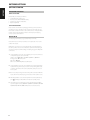
CONNECT AIRPLAY
AirPlay lets you stream music from your AirPlay-enabled device to the
D 7050. The AirPlay-enabled device and the D 7050 must be in the same
network to send and receive streaming audio with AirPlay. This connection
could be wired, using Ethernet cable, or wireless.
FRANÇAIS
SETTING UP NETWORK CONNECTION
The D 7050 can be connected to a network using any of the following
methods
A Wired connection
B Wireless connection
C Share Wi-Fi setting
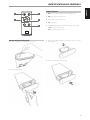
ACCESS POINT MODE
The D 7050 can act as an Access Point (AP) enabling it to connect to a wired
network wirelessly.
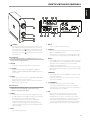
1 Press and hold WPS button located at the real panel of D 7050 for
about 3 seconds and then release it. A flashing signal strength bar
indicator
appears in the upper right corner of the D 7050 display.
2 Using your iOS device (iPad is used here for reference), select among
the list of available network connections the unique network ID (D7050
00EBC8 in this example) of your D 7050.
ESPAÑOL
Start playback of your device after successful network connection using any
of the above methods.
WIRED CONNECTION
PORTUGUÊS
Network connection using Ethernet broadband connection. Set up a Wired
Ethernet broadband router with broadband internet connection. Your
router or home network should have a built-in DHCP server to consummate
the connection.
1 Using a standard straight-through Ethernet cable, connect one end
of the Ethernet cable (not supplied) to the LAN port of your wired
Ethernet broadband router and the other end to D 7050’s LAN port.
2 Connection is established when a solid signal strength bar indicator
appears in the upper right corner of the D 7050 display.
ITALIANO
It is advisable that wired connection is utilized when possible. Wired
connection is less likely to have “drop-out” or range problem and not
vulnerable to interference or eavesdropping.
WIRELESS CONNECTION
DEUTSCH
Wireless (WiFi) broadband router with broadband internet connection
is required for wireless connection to be established. D 7050 can be
connected wirelessly via two methods
A WPS key pairing
B Access point mode
NEDERLANDS
WPS KEY PAIRING
1 Short press the WPS button located at the real panel of D 7050. Press
also the corresponding WPS button in your router. A flashing signal
strength bar indicator
appears in the upper right corner of the
D 7050 display.
2 The D 7050 will attempt to detect the WPS signal from the router and
establish a wireless connection.
3 Wireless connection is established when the flashing signal bar
indicator
turns to solid bar.
SVENSKA
РУССКИЙ
8
^
3 Launch Safari and enter http://192.168.1.1. The NAD AirPlay Setup
menu window will appear. While at Network Configuration section,
select Select Option at Service Set ID (SSID).