1
User Manual
Welcome
Getting Started
Welcome to Spire — we're excited to have you in
our community.
Charge your Spire
First, and most important, if you get stuck or
need help in any way getting the most out of
Spire, please get in touch. We’re always
listening at [email protected] and during business
hours at +1 800 501 CALM.
Features
Steps, Exercise & Calories
Track daily activity and calorie burn wherever
you are — at home, at work, or at the gym.
1.
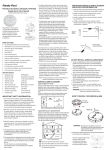
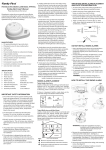
Place Spire on the charging pad. The clip
faces up.
2. Plug your charging pad’s cable into a USB
power adapter. You may also use a
computer’s USB port as a power source.
3. Plug your phone’s charging cable into the
charging pad.
Insights Into State of Mind
Spire helps you recognize and respond to your
state of mind to help you be more productive
and balanced all day.
Targeted Boosts
Guided activities provide extra boosts of focus,
activity, or calm.
See What Moves You
When the Spire stone is charging, the stone’s
LED will slowly pulse. The LED will remain
steadily illuminated when the stone is fully
charged. The stone will take about two hours to
reach full charge.
Attention is our most precious resource. When
and where do you focus and for how long?
To determine the stone’s battery charge level at
any time, tap Spire twice. The LED will flash in
response — 5 flashes in quick succession
indicates a full charge. 1 flash indicates it is time
to charge.
Calm
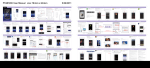
Install the App
Everyone needs some downtime. Do you make
time to relax, reflect, and reset?
On your phone, open http://spire.io/app
Focus
Tension
Some situations really push our buttons. What
triggers you and how often?
Activity
Pair your Spire
1.
Make sure your Spire is charged.
2. Turn your phone’s Bluetooth on.
3. Open the app and follow the prompts onscreen.
It’s not all about your mind! Do you get enough
physical activity in your day?
Support Email: [email protected]
Page 2 of 5