1
Network Video Recorder Quick Start Guide
TABLE OF CONTENTS
Chapter1 Panels Description ........................................................................................................................... 6
1.1
1.2
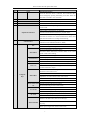
Front Panel ...................................................................................................................................... 6
1.1.1
DS-9600NI-I8 and DS-9600NI-I16 .................................................................................... 6
1.1.2
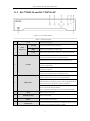
DS-7600NI-I2 and DS-7600NI-I2/P ................................................................................... 8
1.1.3
DS-7700NI-I4 and DS-7700NI-I4/P ................................................................................... 9
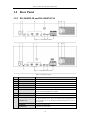
Rear Panel ..................................................................................................................................... 10
1.2.1
DS-9600NI-I8 and DS-9600NI-I16 .................................................................................. 10
1.2.2
DS-7600NI-I2 and DS-7600NI-I2/P ................................................................................. 11
1.2.3
DS-7700NI-I4 and DS-7700NI-I4/P ................................................................................. 12
Chapter 2Installation and Connections ........................................................................................................ 13
2.1
NVR Installation............................................................................................................................ 13
2.2
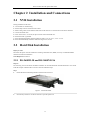
Hard Disk Installation.................................................................................................................... 13
2.3
2.4
2.2.1
DS-9600NI-I8 and DS-9600NI-I16 .................................................................................. 13
2.2.2
DS-7600NI-I2 (/P) and DS-7700NI-I4 (/P) ...................................................................... 15
Connections ................................................................................................................................... 17
2.3.1
Alarm Input Wiring........................................................................................................... 17
2.3.2
Alarm Output Wiring ........................................................................................................ 17
2.3.3
Using Alarm Connectors ................................................................................................... 17
2.3.4
Controller Connection....................................................................................................... 18
HDD Storage Calculation Chart .................................................................................................... 19
Chapter 3Menu Operation ............................................................................................................................ 20
3.1
Menu Structure .............................................................................................................................. 20
3.2
Startup and Shutdown .................................................................................................................... 20
3.3
Activating Your Device ................................................................................................................. 21
3.4
Login and Logout .......................................................................................................................... 22
3.4.1
User Login ........................................................................................................................ 22
3.4.2
User Logout ...................................................................................................................... 23
3.5
Using the Setup Wizard ................................................................................................................. 23
3.6
Network Settings ........................................................................................................................... 24
3.7
Adding IP Cameras ........................................................................................................................ 24
3.8
Live View ...................................................................................................................................... 25
3.9
One-Touch RAID Configuration ................................................................................................... 26
3.10 Recording Settings......................................................................................................................... 27
3.11 Playback ........................................................................................................................................ 27
Chapter 1Accessing by Web Browser ........................................................................................................... 29
1