1
Chapter 2
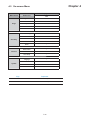
2.2 On-screen Menu
1.
2.
3.
4.
Image
Brightness:
Adjust background black level of the screen image
Contrast:
Adjust the difference between the image background
(black level) and the foreground (white level)
Sharpness:
Adjust the image from weak to sharp
Saturation:
Adjust the saturation of the image color
Hue:
Adjust the screen hue value
Geometry
Auto Config:
Adjust automatically sizes, centers, and fine tunes the video
signal to eliminate waviness and distortion. An “ Adjusting”
message is displayed during the process.
H. Position:
Align the screen image left or right
V. Position:
Align the screen image up or down
Clock :
Adjust the clock value
Phase:
Adjust the phase value
Function
OSD Position:
Adjust OSD menu horizontal and vertical position
OSD Zoom:
Adjust the difference between the image background
(black level) and the foreground (white level).
Color Temp:
Select the screen color - 5500K, 6500K & 9500K.
The factory default is 6500K.
System
Language:
Select the language in which the OSD menu is displayed English, Chinese (中文), Japanese (日本語), German,
French, Spanish, Italian.
Time:
Power OFF:
Function is not supported
Function is not supported
Reset:
Recall returns the adjustments back to factory settings.
Note : The current resolution and refresh rate information show on the top right hand side
of the screen when the LCD is powered on.
P.14