1
SETUP MENU(OSD)
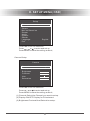
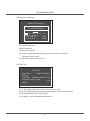
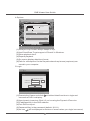
Local IP
IP Type
IP Address
Gateway
Net Mask
[STATIC]
192.168. 1.218
192.168. 1. 1
255.255.255. 0
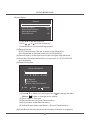
IP TYPE:DHCP/STATIC.
IP ADDRESS:Setup the IP address.
GATEWAY:Default Gateway.
NET MASK:Setup the NET MASK.
(6.3)Port:Setup network port.
(6.4)Mac Address.
(6.5 )Password:Password (default 111111) for review in remote.
(6.6)Video Quality:Setup the video quality level. There are 1~5 levels
and 5 is the best quality.
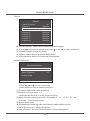
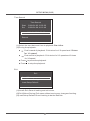
(7)Pan/Tilt Device
Pan/Tilt Device
Channel
ID
Nodel
Pan/ Tilt Test
RS-485(Baudrate)
1
1
None
115200
(7.1)Channel:Select the channel with PTZ device.
(7.2)ID:Set the ID the same with PTZ device.
(7.3)Model:The protocol could be NONE、Pelco D、Pelco Por
MERI LI-LIN.
(7.4)Pan/Tilt Test:Enter the test of PTZ.
(7.5)RS485(Baudrate):Set the baudrate.
(7.6)Select the PTZ channel on live to enter PTZ Mode.
Then Press
to select Direction,focus, Zoom and brightness
setting. After change setting,click “pause” to exit.
12