1
User’s Guide
NPD4749-01 EN
User’s Guide
Copyright and Trademarks
Copyright and Trademarks
Copyright and Trademarks
No part of this publication may be reproduced, stored in a retrieval system, or transmitted in any form or by any
means, electronic, mechanical, photocopying, recording, or otherwise, without the prior written permission of Seiko
Epson Corporation. No patent liability is assumed with respect to the use of the information contained herein. Neither
is any liability assumed for damages resulting from the use of the information herein. The information contained
herein is designed only for use with this Epson product. Epson is not responsible for any use of this information as
applied to other products.
Neither Seiko Epson Corporation nor its affiliates shall be liable to the purchaser of this product or third parties for
damages, losses, costs, or expenses incurred by the purchaser or third parties as a result of accident, misuse, or abuse of
this product or unauthorized modifications, repairs, or alterations to this product, or (excluding the U.S.) failure to
strictly comply with Seiko Epson Corporation’s operating and maintenance instructions.
Seiko Epson Corporation and its affiliates shall not be liable for any damages or problems arising from the use of any
options or any consumable products other than those designated as Original Epson Products or Epson Approved
Products by Seiko Epson Corporation.
Seiko Epson Corporation shall not be held liable for any damage resulting from electromagnetic interference that
occurs from the use of any interface cables other than those designated as Epson Approved Products by Seiko Epson
Corporation.
®
EPSON is a registered trademark, and EPSON EXCEED YOUR VISION or EXCEED YOUR VISION is a trademark
of Seiko Epson Corporation.
™
PRINT Image Matching and the PRINT Image Matching logo are trademarks of Seiko Epson Corporation.
Copyright © 2001 Seiko Epson Corporation. All rights reserved.
®
Intel is a registered trademark of Intel Corporation.
®
PowerPC is a registered trademark of International Business Machines Corporation.
Epson Scan software is based in part on the work of the Independent JPEG Group.
libtiff
Copyright © 1988-1997 Sam Leffler
Copyright © 1991-1997 Silicon Graphics, Inc.
Permission to use, copy, modify, distribute, and sell this software and its documentation for any purpose is
hereby granted without fee, provided that (i) the above copyright notices and this permission notice
appear in all copies of the software and related documentation, and (ii) the names of Sam Leffler and
Silicon Graphics may not be used in any advertising or publicity relating to the software without the
specific, prior written permission of Sam Leffler and Silicon Graphics.
THE SOFTWARE IS PROVIDED "AS-IS" AND WITHOUT WARRANTY OF ANY KIND, EXPRESS,
IMPLIED OR OTHERWISE, INCLUDING WITHOUT LIMITATION, ANY WARRANTY OF
MERCHANTABILITY OR FITNESS FOR A PARTICULAR PURPOSE.
2
User’s Guide
Copyright and Trademarks
IN NO EVENT SHALL SAM LEFFLER OR SILICON GRAPHICS BE LIABLE FOR ANY SPECIAL,
INCIDENTAL, INDIRECT OR CONSEQUENTIAL DAMAGES OF ANY KIND, OR ANY DAMAGES
WHATSOEVER RESULTING FROM LOSS OF USE, DATA OR PROFITS, WHETHER OR NOT
ADVISED OF THE POSSIBILITY OF DAMAGE, AND ON ANY THEORY OF LIABILITY, ARISING
OUT OF OR IN CONNECTION WITH THE USE OR PERFORMANCE OF THIS SOFTWARE.
Features Zoran Corporation Integrated Print System (IPS) for print language emulation.
®
®
®
Microsoft , Windows , and Windows Vista are registered trademarks of Microsoft Corporation.
®
®
®
®
®
®
®
Apple , Macintosh , Mac®, Mac OS , AppleTalk , Bonjour , ColorSync , and TrueType are registered
trademarks of Apple, Inc.
Apple Chancery, Chicago, Geneva, Hoefler Text, Monaco and New York are trademarks or registered trademarks of
Apple, Inc.
®
®
ABBYY and ABBYY FineReader names and logos are registered trademarks of ABBYY Software House.
Monotype is a trademark of Monotype Imaging, Inc. registered in the United States Patent and Trademark Office and
may be registered in certain jurisdictions.
Albertus, Arial, Gillsans, Times New Roman and Joanna are trademarks of The Monotype Corporation registered in
the United States Patent and Trademark Office and may be registered in certain jurisdictions.
ITC Avant Garde, ITC Bookman, ITC Lubalin, ITC Mona Lisa Recut, ITC Symbol, ITC Zapf-Chancery, and ITC
ZapfDingbats are trademarks of International Typeface Corporation registered in the United States Patent and
Trademark Office and may be registered in certain jurisdictions.
Clarendon, Helvetica, New Century Schoolbook, Optima, Palatino, Stempel Garamond, Times and Univers are
registered trademarks of Heidelberger Druckmaschinen AG, which may be registered in certain jurisdictions,
exclusively licensed through Linotype Library GmbH, a wholly owned subsidiary of Heidelberger Druckmaschinen
AG.
Wingdings is a registered trademark of Microsoft Corporation in the United States and other countries.
Antique Olive is a registered trademark of Marcel Olive and may be registered in certain jurisdictions.
Adobe SansMM, Adobe SerifMM, Carta, and Tekton are registered trademarks of Adobe Systems Incorporated.
Marigold and Oxford are trademarks of AlphaOmega Typography.
Coronet is a registered trademark of Ludlow Type Foundry.
Eurostile is a trademark of Nebiolo.
Bitstream is a registered trademark of Bitstream Inc. registered in the United States Patent and Trademark Office and
may be registered in certain jurisdictions.
Swiss is a trademark of Bitstream Inc. registered in the United States Patent and Trademark Office and may be
registered in certain jurisdictions.
3
User’s Guide
Copyright and Trademarks
This product includes RSA BSAFE® Cryptographic software from RSA Security Inc.
RSA, BSAFE are either registered trademarks or trademarks of RSA Security Inc. in the United States and/or other
countries.
RSA Security Inc. All rights reserved.
PCL is the registered trademark of Hewlett-Packard Company.
Adobe, the Adobe logo, PostScript3, Adobe Reader, Acrobat, and Photoshop are trademarks of Adobe systems
Incorporated, which may be registered in certain jurisdictions.
Copyright © 1987, 1993, 1994 The Regents of the University of California. All rights reserved.
Redistribution and use in source and binary forms, with or without modification, are permitted provided that the
following conditions are met:
1. Redistributions of source code must retain the above copyright notice, this list of conditions and the following
disclaimer.
2. Redistributions in binary form must reproduce the above copyright notice, this list of conditions and the following
disclaimer in the documentation and/or other materials provided with the distribution.
4. Neither the name of the University nor the names of its contributors may be used to endorse or promote products
derived from this software without specific prior written permission.
THIS SOFTWARE IS PROVIDED BY THE REGENTS AND CONTRIBUTORS ''AS IS'' AND ANY EXPRESS OR
IMPLIED WARRANTIES, INCLUDING, BUT NOT LIMITED TO, THE IMPLIED WARRANTIES OF
MERCHANTABILITY AND FITNESS FOR A PARTICULAR PURPOSE ARE DISCLAIMED. IN NO EVENT
SHALL THE REGENTS OR CONTRIBUTORS BE LIABLE FOR ANY DIRECT, INDIRECT, INCIDENTAL,
SPECIAL, EXEMPLARY, OR CONSEQUENTIAL DAMAGES (INCLUDING, BUT NOT LIMITED TO,
PROCUREMENT OF SUBSTITUTE GOODS OR SERVICES; LOSS OF USE, DATA, OR PROFITS; OR BUSINESS
INTERRUPTION) HOWEVER CAUSED AND ON ANY THEORY OF LIABILITY, WHETHER IN CONTRACT,
STRICT LIABILITY, OR TORT (INCLUDING NEGLIGENCE OR OTHERWISE) ARISING IN ANY WAY OUT
OF THE USE OF THIS SOFTWARE, EVEN IF ADVISED OF THE POSSIBILITY OF SUCH DAMAGE.
This code illustrates a sample implementation of the Arcfour algorithm
Copyright © April 29, 1997 Kalle Kaukonen. All Rights Reserved.
Redistribution and use in source and binary forms, with or without modification, are permitted provided that this
copyright notice and disclaimer are retained.
THIS SOFTWARE IS PROVIDED BY KALLE KAUKONEN AND CONTRIBUTORS ''AS IS'' AND ANY EXPRESS
OR IMPLIED WARRANTIES, INCLUDING, BUT NOT LIMITED TO, THE IMPLIED WARRANTIES OF
MERCHANTABILITY AND FITNESS FOR A PARTICULAR PURPOSE ARE DISCLAIMED. IN NO EVENT
SHALL KALLE KAUKONEN OR CONTRIBUTORS BE LIABLE FOR ANY DIRECT, INDIRECT, INCIDENTAL,
SPECIAL, EXEMPLARY, OR CONSEQUENTIAL DAMAGES (INCLUDING, BUT NOT LIMITED TO,
PROCUREMENT OF SUBSTITUTE GOODS OR SERVICES; LOSS OF USE, DATA, OR PROFITS; OR BUSINESS
INTERRUPTION) HOWEVER CAUSED AND ON ANY THEORY OF LIABILITY, WHETHER IN CONTRACT,
STRICT LIABILITY, OR TORT (INCLUDING NEGLIGENCE OR OTHERWISE) ARISING IN ANY WAY OUT
OF THE USE OF THIS SOFTWARE, EVEN IF ADVISED OF THE POSSIBILITY OF SUCH DAMAGE.
General Notice: Other product names used herein are for identification purposes only and may be trademarks of their
respective owners. Epson disclaims any and all rights in those marks.
4
User’s Guide
Copyright and Trademarks
© 2012 Seiko Epson Corporation. All rights reserved.
5
User’s Guide
Guidelines
Guidelines
Where to Find Information
Setup Guide (paper)
Provides you with information on setting up the product and installing the software.
User’s Guide (PDF, this
manual)
Provides you with detailed information on the product’s functions, optional products,
maintenance, troubleshooting, and technical specifications.
Network Guide (HTML)
Provides network administrators with information on both the printer driver and network
settings.
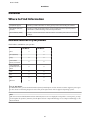
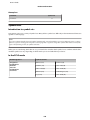
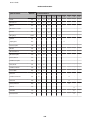
Available features for your product
Check what is available for your product.
WP-M4525
WP-M4595
Print
✓
✓
Print (PS3/PCL)
-
✓
Copy
✓
✓
Scan to USB
Device, Scan to PC
✓
✓
Scan to Network
Folder/FTP, Scan to
Email
✓
✓
Scan
✓
✓
Fax
✓
✓
ADF
✓
✓
Ethernet
✓
✓
Note for WP-M4595:
For PS3/PCL models, you need to download the software from the Epson’s website. Contact customer support in your region
for more details on obtaining the printer driver and system requirements such as supported operating systems.
Note:
If the Scan to Network Folder/FTP and Scan to Email functions are not displayed on the product’s control panel, you may
need to update the product’s firmware from the Epson website or Epson WebConfig. To access Epson WebConfig, see the
Network Guide.
6
User’s Guide
Guidelines
Illustrations used in this guide
The illustrations in this guide are from a similar product model. Although they may differ from your actual product,
the method of operation is the same.
Menu names used in this guide
Although the menus, setting items, or option names displayed on the LCD screen may differ from your actual product,
the method of operation is the same.
Warnings, Cautions, and Notes
Warnings, Cautions, and Notes in this manual are indicated as below and have the following meaning.
!Warnings
must be followed carefully to avoid bodily injury.
!Cautions
must be observed to avoid damage to your equipment.
Notes
contain important information and useful tips on the operation of the product.
7
User’s Guide
Safety Instructions
Safety Instructions
Important Safety Instructions
Read all of the instructions in this section before using the product. Also, be sure to follow all warnings and instructions
marked on the product.
Setting up the product
Observe the following when setting up the product:
❏ Do not block or cover the vents and openings in the product.
❏ Use only the type of power source indicated on the product’s label.
❏ Use only the power cord that comes with the product. Use of another cord may result in fire or electric shock.
❏ The product’s power cord is for use with the product only. Use with other equipment may result in fire or electric
shock.
❏ Be sure your AC power cord meets the relevant local safety standard.
❏ Avoid using outlets on the same circuit as photocopiers or air control systems that regularly switch on and off.
❏ Avoid electrical outlets controlled by wall switches or automatic timers.
❏ Keep the entire computer system away from potential sources of electromagnetic interference, such as
loudspeakers or the base units of cordless telephones.
❏ The power-supply cords should be placed to avoid abrasions, cuts, fraying, crimping, and kinking. Do not place
objects on top of the power-supply cords and do not allow the power-supply cords to be stepped on or run over. Be
particularly careful to keep all the power-supply cords straight at the ends and the points where they enter and
leave the transformer.
❏ If you use an extension cord with the product, make sure that the total ampere rating of the devices plugged into
the extension cord does not exceed the cord’s ampere rating. Also, make sure that the total ampere rating of all
devices plugged into the wall outlet does not exceed the wall outlet’s ampere rating.
❏ Never disassemble, modify, or attempt to repair the power cord, printer unit, scanner unit, or options by yourself,
except as specifically explained in the product’s guides.
❏ Unplug the product and refer servicing to qualified service personnel under the following conditions:
The power cord or plug is damaged; liquid has entered the product; the product has been dropped or the casing
damaged; the product does not operate normally or exhibits a distinct change in performance. Do not adjust
controls that are not covered by the operating instructions.
❏ If you plan to use the product in Germany, the building installation must be protected by a 10 or 16 amp circuit
breaker to provide adequate short-circuit protection and over-current protection for the product.
❏ When connecting the product to a computer or other device with a cable, ensure the correct orientation of the
connectors. Each connector has only one correct orientation. Inserting a connector in the wrong orientation may
damage both devices connected by the cable.
8
User’s Guide
Safety Instructions
❏ If damage occurs to the plug, replace the cord set or consult a qualified electrician. If there are fuses in the plug,
make sure you replace them with fuses of the correct size and rating.
Choosing a place for the product
Observe the following when choosing a place for the product:
❏ Place the product on a flat, stable surface that extends beyond the base of the product in all directions. If you place
the product by the wall, leave more than 10 cm between the back of the product and the wall. The product will not
operate properly if it is tilted at an angle.
❏ When storing or transporting the product, avoid tilting it, placing it vertically, or turning it upside down;
otherwise ink may leak.
❏ Allow spaces behind the product for the cables, and space above the product so that you can fully raise the
document cover.
❏ Avoid places subject to rapid changes in temperature and humidity. Also, keep the product away from direct
sunlight, strong light, or heat sources.
❏ Do not place or store the product outdoors, near excessive dirt or dust, water, heat sources, or in locations subject
to shocks, vibrations, high temperature or humidity. Do not use with wet hands.
❏ Place the product near a wall outlet where the plug can be easily unplugged.
Using the product
Observe the following when using the product:
❏ Do not insert objects through the slots in the product.
❏ Take care not to spill liquid on the product.
❏ Do not put your hand inside the product or touch the ink cartridges during printing.
❏ Do not touch the white flat cable inside the product.
❏ Do not use aerosol products that contain flammable gases inside or around the product. Doing so may cause
fire.
❏ Do not move the print head by hand; otherwise, you may damage the product.
❏ Always turn the product off using the P On button. Do not unplug the product or turn off the power at the outlet
until the LCD panel has turned off completely.
❏ Before transporting the product, make sure that the print head is in the home (far right) position and the ink
cartridges are in place.
❏ Leave the ink cartridges installed. Removing the cartridges can dry out the print head and may prevent the printer
from printing.
❏ Be careful not to trap your fingers when closing the scanner unit.
9
User’s Guide
Safety Instructions
❏ If you are not going to use the product for a long period, be sure to unplug the power cord from the electrical
outlet.
❏ Do not press too hard on the document table when placing the originals.
Handling ink cartridges
Observe the following when handling the ink cartridges:
❏ Keep ink cartridges out of the reach of children and do not drink.
❏ If ink gets on your skin, wash it off with soap and water. If it gets in your eyes, flush them immediately with
water.
❏ Before installing the new ink cartridge in the printer, shake it back and forth horizontally in five centimeter
movements about 15 times within five seconds.
❏ Use the ink cartridge before the date printed on its package.
❏ Use up the ink cartridge within six months of installation for best results.
❏ Do not dismantle the ink cartridges or try to refill them. This could damage the print head.
❏ Do not touch the green IC chip on the side of the cartridge. This may affect normal operation and printing.
❏ The IC chip on this ink cartridge retains a variety of cartridge-related information, such as the ink cartridge status,
so that the cartridge may be removed and reinserted freely.
❏ If you remove an ink cartridge for later use, protect the ink supply area from dirt and dust, and store it in the same
environment as this product. Note that there is a valve in the ink supply port, making covers or plugs unnecessary,
but care is needed to prevent the ink from staining items that the cartridge touches. Do not touch the ink supply
port or surrounding area.
Using the LCD screen
❏ The LCD screen may contain a few small bright or dark spots, and because of its features it may have an uneven
brightness. These are normal and do not indicate that it is damaged in any way.
❏ Only use a dry, soft cloth to clean the LCD screen. Do not use liquid or chemical cleansers.
❏ If the LCD screen is damaged, contact your dealer. If the liquid crystal solution gets on your hands, wash them
thoroughly with soap and water. If the liquid crystal solution gets into your eyes, flush them immediately with
water. If discomfort or vision problems remain after a thorough flushing, see a doctor immediately.
Restrictions on Copying
Observe the following restrictions in order to ensure the responsible and legal use of the product.
Copying of the following items is prohibited by law:
❏ Bank bills, coins, government-issued marketable securities, government bond securities, and municipal securities
10
User’s Guide
Safety Instructions
❏ Unused postage stamps, pre-stamped postcards, and other official postal items bearing valid postage
❏ Government-issued revenue stamps, and securities issued according to legal procedure
Exercise caution when copying the following items:
❏ Private marketable securities (stock certificates, negotiable notes, checks, etc.), monthly passes, concession
tickets, etc.
❏ Passports, driver’s licenses, warrants of fitness, road passes, food stamps, tickets, etc.
Note:
Copying these items may also be prohibited by law.
Responsible use of copyrighted materials:
❏ Products can be misused by improperly copying copyrighted materials. Unless acting on the advice of a
knowledgeable attorney, be responsible and respectful by obtaining the permission of the copyright holder before
copying published material.
Protecting Your Personal Information
This product allows you to store names and telephone numbers in its memory even when the power is turned off.
Use the following menu to erase the memory if you give the product to someone else or dispose of it.
F Setup > Restore Default Settings > All Settings
11
User’s Guide
Contents
Contents
Document glass. . . . . . . . . . . . . . . . . . . . . . . . 33
Copyright and Trademarks
Copyright and Trademarks. . . . . . . . . . . . . . . . . . . 2
Printing
Using Your Software. . . . . . . . . . . . . . . . . . . . . .
Printer driver and status monitor. . . . . . . . . . .
Basic Printing. . . . . . . . . . . . . . . . . . . . . . . . . . .
Selecting the correct paper type . . . . . . . . . . . .
Loading paper or envelopes. . . . . . . . . . . . . . .
Basic printer settings for Windows. . . . . . . . . .
Basic printer settings for Mac OS X 10.5 or 10.6
...................................
Canceling Printing. . . . . . . . . . . . . . . . . . . . . . .
Using the printer button. . . . . . . . . . . . . . . . .
For Windows. . . . . . . . . . . . . . . . . . . . . . . . .
For Mac OS X. . . . . . . . . . . . . . . . . . . . . . . . .
Printing with Special Layout Options. . . . . . . . . .
2-Sided Printing. . . . . . . . . . . . . . . . . . . . . . .
Fit to Page Printing. . . . . . . . . . . . . . . . . . . . .
Pages Per Sheet Printing. . . . . . . . . . . . . . . . .
Poster Printing (for Windows only). . . . . . . . .
Watermark Printing (for Windows only). . . . .
Sharing Your Printer. . . . . . . . . . . . . . . . . . . . . .
Using the PostScript Printer Driver and the PCL6
Printer Driver. . . . . . . . . . . . . . . . . . . . . . . . . . .
Guidelines
Where to Find Information. . . . . . . . . . . . . . . . . .
Available features for your product. . . . . . . . . .
Illustrations used in this guide. . . . . . . . . . . . . .
Menu names used in this guide. . . . . . . . . . . . .
Warnings, Cautions, and Notes. . . . . . . . . . . . . . .
.6
.6
.7
.7
.7
Safety Instructions
Important Safety Instructions. . . . . . . . . . . . . . . . . 8
Setting up the product. . . . . . . . . . . . . . . . . . . . . 8
Choosing a place for the product. . . . . . . . . . . . . 9
Using the product. . . . . . . . . . . . . . . . . . . . . . . . 9
Handling ink cartridges. . . . . . . . . . . . . . . . . . . 10
Using the LCD screen. . . . . . . . . . . . . . . . . . . . 10
Restrictions on Copying. . . . . . . . . . . . . . . . . . . . 10
Protecting Your Personal Information. . . . . . . . . . 11
. 35
. 35
. 36
. 36
. 37
. 37
. 39
. 40
. 41
. 41
. 41
. 42
. 42
. 48
. 51
. 53
. 57
. 59
. 59
Getting to Know Your Product
Product Parts. . . . . . . . . . . . . . . . . . . . . . . . . .
Guide to the Control Panel. . . . . . . . . . . . . . . .
Buttons and LCD. . . . . . . . . . . . . . . . . . . . .
Power Saving Function. . . . . . . . . . . . . . . . . . .
Restarting Automatically After a Power Failure
....................................
.
.
.
.
Scanning
. 16
. 19
. 19
. 21
Let’s Try Scanning. . . . . . . . . . . . . . . . . . . . . . . .
Starting a Scan. . . . . . . . . . . . . . . . . . . . . . . .
Image Adjustment Features. . . . . . . . . . . . . . .
Basic Scanning. . . . . . . . . . . . . . . . . . . . . . . . . .
Scanning from the Control Panel. . . . . . . . . . .
Scanning in Home Mode. . . . . . . . . . . . . . . . .
Scanning in Office Mode. . . . . . . . . . . . . . . . .
Scanning in Professional Mode. . . . . . . . . . . .
Previewing and Adjusting the Scan Area. . . . .
Various Types of Scanning. . . . . . . . . . . . . . . . .
Scanning a Magazine. . . . . . . . . . . . . . . . . . . .
Scanning Multiple Documents to a PDF File
...................................
Scanning a Photo. . . . . . . . . . . . . . . . . . . . . .
Software Information. . . . . . . . . . . . . . . . . . . . .
Starting Epson Scan Driver. . . . . . . . . . . . . . .
Starting Other Scanning Software. . . . . . . . . .
. . 21
Paper Handling
Introduction to Using, Loading, and Storing
Media. . . . . . . . . . . . . . . . . . . . . . . . . . . . . . . . .
Selecting which tray to use and its loading
capacities. . . . . . . . . . . . . . . . . . . . . . . . . . . .
Storing paper. . . . . . . . . . . . . . . . . . . . . . . . .
Loading Paper. . . . . . . . . . . . . . . . . . . . . . . . . . .
Into the paper cassette. . . . . . . . . . . . . . . . . . .
Into the rear MP tray. . . . . . . . . . . . . . . . . . . .
Loading Envelopes. . . . . . . . . . . . . . . . . . . . . . .
Placing Originals. . . . . . . . . . . . . . . . . . . . . . . . .
Automatic Document Feeder (ADF). . . . . . . .
. 22
. 22
. 23
. 24
. 24
. 27
. 29
. 31
. 31
12
. 60
. 60
. 63
. 65
. 65
. 72
. 73
. 75
. 77
. 79
. 79
. 81
. 85
. 86
. 86
. 87
User’s Guide
Contents
Scan mode menu list. . . . . . . . . . . . . . . . . . . . 114
Fax Mode. . . . . . . . . . . . . . . . . . . . . . . . . . . . . . 116
Fax mode menu list. . . . . . . . . . . . . . . . . . . . . 116
Error Messages. . . . . . . . . . . . . . . . . . . . . . . . . . 117
Copying
Selecting Paper. . . . . . . . . . . . . . . . . . . . . . . . .
Copying Documents. . . . . . . . . . . . . . . . . . . . .
Basic copying. . . . . . . . . . . . . . . . . . . . . . . .
2-Sided Copying. . . . . . . . . . . . . . . . . . . . . .
Collate Copying. . . . . . . . . . . . . . . . . . . . . .
Layout copying. . . . . . . . . . . . . . . . . . . . . . .
Copy Mode Menu List. . . . . . . . . . . . . . . . . . . .
.
.
.
.
.
.
.
. 88
. 88
. 88
. 89
. 90
. 91
. 91
Installing Option
250-Sheet Paper Cassette Unit. . . . . . . . . . . . . . . 120
Installing the paper cassette unit. . . . . . . . . . . 120
Uninstalling the cassette unit. . . . . . . . . . . . . . 121
Faxing
Replacing Consumables
Introducing FAX Utility. . . . . . . . . . . . . . . . . . . . 92
Connecting to a Phone Line. . . . . . . . . . . . . . . . . . 92
Using the phone line for fax only. . . . . . . . . . . . 92
Sharing line with phone device. . . . . . . . . . . . . 93
Checking the fax connection. . . . . . . . . . . . . . . 95
Setting Up Fax Features. . . . . . . . . . . . . . . . . . . . . 96
Setting up speed dial entries. . . . . . . . . . . . . . . . 96
Setting up group dial entries. . . . . . . . . . . . . . . 97
Creating header information. . . . . . . . . . . . . . . 98
Changing Fax Output setting to print. . . . . . . . . 99
Selecting paper source to print fax. . . . . . . . . . . 99
Sending Faxes. . . . . . . . . . . . . . . . . . . . . . . . . . . 100
Basics of send faxes. . . . . . . . . . . . . . . . . . . . . 100
Sending faxes using speed dial/group dial. . . . . 100
Sending faxes by broadcasting. . . . . . . . . . . . . 101
Sending a fax at a specified time. . . . . . . . . . . . 102
Sending a fax from a connected phone. . . . . . . 103
Receiving Faxes. . . . . . . . . . . . . . . . . . . . . . . . . . 104
Receiving faxes automatically. . . . . . . . . . . . . . 104
Receiving faxes manually. . . . . . . . . . . . . . . . . 105
Receive a fax by polling. . . . . . . . . . . . . . . . . . 105
Printing Reports. . . . . . . . . . . . . . . . . . . . . . . . . 106
Fax Mode Menu List. . . . . . . . . . . . . . . . . . . . . . 107
Ink Cartridges. . . . . . . . . . . . . . . . . . . . . . . . . . . 122
Checking the ink cartridge status. . . . . . . . . . . 122
Precautions on ink cartridge replacement. . . . . 125
Replacing an ink cartridge. . . . . . . . . . . . . . . . 126
Maintenance Box. . . . . . . . . . . . . . . . . . . . . . . . 127
Checking the maintenance box status. . . . . . . . 127
Handling precautions. . . . . . . . . . . . . . . . . . . 127
Replacing a maintenance box. . . . . . . . . . . . . . 128
Maintaining Your Printer and Software
Checking the Print Head Nozzles. . . . . . . . . . . . . 130
Using the Nozzle Check utility for Windows
. . . . . . . . . . . . . . . . . . . . . . . . . . . . . . . . . . . 130
Using the Nozzle Check utility for Mac OS X
. . . . . . . . . . . . . . . . . . . . . . . . . . . . . . . . . . . 130
Using the control panel. . . . . . . . . . . . . . . . . . 131
Cleaning the Print Head. . . . . . . . . . . . . . . . . . . 131
Using the Head Cleaning utility for Windows
. . . . . . . . . . . . . . . . . . . . . . . . . . . . . . . . . . . 132
Using the Head Cleaning utility for Mac OS X
. . . . . . . . . . . . . . . . . . . . . . . . . . . . . . . . . . . 132
Using the control panel. . . . . . . . . . . . . . . . . . 133
Aligning the Print Head. . . . . . . . . . . . . . . . . . . . 134
Using the Print Head Alignment utility for
Windows. . . . . . . . . . . . . . . . . . . . . . . . . . . . 134
Using the Print Head Alignment utility for
Mac OS X. . . . . . . . . . . . . . . . . . . . . . . . . . . . 134
Using the control panel. . . . . . . . . . . . . . . . . . 135
Setting/Changing Time and Region. . . . . . . . . . . 136
Making Printer Settings. . . . . . . . . . . . . . . . . . . . 137
Power Off Timer Setting. . . . . . . . . . . . . . . . . 137
Paper Size Loaded Setting. . . . . . . . . . . . . . . . 138
Cleaning the Printer. . . . . . . . . . . . . . . . . . . . . . 139
Cleaning the exterior of the printer. . . . . . . . . 139
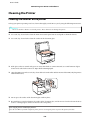
Cleaning the interior of the printer. . . . . . . . . . 140
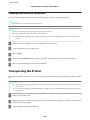
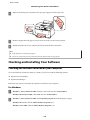
Transporting the Printer. . . . . . . . . . . . . . . . . . . 140
Using the Control Panel
Selecting a Mode. . . . . . . . . . . . . . . . . . . . . . . . . 108
Setup Mode. . . . . . . . . . . . . . . . . . . . . . . . . . . . . 108
Lock Settings. . . . . . . . . . . . . . . . . . . . . . . . . . 108
Power Off Timer. . . . . . . . . . . . . . . . . . . . . . . 109
Paper Size Loaded. . . . . . . . . . . . . . . . . . . . . . 109
Paper Size Notice. . . . . . . . . . . . . . . . . . . . . . 109
Print Status Sheet. . . . . . . . . . . . . . . . . . . . . . 110
Print PS3 Status Sheet. . . . . . . . . . . . . . . . . . . 110
Setup mode menu list. . . . . . . . . . . . . . . . . . . 110
Copy Mode. . . . . . . . . . . . . . . . . . . . . . . . . . . . . 113
Copy mode menu list. . . . . . . . . . . . . . . . . . . 113
Scan Mode. . . . . . . . . . . . . . . . . . . . . . . . . . . . . 114
13
User’s Guide
Contents
Checking and Installing Your Software. . . . . . . . . 141
Checking the software installed on your
computer. . . . . . . . . . . . . . . . . . . . . . . . . . . . 141
Installing the software. . . . . . . . . . . . . . . . . . . 142
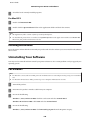
Uninstalling Your Software. . . . . . . . . . . . . . . . . 142
For Windows. . . . . . . . . . . . . . . . . . . . . . . . . 142
For Mac OS X. . . . . . . . . . . . . . . . . . . . . . . . . 143
An ink error is indicated after you replace the
cartridge. . . . . . . . . . . . . . . . . . . . . . . . . . . . . 164
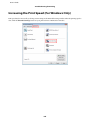
Increasing the Print Speed (For Windows Only)
. . . . . . . . . . . . . . . . . . . . . . . . . . . . . . . . . . . . . 165
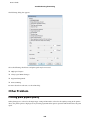
Other Problem. . . . . . . . . . . . . . . . . . . . . . . . . . 166
Printing plain papers quietly. . . . . . . . . . . . . . 166
Troubleshooting for Scanning
Troubleshooting for Printing
Problems Indicated by Messages on the LCD
Panel or Status Light. . . . . . . . . . . . . . . . . . . . . . 168
Problems When Starting a Scan. . . . . . . . . . . . . . 168
Using the Automatic Document Feeder (ADF)
. . . . . . . . . . . . . . . . . . . . . . . . . . . . . . . . . . . 168
Using the button. . . . . . . . . . . . . . . . . . . . . . . 169
Using scanning software other than Epson
Scan driver. . . . . . . . . . . . . . . . . . . . . . . . . . . 170
Problems When Feeding Paper. . . . . . . . . . . . . . 170
The paper gets dirty. . . . . . . . . . . . . . . . . . . . . 170
Multiple sheets of paper are fed. . . . . . . . . . . . 170
The paper jams in the Automatic Document
Feeder (ADF) . . . . . . . . . . . . . . . . . . . . . . . . . 170
Problems With Scanning Time. . . . . . . . . . . . . . 170
Problems With Scanned Images. . . . . . . . . . . . . . 171
Scan quality is unsatisfactory. . . . . . . . . . . . . . 171
The scanning area or direction is
unsatisfactory. . . . . . . . . . . . . . . . . . . . . . . . . 172
Problems Remain After Trying All Solutions. . . . 173
Diagnosing the Problem. . . . . . . . . . . . . . . . . . . 145
Status monitor. . . . . . . . . . . . . . . . . . . . . . . . 145
Running a printer operation check. . . . . . . . . . 145
Checking Printer Status. . . . . . . . . . . . . . . . . . . . 146
For Windows. . . . . . . . . . . . . . . . . . . . . . . . . 146
For Mac OS X. . . . . . . . . . . . . . . . . . . . . . . . . 148
The Paper Jams. . . . . . . . . . . . . . . . . . . . . . . . . . 150
Removing jammed paper from the rear unit. . . 151
Removing jammed paper from the front cover
and the output tray. . . . . . . . . . . . . . . . . . . . . 152
Removing jammed paper from the paper
cassette(s). . . . . . . . . . . . . . . . . . . . . . . . . . . . 153
Removing jammed paper from the Automatic
Document Feeder (ADF). . . . . . . . . . . . . . . . . 154
Preventing paper jams. . . . . . . . . . . . . . . . . . . 156
Reprinting after a paper jam (for Windows
only). . . . . . . . . . . . . . . . . . . . . . . . . . . . . . . . 157
Print Quality Problems. . . . . . . . . . . . . . . . . . . . 157
Horizontal banding. . . . . . . . . . . . . . . . . . . . . 158
Vertical banding or misalignment. . . . . . . . . . 158
Blurry or smeared print. . . . . . . . . . . . . . . . . . 159
Miscellaneous Printout Problems. . . . . . . . . . . . . 159
Incorrect or garbled characters. . . . . . . . . . . . . 159
Incorrect margins. . . . . . . . . . . . . . . . . . . . . . 160
Printout has a slight slant. . . . . . . . . . . . . . . . . 160
Inverted image. . . . . . . . . . . . . . . . . . . . . . . . 160
Blank pages print. . . . . . . . . . . . . . . . . . . . . . 160
Printed side is smeared or scuffed. . . . . . . . . . 161
Printing is too slow. . . . . . . . . . . . . . . . . . . . . 161
Paper Does Not Feed Correctly. . . . . . . . . . . . . . 161
Paper does not feed. . . . . . . . . . . . . . . . . . . . . 161
Multiple pages feed. . . . . . . . . . . . . . . . . . . . . 162
Paper is improperly loaded. . . . . . . . . . . . . . . 162
Paper is not ejected fully or is wrinkled. . . . . . . 163
The Printer Does Not Print. . . . . . . . . . . . . . . . . 163
The LCD screen or all lights are off. . . . . . . . . . 163
The LCD screen or lights came on and then
went out. . . . . . . . . . . . . . . . . . . . . . . . . . . . . 163
The LCD screen or lights are on. . . . . . . . . . . . 163
Troubleshooting for Copying
You see banding (light lines) in your prints or
copies. . . . . . . . . . . . . . . . . . . . . . . . . . . . . . . . . 174
Your print is blurry or smeared. . . . . . . . . . . . . . 174
Your print is faint or has gaps. . . . . . . . . . . . . . . 174
Your print is grainy. . . . . . . . . . . . . . . . . . . . . . . 175
The image size or position is incorrect. . . . . . . . . 175
Troubleshooting for Faxing
Cannot send fax. . . . . . . . . . . . . . . . . . . . . . . . . 176
Cannot receive fax. . . . . . . . . . . . . . . . . . . . . . . . 176
Quality problems (sending). . . . . . . . . . . . . . . . . 176
Quality problems (receiving). . . . . . . . . . . . . . . . 177
Answering machine cannot answer voice calls. . . 177
Incorrect time. . . . . . . . . . . . . . . . . . . . . . . . . . . 177
Product Information
Ink and Paper. . . . . . . . . . . . . . . . . . . . . . . . . . . 178
14
User’s Guide
Contents
Ink cartridges. . . . . . . . . . . . . . . . . . . . . . . . . 178
Maintenance box. . . . . . . . . . . . . . . . . . . . . . . 178
Paper. . . . . . . . . . . . . . . . . . . . . . . . . . . . . . . 179
Option. . . . . . . . . . . . . . . . . . . . . . . . . . . . . . . . 179
250-Sheet Paper Cassette Unit/PXBACU1. . . . 179
System Requirements. . . . . . . . . . . . . . . . . . . . . 179
Windows requirements. . . . . . . . . . . . . . . . . . 179
Macintosh requirements. . . . . . . . . . . . . . . . . 179
Technical Specifications. . . . . . . . . . . . . . . . . . . . 180
Printer specifications. . . . . . . . . . . . . . . . . . . . 180
Scanner specifications. . . . . . . . . . . . . . . . . . . 183
Automatic Document Feeder (ADF)
specifications. . . . . . . . . . . . . . . . . . . . . . . . . 183
Fax specifications. . . . . . . . . . . . . . . . . . . . . . 183
Network Interface Specification. . . . . . . . . . . . 184
Mechanical. . . . . . . . . . . . . . . . . . . . . . . . . . . 184
Electrical. . . . . . . . . . . . . . . . . . . . . . . . . . . . . 184
Environmental. . . . . . . . . . . . . . . . . . . . . . . . 185
Standards and approvals. . . . . . . . . . . . . . . . . 185
Interface. . . . . . . . . . . . . . . . . . . . . . . . . . . . . 186
External USB Device. . . . . . . . . . . . . . . . . . . . 186
Font Information. . . . . . . . . . . . . . . . . . . . . . . . 186
Available fonts. . . . . . . . . . . . . . . . . . . . . . . . 186
Symbol sets. . . . . . . . . . . . . . . . . . . . . . . . . . . 193
Where To Get Help
Technical Support Web Site. . . . . . . . . . . . . .
Contacting Epson Support. . . . . . . . . . . . . . .
Before Contacting Epson. . . . . . . . . . . . . .
Help for Users in Europe. . . . . . . . . . . . . .
.
.
.
.
.
.
.
.
. 198
. 198
. 198
. 199
Index
15
User’s Guide
Getting to Know Your Product
Getting to Know Your Product
Product Parts
Note:
The illustrations in this section are from a similar product model. Although they may differ from your actual product, the
method of operation is the same.
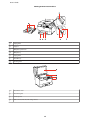
a.
ADF cover *
b.
Automatic Document Feeder (ADF) *
c.
Edge guide *
d.
ADF input tray (place your originals here to be copied) *
e.
ADF output tray (your originals are ejected here as they are copied) *
f.
Paper cassette 1
g.
Paper cassette 2 (optional)
* These parts are only available for the fax model.
16
User’s Guide
Getting to Know Your Product
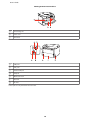
a.
Edge guides
b.
Stopper
c.
Output tray extension
d.
Output tray
e.
Edge guides
f.
Rear MP tray
g.
Feeder guard
a.
Document cover
b.
Document glass
c.
Control panel
d.
USB connector for external storage device
17
User’s Guide
Getting to Know Your Product
a.
Ink cartridge slot
b.
Front cover
c.
Print head
a.
LINE port *
b.
EXT. port *
c.
External USB port
d.
LAN port
e.
Maintenance box
f.
Rear unit
g.
AC inlet
* These parts are only available for the fax model.
18
User’s Guide
Getting to Know Your Product
Guide to the Control Panel
Control panel design varies depending on location.
Note:
Although the menus, setting items, or option names displayed on the LCD screen may differ from your actual product, the
method of operation is the same.
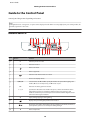
Buttons and LCD
Buttons
Function
a
P
Turns the printer on or off.
b
K
Enters fax mode.*1
c
d
Enters scan mode.
r
Enters copy mode.
Turns the Auto Answer mode on or off.*1
e
f
-
g
l, u, r, d
h
OK
i
0 - 9, *, #
j
y
LCD screen displays menus.
Selects menus. Use u and d to specify the number of copies. When typing a fax
number, l acts as a backspace key, and r inserts a space.
Activates the setting you have selected.
Specifies the date/time or the number of copies, as well as fax numbers. Enters
alphanumeric characters and switches between uppercase, lowercase, and
numbers each time it is pressed. It may be easier to use the software keypad to enter
text instead of using these buttons.
Stops printing/copying/scanning/faxing.
k
Displays the speed dial/group dial list in fax mode.*1
l
Displays the last number dialed. When entering numbers in fax mode, this inserts a
pause symbol (-) that acts as a brief pause during dialing.*1
m
F
Enters setup mode.
19
User’s Guide
Getting to Know Your Product
Buttons
Function
n
Displays Help for solutions to problems.
o
x
Displays detailed settings for each mode.
p
y
Cancels/returns to the previous menu.
q
x
Starts copying/scanning/faxing in black and white.*2
r
x
Starts scanning/faxing in color.*2
*1 These buttons and their functions are only available for fax capable models.
*2 The fax functions are only available for fax capable models.
Lights
Lights
Function
P
On when the product is on.
Flashes when the product is receiving data, printing/copying/scanning/faxing,
replacing an ink cartridge, charging ink, or cleaning the print head.
On when the fax is in Auto Answer mode.
Error
On when an error has occurred.
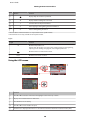
Using the LCD screen
Function
a
Press u or d to select the menu item. The highlight section moves up or down.
b
Displays the available buttons and functions.
c
Press l or r to set the density.
d
Press u or d to set the number of copies.
e
The ADF icon is displayed when there is a document loaded in the Automatic Document Feeder (ADF).
20
User’s Guide
Getting to Know Your Product
Function
f
A virtual keyboard for entering text. Use the u, d, l, r buttons to select a character or button on the keyboard,
and press OK to enter the character or use the selected button.
The keyboard buttons perform the following operations.
(backspace) deletes the character to the left of the cursor.
moves the cursor left or right within the text.
inserts a space.
When finished, select Done and then press OK.
Power Saving Function
After 13 minutes of inactivity, the screen turns black to save energy.
Press any button to return the screen to its previous state.
Restarting Automatically After a Power Failure
If a power failure occurs while the product is in fax standby mode or printing, it restarts automatically and then beeps.
21
User’s Guide
Paper Handling
Paper Handling
Introduction to Using, Loading, and Storing Media
You can achieve good results with most types of plain paper. However, coated papers provide superior prints because
they absorb less ink.
Epson provides special papers that are formulated for the ink used in Epson ink jet printers, and recommends these
papers to ensure high-quality results.
For more details on Epson special media, see “Ink and Paper” on page 178.
When loading special paper distributed by Epson, read the instruction sheets packed with the paper first and keep the
following points in mind.
Note:
❏ Load the paper into the paper cassette printable side down. The printable side is usually whiter or glossier. See the
instruction sheets packed with the paper for more information. Some types of paper have cut corners to help identify the
correct loading direction.
❏
If the paper is curled, flatten it or curl it slightly in the opposite direction before loading. Printing on curled paper may
cause ink to smear on your prints.
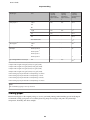
Selecting which tray to use and its loading capacities
Refer to the following table to select the paper cassette tray and its loading capacities according to the type and size of
the media you are using.
22
User’s Guide
Paper Handling
Media Type
Size
Loading
capacity
(sheets) for
paper cassette
1
Loading
capacity
(sheets) for
paper cassette
2
Loading
capacity
(sheets) for rear
MP tray
Plain paper *1
Letter
250
250
80 *5
Legal
250
250
1 *6
A5
250
-
80 *5
A6
-
-
80 *5
User-defined size
-
-
1 *6
Letter
-
-
10 *7
-
-
10
Envelope C4 *4
-
-
1
A4
200
200
50 *8
A4
B5
Thick paper *2
A4
Envelope
Envelope #10 *3
Envelope DL *3
Envelope C6 *3
Epson Bright White Ink Jet Paper
*1 Paper with a weight of 64 g/m² (17 lb) to 90 g/m² (24 lb).
*2 Paper with a weight of 91 g/m² (24 lb) to 256 g/m² (68 lb).
*3 Paper with a weight of 75 g/m² (20 lb) to 90 g/m² (24 lb).
*4 Paper with a weight of 80 g/m² (21 lb) to 100 g/m² (26 lb).
*5 The loading capacity for manual 2-sided printing is 30 sheets.
*6 The loading capacity for manual 2-sided printing is 1 sheet.
*7 The loading capacity for manual 2-sided printing is 5 sheets.
*8 The loading capacity for manual 2-sided printing is 20 sheets.
Note:
The availability of paper varies by location.
Storing paper
Return unused paper to the original package as soon as you finish printing. When handling special media, Epson
recommends storing your prints in a resealable plastic bag. Keep unused paper and prints away from high
temperature, humidity, and direct sunlight.
23
User’s Guide
Paper Handling
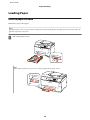
Loading Paper
Into the paper cassette
Follow these steps to load paper:
Note:
The illustrations in this section are from a similar product model. Although they may differ from your actual product, the
method of operation is the same.
A
Pull out the paper cassette.
Note:
If the output tray has been ejected, close it before pulling out the paper cassette.
24
User’s Guide
Paper Handling
B
Slide the edge guides to the sides of the paper cassette.
Note:
When using Legal-size paper, extend the paper cassette as shown in the illustration.
C
Slide the edge guide to adjust to the paper size you will use.
D
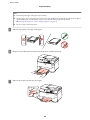
Load paper toward the edge guide with printable side face down, and check that the paper is not sticking out
from the end of the cassette.
25
User’s Guide
Paper Handling
Note:
❏ Fan and align the edges of the paper before loading.
❏
For plain paper, do not load paper above the line just under the d arrow mark inside the edge guide. For Epson
special media, make sure the number of sheets is less than the limit specified for the media.
& “Selecting which tray to use and its loading capacities” on page 22
❏
Do not use paper with binder holes.
E
Slide the edge guides to the edges of the paper.
F
Keep the cassette flat and insert it back into the product carefully and slowly.
G
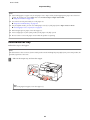
Slide out the output tray and raise the stopper.
26
User’s Guide
Paper Handling
Note:
❏ After loading paper, set paper size for each paper source. Paper will be fed from appropriate paper source based on
setting. To set paper size, press Setup. Then select Printer Setup and Paper Size Loaded.
& “Paper Size Loaded” on page 109
❏
You can also use the panel utility to set the paper size.
& “Paper Size Loaded Setting” on page 138
❏
For fax capable models, you can select which paper source(s) to feed paper from in Paper Source to Print.
& “Selecting paper source to print fax” on page 99
❏
When using Legal-size paper, lower the stopper (*).
❏
Leave enough space in front of the product for the paper to be fully ejected.
❏
Do not remove or insert the paper cassette while the product is operating.
Into the rear MP tray
Follow these steps to load paper:
Note:
The illustrations in this section are from a similar product model. Although they may differ from your actual product, the
method of operation is the same.
A
Slide out the output tray, and raise the stopper.
Note:
When using Legal-size paper, lower the stopper (*).
27
User’s Guide
Paper Handling
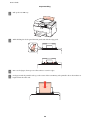
B
Pull up the rear MP tray.
C
While holding the feeder guard forward, pinch and slide the edge guide.
D
Fan a stack of paper, then tap it on a flat surface to even the edges.
E
Load paper with the printable side up, at the center of the rear MP tray. The printable side is often whiter or
brighter than the other side.
28
User’s Guide
Paper Handling
F
Slide the edge guide to the edge of the paper, but not too tightly.
Note:
❏ After loading paper, set paper size for each paper source. Paper will be fed from appropriate paper source based
on setting. To set paper size, press Setup. Then select Printer Setup and Paper Size Loaded.
& “Paper Size Loaded” on page 109
❏
You can also use the panel utility to set the paper size.
& “Paper Size Loaded Setting” on page 138
❏
For fax capable models, you can select which paper source(s) to feed paper from in Paper Source to Print.
& “Selecting paper source to print fax” on page 99
❏
For plain paper, do not load paper above the line just under the d arrow mark inside the edge guide. For Epson
special media, make sure the number of sheets is less than the limit specified for the media.
& “Selecting which tray to use and its loading capacities” on page 22
❏
Up to 1 sheet of Legal-size paper can be loaded at a time.
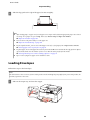
Loading Envelopes
Follow these steps to load envelopes:
Note:
The illustrations in this section are from a similar product model. Although they may differ from your actual product, the
method of operation is the same.
A
Slide out the output tray, and raise the stopper.
29
User’s Guide
Paper Handling
B
Pull up the rear MP tray.
C
While holding the feeder guard forward, pinch and slide the edge guide.
D
Load envelopes short edge first with the flap facing down and at the center of the rear MP tray.
30
User’s Guide
Paper Handling
Note:
❏ The thickness of envelopes and their ability to fold vary widely. If the total thickness of the stack of envelopes
exceeds 10 mm, press down on the envelopes to flatten them before loading. If print quality declines when a stack
of envelopes is loaded, load one envelope at a time.
& “Selecting which tray to use and its loading capacities” on page 22
E
❏
Do not use envelopes that are curled or folded.
❏
Flatten the envelope and the flaps before loading.
❏
Flatten the leading edge of the envelope before loading.
❏
Avoid using envelopes that are too thin, as they may curl during printing.
❏
Align the edges of the envelopes before loading.
Slide the edge guide to the edge of the envelopes, but not too tightly.
For printing instructions, see the following instructions.
& “Basic Printing” on page 36
Placing Originals
Follow these steps to load paper:
Automatic Document Feeder (ADF)
You can use the following originals in the Automatic Document Feeder.
Size
A4/Letter/Legal
Type
Plain paper
Weight
64 g/m2 to 95 g/m2
Capacity
30 sheets or 3 mm or less (A4, Letter)/10 sheets (Legal)
When you scan a 2-sided document using the ADF, legal size paper is not available.
31
User’s Guide
Paper Handling
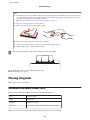
!Caution:
To prevent paper jams, avoid the following documents. For these types, use the document glass.
❏
Documents held together with paper clips, staples, etc.
❏
Documents that have tape or paper stuck to them.
❏
Photos, OHPs, or thermal transfer paper.
❏
Paper that is torn, wrinkled, or has holes.
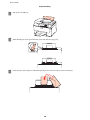
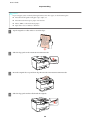
A
Tap the originals on a flat surface to even the edges.
B
Slide the edge guide on the Automatic Document Feeder.
C
Insert the originals face-up and short edge first into the Automatic Document Feeder.
D
Slide the edge guide until it is flush with the originals.
32
User’s Guide
Paper Handling
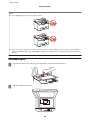
Note:
❏ For 2-up Copy layout, place the original as shown.
❏
When you use the copy function with the Automatic Document Feeder (ADF), the print settings are fixed at Reduce/
Enlarge - Actual Size, Paper Type - Plain Paper, and Paper Size - A4. The print is cropped if you copy an original larger
than A4.
Document glass
A
Open the document cover and place your original face-down on the document glass.
B
Slide the original to the corner.
33
User’s Guide
Paper Handling
Note:
See the following sections if any problems occur with the scanning area or the scanning direction when using EPSON
Scan.
& “The edges of your original are not scanned” on page 172
& “Multiple documents are scanned into a single file” on page 172
C
Close the cover gently.
Note:
When there is a document in the Automatic Document Feeder (ADF) and on the document glass, priority is given to the
document in the Automatic Document Feeder (ADF).
34
User’s Guide
Printing
Printing
Using Your Software
Printer driver and status monitor
The printer driver lets you choose from a wide variety of settings to get the best printing results. The status monitor and
the printer utilities help you check the printer and keep it in top operating condition.
Note for Windows users:
❏ Your printer driver automatically finds and installs the latest version of the printer driver from Epson’s Web site. Click
the Driver Update button in your printer driver’s Maintenance window, and then follow the on-screen instructions. If
the button does not appear in the Maintenance window, point at All Programs or Programs in the Windows Start
menu, and check in the Epson folder.
❏
If you want to change the language of the driver, select the language you want to use from the Language setting in your
printer driver’s Maintenance window. Depending on the location, this function may not be available.
Accessing the printer driver for Windows
You can access the printer driver from most Windows applications, the Windows Start menu, or the taskbar.
To make settings that apply only to the application you are using, access the printer driver from that application.
To make settings that apply to all of your Windows applications, access the printer driver from the Start menu or the
taskbar.
Refer to the following sections to access the printer driver.
Note:
Screen shots of the printer driver windows in this User’s Guide are from Windows 7.
From Windows applications
A
Click Print or Print Setup on the File menu.
B
In the window that appears, click Printer, Setup, Options, Preferences, or Properties. (Depending on your
application, you may need to click one or a combination of these buttons.)
From the Start menu
❏ Windows 7:
Click the start button, select Devices and Printers. Then right-click the printer and select Printing
preferences.
❏ Windows Vista and Server 2008:
Click the start button, select Control Panel, and then select Printer from the Hardware and Sound category.
Then select the printer and then click Select printing preferences or Printing Preferences.
35
User’s Guide
Printing
❏ Windows XP and Server 2003:
Click Start, Control Panel, then Printers and Faxes. Then right-click the printer and select Printing
Preferences.
From the shortcut icon on the taskbar
Right-click the printer icon on the taskbar, then select Printer Settings.
To add a shortcut icon to the Windows taskbar, first access the printer driver from the Start menu as described above.
Next, click the Maintenance tab, and then the Monitoring Preferences button. In the Monitoring Preferences
window, select the Shortcut Icon check box.
Getting information through online help
In the printer driver window, try one of the following procedures.
❏ Right-click the item, then click Help.
❏ Click the
button at the top right of the window, then click the item (for Windows XP only).
Accessing the printer driver for Mac OS X
The table below describes how to access the printer driver dialog.
Dialog Box
How to Access It
Page Setup
Click Page Setup on the File menu of your application.
Note for Mac OS X 10.5 or later:
Depending on your application, the Page Setup menu may not appear in the File menu.
Print
Click Print on the File menu of your application.
Epson Printer
Utility 4
For Mac OS X 10.6, click System Preferences on the Apple menu and then click Print & Fax.
Select your printer from the Printers list box, click Options & Supplies, Utility, and then click
Open Printer Utility.
For Mac OS X 10.5, click System Preferences on the Apple menu and then click Print & Fax.
Select your printer from the Printers list box, click Open Print Queue and then click Utility
button.
Getting information through online help
Click the
Help button in the Print dialog.
Basic Printing
Selecting the correct paper type
The printer automatically adjusts itself for the type of paper you select in your print settings. That is why the paper type
setting is so important. It tells your printer what kind of paper you are using and adjusts the ink coverage accordingly.
The table below lists the settings you should choose for your paper.
For this paper
Select this paper type setting
36
User’s Guide
Printing
Plain paper*
plain papers
Epson Bright White Ink Jet Paper
Thick paper*
Thick-Paper
Envelopes
Envelope
* These paper types are compatible with Exif Print and PRINT Image Matching. For more information, refer to the documentation
that came with the Exif Print or PRINT Image Matching compatible digital camera.
Note:
The availability of special media varies by location. For the latest information on media available in your area, contact
Epson support.
& “Technical Support Web Site” on page 198
Loading paper or envelopes
Refer to the section below for details on loading paper.
& “Loading Paper” on page 24
& “Loading Envelopes” on page 29
Note:
After loading paper, set paper size for each paper source. Paper will be fed from appropriate paper source based on setting.
& “Paper Size Loaded” on page 109
When using special Epson paper, refer to the section below.
& “Introduction to Using, Loading, and Storing Media” on page 22
Refer to the section below for the printable area.
& “Printable area” on page 182
Basic printer settings for Windows
A
Open the file you want to print.
37
User’s Guide
Printing
B
Access the printer settings.
C
Click the Main tab.
D
Select the appropriate Paper Source setting.
E
Select the appropriate Document Size setting. You can also define a custom paper size. For details, see the online
help.
F
Select Portrait (tall) or Landscape (wide) to change the orientation of your print.
& “Accessing the printer driver for Windows” on page 35
Note:
Select Landscape when printing on envelopes.
G
Select the appropriate Paper Type setting.
& “Selecting the correct paper type ” on page 36
Note:
Print quality is automatically adjusted for the selected Paper Type.
38
User’s Guide
Printing
H
Click OK to close the printer settings window.
Note:
To make changes to advanced settings, refer to the relevant section.
I
Print your file.
Basic printer settings for Mac OS X 10.5 or 10.6
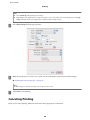
A
Open the file you want to print.
B
Access the Print dialog.
C
Click the d button to extend this dialog.
D
Select the printer you are using as the Printer setting, and then make suitable settings.
& “Accessing the printer driver for Mac OS X” on page 36
39
User’s Guide
Printing
Note:
❏ Select Landscape when printing on envelopes.
❏
Depending on your application, you may not be able to select some of the items in this dialog. If so, click Page
Setup on the File menu of your application, and then make suitable settings.
E
Select Print Settings from the pop-up menu.
F
Make the settings that you want to use to print. See the online help for more details on Print Settings.
& “Selecting the correct paper type ” on page 36
Note:
To make changes to advanced settings, refer to the relevant section.
G
Click Print to start printing.
Canceling Printing
If you need to cancel printing, follow the instructions in the appropriate section below.
40
User’s Guide
Printing
Using the printer button
Press y Cancel to cancel a print job in progress.
For Windows
Note:
You cannot cancel a print job that has been completely sent to the printer. In this case, cancel the print job by using the
printer.
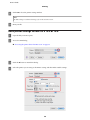
Using EPSON Status Monitor 3
A
Access the EPSON Status Monitor 3.
B
Click the Print Queue button. The Windows Spooler appears.
C
Right-click on the job you want to cancel and then select Cancel.
& “Using EPSON Status Monitor 3” on page 146
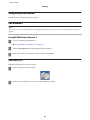
For Mac OS X
Follow the steps below to cancel a print job.
A
Click your printer icon in the Dock.
B
In the Document Name list, select the document which is printing.
41
User’s Guide
Printing
C
Click the Delete button to cancel the print job.
Printing with Special Layout Options
2-Sided Printing
Two types of 2-sided printing are available: standard and folded booklet.
Note:
If the ink runs low during automatic 2-sided printing, the printer stops printing and the ink needs to be replaced. When ink
replacement is complete, the printer starts printing again, but there may be some missing parts in your print. If this happens,
print again the page that has missing parts.
Note for Windows:
Manual 2-sided printing is available only when EPSON Status Monitor 3 is enabled. To enable the status monitor, access the
printer driver and click the Maintenance tab followed by the Extended Settings button. In the Extended Settings window,
check the Enable EPSON Status Monitor 3 check box.
Note for Mac OS X:
Mac OS X supports automatic standard 2-sided printing only.
42
User’s Guide
Printing
Standard 2-sided printing allows you to print both sides of a sheet.
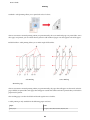
Choose automatic or manual printing. When you print manually, the even-numbered pages are printed first. Once
these pages are printed, you can reload them to print the odd-numbered pages onto the opposite side of the paper.
Folded booklet 2-sided printing allows you to make single-fold booklets.
Side Binding
Center Binding
✽: Binding edge
Choose automatic or manual printing. When you print manually, the pages that will appear on the inside (after the
page is folded) are printed first. The pages that will appear outside the booklet can then be printed after you reload the
paper into the printer.
The resulting pages can then be folded and bound together into a booklet.
2-sided printing is only available for the following papers and sizes.
Paper
Size
Plain paper
Legal*, Letter, A4, Executive*, B5, A5*, A6*
43
User’s Guide
Printing
Thick paper
Letter*, A4*
Epson Bright White Ink Jet Paper
A4
* Manual 2-sided printing only.
Note:
❏ Only use papers that are suitable for 2-sided printing. Otherwise, the print quality may deteriorate.
❏
Depending on the paper and the amount of ink used to print text and images, ink may bleed through to the other side of
the paper.
❏
The surface of the paper may be smeared during 2-sided printing.
❏
Manual 2-sided printing may not be available when the printer is accessed over a network or is used as a shared
printer.
❏
The loading capacity differs during 2-sided printing.
& “Selecting which tray to use and its loading capacities” on page 22
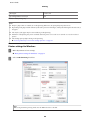
Printer settings for Windows
A
Make adjustments to basic settings.
B
Select 2-Sided Printing check box.
& “Basic printer settings for Windows” on page 37
Note:
When using automatic printing, make sure the Auto check box is checked.
44
User’s Guide
Printing
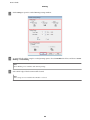
C
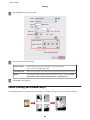
Click Settings to open the 2-Sided Printing Settings window.
D
To print folded booklets using the 2-sided printing option, select the Booklet check box, and choose Center
Binding or Side Binding.
Note:
Center Binding is not available with manual printing.
E
Select which edge of the document will be bound.
Note:
Some settings are not available when Booklet is selected.
45
User’s Guide
Printing
F
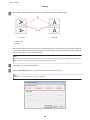
Choose mm or inch as the Unit setting. Then specify the width of the binding margin.
Portrait
Landscape
* : Folding edge
** : Margin
When folded booklets are printed using the 2-sided printing option, a margin of the specified width will appear
on both sides of the fold. For example, if you specify a 10-mm margin, you will get a 20-mm margin (a margin of
10 mm will be placed on each side of the fold).
Note:
The actual binding margin may be different from the specified settings depending on your application. Experiment
with a few sheets to examine actual results before printing the entire job.
G
Click OK to return to the Main window.
H
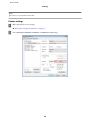
Click the Print Density button to open the Print Density Adjustment window.
Note:
This button is not available when you print manually.
46
User’s Guide
Printing
I
Select one of the Select Document Type settings. This automatically adjusts Print Density and Increase Ink
Drying Time.
Note:
If you are printing high-density data, such as graphs, we recommend adjusting settings manually.
J
Click OK to return to the Main window.
K
Make sure all of the settings are correct, and then click OK to close the printer settings window.
After completing the steps above, print one test copy and examine the results before printing an entire job.
Note:
If you are printing manually, instructions for printing the back pages will be displayed while the face pages are printed.
Follow the on-screen instructions to reload the paper.
Printer settings for Mac OS X 10.5 or 10.6
A
Make adjustments to basic settings.
& “Basic printer settings for Mac OS X 10.5 or 10.6” on page 39
47
User’s Guide
Printing
B
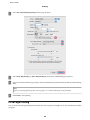
Select Two-sided Printing Settings from the pop-up menu.
C
Select Long-Edge binding or Short-Edge binding from the Two-sided Printing pop-up menu.
D
Select one of the Document Type settings. This automatically adjusts Print Density and Increased Ink Drying
Time.
Note:
If you are printing high-density data, such as graphs, we recommend adjusting settings manually.
E
Click Print to start printing.
Fit to Page Printing
You can use the Fit to Page printing function when you want to print, for example, an A4-size document on another
size paper.
48
User’s Guide
Printing
Fit to Page printing automatically resizes your page to the paper size you select. You can also resize your page manually.
Printer settings for Windows
A
Make adjustments to basic settings.
B
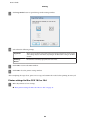
Click the More Options tab, then select the Reduce/Enlarge Document check box.
C
Do one of the following:
& “Basic printer settings for Windows” on page 37
❏ If you selected Fit to Page, select the size of the paper you are using from the Output Paper.
❏ If you selected Zoom to, use the arrows to choose a percentage.
49
User’s Guide
Printing
D
Click OK to close the printer settings window.
After completing the steps above, print one test copy and examine the results before printing an entire job.
Printer settings for Mac OS X 10.5 or 10.6
A
Make adjustments to basic settings.
B
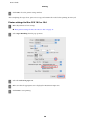
Select Paper Handling from the pop-up menu.
C
Select the Scale to fit paper size.
D
Make sure that the appropriate size is displayed in Destination Paper Size.
E
Click Print to start printing.
& “Basic printer settings for Mac OS X 10.5 or 10.6” on page 39
50
User’s Guide
Printing
Pages Per Sheet Printing
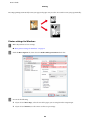
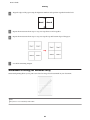
Pages Per Sheet printing allows you to print two or four pages on single sheets of paper.
Printer settings for Windows
A
Make adjustments to basic settings.
B
Select 2-Up or 4-Up as Multi-Page.
& “Basic printer settings for Windows” on page 37
51
User’s Guide
Printing
C
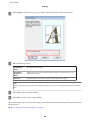
Click Page Order button to open the Page Order Settings window.
D
Select from the following settings.
Page Order
Allows you to specify the order in which the pages will be printed on the sheet of paper.
Some settings may be unavailable, depending on the Orientation setting on the Main
window.
Print Page
Borders
Prints frames around the pages printed on each sheet.
E
Click OK to return to the Main window.
F
Click OK to close the printer settings window.
After completing the steps above, print one test copy and examine the results before printing an entire job.
Printer settings for Mac OS X 10.5 or 10.6
A
Make adjustments to basic settings.
& “Basic printer settings for Mac OS X 10.5 or 10.6” on page 39
52
User’s Guide
Printing
B
Select Layout from the pop-up menu.
C
Select from the following settings:
Pages per Sheet
Prints multiple pages of your document on a single sheet of paper.
You can choose from 1, 2, 4, 6, 9, or 16.
D
Layout Direction
Allows you to specify the order in which the pages will be printed on the sheet of paper.
Border
Prints a border around the pages printed on each sheet. You can choose from None,
Single Hairline, Single Thin Line, Double Hairline, or Double Thin Line.
Click Print to start printing.
Poster Printing (for Windows only)
Poster Printing allows you to print poster-size images by enlarging one page to cover several sheets of paper.
53
User’s Guide
Printing
Note:
This feature is not available for Mac OS X.
Printer settings
A
Make adjustments to basic settings.
B
Select 2x1 Poster, 2x2 Poster, 3x3 Poster, or 4x4 Poster as Multi-Page.
& “Basic printer settings for Windows” on page 37
54
User’s Guide
Printing
C
Click Settings to adjust the way your poster will be printed. The Poster Settings window opens.
D
Make the following settings:
Print Cutting
Guides
Prints guide lines for cutting.
Overlapping
Alignment
Marks
Slightly overlaps the panels and prints alignment markers so that the panels can be
aligned more precisely.
Trim Lines
Prints border lines on the panels to guide you when trimming the pages.
Note:
If you want to print only a few of the panels without printing the entire poster, click the panels that you do not want to
print.
E
Click OK to return to the Main window.
F
Click OK to close the printer settings window.
After completing the steps above, print one test copy and examine the results before printing an entire job. Then follow
the instructions.
& “How to make a poster from your prints” on page 56
55
User’s Guide
Printing
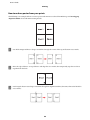
How to make a poster from your prints
The following is an example of how to create a poster with 2x2 Poster selected for Multi-Page and Overlapping
Alignment Marks selected for Print Cutting Guides.
A
Cut off the margin of Sheet 1 along a vertical line through the center of the top and bottom cross-marks:
B
Place the edge of Sheet 1 on top of Sheet 2 and align the cross-marks, then temporarily tape the two sheets
together from the back:
C
Cut the taped sheets in two along a vertical line through the alignment markers (this time, a line to the left of the
cross-marks):
56
User’s Guide
Printing
D
Align the edges of the paper using the alignment markers and tape them together from the back:
E
Repeat the instructions from step 1 to step 4 to tape Sheets 3 and 4 together.
F
Repeat the instructions from step 1 to step 4 to tape the top and bottom edges of the paper:
G
Cut off the remaining margins.
Watermark Printing (for Windows only)
Watermark printing allows you to print a text-based or image-based watermark on your document.
Note:
This feature is not available for Mac OS X.
57
User’s Guide
Printing
Printing the watermark
A
Make adjustments to basic settings.
B
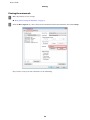
Click the More Options tab, choose the desired watermark from the Watermark list, then click Settings.
& “Basic printer settings for Windows” on page 37
If you want to create your own watermark, see the online help.
58
User’s Guide
Printing
C
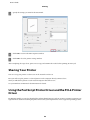
Specify the settings you want for the watermark.
D
Click OK to return to the More Options window.
E
Click OK to close the printer settings window.
After completing the steps above, print one test copy and examine the results before printing an entire job.
Sharing Your Printer
You can set up your printer so other users on the network can share it.
First you will set up the printer as a shared printer on the computer directly connected to it.
Then you will add the printer to each network computer that will access it.
See your Windows or Macintosh documentation for details.
Using the PostScript Printer Driver and the PCL6 Printer
Driver
For PS3/PCL models, you need to download the software from the Epson’s website. Contact customer support in your
region for more details on obtaining the printer drivers and system requirements such as supported operating systems.
59
User’s Guide
Scanning
Scanning
Let’s Try Scanning
Starting a Scan
Let’s scan a document to get used to the process.
A
Place your document.
B
Start Epson Scan.
& “Placing Originals” on page 31
❏ Windows:
Double-click the Epson Scan icon on the desktop.
❏ Mac OS X:
Select Applications > Epson Software > EPSON Scan.
C
Select Home Mode.
60
User’s Guide
Scanning
D
Select Text/Line Art as the Document Type setting.
E
Click Preview.
61
User’s Guide
Scanning
F
Click Scan.
G
Click OK.
Your scanned image is saved.
62
User’s Guide
Scanning
Image Adjustment Features
Epson Scan offers a variety of settings for improving color, sharpness, contrast, and other aspects affecting image
quality.
See the Help for more details on Epson Scan.
Histogram
Provides a graphical interface for adjusting highlight, shadow, and gamma levels
individually.
Tone Correction
Provides a graphical interface for adjusting tone levels individually.
Image Adjustment
Adjusts brightness and contrast and the balance of red, green, and blue colors in the
overall image.
Color Palette
Provides a graphical interface for adjusting mid-tone levels, such as skin tones,
without affecting the highlight and shadow areas of the image.
Unsharp Mask
Sharpens the edges of image areas for an overall clearer image.
63
User’s Guide
Scanning
Descreening
Removes rippled patterns (known as moiré) that can appear in subtly shaded image
areas such as skin tones.
Color Restoration
Restores the colors in faded photos automatically.
Backlight Correction
Removes shadows from photos that have too much background light.
Dust Removal
Removes dust marks from your originals automatically.
Text Enhancement
Enhances text recognition when scanning text documents.
Auto Area Segmentation
Makes Black&White images clearer and text recognition more accurate by
separating the text from the graphics.
64
User’s Guide
Scanning
Color Enhance
Enhance a certain color. You can select from red, blue, or green.
Basic Scanning
Scanning from the Control Panel
Scanning to a USB storage device
A
Place your original(s).
B
Connect the USB device to your product.
C
Select Scan.
D
Select Scan to USB Device.
E
Adjust settings.
F
Press Start.
& “Placing Originals” on page 31
Your scanned image is saved.
65
User’s Guide
Scanning
Scanning to a folder
The Scan to Network Folder/FTP function allows you to save scanned images to a folder on a server. Before you use this
function, make sure you have configured and saved the folder settings.
Note:
❏ If this function is not displayed on the product’s control panel, you may need to update the product’s firmware from the
Epson website or Epson WebConfig. To access Epson WebConfig, see the Network Guide.
❏
It may be easier to configure the settings on a computer connected to the product using Epson softwares (Epson
WebConfig or Epson NetConfig). These softwares also allow you to create a list of folder settings so that you can quickly
select a folder from the list and import existing folder settings from other Epson products. You can download the latest
version of Epson NetConfig from the Epson website.
& “Where To Get Help” on page 198
Configuring the folder settings
You can create a folder list so that you can quickly select destinations to which to send the scanned data.
A
Press F Setup.
B
Select Scan Settings.
C
Select Address Settings.
D
Select Folder List Setup.
E
Select Add Folders. You see the available folder entry numbers.
F
Press u or d to select the folder entry number that you want to register.
G
Press OK.
H
Specify the communication mode, enter a folder path, and then configure the folder settings. For details on each
setting item, see the following section.
& “Scan mode menu list” on page 114
I
Press OK.
J
Repeat step 5 to 9 to add more folders.
Note:
You can print the list of registered folders. Press x on the Scan to Network Folder/FTP top screen, and then select
Scan to Folder/FTP Report > Scan to Folder List.
66
User’s Guide
Scanning
Sending scanned data to the folder
A
Place your original(s).
B
Select Scan.
C
Select Scan to Network Folder/FTP.
D
Press r.
E
Press x to display a list of registered folders.
& “Placing Originals” on page 31
Note:
You can also specify the folder by entering the folder path directly. After step 4, select Communication Mode, enter
the folder path using the numeric keypad and other buttons on the control panel, and then configure the folder
settings.
& “Scan mode menu list” on page 114
F
Select a folder from the list.
G
Press x and select Scan Settings to adjust the settings.
H
Press Start.
& “Scan mode menu list” on page 114
Your scanned image is saved.
Scanning to an email
The Scan to Email function allows you to send scanned image files by email directly from the product through a
preconfigured email server. Before you use this function, make sure you have configured the Email Server Settings.
Note:
❏ If this function is not displayed on the product’s control panel, you may need to update the product’s firmware from
Epson website or Epson WebConfig. To access Epson WebConfig, see the Network Guide.
❏
It may be easier to configure the settings on a computer connected to the product using Epson softwares (Epson
WebConfig or Epson NetConfig). These softwares also allow you to create a contact list so that you can quickly select
recipients from the list and import existing contact lists from other Epson products. You can download the latest
version of Epson NetConfig from the Epson website.
& “Where To Get Help” on page 198
Making email server settings
A
Press F Setup.
67
User’s Guide
Scanning
B
Select Scan Settings.
C
Select Email Server Settings.
D
Follow the on-screen instructions to make the settings. When you have finished, a completion message is
displayed.
Note:
❏ SMTP AUTH stands for SMTP Service Extension for Authentication.
E
❏
The account name and password are necessary to log in to the server. You can enter up to 30 ASCII characters for
the account name and up to 20 ASCII characters for the password.
❏
You can enter up to 64 ASCII characters for the sender’s email address.
❏
You can enter up to 50 ASCII characters for the SMTP server address. You can use the IP address or host name to
specify the server. To use the host name, you need to make DNS server settings in advance.
❏
If you select POP before SMTP, you need to enter the POP3 server port number and the POP3 server address.
❏
You can make the timezone settings on Epson WebConfig. To access Epson WebConfig, see the Network Guide.
Select Email Server Connection Check to run a test to confirm that the email server is working properly.
Registering addresses to the contacts list
You can create a contacts list so that you can quickly select recipients from the list. You can register up to 50 combined
email addresses and group addresses.
A
Press F Setup.
B
Select Scan Settings.
C
Select Address Settings.
D
Select Email Address Setup.
E
Select Add Contacts. The available email address entry numbers are displayed.
F
Press u or d to select the address entry number that you want to register.
G
Press OK.
H
Press r. Use the numeric keypad with other buttons on the control panel to enter the name of the email address
that you want to register.
I
Press d, and then enter an email address. You can enter up to 64 characters.
68
User’s Guide
Scanning
J
Press OK.
Note:
You can also add email address entries to a group allowing you to send an email to multiple recipients at the same
time. Follow the instructions below.
K
Select Group Address Setup in step 4.
L
Select Add Group. The available group address entry numbers are displayed.
M
Press u or d to select the address entry number that you want to register.
N
Press OK.
O
Press r. Use the numeric keypad with other buttons on the control panel to enter the name of the email address
that you want to register.
P
Press u or d to select the email address entry number that you want to add to the group.
Q
Press r to add the email address entry to the group.
Note:
Press l to cancel adding the email address entry that you selected.
R
Repeat steps 16 and 17 to add other email address entries to the group.
S
Press OK.
Sending a scanned file by email
A
Place your original(s).
B
Select Scan.
C
Select Scan to Email.
D
Press r.
& “Placing Originals” on page 31
69
User’s Guide
Scanning
E
Enter the subject of the email to which you want to attach the scanned file.
Note:
A predetermined message, “Attached Scan Data”, is automatically entered as the body of the email.
F
Select Address01 and enter an email address. To add another email address, press d and then select another
address number.
Note:
To select addresses from the contacts list, go to the next step. If you do not need to add addresses from the contacts list,
go to step 10.
G
Press x to display the contacts list.
H
Press u or d to select an email address entry, and then press r to add it. Repeat this step to add another entry.
Note:
❏ To cancel adding the entry, press l.
❏
You can send an email to up to 10 individual email addresses and groups.
I
Press OK.
J
Press x and select Scan Settings to adjust the settings.
& “Scan settings” on page 116
Note:
❏ You can specify a name for the scanned image file. Select File Setting > Filename Prefix, and then enter the
prefix for the file name.
❏
K
You can specify the maximum size for files that can be attached to an email in Attached File Max Size. Select a
larger size if you often send large files.
Press Start.
Your scanned image is sent by email.
Scanning to a computer
A
Place your original(s).
B
Select Scan.
& “Placing Originals” on page 31
70
User’s Guide
Scanning
C
Select an item.
D
Select your PC.
& “Scan mode menu list” on page 114
Note:
If the product is connected to a network, you can select the PC to which you want to save the scanned image.
E
Press Start.
Your scanned image is saved.
71
User’s Guide
Scanning
Scanning in Home Mode
Home Mode lets you customize some scanning settings and check the changes you have made in a preview image. This
mode is useful for basic scanning of photos and graphics.
Note:
❏ In Home Mode, you can only scan from the document glass.
❏
See the Help for more details on Epson Scan.
A
Place your original(s).
B
Start Epson Scan.
C
Select Home Mode from the Mode list.
& “Document glass” on page 33
& “Starting Epson Scan Driver” on page 86
72
User’s Guide
Scanning
D
Select the Document Type setting.
E
Select the Image Type setting.
F
Click Preview.
G
Adjust the exposure, brightness, and other image quality settings.
H
Click Scan.
I
In the File Save Settings window, select the Type setting and then click OK.
& “Previewing and Adjusting the Scan Area” on page 77
Note:
If the Show this dialog box before next scan check box is cleared, Epson Scan starts scanning immediately without
displaying the File Save Settings window.
Your scanned image is saved.
Scanning in Office Mode
Office Mode lets you quickly scan text documents without previewing your image.
Note:
See the Help for more details on Epson Scan.
A
Place your original(s).
& “Placing Originals” on page 31
Note for the Automatic Document Feeder (ADF):
Do not load paper above the line just under the d arrow mark on the ADF.
B
Start Epson Scan.
& “Starting Epson Scan Driver” on page 86
73
User’s Guide
Scanning
C
Select Office Mode from the Mode list.
D
Select the Image Type setting.
E
Select the Document Source setting.
F
Select the size of your original as the Size setting.
G
Select an appropriate resolution for your original(s) as the Resolution setting.
H
Click Scan.
74
User’s Guide
Scanning
I
In the File Save Settings window, select the Type setting and then click OK.
Note:
If the Show this dialog box before next scan check box is cleared, Epson Scan starts scanning immediately without
displaying the File Save Settings window.
Your scanned image is saved.
Scanning in Professional Mode
Professional Mode gives you total control of your scanning settings and lets you check the changes you have made in a
preview image. This mode is recommended for advanced users.
Note:
See the Help for more details on Epson Scan.
A
Place your original(s).
B
Start Epson Scan.
& “Placing Originals” on page 31
& “Starting Epson Scan Driver” on page 86
75
User’s Guide
Scanning
C
Select Professional Mode from the Mode list.
D
Select the type of original(s) you are scanning as the Document Type setting.
E
Select the Document Source setting.
F
If you select Reflective as the Document Type setting, select Photo or Document as the Auto Exposure Type
setting.
76
User’s Guide
Scanning
G
Select the Image Type setting.
H
Select an appropriate resolution for your original(s) as the Resolution setting.
I
Click Preview to preview your image(s). The Preview window opens and displays your image(s).
& “Previewing and Adjusting the Scan Area” on page 77
Note for the Automatic Document Feeder (ADF):
❏ The ADF loads your first document page, and then Epson Scan prescans it and displays it in the Preview
window. The ADF then ejects your first page.
Place your first document page on top of the rest of the pages, and then load the entire document into the ADF.
❏
Do not load paper above the line just under the d arrow mark on the ADF.
J
Select the size of the scanned image(s) as the Target Size setting if necessary. You can scan your images at their
original size, or you can reduce or enlarge their size by selecting Target Size.
K
Adjust the image quality if necessary.
& “Image Adjustment Features” on page 63
Note:
You can save the settings you make as a group of custom settings with a Name, and later apply these custom settings
when scanning. Your custom settings are also available in Epson Event Manager.
See the Help for more details on Epson Event Manager.
L
Click Scan.
M
In the File Save Settings window, select the Type setting and then click OK.
Note:
If the Show this dialog box before next scan check box is cleared, Epson Scan starts scanning immediately without
displaying the File Save Settings window.
Your scanned image is saved.
Previewing and Adjusting the Scan Area
Selecting a preview mode
Once you have selected your basic settings and resolution, you can preview your image and select or adjust the image
area in a Preview window. There are two types of preview.
❏ Normal preview displays your previewed image(s) in their entirety. You can select the scan area and make any
image quality adjustments manually.
77
User’s Guide
Scanning
❏ Thumbnail preview displays your previewed image(s) as thumbnail(s). Epson Scan automatically locates the
edges of your scan area, applies automatic exposure settings to the image(s), and rotates the image(s) if necessary.
Note:
❏ Some of the settings that you change after previewing an image are reset if you change the preview mode.
❏
Depending on your document type and the Epson Scan mode you are using, you may not be able to change the preview type.
❏
If you preview image(s) without the Preview dialog displayed, image(s) are displayed in the default preview mode. If you
preview with the Preview dialog displayed, image(s) are displayed in the preview mode that was displayed just before
previewing.
❏
To resize the Preview window, click and drag the corner of the Preview window.
❏
See the Help for more details on Epson Scan.
Creating a marquee
A marquee is a moving dotted line that appears on the edges of your preview image to indicate the scan area.
Do one of the following to draw a marquee.
❏ To draw the marquee manually, position the pointer in the area where you want to place the corner of your
marquee and click. Drag the cross-hairs over the image to the opposite corner of the desired scan area.
❏ To draw the marquee automatically, click the
auto locate icon. You can only use this icon when you are
viewing a normal preview and you only have one document on the document glass.
❏ To draw the marquee at a specified size, type in a new width and height in the Document Size setting.
❏ For best results and image exposure, make sure all sides of the marquee are located inside the preview image. Do
not include any areas around the preview image in the marquee.
Adjusting a marquee
You can move the marquee and adjust its size. If you are viewing a normal preview, you can create multiple marquees
(up to 50) on each image to scan different image areas as separate scan files.
To move the marquee, position your cursor inside the marquee. The pointer becomes a hand. Click
and drag the marquee to the desired location.
78
User’s Guide
Scanning
To resize the marquee, position your cursor over the edge or corner of the marquee.
The pointer becomes a straight or angled double-arrow. Click and drag the edge or corner to the
desired size.
To create additional marquees of the same size, click this icon.
To delete a marquee, click inside the marquee and click this icon.
To activate all marquees, click this icon.
Note:
❏ To restrict the movement of the marquee to vertical or horizontal only, hold down the Shift key as you move the
marquee.
❏
To restrict the size of the marquee to the current proportions, hold down the Shift key as you resize the marquee.
❏
If you draw multiple marquees, make sure you click All in the Preview window before you scan. Otherwise, only the area
inside the last marquee you drew will be scanned.
Various Types of Scanning
Scanning a Magazine
First of all, place your magazine and start Epson Scan.
79
User’s Guide
Scanning
& “Starting a Scan” on page 60
A
Select Home Mode from the Mode list.
B
Select Magazine as the Document Type setting.
C
Click Preview.
D
Adjust the exposure, brightness, and other image quality settings.
See the Help for more details on Epson Scan.
80
User’s Guide
Scanning
E
Click Scan.
F
Select PDF as the Type setting, and then click OK.
Your scanned image is saved.
Scanning Multiple Documents to a PDF File
First of all, place your document and start Epson Scan.
81
User’s Guide
Scanning
& “Starting a Scan” on page 60
A
Select Professional Mode from the Mode list.
B
Select the Document Source setting.
82
User’s Guide
Scanning
C
Click Preview.
Note for the Automatic Document Feeder (ADF):
❏ The document page ejected by the ADF has not been scanned yet. Reload the entire document into the ADF.
❏
Do not load paper above the line just under the d arrow mark on the ADF.
D
Adjust the exposure, brightness, and other image quality settings.
E
Click Scan.
F
Select PDF as the Type setting, and then click OK.
See the Help for more details on Epson Scan.
Note:
If the Show Add Page dialog after scanning check box is cleared, Epson Scan automatically saves your document
without displaying the Add Page Confirmation window.
83
User’s Guide
Scanning
G
Epson Scan starts scanning your document.
H
If you want to scan more pages, click Add page.
Load the document and scan again, repeating as necessary for each page.
If you have finished scanning, go to step 9.
I
Click Edit page or Save File.
Edit page
Select this button if you want to delete or reorder any of the pages. Then use the icons on the
bottom of the Editing Page window to select, rotate, reorder, and delete pages.
See the Help for more details on Epson Scan.
Click OK when you are finished editing your pages.
Save File
Select this button when you are finished.
The pages are saved in one PDF file.
84
User’s Guide
Scanning
Scanning a Photo
First of all, place your photo on the document glass and start Epson Scan.
& “Starting a Scan” on page 60
A
Select Home Mode from the Mode list.
B
Select Photograph as the Document Type setting.
C
Click Preview.
D
Adjust the exposure, brightness, and other image quality settings.
See the Help for more details on Epson Scan.
85
User’s Guide
Scanning
E
Click Scan.
F
Select JPEG as the Type setting, and then click OK.
Your scanned image is saved.
Software Information
Starting Epson Scan Driver
This software lets you control all aspects of scanning. You can use this as a standalone scanning program or use it with
another TWAIN-compliant scanning program.
How to start
❏ Windows:
Double-click the EPSON Scan icon on the desktop.
Or, select the start button icon or Start > All Programs or Programs > EPSON > EPSON Scan > EPSON
Scan.
❏ Mac OS X:
Select Applications > Epson Software > EPSON Scan.
86
User’s Guide
Scanning
How to access the help
Click the Help button on the Epson Scan driver.
Starting Other Scanning Software
Note:
Some scanning software may not be included in some countries.
Epson Event Manager
This lets you assign any of the product buttons to open a scanning program. You can also save frequently used
scanning settings, which can really speed up your scanning projects.
How to start
❏ Windows:
Select the start button or Start > All Programs or Programs> Epson Software > Event Manager.
❏ Mac OS X:
Select Applications > Epson Software, and then double-click the Launch Event Manager icon.
How to access the help
❏ Windows:
Click the
icon in the upper right corner of the screen.
❏ Mac OS X:
Click menu > Help > Epson Event Manager Help.
87
User’s Guide
Copying
Copying
Selecting Paper
Before printing, you need to select the correct paper type setting. This important setting determines how the ink is
applied to the paper.
Note:
❏ The availability of special media varies by location.
❏
For the loading capacity, see the following instructions.
& “Selecting which tray to use and its loading capacities” on page 22
If you want to print on this paper
Choose this Paper Type on the LCD screen
a
Plain paper
Plain Paper
b
Epson Bright White Ink Jet Paper
Plain Paper
Copying Documents
Basic copying
Use the l, r, u, or d buttons to change the LCD screen view to find the menu, setting item, or option you want to
enter.
A
Load paper.
& “Loading Paper” on page 24
B
Place original horizontally.
& “Placing Originals” on page 31
C
Enter r Copy mode.
D
Set the number of copies.
E
Set the density.
F
Enter the x Menu.
G
Select Paper and Copy Settings.
88
User’s Guide
Copying
H
Select the appropriate copy settings.
I
Press x Menu to finish making settings.
J
Press the x Start (B&W) button to start copying.
2-Sided Copying
With duplex copying, you can create double-sided or single-sided copies from double-sided or single-sided originals.
Follow the instructions below to perform duplex copying. Use the l, r, u, or d buttons to change the LCD screen view
to find the menu, setting item, or option you want to enter.
A
Load paper.
& “Loading Paper” on page 24
B
Place original horizontally.
& “Placing Originals” on page 31
C
Enter r Copy mode.
D
Set the number of copies.
E
Set the density.
F
Enter the x Menu.
G
Select Paper and Copy Settings.
H
Select 2-Sided Copying.
I
Select the type of 2-sided copying.
Setting
Description
1>1-Sided
Normal copying.
1>2-Sided
Two single-sided originals are printed onto each side of a single sheet of paper.
2>1-Sided
Each side of a double-sided original is printed onto one side of a single sheet of paper.
2>2-Sided
Each side of a double-sided original is printed onto each side of a single sheet of paper.
89
User’s Guide
Copying
J
Make the appropriate settings for Document Orientation, Binding Direction, or Binding Margin.
Setting
Description
Document Orientation
Specifies the orientation of your originals.
This setting is not available when the following settings have been made.
2-Sided Copying - 2>2-Sided or
2-Sided Copying - 1>1-Sided when Layout is set to With Border
Binding Direction
Specifies the binding direction of your originals. This setting is available only when
2>1-Sided is selected.
Binding Margin
Specifies the binding direction of your prints. This setting is available only when
1>2-Sided is selected.
K
Press x Menu to finish making settings.
L
Press the x Start (B&W) button to start copying.
Collate Copying
With the collate copying function, multiple copies of multiple pages in a document are printed in order and collated by
copy set.
Follow the instructions below to perform collated copying. Use the l, r, u, or d buttons to change the LCD screen
view to find the menu, setting item, or option you want to enter.
A
Load paper.
& “Loading Paper” on page 24
B
Place original horizontally.
& “Placing Originals” on page 31
C
Enter r Copy mode.
D
Set the number of copies.
E
Set the density.
F
Enter the x Menu.
G
Select Paper and Copy Settings.
H
Select Collate Copying.
I
Select On.
90
User’s Guide
Copying
J
Press x Menu to finish making settings.
K
Press the x Start (B&W) button to start copying.
Layout copying
With the layout function, you can copy two single-sided originals onto a single page.
Follow the instructions below to use the layout function. Use the l, r, u, or d buttons to change the LCD screen view
to find the menu, setting item, or option you want to enter.
A
Load paper.
& “Loading Paper” on page 24
B
Place original horizontally.
& “Placing Originals” on page 31
C
Enter r Copy mode.
D
Enter the x Menu.
E
Select Paper and Copy Settings.
F
Select Layout.
G
Select 2-up Copy.
H
Press x Menu to finish making settings.
I
Press the x Start (B&W) button to start copying.
Copy Mode Menu List
Refer to the section below for the Copy mode menu list.
& “Copy mode menu list” on page 113
91
User’s Guide
Faxing
Faxing
Introducing FAX Utility
FAX Utility is a software capable of transmitting data such as documents, drawings, and tables created using a word
processing or spreadsheet application directly by fax, without printing. In addition, this utility has a function to save a
received fax as a PDF file on a computer. This enables you to check the data without printing it and print only the data
that you want to print. Use the following procedure to run the utility.
Windows
Click the start button (Windows 7 and Vista) or click Start (Windows XP), point to All Programs, select Epson
Software, and then click FAX Utility. (Server OS is not supported.)
Mac OS X
Click System Preference, click Print & Fax or Print & Scan, and then select FAX (your printer) from Printer. Then,
click Open Print Queue and click Utility. Or, click Option & Supplies - Utility - Open Printer Utility.
Note:
For more details, see the online help for FAX Utility.
Connecting to a Phone Line
Using the phone line for fax only
A
Connect a phone cable leading from a telephone wall jack to the LINE port.
B
Turn on auto answer.
!Caution:
If you do not connect an external telephone to the product, make sure you turn on auto answer. Otherwise, you cannot
receive faxes.
92
User’s Guide
Faxing
Sharing line with phone device
A
Connect a phone cable leading from a telephone wall jack to the LINE port.
B
Remove the cap.
93
User’s Guide
Faxing
C
Connect a phone or answering machine to the EXT. port.
Note:
❏ See the following for other connection methods.
❏
For details, see the documentation that came with your devices.
Connecting to DSL
a
Telephone wall jack
b
Splitter
c
DSL modem
94
User’s Guide
Faxing
Connecting to ISDN (one phone number)
a
ISDN wall jack
d
Terminal adapter or ISDN router
Connecting to ISDN (two phone numbers)
a
ISDN wall jack
d
Terminal adapter or ISDN router
Checking the fax connection
Follow the instructions below to check the fax connection. Use the l, r, u, or d buttons to change the LCD screen view
to find the menu, setting item, or option you want to enter.
A
Load A4-size plain paper.
& “Loading Paper” on page 24
B
Enter F Setup mode.
C
Select Fax Settings.
95
User’s Guide
Faxing
D
Select Check Fax Connection.
E
Press the x Start (B&W) buttons to print the report.
Note:
If an errors are reported, try the solutions in the report.
Setting Up Fax Features
Setting up speed dial entries
You can create a speed dial list allowing you to select fax recipient numbers quickly when faxing. Up to 60 combined
speed dial and group dial entries can be registered.
Follow the instructions below to create a speed dial list. Use the l, r, u, or d buttons to change the LCD screen view to
find the menu, setting item, or option you want to enter.
A
Enter K Fax mode.
B
Enter the x Menu.
C
Select Speed Dial Setup.
D
Select Create. You see the available speed dial entry numbers.
E
Press u or d to select the speed dial entry number that you want to register. You can register up to 60 entries.
F
Press OK.
G
Use the numeric keypad with other buttons on the control panel to enter a phone number. You can enter up to
64 digits.
Note:
To separate phone numbers, enter a space by pressing r.
H
Press OK.
96
User’s Guide
Faxing
I
Enter a name to identify the speed dial entry. You can enter up to 30 characters.
Note:
For details on using the virtual keyboard, refer to the section below.
& “Using the LCD screen” on page 20
J
Select Done to register the name.
Setting up group dial entries
You can add speed dial entries to a group, allowing you to send a fax to multiple recipients at the same time. Up to 60
combined speed dial and group dial entries can be entered.
Follow the instructions below to add speed dial entries to a group. Use the l, r, u, or d buttons to change the LCD
screen view to find the menu, setting item, or option you want to enter.
A
Enter K Fax mode.
B
Enter the x Menu.
C
Select Group Dial Setup.
D
Select Create. You see the available group dial entry numbers.
E
Press u or d to select the group dial entry number that you want to register.
F
Press OK.
G
Enter a name to identify the group dial entry. You can enter up to 30 characters.
Note:
For details on using the virtual keyboard, refer to the section below.
& “Using the LCD screen” on page 20
H
Select Done to register the name.
I
Press u or d to select the speed dial entry number that you want to register in the group dial list.
J
Press r to add the speed dial entry to the group dial.
Note:
Press l to cancel adding the speed dial entry that you selected.
97
User’s Guide
Faxing
K
Repeat steps 9 and 10 to add other speed dial entries to the group dial list. You can register up to 30 speed dial
entries in a group dial.
L
Press OK to finish creating a group dial list.
Creating header information
You can create a fax header by adding information such as your phone number or name.
Follow the instructions below to create a fax header. Use the l, r, u, or d buttons to change the LCD screen view to
find the menu, setting item, or option you want to enter.
Note:
Make sure you have set the time correctly.
& “Setting/Changing Time and Region” on page 136
A
Enter F Setup mode.
B
Select Fax Settings.
C
Select Communication.
D
Select Header.
E
Select Fax Header.
F
Enter the header information. You can enter up to 40 characters.
Note:
For details on using the virtual keyboard, refer to the section below.
& “Using the LCD screen” on page 20
G
Select Done.
H
Select Your Phone Number.
98
User’s Guide
Faxing
I
Use the numeric keypad with other buttons on the control panel to enter your phone number. You can enter up
to 20 digits.
Note:
❏ Press r to enter a space, and press l to delete.
❏
J
Press the # button to enter a plus sign (+) which represents the international call prefix. Note that the * button
does not work.
Press OK to register the header information.
Changing Fax Output setting to print
You can select whether to save the received fax as a data file or to print it. To print the fax, follow the steps below.
Follow the instructions below to change the fax output setting to print. Use the l, r, u, or d buttons to change the LCD
screen view to find the menu, setting item, or option you want to enter.
Note:
❏ Use FAX Utility to change the setting to save the received fax as a data file. You cannot change the setting to save from
the control panel.
❏
When you change the setting from save to print, the received fax data stored in the product’s memory will be printed
automatically.
A
Enter F Setup mode.
B
Select Fax Settings.
C
Select Receive Settings.
D
Select Fax Output.
E
Press OK.
F
Select Yes.
Selecting paper source to print fax
Follow the instructions below to select the paper source to print the fax. Use the l, r, u, or d buttons to change the
LCD screen view to find the menu, setting item, or option you want to enter.
A
Enter F Setup mode.
99
User’s Guide
Faxing
B
Select Fax Settings.
C
Select Receive Settings.
D
Select Paper Source to Print.
E
Select the paper source that you want to change.
F
Change the setting.
Sending Faxes
Basics of send faxes
Use the l, r, u, or d buttons to change the LCD screen view to find the menu, setting item, or option you want to
enter.
A
Place your original in the Automatic Document Feeder or on the document glass.
& “Placing Originals” on page 31
B
Enter K Fax mode.
C
Use the keys on the numeric keypad to enter the fax number. You can enter up to a maximum of 64 digits.
Note:
❏ To separate phone numbers, enter a space by pressing r.
D
❏
To display the last fax number you used, press
❏
Press x Menu and select Send Settings to change the settings.
Redial/Pause.
Press one of the x Start buttons to start sending.
Note:
If the fax number is busy or there is some problem, this product redials after one minute. Press
immediately.
Redial/Pause to redial
Sending faxes using speed dial/group dial
You can add speed dial entries to a group, allowing you to send a fax to multiple recipients at the same time. Up to 60
combined speed dial and group dial entries can be entered.
100
User’s Guide
Faxing
Follow the instructions below to send faxes using speed dial/group dial. Use the l, r, u, or d buttons to change the
LCD screen view to find the menu, setting item, or option you want to enter.
A
Place your original in the Automatic Document Feeder or on the document glass.
& “Placing Originals” on page 31
B
Enter K Fax mode.
C
Press
Note:
Press
D
Speed Dial.
Speed Dial to switch the speed dial list or group dial list.
Select the entry number to send.
Note:
Press x Menu and select Send Settings to change the settings.
E
Press one of the x Start buttons to start sending.
Note:
To scan and fax both sides of your original, load the original in the ADF. After step 4, press x Menu and select Send Settings
- 2-Sided Faxing - On.
Sending faxes by broadcasting
Broadcast allows you to easily send the same fax to multiple numbers (up to 30) using speed dial/group dial, or by
entering the fax numbers.
Follow the instructions below to send faxes by broadcasting. Use the l, r, u, or d buttons to change the LCD screen
view to find the menu, setting item, or option you want to enter.
Note:
You can only send B&W faxes.
A
Place your original in the Automatic Document Feeder or on the document glass.
& “Placing Originals” on page 31
B
Enter K Fax mode.
C
Enter the x Menu.
101
User’s Guide
Faxing
D
Select Broadcast Fax.
Note:
To select recipients from a speed or group dial list, go to step 7.
E
Press r, and then enter a fax number.
F
Press d, and then add the fax number.
Note:
❏ To add another number, repeat steps 5 and 6.
❏
G
If you do not need to add recipients from the speed dial/group dial lists, press OK and go to step 10.
Press
Note:
Press
H
Speed Dial.
Speed Dial to switch the speed dial list or group dial list.
Press u or d to select an entry number, and then press r to add phone numbers. Repeat this step to add another
entry.
Note:
To cancel adding the entry, press l.
I
Press OK. You see a confirmation message.
J
Press the x Start (B&W) button to send the fax.
Sending a fax at a specified time
Follow the instructions below to send a fax at a specified time. Use the l, r, u, or d buttons to change the LCD screen
view to find the menu, setting item, or option you want to enter.
Note:
❏ Make sure you have set the time correctly.
& “Setting/Changing Time and Region” on page 136
❏
You can only send B&W faxes.
A
Place your original in the Automatic Document Feeder or on the document glass.
& “Placing Originals” on page 31
B
Enter K Fax mode.
102
User’s Guide
Faxing
C
Enter a fax number. You can also use redial, speed dial, or group dial lists to select fax numbers.
D
Enter the x Menu.
E
Select Send Fax Later.
F
Select On.
G
Set the time that you want to send the fax, and then press OK.
H
Press y Back to return to the fax send screen.
I
Press the x Start (B&W) button to start scanning. The scanned image is sent at the specified time.
Note:
If you need to cancel faxing at the time you specified, press y Stop/Reset.
Sending a fax from a connected phone
If the recipient has the same number for both phone and fax, you can send a fax after talking over the phone without
hanging up.
A
Place your original in the Automatic Document Feeder or on the document glass.
& “Placing Originals” on page 31
B
Dial a number from the phone connected to the product.
C
Select Send.
D
Press one of the x Start buttons to send fax.
103
User’s Guide
Faxing
E
Hang up the phone.
Receiving Faxes
Receiving faxes automatically
The product automatically receives and prints faxes in Auto Answer mode.
Note:
❏ Depending on the Fax Output settings, the received fax is saved as a data or printed.
& “Changing Fax Output setting to print” on page 99
❏
If Fax Output is set to Save, the received fax data is automatically saved as data, and you can skip step 1.
A
Load A4-size plain paper.
& “Loading Paper” on page 24
B
Press
Auto Answer to turn on the Auto Answer mode.
Note:
❏ When an answering machine is connected directly to this product, make sure you set Rings to Answer correctly
using the following procedure.
❏
Depending on the region, Rings to Answer may be unavailable.
C
Enter F Setup mode.
D
Select Fax Settings.
E
Select Communication.
F
Select Rings to Answer.
G
Press u or d to select the number of rings, and then press OK.
!Caution:
Select more rings than needed for the answering machine to pick up. If it is set to pick up on the fourth ring, set the
product to pick up on the fifth ring or later. Otherwise the answering machine cannot receive voice calls.
104
User’s Guide
Faxing
Note:
When you receive a call and the other party is a fax, the product receives the fax automatically even if the answering machine
picks up the call. If you pick up the phone, wait until the LCD screen displays a message saying that a connection has been
made before you hang up. If the other party is a caller, the phone can be used as normal or a message can be left on the
answering machine.
Receiving faxes manually
If your phone is connected to the product, and Auto Answer mode has been set to Off, you can receive fax data after the
connection is made.
Note:
❏ Depending on the Fax Output settings, the received fax is saved as data or printed.
& “Changing Fax Output setting to print” on page 99
❏
If Fax Output is set to Save, the received fax data is automatically saved as data, and you can skip step 1.
A
Load A4-size plain paper.
& “Loading Paper” on page 24
B
When the telephone rings, lift the phone connected to the product.
C
Select Receive.
D
Press the x Start (B&W) button to receive the fax, and then put the phone back on the hook.
Note:
If Fax Output is set to Save, the received fax data is automatically saved as data, and you do not have to proceed to
step 5.
E
Press the x Start (B&W) button to print your faxes.
Receive a fax by polling
This allows you to receive a fax from the fax information service you have called.
105
User’s Guide
Faxing
Note:
❏ Depending on the Fax Output settings, the received fax is saved as a data or printed.
& “Changing Fax Output setting to print” on page 99
❏
If Fax Output is set to Save, the received fax data is automatically saved as data, and you can skip step 1.
Follow the instructions below to receive a fax by polling. Use the l, r, u, or d buttons to change the LCD screen view to
find the menu, setting item, or option you want to enter.
A
Load A4-size plain paper.
& “Loading Paper” on page 24
B
Enter K Fax mode.
C
Enter the x Menu.
D
Select Polling.
E
Enter the fax number.
F
Press the x Start (B&W) button to receive the fax.
Note:
❏ If Fax Output is set to Save, the received fax data is automatically saved as data, and you do not have to proceed
to step 7.
❏
G
If Auto Answer mode is turned on, the received fax data is automatically printed, and you do not have to proceed
to step 7.
Press the x Start (B&W) button to print the received fax.
Printing Reports
Follow the instructions below to print a fax report. Use the l, r, u, or d buttons to change the LCD screen view to find
the menu, setting item, or option you want to enter.
A
Load A4-size plain paper.
& “Loading Paper” on page 24
B
Enter K Fax mode.
C
Enter the x Menu.
D
Select Fax Report.
106
User’s Guide
Faxing
E
Press u or d to select an item.
F
Press OK.
Note:
Only Fax Log can be viewed on the screen.
G
Press the x Start (B&W) button to print the report you selected.
Fax Mode Menu List
Refer to the section below for the Fax mode menu list.
& “Fax mode menu list” on page 116
107
User’s Guide
Using the Control Panel
Using the Control Panel
Selecting a Mode
You can use this product as a printer, copier, scanner, and fax. When using one of these functions, except the printer
function, select your desired function by pressing the corresponding Mode button on the control panel. Each mode’s
main screen appears as you select the mode.
There are three Mode buttons on the control panel that allow you to switch between the modes: Copy mode, Scan
mode, and Fax mode. In addition, you can also use the Setup button for making various settings for this product.
Setup Mode
Lock Settings
You can lock the control panel to make it childproof, or to prevent unintended changes made by using the control
panel.
A
Enter F Setup mode.
B
Select Lock Settings.
C
Select On.
D
Enter the password. You can enter up to 20 characters.
Note:
For details on using the virtual keyboard, refer to “Using the LCD screen” on page 20.
E
Press the l, r, u, or d buttons to select Done, and then press the OK button.
Note:
❏ To turn off the Lock Settings or change the password, carry out steps 1 and 2 above, and follow the on-screen
instructions.
❏
If you forget the password, contact Epson Support.
& “Where To Get Help” on page 198
108
User’s Guide
Using the Control Panel
Power Off Timer
Note:
This function is not available for Fax model.
You can adjust the time before Power Management is applied. Any increase will affect the printer’s energy efficiency.
Please consider the environment before making any change.
A
Enter F Setup mode.
B
Select Printer Setup.
C
Select Power Off Timer.
D
Select the time.
Paper Size Loaded
Select your paper size loaded in the rear MP tray and cassette(s).
A
Enter F Setup mode.
B
Select Printer Setup.
C
Select Paper Size Loaded.
D
Select paper source that you load.
E
Select paper size that you load.
Paper Size Notice
If you want to ignore a paper size error, select Off. When you turn this item off, the product keeps printing even if the
image size exceeds the printable area for the specified paper size. This may cause smudges because of the ink that is not
transferred onto the paper properly. When this item is turned on, the product stops printing if a paper size error
occurs.
A
Enter F Setup mode.
B
Select Printer Setup.
109
User’s Guide
Using the Control Panel
C
Select Paper Size Notice.
D
Select On or Off.
Print Status Sheet
Prints a sheet showing the current product settings and installed options. This sheet can be useful to confirm whether
options have been installed correctly.
A
Enter F Setup mode.
B
Select Print Status Sheet.
C
Press the x Start (B&W) button to print the status sheet.
Print PS3 Status Sheet
Prints a sheet showing information about the PS3 such as the PS3 version.
A
Enter F Setup mode.
B
Select Print PS3 Status Sheet.
C
Press the x Start (B&W) button to print the status sheet.
Setup mode menu list
Note:
Depending on the model, some functions may not be available.
Menu
Setting Item
Description
Ink Levels
-
Checks the status of ink cartridges and maintenance
box.
Maintenance
Nozzle Check
Prints a nozzle check pattern to check the condition of
the print head.
Head Cleaning
Cleans the print head to improve the condition of the
print head.
Head Alignment
Adjusts the alignment of the print head.
110
User’s Guide
Using the Control Panel
Menu
Setting Item
Description
Printer Setup
Paper Size Loaded
& See “Paper Size Loaded” on page 109
Thick Paper
Turn on when printing on thick paper.
Dry Time
Sets the dry time when 2-sided printing.
Sound
On, Off
Date/Time
& See “Setting/Changing Time and Region” on
page 136
Daylight Saving Time
-
Country/Region
& See “Setting/Changing Time and Region” on
page 136
Language
-
Paper Size Notice
& See “Paper Size Notice” on page 109
Network Settings
For details on the setting items, see the online Network Guide.
Scan Settings
Email Server Settings
& See “Making email server settings” on page 67
Email Server Connection Check
Check if the email server is working correctly. Run this
check after making settings in Email Server Settings.
Address Settings
Email Address Setup: & See “Registering addresses
to the contacts list” on page 68
Group Address Setup: & See “Registering addresses
to the contacts list” on page 68
Folder List Setup: & See “Configuring the folder
settings” on page 66
File Sharing Setup
For details on the setting items, see the online Network Guide.
111
User’s Guide
Using the Control Panel
Menu
Setting Item
Description
Fax Settings
Send Settings
Resolution: Select this option to change the
resolution for fax data you are sending.
Quality: Select this option to change the quality for
fax data you are sending.
Contrast: Select this option to change the contrast for
fax data you are sending.
2-Sided Faxing: Turn on when sending 2-sided
originals in the ADF.
Last Transmission Report: Indicates whether or
when the product prints a report for outgoing faxes.
Select Off to turn off report printing, select On Error
to print reports only when an error occurs, or select
On Send to print reports for every fax you send.
Receive Settings
Paper Source to Print: & See “Selecting paper source
to print fax” on page 99
Auto Reduction: Indicates whether large received
faxes are reduced in size to fit on A4-size, or printed at
their original size on multiple sheets.
Fax Output: & See “Changing Fax Output setting to
print” on page 99
Communication
Dial Mode: Indicates the type of phone system to
which you have connected the product. Depending
on the region, this setting may not be displayed.
DRD: Indicates the type of answer ring pattern you
want to use to receive faxes. To select an option other
than All (or Off), you must set up your phone system
to use different ring patterns. This option may be On
or Off depending on the region.
ECM: Indicates whether or not to use Error Correction
Mode to automatically correct fax data sent/received
with errors due to the line or any other problems.
Color faxes cannot be sent/received when ECM is off.
V.34: Indicates the speed at which you transmit and
receive faxes. On is 33.6 Kbps and Off is 14.4 Kbps.
Rings to Answer: Indicates the number of rings that
must occur before the product automatically receives
a fax. Depending on the region, this setting may not
be displayed.
Dial Tone Detection: When this is set to On, the
product starts dialing after it detects a dial tone. It may
not be able to detect a dial tone when a PBX (Private
Branch Exchange) or a TA (Terminal Adapter) is
connected. In that case, set to Off. However, doing so
may drop the first digit of a fax number and send the
fax to the wrong number.
Header: & See “Creating header information” on
page 98
Print Status Sheet
Check Fax Connection
Checks the status of your fax connection.
-
& See “Print Status Sheet” on page 110
112
User’s Guide
Using the Control Panel
Menu
Setting Item
Description
Print PS3 Status Sheet
-
& See “Print PS3 Status Sheet” on page 110
Lock Settings
On, Off, Change Password
& See “Lock Settings” on page 108
Restore Default Settings
Fax Send/Receive Settings
Initializes Fax Send/Receive settings to the factory
default settings.
Fax Data Settings
Initializes Fax Data settings to the factory default
settings.
Network Settings
Initializes Network settings to the factory default
settings.
All except Network & Fax Settings
Initializes all settings except for Network & Fax
settings to the factory default settings.
All Settings
Initializes all settings to the factory default settings.
Copy Mode
Copy mode menu list
Note:
Depending on the model, some functions may not be available.
Menu
Setting and Options
Paper and Copy Settings
2-Sided Copying
1>1-Sided, 1>2-Sided, 2>1-Sided, 2>2-Sided
Collate Copying
Off, On
Layout
With Border, 2-up Copy
Reduce/Enlarge
Custom Size, Actual Size, Auto Fit Page,
10 x 15 cm->A4, A4->10 x 15 cm, 13 x 18->10 x 15,
10 x 15->13 x 18, A5->A4, A4->A5
Paper Size
A4, A5, 10 x 15 cm(4 x 6 in), 13 x18 cm(5 x 7 in)
Paper Type
Plain Paper, Matte, Prem. Glossy, Ultra Glossy, Glossy,
Photo Paper
Quality
Standard Quality, Best
Document Orientation
Portrait, Landscape
Binding Direction
Left, Top
Binding Margin
Left, Top
Maintenance
Nozzle Check
Head Cleaning
Head Alignment
113
User’s Guide
Using the Control Panel
Menu
Setting and Options
Problem Solver
Scan Mode
Scan mode menu list
Note:
Depending on the model, some functions may not be available.
Menu
Setting and Options
Scan to USB Device
& See “Scan settings” on page 116
Scan to Network Folder/
FTP > r
Save to
Communication Mode
Select Network Folder (SMB) or FTP.
Save to
Enter a path to the folder in which
scanned images are saved.
You can use an IP address or a host name
to specify the PC. To use a host name,
you need to make DNS server settings in
advance.
User Name
Enter a user account name to allow the
user to access the folder specified in
Save to.
Password
Enter a password for the user specified in
User Name.
Connection Mode
Select FTP session mode when FTP is
selected as the Communication Mode.
Port Number
Enter a port number when FTP is
selected as the Communication Mode.
Profile Name*
Enter the name you want to display on
the folder list when you making folder
settings from Folder List Setup
Folder List Setup*
& See “Configuring the folder settings”
on page 66
114
User’s Guide
Using the Control Panel
Menu
Setting and Options
Scan to Network Folder/
FTP > x
Scan Settings
& See “Scan settings” on page 116
File Settings
Filename Prefix
Enter a name for the scanned image file.
The file’s serial number and page
number (for TIFF and JPEG files only) are
automatically inserted after the name
you specified.
Scan to Folder/FTP
Report
Scan to Folder List
Print a list of the folders you added to the
Folder List.
Scan to Folder Log
Print a log of the last 30 scan to folder
jobs.
Scan to Email > r
Scan to Email > x
Scan to PC
Subject
Enter a subject line for the email used to send the scanned image.
AddressXX
Enter email addresses to which to send the scanned image file.
Contacts
Email Address Setup*
Store email addresses to use with the
Scan to Email function.
Group Address Setup*
Configure groups of email addresses to
use with the Scan to Email function.
Scan Settings*
& See “Scan settings” on page 116
File Settings*
Filename Prefix
Enter a name for the scanned image file.
For TIFF and JPEG files, a page number is
automatically inserted after the name
you specified.
Email Report
Email Address List
Print a list of addresses that you
registered in the contacts list.
Email Log
Print a log of the last 60 scan to email
jobs.
2-Sided Scanning
Select On to scan both sides of your
document(s).
Scan Settings
Scan to PC (PDF)
Scan to PC (Email)
Scan to PC (WSD)
Available for computers running English versions of Windows 7 or Vista.
* You can also configure these settings on a computer connected to the product using Epson softwares (Epson WebConfig or Epson
NetConfig). To access Epson WebConfig, see the Network Guide. You can download the latest versions of Epson NetConfig from the
Epson website.
& “Where To Get Help” on page 198
115
User’s Guide
Using the Control Panel
Scan settings
Menu
Setting item
Description
Format
JPEG, PDF, TIFF
Select the file save format.
If you select TIFF when using the Scan to Email function, color
scanning is disabled and your document is scanned in
monochrome. This is because color TIFF files are normally too
big to attach to an email.
If you select TIFF when using the Scan to Network Folder/FTP
function, color scanning is available but make sure you check
the file size as it may be much larger than for files saved in
other formats.
2-Sided Scanning
Off, On
Select On to scan both sides of your document(s).
Scan Area
A4, Auto Cropping, Max Area
If the edges of scanned images are faint or cropped, select
Max Area.
Document
Text, Photograph
Select your document type.
Resolution
200dpi, 300dpi, 600dpi
Select scanning resolution.
Contrast
-4 to +4
Adjust the contrast of scanned image.
Document Orientation
Portrait, Landscape
-
Binding Direction
Left, Top
Select which edge of the document will be bound.
Attached File Max Size
1MB, 2MB, 5MB, 10MB, 20MB,
30MB
Available only for the Scan to Email function. Specify the
maximum size for scanned images that can be attached to an
email.
Fax Mode
Fax mode menu list
Note:
❏ These functions are only available for Fax capable models.
❏
Depending on the model, some functions may not be available.
Menu
Setting item
Description
Send Settings
Resolution
Select this option to change the resolution for fax data
you are sending.
Quality
Select this option to change the quality for fax data
you are sending.
Contrast
Select this option to change the contrast for fax data
you are sending.
2-Sided Faxing
Turn on when sending 2-sided originals in the ADF.
116
User’s Guide
Using the Control Panel
Menu
Setting item
Description
Speed Dial Setup
Create
& See “Setting up speed dial entries” on page 96
Edit
Delete
Group Dial Setup
Create
& See “Setting up group dial entries” on page 97
Edit
Delete
Send Fax Later
-
& See “Sending a fax at a specified time” on
page 102
Broadcast Fax
-
& See “Sending faxes by broadcasting” on page 101
Polling
-
& See “Receive a fax by polling” on page 105
Fax Report
Fax Log
Prints or displays the communication log.
Last Transmission
Prints a communication-in log for the previous
transmission or the previous polling results received.
Speed Dial List
Prints the speed dial list.
Group Dial List
Prints the group dial list.
Reprint Faxes
Reprints from the latest fax received. When the
memory is full, the oldest faxes are erased first.
Protocol Trace
Prints the protocol for the latest communication.
Maintenance
Nozzle Check
Head Cleaning
Head Alignment
Problem Solver
Error Messages
This section describes the meaning of messages displayed on the LCD screen.
Error Messages
Solutions
Paper out or Paper jam
& See “The Paper Jams” on page 150
No paper source matches paper size setting. Load XXX
paper in YYY. Press x or x.
& See “Loading Paper” on page 24
No paper source matches paper size setting. Load
appropriate paper in YYY. Press x or x.
117
User’s Guide
Using the Control Panel
Error Messages
Solutions
A printer error has occurred. Turn power off and then on
again. For details, see your documentation.
Turn the printer off and then back on. Make sure that no paper is
still in the printer. If the error message still appears, contact Epson
support.
Printer error. Turn power off and then on again. For details,
see your documentation.
Communication error. Connect computer.
Communication error. Make sure the computer is
connected, then try again.
Make sure the computer is connected correctly. If the error
messages still appears, make sure that scanning software is
installed on your computer and that the software settings are
correct.
Maintenance box is nearing end of its service life.
Replace maintenance box before the end of its service life.
& See “Replacing a maintenance box” on page 128
When the maintenance box is full, the printer stops and you need
to replace the maintenance box to continue printing.
Maintenance Box is at the end of its service life. You need to
replace it.
Replace maintenance box.
Cannot recognize USB device.
Make sure USB device has been inserted correctly.
Cannot recognize the device.
Make sure the storage disk has been inserted correctly.
& See “Replacing a maintenance box” on page 128
Cannot recognize the device. Make sure the connected
device is capable of storage.
No dial tone detected. Try Check Fax Connection.
Make sure the phone cable is connected correctly and the phone
line works.
& See “Connecting to a Phone Line” on page 92
If you connected the product to a PBX (Private Branch Exchange)
phone line or Terminal Adapter, turn off the Dial Tone
Detection.
& See “Setup mode menu list” on page 110 (Fax Settings >
Communication > Dial Tone Detection)
The combination of IP address and subnet mask is invalid.
See your documentation.
Refer the online Network Guide.
Recovery Mode
The firmware update has failed. You will need to re-attempt the
firmware update. Ready a USB cable and visit your local Epson
website for further instructions.
One side will be printed. You can only use XXX size plain
paper for 2-sided print.
Press the y button to cancel printing, or press the x Start (B&W)
button to print one side using the currently loaded paper.
For 2-sided printing, cancel printing, load a paper size that
supports 2-sided printing, and then reprint the data.
Can not print because memory is full.
Not enough memory in the printer to complete the current print
job. Press the x Start (B&W) button to cancel the current job.
Data error. Document was not printed.
Cannot print as there is a problem with the print data, such as the
inclusion of compressed data. Check the print data.
118
User’s Guide
Using the Control Panel
Error Messages
Solutions
Memory is full. Only one copy of documents was printed.
Not enough memory in the printer to print the documents at the
specified number of copies. The printer automatically prints only
one copy of the documents so that it can continue printing. To
print multiple copies of the documents, try simplifying the page
by reducing the number of graphics or reducing the number and
type of fonts.
Memory is full. Data was printed with low resolution.
Not enough memory in the printer to print the page at the
specified print quality. The printer automatically lowers the print
quality so that it can continue printing. If the quality of the printout
is not acceptable, try simplifying the page by reducing the number
of graphics or reducing the number and type of fonts.
DNS error while connecting to POP3 server.
Check the product’s DNS settings from the control panel, and
check the DNS settings for the server, the computer, or the access
point. To check the settings from the control panel, select Setup >
Network Settings > General Network Setup.
DNS error while connecting to SMTP server.
Operation canceled. DNS error. Check DNS setting.
SMTP server authentication error.
POP3 server authentication error.
Check the product’s Email Server Settings from the control panel
and make sure each setting is configured correctly.
& Setup > Scan Settings > Email Server Settings
Operation canceled.f Authentication error. Check printer
server settings.
When you are using the Scan to Network Folder/FTP function,
check that the entered folder path, the user name, and the
password are correct on the computer and the product’s control
panel. Press r on the Scan to Network Folder/FTP top screen, and
then select Save to.
SMTP server communication error.
Make sure the product is connected to the network. For details, see
the Network Guide.
POP3 server communication error.
Communication error. Operation canceled.
When you are using the Scan to Network Folder/FTP function,
check that the entered folder path, the user name, and the
password are correct on the computer and the product’s control
panel. Press r on the Scan to Network Folder/FTP top screen, and
then select Save to.
Check the product’s Email Server Settings from the control panel
and make sure each setting is configured correctly.
& Setup > Scan Settings > Email Server Settings
119
User’s Guide
Installing Option
Installing Option
250-Sheet Paper Cassette Unit
Installing the paper cassette unit
Follow the steps below to install the paper cassette unit.
A
Turn the product off and unplug the power cord and all the interface cables.
!Caution:
Make sure to unplug the power cord from the product to prevent getting an electric shock.
B
Carefully remove the paper cassette unit from its carton and place it where you intend to set up the product.
Note:
❏ Remove the protective materials from the unit.
❏
C
Keep all protective materials in case you want to ship the optional paper cassette unit in the future.
Carefully, grasp the product at the position indicated below and lift it carefully.
120
User’s Guide
Installing Option
D
Align the corners of the product and the unit, then lower the product gently onto the unit so that the connector
and two pins on the top of the unit fit into the terminal and the holes on the bottom of the product respectively.
E
Reconnect all the interface cables and the power cord.
F
Plug the product’s power cord into an electrical outlet.
G
Turn on the product.
To confirm that the option is installed correctly, print a Status Sheet.
& “Print Status Sheet” on page 110
Uninstalling the cassette unit
Perform the installation procedure in reverse.
121
User’s Guide
Replacing Consumables
Replacing Consumables
Ink Cartridges
Checking the ink cartridge status
For Windows
Note:
❏ Epson cannot guarantee the quality or reliability of non-genuine ink. If non-genuine ink cartridges are installed, the ink
cartridge status may not be displayed.
❏
When an ink cartridge is running low, the Low Ink Reminder screen automatically appears. You can also check the ink
cartridge status from this screen. If you do not want to display this screen, first access the printer driver and then click the
Maintenance tab, and then Monitoring Preferences. On the Monitoring Preferences screen, clear the See Low Ink
Reminder alerts check box.
❏
If an ink cartridge is running low, prepare a new ink cartridge.
To check the ink cartridge status, do one of the following:
❏ Open the printer driver, click the Main tab, and then click the Ink Levels button.
❏ Double-click the printer shortcut icon on your Windows taskbar. To add a shortcut icon to the taskbar, see the
following section:
& “From the shortcut icon on the taskbar” on page 36
122
User’s Guide
Replacing Consumables
❏ Open the printer driver, click the Maintenance tab, then click the EPSON Status Monitor 3 button. A graphic
displays the ink cartridge status.
Note:
❏ If EPSON Status Monitor 3 does not appear, access the printer driver and click the Maintenance tab and then the
Extended Settings button. In the Extended Settings window, check the Enable EPSON Status Monitor 3 check box.
❏
Depending on current settings, the simplified status monitor may be displayed. Click the Details button to display the
window above.
❏
The ink levels displayed are an approximate indication.
For Mac OS X
Note:
If an ink cartridge is running low, prepare a new ink cartridge.
You can check the ink cartridge status using EPSON Status Monitor. Follow the steps below.
A
Access the Epson Printer Utility 4 dialog.
& “Accessing the printer driver for Mac OS X” on page 36
123
User’s Guide
Replacing Consumables
B
Click the EPSON Status Monitor button. The EPSON Status Monitor appears.
Note:
❏ The graphic displays the ink cartridge status when EPSON Status Monitor was first opened. To update the ink cartridge
status, click Update.
❏
Epson cannot guarantee the quality or reliability of non-genuine ink. If non-genuine ink cartridges are installed, the ink
cartridge status may not be displayed.
❏
The ink levels displayed are an approximate indication.
Using the control panel
A
Enter F Setup mode.
B
Select Ink Level.
Note:
The ink levels displayed are an approximate indication.
124
User’s Guide
Replacing Consumables
Precautions on ink cartridge replacement
Read all of the instructions in this section before replacing the ink cartridges.
❏ We recommend storing ink cartridges at normal room temperature, and to use them by the expiry date printed on
the cartridge packaging.
❏ For the best printing results, use up the ink cartridge within six months of installation.
❏ If you move ink cartridges from a cold place to a warm place, leave it at room temperature for more than four hours
before using the ink cartridge.
❏ Although the ink cartridges may contain recycled materials, this does not effect printer function or performance.
❏ Do not drop or knock it against hard objects; otherwise, the ink may leak.
❏ This printer uses ink cartridges equipped with an IC chip that monitors the amount of ink used by each cartridge.
Cartridges are usable even if they are removed and reinserted.
❏ If you need to remove an ink cartridge temporarily, be sure to protect the ink supply area from dirt and dust. Store
the ink cartridge in the same environment as the printer.
❏ Never turn off the printer during initial ink charging. The ink may fail to filled up and the printer may become
unavailable to print.
❏ The valve in the ink supply port is designed to contain any excess ink that may be released. However, careful
handling is recommended. Do not touch the supply port of the ink cartridge or its surrounding area.
❏ For maximum ink efficiency, only remove an ink cartridge when you are ready to replace it. Ink cartridges with
low ink status may not be used when reinserted.
❏ Other products not manufactured by Epson may cause damage that is not covered by Epson’s warranties, and
under certain circumstances, may cause erratic printer behavior.
❏ Keep ink cartridges out of the reach of children. Do not allow children to drink from or handle the cartridges.
❏ Be careful when you handle used ink cartridges, as there may be some ink around the ink supply port. If ink gets on
your skin, wash the area thoroughly with soap and water. If ink gets into your eyes, flush them immediately with
water. If discomfort or vision problems continue after a thorough flushing, see a doctor immediately.
❏ Epson recommends the use of genuine Epson ink cartridges. Epson cannot guarantee the quality or reliability of
non-genuine ink. The use of non-genuine ink may cause damage that is not covered by Epson’s warranties, and
under certain circumstances, may cause erratic printer behavior. Information about non-genuine ink levels may
not be displayed, and use of non-genuine ink is recorded for possible use in service support.
❏ Leave the old cartridge installed in the printer until you have obtained a replacement; otherwise, ink remaining in
the print head nozzles may dry out.
❏ Never turn off the printer while replacing the ink cartridge. Doing so may damage the IC chip on the ink cartridge
and the printer may not print properly.
❏ To ensure you receive premium print quality and to help protect your print head, a variable ink safety reserve
remains in the cartridge when your printer indicates to replace the cartridge. The yields quoted for you do not
include this reserve.
125
User’s Guide
Replacing Consumables
Replacing an ink cartridge
When the ink cartridge becomes low or expended, a message appears on your computer or the control panel.
A
Open the front cover.
B
Push the ink cartridge and pull it out of the printer. Dispose of the used cartridge properly. Do not take the used
cartridge apart or try to refill it.
Note:
Removed ink cartridges may have ink around the ink supply port, so be careful not to get any ink on the surrounding
area when removing the cartridges.
C
Remove the replacement ink cartridge from its package. Do not touch the green chip on the side of the cartridge.
Doing so may prevent normal operation and printing.
Note:
Do not shake used ink cartridges, as they may leak.
126
User’s Guide
Replacing Consumables
D
Shake the ink cartridge for 5 seconds 15 times horizontally in approximately 5 cm movements as shown in the
following illustration.
E
Place the ink cartridge into the cartridge holder. Push the cartridge until it clicks into place, and then close the
front cover.
Note:
The power light continues to flash while the printer is charging ink. Do not turn off the printer during ink charging. If
the ink charging is incomplete, you may not be able to print.
Ink cartridge replacement is complete. The printer will return to its previous status.
Maintenance Box
Checking the maintenance box status
The maintenance box status is shown in the same screen of the ink cartridge status. You can check the status from the
printer software or the control panel.
& “Checking the ink cartridge status” on page 122
Handling precautions
Read all of the instructions in this section before replacing the maintenance box.
❏ Epson recommends the use of a genuine Epson maintenance box. The use of a non-genuine maintenance box may
cause damage that is not covered by Epson’s warranties, and under certain circumstances, may cause erratic
printer behavior. Epson cannot guarantee the quality or reliability of a non-genuine maintenance box.
❏ Do not dismantle the maintenance box.
❏ Do not touch the green IC chip on the side of the maintenance box.
❏ Keep out of reach of children, and do not drink the ink.
127
User’s Guide
Replacing Consumables
❏ Do not tilt the used maintenance box until it is placed in the plastic bag provided.
❏ Do not reuse a maintenance box which has been removed and left detached for a long period.
❏ Keep the maintenance box away from direct sunlight.
Replacing a maintenance box
To replace the maintenance box, follow the steps below.
A
Confirm that the product is not draining the ink.
B
Remove the replacement maintenance box from the package.
Note:
Do not touch the green chip on the side of the box. Doing so may prevent normal operation.
C
Push the buttons on either side of the rear unit at the same time, and then pull the unit out.
D
Put your hand on the handle of the maintenance box, and then pull the box outward.
Note:
If ink gets on your hands, wash them thoroughly with soap and water. If ink gets into your eyes, flush them
immediately with water.
E
Put the used maintenance box in the plastic bag provided with the replacement box, and dispose of it properly.
Note:
Do not tilt the used maintenance box until after it is sealed in the plastic bag.
128
User’s Guide
Replacing Consumables
F
Insert the maintenance box into place as far as it will go.
G
Push the button on either side of the rear unit at the same time, and then reattach the unit.
H
Press OK.
Maintenance box replacement is complete.
129
User’s Guide
Maintaining Your Printer and Software
Maintaining Your Printer and Software
Checking the Print Head Nozzles
If you find that the print is unexpectedly faint or that dots are missing, you may be able to identify the problem by
checking the print head nozzles.
You can check the print head nozzles from your computer by using the Nozzle Check utility or from the printer by
using the buttons.
Using the Nozzle Check utility for Windows
Follow the steps below to use the Nozzle Check utility.
A
Make sure that no warnings or errors are displayed on the LCD screen.
B
Make sure that A4-size paper is loaded in the rear MP tray or the paper cassette.
C
Right-click the printer icon on the taskbar, then select Nozzle Check.
If the printer icon does not appear, refer to the following section to add the icon.
& “From the shortcut icon on the taskbar” on page 36
D
Follow the on-screen instructions.
Using the Nozzle Check utility for Mac OS X
Follow the steps below to use the Nozzle Check utility.
A
Make sure that no warnings or errors are displayed on the LCD screen.
B
Make sure that A4-size paper is loaded in the rear MP tray or the paper cassette.
C
Access the Epson Printer Utility 4 dialog.
D
Click the Nozzle Check button.
E
Follow the on-screen instructions.
& “Accessing the printer driver for Mac OS X” on page 36
130
User’s Guide
Maintaining Your Printer and Software
Using the control panel
Follow the steps below to check the print head nozzles using the printer control panel.
Use the l, r, u, or d buttons to change the LCD screen view to find the menu, setting item, or option you want to
enter.
A
Make sure that A4-size paper is loaded in the paper cassette.
B
Press F Setup.
C
Select Maintenance.
D
Select Nozzle Check.
E
Press the x Start (B&W) button to print the nozzle check pattern.
F
Select Finish Nozzle Check.
Below are two sample nozzle check patterns.
Compare the quality of the printed check page with the sample shown below. If there are no print quality
problems, such as gaps or missing segments in the test lines, the print head is fine.
If any segment of the printed lines is missing, as shown below, this could mean a clogged ink nozzle or a
misaligned print head.
& “Cleaning the Print Head” on page 131
& “Aligning the Print Head” on page 134
Cleaning the Print Head
If you find that the print is unexpectedly faint or that dots are missing, you may be able to solve these problems by
cleaning the print head, which ensures that the nozzles are delivering ink properly.
131
User’s Guide
Maintaining Your Printer and Software
You can clean the print head from your computer using the Head Cleaning utility in the printer driver or from the
printer by using the buttons.
Note:
❏ Because print head cleaning uses some ink from the cartridge, clean the print head only if quality declines; for example, if
the printout is blurry or the color is incorrect or missing.
❏
When ink is low you may not be able to clean the print head. When ink is expended you cannot clean the print head.
Replace the appropriate ink cartridge first.
Using the Head Cleaning utility for Windows
Follow the steps below to clean the print head using the Head Cleaning utility.
A
Make sure that no warnings or errors are displayed on the LCD screen.
B
Right-click the printer icon on the taskbar, then select Head Cleaning.
If the printer icon does not appear, refer to the following section to add the icon.
& “From the shortcut icon on the taskbar” on page 36
C
Follow the on-screen instructions.
!Caution:
Do not open the front cover or turn off the printer during head cleaning.
Note:
To maintain print quality, we recommend printing a few pages on a regular basis.
Note only for printers with fax function:
If print quality has not improved after repeating this procedure about four times, leave the printer on and wait for at least six
hours. Then run the nozzle check again and repeat the head cleaning if necessary. If print quality has still not improved,
contact Epson support.
Note only for printers without fax function:
If print quality has not improved after repeating this procedure about four times, turn the printer off and wait for at least six
hours. Then run the nozzle check again and repeat the head cleaning if necessary. If print quality has still not improved,
contact Epson support.
Using the Head Cleaning utility for Mac OS X
Follow the steps below to clean the print head using the Head Cleaning utility.
A
Make sure that no warnings or errors are displayed on the LCD screen.
132
User’s Guide
Maintaining Your Printer and Software
B
Access the Epson Printer Utility 4.
C
Click the Head Cleaning button.
D
Follow the on-screen instructions.
& “Accessing the printer driver for Mac OS X” on page 36
!Caution:
Do not open the front cover or turn off the printer during head cleaning.
Note:
To maintain print quality, we recommend printing a few pages on a regular basis.
Note only for printers with fax function:
If print quality has not improved after repeating this procedure about four times, leave the printer on and wait for at least six
hours. Then run the nozzle check again and repeat the head cleaning if necessary. If print quality has still not improved,
contact Epson support.
Note only for printers without fax function:
If print quality has not improved after repeating this procedure about four times, turn the printer off and wait for at least six
hours. Then run the nozzle check again and repeat the head cleaning if necessary. If print quality has still not improved,
contact Epson support.
Using the control panel
Follow the steps below to clean the print head using the printer control panel.
Use the l, r, u, or d buttons to change the LCD screen view to find the menu, setting item, or option you want to
enter.
A
Press F Setup.
B
Select Maintenance.
C
Select Head Cleaning.
D
Press OK.
E
Select an item and press the x Start button if necessary.
F
Select Finish Cleaning or Finish Head Cleaning.
133
User’s Guide
Maintaining Your Printer and Software
Note:
To maintain print quality, we recommend printing a few pages on a regular basis.
Note only for printers with fax function:
If print quality has not improved after repeating this procedure about four times, leave the printer on and wait for at least six
hours. Then run the nozzle check again and repeat the head cleaning if necessary. If print quality has still not improved,
contact Epson support.
Note only for printers without fax function:
If print quality has not improved after repeating this procedure about four times, turn the printer off and wait for at least six
hours. Then run the nozzle check again and repeat the head cleaning if necessary. If print quality has still not improved,
contact Epson support.
Aligning the Print Head
If you notice a misalignment of vertical lines or horizontal banding, you may be able to solve this problem by using the
Print Head Alignment utility in your printer driver or by using the printer buttons.
Refer to the appropriate section below.
Note:
Do not press y Cancel to cancel printing while printing a test pattern with the Print Head Alignment utility.
Using the Print Head Alignment utility for Windows
Follow the steps below to align the print head using the Print Head Alignment utility.
A
Make sure that no warnings or errors are displayed on the LCD screen.
B
Make sure A4-size paper is loaded in paper cassette 1.
C
Right-click the printer icon on the taskbar, then select Print Head Alignment.
If the printer icon does not appear, refer to the following section to add the icon.
& “From the shortcut icon on the taskbar” on page 36
D
Follow the on-screen instructions to align the print head.
Using the Print Head Alignment utility for Mac OS X
Follow the steps below to align the print head using the Print Head Alignment utility.
134
User’s Guide
Maintaining Your Printer and Software
A
Make sure that no warnings or errors are displayed on the LCD screen.
B
Make sure A4-size paper is loaded in paper cassette 1.
C
Access the Epson Printer Utility 4 dialog.
D
Click the Print Head Alignment button.
E
Follow the on-screen instructions to align the print head.
& “Accessing the printer driver for Mac OS X” on page 36
Using the control panel
Follow the steps below to align the print head using the printer control panel.
Use the l, r, u, or d buttons to change the LCD screen view to find the menu, setting item, or option you want to
enter.
A
Make sure that A4-size paper is loaded in paper cassette 1.
B
Press F Setup.
C
Select Maintenance.
D
Select Head Alignment.
E
Press the x Start (B&W) button to print the patterns.
F
Select the most solid pattern.
G
Enter the pattern number for #1.
H
Repeat step 7 for all patterns.
135
User’s Guide
Maintaining Your Printer and Software
I
Finish aligning the print head.
Setting/Changing Time and Region
Follow the steps below to set the time and region using the printer control panel.
Use the l, r, u, or d buttons to change the LCD screen view to find the menu, setting item, or option you want to
enter.
A
Press F Setup.
B
Select Printer Setup.
C
Select Date/Time.
D
Select the date format.
E
Set the date.
F
Select the time format.
G
Set the time.
Note:
To select daylight saving time, set Daylight Saving Time to On.
& “Setup mode menu list” on page 110
H
Select Country/Region.
I
Select the region.
J
Select Yes.
Note:
When the power is left off for an extended period of time, the clock may be reset. Check the clock when you turn the power
back on.
136
User’s Guide
Maintaining Your Printer and Software
Making Printer Settings
If you have installed the printer driver, you can make various printer settings from your computer using the setting
utility.
Note:
For PS3/PCL models, you need to download the software from the Epson’s website.
Power Off Timer Setting
Note:
❏ This option is only available for printers without a fax.
❏
This setting can also be made using the printer’s control panel.
& “Power Off Timer” on page 109
The printer turns off automatically if no operations are performed for the selected period after it enters sleep mode.
You can adjust the time before power management is applied. Any increase will affect the product’s energy efficiency.
Please consider the environment before making any change.
Follow the steps below to adjust the time.
For Windows
A
Windows 7: Click the start button, select Devices and Printers, and then right-click the printer and select
Printer properties.
Windows Vista and Server 2008: Click the start button, select Control Panel, and then select Printer from the
Hardware and Sound category. Then right-click the printer and select Properties.
Windows XP and Server 2003: Click Start, Control Panel, and then Printers and Faxes. Then right-click the
printer and select Properties.
B
Click the Optional Settings tab, and then click the Printer Settings button.
C
Select Off, 2h, 4h, 8h, or 12h as the Power Off Timer setting.
D
Click the Apply button.
For Mac OS X
A
Access the Epson Printer Utility 4 dialog box.
& “Accessing the printer driver for Mac OS X” on page 36
B
Click the Printer Settings button. The Printer Settings screen appears.
137
User’s Guide
Maintaining Your Printer and Software
C
Select Off, 2h, 4h, 8h, or 12h as the Power Off Timer setting.
D
Click the Apply button.
Paper Size Loaded Setting
Note:
This setting can also be made using the printer’s control panel
& “Paper Size Loaded” on page 109
Follow the steps below to define which paper size should be loaded in the rear MP tray and cassette(s).
Once this setting is made, you do not have to select the paper source every time you print.
For Windows
A
Windows 7: Click the start button, select Devices and Printers, and then right-click the printer and select
Printer properties.
Windows Vista and Server 2008: Click the start button, select Control Panel, and then select Printer from the
Hardware and Sound category. Then right-click the printer and select Properties.
Windows XP and Server 2003: Click Start, Control Panel, then Printers and Faxes. Then right-click the
printer and select Properties.
B
Click the Optional Settings tab and click the Printer Settings button.
C
Select the paper size for each paper source as the Paper Size Loaded.
D
Click the Apply button.
For Mac OS X
A
Access the Epson Printer Utility 4 dialog box.
& “Accessing the printer driver for Mac OS X” on page 36
B
Click the Printer Settings button. The Printer Settings screen appears.
C
Select the paper size for each paper source as the Paper Size Loaded.
D
Press the Apply button.
138
User’s Guide
Maintaining Your Printer and Software
Cleaning the Printer
Cleaning the exterior of the printer
To keep your printer operating at its best, clean it thoroughly several times a year by using the following instructions.
!Caution:
Never use alcohol or thinner to clean the printer. These chemicals can damage the printer.
❏ Use a soft, dry, clean cloth to clean the LCD screen/touch panel. Do not use liquid or chemical cleaners.
❏ Use a soft, dry, clean cloth to clean the surface of the document glass.
❏ If the glass surface is stained with grease or some other hard-to-remove material, use a small amount of glass
cleaner and a soft cloth to remove it. Wipe off all remaining liquid.
❏ Open the ADF cover and use a soft, dry, clean cloth to clean the roller and the interior of the ADF (only for printers
with ADF function).
❏ Do not press the surface of the document glass with any force.
❏ Be careful not to scratch or damage the surface of the document glass, and do not use a hard or abrasive brush to
clean it. A damaged glass surface can decrease the scan quality.
Note only for printers without fax function:
Close the rear MP tray and the output tray when you are not using the printer to protect the printer from dust.
139
User’s Guide
Maintaining Your Printer and Software
Cleaning the interior of the printer
To keep your print results at their best, clean the roller inside by using the following procedure.
!Warning:
Be careful not to touch the parts inside the printer.
!Caution:
❏ Be careful to keep water away from the electronic components.
❏
Do not spray the inside of the printer with lubricants.
❏
Unsuitable oils can damage the mechanism. Contact your dealer or a qualified service person if lubrication is
needed.
A
Make sure that no warnings or errors are displayed on the LCD screen.
B
Load several sheets of A4-size plain paper.
C
Press r Copy.
D
Press the x Start (B&W) button to make a copy without placing a document on the document glass.
E
Repeat step 4 until the paper is not smeared with ink.
Transporting the Printer
If you move the printer some distance, you need to prepare it for transportation in its original box or one of a similar
size.
!Caution:
❏ When storing or transporting the printer, avoid tilting it, placing it vertically, or turning it upside down; otherwise
ink may leak.
❏
Leave the ink cartridges installed. Removing the cartridges can dry out the print head and may prevent the printer
from printing.
A
Make sure the printer is off.
B
Unplug the power cord from the outlet, then disconnect the USB cable from your computer. Disconnect all
other cables from the printer.
C
Remove all paper from the rear MP tray.
140
User’s Guide
Maintaining Your Printer and Software
D
Flip back the feeder guard, and then close the paper support and the output tray.
E
Remove all paper from the paper cassette and re-insert the cassette into the printer.
F
Repack the printer in its box, using the protective materials that came with it.
Note:
❏ Keep the printer level during transport.
❏
Be sure to remove the protective materials from the printer before using it again.
Checking and Installing Your Software
Checking the software installed on your computer
To use the functions described in this User’s Guide, you need to install the following software.
❏ Epson Driver and Utilities
❏ Epson Event Manager
Follow the steps below to check that the software is installed on your computer.
For Windows
A
Windows 7, Vista, and Server 2008: Click the start button and select Control Panel.
B
Windows 7, Vista, and Server 2008: Click Uninstall a program from the Programs category.
Windows XP and Server 2003: Click Start and select Control Panel.
Windows XP: Double-click the Add or Remove Programs icon.
Windows Server 2003: Click the Add or Remove Programs icon.
141
User’s Guide
Maintaining Your Printer and Software
C
Check the list of currently installed programs.
For Mac OS X
A
Double-click Macintosh HD.
B
Double-click the Epson Software folder in the Applications folder and check the contents.
Note:
❏ The Applications folder contains software provided by third parties.
❏
To check that the printer driver is installed, click System Preferences on the Apple menu and then click Print & Fax.
Then locate your product in the Printers list box.
Installing the software
Insert the printer software disk that came with your product and select the software you want to install on the Software
Select screen.
Uninstalling Your Software
You may need to uninstall and then reinstall your printer software to solve certain problems or if you upgrade your
operating system.
For Windows
Note:
❏ For Windows 7, Vista, and Server 2008, you need an administrator account and password if you log on as a standard
user.
❏
For Windows XP and Server 2003, you must log on to a Computer Administrator account.
A
Turn off the product.
B
Disconnect the product’s interface cable from your computer.
C
Do one of the following.
Windows 7, Vista, and Server 2008: Click the start button and select Control Panel.
Windows XP and Server 2003: Click Start and select Control Panel.
D
Do one of the following.
Windows 7, Vista, and Server 2008: Click Uninstall a program from the Programs category.
142
User’s Guide
Maintaining Your Printer and Software
Windows XP: Double-click the Add or Remove Programs icon.
Windows Server 2003: Click the Add or Remove Programs icon.
E
Select the software you want to uninstall such as your product’s driver and the application from the list
displayed.
F
Do one of the following.
Windows 7 and Server 2008: Click Uninstall/Change or Uninstall.
Windows Vista: Click Uninstall/Change or Uninstall, and then click Continue in the User Account Control
window.
Windows XP and Server 2003: Click Change/Remove or Remove.
Note:
If you chose to uninstall your product’s printer driver in step 5, select the icon for your product and then click
OK.
G
When the confirmation window appears, click Yes or Next.
H
Follow the on-screen instructions.
In some cases, a message may appear to prompt you to restart your computer. If so, make sure I want to restart my
computer now is selected and click Finish.
For Mac OS X
Note:
❏ To uninstall your printer software you need to download the Uninstall Center.
Access the site at:
http://www.epson.com
Next, select the support section of your local Epson Web site.
❏
To uninstall applications, you must log on to a Computer Administrator account.
You cannot uninstall programs if you log on as a limited account user.
❏
Depending on the application, the Installer may be separated from the Uninstaller.
A
Quit all running applications.
B
Double-click the Uninstall Center icon in the Epson folder in your Mac OS X hard drive.
C
Select the check boxes for the software you want to uninstall, such as your product’s driver and the application,
from the list displayed.
D
Click Uninstall.
143
User’s Guide
Maintaining Your Printer and Software
E
Follow the on-screen instructions.
If you cannot find the software you want to uninstall in the Uninstall Center window, double-click the Applications
folder in your Mac OS X hard drive, select the application you want to uninstall, and then drag it to the Trash icon.
Note:
If you uninstall the printer driver and the name of your product remains in the Print & Fax window, select the name of your
product and click the - remove button.
144
User’s Guide
Troubleshooting for Printing
Troubleshooting for Printing
Diagnosing the Problem
Troubleshooting printer problems is best handled in two steps: first diagnose the problem, then apply likely solutions
until the problem is fixed.
The information that you need to diagnose and solve most common problems is provided by online problem solving,
the control panel, the status monitor, or by running a printer operation check. Refer to the appropriate section below.
If you have a specific problem relating to print quality, a printing problem not related to print quality, or a paper
feeding problem, or if the printer does not print at all, refer to the appropriate section.
To solve a problem, you may need to cancel printing.
& “Canceling Printing” on page 40
Status monitor
If a problem occurs while printing, an error message will appear in the status monitor window.
When you need to replace an ink cartridge or a maintenance box, click the How To button on the window, and the
status monitor will lead you step-by-step through the cartridge or the maintenance box replacement procedure.
Note for Windows users:
If EPSON Status Monitor 3 does not appear, access the printer driver and click the Maintenance tab and then the Extended
Settings button. In the Extended Settings window, check the Enable EPSON Status Monitor 3 check box.
To confirm the status of each ink cartridge, see one of the following sections:
& “Using EPSON Status Monitor 3” on page 146 (Windows)
& “Using EPSON Status Monitor” on page 148 (Mac OS X)
Running a printer operation check
If you are unable to determine the source of the problem, run a printer operation check to help you determine whether
the problem comes from the printer or your computer.
To run a printer operation check, follow these steps.
Use the l, r, u, or d buttons to change the LCD screen view to find the menu, setting item, or option you want to
enter.
A
Make sure the printer is turned off.
B
Make sure that A4-size paper is loaded in the paper cassette.
145
User’s Guide
Troubleshooting for Printing
C
Press the P button to turn on the printer.
D
Press F Setup.
E
Select Maintenance.
F
Select Nozzle Check.
G
Press the x Start (B&W) button to start the ink nozzle check.
A test page prints showing a nozzle check pattern. If the pattern has gaps, you need to clean the print head.
& “Cleaning the Print Head” on page 131
❏ If the test page prints, the problem probably lies in your software settings, the cable, or your computer. It is also
possible that your software may not be installed correctly. Try uninstalling your software and reinstalling it.
& “Uninstalling Your Software” on page 142
❏ If the test page does not print, you may have a problem with your printer. Try the suggestions in the following
section.
& “The Printer Does Not Print” on page 163
Checking Printer Status
For Windows
Using EPSON Status Monitor 3
EPSON Status Monitor 3 displays detailed information on the printer status.
There are two ways to access EPSON Status Monitor 3:
❏ Double-click the printer shortcut icon on your Windows taskbar. To add a shortcut icon to the taskbar, see the
following section:
& “From the shortcut icon on the taskbar” on page 36
❏ Open the printer driver, click the Maintenance tab, then click the EPSON Status Monitor 3 button.
146
User’s Guide
Troubleshooting for Printing
When you access EPSON Status Monitor 3, the following window appears:
Note:
❏ If EPSON Status Monitor 3 does not appear, access the printer driver and click the Maintenance tab and then the
Extended Settings button. In the Extended Settings window, check the Enable EPSON Status Monitor 3 check box.
❏
Depending on current settings, the simplified status monitor may be displayed. Click the Details button to display the
window above.
EPSON Status Monitor 3 provides the following information:
❏ Current Status:
If the ink is low/expended or the maintenance box is nearly full/full, the How to button appears in the EPSON
Status Monitor 3 window. Clicking How to displays ink cartridge or maintenance box replacement instructions.
❏ Ink Levels:
EPSON Status Monitor 3 provides a graphic display of the ink cartridge status.
❏ Information:
You can view information about the installed ink cartridges by clicking Information.
❏ Maintenance Box Service Life:
EPSON Status Monitor 3 provides a graphic display of the maintenance box status.
❏ Technical Support:
You can access the online User’s Guide from EPSON Status Monitor 3. If you encounter a problem, click
Technical Support in the EPSON Status Monitor 3 window.
147
User’s Guide
Troubleshooting for Printing
❏ Print Queue:
You can view Windows Spooler by clicking Print Queue.
If a problem occurs during printing, EPSON Status Monitor 3 will pop up and display an error message. For more
information, click Technical Support to access the online User’s Guide.
When the ink is low/expended or the maintenance box is nearly full/full, the How to button appears. Click How to, and
EPSON Status Monitor 3 will lead you step-by-step through the cartridge or maintenance box replacement procedure.
For Mac OS X
Using EPSON Status Monitor
If EPSON Status Monitor detects a printer problem, it will inform you with an error message.
Follow these steps to access EPSON Status Monitor.
A
Access the Epson Printer Utility 4.
& “Accessing the printer driver for Mac OS X” on page 36
148
User’s Guide
Troubleshooting for Printing
B
Click the EPSON Status Monitor button. The EPSON Status Monitor appears.
When ink is low/expended or the maintenance box is nearly full/full, a How to button appears. Click How to, and
EPSON Status Monitor will lead you step by step through the ink cartridge or maintenance box replacement
procedure.
149
User’s Guide
Troubleshooting for Printing
You can also use this utility to check the ink cartridge status before printing. EPSON Status Monitor displays the ink
cartridge status at the time it was opened. To update the ink cartridge status, click Update.
The Paper Jams
!Warning:
Never touch the buttons on the control panel while your hand is inside the printer.
Check the error message, and then try the following solutions in order from the top.
Error Messages
Solution
Paper jam. Press
to see how to remove jammed paper.
Reattach rear unit and press x or x.
1. & “Removing jammed paper from the rear unit” on
page 151
Paper jam. Press r.
Reattach rear unit and press x or x.
Paper jam. Press
to see how to remove jammed paper.
Reattach rear unit and close front cover. Press x or x.
Paper jam. Press r.
Reattach rear unit and close front cover. Press x or x.
2.Press the x Start (B&W) button to clear the message.
1. & “Removing jammed paper from the rear unit” on
page 151
2. & “Removing jammed paper from the front cover and the
output tray” on page 152
3.Press the x Start (B&W) button to clear the message.
Paper jam. Press
to see how to remove jammed paper.
Close front cover and press x or x.
Paper jam. Press r.
Close front cover and press x or x.
1. & “Removing jammed paper from the front cover and the
output tray” on page 152
2.Press the x Start (B&W) button to clear the message.
Paper out or paper jam. Check paper size and load paper in
paper cassette 1.
1. & “Removing jammed paper from the paper cassette(s)” on
page 153
Paper out or paper jam. Check paper size and load paper in
paper cassette 1. Press r.
2. & “Removing jammed paper from the rear unit” on
page 151
3.Press the x Start (B&W) button to clear the message.
Paper out or paper jam. Check paper size and load paper in
paper cassette 2.
Paper out or paper jam. Check paper size and load paper in
paper cassette 2. Press r.
Note:
If the error message still does not clear, try the following
steps.
4. & “Removing jammed paper from the front cover and the
output tray” on page 152
5. Press the x Start (B&W) button to clear the message.
150
User’s Guide
Troubleshooting for Printing
Error Messages
Solution
Paper out or paper jam. Check paper size and load paper in rear
MP tray.
1. Reload the paper into the rear MP tray.
& “Into the rear MP tray” on page 27
Paper out or paper jam. Check paper size and load paper in rear
MP tray. Press r.
2. & “Removing jammed paper from the rear unit” on
page 151
3. Press the x Start (B&W) button to clear the message.
Note:
If the error message still does not clear, try the following
steps.
4. & “Removing jammed paper from the front cover and the
output tray” on page 152
5. Press the x Start (B&W) button to clear the message.
Paper jam in the Automatic Document Feeder (ADF).
Remove the jammed paper.
& “Removing jammed paper from the Automatic Document
Feeder (ADF)” on page 154
Paper jam in the Automatic Document Feeder (ADF). Remove
the jammed paper. Press r.
Paper jam inside, in back, or in ADF. Press
remove jammed paper.
Paper jam inside or in back. Press
jammed paper.
to see how to
to see how to remove
Paper jam inside, in back, or in ADF. Press r.
1. & “Removing jammed paper from the paper cassette(s)” on
page 153
2. & “Removing jammed paper from the rear unit” on
page 151
3. & “Removing jammed paper from the front cover and the
output tray” on page 152
4. & “Removing jammed paper from the Automatic
Document Feeder (ADF)” on page 154 (only for printers with
an Automatic Document Feeder)
5. Press the P button to turn off the printer, and then press the
P button again to turn the printer back on.
Removing jammed paper from the rear unit
A
Push the buttons on either side of the rear unit at the same time, and then pull the unit out.
151
User’s Guide
Troubleshooting for Printing
B
Carefully remove the jammed paper.
C
Carefully remove the jammed paper.
D
Push the button on either side of the rear unit at the same time, and then reattach the unit.
Removing jammed paper from the front cover and the output tray
A
Open the front cover.
152
User’s Guide
Troubleshooting for Printing
B
Remove all of the paper inside, including any torn pieces.
C
Close the front cover. If the jammed paper remains near the output tray, carefully remove the paper.
Removing jammed paper from the paper cassette(s)
Note:
The illustrations in this section show how to remove jammed paper from paper cassette 1.
When removing jammed paper from paper cassette 2, repeat the instructions described below.
A
Pull out the paper cassette.
B
Reload the paper into the paper cassette.
& “Into the paper cassette” on page 24
153
User’s Guide
Troubleshooting for Printing
C
Carefully remove any paper jammed inside the printer.
D
Keep the cassette flat and insert it back into the printer carefully and slowly.
Removing jammed paper from the Automatic Document Feeder
(ADF)
A
Remove the stack of paper from the ADF input tray.
B
Open the ADF cover.
!Caution:
Make sure you open the ADF cover before removing jammed paper. If you do not open the cover, the printer
may be damaged.
154
User’s Guide
Troubleshooting for Printing
C
Carefully remove the jammed paper.
D
Close the ADF cover.
E
Open the document cover.
F
Carefully remove the jammed paper.
G
Close the document cover.
155
User’s Guide
Troubleshooting for Printing
H
Raise the ADF input tray.
I
Carefully remove the jammed paper.
J
Return the ADF input tray to its original position.
Preventing paper jams
If your paper jams frequently, check the following.
❏ The paper is smooth, not curled or wrinkled.
❏ You are using high-quality paper.
❏ The printable side of the paper is face down in the paper cassette.
❏ The printable side of the paper is face up in the rear MP tray.
❏ The paper stack was fanned before loading.
❏ For plain paper, do not load paper above the line just under the H or c arrow mark inside the edge guide.
For Epson special media, make sure the number of sheets is less than the limit specified for the media.
& “Selecting which tray to use and its loading capacities” on page 22
❏ The edge guides are snug against the edges of the paper.
❏ The printer is on a flat, stable surface that extends beyond the base in all directions. The printer will not operate
properly if it is tilted.
156
User’s Guide
Troubleshooting for Printing
Reprinting after a paper jam (for Windows only)
After you cancel the print job because of a paper jam, you can reprint it without reprinting pages that have already been
printed.
A
Solve the paper jam.
& “The Paper Jams” on page 150
B
Access the printer settings.
& “Accessing the printer driver for Windows” on page 35
C
Select the Print Preview check box in the Main window of your printer driver.
D
Make the settings that you want to use to print.
E
Click OK to close the printer settings window, and then print your file. Print Preview window opens.
F
Select a page that has already been printed in the page list box on the left side, and then select Remove Page from
the Print Options menu. Repeat this step for all the pages that have already been printed.
G
Click Print on the Print Preview window.
Print Quality Problems
If you are having print quality problems, then compare it with the illustrations below. Click the caption under the
illustration that best resembles your prints.
Good sample
& “Horizontal banding” on page 158
& “Vertical banding or misalignment” on
page 158
157
User’s Guide
Troubleshooting for Printing
Horizontal banding
❏ Make sure the printable side of the paper is face up in the rear MP tray.
❏ Make sure the printable side of the paper is face down in the paper cassette.
❏ Run the Nozzle Check utility. If any missing segments or broken lines are observed on the printed pattern, clean
the print head.
& “Checking the Print Head Nozzles” on page 130
❏ For best results, use up ink cartridge within six months of opening the package.
❏ Try to use genuine Epson ink cartridges.
❏ Check the ink cartridge status by using EPSON Status Monitor 3 (Windows) or EPSON Status Monitor (Mac OS
X).
& “Checking the ink cartridge status” on page 122
If the graphic displays the ink is low or expended, replace the appropriate ink cartridge.
& “Replacing an ink cartridge” on page 126
❏ Make sure the paper type selected in the printer driver is appropriate for the type of paper loaded in the printer.
& “Selecting the correct paper type ” on page 36
❏ If banding appears at intervals of 2.5 cm, run the Print Head Alignment utility.
& “Aligning the Print Head” on page 134
Vertical banding or misalignment
❏ Make sure the printable side of the paper is face up in the rear MP tray.
❏ Make sure the printable side of the paper is face down in the paper cassette.
❏ Run the Nozzle Check utility. If any missing segments or broken lines are observed on the printed pattern, clean
the print head.
& “Checking the Print Head Nozzles” on page 130
❏ Run the Print Head Alignment utility.
& “Aligning the Print Head” on page 134
❏ For Windows, clear the High Speed check box from the More Options window in your printer driver. See the
online help for details.
For Mac OS X 10.5 or later, select Off from the High Speed Printing. To display the High Speed Printing, click
through the following menus: System Preferences, Print & Fax, your printer (in the Printers list box), Options &
Supplies, and then Driver.
❏ Make sure the paper type selected in the printer driver is appropriate for the type of paper loaded in the printer.
& “Selecting the correct paper type ” on page 36
158
User’s Guide
Troubleshooting for Printing
Blurry or smeared print
❏ We recommend using Epson paper.
& “Paper” on page 179
❏ Try to use genuine Epson ink cartridges.
❏ Make sure the printer is on a flat, stable surface that extends beyond the base in all directions. The printer will not
operate properly if it is tilted.
❏ Make sure your paper is not damaged, dirty, or too old.
❏ Make sure your paper is dry and the printable side is facing up in the rear MP tray.
❏ Make sure your paper is dry and the printable side is face down in the paper cassette.
❏ If the paper is curled toward the printable side, flatten it or curl it slightly in the opposite direction.
❏ Make sure the paper type selected in the printer driver is appropriate for the type of paper loaded in the printer.
& “Selecting the correct paper type ” on page 36
❏ Remove each sheet from the output tray as it is printed.
❏ Do not touch or allow anything to come into contact with the printed side of paper with a shiny finish. To handle
your prints, follow the instructions of the paper.
❏ Run the Nozzle Check utility. If any missing segments or broken lines are observed on the printed pattern, clean
the print head.
& “Checking the Print Head Nozzles” on page 130
❏ If the paper is smeared with ink after printing, clean the interior of the printer.
& “Cleaning the interior of the printer” on page 140
❏ If you have just replaced an ink cartridge, make sure the date on the box. If you have not used the printer for a long
time, Epson recommends replacing the ink cartridges.
Miscellaneous Printout Problems
Incorrect or garbled characters
❏ Clear any stalled print jobs.
& “Canceling Printing” on page 40
❏ Turn off the printer and computer. Make sure the printer’s interface cable is securely plugged in.
❏ Uninstall the printer driver, then reinstall it.
& “Uninstalling Your Software” on page 142
159
User’s Guide
Troubleshooting for Printing
Incorrect margins
❏ Check the margin settings in your application. Make sure that the margins are within the printable area of the
page.
& “Printable area” on page 182
❏ Make sure the printer driver settings are appropriate for the paper size you are using.
For Windows, check the Main window.
For Mac OS X, check the Page Setup dialog or Print dialog.
See the printer driver online help for details.
❏ Uninstall the printer driver, then reinstall it.
& “Uninstalling Your Software” on page 142
Printout has a slight slant
Make sure that the paper is loaded into the rear MP tray or the paper cassette correctly.
& “Loading Paper” on page 24
Inverted image
❏ For Windows, clear the Mirror Image check box from the More Options window of your printer driver, or turn
off the Mirror Image setting in your application.
For Mac OS X, clear the Mirror Image check box in Print Settings in the Print dialog box of your printer driver, or
turn off the Mirror Image setting in your application.
For instructions, see the online help for your printer driver or for your application.
❏ Uninstall the printer driver, then reinstall it.
& “Uninstalling Your Software” on page 142
Blank pages print
❏ Make sure the printer driver settings are appropriate for the paper size you are using.
For Windows, check the Main window.
For Mac OS X, check the Page Setup dialog or Print dialog.
See the printer driver online help for details.
❏ For Windows, check the Skip Blank Page setting by clicking the Extended Settings button on the Maintenance
window of the printer driver.
For Mac OS X 10.5 or later, select On from the Skip Blank Page. To display the Skip Blank Page, click through the
following menus: System Preferences, Print & Fax, your printer (in the Printers list box), Options & Supplies,
and then Driver.
❏ Uninstall the printer driver, then reinstall it.
& “Uninstalling Your Software” on page 142
After trying one or more of these solutions, run a printer operation check to check your results.
& “Running a printer operation check” on page 145
160
User’s Guide
Troubleshooting for Printing
Printed side is smeared or scuffed
❏ If the paper is curled toward the printable side, flatten it or curl it slightly in the opposite direction.
❏ For Windows, clear the High Speed check box from the More Options window in your printer driver. See the
online help for details.
For Mac OS X 10.5 or later, select Off from the High Speed Printing. To display the High Speed Printing, click
through the following menus: System Preferences, Print & Fax, your printer (in the Printers list box), Options &
Supplies, and then Driver.
❏ Make several copies without placing a document on the document glass.
❏ Uninstall the printer driver, then reinstall it.
& “Uninstalling Your Software” on page 142
Printing is too slow
❏ Make sure the paper type selected in the printer driver is appropriate for the type of paper loaded in the printer.
& “Selecting the correct paper type ” on page 36
❏ For Windows, choose a lower Quality in the printer driver Main window.
For Mac OS X, choose a lower Print Quality in the Print Settings dialog from your printer driver’s Print dialog.
& “Accessing the printer driver for Windows” on page 35
& “Accessing the printer driver for Mac OS X” on page 36
❏ For Mac OS X 10.5 or later, select On from the High Speed Printing dialog. To display the High Speed Printing
dialog, click through the following menus: System Preferences, Print & Fax, your printer (in the Printers list
box), Options & Supplies, and then Driver.
❏ Close any unnecessary applications.
❏ If you print continuously for an extended period, the printing may be extremely slow. This is to slow down the
printing speed and prevent the printer mechanism from overheating and being damaged. If this happens, you can
continue to print, but we recommend stopping and leaving the printer idle for at least 30 minutes with the power
on. (The printer does not recover with the power off.) After you restart, the printer will print at normal speed.
❏ Uninstall the printer driver, then reinstall it.
& “Uninstalling Your Software” on page 142
If you try all of the methods above and cannot solve the problem, see the following:
& “Increasing the Print Speed (For Windows Only)” on page 165
Paper Does Not Feed Correctly
Paper does not feed
Remove the stack of paper and make sure of the following:
❏ You have inserted the paper cassette all the way into the printer.
161
User’s Guide
Troubleshooting for Printing
❏ The paper is not curled or creased.
❏ The paper is not too old. See the instructions that came with the paper for more information.
❏ Check the Paper Size Loaded setting and load paper that matches the paper size set for each paper source.
& “Paper Size Loaded” on page 109
❏ You have selected the correct paper source in the application or printer driver settings.
& “Selecting which tray to use and its loading capacities” on page 22
❏ For plain paper, do not load paper above the line just under the H or c arrow mark inside the edge guide.
For Epson special media, make sure the number of sheets is less than the limit specified for the media.
& “Selecting which tray to use and its loading capacities” on page 22
❏ Paper is not jammed inside the printer. If it is, remove the jammed paper.
& “The Paper Jams” on page 150
❏ The ink cartridge is not expended. If a cartridge is expended, replace it.
& “Replacing an ink cartridge” on page 126
❏ You have followed any special loading instructions that came with your paper.
❏ The paper does not have any binder holes.
Multiple pages feed
❏ For plain paper, do not load paper above the line just under the H or c arrow mark inside the edge guide.
For Epson special media, make sure the number of sheets is less than the limit specified for the media.
& “Selecting which tray to use and its loading capacities” on page 22
❏ Make sure the edge guides are snug against the edges of the paper.
❏ Make sure the paper is not curled or folded. If so, flatten it or curl it slightly toward the opposite side before
loading.
❏ Remove the stack of paper and make sure that the paper is not too thin.
& “Paper” on page 180
❏ Fan the edges of the stack to separate the sheets, then reload the paper.
❏ If too many copies of a file are being printed, check the Copies setting in your printer driver as follows, and also
check in your application.
For Windows, check the Copies setting on the Main window.
For Mac OS X 10.5 or later, check the Copies setting in the Print dialog.
Paper is improperly loaded
If you have loaded the paper too far into the printer, the printer cannot feed the paper correctly. Turn the printer off
and gently remove the paper. Then turn the printer on and reload the paper correctly.
162
User’s Guide
Troubleshooting for Printing
Paper is not ejected fully or is wrinkled
❏ If the paper does not eject fully, press the x Start (B&W) button to eject the paper. If the paper is jammed inside
the printer, remove it by referring to the following section.
& “The Paper Jams” on page 150
❏ If the paper is wrinkled when it comes out, it may be damp or too thin. Load a new stack of paper.
Note:
Store any unused paper in its original packaging in a dry area.
The Printer Does Not Print
The LCD screen or all lights are off
❏ Press the P button to make sure the printer is on.
❏ Turn off the printer and make sure that the power cord is securely plugged in.
❏ Make sure that your outlet works and is not controlled by a wall switch or timer.
The LCD screen or lights came on and then went out
The printer’s voltage may not match the outlet rating. Turn off the printer and unplug it immediately. Then check the
label on the back of the printer.
!Caution:
If the voltage does not match, DO NOT PLUG YOUR PRINTER BACK IN. Contact your dealer.
The LCD screen or lights are on
❏ Turn off the printer and computer. Make sure the printer’s interface cable is securely plugged in.
❏ If you are using the USB interface, make sure your cable meets the USB or Hi-Speed USB standards.
❏ If you are connecting the printer to your computer via a USB hub, connect the printer to the first-tier hub from
your computer. If the printer driver is still not recognized on your computer, try to directly connect the printer to
your computer without the USB hub.
❏ If you are connecting the printer to your computer via a USB hub, make sure the USB hub device is recognized by
your computer.
❏ Turn off the printer and the computer, disconnect the printer’s interface cable, then print an operation check
page.
& “Running a printer operation check” on page 145
163
User’s Guide
Troubleshooting for Printing
❏ If you are trying to print a large image, your computer may not have enough memory. Try reducing the resolution
of your image or printing the image at a smaller size. You may need to install more memory in your computer.
❏ Users of Windows can clear any stalled print jobs from the Windows Spooler.
& “Canceling Printing” on page 40
❏ Uninstall the printer driver, then reinstall it.
& “Uninstalling Your Software” on page 142
An ink error is indicated after you replace the cartridge
A
Open the front cover. Remove and reinsert the ink cartridge and then continue with the ink cartridge
installation.
B
Close the front cover firmly.
164
User’s Guide
Troubleshooting for Printing
Increasing the Print Speed (For Windows Only)
Print speed may be increased by selecting certain settings in the Extended Settings window when the printing speed is
slow. Click the Extended Settings button on your printer driver’s Maintenance window.
165
User’s Guide
Troubleshooting for Printing
The following dialog box appears.
Select the following check boxes and print speed may be increased.
❏ High Speed Copies
❏ Always spool RAW datatype
❏ Page Rendering Mode
❏ Print as Bitmap
For more details on each item, see the online help.
Other Problem
Printing plain papers quietly
When plain paper is selected as the Paper Type setting and Normal is selected as the Quality setting in the printer
driver, the printer prints at high speed. Try choosing Quiet Mode for quieter operation which will reduce the print
speed.
166
User’s Guide
Troubleshooting for Printing
For Windows, select the Quiet Mode check box in the Main window of your printer driver.
For Mac OS X 10.5 or later, select On from the Quiet Mode. To display the Quiet Mode, click through the following
menus: System Preferences, Print & Fax, your printer (in the Printers list box), Options & Supplies, and then
Driver.
167
User’s Guide
Troubleshooting for Scanning
Troubleshooting for Scanning
Problems Indicated by Messages on the LCD Panel or
Status Light
❏ Make sure the product is connected to your computer properly.
❏ Turn off the product and turn it on again. If the problem is not solved, the product may be malfunctioning, or the
light source in the scanner unit may need to be replaced. Contact your dealer.
❏ Make sure the scanning software is fully installed.
See the paper manual for instructions on installing the scanning software.
Problems When Starting a Scan
❏ Check the status light and make sure the product is ready to scan.
❏ Make sure your cables are securely connected to the product and a working electrical outlet.
If necessary, test your product’s AC adapter by plugging in another electrical device and turning it on.
❏ Turn off the product and computer, and then check the interface cable connection between them to make sure it is
secure.
❏ Make sure you select the correct product if a scanner list appears when starting to scan.
Windows:
When you start Epson Scan using the EPSON Scan icon, and the Select Scanner list is displayed, make sure you
select the model of your product.
Mac OS X:
When you start Epson Scan from the Applications folder and the Select Scanner list is displayed, make sure you
select the model of your product.
❏ Connect the product directly to the computer’s external USB port or through one USB hub only. The product may
not work properly when connected to the computer through more than one USB hub. If the problem persists, try
connecting the product directly to the computer.
❏ If more than one product is connected to your computer, it may not work. Connect only the product you want to
use, and then try scanning again.
❏ If the scanning software does not work properly, uninstall the software first and then reinstall it as described in the
paper manual.
& “Uninstalling Your Software” on page 142
Using the Automatic Document Feeder (ADF)
❏ If the document cover or ADF cover is open, close it and try scanning again.
168
User’s Guide
Troubleshooting for Scanning
❏ Make sure you have selected either Office Mode or Professional Mode in Epson Scan.
❏ Make sure your cables are securely connected to the product and a working electrical outlet.
Using the button
Note:
Depending on the product, the scanning function may not be available when using the button.
❏ Check if you have assigned a program to the button.
& “Epson Event Manager” on page 87
❏ Make sure Epson Scan and Epson Event Manager are installed correctly.
❏ If you have clicked the Keep Blocking button in the Windows Security Alert window during or after installation of
the Epson Software, unblock Epson Event Manager.
& “How to unblock Epson Event Manager” on page 169
❏ Mac OS X:
Make sure you are logged on as the user who installed the scanning software. Other users must first start Epson
Scanner Monitor in the Applications folder and then press a button to scan.
How to unblock Epson Event Manager
A
Click Start or the start button, and then point to Control Panel.
B
Do one of the following.
❏ Windows 7:
Select System and Security.
❏ Windows Vista:
Select Security.
❏ Windows XP:
Select Security Center.
C
Do one of the following.
❏ Windows 7 and Windows Vista:
Select Allow a program through Windows Firewall.
❏ Windows XP:
Select Windows Firewall.
D
Do one of the following.
❏ Windows 7:
Confirm that the check box for EEventManager Application is selected in the Allowed programs and
features list.
169
User’s Guide
Troubleshooting for Scanning
❏ Windows Vista:
Click the Exceptions tab, and then confirm that the check box for EEventManager Application is selected
in the Program or port list.
❏ Windows XP:
Click the Exceptions tab, and then confirm that the check box for EEventManager Application is selected
in the Programs and Services list.
E
Click OK.
Using scanning software other than Epson Scan driver
❏ If you are using any TWAIN-compliant programs, such as Adobe Photoshop Elements, make sure that the correct
product is selected as the Scanner or Source setting.
❏ If you cannot scan using any TWAIN-compliant scanning programs, such as Adobe Photoshop Elements,
uninstall the TWAIN-compliant scanning program and then reinstall it.
& “Uninstalling Your Software” on page 142
Problems When Feeding Paper
The paper gets dirty
You may need to clean the product.
& “Cleaning the Printer” on page 139
Multiple sheets of paper are fed
❏ If you load unsupported paper, the product may feed more than one sheet of paper at a time.
& “Automatic Document Feeder (ADF) specifications” on page 183
❏ You may need to clean the product.
& “Cleaning the Printer” on page 139
The paper jams in the Automatic Document Feeder (ADF)
Remove the jammed paper inside the ADF.
& “Removing jammed paper from the Automatic Document Feeder (ADF)” on page 154
Problems With Scanning Time
❏ Computers with Hi-Speed external USB ports can scan faster than those with external USB ports. If you are using a
Hi-Speed external USB port with your product, make sure it meets the system requirements.
& “System Requirements” on page 179
170
User’s Guide
Troubleshooting for Scanning
❏ Scanning at a high resolution takes a long time.
Problems With Scanned Images
Scan quality is unsatisfactory
Scan quality can be improved by changing the current settings or adjusting the scanned image.
& “Image Adjustment Features” on page 63
An image on the back of your original appears in your scanned image
If your original is printed on thin paper, images on the back may be visible to the product and appear in your scanned
image. Try scanning the original with a piece of black paper placed on the back of it. Also make sure the Document
Type and Image Type settings are correct for your original.
Characters are distorted or blurred
❏ In Office Mode or Home Mode, select the Text Enhancement check box.
❏ Adjust the Threshold setting.
Home Mode:
Select Black&White as the Image Type setting, click the Brightness button, and then try adjusting the Threshold
setting.
Office Mode:
Select Black&White as the Image Type setting, and then try adjusting the Threshold setting.
Professional Mode:
Select Black & White as the Image Type setting and click the + (Windows) or r (Mac OS X) button next to Image
Type. Make the appropriate Image Option setting and then try adjusting the Threshold setting.
❏ Increase the resolution setting.
Characters are not recognized correctly when converted into editable text
(OCR)
Place the document so that it is straight on the document glass. If the document is skewed, it may not be recognized
correctly.
Ripple patterns appear in your scanned image
A ripple or cross-hatch pattern (known as moiré) may appear in a scanned image of a printed document.
171
User’s Guide
Troubleshooting for Scanning
❏ Rotate your original document.
❏ Rotate the scanned image using the application software after scanning.
❏ Select the Descreening check box.
❏ In Professional Mode, change a resolution setting and scan again.
Uneven color, smears, dots, or straight lines appear in your image
You may need to clean the interior of the product.
& “Cleaning the Printer” on page 139
The scanning area or direction is unsatisfactory
The edges of your original are not scanned
❏ If you are scanning using thumbnail preview in Home Mode or Professional Mode, move the document or photo
6 mm (0.2 inch) away from the horizontal and vertical edges of the document glass to avoid cropping.
❏ If you are scanning using the button or using normal preview in Office Mode, Home Mode, or Professional Mode,
move the document or photo about 3 mm (0.12 inch) away from the horizontal and vertical edges of the document
glass to avoid cropping.
Multiple documents are scanned into a single file
Position documents at least 20 mm (0.8 inch) apart from each other on the document glass.
Cannot scan the area you want
Depending on the documents, you may not be able to scan the area you want. Use normal preview in Office Mode,
Home Mode, or Professional Mode and create marquees on the area you want to scan.
172
User’s Guide
Troubleshooting for Scanning
Cannot scan in the direction you want
Click Configuration, select the Preview tab, and then clear the Auto Photo Orientation check box. Then, place your
documents correctly.
Problems Remain After Trying All Solutions
If you have tried all the solutions and have not solved the problem, initialize the Epson Scan settings.
Click Configuration, select the Other tab, and then click Reset All.
173
User’s Guide
Troubleshooting for Copying
Troubleshooting for Copying
You see banding (light lines) in your prints or copies
❏ Make sure you select the correct paper type.
& “Selecting Paper” on page 88
❏ Make sure the printable side (the whiter or glossier side) of the paper is facing in the right direction.
& “Loading Paper” on page 24
❏ Perform a nozzle check first. If any missing segments or broken lines are observed on the printed pattern, clean the
print head.
& “Checking the Print Head Nozzles” on page 130 and “Cleaning the Print Head” on page 131
❏ Align the print head. If a quality is not improved, try aligning using the printer driver utility.
& “Aligning the Print Head” on page 134
❏ For best results, use up ink cartridge within six months of opening the package.
& “Replacing an ink cartridge” on page 126
❏ If a moire (cross-hatch) pattern appears on your copy, change the Reduce/Enlarge setting or shift the position of
your original.
Your print is blurry or smeared
❏ Make sure you select the correct paper type.
& “Selecting Paper” on page 88
❏ Make sure the printable side (the whiter or glossier side) of the paper is facing in the right direction.
& “Loading Paper” on page 24
❏ Perform a nozzle check first. If any missing segments or broken lines are observed on the printed pattern, clean the
print head.
& “Checking the Print Head Nozzles” on page 130 and “Cleaning the Print Head” on page 131
❏ Align the print head. If a quality is not improved, try aligning using the printer driver utility.
& “Aligning the Print Head” on page 134
❏ To clean the inside of the product, make a copy without placing a document on the document glass/ADF.
❏ Try to use the genuine Epson ink cartridges and paper recommended by Epson.
Your print is faint or has gaps
❏ Make sure you select the correct paper type.
& “Selecting Paper” on page 88
174
User’s Guide
Troubleshooting for Copying
❏ Make sure the printable side (the whiter or glossier side) of the paper is facing in the right direction.
& “Loading Paper” on page 24
❏ When you select Standard Quality or Best as the Quality setting, select Off as the Bidirectional setting.
Bidirectional printing decreases print quality.
❏ Perform a nozzle check first. If any missing segments or broken lines are observed on the printed pattern, clean the
print head.
& “Checking the Print Head Nozzles” on page 130 and “Cleaning the Print Head” on page 131
❏ For best results, use up ink cartridge within six months of opening the package.
& “Replacing an ink cartridge” on page 126
Your print is grainy
❏ Align the print head. If a quality is not improved, try aligning using the printer driver utility.
& “Aligning the Print Head” on page 134
The image size or position is incorrect
❏ Make sure you selected the correct Paper Size, Layout, Expansion, and Reduce/Enlarge setting for the loaded
paper.
& “Copy mode menu list” on page 113
❏ Make sure you loaded paper and placed the original correctly.
& “Loading Paper” on page 24 and “Placing Originals” on page 31
❏ If the edges of the copy or photo are cropped off, move the original slightly away from the corner.
❏ Clean the document glass.
& “Cleaning the exterior of the printer” on page 139
175
User’s Guide
Troubleshooting for Faxing
Troubleshooting for Faxing
Cannot send fax
❏ Make sure the phone cable is connected correctly and check that the phone line works. You can check the line
status by using the Check Fax Connection function.
& “Connecting to a Phone Line” on page 92
❏ If you connected the product to a DSL phone line, you must install a DSL filter on the line otherwise you cannot
fax. Contact your DSL provider for the necessary filter.
❏ If you connected this product to a PBX (Private Branch Exchange) phone line or Terminal Adapter, turn off Dial
Tone Detection.
& “Setup mode menu list” on page 110
❏ Make sure that the recipient’s fax machine is turned on and working.
❏ Turn off V.34.
& “Setup mode menu list” on page 110
❏ Make sure that ECM is turned on.
& “Setup mode menu list” on page 110
Cannot receive fax
❏ Make sure the phone cable is connected correctly and check that the phone line works. You can check the line
status by using the Check Fax Connection function.
& “Connecting to a Phone Line” on page 92
❏ If you connected the product to a DSL phone line, you must install a DSL filter on the line otherwise you cannot
fax. Contact your DSL provider for the necessary filter.
❏ If this product is not connected to a phone and you want to receive faxes automatically, make sure you turn on auto
answer.
& “Receiving faxes automatically” on page 104
❏ Turn off V.34.
& “Setup mode menu list” on page 110
❏ Make sure that ECM is turned on.
& “Setup mode menu list” on page 110
Quality problems (sending)
❏ Clean the document glass and Automatic Document Feeder (ADF).
& “Cleaning the exterior of the printer” on page 139
176
User’s Guide
Troubleshooting for Faxing
❏ If the fax you sent was faint or not clear, change the Resolution (or Quality depending on your model) or
Contrast in the fax settings menu.
& “Setup mode menu list” on page 110
❏ Make sure that ECM is turned on.
& “Setup mode menu list” on page 110
Quality problems (receiving)
❏ Make sure that ECM is turned on.
& “Setup mode menu list” on page 110
Answering machine cannot answer voice calls
❏ When auto answer is turned on and an answering machine is connected to the same phone line as this product, set
the number of rings to answer for receiving faxes to a higher number than the number of rings for the answering
machine.
& “Receiving faxes automatically” on page 104
Incorrect time
❏ The clock may run fast/slow or may be reset after a power failure, or the power is left off for a long time. Set the
correct time.
& “Setting/Changing Time and Region” on page 136
177
User’s Guide
Product Information
Product Information
Ink and Paper
Ink cartridges
For information on compatible ink cartridge part number, see the setup guide sheet that came with your printer. The
ink cartridge part number may vary by region.
Color
Black
Cartridge life
For best results, use up ink cartridge within six months of opening the package.
Temperature
Storage:
-20 to 40 °C (-4 to 104 °F)
1 month at 40 °C (104 °F)
Freezing:*
-13 °C (8.6 °F)
* Ink thaws and is usable after approximately 3 hours at 25 °C (77 °F).
!Caution:
❏ Epson recommends the use of genuine Epson ink cartridges. Other products not manufactured by Epson may
cause damage that is not covered by Epson’s warranties, and under certain circumstances, may cause erratic
printer behavior.
❏
Epson recommends using the ink cartridge before the date printed on the package.
Note:
❏ The ink cartridge packaged with your printer is partly used during initial setup. In order to produce high quality
printouts, the print head in your printer will be fully charged with ink. This one-off process consumes a quantity of ink
and therefore the cartridge may print fewer pages compared to subsequent ink cartridges.
❏
Quoted yields may vary depending on the images that you are printing, the paper type that you are using, the frequency
of your prints and environmental conditions such as temperature.
❏
To ensure you receive premium print quality and to help protect your print head, a variable ink safety reserve remains in
the cartridge when your printer indicates to replace the cartridge. The yields quoted for you do not include this reserve.
❏
Although the ink cartridges may contain recycled materials, this does not affect product function or performance.
Maintenance box
You can use the following maintenance box with this product.
Part number
Maintenance Box
T6710
178
User’s Guide
Product Information
Paper
Epson offers specially-designed paper and other print media for all your printing needs.
Note:
❏ The availability of paper varies by location.
❏
You can find the part numbers for the following Epson special papers on the Epson support Web site.
& “Technical Support Web Site” on page 198
Paper
Size
Epson Bright White Ink Jet Paper
A4
Option
250-Sheet Paper Cassette Unit/PXBACU1
You can use the following 250-Sheet Paper Cassette Unit/PXBACU1.
Part number
250-Sheet Paper Cassette Unit/PXBACU1
C12C817011
System Requirements
Windows requirements
System
PC Interface
Windows 7, Vista, XP Professional x64 Edition, XP SP1 or higher, Server 2008 R2, Server
2008, and Server 2003
Hi-Speed USB (Recommended)
USB (Minimum)
Note:
❏ Windows Server OS supports the printer driver only; the scanner driver and bundled applications are not supported.
❏
Contact your software manufacturer to find out if their software works in Windows XP Professional x64 Edition.
Macintosh requirements
System
PC Interface
PowerPC-based or Intel-based Macintosh computers running Mac OS® X 10.5.x, 10.6.x,
10.7.x
Hi-Speed USB (Recommended)
179
USB (Minimum)
User’s Guide
Product Information
Note:
The UNIX File System (UFS) for Mac OS X is not supported.
Technical Specifications
Printer specifications
Paper path
Paper cassette 1 and 2, front entry
Rear MP tray, top entry
Capacity
27.5 mm for paper cassette 1 and 2 *1
9.0 mm for rear MP tray *1*2*3*4
*1 Paper with a weight of 64 to 90g/m² (17 to 24 lb).
*2 Envelope #10, DL, and C6 with a weight of 75 to 90 g/m² (20 to 24 lb).
*3 Envelope C4 with a weight of 80 to 100 g/m² (21 to 26 lb).
*4 For Legal and User Defined sizes, load one sheet at a time.
Paper
Note:
❏ Since the quality of any particular brand or type of paper may be changed by the manufacturer at any time, Epson
cannot attest to the quality of any non-Epson brand or type of paper. Always test samples of paper stock before
purchasing large quantities or printing large jobs.
❏
Poor quality paper may reduce print quality and cause paper jams or other problems. If you encounter problems, switch
to a higher grade of paper.
❏
Use paper under normal conditions:
Temperature 15 to 25 °C (59 to 77 °F)
Humidity 40 to 60% RH
If all the conditions below are met, pre-punched paper with binding holes can be used for this product:
Paper source
rear MP tray
Paper size
A4, A5, A6, B5, Letter, Legal
Hole position
Within 19 mm (0.74 in.) from the left side of paper facing the printing surface. See
the illustration below.
180
User’s Guide
Product Information
Single sheets:
Size
A4 210 × 297 mm
10 × 15 cm (4 × 6 in.)
13 × 18 cm (5 × 7 in.)
A6 105 × 148 mm
A5 148 × 210 mm
B5 182 × 257 mm
9 × 13 cm (3.5 × 5 in.)
13 × 20 cm (5 × 8 in.)
20 × 25 cm (8 × 10 in.)
16:9 wide size (102 × 181 mm)
100 × 148 mm
Letter 8 1/2 × 11 in.
Legal 8 1/2 × 14 in.
Paper types
Plain paper or special paper distributed by Epson
Thickness
(for plain paper)
0.08 to 0.11 mm (0.003 to 0.004 in.)
Weight
(for plain paper)
64 g/m² (17 lb) to 90 g/m² (24 lb)
Envelopes:
Size
Envelope #10 4 1/8 × 9 1/2 in.
Envelope DL 110 × 220 mm
Envelope C6 114 × 162 mm
Envelope C4 229 × 324 mm
Paper types
Plain paper
Weight
75 g/m² (20 lb) to 90 g/m² (24 lb) for Envelope #10, DL, and C6
80 g/m² (21 lb) to 100 g/m² (26 lb) for Envelope C4
181
User’s Guide
Product Information
Printable area
Highlighted portions show printable area.
Single sheets:
Envelopes:
Minimum margin
Media type
Single sheets
Envelopes
A
3.0 mm (0.12 in.)
3.0 mm (0.12 in.)
B
3.0 mm (0.12 in.)
5.0 mm (0.20 in.) *1
C
3.0 mm (0.12 in.)
3.0 mm (0.12 in.) *2
*1 The recommended margin for Envelope C4 is 9.5 mm.
*2 The recommended margin for Envelope #10, Envelope DL, and Envelope C6 is 20.0 mm.
Note:
Depending on the type of paper, print quality may decline in the top and bottom areas of the print, or the area may be
smeared.
182
User’s Guide
Product Information
Scanner specifications
Note:
Specifications are subject to change without notice.
Scanner type
Flatbed color
Photoelectric device
CIS
Effective pixels
10200 × 14040 pixels at 1200 dpi
Scanning area may be restricted if resolution setting is large.
Document size
216 × 297 mm (8.5 × 11.7 inches) A4 or US letter size
Scanning resolution
1200 dpi (main scan)
2400 dpi (sub scan)
Output resolution
50 to 4800, 7200, and 9600 dpi
(50 to 4800 dpi in 1 dpi increments)
Image data
16 bits per pixel per color internal
8 bits per pixel per color external (maximum)
Light source
LED
Automatic Document Feeder (ADF) specifications
Paper input
Face-up loading
Paper output
Face-down ejection
Paper size
A4, Letter, Legal*
Paper types
Plain paper
Paper weight
64 to 95 g/m²
Paper capacity
Total thickness of 3 mm, up to about 30 sheets (Letter, A4) 10 sheets (Legal)
* When you scan a 2-sided document using the ADF, the legal size paper is not available.
Fax specifications
Fax type
Walk-up black and white and color fax capability
Support line
Household phone line
Speed
Up to 33.6 kbps
183
User’s Guide
Product Information
Resolution
Monochrome
Standard: 203 × 98 dpi
Fine: 203 × 196 dpi
Photo: 203 × 196 dpi
Color
Fine: 200 × 200 dpi
Photo: 200 × 200 dpi
Error correction mode
CCITU/ITU Group 3 fax with error correction mode
Speed dial numbers
Up to 60
Page memory
Up to 180 pages (ITU-T No.1 chart)
Redial
2 times (with 1 minute interval)
Interface
RJ-11 Phone Line RJ-11 Telephone set connection
Network Interface Specification
Ethernet
Standard:
Ethernet 100BASE-TX/10BASE-T
Mechanical
Dimensions
Storage
Width: 460 mm (18.1 inches)
Depth: 420 mm (16.5 inches)
Height: 341 mm (13.4 inches)
Printing*
Width: 460 mm (18.1 inches)
Depth: 654 mm (25.7 inches)
Height: 383 mm (15.1 inches)
Weight
Approx. 13.8 kg (30.4 lb) without the ink cartridges and the power cord.
* With the output tray extension extended.
Electrical
WP-M4525
100-240 V Model
Input voltage range
90 to 264 V
Rated frequency range
50 to 60 Hz
Input frequency range
49.5 to 60.5 Hz
184
User’s Guide
Product Information
0.7 to 0.35 A
Rated current
Power consumption
Standalone
copying
Approx. 17 W (ISO/IEC24712)
Ready mode
Approx. 7 W
Sleep mode
Approx. 2.4 W
Power off
Approx. 0.3 W
WP-M4595
100-240 V Model
Input voltage range
90 to 264 V
Rated frequency range
50 to 60 Hz
Input frequency range
49.5 to 60.5 Hz
Rated current
0.7 to 0.35 A
Power consumption
Standalone
copying
Approx. 19 W (ISO/IEC24712)
Ready mode
Approx. 9 W
Sleep mode
Approx. 2.4 W
Power off
Approx. 0.3 W
Note:
Check the label on the back of the printer for its voltage.
Environmental
Temperature
Operation:
10 to 35 °C (50 to 95 °F)
Storage:
-20 to 40 °C (-4 to 104 °F)
1 month at 40 °C (104 °F)
Humidity
Operation:*
20 to 80% RH
Storage:*
5 to 85% RH
* Without condensation
Standards and approvals
European model:
185
User’s Guide
Product Information
Low voltage directive 2006/95/EC
EN60950-1
EMC directive 2004/108/EC
EN55022 Class B
EN61000-3-2
EN61000-3-3
EN55024
R&TTE directive 1999/5/EC
TBR21
EN60950-1
For European users:
We, Seiko Epson Corporation, hereby declare that the equipment Models, C451A and C451E, are in compliance with
the essential requirements and other relevant provisions of Directive 1999/5/EC.
For use only in Ireland, UK, Austria, Germany, Liechtenstein, Switzerland, France, Belgium, Luxemburg,
Netherlands, Italy, Portugal, Spain, Denmark, Finland, Norway, Sweden, Iceland, Cyprus, Greece, Slovenia, Bulgaria,
Czech, Estonia, Hungary, Latvia, Lithuania, Poland, Romania, Slovakia, and Malta.
Interface
Hi-Speed USB (Device Class for computers)
Hi-Speed USB (Mass storage class for external storage)
External USB Device
Devices
The Maximum capacities
MO drive*
1.3 GB
Hard disk drive*
2TB
Formatted in FAT, FAT32, or exFAT.
USB Flash drive
* External storage devices that are powered via USB are not recommended. Use only external storage devices with independent AC
power sources.
Font Information
Font information only relates to PostScript and PCL.
Available fonts
The fonts provided with the printer are shown below.
PS 3 mode
Font Name
Albertus, Albertus Italic, Albertus Light
186
User’s Guide
Product Information
Font Name
AntiqueOlive Roman, AntiqueOlive Italic, AntiqueOlive Bold, AntiqueOlive Compact
Apple Chancery
ITC AvantGarde Gothic Book, ITC AvantGarde Gothic Book Oblique, ITC AvantGarde Gothic Demi, ITC AvantGarde Gothic Demi
Oblique
Bodoni, Bodoni Italic, Bodoni Bold, Bodoni Bold Italic, Bodoni Poster, Bodoni Poster Compressed
ITC Bookman Light, ITC Bookman Light Italic, ITC Bookman Demi, ITC Bookman Demi Italic
Carta
Chicago
Clarendon, Clarendon Light, Clarendon Bold
CooperBlack, CooperBlack Italic
Copperplate Gothic 32BC , Copperplate Gothic 33BC
Coronet
Courier, Courier Oblique, Courier Bold, Courier Bold Oblique
GillSans, GillSans Italic, GillSans Bold, GillSans Bold Italic, GillSansCondensed, GillSans Condensed Bold, GillSans Light, GillSans
Light Italic, GillSans Extra Bold
Eurostile, Eurostile Bold, Eurostile Extended Two, Eurostile Bold Extended Two
Geneva
Goudy Oldstyle, Goudy Oldstyle Italic, Goudy Bold, Goudy BoldItalic, Goudy ExtraBold
Helvetica, Helvetica Oblique, Helvetica Bold, Helvetica Bold Oblique, Helvetica Condensed, Helvetica Condensed Oblique,
Helvetica Condensed Bold, Helvetica Condensed Bold Oblique, Helvetica Narrow, Helvetica Narrow Oblique, Helvetica Narrow
Bold, Helvetica Narrow Bold Oblique
Hoefler Text, Hoefler Text Italic, Hoefler Text Black, Hoefler Text Black Italic, Hoefler Text Ornaments
Joanna, Joanna Italic, Joanna Bold, Joanna Bold Italic
LetterGothic, LetterGothic Slanted, LetterGothic Bold, LetterGothic Bold Slanted
ITC Lubalin Graph Book, ITC Lubalin Graph Book Oblique, ITC Lubalin Graph Demi, ITC Lubalin Graph Demi Oblique
Marigold
Monaco
ITC Mona Lisa Recut
New Century Schoolbook Roman, New Century Schoolbook Italic, New Century Schoolbook Bold, New Century Schoolbook Bold
Italic
New York
Optima, Optima Italic, Optima Bold, Optima Bold Italic
Oxford
Palatino Roman, Palatino Italic, Palatino Bold, Palatino Bold Italic
187
User’s Guide
Product Information
Font Name
Stempel Garamond Roman, Stempel Garamond Italic, Stempel Garamond Bold, Stempel Garamond Bold Italic
Symbol
Tekton
Times Roman, Times Italic, Times Bold, Times Bold Italic
Univers, Univers Oblique, Univers Bold, Univers Bold Oblique, Univers Light, Univers Light Oblique
UniversCondensed, UniversCondensed Oblique, UniversCondensed Bold, UniversCondensed Bold Oblique
UniversExtended , UniversExtended Oblique, UniversExtended Bold, UniversExtended Bold Oblique
Wingdings
ITC ZapfChancery Medium Italic
ITC ZapfDingbats
Arial, Arial Italic, Arial Bold, Arial Bold Italic
Times New Roman, Times New Roman Italic, Times New Roman Bold, Times New Roman Bold Italic
PCL5 mode
Font Name
Family
HP Equivalent
FixedPitch 810
Medium, Bold, Italic, Bold Italic
Courier
Ding Dings SWA
-
ITC Zapf Dingbats
Dutch 801
Medium, Bold, Italic, Bold Italic
CG Times
Zapf Humanist 601
Medium, Bold, Italic, Bold Italic
CG Omega
Ribbon 131
-
Coronet
Clarendon 701
-
Clarendon Condensed
Swiss 742
Medium, Bold, Italic, Bold Italic
Univers
Swiss 742 Condensed
Medium, Bold, Italic, Bold Italic
Univers Condensed
Incised 901
Medium, Bold, Italic
Antique Olive
Aldine 430
Medium, Bold, Italic, Bold Italic
Garamond
Calligraphic 401
-
Marigold
Flareserif 821
Medium, Extra Bold
Albertus
Ryadh BT
Medium, Bold
Ryadh
Miryam BT
Medium, Bold, Italic
Miryam
David BT
Medium, Bold
David
Narkis Tam BT
Medium, Bold
Narkis
188
User’s Guide
Product Information
Font Name
Family
HP Equivalent
Swiss 721 SWM
Medium, Bold, Italic, Bold Italic
Arial
Dutch 801 SWM
Medium, Bold, Italic, Bold Italic
Times New
Swiss 721 SWA
Medium, Bold, Oblique, Bold Oblique
Helvetica
Swiss 721 Narrow SWA
Medium, Bold, Oblique, Bold Oblique
Helvetica Narrow
Zapf Calligraphic 801 SWA
Medium, Bold, Italic, Bold Italic
Palatino
Geometric 711 SWA
Medium, Bold, Oblique, Bold Italic
ITC Avant Garde Gothic
Revival 711 SWA
Light, Demi Bold, Light Italic, Demi Bold
Italic
ITC Bookman
Century 702 SWA
Medium, Bold, Italic, Bold Italic
New Century Schoolbook
Dutch 801 SWA
Medium, Bold, Italic, Bold Italic
Times
Chancery 801 Medium SWA Italic
-
ITC Zapf Chancery Medium Italic
Symbol SWM
-
Symbol
Symbol SWA
-
SymbolPS
More WingBats SWM
-
Wingdings
FixedPitch 850
Regular, Bold, Italic
Letter Gothic
Naskh BT
Medium, Bold
Naskh
Koufi BT
Medium, Bold
Koufi
FixedPitch 810 Dark
Medium, Bold, Italic, Bold Italic
CourierPS
Line Printer
-
Line Printer
OCR A
-
-
OCR B
-
-
Code39
9.37cpi, 4.68cpi
-
EAN/UPC
Medium, Bold
-
Note:
Depending on the print density, or on the quality or color of the paper, OCR A, OCR B, Code39, and EAN/UPC fonts may not
be readable. Print a sample and make sure the fonts can be read before printing large quantities.
PCL6 mode
For symbol set, see “In the PCL6 mode” on page 195.
Scalable font
Font Name
Symbol Set
FixedPitch 810
*1
189
User’s Guide
Product Information
Font Name
Symbol Set
FixedPitch 810 Bold
*1
FixedPitch 810 Italic
*1
FixedPitch 810 Bold Italic
*1
FixedPitch 850 Regular
*1
FixedPitch 850 Bold
*1
FixedPitch 850 Italic
*1
FixedPitch 810 Dark
*3
FixedPitch 810 Dark Bold
*3
FixedPitch 810 Dark Italic
*3
FixedPitch 810 Dark Bold Italic
*3
Dutch 801
*2
Dutch 801 Bold
*2
Dutch 801 Italic
*2
Dutch 801 Bold Italic
*2
Zapf Humanist 601
*3
Zapf Humanist 601 Bold
*3
Zapf Humanist 601 Italic
*3
Zapf Humanist 601 Bold Italic
*3
Ribbon 131
*3
Clarendon 701
*3
Swiss 742
*2
Swiss 742 Bold
*2
Swiss 742 Italic
*2
Swiss 742 Bold Italic
*2
Swiss 742 Condensed
*3
Swiss 742 Condensed Bold
*3
Swiss 742 Condensed Italic
*3
Swiss 742 Condensed Bold Italic
*3
Incised 901
*3
Incised 901 Bold
*3
Incised 901 Italic
*3
190
User’s Guide
Product Information
Font Name
Symbol Set
Aldine 430
*3
Aldine 430 Bold
*3
Aldine 430 Italic
*3
Aldine 430 Bold Italic
*3
Calligraphic 401
*3
Flareserif 821 Medium
*3
Flareserif 821ExtraBold
*3
Swiss 721 SWM
*3
Swiss 721 SWM Bold
*3
Swiss 721 SWM Italic
*3
Swiss 721 SWM Bold Italic
*3
Dutch 801 SWM
*3
Dutch 801 SWM Bold
*3
Dutch 801 SWM Italic
*3
Dutch 801 SWM Bold Italic
*3
Swiss 721 SWA
*3
Swiss 721 SWA Bold
*3
Swiss 721 SWA Oblique
*3
Swiss 721 SWA Bold Oblique
*3
Swiss 721 Narrow SWA
*3
Swiss 721 Narrow SWA Bold
*3
Swiss 721 Narrow SWA Oblique
*3
Swiss 721 Narrow SWA Bold Oblique
*3
Zapf Calligraphic 801 SWA
*3
Zapf Calligraphic 801 SWA Bold
*3
Zapf Calligraphic 801 SWA Italic
*3
Zapf Calligraphic 801 SWA Bold Italic
*3
Geometric 711 SWA
*3
Geometric 711 SWA Bold
*3
Geometric 711 SWA Oblique
*3
Geometric 711 SWA Bold Italic
*3
191
User’s Guide
Product Information
Font Name
Symbol Set
Revival 711 Light SWA
*3
Revival 711 Demi SWA Bold
*3
Revival 711 Light SWA Italic
*3
Revival 711 Demi SWA Bold Italic
*3
Century 702 SWA
*3
Century 702 SWA Bold
*3
Century 702 SWA Italic
*3
Century 702 SWA Bold Italic
*3
Dutch 801 SWA
*3
Dutch 801 SWA Bold
*3
Dutch 801 SWA Italic
*3
Dutch 801 SWA Bold Italic
*3
Chancery 801 Medium SWA Italic
*3
Symbol SWM
*4
More WingBats SWM
*5
Ding Dings SWA
*6
Symbol SWA
*4
David BT
*7
David BT Bold
*7
Narkis Tam BT
*7
Narkis Tam BT Bold
*7
Miryam BT
*7
Miryam BT Bold
*7
Miryam BT Italic
*7
Koufi BT
*8
Koufi BT Bold
*8
Naskh BT
*8
Naskh BT Bold
*8
Ryadh BT
*8
Ryadh BT Bold
*8
192
User’s Guide
Product Information
Bitmap font
Font Name
Symbol Set
Line Printer
*9
Symbol sets
Introduction to symbol sets
Your printer can access a variety of symbol sets. Many of these symbol sets differ only in the international characters
specific to each language.
Note:
Since most software handles fonts and symbols automatically, you will probably never need to adjust the printer’s settings.
However, if you are writing your own printer control programs, or if you are using older software that cannot control fonts,
refer to the following sections for symbol set details.
When you are considering which font to use, you should also consider which symbol set to combine with the font.
Available symbol sets vary depending on which mode you use and which font you choose.
In the PCL5 mode
Available typefaces
Symbol set name:
19 Typefaces
FixedPitch 810
Dutch 801
Swiss 742
FixedPitch 850
Line Printer
IBM-US (10U)
Roman-8 (8U)
ECM94-1 (0N)
8859-2 ISO (2N)
8859-9 ISO (5N)
8859-10ISO (6N)
IBM-DN (11U)
PcMultilingual (12U)
Legal (1U)
8859-15ISO (9N)
193
User’s Guide
Product Information
Available typefaces
Symbol set name:
19 Typefaces
FixedPitch 810
Dutch 801
Swiss 742
FixedPitch 850
PcBlt775 (26U)
Pc1004 (9J)
WiBALT (19L)
DeskTop (7J)
PsText (10J)
Windows (9U)
McText (12J)
MsPublishi (6J)
PiFont (15U)
VeMath (6M)
VeInternational (13J)
VeUS (14J)
PcE.Europe (17U)
PcTk437 (9T)
WiAnsi (19U)
WiE.Europe (9E)
WiTurkish (5T)
UK (1E)
Swedis2 (0S)
Italian (0I)
Spanish (2S)
German (1G)
Norweg1 (0D)
French2 (1F)
Roman-9 (4U)
PcEur858 (13U)
ISO 8859/4 Latin 4 (4N)
Unicode 3.0 (18N)
19 Typefaces
FixedPitch 810
Dutch 801
Swiss 742
FixedPitch 850
David BT
Miryam BT
Narkis Tam BT
Naskh BT
Koufi BT
Ryadh BT
PsMath (5M)
Math-8 (8M)
FixedPitch 810
Dutch 801
Swiss 742
FixedPitch 850
Pc866Cyr (3R)
Pc866Ukr (14R)
WinCyr (9R)
Pc8Grk (12G)
Pc851Grk (10G)
WinGrk (9G)
ISOGrk (12N)
Greek8 (8G)
ANSI ASCII (0U)
FixedPitch 810
Dutch 801
Swiss 742
FixedPitch 850
Line Printer
ISOCyr (10N)
Line Printer
Roman Extension (0E)
FixedPitch 810
FixedPitch 850
David BT
Narkis Tam BT
Miryam BT
Hebrew7 (0H)
Hebrew8 (8H)
194
ISO 8859/8 Hebrew (7H)
PC-862, Hebrew (15H)
User’s Guide
Product Information
Available typefaces
Symbol set name:
Koufi BT
Naskh BT
Ryadh BT
Arabic8 (8V)
PC-864, Arabic (10V)
Symbol SWA
Symbol SWM
Symbol (19M)
More WingBats SWM
Wingdings (579L)
Ding Dings SWA
ZapfDingbats (14L)
OCR A
OCR A (0O)
OCR B
OCR B (1O)
Code3-9
Code3-9 (0Y)
EAN/UPC
EAN/UPC (8Y)
HPWARA (9V)
OCR B Extension (3Q)
The 19 typefaces refer to those listed below:
Zapf Humanist 601
Ribbon 131
Clarendon 701
Swiss 742 Condensed
Incised 901
Aldine 430
Calligraphic 401
Flareserif 821
Swiss 721 SWM
Dutch 801 SWM
Swiss 721 SWA
Swiss 721 Narrow SWA
Zapf Calligraphic 801 SWA
Geometric 711 SWA
Revival 711 SWA
Century 702 SWA
Dutch 801 SWA
Chancery 801 Medium SWA Italic
FixedPitch 810 Dark
In the PCL6 mode
Symbol Set Name
Attribute
Font Classification
*1
*2
*3
*4
*5
*6
*7
*8
*9
ISO Norwegian
4
N
N
N
-
-
-
-
-
-
ISO Italian
9
N
N
N
-
-
-
-
-
-
ISO 8859-1 Latin 1
14
N
N
N
-
-
-
-
-
N
ISO Swedish
19
N
N
N
-
-
-
-
-
-
195
User’s Guide
Product Information
Symbol Set Name
Attribute
Font Classification
*1
*2
*3
*4
*5
*6
*7
*8
*9
ASCII
21
N
N
N
-
-
-
N
N
-
ISO United Kingdom
37
N
N
N
-
-
-
-
-
-
ISO French
38
N
N
N
-
-
-
-
-
-
ISO German
39
N
N
N
-
-
-
-
-
-
Legal
53
N
N
N
-
-
-
-
-
N
ISO 8859-2 Latin 2
78
N
N
N
-
-
-
-
-
N
ISO Spanish
83
N
N
N
-
-
-
-
-
-
Roman-9
149
N
N
N
-
-
-
-
-
-
PS Math
173
N
N
N
-
-
-
N
N
-
ISO 8859-9 Latin 5
174
N
N
N
-
-
-
-
-
N
Windows 3.1 Latin 5
180
N
N
N
-
-
-
-
-
-
Microsoft Publishing
202
N
N
N
-
-
-
-
-
-
ISO 8859/10 Latin 6
206
N
N
N
-
-
-
-
-
N
DeskTop
234
N
N
N
-
-
-
-
-
-
Math-8
269
N
N
N
-
-
-
N
N
-
Roman-8
277
N
N
N
-
-
-
-
-
N
Windows 3.1 Latin 2
293
N
N
N
-
-
-
-
-
-
Pc1004
298
N
N
N
-
-
-
-
-
-
ISO 8859-15 Latin 9
302
N
N
N
-
-
-
-
-
-
PC-Turkish
308
N
N
N
-
-
-
-
-
-
Windows 3.0
309
N
N
N
-
-
-
-
-
-
PS Text
330
N
N
N
-
-
-
-
-
-
PC-8
341
N
N
N
-
-
-
-
-
N
PC-8 D/N
373
N
N
N
-
-
-
-
-
N
MC Text
394
N
N
N
-
-
-
-
-
-
PC-850
405
N
N
N
-
-
-
-
-
N
PcEur858
437
N
N
N
-
-
-
-
-
-
Pi Font
501
N
N
N
-
-
-
-
-
-
196
User’s Guide
Product Information
Symbol Set Name
Attribute
Font Classification
*1
*2
*3
*4
*5
*6
*7
*8
*9
PC852
565
N
N
N
-
-
-
-
-
-
Unicode 3.0
590
N
N
N
-
-
-
-
-
-
WBALT
620
N
N
N
-
-
-
-
-
-
Windows 3.1 Latin 1
629
N
N
N
-
-
-
-
-
-
PC-755
853
N
N
N
-
-
-
-
-
-
18540
-
-
-
-
N
-
-
-
-
Symbol
621
-
-
-
N
-
-
-
-
-
ZapfDigbats
460
-
-
-
-
-
N
-
-
-
PC-866, Cyrillic
114
N
N
-
-
-
-
-
-
-
Greek8
263
N
N
-
-
-
-
-
-
-
Windows Greek
295
N
N
-
-
-
-
-
-
-
Windows Cyrillic
306
N
N
-
-
-
-
-
-
-
PC-851, Greek
327
N
N
-
-
-
-
-
-
-
ISO 8859/5 Cyrillic
334
N
N
-
-
-
-
-
-
-
PC-8, Greek
391
N
N
-
-
-
-
-
-
-
ISO 8859/7 Greek
398
N
N
-
-
-
-
-
-
-
PC-866 UKR
466
N
N
-
-
-
-
-
-
-
8
N
-
-
-
-
-
-
-
-
ISO 8859/8 Hebrew
232
N
-
-
-
-
-
N
-
-
Hebrew8
264
N
-
-
-
-
-
N
-
-
PC-862, Hebrew
488
N
-
-
-
-
-
N
-
-
Arabic8
278
-
-
-
-
-
-
-
N
-
HPWARA
310
-
-
-
-
-
-
-
N
-
PC-864, Arabic
342
-
-
-
-
-
-
-
N
-
Wingdings
Hebrew7
197
User’s Guide
Where To Get Help
Where To Get Help
Technical Support Web Site
Epson’s Technical Support Web Site provides help with problems that cannot be solved using the troubleshooting
information in your product documentation. If you have a Web browser and can connect to the Internet, access the site
at:
http://support.epson.net/
If you need the latest drivers, FAQs, manuals, or other downloadables, access the site at:
http://www.epson.com
Then, select the support section of your local Epson Web site.
Contacting Epson Support
Before Contacting Epson
If your Epson product is not operating properly and you cannot solve the problem using the troubleshooting
information in your product documentation, contact Epson support services for assistance. If Epson support for your
area is not listed below, contact the dealer where you purchased your product.
Epson support will be able to help you much more quickly if you give them the following information:
❏ Product serial number
(The serial number label is on the side of the product.)
❏ Product model
❏ Product software version
(Click About, Version Info, or similar button in the product software.)
❏ Brand and model of your computer
❏ Your computer operating system name and version
❏ Names and versions of the software applications you normally use with your product
Note:
Depending on the product, the dial list data for fax and/or network settings may be stored in the product’s memory. Due to
breakdown or repair of a product, data and/or settings may be lost. Epson shall not be responsible for the loss of any data, for
backing up or recovering data and/or settings even during a warranty period. We recommend that you make your own backup
data or take notes.
198
User’s Guide
Where To Get Help
Help for Users in Europe
Check your Pan-European Warranty Document for information on how to contact Epson support.
199
User’s Guide
Index
Index
collate............................................................................................90
layout............................................................................................91
Copyright...........................................................................................2
Country/Region............................................................................111
2
2-Sided..............................................................................................81
2-Sided Copying.....................................................................89, 113
2-Sided Faxing......................................................................112, 116
2-Sided Printing..............................................................................42
2-Sided Scanning..........................................................................116
2-up Copy.........................................................................33, 91 , 113
D
Date/Time..............................................................................111, 136
Daylight Saving Time...........................................................111, 136
Dial Mode......................................................................................112
Dial Tone Detection.....................................................................112
Document......................................................................................116
Document glass...............................................................................33
Document Orientation
copy............................................................................................113
scan.............................................................................................116
Documents
printing.........................................................................................36
Double Sided Copy.................................................................89, 113
DRD................................................................................................112
Driver................................................................................................86
accessing for Mac OS X..............................................................36
accessing for Windows..............................................................35
Dry Time........................................................................................111
DSL...................................................................................................94
A
Address Settings............................................................................111
Aligning print head......................................................................134
Attached File Max Size.................................................................116
Auto Answer...........................................................................92, 104
Auto Reduction.............................................................................112
Automatic Document Feeder (ADF)...........................................31
paper jams in.............................................................................170
problems....................................................................................170
B
Banding..........................................................................................158
Beep................................................................................................111
Binding Direction
copy............................................................................................113
scan.............................................................................................116
Binding Margin.............................................................................113
Blank pages....................................................................................160
Blurry prints..................................................................................159
Broadcast Fax........................................................................101, 117
Button...............................................................................................65
problems....................................................................................169
Buttons
control panel................................................................................19
E
ECM................................................................................................112
Email Address Setup....................................................................111
Email Server Connection Check.................................................111
Email Server Settings....................................................................111
Enlarge............................................................................................113
Enlarging pages...............................................................................48
Envelopes
loading..........................................................................................29
printable area.............................................................................182
Epson
paper.............................................................................................22
Epson Event Manager....................................................................87
Error messages..............................................................................117
Errors
copy............................................................................................174
fax................................................................................................176
print............................................................................................145
scan.............................................................................................168
C
Canceling printing..........................................................................40
Mac OS X.....................................................................................41
Windows......................................................................................41
Check Fax Connection...........................................................95, 112
Cleaning
print head...................................................................................131
Clock...............................................................................................136
Collate Copying......................................................................90, 113
Communication............................................................................112
Contacting Epson.........................................................................198
Contrast
fax.......................................................................................112, 116
scan.............................................................................................116
Control panel............................................................................19, 65
lock.............................................................................................108
Copying
2-sided..........................................................................................89
basic..............................................................................................88
F
Fax
using different ring patterns (DRD)......................................112
Fax from a connected phone.......................................................103
Fax header........................................................................................98
Fax information service...............................................................105
Fax Log...........................................................................................117
Fax Output...............................................................................99, 112
Fax Report.............................................................................106, 117
200
User’s Guide
Index
Fax scheduled transmission........................................................102
Fax Settings....................................................................................112
Faxing
receiving.....................................................................................104
Faxing to multiple recipients..............................................100, 101
File Sharing Setup.........................................................................111
Fit to page printing.........................................................................48
Folder List Setup...........................................................................111
Font.................................................................................................186
Fonts
LJ4 mode....................................................................................188
PCL6 mode................................................................................189
PS 3 mode..................................................................................186
Format............................................................................................116
control panel................................................................................19
flashing.......................................................................................164
LJ4 mode........................................................................................188
Loading
envelopes......................................................................................29
paper................................................................................22, 24 , 27
Lock Settings.........................................................................108, 113
M
Mac OS X
accessing printer settings...........................................................36
checking printer status.............................................................148
Maintenance box..........................................................................127
Managing print jobs
Windows....................................................................................146
Margins
problems....................................................................................160
Marquee...........................................................................................78
Media Type
selecting........................................................................................36
Mirror image.................................................................................160
Misalignment................................................................................158
Multiple pages per sheet..........................................................51, 90
G
Group Address Setup...................................................................111
Group Dial.....................................................................................100
Group Dial List.............................................................................117
Group Dial Setup....................................................................97, 117
H
Head cleaning
control panel.............................................................................133
Mac OS X...................................................................................132
Windows....................................................................................132
Header..............................................................................................98
Help
Epson..........................................................................................198
Epson Event Manager................................................................87
Epson Scan...................................................................................86
Home Mode.....................................................................................72
Horizontal banding......................................................................158
N
Nozzle check..................................................................................130
control panel.............................................................................131
Mac OS X...................................................................................130
Windows....................................................................................130
O
Office Mode.....................................................................................73
Operation check............................................................................145
I
P
Image Adjustment..........................................................................63
Incorrect characters......................................................................159
Initialize..........................................................................................173
Ink
checking ink cartridge status in Mac OS X...........................123
checking ink cartridge status in Windows............................122
checking ink cartridge status using the control panel.........124
Ink cartridges
part numbers.............................................................................178
replacing when expended........................................................126
Ink Levels.......................................................................................110
Interface cables..............................................................................186
ISDN.................................................................................................95
Pages per sheet printing.................................................................51
Paper
Epson special paper....................................................................22
feeding problems......................................................................161
jams.............................................................................................150
loading..........................................................................................24
loading capacity.............................................................22, 24 , 27
printable area.............................................................................182
selecting type.........................................................................36, 88
specifications.............................................................................180
wrinkling....................................................................................163
Paper and Copy Settings..............................................................113
Paper cassette
installing.....................................................................................120
loading..........................................................................................24
uninstalling................................................................................121
Paper jam.......................................................................................170
Paper Size.......................................................................................113
Paper Size Loaded.................................................................109, 111
Paper Size Notice..................................................................109, 111
Paper Source to Print.............................................................99, 112
L
Language........................................................................................111
Last Transmission.........................................................................117
Last Transmission Report............................................................112
Light
status lights................................................................................168
Lights
201
User’s Guide
Index
Paper Type.....................................................................................113
PCL...........................................................................................59, 186
PCL6 mode............................................................................189, 195
PDF...................................................................................................81
Polling....................................................................................105, 117
Poster printing.................................................................................53
assembling pages.........................................................................56
PostScript.................................................................................59, 186
Power failure....................................................................................21
Power Off Timer...........................................................................109
Previewing.......................................................................................77
Print head
aligning.......................................................................................134
checking.....................................................................................130
cleaning......................................................................................131
Print PS3 Status Sheet..........................................................110, 113
Print quality
improving..................................................................................157
Print speed
increasing..........................................................................161, 165
Print Status Sheet..................................................................110, 112
Printable area specifications........................................................182
Printer
checking status..........................................................................146
cleaning......................................................................................139
operation check.........................................................................145
transporting...............................................................................140
Printer settings
accessing for Mac OS X..............................................................36
accessing for Windows..............................................................35
Paper Size Loaded............................................................109, 138
Power Off Timer...............................................................109, 137
Printer Setup..................................................................................111
Printing
2-sided..........................................................................................42
canceling......................................................................................40
fit to page.....................................................................................48
multiple pages per sheet.............................................................51
posters..........................................................................................53
text................................................................................................36
watermarks..................................................................................57
Problems
banding......................................................................................158
blank pages................................................................................160
blurry prints..............................................................................159
contacting Epson......................................................................198
copy............................................................................................174
diagnosing..................................................................................145
fax................................................................................................176
incorrect characters..................................................................159
margins......................................................................................160
mirror image.............................................................................160
paper feeding.............................................................................161
paper jams..................................................................................150
print............................................................................................145
print speed.................................................................................161
printer does not print...............................................................163
scan.............................................................................................168
smeared prints..................................................................159, 161
solving........................................................................................198
Product
parts..............................................................................................16
Professional Mode..........................................................................75
Protocol Trace...............................................................................117
PS 3 mode......................................................................................186
Q
Quality
copy............................................................................................113
fax.......................................................................................112, 116
R
Rear MP tray
loading..........................................................................................27
Receive Settings.............................................................................112
Redial..............................................................................................100
Reduce............................................................................................113
Reducing page size..........................................................................48
Replacing ink cartridges..............................................................126
Reprint Faxes.................................................................................117
Resizing pages..................................................................................48
Resolution
fax.......................................................................................112, 116
scan.............................................................................................116
Restore Default Settings...............................................................113
Restrictions on copying..................................................................10
Rings to Answer....................................................................104, 112
S
Safety information............................................................................8
Scan Area.......................................................................................116
Scan quality problems..................................................................171
Scan Settings..................................................................................111
Scan to a folder................................................................................66
Scan to an email..............................................................................67
Scan to Email.................................................................................115
Scan to Network Folder/FTP..............................................114, 115
Scan to PC......................................................................................115
Scan to PC (Email).......................................................................115
Scan to PC (PDF)..........................................................................115
Scan to PC (WSD)........................................................................115
Scan to USB Device......................................................................114
Scanning software
bundle software...........................................................................87
uninstalling................................................................................142
Send Fax Later.......................................................................102, 117
Send Settings.........................................................................112, 116
Service.............................................................................................198
Shipping printer............................................................................140
Smeared prints......................................................................159, 161
Sound..............................................................................................111
Specifications
automatic document feeder....................................................183
external USB device..................................................................186
fax................................................................................................183
ink cartridges.............................................................................178
mechanical.................................................................................184
paper...........................................................................................180
printer.........................................................................................180
scanner.......................................................................................183
202
User’s Guide
Index
standards and approvals..........................................................185
Speed
increasing..........................................................................161, 165
Speed Dial......................................................................................100
Speed Dial List...............................................................................117
Speed Dial Setup.....................................................................96, 117
Status lights....................................................................................168
Status Monitor
Mac OS X...................................................................................148
Windows....................................................................................146
Symbol sets
introduction..............................................................................193
PCL6 mode................................................................................195
System requirements....................................................................179
T
Technical support.........................................................................198
Text
printing documents....................................................................36
Thick Paper....................................................................................111
Trademarks........................................................................................2
Transporting printer....................................................................140
U
Uninstalling software...................................................................142
USB
connecter...................................................................................186
V
V.34.................................................................................................112
W
Watermark printing.......................................................................57
Windows
accessing printer settings...........................................................35
checking printer status.............................................................146
managing print jobs.................................................................146
status monitor...........................................................................146
203