1
TROUBLESHOOTING
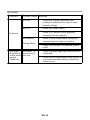
Before sending your LCD monitor for servicing, please check the troubleshooting list below to see if you can self-diagnose the problem.
(VGA Mode)
Problems
Current Status Remedy
LED ON
·
Using OSD, adjust brightness and contrast
to maximum or reset to their default
settings.
LED OFF
·
Check the power switch.
·
Check if AC power cord is properly
connected to the monitor.
·
Check if video signal cable is properly
connected at the back of monitor.
·
Check if the power of computer system is
ON.
Unstable
Picture
·
Check if the specification of graphics
adapter and monitor is in compliance
which may be causing the input signal
frequency mismatch.
Display is
missing, center
shift, or too
small or too
large in display
size
·
Using OSD, adjust RESOLUTION, CLOCK,
CLOCK-PHASE, H-POSITION and VPOSITION with non-standard signals.
·
Using OSD, in case of missing full-screen
image, please select other resolution or
other vertical refresh timing.
·
Wait for a few seconds after adjusting the
size of the image before changing or
disconnecting the signal cable or powering
OFF the monitor.
·
Check the audio cable with the host PCis
connected.
·
Check if the volume setup of the hostPC is
in minimum position and try toraise the
volume level.
No Picture
LED displays
Blinking White
Abnormal
Picture
Abnormal
Sound(Only
Audio-Input
model)
(Optional)
No sound, or
sound level is
too low
EN-14