1
Rule 3 – Cardinality
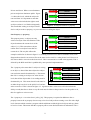
This rule states that there may be some upper limit for a role. This upper limit could apply at the stage
when roles are assigned to subjects or at the stage when a subject activates a role. For this project the
latter is assumed. Therefore there may be a limit to the number of users that may be active in a role at
any one time. This is a two-part rule, which deals with the limit a given role may have and the number
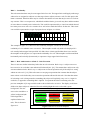
of users that are currently active in that role. This could be represented by a visual icon which showed
how many users were active in a certain role as well as how much the limit is for the role. This visual
icon could be represented as a type of progress bar as in figure 4.11 below.
1
2
3
4
5
6
7
8
9 10 11 12 13 14 15
Figure 4.11: Cardinality metaphor
The example in figure 4.11 shows how the cardinality metaphor would look for a role with a
cardinality of 15 in which 6 users were active. This metaphor would only need to be displayed if a
role actually had an upper limit specified. If it didn’t have a limit specified then there is no need for
the metaphor as the purpose is to represent the cardinality of a role. This metaphor could extend both
horizontally and vertically (downwards), to represent a larger upper limit if necessary.
Rule 4 – Role Authorization & Rule 5 – Role Execution
These 2 rules are similar in that they both relate to role activation. Rule 4 says “a subject can never
have an active in a role that is not authorised for that subject” [16]. This means that a subject can only
activate authorised roles. Rule 5 says “a subject can execute an operation only if the subject is acting
within an active role” [16]. This refers more to carrying out operations but it means that the subject
must activate a role before they can execute the operations allowed for this role. Note that the notion
of activating a role is being treated as something the subject will explicitly carry out i.e. a login for
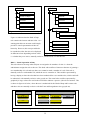
each role, as opposed to something that is implicit. To represent the idea of activating roles, the
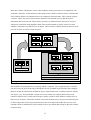
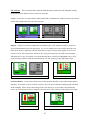
previous metaphor of job tags could be used to show which roles are active. The display could show
all the roles that a subject is authorised for and could highlight the active roles with a green
background. The non-
Authorized Roles
active roles would have a
yellow background (the
red background is
explained in the next
rule). This is shown in
figure 4.12.
Alice
Alice
Alice
Head Of Dept
Tutor
Student
Alice
Alice
Alice
Lecturer
T. Assistant
Postgraduate
Figure 4.12: Role Activation Metaphor
33