1
CONNECTING
R201
MULTIMEDIA SPEAKER
SOUND CARD
Line In
Spk Out
Sound Card
Connected
with AC power
WHITE
RED
R
L
CAUTION
RISK OF ELECTRIC SHOCK
DO NOT OPEN
1
CONNECTING
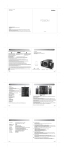
Connect the satellite speakers to the output splints on the back panel of the Sub-woofer. Please note to match
the color, red to red and white to white.
2
Connect the subwoofer to the Audio device.
Using Audio connecting cord , connect the Line-input port of the subwoofer to Line-out of the Audio Device
(Such as the computer, Discman, etc).
3
Playing the audio device
Plug the AC power plug into the wall outlet and turn on the power switch, Now your speaker system is ready for
Use. Adjusting the volume control and the Super bass,then you can enjoy the music.
SPECIFICATIONS:
Total Power Output :
RMS 8W x 2 + 1 2W
Input Impedance:
10K Ohm
Input Sensitive:
450 mV
Bass Unit:
5 Aluminum coil, 4 Ohm
Tweeter Unit:
2 3/4 Paper coil, 4 Ohm
Frequency Response:
48 Hz ~ 20 KHz
Dimension(Subwoofer):
158(W) x 194(H) x 286(D)mm
Dimension(Satellite):
86(W) x 139(H) x 100(D)mm
Gross Weight:
About 4.5 Kg